 Problems? See this thread at archive.org.
depends on the game and the graphics card...
-
-
So let's say I buy an Alienware 15, and replace the default SSD with a Samsung 850pro m2....how do I exactly do that??
-
Instead of replacing the M.2, you could just install another M.2. The 15 has room for 2 M.2s. The procedure should be easy. Just open the maintenance/base panel and slide it in. Just be sure you have a screw in handy in case there aren't free one(s) present.
But if you intend on replacing it, wouldn't it be better to not get it at all? -
gonna say bye bye to aw 15 > <
my country they adjust the price
and previous quotation those all not count any more
the price changes a lot
i think i may be go for clevo -
I'm in almost the same situation as you unfortunately. After having MSI and Clevo laptops for the last few years I was aching for a return to Alienware (I had an m11x r3 ages ago and was easily the most reliable laptop I've ever owned) But charging $3k+ AU while not offering a 980m option (best option is the 970m) is dreadful. I'm looking very hard at both the Clevo P650SG and P150SM-A at the moment.
-
I just want the GTX 980m and highest i7 option they have which might require me to get an SSD. But I'm more curios about the actual OS implementation. How does that work? do I clone the primary HD to the new SSD?
-
Bigtonyman, you just completely blew my mind. Alienware missed the biggest opportunity ever. Wow. This is so genius im still wowing over the fact the engineers didnt think of this possibility LOL......bigtonyman likes this.
-
haha
i still thinking clevo p650 or alienware 15 > < -
For me it's Aorus X5 vs Alienware 15.
Aorus has bad keyboard
Alienware has no 980M in my country.
The important choices that keeps me from buying both. -
actually in my country
i find out got p150sm-a and the price similar as alienware 15
which better? > <
by seeing spec and upgrade like p150sm-a and the weight of both laptop
are quite similar
really have a hard decision on this 2 -
I'm still wondering about the portability of the 15. The website information shows that the average weight is 7.07Lbs / 3.2078Kg. It will probably come with 200 - 240 watt power-brick, which will weight around a kilo. Can anyone confirm the measurements and weight and if this is included in the total average weight? Thanks.
Last edited: Jan 16, 2015 -
I think the PSU is a 180w across the board for the 15. Shouldn't be too heavy, I assume.
-
HID ships the 15 with a 240 Watt power-brick, might be 3rd party then.
-
Anddddd... my Alienware Amp from Amazon shipped... Should be here Monday!
http://www.amazon.com/gp/product/B00PCJXN0I/
You can save $35 if you are thinking about picking one up!Last edited by a moderator: Jan 17, 2015 -
bro, In SG the prices changed too - up by around $300 sgd for the top spec
I managed to get a quote before the price changed
was also able to get a discount on top of that
overall I got the top spec AW 15 for around $500 sgd less than the advertised price on their website
i suggest you talk to the dell sales online - that may do wonders
and because of this my colleagues would like to buy one too =) -
Honestly origin PC thought of it minus the amplifier and they will probably jump on that bandwagon soon enough.
EAON15-X
EON17-Xnightingale likes this. -
Sager NP9752 (Clevo P750ZM)
-
I have seen Laptops with desktop GPU's earlier, also with some demos on CES. It works, but the the noise level of the cooler is abnormal.
Also the Origin EON15-X has a TN panel, which I do not like at all.
For the rest very impressive laptop though. -
is it worth it to call sales or chat with them for a lower price or not.
-
Don't use chat. Just call them. Their chat is just .
If you ask something, they will repeat same thing again and again. -
Clevo thought of the idea, origin resells it

-
Thanks for the correction. forgot about the big company behind the scenes.
-
Dell Web-chat has indicated that the 1tb drive in the M15 is indeed a Hybrid drive...
-
mine is ready for shipment, so I'll verify as soon as its in hand.
-
Geez, that was fast. And here I am (and others) still waiting for my 13.
You could check the invoice of the 15. They happen to be very reliable (and a fail-safe if you didn't get what you should have goted). -
When did you order yours? And when was your estimated ship date?
-
My AW15 is also ready for shipment. I ordered it on 12th, and expected ship date was 4th of February.
Then, order status changed to 'In Product' on 13th.
This is sooooo fast. I did not expect this at all.. -
I ordered mine on the 7th and it still says in production... Hopefully that'll change soon. It'd be really nice to get it before February.
-
If you added more parts like ssd or gts980m, it will definitely take longer. Mine is second option of AW 15 build page without any additional parts.
-
Mine was too, I did add the recovery USB though.
-
I ordered the same one without any additions and it's currently In Production. Hopefully it changes by tomorrow. Ordered on the 7th.
-
Does that usb come with Alienware drivers as well so if you change to ssd? Also that would suck if that's holding back the shipment. I'm still thinking if I should get 4k screen or not.
Also if u get the 1 tb option how hard would it be to take that out and put in 2 msata drives? And would u need that usb to make sure u can put new os etc on laptop?Last edited: Jan 17, 2015 -
They don't support mSATA, but you can put in two M.2 SSDs (that's probably what you meant).
The USB will have a backup of the OS on it (not sure about drivers, but those can be downloaded from Dell's website). I just figured I might as well have it just in case I ever need it; plus I plan on swapping out the 1TB drive with an MX100 I have laying around, so having the recovery USB ready to go will be handy for that. -
Wanted to get back on this, but there happens to be another M.2 used in the 13.
This Toshiba HG6 M.2. It's MLC as opposed to TLC of the Samsung PM851 and has better sequential write speeds and slightly worse sequential read speeds. Random read and writes are worse, though.
Let's hope the MX100 works in the 15 and 17 R2. Crucial 2.5" SSDs don't work in the 13.
In other news, benchmarks for the base 15 are up.
http://www.3dmark.com/fs/3693339
http://www.3dmark.com/compare/fs/3738807/fs/3693300 -
and i suppose the mlc is a more expensive option in the dell site?
-
Actually, there's no option to choose which SSD you get. Same for the HDD, which is Western Digitial. The SSHD is the usual Seagate SSHD.
It's all a game of chance. -
I was hoping that problem would be solved by now. Hopefully it will be in the 15 and 17. Unfortunately for me, all three SSDs I own are Crucials.
-
Seems as if the cooling for the 15 is pretty good.
Generic VGA video card benchmark result - Intel Core i7-4710HQ,GIGABYTE X7V3 (Graphics score: 5486)
Generic VGA video card benchmark result - Intel Core i7-4720HQ,ASUSTeK COMPUTER INC. G751JL (Graphics score: 5382)
Generic VGA video card benchmark result - Intel Core i5-4210H,Alienware 0TK7PG (Graphics score: 5803)
These were the top benchmarks for their respective processors with the GTX 965m. I would like to see how the i7-4710HQ performs under it. More benchmarks are welcome. -
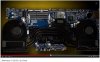
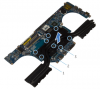
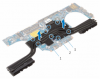
I hope so. The Alienware 15 Up Close video Alienware released was a little misleading since they showed the 17's heat sink instead of the 15's heat sink.
Heat sink shown in the Alienware 15 Up Close video:
Alienware 15 heat sink from service manual:
Alienware 17 heat sink from service manual:
-
Maybe with the m295x and the GTX 980m, it'll use the heat sink shown in the video? A guess, but we'll have to see.
I've been thinking about how bad the 180w PSU really is for the 15 (and as a reuslt, the 17 R2). As it turns out, there have been three laptops with either a GTX 970m or GTX 980m that use a 180w PSU.
Schenker XMG P505 PRO (Clevo P651SG) Notebook Review - NotebookCheck.net Reviews
Clevo P651SE (Schenker XMG P505) Barebones Notebook Review - NotebookCheck.net Reviews
Gigabyte P35X v3 Notebook Review - NotebookCheck.net Reviews
MSI GS70-2QE16SR51 Notebook Review - NotebookCheck.net Reviews
Aside from Gigabyte's CPU throttling, the 180w can handle the components at the cost of burning itself up. I would only recommend the GTX 970m for either laptop as its the safest bet for not killing the charger, as shown with the MSI laptop, and has some overclocking room. As for the GTX 980m and m295x, I don't know. Looks kind of grim.Ramzay likes this. -
if i have a monster pc at home with 780 SLI, should i get the alienware 15 with 98m or go for mobility with the alienware 13 860m ?
-
For the same price as a good AW 13, you can get a mid-spec'd AW 15 with the 970M. I'd grab that if I were you.tinker_xp likes this.
-
Might have to mod up a PSU like they used to do for the m17x r2 with the XM cpu and newer graphics cards. Dumb that you would have to do that with factory parts though. Come on alienware get your crap together and stop ruining the brand.
-
I ordered mine on the 7th as well. Mine still says "in production" but they called me because I have a promo code that has to be added after ship. They said I should have it next week, even though the expected date is still Feb 6th.
Mine is just the 15" with the I7 and the 970m... nothing special added. -
Just to add my voice; ordered on the 8th (canceled my AW13 order and re-ordered). 15", 1080p, 970m but I took the option for the 256GB SSD in addition to the 1T. Went in-production on the 13th as well, still expected ship date in February. I remain hopeful
Oh yeah, and my estimated delivery is the 5th, but I took the overnight shipping option too (coupon codes... awesome) -
How many of you guys are going for the 4k screen
-
Why mod up to a PSU? If the 180w charger will be using about 200 watts, the old 240w charger should work just fine.
Or is that what you meant? -
For gaming, I think it would only be worth it if you had the GA unit....
-
Yeah, I think for my part that the 970m or even the 980m are going to have their work cut out for them with a 4K screen. That's a lot of pixels to push, and that requires more power with more weight and more heat... not great in a laptop form factor. Besides, with a 15" screen at normal viewing distance I find it difficult to believe people are really going to notice the difference in games. Photographers might use it, but they're probably not shopping Alienware.
Now, on my desk I have a 4K screen and will run that with the GA and a GTX980. That'll be for photography as well as gaming, but I don't need 4K on-the-go. For the cost differential it just really isn't worth it to me. I feel like I'd have a choice between the ultra detail settings OR 4K resolution but not both at the same time with either of the "m" chips... I'll take detail because when it's all moving it's REALLY hard to tell the difference between 1080p and 4K. -
I got the 4k as its the only screen that comes with 980m on this side of the planet
ALIENWARE 15 HYPE?! leaked video
Discussion in '2015+ Alienware 13 / 15 / 17' started by MikeTheVike, Jan 6, 2015.


