 Problems? See this thread at archive.org.
did you get the 1080p panel? It not, it might be based on panel availability.
-
-
When did you order yours?
-
wow thats great! exited for you lol, you may be the first one telling us how it really is this 4K screen and all the rest.
it probably ships so early because for sure they have a bunch of laptops already made, and maybe not many 4K screens sold so early on and they were able to send yours right away -
Estimated shipping date is 22 Jan 2015 on the UK site now.
-
Anyone have any experience with Transcend M.2 SSDs? I may pick one up to throw in my 15 as a boot drive if my MX100 doesn't work.
Amazon.com: Transcend 128 GB SATA III 6Gb/s MTS800 80 mm M.2 SSD Solid State Drive TS128GMTS800: Computers & Accessories -
They are ok, but certainly not the fastest around.
-
As long as it's faster than an HDD I'm happy. I'm more concerned with reliability. Thanks.
-
you could buy an Alienware 15 from HID with a Crucial M550 M2 which should be faster than any of them. Or wait for the end of this month for the Kingston Hyper X Predator M2 which is ~2x faster than anything out in the consumer market atm.
-
I was looking at picking up one of the current ones out, but I think I'm gonna hold off and get something like you mentioned or this.
http://www.amazon.com/gp/product/B00JOSM3TK/Last edited by a moderator: Jan 25, 2015 -
so anyone else here this stuck lol. This is a nightmare 1080p vs 4k lol. since im getting the ga I want it but 350 is just so much for a screen. I wish I could see em in person.
-
Yea, that's really fast. I might just wait for the Kingston HyperX Predator or Samsung SM951. Anyways all of these choices are faaaar better than the default SSD Dell ships with the Alienwares.
-
yeah I'm gonna wait a month or so after I get mine. Get my review up and done and then see how prices settle. I'd like to be about 250$ if I can get those speeds for a 500GB SSD. -
Its so bulky and its gonna be expensive.
-
Let me know if this reply should be a new thread.
There has been a lot of controvery, anger, and confusion surrounding the new Alienware 15, and I want to reply to that. There are those who, in their frustration, are dismissing the Alienware 15 and 17, saying they are for blind idiot consumers.
Look, I agree that there should be an Alienware 18 Roswell MX Edition laptop that allows for desktop CPUs, fully customizable, replaceable CPU/GPU, etc, for the enthusiast desktop replacement crowd. I get that. They would have to price it pretty high for sake of the parts and so on, but people seem to be willing to pay that kind of price.
However, let it be known that the new Alienware 15 has a market for even the informed customers. For example, consider that the Alienware 15 is the only touchscreen laptop with a 9XXm series GPU. Instantly, anyone with those requirements would have to settle on this laptop. Let me elaborate, by comparing this laptop to some competitors.
Alienware 15 vs Lenovo Y50
Advantages Y50:
- Cheaper
- Thinner
Advantages Alienware 15:
- chassis better materials
- faster 980m vs 860m
- better screen IPS 1080p vs crap TN 1080p, and Sharp 60Hz 4K vs crap Samsung 48Hz 4k
- DisplayPort
- M2 ports
Alienware 15 vs Acer V Nitro 15
Advantages Nitro 15:
- Cheaper
- Thinner
Advantages Alienware 15:
- chassis better materials
- faster 980m vs 860m
- 4K screen option
- DisplayPort
- Touchscreen option
Alienware 15 vs Asus NX500
Advantages NX500:
- thinner
- probably higher quality chassis
Advantages Alienware 15:
- faster 980m vs 850m
- cheaper
Alienware 15 vs HP Omen
Advantages Omen:
- Cheaper
- Thinner
Advantages Alienware 15:
- chassis better materials
- faster 980m vs 860m
- 4K screen option
- non-soldered ram
- less unethical ( HP Boycott Campaign: Home)
Alienware 15 vs MSI GS60
Advantages GS60:
- Thinner
- 3K option
Advantages Alienware 15:
- Touchscreen option
- Sharp 60Hz 4K vs Samsung 48Hz 4K
- more USB ports
- faster 980m vs 970m
Alienware 15 vs Razer Blade 14
Advantages Razer Blade 14:
- Thinner
Advantages Alienware 15:
- Faster 980m vs 870m
- DisplayPort
- Cheaper
- non-soldered ram
Alienware 15 vs Auros X5
Advantages Auros X5
- Thinner
- usually faster 965m SLI vs 980m
Advantages Alienware 15:
- Cheaper
- Touchscreen option
Alienware 15 vs Gigabyte P35X v3
Advantages P35X v3:
- Thinner
- 3K option
Advantages Alienware 15:
- Touchscreen option
- 4k option
Alienware 15 vs MSI GS30:
Advantages MSI GS30:
- Thinner
- better CPU 4870HQ vs 4710HQ
- better docking station with power, network, audio, and PCI 3.0 x16 vs x4
Advantages Alienware 15:
- better screens
- 4K option
- has a dedicated GPU vs iris 5200
- touchscreen option
- DisplayPort
- twice as many USB ports
Alienware 15 vs Clevo P75xZM
Advantages P75xZM:
- non-soldered GPU
- desktop CPU
Advantages Alienware 15:
- slightly thinner
- Touchscreen option
Alienware 15 vs Clevo P65xSx
Advantages Clevo P65xSx:
- thinner
- most likely better cooling
Advantages Alienware 15:
- touchscreen option
- graphics amplifier option
Notes:
- The graphics amplifier external GPU option is an advantage for the Alienware 15 across the board, except for the MSI GS30, which also has an external GPU option.
- I didn't weigh in subjective things, such as how cool, stylish, or embarrassing the chassis is.
- The jury is still out on cooling performance of the Alienware 15
- The Alienware 15's chassis is made of high quality parts, which would make it at least feel more premium than most of its competitors.
FAQ:
Q: But the Graphics Amplifier supports only x4, so it is gimped out the gate. Why waste your money on that?
A: The practical performance difference between x4 and x16 is apparently way overblown:
GeForce GTX 980 PCI-Express Scaling | techPowerUp .
Q: How do you know the Alienware 15 will use the Sharp 60Hz panel?
A: It appears that the screen is holding up the expected delivery dates on Alienware 15s ordered with the 4K panel. As far as I know, there is no Samsung 4K screen shortage, but there has most certainly been an ongoing Sharp 4K screen supply problem (just look at the recent Clevo 4K option histories). Oh, and AlienwareTechSupport on twitter told me that the CES Alienware 15 had a Sharp panel =P.
Q: Why would you want a touchscreen? Eww.
A: - More effective multi-touch mobile game and app development.
- While I'm standing up and roaming around, it's nice to be able to quickly tap something that pops up on the screen, without having to keel down to the touchpad or mouse.
- It's faster to tap big form fields (such as Gmail) even when sitting.
- It makes casually scrolling through articles far more comfortable while sitting cross-legged with the laptop on my lap.
- It makes it easier to pin-and-zoom to quickly show somebody nearby a specific part of a web page, such as a picture.
- It makes it easier for me to over-the-shoulder help guide someone sitting at my computer on how to perform a task. "Click this
(tap), then scroll down here (swipe)" and so on.
Q: Doesn't 4K scale to 1080p perfectly, since there are exactly 4 times the number of pixels (evenly divisible)?
A: Not necessarily. In my experience with a 4K Y50, 1080p was less sharp than a native 1080p screen. It appears that the screen interpolates pixels regardless of the ideal arithmetic. Playing games at 1080p was seamless though and I don't think I would be able to tell which was the native 1080p screen if placed side-by-side.
Q: Doesn't Windows have sucky scaling?
A: This is a common misconception. For the most part, 4K on the Lenovo Y50 worked really well in Windows (8.1). I had the scale settings set at 125% or 150% and I only had trouble in certain applications, such as Adobe CS6 suite and a few game development IDEs. It really depends on what applications you're using. But for normal web browsing and file management, the 4K was great.
Q: Where's my numpad?
A: I personally don't like the numpad. Not having a numpad keeps my typing more centered with the screen. Typing on a laptop with a numpad has slowly taken a toll on my neck muscles, because my shoulders are oriented asymmetrically, even if ever so slightly. Moreover, I type numbers a lot, but the horizontal number row is much faster to type on, because they are closer to the letters, and you can also more effectively use two hands.
Q: Is it easy to access part X? What type of storage slots does this have?
A: These, and a whole lot of other questions can be answered in the service manual located here:
Alienware 15 Service Manual
---
I ordered the 4K 980m Alienware 15 on January 8th, so I might come on here and follow up with my thoughts on it when I get it, God-willing. If I made this its own thread, then maybe I could keep updating it.Last edited: Jan 20, 2015hendav and Th4tRedhe4d like this. -
You're under the impression the " Graphics Amplifier supports only x4". It's actually 16x and dictated by the CPU's. Lower terd CPU's limit it to x4.
I actually like the AW15 and 17 alot. I would have bought a AW15 with a GA in a heartbeat had it not had soldered parts and limited selection of configurable BGA CPU's. They would need to offer a extreme CPU or at least a socket so I upgrade it myself like the AW14 could.
Also I don't want to have to pay whatever Dell are asking me for warranty to cover the machine. Warranty is a 200% must with all these components soldered together. If 1 part breaks, there is no hope for anyone to be able to replace the damaged component. If your not covered.. that's a pretty expensive paper weight. Thinking the GA will extend the lifetime of the machine under the current soldered design is only true for as long as you keep paying for Dell warranty. -
Actually while it is limited by the ULV cpu to 4x speeds i also read that the cable itself is limited to 4x
(information courtesy of another nbr forum member in the aw13 thread)
-
I don't think thats right. Alot of people have been reporting x4 not just yourself. But I've yet to see any concrete evidence. I refuse to believe AW would drop the ball and be so shortsighted.. but then again..
nightingale likes this. -
While I understand everyone is disappointed the cpu and gpu is soldered, it is unfortunately the way the whole industry is heading and I am sure in 2 years times mxm cards will be a thing of the past.
I have owned every generation of AW plus many other clevo's, msi and apple machines and in all honesty by the time it comes to the point where I want to upgrade the GPU, the new model is out which comes with newer tech/benefits and I end up selling my current model and buying the newer. Also throw in the fact that mxm cards cost a small fortune it is often as economical to sell old and buy a new machine.
I have ordered a 17 r2 and currently have a r1. I contemplated upgrading mine but I wanted:
the IPS screen
the thinner profile (the r1 is a hulk, thicker than even the m17x r4)
the option of the GA in the future when my 970m doesn't cut it (if I haven't sold it for a new model)
I will test the r2 vs my r1 and post a review. I am completely unbiased and will be happy to send the r2 back if it does not meet my quality standards.TBoneSan likes this. -
2years may be too soon, msi has concretely promised gpu upgradability for two generations on the brand new gt72 and the gt80 that have the 900m series, at worst i imagine either after the 1100series we may have to start worrying about completely soldered components.
-
Thing is, the whole industry isn't moving towards it. That's just an excuse people use to settle for a massive compromise. Do you think they would keep selling BGA performance machines if no one bought them or something? Of course not. Intel, Alienware, and the whole merry bunch of BGA peddlers would quickly go back to socketed machines.
Your example of upgrading every new model is fine. It works well if that's what you do. So long as newer is better, which we've seen not to be the case with Ivy to Haswell, I'd agree MXM's GPU's a stupid expensive. But nothing to stop anyone from selling their old MXM GPU to offset the cost.
Anyway, I don't think I'll comment anymore. I don't want to tarnish your new experience. You'll still love it. My disappointment is there is nothing on offer within Alienware for me or people who don't like compromising on the hardware and terms of ownership of what's inside. That's not meant to be condescending... But I think you know where I am coming from
Clevo seems to be capitalizing on this, I'll probably jump ship next machine.nightingale likes this. -
If you have time try to scroll throught the Alienware 13 thread - you will find side by side comparison pics posted by DocSteel there (God Bless him!)
His post will contain pictures of 1080p vs 1440p - he had both units at the same time and took pictures of them.
This made me decide to pick the 1440p.
Happy Hunting! -
guys want to ask the ssd m2 for aw is what brand ?
choosing the aw better or go outside buy 1 and upgrade by our own better? -
Someone in Korea ordered AW 15 on 16th and received his AW 15 on 20th..
so quick.. -
buy m.2 ssd from Amazon or newegg. I bought m500 480gb ssd from Amazon. this one is definitely faster than the one that dell uses.
-
It's very likely that the SSD used by Dell is faster than a m500 (or even much faster for models using Samsung's XP941). The m500 is still interesting because it's much cheaper and it's fast enough.
-
Most people are saying the A15 uses a Samsung PM85. Soo....slower and TLC Nand. Not confirmed however. But it makes sense.....why would Dell give you a enthusiast level SSD and lose revenue spending money on expensive SSDs?
-
SSD used by Dell is slow TLC samsung ssd, which uses SATA interface. So, it is technically impossible to be faster than x941 due to the limit of sata. x941. x941 uses pcie interface.
If Dell uses faster MLC ssds like 550m, the 512 gb option cost should be around 500 dollars.
So just buy AW without adding ssd or ram, and get ssds or rams from online stores. -
The slots are likely to be SATA devices only.
-
cant find lot of post in aw 13
gg -
I forget the page but I just saw it. Do yourself a favor get the UHD it looks amazing and no cheap plastic bezel cover. Im going 4k after seeing that.xxpmrong likes this.
-
anyone getting the extended warranty
-
oh
u saw at here?
but problem is if u gaming on 4k screen
gtx 970m .... will be a big problem
even i play normal on9 games -
I noticed HID and Xotic PC have M2 PCI options for the AW15, like the Samsung XP941 and Plextor m6e. So...from the options it seems M2 PCI is compatible. If it was SATAIII only....I may have to rethink about getting a AW15.
-
I figured the same, but AlienwareTechSupport on twitter confirmed to me that it is indeed x4 (despite the CPU's capability) =/. But as I mentioned in the FAQ of my lengthy post ( http://forum.notebookreview.com/alienware/768731-alienware-15-hype-leaked-video-37.html#post9896943 ), x4 does not seem to be a very limiting factor over x16, as seen in this article: GeForce GTX 980 PCI-Express Scaling | techPowerUp .
I am scheduled to receive the Alienware 15 4K 980m tomorrow. Should I go ahead and create an owner's thread, along with the resources I provided in post I made around 20 posts back (#364)? I could try to maintain the post to include reports people have about cooling, stock SSD models, reviews, and so on.bumbo2 likes this. -
That would be great! would really like to get some confirmation on the stock SSD M2 model, and the cooling performance and infrastructure.
-
I was just looking at either an alienware 13 with a 1440p display + i7 or a 15 with the 1080p screen + 970m. Both came out to about $1600. Not sure which one I like better for crappy bga machines and I couldn't make myself push the buy button for either one. Probably just gonna wait for now and see where the market goes. I don't need a new laptop till august anyway.
-
When did you order your A15?
-
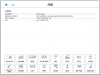
This is spec manual from Korean AW site.
It says that interface is sata 3, and there are 1 hdd port and 2 m.2 ports. -
Thats great, i cant wait for your impressions honestly! Will be happy to see what you think of that expecially the screen and the 980m, hoping the 970m avaliable in europe won't be so much less than that! -
That would be great!
-
I'd talk to Mr. Fox before we just start creating owners threads.
-
I just received my AW 15! Yay!
bigtonyman, xxpmrong and uofaboy like this. -
Can you post pictures and temps?
Ordered mine on the 7th and it still hasn't shipped yet, this wait is killing me haha -
Congrats! I can't wait to get mine next month!
-
For those in the fence over the 1080p vs 1440p screen, here are some great posts by docsteel.
This eventually made me decide to pick the 1440p
http://forum.notebookreview.com/alienware-13-m11x/759061-new-alienware-13-a-172.html
http://forum.notebookreview.com/alienware-13-m11x/759061-new-alienware-13-a-173.html -
Congrats on the new machine. hope you enjoy it!!
-
Looks fantastic! haha
But I cannot change the color of the Alien head power button right above the keyboard for some reason. hmmm...
I think it may need a reboot.
And I thought that the touchpad did not have pulse and morph options on previous models, but this one has pulse and morph.Last edited: Jan 20, 2015 -
that's weird because I ordered mine on the 12th and got it in today, it also has the 4K screen which was supposed to have longer ship times.
-
I ordered the second configuration and the only thing I added was the recovery USB which I wouldn't think would delay anything... I was really hoping to get it this week, maybe it'll ship tomorrow.
-
I also ordered the second configuration with the recovery USB on 12th, and received it today.
And strange thing is my order status is still 'In Production'. lol
I got a confirmation call from Dell before shipping on last Friday, but the order status never changed.
ALIENWARE 15 HYPE?! leaked video
Discussion in '2015+ Alienware 13 / 15 / 17' started by MikeTheVike, Jan 6, 2015.


