Problems? See this thread at archive.org.
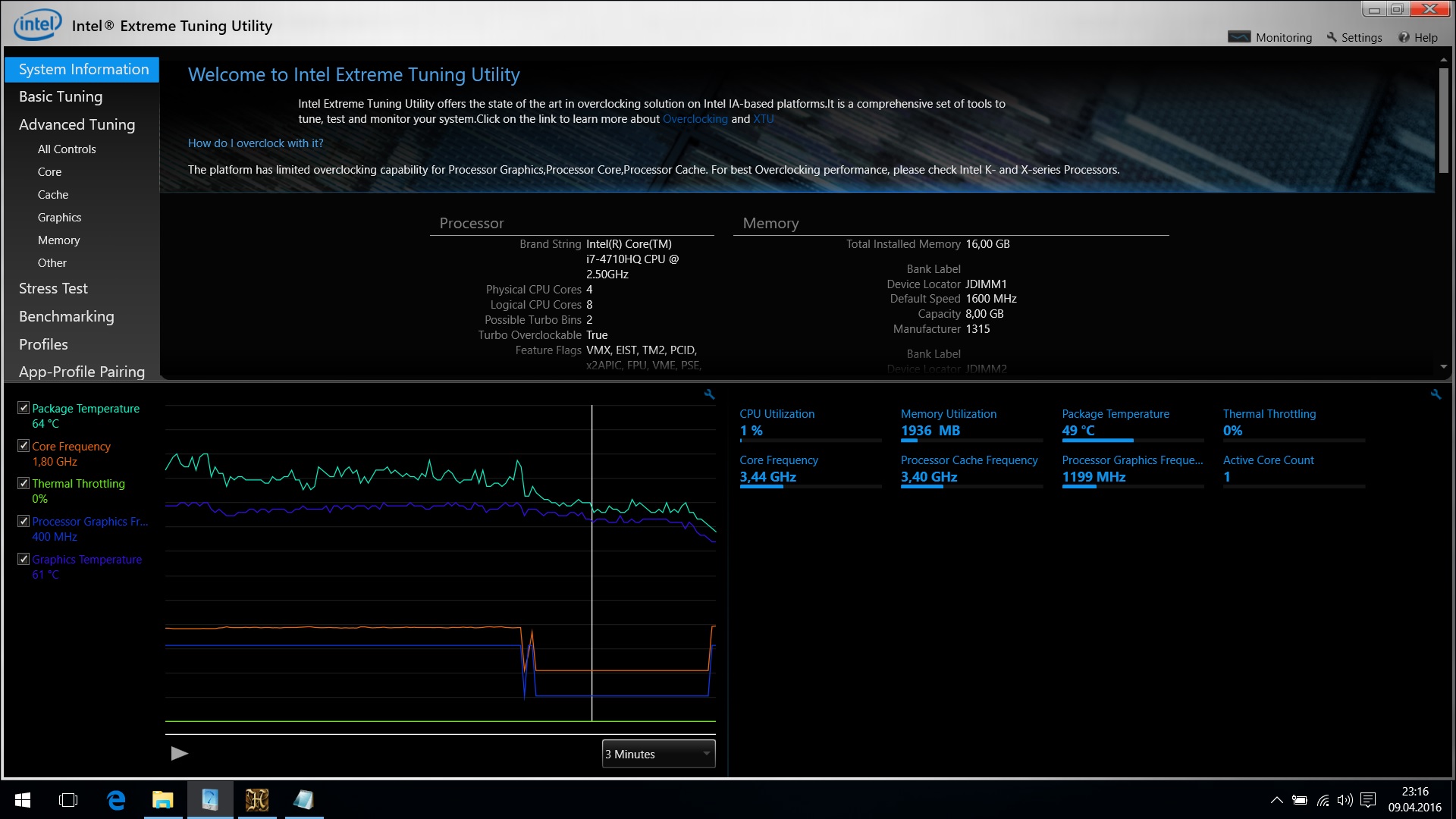
my Alienware 15 R1 with the 4710HQ CPU and 980m GPU throttles after some minutes running Unigine Benchmark, or playing a game from around 3.4 GHz to 1.8 GHz which makes every game laggy...
(the IGPU throttles at the same time from 1200 MHz to 400 MHz as Intel XTU shows)
I found some threads about throttling to 800 MHz with the 4710HQ and tried following things to solve my problem - without success:
- using 240 W PSU instead of the 180 PSU
- trying BIOS A00 & A06
- uninstalled "Intel Dynamic Platform & Thermal Framework Driver"
- using Intel XTU with these settings:
* changing "Processor current limit from 85 Amps to 100 Amps.
* changing "Turbo Boost Power time from 8 secs to 28 secs.
- using Throttlestop with these settings:
* unklicking "BD PROCHOT"
* unklicking "C1E"
* setting Voltage ID to 1.0289
* setting VCCIN to 1.9072
EDIT:
very interesting is, that the CPU throttle to 1.8 GHz only happens, if i use a GPU intensive Benchmark like UNIGINE, or a game is played (in the cases where the 980m is used).
I have created a Logfile with GPU-Z of the 980m core-clock & memory-clock when the CPU throttling to 1.8 GHz happens and both GPU-clocks stay stable at the same time.
When a CPU-only Benchmark like "Prime95" is running, the throttling doesn't happen.
someone have other ideas?
thanks!
-
this is the max frequency that i can have without throttling
![[IMG]](images/storyImages/hrn3gy.jpg)
-
thanks Judal for your reply!
with default settings your 4710HQ throttles to 1.8 GHz?
are you using also other tools like Trottlestop or something else? -
@unclewebb
here is the Trottlestop-Log and a XTU screenshot showing the throttling to 1.8 GHz...
no matter which settings i made, ( as described in my first post in this thread) throttling happens...Attached Files:
-
-
i only use intel XTU and i can have 3Ghz on four cores while gaming without throttling
JohnnyR8 likes this. -
Hello, I have seen your replies to the threads and I will do my best to help you.
First of all I'd like you to share what kind of throttling you are facing, you can determine the throttling type by using "Limit Reasons" application provided with Throttlestop . I assume you are getting power throttling. If that is the case:
1-) Make sure that you have the latest BIOS version which is A06.
2-) It seems that you have already uninstalled the dynamic platform & thermal framework driver so keep that driver uninstalled.
3-) Open Throttlestop and at the FIVR menu set your VCCIN to some value around 1.8-1.9 or around 1.5 ( CAUTION: setting the VCCIN to 1.75 made my computer unstable, do NOT try VCCIN values in the interval [1.55,1.78] that interval was set by my experiments )
)
4-) Make sure to apply undervolt about 50-60 mV's to both CPU Core and CPU Cache
5-) You may try the new feature Unclewebb has introduced, the "PowerCut". It may help.
On the other hand very strange things happened to my laptop.
For some reasons that I cannot explain, the CPU stays at 3.4 GHz without any tweaking software even under load if the temperatures are not at extreme levels as if the CPU was never broken. I have even tried overclocking the CPU to 3.5 GHz and I was able to play games by 100 MHz overclock. Right now I only use Throttlestop to undervolt the CPU in order to make the CPU use fewer power and to maintain better temperatures. I left the VCCIN at default value.
So if the 5 points I made above do not help you, I suggest you not to use any tweaking software such as Throttlestop or XTU. Just leave everything on stock values and give it a go. My CPU would throttle to 2.6 GHz and stay there for 3-4 minutes every once in a while so I tried not using anything and voila! I only had temperature issues which I use throttlestop and HWiNFO 64 to get over with. Just make sure you have the BIOS A06 installed.JohnnyR8 likes this. -
Maybe @VICKYGAMEBOY can give some advices. Maybe he have heard from Dell tech team now?
JohnnyR8 likes this. -
thank you for your help - i tried every mentioned tip but nothing stops the throttling -
any other ideas? -
Have you read this thread? http://forum.notebookreview.com/threads/alienware-15-r1-cpu-issue-warning.788446/ ? Maybe there are a few options in the thread you have not tried out?
-
The problem you experience is most likely created by Dell aka crippled bios/Ec. You should talk with Dell's support. Maybe you have more luck than the OP in the thread I showed you.
 Last edited: Apr 11, 2016JohnnyR8 likes this.
 -
i have talked to Dell.... they say throttling to 1.8 GHz is no defect - within the range....
Intel says the 4710HQ has a Base-frequency with 2.5 GHz....
if i buy i car with 100 HP and after a short i ride it only has 70 HP on the test bench the producer has to fix it, if i am in warranty time... and i am in time with my Alienware... i have wrote them a mail - but i am sure they won't react in the correct way and repair my Laptop, but i like getting surprised positive...Last edited: Apr 11, 2016 -
Hi, I've got a question about throttling.
1.)If you are gaming and while gaming the core goes down like below 2.5ghz would that mean the cpu is throttling?
2.)if you are on balanced mode power setting is it normal for the cpu to be on 800mhz min and while gaming it will go up to 3.5ghz. is that normal?
3.)does balanced mode will affect gaming like fps drop?
4.)if temps reach 94 Celsius max and there is no throttling would that mean the laptop is not overheating? what would be overheating like?
Thanks ^^ -
1.)Yeah... Throttling under the base clock is even worse than Throttling under max Turbo boost. Both is crap!!
2.)Yeah... But I can't understand why some like balanced mode. Maybe they think the temp will be lower and not so much Throttling becauce of crippled hardware/cooling.
3.)Haven't tried... I hate balanced power plan. But why want people see lower clock speed? I hate everything below max OC'd Turbo boost.
4.)if your temps reach 94 Celsius max... This isn't any good for life span... Too near the Throttle point. Change thermal grease. Buy you a new and better machine if you still have high temp with new paste. -
Thanks for the quick response @Papusan
I did contacted dell tech support earlier and he told me they cannot send any tech guy to replace heatsink as of the moment because 94 celcius is not considered overheat. he suggested that i buy a cooling pad which im looking to it now. also he asked me to change power setting and put power processor management to 99% and the temps went down but also the core. it with to stock which is 2.5ghz. i told the tech guy i bought this laptop because of the turbo boost and why would i reduce performance for this. so the conversation ended up that ill try to get a cooling pad and used balanced mode. i told him that probably ill be back after 6 months and by the my laptop will overheat and they should do something about it. my plan now is to buy a cooling pad (if you could suggest please) and maybe buy a new game that would work my laptop out so that i can tell them this heat issue should be fix so i can play the game. LOL. as of the moment the game that caused the 94 celcius was dragon age inquisition which is a old game. hopefully everything will work out somehow.. -
lol "94 C is normal"
GTFO Dell. If normal operating temp is 6 degrees away from boiling water, you seriously need to re-evaluate your engineering team.
0lok, 94 degC is NOT a safe operating normal temperature. you need to change thermal paste immediately, get dell to fix it, or sell the computer before it manages to cook itself. I repeat, 94 degC is not a safe operating temperature by any stretch of the imagination. -
ikr.. i don't even know where to sell this freaking machine.. as of the moment ill keep on playing and once it reaches 95 celcius ill make sure they will do something about it.. i guess this is what i get from filing a complaint to the tech guy who changed my heatsink.. LOL..
-
Olok As I said in previous post... Change thermal paste self or Dell have to do it... If the temp is still too high after new paste or you experience Throttling... Dell must fix this or give you your money back so you can buy something that functions as intended. No one should be forced to balanced power plan, put power processor management to 99% or BUY A colling pad because a laptop OEM can't make something real/proper. Return the crap and claim your money back.
-
lol.... wow
DELL now telling ppl 90c+ is safe operating temp....... s**t really is starting to roll down hill!! -
Blame intel for that. They state it is okay.
But my temps with stock paste never went over 80c or 85c in 30c ambient temperature japan. Full load ofcourse. -
wow your very lucky then.. my ambient temp is 24 max.. now that i have elevated my laptop the max temp is 89 on balanced power mode playing dragon age inquisition.. any of you guyz know a game with a intensive cpu usage. ill play on that and see temps then argue with dell.. haha..
-
For the brief amount of time I owned my 17R2, whenever I would game, CPU temp would routinely bounce off the thermal throttle limit. I didn't even bother to fix it because I knew the design was faulty, sold it off to some sucker instead, even after full disclosure.
-
I wasnt lucky. Had 3 AW's in use. The first one though got bumped in transit so it had a dented lid. But I still tested it and it ran fine (AW15R1), second one I received too but the battery had some issues and the technician screwed up the replacement thus busting a motherboard. Anyway this machine also didnt had temperature or throttling issues. The third one a R2 model is running perfectly now.
CPU intensive games? Try RTS games.
Its not by design @Raidriar just unlucky. -
Try Crysis 3. Battlefield 4 and arma 3 are also good candidates. Start with these. Remember to have a warm ambient temperature when gaming. Work guaranteed, LOL
Maybe start the gaming with 29-30 degrees ambient temp
Ps. Many have been unlucky with these new modern slim Aw machines. Especially those with Haswell chipset. Just take a look in the forum + others. Whether it's by design or not. There have been tragic to read the fall of AW... I personally is 100% sure that the problem is by design and not because many AW owners have been unlucky... But thats me!!Last edited: Apr 11, 2016 -
Around 10 maybe 20 users out of thousands......
-
5-6 faulty motherboard on a single laptop says almost everything. No one knows the dark figures. They may be few, but also very many. Then you have those who do not know or have the knowledge of how a laptop should work. + Those who do nothing about the problem. It will be a very large dark figures of such.
-
Refurb mothersboards that are exchanged other faulty boards. Dell should scrap those.
-
There is a reason why so many motherboards is faulty. Some have had them in their machines first... I know that motherboard can be defective, but the chance of this is much greater when all of the hardware is soldered on aka BGA. A useless concept... Just because OEMs can pay a lower price if the design is such and simultaneously shrink the laptop size with subsequent weaker cooling. All by design that I said so nicely before.
-
There is nothing wrong with the cooling. Like I said before 65c for GPU and 75c CPU and 80c CPUwhen both are 100% stressed is pretty much perfect.
Please read what I say carefully, An users has a faulty motherboard, it gets exchanged for a new one. But the faulty one is going to be reused for another user if they have a problem. Thus a faulty batch is staying in circulation. -
temps reach 95 Celsius today. contacted dell and they will send a tech agent to change my heatsink. i will make sure they will use my thermal paste.
-
Which paste do you have? And remember to check that there are no screws that are left over after the assembly of your laptop
-
ill make sure everything is in place.. lol.. i have gelid extreme..Papusan likes this.
-
Gelid is not really good. Get some IC diamon 7 at least.
-
Really?! I was under the impression the Gelid was consistently rated pretty good, hence its popularity?!?
I've not used IC Diamond though, isn't it a bit "scratchy" ?!!! -
Its a bit scratchy indeed. But it performs better for a longer time. I hear a lot of good stuff about grizzly kryonaut? Still need to test it though.
Gelid gave me a 3c temp decrease on the gigabyte and ic diamond 7 a 5 to 6c. Warming the tube before applying the past with warm water makes ot easier and less scratching. -
Try re pasting the GPU & CPU, clean out everything. Should be good to go.
-
I did not see this was already suggested. It could also be bad contacts on the heat sinks/plates on top of the chips. Hope everything goes well!
-
got a question here.. is it a good idea to put the thermal paste plus the stock thermal pads together for better contact?
-
Download ThrottleStop 8.10. Leave default main window. Than go to FIVR. There you can overclock. Check square overclock in Turbo Ratio Limits. You can undervolt cpu, check square in Cpu Core Voltage and move slider Offset Voltage.
Main thing! Set Non Turbo Ration to 24 and leave unchecked square. Press ok or apply.
To test how cpu work, use build in TS Bench 1024.
Sent from my SGH-M919 using Tapatalk -
You missed the point. The worst throttling of the processor happens when there is heavy load on the processor and GPU. Benchmark test only the processor does not enforce the massive throttling.
-
I said that for quick test. He can use any cpu test program. I am owner lenovo Y50 with same cpu. And this setting really helped me to run cpu at higher clock.
Sent from my SGH-M919 using Tapatalk -
Temp 94°C is way too high. Bad cooling system. Lift up a little bit your laptop.
Sent from my SGH-M919 using Tapatalk -
Don't do that. Thermal paste only on gpu die.
Do not forget that this is the first fully BGA system from Alienware. A sorry and tragic mess. Even if you have tried every possible way with Throttlestop or Xtu... The result is just as bad anyway. Several Aw owners have received a total crippled system from Dell, which can not be cured. -
its the chip..... the skylake revisions dont throttle anything like that.
-
Haswell socket chips did not have the same problem... It is a BGA problem. + crippled bios / Ec in early AW Echo. Crippled EC firmware is much of root of all that is wrong in early AW Echo models.
-
ah..................
-
-
there is no way to modify the EC driver ?
-
@Papusan what test can i do to show you that my i74710hq dont throttle (at 3Ghz) while using gtx970m with an oc...
-
What exactly do you do to make it throttle..
Meaning could you tell me a game or something that you are running.
I want to see if I can recreate this.
I have on an off Throttling since the beginning of having this laptop and Dell keeps blowing me off.
Im trying to find a sure fire way to recreate this to show it is indeed an issue and that the system is just barely stable.
AW 15 R1 Throttling
Discussion in '2015+ Alienware 13 / 15 / 17' started by JohnnyR8, Apr 9, 2016.