 Problems? See this thread at archive.org.
hi do you have clearer pictures of the new heatsink you bought and the link to where you bought it? thanks
-
-
Also interested in that @Zer0K !
I have reported this issue with Dell and was supposed to get a replacement heatsink and motherboard last monday but it didn't come.
Upon talking with Dell again they said the parts have been delayed to late May, early June, so I'm hoping Alienware already had the revised heatsinks on their hands and will start replacing faulty units with the updated parts.
I'll check it when it arrives on my end. -
Unfortunately, premium service and warranty are not available in my situation. So I buy the parts for my laptop in China.
New cooling systems are made much more carefully. So I think your details that come to replace will be OK -
is there a link to where did u buy the heatsink?
-
thank you
-
Due to popular request, picture of motherboard with description on areas to focus on added thread 1. hope this helps all those who have this issue
Teknobry likes this. -
opening thread updated with simpler steps and more detailed description
Teknobry likes this. -
Any hints on where to find Fujipoly pads in europe? Or the most similar, maybe the Alphacool 11mK/V ones but they are pricey!
-
alphacool is fujipoly
or you can just use arctic 6w/mk blue pads, cheap and cost effectiveVasudev likes this. -
Look if can purchase Alphacool 14mK ones. Or go for the cheaper one suggested above.
-
I recommend t-Global TG-X 12 W/mK or GELID GP-Extreme Thermal Pad

P.S. I completely solve the problem with my unit using these thermal pads and сopper plates -
Where did you put the copper plates?
-
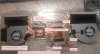

This is an approximate scheme of the cooling system problematic elements for my unit.
In your case, the required thickness is likely to be differentLast edited: May 22, 2017Niarus and alexnvidia like this. -
Thank you. Didn't have any stuttering issues yet, but I think I'll recheck pads if they're steady and don't move.
-
wow...Your method is quite extreme, seems to require a lot of work to source different copper thickness. But i can imagine it might deliver better result since copper is a better conductor. as long as it delivers the same result, we are all happy owners.
can i please check with you, did you solve the CPU core temperature differential issue? if you did, what have you done to make the temperature of all cores more even? you can discuss your methods here http://forum.notebookreview.com/thr...u-core-temperature-differential-issue.805062/gunbolt likes this. -
I even installed the oc VBIOS again)
My Results in Superposition (Unigine benchmark):
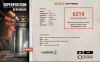
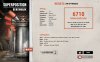
I don't see a problem with different processor core temperatures (3.8GHz / -0.120V)
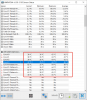 alexnvidia likes this.
 -
Good result with the OC vBIOS. proves that dealing with the power delivery components actually work!
undervolt and gaming dont normally show big differences in cpu core differentials. my temps are 5C within each other when undervolted and gaming. but if i run just OCCT, no undervolt, OC to 4.1GHz, you can see over 10C temperature difference between the coolest and hottest core. -
Btw, wanted to ask. People who have\had stuttering, how often stuttering happens after the MB and components have heated up? From Zer0K's video it seems to be every ~10 seconds.
-
For me it was every 15-20 seconds
-
Does anyone know if the heatsink is included when Alienware does a full motherboard replacement?
I'm finally getting mine fixed tomorrow but they say it's only the motherboard so I'm afraid the issue will persist -
No its a separate line-item. However they are trigger happy about replacing fans and heatsinks if you bring up heat issues haha.
-
you are not getting a heatsink assembly unless it's being stated. motherboard is a separate part. either way, you will most likely run into the same stuttering problem again with the same heatsink cos there's fundamentally nothing wrong with the motherboard when it comes to stuttering issue
-
10 seconds plus minus sounds about right. and it will continue to do so indefinitely until you exit the game and let the power delivery circuits cool down
-
When it starts happening it's every 10 seconds or so. Depends on the game.
I give up on this PC, I'm going to ask for a refund.
Spent another 30mins talking with support today. After almost 1 month of waiting on a motherboard that was on backorder I get the i
Yep.
FML
I'm making a return if the stuttering stays. I'll buy a fugly MSI with a 60Hz panel and I'll like it even if it kills me -
Honestly since you have waited for so long and you are replacing the motherboard, just spend some time to sort out the thermal pads as what was detailed in the first page. Both i and @Zer0K have confirmed this fix works. It's whether or not you are willing to fix it. I can understand your frustration, but the end result will be far more rewarding than having to settle for no quality MSI.
-
i actuallly had the MSI gt73vr for about a month, no shuttering problem, however, the fan pitch is out of this world, i simply cannot stand it, AW is much better and the AW hwinfo fan control is much better than the MSI fan curve
-
Have you used Alienware 17R4 before? i assume you have otherwise you wont be making comparisons on the fan noise. My GT72 is generally quiet and fans dont spin up as high as alienware, but im not sure about GT73vr. yes the pitch is annoying on MSI system, but the intensity is probably more relaxed than alienware? can you confirm this?
yes i agree with you, MSI generally works well out of the box. -
Maybe it's my heatsink or something but I cannot get it to work. Every single chip is making contact, i quadruple checked!
-
the problem with pitch is that even when fan is at lower RPM it still bothers me. For MSI when the fan is over 3000rpm i had to put on headset, for AW i can stand around 3700-3800 before it started to get really annoying
-
I recommend that you always require a cooling system replacement for this problem. I bought 2 cooling systems and they give radically different results.
P.S. In Eastern Europe, now the transfer of guarantee is one huge problem. Buy units only from official resellersLast edited: May 25, 2017 -
for you guys who have done it multiple times, are you replacing with new thermal pads every time or can you get away with using the same? i did the fujipoly when i repasted, but still getting stuttering, so thinking about opening it up again to take a look for this issue. obviously id probably have to order more pads if i cant reuse
-
fujipoly pads, the extreme series (11 and above) are quite flaky and crumbly, if that makes sense. and once compressed, it does not return to its original form. so be cautious when you reuse the pads. i think using pads which are rated at 6 is more than enough.
since you are opening your laptop again, pay special attention to the power delivery components for the gtx 1080. my problem is totally fixed without having to change anything other than adjusting thermal padsTeknobry likes this. -
Pool added so we can get a better picture of how wide spread the stuttering issue is
Vasudev likes this. -
Hi Alexnvidia, love your post and information ! I was wondering if you would be open to doing an interview video showing your process and sharing your findings on my channel www.youtube.com/OWNORDISOWN. I did a similar one with iunlock and team liquid hertz and it helped spread the word on how to fix the cpu pasting issues. My email is [email protected] Thanks!Teknobry, MogRules, alexnvidia and 1 other person like this.
-
Iunlock's guide mentions we'll need 3 x 1.0mm pads and 3 x 0.5mm pads for the 1080/7820HK model. I plan on repasting/repadding/pch mod later this week when the items are delivered and was wondering if I need to order extra pads? Will the x3 of each leave enough excess to be used for filling in any possible leftover gaps?
-
Yes don't worry. there will be plenty of leftovers.DontWorrys likes this.
-
Alright. Some good news. Yesterday I repasted (2nd time). Saw that the fujipoly pads i installed last time, some of them didn't have indents from contact. So I went back over those with what I had leftover. Barely had enough left over. Just enough conductonaut. Also did the pch heatsink.
Now it seems like my stuttering has disappeared. Last night put it through it's usual paces in overwatch . Was good. Decided to try my luck with the OC bios and the temps and stuttering came back. So went back to the old video bios. And seems to be smooth. So I wonder if they did any voltage increments in the newer vbios.
The lm paste was never really a killer temp dropper on mine like how everyone says they got.. but I suppose that could relate to weather and climate etc.
Bad news: i broke one of the pins on the killer 1535 wifi card. So ordered a new one. I did notice some uneven core temps but I'm not too stressed over that.
Sent from my LG-VS995 using Tapatalk -
They did mess with the voltages in the newer BIOS and vBIOS. I too have to run 1.0.5 and the original vBIOS to play stutter free.
I don't really care though because I still get amazing performance with temps never exceeding 70c on my CPU or GPU.MogRules likes this. -
Good that you are seeing some of the underlying problems. I used a pair of small but very sharp scissors to cut the fujipoly pads, and if you are careful with them, there are actually quite a bit leftovers when you are done.
anyway, from what i understand you had stuttering even without the OC vBIOS? cos most people, including myself only experienced stuttering with the OC vBIOS. it looks like your thermal pad situation is far worse. but i'm glad at least after putting in some work you can now game stutter free with old vBIOS.
If you want to take this to further, the next time you disassemble your laptop, again check for power delivery component imprints to ensure everything has proper contacts. and if you really want everything to be good, you might consider changing out all the pads again with a set of fresh ones, this time with proper pad thickness suited to your heatsink. and be careful about reusing the pads. fujipoly 11 and above is quite crumbly and flaky after and does not return to shape after compressed. that is what i later found out because i reused the pads on the tiny VRM which has component imprints on them already but my laptop was still stuttering. it wasn't until later on when i wiggle the pads i found that it's actually not making any contacts at all.
off topic, dont expect LM to perform any better than the best traditional paste on the GPU. It works wonders on the CPU side, especially when you have some gap issue with the CPU die and heatsink. GPU heatsink contact is excellent on new alienware models so there's really not much more you can improve upon that. -
Honestly don't even bother with the choke or gddr5x, those are fine running at high temp and the gddr5x produce so little heat.
Focus on VRM. -
I understand your system is stutter free now from using the old BIOS and old vBIOS. But if your system is stuttering with the new BIOS and vBIOS, it's just showing you there is a problem with your PD cooling. you can choose to ignore them and never upgrade your BIOS, but considering your PD components are operating at the edge, it's not going to live very long, and might cause permanent damage.DontWorrys likes this.
-
There is no vote for 'stuttering with old vbios'.
I'm convinced it's thermal, i downgraded to old vbios and did the other tricks and it was fine (no repaste yet) gaming in a hotel and the desk was quite thin so the laptop was up against the wall...stuttering started. I could feel the heat through the keyboard! -
Hey Zer0! I have Dell support at my house right now and I showed them your revised heatsink. Can you possibly get me a better photo or a full photo of the part number? It's the little sticker with a QR Code on it, I would very much appreciate it, cheers!
-
is your heatsink revision A01? that's the latest CCI heatsink revision
-
I dont think so. It's a AT1QB009ZC0.
But it's a mess because Dell has the same part number for both revisions I think... Does the A01 begin with A01 instead of AT1? -
read the sticker next to the AT1. it's a small square white sticker. The revision number is the last 3 digits. it's the same sticker where u get the QR code and DP/N. it should read something like this CN-XXXXX-A00 or A01Last edited: May 31, 2017
-
Yep, it's the A01.
So here's how my on site support intervention went:
-Replacement motherboard was a refurbished unit. Keyboard, macro and backlight connectors were already broken to ****.
-We still tried assembling it just to rule the mobo out but couldn't even access the BIOS as the F2 key wouldn't work.
-Reinstalled original mobo.
-Fiddled with the heatsink and part numbers, arrived nowhere.
-Reassembled whole unit, technician scratched the metal top cover with his "anti-static" mat.
-Tested again, still freezes.
-"Lets test the SSD" I say, seeing as you're already here you can check the temps which are outside Toshiba's safety range and report back to Dell.
-We saw the SSD is too hot and is thermal throttling.
-Ordered new mobo
-Have to do all the diagnostics again so as to get a replacement heatsink. My issue is probably with the GPU power delivery circuits but **** that, lets do Dell CPU tests, wait for that magical 95ºC and phone it in as a heatsink replacement.
-Same for SSD, had to run diagnostics all over again, luckily it got nice and toasty after only 30 seconds.
-Technician left with 4 and a half hours of my life and a vacation day of work just to deal with this ********. Absolutely nothing has been fixed yet.
Waited 40 days for a broken mobo. 10/10 customer satisfaction.
**** me for having this brilliant idea to get an Alienware. Would have been happier with a P775DM
*EDIT:
Does anyone have any idea on how to get Dell's ePSA boot diagnostics software to show the SSD temp? I have tried it in RAID and AHCI mode and the only temp showing up is the HDD.
Now they say they can't accept my SSD complaint without an ePSA test and photo of the temps... I'm getting real tired of this. The guy was here, phisically, he saw the temps, I was "forced" to send them photos, benchmarks and Dells own Support Assist makes the SSD rise above the operating temps but still they want more...
What a ****ing nightmareLast edited: May 31, 2017 -
sorry to hear about your horrific experience. I hope the next motherboard they send to you will be a new one. As if the on site tech "skills proficiency factor" is not enough, we still need to deal with monkey tech support who insist on standard procedure test results. Believe me i've dealt with them countless times, sometimes exchanging over 20 email just to get something simple done.
quick question. what is the temperature dell consider as thermal throttling for ssd? -
One manager from Alienware Tech Support said that he would investigate this with his engineering team.
I hope the official will give a suggestion to solve this problem.Last edited: May 31, 2017
Alienware 17 R4 GTX1080 in game random Stutter & Freeze
Discussion in '2015+ Alienware 13 / 15 / 17' started by alexnvidia, May 6, 2017.


