 Problems? See this thread at archive.org.
From Dell's Install instructions...
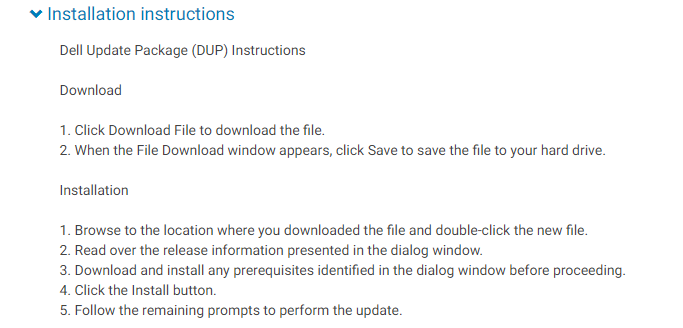
You'll find driver info for most drivers in Device manager under each hardware sub category.
Read also OP post #1
-
-
Are these all the updates need strictly for performance & stability for gaming/bench marking?
I don't know what most of them are, like the Kionix one or the Realtek & Thunderbolt one. -
If you're not facing any issues right now and more importantly if you don't know what these are, don't touch a thing! The only thing that will improve performance is the Graphics Card Drivers.jclausius and SpentaTONofMoolah4k like this.
-
working like a charm here since 4 days
-
So is ASUS' live update utility. These update tools are a joke and coming from the manufacturer is a bigger joke.Papusan likes this.
-
Same also for ALL types unofficial update tools. Paid or free it doesn't matter. People should stay long way from them. They make more trouble than they are useful.jclausius and Spartan@HIDevolution like this.
-
I entered msinfo32 in run to see my current bios, which is v1.3.2, so that's been updated from the factory.
My Nvidia Control settings info shows:
My Geforce 2080 driver is 425.31
My Video Bios version is: 90.04.3F.00.0E
So I guess I need to update the VBIOS? Just run the .exe & it'll do the work, nothing tricky with updating the VBIOS? -
Don't update the VBIOS yet as the new one will have increased power (200W) vs your current 190W and until Dell figures out why some laptops were burning in smoke, it's best to not touch the VBIOS update for now.jclausius likes this.
-
Very true, the ones not from the manufacturers add viruses and malware as well. Pure snake oil. The best way to update your drivers is by getting them officially from the manufacturer(s)Papusan likes this.
-
One of many My Area-51m started smoking
 . I took it apart and this is what I found
-
Dell often rebuts NBR forum as misguiding fools and stupid people who are just defaming Dell(AW,XPS etc......) whilst in reality its the opposite.
-
The following drivers were updated for the Alienware Area-51m, grab the new downloads from the OP:
Intel Dynamic Platform and Thermal Framework v8.5.10103.7263
Intel Serial IO Driver v30.100.1841.2
Intel HID Event Filter Driver v2.2.1.375
Killer Wireless-AC 1550/Intel Wireless-AC 9260 WLAN Driver v21.0.0.5
Killer Wireless-AC 1550/Intel Wireless-AC 9260 Bluetooth Driver v21.0.0.4VoodooChild, Fire Tiger and Vasudev like this. -
nVIDIA GeForce Driver updated to v25.21.14.1972
Fire Tiger and Vasudev like this. -
Nvidia 430.39 v1903 compliant driver has been released few hours ago. I'm downloading it the third time because its failing at 85% and 95%.
EDIT: I think Nvidia has CDN issues... Now its completed and I hope this driver works.Last edited: Apr 23, 2019 -
I’m pretty sure the ones who were experiencing smoke coming out from their systems were just unlucky and received bad units. Newly manufactured ones have no serious issues. Maybe ones with bad thermal paste jobs, but that particular issue about the smoking RTX 2080 has been sorted. The latest versions of VBIOS & System BIOS are both marginally safe to update to. Might be a little buggy though, and voltages may need to be adjusted to keep down the steamy CPU temps with the i9 9900K. Thing does get super hot at times.Spartan@HIDevolution likes this.
-
well I did update my VBIOS since 5 days and all good.
-
Alienware Area-51m BIOS v1.5.0
Fixes & Enhancements
Fixes:
- Fixed the issue where the graphics card does not get detected when the Alienware Graphic Amplifier is connected for the first time.
- Fixed the issue where PowerDVD18 shows error code 21002 while playing Blu-ray Disc through HDMI output.
- Fixed the issue where the system fan does not run according to the custom profile settings configured in Alienware Command Center.
- Reduced fan noise during BIOS update process.
Enhancement:
- Updated Intel Microcode version to 906ED_0000B0 .
- Updated Management Engine (ME) version to 1.2.0.30.1425.
- Generates correct warning message when system is connected to AC adapters with low wattage.
GeForce RTX 2080 200W VBIOS v1.0.0.2
Fixes & Enhancements
Fixes
- Fixed the issue where McAfee scan engine displays warning message when user launches the tool.
Enhancements
- Not Applicable -
Hey Phoenix er Ultra Male

I saw you posted somewhere a AW Icon theme pack? Is that an install-able theme pack or just icons you manually changed everything to?
Thanks! -
It's all done manually bro
Now, for the contacts folder and desktop folder, if you don't find the CUSTOMIZE tab when you right click on them then go to properties, then you need to enable these reg tweaks then you'll see the CUSTOMIZE tab
Enable Contacts Customize Tab
Enable Desktop Folder Customize Tab
Lemme know if you need any assistance with customizing them.
I have every folder customized including the recycle binVoodooChild, Fire Tiger and pathfindercod like this. -
Last edited: May 1, 2019Maart, Fire Tiger and pathfindercod like this.
-
Thank you bro! Where might i find the icons to download?
-
Alienware Invader Icons
Copy the Icons folder within that ZIP to C:\Windows\ (optional step)
@clayton006
Alienware Support just got back to me. They released a new Driver for the Graphics Amplifier that's supposed to be compatible with the Area-51m:
Alienware External Graphics Amplifier Software v3.0.13.0
Please let me know if it works or not so I can reply back to themDarkhan, pathfindercod and Fire Tiger like this. -
The following drivers were updated with new links added to the OP:
Killer E3000 Gigabit Ethernet Controller Driver v2.0.1167_A12
Killer Wireless-AC 1650/1550/Intel Wireless-AC 9260 WLAN Driver v2.0.1168_A03
Killer Wireless-AC 1650/1550/Intel Wireless-AC 9260 Bluetooth Driver v21.0.0.4_A00_01
Alienware Mobile Connect Driver v2.0_A00
Intel Dynamic Platform and Thermal Framework v8.5.10103.7263_A03_02
Intel Serial IO Driver v30.100.1841.2_A02_03
Intel HID Event Filter Driver v2.2.1.375_A10_01
Intel Rapid Storage Technology AppX v17.0.1010.0_A00_03
Dell Update Application v3.0.1_A00_01Sherif_k, Amroth, Vasudev and 1 other person like this. -
Due to the lack of appreciation, I am deleting this thread. Y'all find updated drivers on your own.
-
Lack of appreciation? How do you know people haven't appreciated that you've put this topic here? A somewhat surprising decision. I for one, appreciated the effort whenever new drivers had arrived and I hadn't noticed on Dell's website. Oh well, it was a good idea while it lasted. It's not difficult to see on whether you've got the latest drivers anyway, just takes a little more effort. This topic was for the lazy ones, if anything else.Fire Tiger likes this.
-
Damn this was a neat little thread and I'm sorry that it's gone. I understand why OP did this and respect his wishes. The lazy ones need to get off their back side now.
Sent from my SM-G965F using TapatalkFire Tiger likes this.
Alienware Area-51m Drivers
Discussion in '2015+ Alienware 13 / 15 / 17' started by Spartan@HIDevolution, Mar 6, 2019.


