Problems? See this thread at archive.org.
Hmmm.....I hope not. Well if you're still under warranty, then....it's all good. Have you tried reinstalling the drivers? Also, messing with the GPU settings (NVIDIA control panel and the computers?)
I was having some strange resolution issues last night where I would be in a game and my mouse would only be able to move within what it seem to be a 1080p area. So portions of the right side and bottom side were not accessible by the mouse cursor. - Then I kind of figured it out...I think? My computers screen resolution was set to 4K...but the game was set to 2560x1440, so I had to change my computers resolution to 2560x1440, which I prefer over 4K anyway. I guess I've gotten used to my MacBook Pro Retina, but I really like that "in between 4k and 1080p" setting....making sure both the resolution of the computer and game being equal may have done the trick....Note: I am also running my external as the primary with the laptops screen off. So maybe that given area that my mouse cursor was limited to had something to do with it being the size of the laptaps screen area? Who knows....
Anyhow....I know this isn't related to your situation, but for informational sake to have on the board for anyone in the future.....decided to share
Nice monitor! I'm looking into a curved monitor at the moment as well....right now I have a 4K Samsung 28" and it's stunning...
-
Will this work with 8gb 980m?
-
Not as far as I know, only the 4GB models supported.
-
Ok thanks, did try flashing it, works aside from only reading it as a 4g
-
its my first time doing this and I got my alienware 15R2 only 2 months ago. So I managed to update the vbios. What should I do next or is it already overclocked ?
![[IMG]](images/storyImages/wk3exx.jpg)
UPDATE: Tried with NVidia inspector but don't know if I did things right
![[IMG]](images/storyImages/23j63w0.jpg) Last edited: Feb 27, 2016
Last edited: Feb 27, 2016 -
Need help guys. Restarted my Alienware with the above settings and now am getting a black screen on Windows when it loads and sometimes it manages to log into and gives me display driver noida stopped responding and screen freezes
-
Is everybody here able to use an external monitor? Mainly for those who successfully flashed.
-
I would say you are getting that because you selected your overclock settings to apply on restart. You most likely set them too high and you are getting a black screen. Boot into safe mode and reset your video settings if that is what you have done.
-
You didn't do it right. You are still reading as the stock bios. Once the vbios is installed you can run higher then 135mhz base clock and have more adjustment for over voltage
-
yes my first mistake to get black screen was that I downloaded the 15R1 version by mistake. Did download the R2 after and it worked but cannot find right overclock settings for my 970m as keep getting NVidia driver crashed after a while so now returned to stock back again till someone suggests any reasonable settings
at present have the oculus rift dk2 working with stock and I wanted to overclock to get better quality.
-
I'm an idiot and it's safe to flash your video card. I was using the link from the first post and using that one. Apparently that one is not the r3 version. Make sure you get the r3 version and all is well. External monitor works and I can go beyond 135 for core.
Edit: also flash while on 359.06
Another edit: what are you guys using to monitor your clocks? I'm using hwmonitor, hwinfo AND afterburner and for some reason the overclock settings for memory will be reflected in the programs. However for the core offset, it's always at default values in the monitoring. It's showing 540 as core no matter what I set. Although oddly in unigine I did get a 4.4fps increase with +170/+325. So I'm guessing the core is indeed being applied but none of the 3 monitoring software is seeing it.Last edited: Feb 28, 2016iunlock likes this. -
am hearing about this external monitor not working. As stated before I want to overclock my 970m to get better performance on my oculus rift DK2 which connects to the hdmi port of my alienware 15R2. So will I be stranded with the oculus not working if I upgrade ?
-
Refer to the post right above from me. Just make sure you flash using the correct bios for your system. I was using the one for previous gen and that was the root of my problems.
-
Thanks. I did as well same mistake by downloading the R1 version instead of R2 for my alienware 15.
So I need to update vbios while having driver 359.06 ?
If I correctly understood the process first I need to downgrade the driver to 359.06, than upload the vbios to the card, restart and overclock the card and restart and update the driver back to latest...right ? -
It's pretty simple. Do a clean install for 359.06 (just tick the box during installation, probably not necessary but doesn't hurt), run the .bat file and press y for yes when it prompts. Restart. And that's it!
First time I ran the .bat file it just got stuck. Never asked me to type anything in. I just restarted computer and tried again and it was fine.iunlock likes this. -
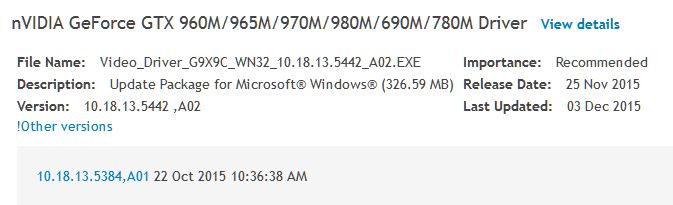
Windows 8.1 Pro...where can I obtain NVIDIA Driver 359.06?
Long day....yaawwnn....okay so I rolled back my NVIDIA driver from 361.91 in hopes to have 359.06, however, it is version 354.42...
I'm tired for sure....and maybe blind right now, but where can I download version 359.06 so that I can flash the mod? I'm a little gun shy to download anything from 3rd party sites like this. Anyone have a link to a trusted site / file?
I've clicked on "Other versions," on Dells site only to find 353.84...
Thanks in advance....clocking out....
Attached Files:
Last edited: Mar 1, 2016 -
-
Are we stuck on 359.06 forever then?
-
am using same settings like yours on my 970m and alienware 15R2 and am getting half your score what am I doing wrong ?
http://www.3dmark.com/3dm/11032062?
UPDATE: sorted seems for overclock to work I need to remain on driver 359.06
http://www.3dmark.com/3dm/11032963?Last edited: Mar 2, 2016 -
That's odd, I flashed the bios whilst using driver ver 359.00 and then updated to the latest driver 361.91 and my overclocking works fine....
http://www.3dmark.com/fs/7745570 -
Anyone have a link to download 359.06?
-
-
Much appreciated.
I take it the drivers are universal for the 9##M gpu's? When looking on the Dell website, under previous drivers it did not show 359.06 so it made me curious...
359.06 is for sure the right one for my rig yes? (See sig.)
Thanks again.
Powered by: Quad Core Exynos + 6820HK -
I should think so, I have never used the Dell drivers. I always get the latest drivers from the manufacturer where possible.
iunlock likes this.
-
yes now am afraid to upgrade the drivers btw nice marks on the 980m
-
Thanks, I'm gonna go for 9500 points tonight, I'm pretty sure I can get there as I only had to back off because I also had my CPU clocked at 4.2GHz and there was touch of instability. I'll wind it back to 4 or 4.1GHz and try again!
-
Well, I think its fair to say I hit my target....
http://www.3dmark.com/fs/7756059 -
Sexy score. Whats your O/C settings for both cpu and gpu when you ran that?
-
CPU @ 4.1GHz (Bios only)
All cores set to x 41
1150 "Extra voltage"
110000 "Power Limit"
GPU Core +155MHz (1281Mhz effective)
Mem + 400MHz (1453MHz effective)
+25mv (I could have run without it but I don't like to see even 1 artifact)
GPU never broke 72c and the CPU averaged at around 80c but did spike to 94c for not even a second. Thermal latency I believe.
I'm quite impressed!
edit: Looking at the scores on 3DMark.com, I reckon I can push the core a bit more......
Last edited: Mar 2, 2016 -
Does anyone here overclock the 970m for gaming ? if yes what are the temps and how much more performance you'll get lets say on a 40fps average game
the CPU is already hot but I noticed the GPU still has some headroom so I was thinking on flashing this vBios or just overclock the 135mhz base overclock.
***NEW*** Prema Mod Alienware 15. 15 R2 / 17 R2 and R3 Performance vBIOS
Discussion in '2015+ Alienware 13 / 15 / 17' started by Mr. Fox, Aug 17, 2015.