Problems? See this thread at archive.org.
In my experience, the laptop just shuts down. Nothing fancy. I never checked the BSOD logs afterwards, but that's all I witnessed.
-
If you installed the AGA driver, then nothing happens.
This driver blocks any situation with sporadic power failure
and disconnection of the data cable from the AGA -
Ummm Hey folks, long time no see.
Forgive me if I don't search too far through this thread, but it actually seems a bit on topic right now. I just picked up an EVGA 1080ti SC2, got it loaded up, driver installed all that jazz (running an m15x R2 6700hq, 16 GB ram, crappy hard drive - anyway. Playing BF1, and my frames aren't that great. Just about solid 60 fps on 1080 with 100% sample, at ultra settings, but I was pretty close to that on my gtx 970m. If I crank settings to 200% sample, which looks gorgeous, I am only getting 38 - 45 frames.
Check GPUz and it says Vrel ... I am getting performance capped due to voltage reliability !??!?! -
Also, does anyone else's power supply make a buzzing noise as soon as you put any load through the Amp !?
-
Its good to know that I don't have to wait for a power outage to find out what happens
 thanks for the info.
I did recently install the AGA driver, kinda wondered what it was for since it was working without it anyways. The more you know. -
Lol. Vrel is widespread misunderstood and no wonder why.
From GPU-Z website: "It's so simple to use, you don't need documentation.
Just download and run the binary, without installation."
BAH don't need documentation my arse. If you need a better idiot before you write documentation I'll be your better idiot.
Vrel from what I've garnered through observation and anecdotes on the web is simply informational. It means no further boost can be achieved without becoming unreliable.
Anyhow you should pay more attention to GPU usage and the clock speed if you want to identify the bottleneck. Make sure your GPU is in prefer maximum performance mode in order to minimize clock speed fluctuations so when you take GPU usage measurements you're spot on. You may very well simply be CPU limited.Shaden likes this. -
Thanks for the quick reply, I had been looking at the other measures, and it seems the GPU is running at near 100% load, and the boost on the super clock is working. Core clocks go up to 1961 Mhz, the Vrel thing was just really throwing me for a loop.
The only other odd thing I see is that it says, when running BF1, that its using 3.8GB or mem, but the graph indicates that is almost all the Vram, when this thing has 11 GB ... anyway I will play around some more with it, thanks for relieving me about the Vrel thing.
Still wonder if anyone gets a weird buzzing from their AGA when they put some load on it ? Even if it doesn't impact performance, its annoying. -
Max load and max clocks sounds like the poor thing is giving you all its got! Personally I use HWInfo64's graphing functions they're larger, customizable, and easier to see trends with because of this. Maybe your memory isn't full but the graph is so small you can't really tell?
I get buzzing under load but it was my GTX 1080; the buzzing was there under load when the thing was in my old desktop and persists over in the AGA. It bothered me greatly and as a result now I have the skill and patience of a fighting monk. -
LOL.
Hrm, I was just running Hwinfo, but only looked at the CPU stuff. Highest CPU load was 87% ... not sure if it would start to bottle neck down at that point. I am going to give her some more testing tomorrow, it just FEELS like something is wrong. Should be a bigger difference from the gtx 970m to this thing.
Thanks agian for the response, will update tomorrow
-
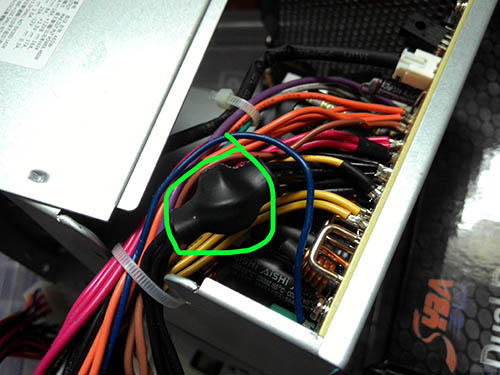
View attachment 146005
Do you use the both 12V power cords from AGA's PSU, I mean black-yellow and black-brown wires?
my stock PSU made buzzing noise if i plug black-brown wire.
black-brown wire inside in PSU containe some ferrite filter on this wire.
In a hi-loaded applications he make some noise.
I think if you just remove this filter you can forget about buzzing noise.
this filter actualy not a nessesery
Add:
if you use black-brown wires, in this case guilty ferrite ring (see on picture)
buzzing not exactly ferrite ring, Ring helps to do it, the noise made the wires under high AMPsAttached Files:
Last edited: Jun 1, 2017Shaden likes this. -
-
Of course you feel like something is wrong. My AW13 felt wrong before it left the cardboard it came in long before I actually found something actually wrong with it. The powerful want only one thing; more power.
TBH this place is like a support group for people who feel like everything is wrong but I am preaching to the choir you seem to have been here around as long as I have. We can't be satiated until Alienware changes their slogan to "Go ahead, stress test it, we dare you." but their technicians are trained to be p!@#sies and will only stress test the CPU or the GPU, but not BOTH at the same time despite using shared heat-pipe designs.
Some of these guys here have an insane sense of humor to go around spilling liquid metal over their $2000 !@Q#$% and defending re-paste as the norm. But eh, May your temperatures be low and your framerate high! I understand where they're coming from.
On the flip-side if nobody feels like anything is wrong crap-tastic design decisions continue to be made. I use the monk analogy in jest, but there's a little wisdom in the attitudes they have. They treat life like its one big joke but they can rip you a new !@#%#@ if you tell them not to laugh.
Anyways don't test in a vacuum. I don't have BF1 or the 1080 Ti so I cannot give you comparable results unfortunately but it would be best if someone could compare results.
Anyways test onwards. The results will prove your sanity lol.Shaden likes this. -
you might wanna go on youtube, search for @OWNORDISOWN , he recently posted videos on AGA with 1080ti. He too faced problems with AGA paired with 1080ti and he managed to resolve the problem by DDU if im not mistaken. Just take a look at his video, hope it resolves your low FPS issue.Shaden likes this.
-
Just a heads up .... my fps weren't anywhere as bad as ownordisown's ... but using the software to completely clear my old drivers and install the new ones fresh increased my performance nicely. Still think I am capped somewhere but saw a nice improvement in benches and a solid 10-15 fps gain in BF1. Now running fully maxed 200% sample full post and getting 50 - 60 fps. Drops to high 40s occassionally.
Wondering if you or Ram or even my cheap 5400 rpm hard drive are hurting me -
Well if you're running at over 80% CPU usage, average, is it average?? Because if you're up that high on average you'll even notice the effects of a handful of background tasks on the game performance. But you say that your GPU is Max clock and Max load so that's an indicator your CPU is keeping the GPU very well fed and it to me does not indicate a CPU bottleneck. It sounds like you need a GTX 1180 Ti Championship New Challengers Edition.Shaden likes this.
-
So you just removed the filter? I'm am not to privvy as to what this thing does. However my GTX 1080's buzzing is loud, so I am not sure if my PSU buzzes because of this so even if I were to remove it on mine I would likely not hear a benefit until I got a new graphics card.
-
in my case i installed the another PSU for Titan X because i had another one, more powerful and quiet. Although stock PSU worked fine with this card.
to remove the filter it's not a big deal.
For example, another brands of PSU's don't uses the same like AGA filter on second 12V line.
But if you have no expirience with that work i not recomend you do it self.
if your GTX 1080 have only one 8pin power line, you can use yellow-black wires.
black-brown wires make noise only if connected in Cardshadowyani likes this. -
Yea ... I am just not getting it ... still not getting the frames I think I should ... LOAD on the 1080 is max, but the software that comes with the EVGA ICX Superclocked 2 forces max load I think, .... but memory usage on the card is pretty low, most I have seen is almost 5GB ... of 11GB. I mean, am I running near or at 60 FPS in everything, yes, but what I see online suggests I should be geting much more . Dunno if there is a bottle nexk I am not aware of ... could 16GB of RAM be the issue ... ???
-
Also ... 3D Mark seems to KILL Hwinfo ... anyone know what thats about. sensors don't seem to track while bench is running ...
-
Well let's not disregard the obvious then. If you drop your resolution to something really low like 1024x768 are you still at 60 fps?
-
I will check this I the morning.
-
Does the amp support duo slot GPU without modification?
I'm looking to get Quadro 6000 that has Duo slots. -
AGA support dual slot Graphic cards, but i'm not sure about support Quadro 6000
Because in official support list no Quadro 6000
https://www.dell.com/support/articl...plifier--supported-graphics-card-list?lang=EN -
You mean it supports dual slot form factor cards or also cards with dual slot?
-
Hi there I'm wondering if anyone can help with this. My AGA seems to be slowing my computer down significantly and only running at PCIe x1 instead of the advertised x4.
Here's the situation and things that can be ruled out.
Currently running the Alienware 15r2
I have tried both the asus 1070 turbo and the asus 1080 strix cards with no success. I have tried upgrading and downgrading BIOS currently at 1.3.10 but i ha e also gone all the way down to 1.2.8. I have reinstalled (clean installed) all nvidia drivers trying both the asus websites nvidia drivers and the latest dell mobile ones. I know the card is connected correctly. I have reinstalled and updated alienware command center and the alienware graphics amplifier drivers. I always only connect it when the computer is turned off. I also tried using only an external display and still didn't help.
I tried calling alienware support and they weren't much help. Can someone please help me? I would really appreciate it.Last edited: Jun 18, 2017 -
-
What OS do you use?
Try to update latest official drivers from sites Intel and NVidia
For correct working AGA need only three important drivers
1. Intel Chipset
2. Intel HD Graphics
3. NVidia Graphics
another drivers it's just monitoring etc.
Intel-
https://downloadcenter.intel.com/product/88345/Intel-HD-Graphics-530
https://downloadcenter.intel.com/product/1145/Intel-Chipset-Software-Installation-Utility
NVidia-
http://www.geforce.com/driversLast edited: Jun 18, 2017 -
Hi I have windows 10 64bit installed and have tried updating the chipset, intel graphics driver and nvidia drivers. No luck unfortunately.
-
I have Windows 10 64 bit installed I tried updating intel graphics and intel chipset and nvidia. no luck unfortunately. i'm not sure if i can send you my GPU-Z screenshot if that would help. i don't know how i would send it on here though. -
Ok
another questions.
what settings in Control Panel - Power Option, a power plan?
for example, the Power Saver option switched PCI-e into speed x1
When you run GPU-Z and Render Test, do you have the same speed result x1? -
Hi, thanks for your help with this.
Power option: High Performance
GPU-Z render test i still have PCIe x1 when running render test. my computer seems to actually run slower when i have the AGA and desktop graphics card plugged in. -
Hi
when Video cards have some glitch behavior, sometimes this utility helps
http://www.guru3d.com/files-details/display-driver-uninstaller-download.html
It's Video Driver Uninstaller, very helpfull, it clean registry and files
Try to Uninstall both drivers and then install Intel driver first and after NVidia driverLast edited: Jun 19, 2017 -
Sorry for some noob q's but thought I'd ask:
1. Will a 1080Ti FE work perfectly fit-wise and with the standard PSU cables?
2. Is there any overheating risk if my AGA sits on the floor which is carpet?
3. Does anyone overclock founders edition cards in an AGA? Anything to be concerned about vs any overclocking a GPU normally? -
1. Yes
2. No risk, AGA take air from front and sides and then out from back side.
3. You can overclock, do everything like a regular Desktop Card, use water cooling etc.jace888au likes this. -
Hi,
Have been reading through this thread for the last few days and definitely interested in getting the amp in the future.
Just a couple of questions for people who are running it with a kaby 13 R3.
Firstly, will the 7700HQ have enough juice paired with a 1080?
Also, does anyone have any actual temps of the 13 when gaming?
I'm hearing around a 20 degree drop on cpu when using the AGA?
A temp of 50 when gaming would be fantastic...and quiet.
Lastly (this may be a daft question), but would you manually turn on the gpu fan even though its not in use? Is this even possible?
Would there be any benefit to this as the heatsink is shared? More cool air into it?
Thanks in advance. -
I don know about 7700HQ, but i think your the CPU power it could be enough for all
I have 6700HQ onboard and Titan XP in AGA, most of my games is VR,
in my case 6700HQ power is enough for games
when i use AGA then AW13r3 becomes more quiet. if compare use onboard GTX1060Last edited: Jun 26, 2017 -
How do you know its only running at pcie x1, and not x4? I have the Alienware awr416 with amp & 1080.. runs ok.. frames for H1 around 130fps.
-
Thanks for the info.
When you say it run's quieter, would it be possible to get your max CPU temp whilst gaming please?
I'm interested as to how quiet the system is when only using the CPU whilst gaming.
(CPU only with LM repaste - Hoping for 50 degrees max - Should result in a very quiet machine with the AGA doing all the grunt).
Thanks in advance. -
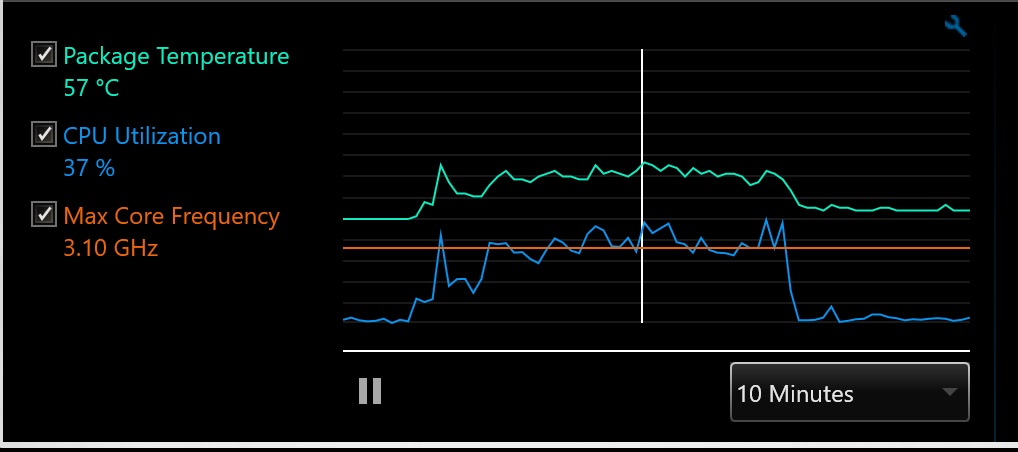
was launched game The Solus Project in VR
Maximum CPU temperature was 57°C (look at picture)
The CPU thermal compound replaced to EKWB Thermal PasteAttached Files:
Rairch likes this. -
-
Thank you for the quick reply. Very much appreciated.
57 degrees is great, fan noise would be minimal. -
You welcome!
if you look at attached picture, 57°C was short period another time temperature was around 50°C -
Guys, I'm having a lot of issues with getting a Quadro 6000 card connected to my 13 r3.
Installing the latest driver from Nvidia gives me an "error code 31" with an exclamation mark next to the driver in device manager although the install installing process goes perfectly. It's only when I restart the system do I know to get the message by right clicking on the display driver in the device manager.
The only driver that installs correctly is a 2-year driver but is no use at all since all apps and games still option to use the integrated 530 graphics every time.
I've tried accessing the Nvidia control panel but is missing the 3d setting so setting to it to performance mode is not an option.
I've also tried turning off Optimus in the BIOS but Dell has some however hidden the option.
I know Quadro cards are not officially supported by the Alienware power amplifier but since it recognizes the card just fine, it should run fine as well.
Not make matters worse, every time I reboot my r3, the drivers or both the Quadro and gtx1060 drivers (when unplugged) will no be installed and only after a few minutes if lucky will I get a Windows display driver update notification to restart my system to properly to restore full function of the drivers.
I've also tried completely installing the Nvidia drivers using the display driver uninstaller software but realize despite the card connected and properly recognized, it will instead install the gtx1060 graphics. How do I know? Well once I disconnect the amp, the Nvidia drivers were missing.
What gives?
P.S. Dell representative won't help since it's not officially supported card
Went on Nnvidia online chat but after realizing I was using it with an external box, told me to speak to the manufacturer. No use whatsoever. -
You have a very specific Video Card for figure out the issue.
I think the Quadro 6000 have two moments for problem.
one of them is it possible Quadro 6000 does not support PCI-e 4 lines and second is Quadro Driver for Windows, which different with usual GeForce driver.
looks like schematically the Quadro compatible with PIC-e standarts, as you said Video Card recognised in OS.
IMHO the Driver is the issue. To ask for resolve some issues in NVidia, is the same as screaming into the Space...Last edited: Jun 29, 2017 -
So any ideas on what I can do to solve this driver problem?
Is there a way I can force apps to use the Quadro card with an old driver? -
the driver problem can resolve only NVidia company, as i said.
Or super-duper programmer, but it's another story... -
Does anyone mine alt currencies (ie. non bitcoin) using an AGA? Using Nicehash I was getting around $9 AUD per day using both the inbuilt 1060 and external 1080Ti... but worry it'll ruin my laptop even though it's on an active cooling pad (Coolermaster Ergostand 3).
(for non Aussies; 0.00244032 BTC per day) -
100% GPU usage 27/4 is a disaster waiting to happen. And bitcoin is so 2013, Ethereum all the way
Vasudev likes this. -
Yep it's ethereum. I let it run for a couple of days since it's winter here and already quite naturally cool but would rather not ruin my 1080Ti
Sent from my iPhone using Tapatalk -
that's why people are buying 460, if 1 card does burn out it is not a big deal. If the 1080ti burns out you lose months of earning
-
I know it's expected for the fans to be on full blast during gaming but if the game is on pause and minimised, shouldn't the fans go back to normal?
-
It depends on how the game is implemented because there are no hard and fast rules the developers have to abide by on this as far as win32 applications go. More often than not a minimized game has no respect for sharing resources kindly. Such is the openness of Windows.
*OFFICIAL* Alienware "Graphics Amplifier" Owner's Lounge and Benchmark Thread (All 13, 15 and 17)
Discussion in '2015+ Alienware 13 / 15 / 17' started by Mr. Fox, Dec 10, 2014.