Problems? See this thread at archive.org.
@COtto1984 Mine did the same thing, how I fixed it was disconnect everything, pull out the card place it back in make sure your 6 or 8 pin power connector is plugged in download the latest NVidia driver and when I did that IN THAT ORDER I finally got mine to work
-
Thanks for the suggestion(s). I just tried all of that and it didn't change anything.
-
your very welcome hmmmm, I'm sorry to hear that, let me do some more research and see if I can find a solution for you, but just so you know that's exactly the same thing that happened to me, and what it ended up being is my card was not getting power have you tired both 8 pin connectors? maybe one of them is bad? when you take out the card look for another place to plug in the second one I sincerely doubt a 1060 takes near enough power for both but you never know
-
I went ahead and ordered another AGA on Amazon which will be here Friday. If it does the same thing, I'll send it back, but at least I can start narrowing down the problem. My graphics card is new so I should be able to get a replacement if it turns out to be the issue.
FaTT likes this. -
that sounds like a good plan, to be honest more times then not its the AGA and some pin or something isn't making a proper connection so while your waiting on your new one play with the connectors and the PCIE slot, if you have a bright flashlight check and make sure of no corrosion on the connection ect... hopefully you will be able to cancel the new one best of luck to you my friend
-
As someone who's AGA worked for MONTHS (at least 6), then suddenly became unreliable and I occasionally got the "your card isn't the right one for this AGA" type message... let me tell you to try replacing the power supply. Reading on here, I saw the Corsair 650w PS was about $70 at Best Buy. This was cheaper than many online places, and because I live a couple miles from a store, I got it right away.
I waited 2 weeks to install it, hoping not to need to spend $70 to resolve my problem. But in the back of my mind I knew what problems cheap power supplies cause, and after upgrading the "Dell" stock PS to the newer Corsair (which I've never had a problem with their units, I ONLY buy their stuff now)... I've had ZERO issues as a result of hardware. I hope this might be of use to you.
In the meantime, I bought Destiny from Newegg earlier for $29 w/ free shipping and no tax. Could have had it today for another $10+, but decided since I have it on Xbox One and this is more for the benefit of playing on my Alienware 17 R3 with the ASUS GeForce 1080 GTX, I'd go for the cheapest price and wait a few days. I'm becoming a LOT more patient at 46 than I was in my younger days.
Anyway, I'm about to try the latest Nvidia drivers. I expect they will fail to install because the newer Nvidia normally aren't written for AGA + Laptop graphics users like us. I had tried a "unlicensed install" folks here recommended, but after a few days the drivers reverted suddenly and I had an older driver I hadn't even downloaded before.
Anyone got instructions on where to download the latest driver that will work with both the AGA and internal Nvidia graphics, and exactly what I need to do so the system will install it correctly and not revert it later? Any help is appreciated, and I thank everyone here because Notebook Reviews forums have always been top notch!!!
Vasudev likes this. -
Well as a new aga user (brand new like i got it on Monday)I haven't had any problem with the newest NVidia drivers I have 368.25 just downloaded a few days ago and it works great so far, I have a question for you though, I have been experiencing performance issues, have you had any issues on your 1080 with the aga? also are you connected to a external display or are you using your laptop screen and what cpu are you running in your R3? my problem is my 1080 is running at like a 1070, according to the BMVasudev likes this. -
Browse a few pahes back. I explained what to do. Disable windows automatic driver updates.
-
What happened when you installed BIOS 1.3.12? I am just getting my AGA going and have had no luck. I got a replacement AGA today and am getting all kinds of different reactions out of it. First one said it couldn't recognize the card every single time I booted. New one turned on, shut off, turned on, shut off repeatably on my first attempt to hook it up. I checked and reconnected all connections, changed power supply cable to video card, and what do you know, it worked ONCE. Now I'm back to "unrecognized card" every time I hook it up. I may try grabbing a power supply from Best Buy tomorrow to see if that helps. I'm beyond frustrated at this point. Is anyone successfully running BIOS 1.3.12 with the AGA?
-
one thing I noticed on mine is the power cord is janky as hell and if I move it anywhere I have to like wiggle the cord and if it dosnt get a good connection it does that reboot loop happened like 3 times now na d I am on the latest bios with AGA
-
I replaced the power supply with a Corsair CX550M and am getting much better results thus far. I was able to boot successfully 2 out of 3 times where the card was detected correctly. I received the card not recognized message on the second boot, but I had just finished moving the AGA and hooking everything up where I wanted it. We'll see where it goes from here.FaTT likes this.
-
Didn't Windows implement that new program where you can play your Xbox games on your pc through the Windows store app? You should see if you have destiny on your Windows app on your pc.Vasudev likes this.
-
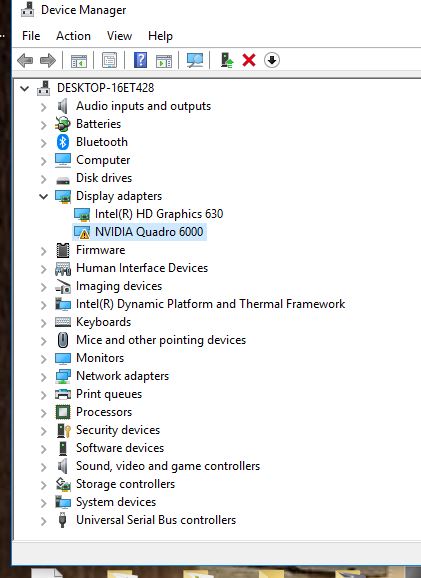
I still can't get my Quadro 6000 card to work with the power amp.
Dell won't assist me because they say it's not one of the listed cards. -
Hey all, I'm slowly working back through the 300+ pages of this thread, but I've encountered an issue trying to get my AGA up and running with an Alienware 15 r2 and a founders GTX 1070 card. I've flashed the laptop to the latest bios, command center and AGA software, but I'm having some challenges.
When booting with the AGA plugged in, I get the "Unrecognized device in Alienware Graphics Adapter. Alienware Graphics adapter supports NVIDIA or AMD Graphics Cards only Press any key to continue."
When I do so and boot to Win10 and check Command Center / Adrenaline, it doesn't seem to be seeing cards - I don't have the area of the amplifier where it typically would say what cards it sees on the Laptop and AGA and if they're enabled/disabled. The USB ports/hub appears to work, and the AlienFX sees the AGA in so far as allowing color configurations - it just doesn't seem to be picking up on the giant honking graphics card that's plugged into it.
Any ideas?Vasudev likes this. -
I ended up having to replace my power supply with a Corsair to get my 1060 to work. Only other issue I have encountered is the cable between the computer and AGA is VERY sensitive and finicky. Make sure you have solid connections at both ends and do not move it as it will easily disrupt the connection between the two.Vasudev likes this.
-
If it is that finnicky than your cable is not good. I am using mine for more than a year and i can wiggle the cable around without any disconnects. I also never had an error message.Vasudev likes this.
-
Can someone confirm whether maxwell quadro cards work, the m5000 in particular. I initially thought all cards that fit would work until i put in an old 6000 and while recognized in Windows 10, wouldnt let me use it
Also i know the m5000 is basically a gtx980 which according to reviews is about 10% improvement over a gtx1060. Since the maxwell quadro card now perform identical to it's consumer counterpart, the gtx980. Would i get any increase in gaming over the internal gtx1060 talking into considering the pcie 4 lane bottleneck?Last edited: Dec 16, 2017 -
Hi all,
Looking to buy the AGA and a 1080 or 1080 Ti card next month. From what I've gathered, the PSU and fans are two things that can be modded for better performance. I'd like to find out
1. What the best PSU within the 500/550 range will be (100-240v). Something that wouldn't require too much tinkering to fit in
2. I've seen a few videos with water cooled cards in the AGA. What would be your recommendation for a water cooled kit/card that fits properly into the AGA? (and are there any guides online for these mods?)
Thanks! -
The Corsair CXm seems to be a drop in swap (was for me). As for watercooling, why? I am sure you could make something work with a 92mm radiator but it would have to be a custom job and absolutely wont be worth the trouble - the GPU is not the bottleneck and overclocking to the point where additional cooling is needed will not make a difference. I actually have the 92mm fan in my AGA unplugged since the noise it adds is not worth it - the GPU runs the same temp regardless.
-
I was looking into getting an alienware 13 with an amplifier with the GTX1080.
But damn what a difference in performance.
This is my current desktop:
![[IMG]](images/storyImages/PB5fyUI.jpg)
Why is the difference in performance SO Big?
I don't assume the CPU is a bottleneck in your case.Vasudev likes this. -
Well you loose 10% of the power right off the bat with the aga go look at the overclock Era lounge when I put that same card in my desktop (that is now stolen the one in my sig) I was getting 7k+ in heaven that cpu was totally a bottleneckVasudev likes this.
-
despite successfully installing the latest driver for my Quadro 6000, I still get an exclamation mark in the device manager. I didn't work when it first tested it with my 13 r3 but somehow thought that after nearly a year with new updates it would somehow work. I should have known better. I don't understand why the graphics amp only works consumer cards and not workstation cards whenever ever other egpu box solution via thunderbolt 3 works with essential any card that fits. The big box has taking up 1/3 of my desktop for the past year. It would be nice to make use of it.
Attached Files:
-
-
Indeed, I saw some benchmarks on youtube from reviewers, like you said, difference of 10% tend to happen. have also seen games where that difference is lower.
But in this case, it's a lot more than 10%, and I haven't even overclocked my gpu. -
Only if you pipe the signal back to the internal monitor. I had a mere 2% drop only compared to my desktop with the exact same card (graphics score).Vasudev likes this.
-
Hey man, good to see you still around, I haven't been around much, or as much as I'd like. Hope all is well. Still in the NOVA/DC area? When did you update your User ID?
-
Hello everyone,
i receaved the following error with my asus mars 760x2 in the device Manager
(Code 31) the System can´t load the Drivers..... can´t get it to work however i installed the nvidia Drivers properly...
Does anyone has an idea? -
Hello,
I wanted somewhere to share my benchmark results, so here they are:
https://www.3dmark.com/spy/3032647
I ran 3DMark Time Spy with an nvidia geforce gtx 1070, running in the graphics amplifier.
Here are the rest of my specs: Alienware 17R3: Intel Core i7-6700HQ @ 2.60 Ghz, 16GB DDR4 RAM, NVIDIA GeForce GTX 970M, and the 1080p panel.gschneider likes this. -
Mine with AGA with ASUS GTX1070 Turbo re-paste with Noctua NT-H1 and I have re-paste the AW17 R3 with Thermal Grizzly Conductonaut & Thermal Grizzly Minus Pad 8 and with a 500GB 960 EVO
http://forum.notebookreview.com/thr...3-re-paste-guide.788431/page-19#post-10428938
Stock GPU speed
https://www.3dmark.com/3dm/24288953
GPU speed OC +9%
https://www.3dmark.com/3dm/24289215gschneider likes this. -
a_lunatic and bhatto23
I found your scores a little odd.
My AW15 r3 with a 1070 inside scores higher?
https://www.3dmark.com/spy/2522615
My overall and graphics scores are higher. In fact my graphics score is higher than yours with a 9% OC?
I am not trying to rain on a parade. More trying to understand why its lower? -
We got the 6700HQ so more of a bottleneck for us.gschneider likes this.
-
Even on the graphics score side of things?
I only wonder as I have a 1080ti in my amp I am curious at the loss I get...
http://www.3dmark.com/spy/2729326
I am debating selling my AW15r3 and building a desktop with my 1080ti and an 8700k. maybe a ITX or mATX as I like small systems. Which is why I went laptop and amp.
I have however realised I rarely move my laptop, I don't game anywhere but my desk. A desktop and Surface Pro with just an M3 would actually fit my needs.
My monitor is athe Alienware 34" curved though trying to push 3440x1440p at 120hz is not easy for a 1070 so I got an AMO and 1080ti. I need to keep my future costs down. I was hoping for a laptop with more than 4 PCI lanes to the eGPU, I can't see what happening for a few years which is very annoying. -
I had the same use case as you and did exactly that, went for a desktop and a smaller laptop/tablet for travel. I even have the same monitor as you, haha. Once you game ultra-wide, its hard to go back. I initially got the 17 because I travel about a month out of the year but I realized on my first or second trip of last year that I don't really game on trips. I like to enjoy the place that I am and traveling wears me out so much that once I get back to my hotel, I am ready for bed. Also lugging around the alienware was a major pita. I still have my 17 and just haven't gotten around to selling it, but I really use it less and less these days.
For the desktop I went with an i5-6600k and sli 1080s as I already had 1 1080 laying around from my amp. I think the i5 is bottlenecking me some as I can't really get over 85/90 FPS in R6Siege with max settings at 3440x1440. Prices on 6700k's havent dropped like I thought they would, but as soon as I see a cheap one, I'll probably grab it and toss it in there. it would be nice to get 120fps on the only shooter I play.gschneider and Vasudev like this. -
lol that is amazing. The monitor is good isn't it.
What did you go for laptop wise? I travel twice a month and to be fair I only need playing movies and music just to chill out to. Like you I am far to tired to be fussed about playing a game.
I play quite a few shooters, plus dirt rally and some strategy games. I like to vary things.Vasudev likes this. -
I tend to change ultrabooks often so i have had a few different ones. I'd probably go with an XPS 13 or Surface pro if I could do it all over again. Right now I use an Acer switch alpha 12 only because i can't sell it, haha. I have had a few xps 13's and its hard to beat the form factor and battery life. I also had an ipad pro 2017 12.9 and it was pretty great but I don't use an iphone and didn't need a 3rd echosystem to buy apps for.Vasudev likes this.
-
Does anyone k is where I can get a cable for the amplifier?
-
Got a AGA and 1080 Ti FE for my 13r3, 7700HQ. Here are my 3d mark scores, graphics score in (), all with internal display.
FS: 16706 (24829)
FSE: 11209 (12941)
FSU: 6295 (6436)
TS: 7796 (9240)
TSE: 3651 (4370)
Pretty happy with the results, anyone doing much better with same or similar setup? The one annoying thing is when I plug into the AGA, I have to start up, and then restart for it to use the 1080ti.
Sent from my iPhone using TapatalkVasudev likes this. -
That's a given my dude. You can't just plug in a pci-e cable and expect it to get to work. It's needs a restart. How many manufactures are you aware of that make cables as such? It's not that big of a deal.
Sent from my SM-G955U using Tapatalk -
Its booting up connected to the AGA. It doesnt allow hot swapping. The 1080Ti registers in hwinfo, but it utilizes the Intel 630 until you do a restart.
Sent from my iPhone using Tapatalk -
I just tried my new AW13r3 OLED 1060 with my AGA 1080Ti and noticed that unlike my AW15r3, the inbuilt GPU actually is disabled and not visible in device manager when using the AGA! This is different to the AW15r3 whereby both 1060 and 1080Ti were visible.
I suspect it's to do with the AW15r3 having the 1060 and GSync 60hz IPS panel.
![[IMG]](images/storyImages/ADIDFYi.png)
Pity I can't do the same on the AW13r3 though as I actually liked having two GPU's active.Last edited: Jan 5, 2018 -
I used my external X34 connected to the AGA on my 13r3.
FS:16852
FSU: 6415
SD: 31112
TS: 7904
Without the AGA
FS: 9550
SD: 24212
TS: 3738
Interestingly my AW15r3, FS was 16777 and FSU was 6543, SD was 30513.
There are minor differences between AW13r3 and AW15r3 with same specs but I suspect it's just within margin of error.gschneider likes this. -
Why did you go from a 15r3 to the aw13?
I was thinking of the same move simply for more portability.
I use an alien ware aw3418dw monitor and a 1080ti in the AGA -
Portability.
Main reason I chose AW15r3 was I thought it would be nicer to game on a bigger laptop screen, and it could fit lots of storage in using the 2.5" (for my photos/music/etc) and also upgrading the other m.2 slots with more SSD space. In practice though it was too damn heavy to carry all the time even with the Vindicator backpack, and battery life was shocking since it had the GSync... which meant I rarely actually brought it outside. Performance was decent with a 1060 but for my birthday, my wife bought me the X34 UW, AGA and a 1080Ti so it meant the laptop GPU wasn't so important when playing at home. With Intel 6000p (business version of 600p) being sold surprisingly cheap in Australia for 1TB, it meant that I was able to have a decent amount of storage on the go if I went with the m.2 only AW13r3.
So with all that put together, I decided to move to a smaller more portable laptop. It also means it can replace my other laptops which I spend a lot of time trying to keep in sync/use every now and then (Surface Pro and GPD Pocket). I actually am most excited about having a single AW13r3 laptop to do everything... and whilst wife wants me to sell the AW15r3 and Surface Pro 4, I may hold onto GPD Pocket since it's just so damn small and cute.Vasudev likes this. -
Does anyone know if a card with these dimensions (30.5 x 20.3 x 7.6 cm) will fit?
-
-
Have you managed to resolve this? Thinking of getting a GA for my 15 R2,, but Dell only claims compatibility with 15 R3 in the website...
-
I run an aw15r2 and it works without issues.
-
I realised on my new AW13r3, everytime I switch between inbuilt and AGA, I have to reinstall the 388.71 Nvidia drivers otherwise the 1080Ti in the AGA isn't detected and Nvidia Control Panel doesn't show up. Any ideas? I thought this issue was resolved ages ago.
-
After you connect the amp and power up, try doing a restart. On the first boot mine is stuck with the intel 630, restarting resolves this for me without having to do the driver reinstall.
Sent from my iPhone using Tapatalk -
Your wife got you all that for your Birthday????????!!!!! How do I get mine to do that?propeldragon, Jayce 71 and jace888au like this.
*OFFICIAL* Alienware "Graphics Amplifier" Owner's Lounge and Benchmark Thread (All 13, 15 and 17)
Discussion in '2015+ Alienware 13 / 15 / 17' started by Mr. Fox, Dec 10, 2014.