Problems? See this thread at archive.org.
Can you share any info on that? Very interesting
-
-
Hmm they had a survey a few weeks ago about it and asked us what we would like to see the most.
Stuff like TB3 and AGA port in 1 machine for example and some more questions. It was also linked on the AW Reddit but cannot find it there anymore. -
cookinwitdiesel Can you overclock cpu and repeat benchmark on GoW 4 ?
Last edited: Mar 22, 2018 -
I could but it would be pointless. The CPU would just spend the whole time throttling (due to power draw as much as thermals) and not have consistent performance. I actually have it underclocked and undervolted right now to get it consistent.
-
Whenever I plug or unplug my 13R3 from the AGA (1080Ti) I have to reboot Windows 10 for it to properly detect the Nvidia card (either the 1060 or the 1080Ti). Everything more or less work without the reboot, but I can see in the Task Manager that a Nvidia Setup is running. I also don't get the Nvidia Properties in the contextual menu in the desktop until the extra reboot. I've read here that this is normal because the card is replaced in the PCIe bus and the Nvidia Drivers for the laptop 1060 and the desktop 1080Ti are not 100% identical, so they are reinstalled every time. Just want to confirm that there is no way around this. I'm running an old BIOS (1.0.8) and haven't installed any extra Alienware software (besides the AGA driver). I have no need to update or install anything but if this could be fixed by a new BIOS or any extra tool I will definitely try it.
Also, did anyone try to adjust the .inf of the drivers so it support both without reinstalling? -
Anyone know if this amplifier will work with a EVGA 980 ti kingpin? Looks like it will meet the power demand but the KP requires two 8pin and one 6 pin power connectors. I know I don't need a kingpin but I have a chance to buy one for a very good price, cheaper than most 980ti I have seen around. I'll be using it on a 17R3 (integrated 980m).
-
Doesnt fit, card is too big
-
A 1070 would be a lot better investment than a 980 Ti and should be priced similarly (at least in a sane non Cryptocurrency obsessed world...)
-
Hey guys..have an Alienware 17r2 for a year now..it came with AGA. I never put a card in it but want to now. I know some cards wont fit etc..But my coworker has a brand new MSI GTX 1070 Ti Titanium 8G ...its about 11inches.. This card I'm sure wont fit with cover down..but I don't care if I have to take cover off? Any issues you see with this card in amplifier with cover off? Thanks for your help
https://www.msi.com/Graphics-card/GeForce-GTX-1070-Ti-Titanium-8G/Specification -
You can use it with the cover off. It wont fit for sure though with the cover on. The card is too high, might be a bit too wide as well.
-
Removing the cover is just a handful of screws, very doable
-
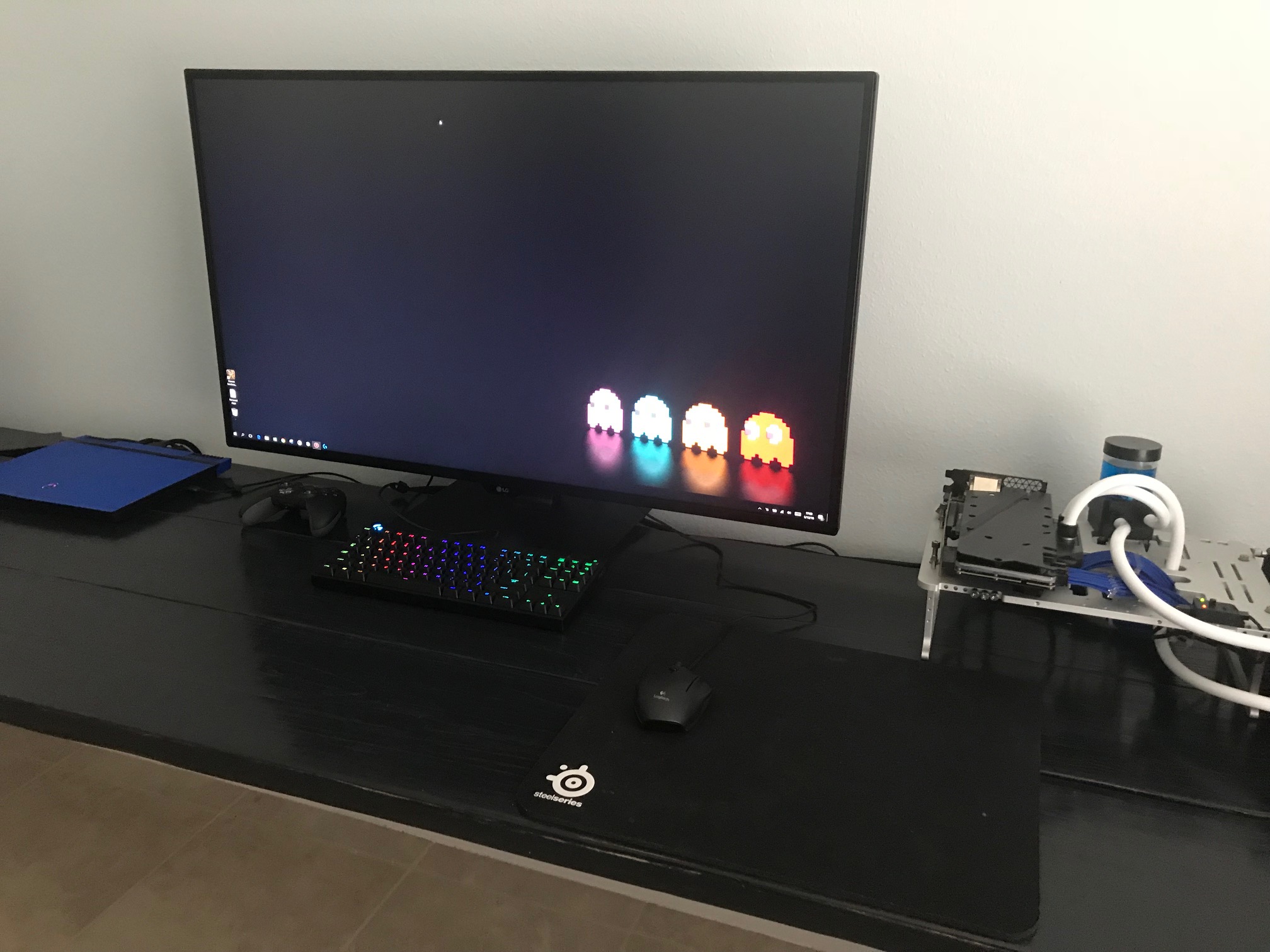
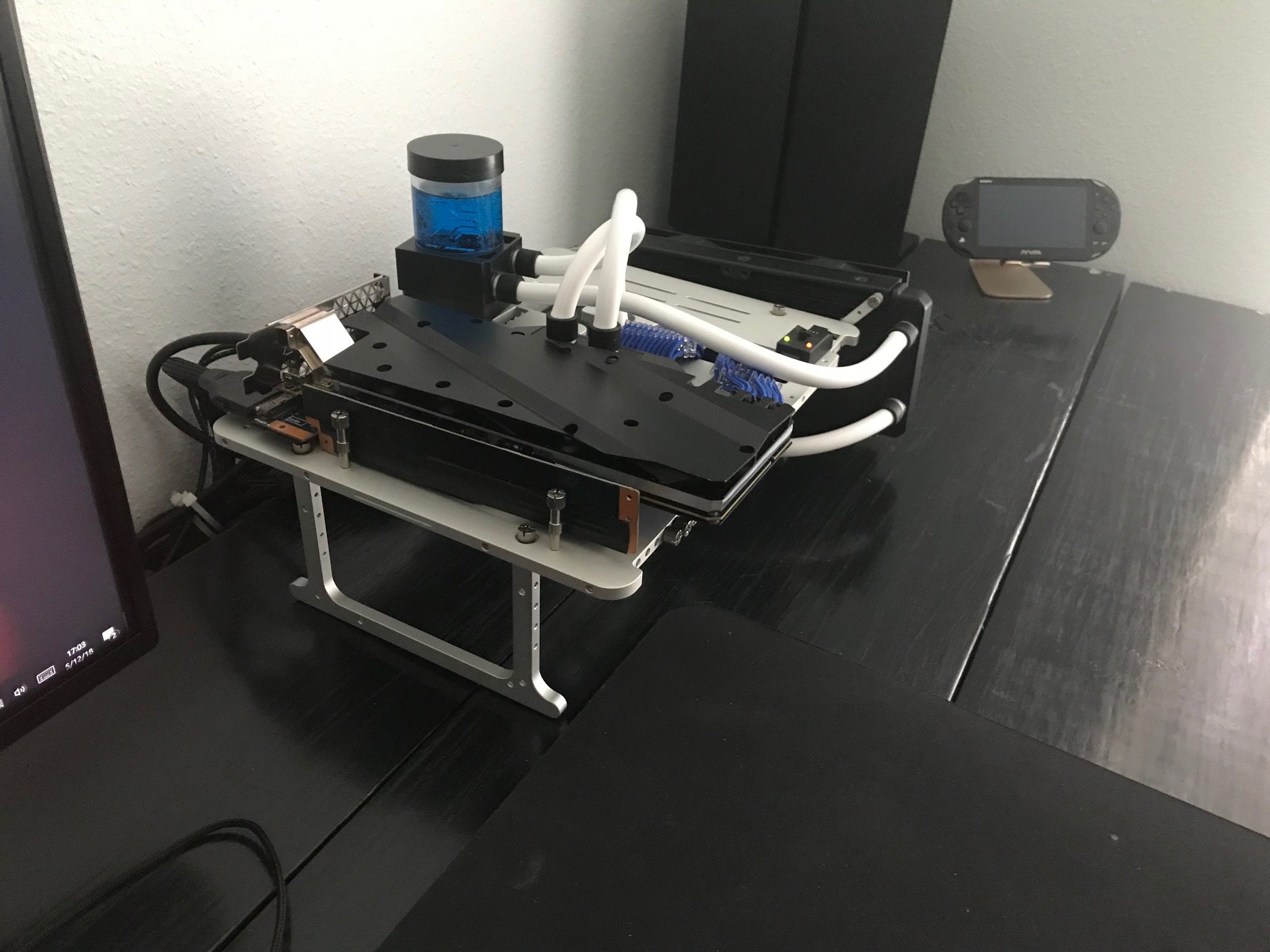
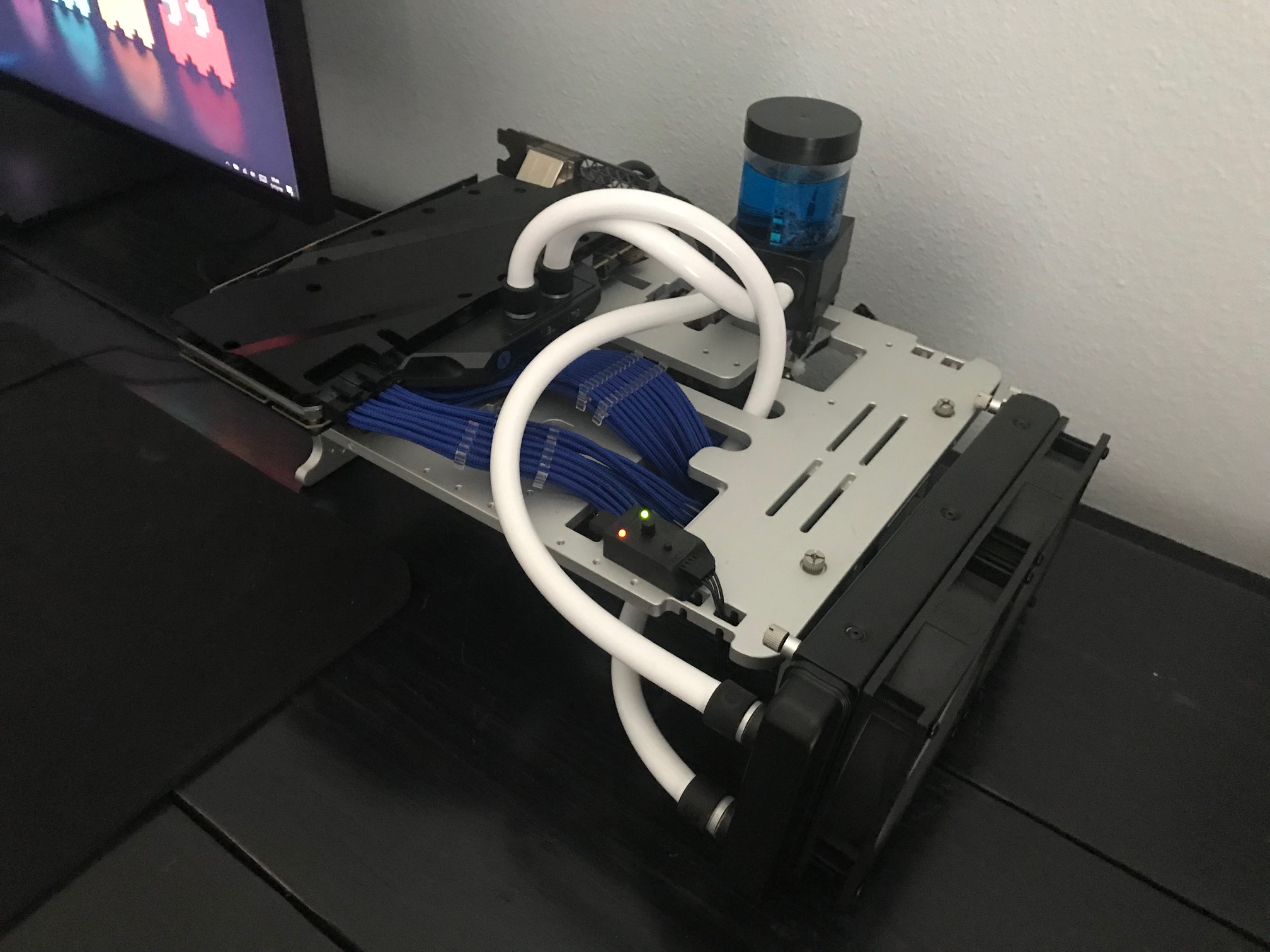
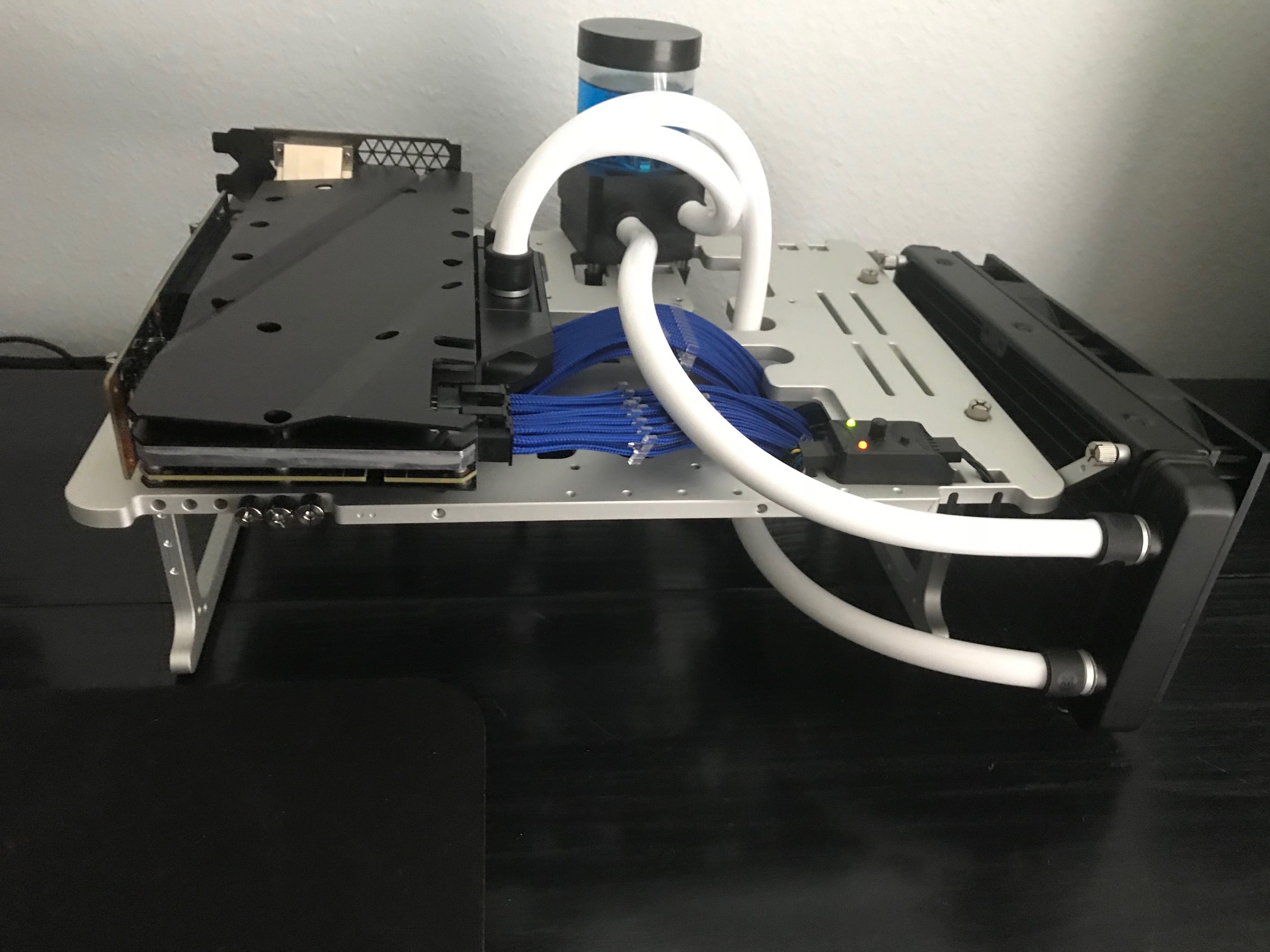
Hi Everyone,
Just finished up modding the AWA amplifier. I essentially broke it down to the PCIe board. I then used a Open Bench Table to install the remaining components. Everything works as expected and with the GPU and radiator being exposed temps are low and the system is quiet. I have a Noctua regulator to lower and increase the pump/fans. Overall very happy with the setup.Attached Files:
Last edited: May 12, 2018 -
-
What test bench is that? Nice and clean layout, I like it.
-
Thank you. Streacom Open Bench Table.
http://www.streacom.com/products/bc1-open-benchtable/pathfindercod and rinneh like this. -
That benchtable look incredible.
-
Thank you. It came together nicely.
-
I've been trying to find a video or page with info on replacing the AGA fan but most say to splice some wires. Is there any info/page with the correct adapter to use with no wire splicing?
propeldragon likes this. -
To do it without splicing you also need to replace the power supply so that you will have a 4-pin molex you can power the fan off of with an adapter.
-
So is the fan hardwired to the PSU? If not, I'm sure there is an adapter. I can't find much info on either I guess I'll have to wait til I get mine
-
The fan uses a non-standard plug to the PCB right now, that is why splicing is needed. I actually have found the fan to be of very little value and somewhat noisy - I just have mine unplugged.
illuMinniti likes this. -
I see, thanks for the info. That's such a dumb decision on Dell's part.
So I know this question sounds like it doesn't belong in this area but I feel like it's fitting.
How does the 7700HQ compare with let's say a desktop i7 like the 7700K? Reason is, I have the option of buying a 200$ AGA or I could keep that money and just not sell my old desktop for a while longer which has a 4790K. I've seen comparisons online and they seem pretty unrealistic on the performance hits so I don't believe those benchmarks done by people without credibility. I trust anyone on these forums way more than random from YouTube lol. If it's only proven to lose 1-2fps with using a mobile CPU vs the desktop version then I could care less about that loss -
My setup includes a 4k monitor with Titan X Pascal. All my games are played at high or highest settings with AA at lowest setting. If I cap the frames at 60 then it runs very well. If I uncap the FPS I notice an occasional major drop performance. Not certain if there is a correlation.
Honestly, I cannot tell a difference between the 7700k and 7700HQ in game. I’m playing Far Cry 5, GTA, Dishonored 2 and Division currently.
And, I really like having everything on a single computer.Last edited: May 17, 2018illuMinniti likes this. -
See that's what I like to hear. I've searched YouTube and there were some videos showing the 7700HQ vs the 7700K and it was showing like 20FPS short in the same games. Which is unrealistic. I do know the 7700HQ can hit like 99% usage in games but I don't think that's a big deal... I think I'll just check out my own results with my 4790K and 7700HQ but that'd really a pain since the 4790K is in an ITX case with 2 CLC
-
Are the 20fps differences happening at much higher FPS and or at 1080p?
I’ve stopped benchmarking for the most part excluding basic post setup test to make certain temps, noise and performance is working right.
Another consideration when using the AGA is the laptop’s CPU runs much cooler. Mine never goes above 60 which means almost no fan noise.
I have had both setups and unless you are a competive gamer the laptop/AGA is great.
What laptop and GPU are considering? -
Well I already have an Alienware 15 R3 with GTX 1070 + 7700HQ. But I wanted to do 4K gaming so I got a 1080ti and order an AGA. I was looking for a simple desktop processor vs mobile processor with gaming comparison (though the variables would be a little inconsistent since the AGA has a little bit of performance loss. But I still feel like it would be neat to see the performance comparisons. Cuz other than benchmarks, I feel like the FPS should be very similar
-
Interesting. I pulled a 7133 on Firestrike Ultra today. I will run some FPS benchmarks and post. My Titan is from 2016 and runs almost identical to the 1080ti. -
It is not the exact same setup, but my desktop with a 4770k at stock ran about 17% higher score than a mildly downclocked 6820HK (to avoid throttling) CPU/Physics score in 3DMark Fire Strike. The main hit with the AGA is not from the CPU change, it is from the PCIe x4 interface.
illuMinniti likes this. -
Again and I have to keep saying this, various tests have proven that 4X is hardly a bottleneck and only degrades performance for about 4%.at it's worst (in higher resolutions it becomes less)
What does degrade performance is using the internal screen vs an external screen on the AGA.
Posted it in another topic so you can search for it, I have used the same 1070GTX card in my 7700HQ laptop with an AGA and my desktop system and the scores where almost identical.
https://www.techpowerup.com/reviews/NVIDIA/GeForce_GTX_1080_PCI_Express_Scaling/illuMinniti likes this. -
These are from a quick benchmarks of games and stress test. Take for what it is worth.
AGA TITAN X PASCAL – 13 R3 7700HQ
Titan – Undervolted to - .925 with 1999 clock and 327 Memory
7700HQ – Undervolted to -.130
4K Monitor
Max Settings - all possible graphical settings set to highest option
High Settings – AA turned off or at lowest settings and overall setting moved to 2nd highest option. This is sometimes High or Very High.
3DMark Firestrike Ultra - 7188
Division – Maxed Settings – 43
Division – High Settings – 50
Far Cry 5 – Maxed Settings – 55
Far Cry 5 – High Settings – 60
GTA 5 – Maxed Settings – 35
GTA 5 – High Settings (Grass Normal) – 90 ish
Grid Autosport – Max Settings – 93
Hitman – Max Settings – 72
Watch Dogs 2 – Max Settings – Unplayable for me. Frames kept dropping to single digits
Watch Dogs 2 – High Settings - Again unplayable
Unigine Heaven 4.0 – Max Settings - 40 FPS – Score of 1011 at 4K
Unigine Heaven 4.0 – Max Settings – 143 - Score of 3618 at 1080p
Rise of Tomb Raider – Max Settings – 55
Rise of Tomb Raider – High Settings - 69Last edited: May 24, 2018illuMinniti likes this. -
Do people use an AGA and the laptop screen?! I would think if you are going through the trouble - definitely use a bigger and better quality screen! (At least in the case of the screen on my AW 15 R3 - the screen I got is mediocre at best). You can get a decent 27" 4k screen for under $400 - and screen scan last a decade literally so the investment is sound. Ditto for mouse and keyboard.
-
OLED
Sent from my iPhone using Tapatalk -
OLED. I have a 4K external monitor I use with the AGA but anytime the OLED turns on it is truly striking. -
I see, I have only experienced OLED on phones and tablets so have yet to realize its real potential. I currently use 2 Dell 25" IPS screens (U2515h) attached to my AGA.
-
I appreciate the large amount of info you guys have conducted. And yeah I learned from searching around that the AGA is the best eGPU setup with its minimal performance loss. But I am curious about the mobile CPU vs desktop. Which @votehart provided a lot of info I can use to compare benchmarking websites with their desktop CPU results. I'm sure it'll also be minimal but I'll check when I'm on a desktop and not a phone and I'll report back what I gathered
-
I just bought a EVGA 1080 TI SC2 to put into my Alienware Graphics Amplifier, to be used with my Alienware 13 R3. It's 'not approved' by Alienware as a compatible card, but I read some people having success with it. This is the first time trying a GPU in the amp, as I've been using it as a USB hub for the past 2 months with no issue. Sure enough it didn't work. I get the bootloop when the laptop boots with the amp connected. Laptop screen is blank, amp and laptop power up, then 5 sec later off.
AWR13 R3 KBL CPU, 32 GB RAM, 1060 GPU, 2 x 512 GB NVE Drives
Here is what I've troubleshooted:
- disconnect all USB devices from the hub, AW13 R3
- disconnect all video cables from the AW13 R3
- Power laptop on, then quick connect the amp. Windows boots, but then detects the amp and requests a reboot
- AW13 R3 was on bios 1.2.4. I downgraded to 1.2.1, and tried all the way down to 1.0.8
- Disabled UEFI
- Renabled UEFI but enabled Legacy Boot ROM
- Tried a Radeon RX 570 with the same bootloop
- Tried EVGA 1080 TI SC2 in another PC and PC boots and card is detected. Also tried Radeon RX 570 in the same machine with positive results
- Disabled on board gpu (INTEL) in Windows
- Reinstalled AMP software
- Ran DDU to remove all drivers and reinstalled
- Tested a 1000W PSU with the AMP (same bootloop)
- Ran Dell/AW diagnostics with FN+PWR. All pass
- Tried to run FN+PWR with the AMP connected (same bootloop).
I did contact Dell for support. They suggested the FN+PWR and then wanted to remote control my machine to reinstall the drivers. I said no, and they proceeded to insist, then later kept me on hold for an hour 'researching' why the GPUs didn't work. They came back to me to say the AMP is fine, and my GPUs aren't compatible. The next day I tested a EVGA 1080TI FE and same results. Dell finally accepted that test and agreed to RMA.
Is there anything I missed regarding this AMP issue? All my testing leads to the AMP being the problem. Anyone else have success with a EVGA 1080 TI SC2 in the AMP with the AW13R3?
Thanks -
Not sure if its much help, but to get mine working I literally just went to the Dell supprt > Drivers > selected laptop. Went and downoladed the latest BIOS, AW Command Center and AGA drivers and the latest Nvidia drivers. Installed the BIOS. Then the AW Command center. Then AGA drivers. Then Nvidia drivers and everything simply worked. Seems a bit finnicky with the LED's matching or turning on, but it works perfectly when compared to benchmarks with other laptops with same specs
-
Do you have the exact same gpu I tried? EVGA 1080TI SC2?
Dell is RMAing my amplifier. -
Nah I have the 1080ti founders edition. Just figured since I also just downloaded the newest drivers and updated a BIOS, figured it would help to know that they did at least work for me
-
The SC2 is just a foundation edition board with a different cooler on it.
Seems your cable is faulty. at least your symptoms suggest thatvalion99 likes this. -
Got the new amplifier and it worked right out of the box with the FE card and SC2 gaming card.a_lunatic likes this.
-
Has there been any measurable performance loss when using a AGA, a 7700HQ and a NVME SSD? Since the NVME SSD would use some PCIE lanes right, as well as the AGA
-
The AGA is x4 directly off of the CPU. The NVME SSDs all come off of the PCH over the DMI interface - no conflict at all for bandwidth.illuMinniti likes this.
-
Interesting. Is that just a feature with laptops due to storage limitations or does that apply to a desktop motherboard M.2 2280 slot as well?
-
It is 100% up to the motherboard designer. In this case, the 16 lanes from the CPU are 8x dGPU, 4x ThunderBolt, 4x AGA so there were none left for storage devices. Realistically this is not an issue since storage is a pretty low priority operation that can be done as a best effort operation in the background. Rarely will this impact user experience in a meaningful way.
This is actually the ideal configuration for ThunderBolt performance. The most annoying thing to me is that the AGA does not share lanes with the dGPU through a switch, so when the AGA is plugged in, 8x lanes are just wasted since the dGPU is disabled.illuMinniti likes this. -
I see. I'm not surprised but I've also never heard about all that. Learned something new, thank you
-
Just bought a new Zotac 1070Ti Amp! Edition for around $350!
I wanted to report my success installing the card with it booting up immediately, albeit the Nvidia drivers were missing for some reason.
To summarize the past 330 pages that I've combed to see what cards would or would not fit as I'm sure it'd benefit someone:
General idea for a "perfect" fit with the lid closing:
- <10.5" in length, 2-slot width, and <5.0" height
My card: 2 slot, 11.8" L x 5.83" H, 1.71" width
I can confirm that the 11.8" card fits and doesn't bump into the hinge, and, sticking a tape measure in there, I'm sure cards up to 12 and 13" would fit comfortably too.
My lid does not close completely, and I'm okay with that. I keep it propped up so some of the cables are hidden, but the two fans on my 1070Ti (& lighting) are exposed. This reduces temperatures with the standard curve by about 6 degrees (66-67C to 59-60C. This has yielded higher clocks (+25-30mhz) courtesy of GPU Boost 3.0.
I am not noticing any bottlenecking with my i7-6700T (I run an Alienware Alpha R2) nor the typical loss of 5% by using the Amp.
- Userbenchmark score of 114%, 28th percentile out of the box (average is 115%) and OCing with Firestorm to 124%, 93rd percentile with 160 core offset + 500mhz memory.
AGA mods: following the direction of some other posters here, I stuck a Noctua NF-B9 replacing the loud fan. I've noticed that this is louder than my 1070Ti's dual fans at 60%. Oh well!
Kept the current PSU - seems to be reliable for now.
Overall very happy. I hope the details of this post helps someone, especially someone who's not sure if their target card will fit!
https://imgur.com/a/6SQoxXk
-
I need some help with my aga. I have a evga 1080 ftw and a 700wat ps. I am just getting a white screen and device manager says the 1080 is stopped.
when I boot to bios everything works properly. -
The question in fact is anyone know if its possible to use cuda with a high end graphics on the amplifier and linux?
The facing problem is: i don't have money to build and exotic high end desktop either to buy a high end laptop.
Sent from my Moto Z2 Play using Tapatalk
*OFFICIAL* Alienware "Graphics Amplifier" Owner's Lounge and Benchmark Thread (All 13, 15 and 17)
Discussion in '2015+ Alienware 13 / 15 / 17' started by Mr. Fox, Dec 10, 2014.