 Problems? See this thread at archive.org.
Hey Crusin. In lue of what you said about keeping the lid open to cool the unit, I listened to your comment and drilled some vent holes on top of the AGA cover. It works perfect along with the additional fans I have added and my super glued heatsink to PSU! Lmao. Personally I like the lid closed because of my dog and pure aesthetics so leaving cover open is not the solution for me.
Temps are amazingly cooler now at 52-53c! Thats about another 2c drop on top of what I did before! You are the man! Lol
-
It's been a while, still no non-Nvidia OEM RTX cards inside AGA pictures?
-
Just measure it....if its wider than 2 slits, and higher than the FE edition in general it wont fit. Some higher cards fit with low profile extension powercables but apart from that you have to mod.
-
Darn, all non-Nvidia RTX cards are thicker than 2 slits. I got the Asus RTX 2070 Turbo card.
-
They wont fit then if you want to use with with the lid closed and without mods.
-
So I just checked the dimensions of my RTX card. It's 10.54" x 4.45" x 1.57"
AGA slot dimensions is 10.50" x 4.37" x ???
I know I can't close the lid, but I don't know the width of the AGA card slot. -
you have a little margin, my old EVGA 1070GTX FTW just fit. But it was really close. I had to remove the tabs in the top cover for it to close and low profile cables. The side where almsot touching the side of the card.
-
AWESOME! Thanks. I'm in the clear!
By the way, do you know the missing dimension (width/height) of the AGA slot? -
no i havent. only the more totalyl safe dimensions of Dell themselves. But there is a small room for margin. But not much.
-
The slot? What exactly are you looking to find out?
And what card are you referring to? If you have a GPU that physically won’t fit just remove the lid or move the electronics over to an empty small tower chassis so you can use as big of a GPU as you want.
Sent from my iPhone using Tapatalk -
The dimensions of my RTX card is 10.54" x 4.45" x 1.57".
AGA graphics slot dimensions is 10.50" x 4.37" x ???. It is missing the width (or height, if the graphics card slot is laid flat horizontally, parallel to the floor).
The width refers to the distance from the wall of the PSU to the lid (on the opposite side) in the graphics card slot of the AGA.
And I called Dell Tech Support and the Sales department to inquiry about the width of the AGA's slot, and they rerouted my call 4 times before finally I had enough and ask to report this issue to Dell. Once I got the width, I can then make my purchase. I'm just that close on buying it.Last edited: Nov 30, 2018 -
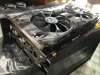
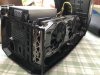
Alright well my AGA is up and running on all cylinders with a 2080 Ti. For the record the EVGA XC Gaming fits perfectly, effectively an exact replica of the FE card.
Here's the long version if anyone wants TMI:
Firstly, Win10 updated to build 1809, video drivers updated to 417.01 mobile version from Nvidia site.
Everything turned off and AGA docked to laptop.
Initially powered up with the dGPU still connected to the AGON and after a few flickers the desktop came up then a GFE popup said an update was available for 417.01 (which was supposedly already installed) and GFE
itself which I accepted though I can't tell exactly what it did.
Then powered down and connected only the AGA to the AGON and on reboot the desktop came up on the eGPU and the laptop display also kicked on with no warnings or messages from GFE, everything seemingly ok.
Device Manager showed all 3 GPU's under Display adapters: Intel HD Graphics 630, NVIDIA GeForce GTX 1080 and NVIDIA GeForce RTX 2080 Ti. Notably the 1080 had a warning triangle on it and the message 'Windows
has stopped this device because it has reported problems. (Code 43)' so since the laptop screen was active I assume it was on the Intel iGPU.
Next checked GFE which showed the driver was now backlevel at 411.70 with 417.01 available so I let it auto-update which finished without issue. Afterward the laptop display turned off and all 3 GPU's showed as
working properly in Device Manager. No problem activating the laptop display to extend the desktop which now runs off the 1080.
So it wasn't exactly plug and play but wasn't painful.
Ran FFXV bench 1440p High Quality and scored a 9359, idle temp ~45C and got up to 73C at full load. So I'm pretty stoked. -
Hmmm, what is the recommended power watt output the card should be using, per EVGA's site?
On my Asus site, it said my RTX card needs to have 550W. Does that mean my AGA need to have a PSU with 550W output?
Also, @rickdeckard can you tell me what is the maximum width of the slot (from your PSU to the AGA's wall)? Or better, your EVGA RTX 2080 Ti's full dimensions (width x height x length)? -
Dude you’re making things way too complicated. The AGA has more than enough power to run any RTX card.
The ASUS recommendation for minimum power supply is assuming the GPU is going to be used in a computer that has a CPU, hard drives, and so on that also need power.
Sent from my iPhone using Tapatalk -
I promise you the EVGA board is basically an Nvidia Founder's Edition, dimensions & specs are identical. I had Nvidia Inspector going and it got up to around 259W draw which is well within Nvidia's and the stock PSU's spec. To my knowledge there's no such thing as a 2080 Ti drawing 550W.
-
Thanks for the clarification on the 550W. Now I just need that maximum AGA slot dimensions, and it will be all over.
EDIT: Oh, I didn't see the other post. Checking the dimensions on the EVGA card.
Ugh, Nvidia and EVGA both said their cards' width are 2-slot, which isn't even in inches.Last edited: Nov 30, 2018 -
Just dont buy non 2slot cards, also not 2.5slots like those Palit cards etc.
-
2 slot wide is what the AGA is designed for. 2.5 and 3 are not going to work without modification.
Sent from my iPhone using Tapatalk -
Ok, so it seems like my RTX card is a 2-slot, not some 2.5 slot or 2.75 slot.
I'm assuming that the metal plating tabs are standard slot sizes, there are 2 tabs, and nothing goes outside of the width of the 2 tabs.
I guess this is the actual width measurement of the slot dimensions for all graphics card, and they don't normally use inches/centimeters to measure the width, right? -
Oh for the love. Will you please just get the card and put it in. Everyone here is telling you it will work and it will fit.
It fits. This stuff is all standardized. The AGA is a standard slot. Every GPU uses the same bracket and mounting mechanisms.
I’m guessing the metal tabs you refer to are the PCI brackets. All PCI cards for all computers all around the world use the same bracket dimensions.
Sent from my iPhone using Tapatalk -
Measuring width in terms of how many slots it takes up is a more meaningful measure since modern higher end GPUs take up more than one PCI slot. This way there’s no need to measure in a computer, if you have 3 empty PCI slots next to each other than the consumer knows a 3 slot wide 2080ti will fit.
And, for the thr AGA, the maximum width with the lid closed is 2 slots.
Sent from my iPhone using Tapatalk -
I don't have AGA at the moment, and I'm waiting on Dell to give me that $50 discount they promised me, so I can reimburse and get a cheaper AGA directly from Dell online.
-
It’s $50 cheaper on Amazon FYI
Sent from my iPhone using Tapatalk -
Aren't the model numbers different?
And who knows if AGA sold by Amazon doesn't have the same components as what was sold from Dell? -
It’s the same AGA. There’s only one modem but it’s typical to have a variety of part numbers and build revisions.
What on earth are you talking about different components? Dell makes it and ships it to Amazons warehouse for Amazon to sell.
Sent from my iPhone using Tapatalk -
Pretty much referring to different revisions, or kind of like how the size of the overall newer AGA dimensions is larger than older models.
But oh well. Thanks for the slew of information. -
There is and has only ever been one AGA model. If it is the Alienware Graphics Amplifier sold by Dell, no matter where you buy it, you will be fine.
This what I got if that helps you feel safe: https://www.amazon.com/gp/product/B00PCJXN0I/ref=oh_aui_search_detailpage?ie=UTF8&psc=1
Has ran like a charm since day 1 with my 15r3. -
Thanks for that information also.
-
I found out if you do WINKEY + CTRL + SHIFT + B, it reloads your graphics drivers.
I am wondering if anyone has tried this shortcut hotkeys while running AGA?
(And yes, AGA is bought, both my laptop and my AGA are shipping as we speak.) -
No. Never.
Just wait until you get the AGA and laptop. It’s pretty much plug and play. No need to play “what if.”
Should you encounter issues we will burn that bRidge when we get there. This is extremely simple to set up.
Sent from my iPhone using Tapatalk -
Alright, I'll see you all in a week then. That's the day when my laptop arrives.
-
Received my AGA.
I followed the instructions in the user guide, to flip the safety latch to the left (open state) before opening the lid....
Nobody said opening the lid is hard... I still can't open it. I felt like I need to pry it open. -
Don’t pry it. But it can be tricky. Make sure you are holding the latch open. It gets easier the more that mechanism is used. Mine opens without issue now.
And there was no need to give you one more thing to panic about
Sent from my iPhone using Tapatalk -
I see it, there's a hook on either side of the lid. One of the hook didn't come loose, so I had to "stretch" and "pry" it a tiny bit, so the hook can release from the side. I managed to open up the lid now. Alright, just going to give my Alienware 13 R1 a few last hurrah before my Alienware 15 R4 arrives.
Update: So the sound level of my AGA + my RTX card is like, really quiet. Barely hearing its roar, which is unexpected. But maybe it's because it's lacking any drivers, so it's really just idling. -
I finally was able to get my Alienware 13 R1 to at least work well with Asus Nvidia RTX 2070 Turbo, so here are my steps (and yes, I do love my bullet points):
- All of the steps mentioned in page 384 (near the bottom) don't really work well with Alienware 13 R1. They work with other Alienware laptops starting with R2 and up.
- Starting from scratch, I put my graphics card into the amplifier, plugged my external monitor into the amplifier, (here, it's AGA from here on out), but did not plug in the wire to the laptop.
- I turned on my laptop, login, and let every startup app finish their things (Steam updates, etc.).
- I went ahead and install the AGA drivers for my laptop (using my service tag and downloading only the AGA drivers matching my model).
- I opened up Nvidia GeForce Experience, tick all the options to automatically update drivers.
- Seeing how Nvidia GeForce Experience is not fetching any drivers, I restarted the laptop.
- After all startup apps are finished, Nvidia GeForce Experience automatically started downloading and prompting me to install the latest drivers. (Here, I do not know if the downloaded driver is a laptop mobile driver, or a desktop driver).
- After installing the driver, I turned off my laptop.
- I plug in the AGA to my laptop.
- I booted up the laptop.
- After all startup apps have finished, I went to the Device Manager, and see I have Microsoft Basic Video Adapter.
- I let it automatically fetch and install the latest drivers. Windows 10 calls to the drivers distribution channel per Windows Update. Here, it gathers information and downloads the necessary drivers I was missing.
- After it finished installing, it prompted me that the Nvidia RTX 2070 drivers are installed. (Here, basically, I installed the same latest drivers 2 times, one with AGA plugged in, one without AGA plugged in.)
- Rebooting the laptop for the last time.
- My external monitor now displays something. I'm back to dual monitors setup!
That's all.Last edited: Dec 4, 2018 -
It’s new and hard to open at first. Use a little Vaseline on the contact points of the cover to the casing to lubricate it a drop and it will open more easily.
I can open mine easily now. -
This little simple vent modification to the top of the AGA casing helps so much to dissipate the heat. The location of the vents is where the cover gets the warmest on my AGA. I can actually feel hot air coming though the holes. Now the area feels so much cooler. Temps run cooler on the card too. The new RTX cards have the heatsink radiator fins facing on top of the card. I am not sure if it’s the same for the GTX cards as some cards have the blower style fans.
Last edited: Dec 5, 2018 -
My RTX card is a blower fan design, and the (hot?) air comes out next to my HDMI output.
I don't know how you all managed to get the RTX card hot.
-
That’s how they all work - they are designed to pull in cool air from the case and shoot it out as hot air out the mounting bracket
Sent from my iPhone using Tapatalk -
The Zotac 2080AMP in action. OFC it won't fit, this thing is HUGE. Out of the box it has boost clock of 1830Mhz, little bit higher than FE. Try the cute OC Scanner from nvidia and it bump to around 1900Mhz. On top of it, it runs so silent despite being OCed and the temperature is only around 65-66*C under stress-test
-
Overclock the card and play games on ultra settings with 144hz refresh rate and see how hot it gets. I seen my card get as high as 78-79c which is acceptable with Nvidia standards but I don’t feel comfortable with those temps.
The AGA is too small of an enclosure to dissipate heat. With the cover open the card operates very cool without any modifications needed but asthetically not appealing for me.Last edited: Dec 6, 2018 -
Stress test temps and actual gaming temps vary so much with my testing. -

That is hotter than my card gets when fully maxed out and I haven’t made any case modifications, replaced fans, or added new ones. Just the stock AGA.
Sent from my iPhone using Tapatalk -
What card are you using ?
Either way my Nvidia RTX 2080ti card now runs at 55c with the cover closed on max ultra settings on any game with all my modifications. The division runs at 59c.
It might not be for you but it worked for my setup. -
Gigabyte 1080 that’s overclocked
Sent from my iPhone using Tapatalk -
This is my almost dangerous modification to my car! No crazy glue involved! Lol
-
The RTX cards run hotter than the GTX cards. If you upgrade in the future let us know your temps then with OC and maxed settings. You can’t compare your setup with mine as you don’t have the RTX card yet.
-
Could this use other graphics card, like capture cards or other pcie cards in general? I know it may not make sense I am just curious.
-
No. You’ll need to get a Thunderbolt 3 PCIE enclosure for anything like that.
It has to do with the way it’s implemented at a hardware level. But you do have options via Thunderbolt 3
Sent from my iPhone using Tapatalk -
could this work with the AGA and any laptop with free m.2 m-key sot?
https://www.ebay.com/itm/M-2-Golden...746286?hash=item442e7d666e:g:a8YAAOSwkDtb~tFY
*OFFICIAL* Alienware "Graphics Amplifier" Owner's Lounge and Benchmark Thread (All 13, 15 and 17)
Discussion in '2015+ Alienware 13 / 15 / 17' started by Mr. Fox, Dec 10, 2014.


