 Problems? See this thread at archive.org.
Something like this?
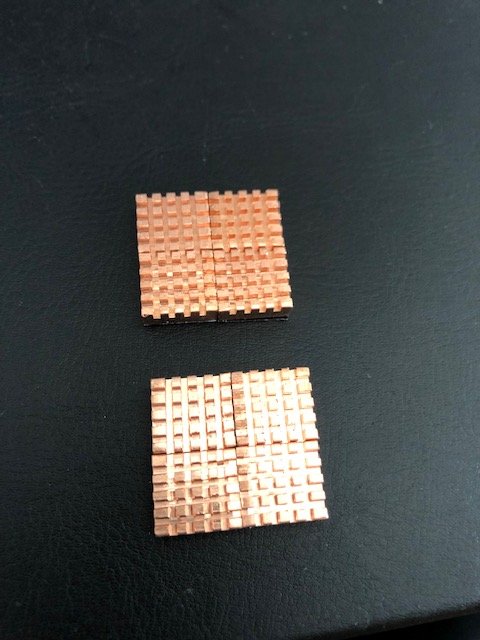
I'm gonna compare these to my versarien foam to an aluminum one and see which one works best with and without a coolerpad.
-
-
As far as I knwo hot removal was never supported, The cable plug isnt really made for it either. The laptop actually electronically disabled the internal geforce GPU when the AGA is detected with a GPU installed. That is also the reason why the laptop when powering on shuts down again directly for another power test.
-
While you are right, I would add that with G-Sync models, the internal dGPU stays on to run the laptop screen, different from non G-Sync models were the behavior is as you described (the screen is fed off of the Intel iGPU so the dGPU can be disabled).
-
That is true but even then it is not supposed to be hot swappable.
-
Correct
-
I didn't mean hot swappable. Just meant hot removal as in take out the AGA gpu without having to restart. Didn't mean that it would activate the dgpu in the same go.
I have found that nvidia driver 398.11 is the last driver that works without any issues regarding dgpu crashing when alt tabbing / minimizing, and my 980ti AGA gpu working 100% with the hot removal. The first issue is more concerning, that every driver after just doesnt work as intended with the dgpu. -
Thats officialy not supported as well.
-
Does anyone with an AGA also have an Area 51m?
I have been troubleshooting a weird problem with my AGA + 51m combination where the eGPU only runs at PCIe 2x speeds unless the dGPU drivers are never loaded and it stays listed as a "Microsoft Basic Display Adapter".
If you have one and are willing to troubleshoot a bit, please send me a PM!
EDIT: The PCIe 2x problem I was experiencing is not present when using a VEGA 56 or an RTX 2080 in the AGA...for some reason, there is a driver problem forcing 2x mode when I tried a 1080 or Titan V in the AGA.Last edited: Mar 14, 2019 -
Hi,
Just wondering if someone would know if this gpu will fit in the graphics amplifier and the lid would close properly without causing any problems...
msi geforce gtx 1080 ti gaming x 11gb
Card dimensions are 290 x 140 x 51 mm
Thanks in advance
Ian -
No you will not be able to close the AGA lid. Max dimensions of cards that comfortably fit are the Blower types (267x111mm). For example my Zotac gtx1080ti Blower is 267x111x35mm and it fits and works perfectly.
https://www.dell.com/community/Alie...ngth-10-50-quot-Height-4-37-quot/td-p/5555839IanC likes this. -
Oh this is bad news, don't have a 51m but have felt since it was announced that paired with an AGA it would be a complete DTR in every way. Hope this topic gets more attention once more people get their 51m's.
-
I haven't had any issues with my AGA with my 51m with a 2080 ti.
I've made some posts about it in the Area-51m thread.TomC69 likes this. -
Wow that must be such a nice setup! -
Could you run a firestrike bench? I wanna see how Area-51M + 2080Ti stacks against my old AW 13 R3 + Titan X (Pascal): https://www.3dmark.com/fs/13653218
-
When you guys run these benchmarks are you using 1080p?
-
Well, firestrike runs at 1080p. But when I had my AW 13 R3 + Titan X (Pascal) combo I ran 2560x1440 and 4K resolutions, never 1080p.
-
Thanks for posting this information here and in the Area-51m thread. I see that your Area-51m has a 9700k and rtx2070. I know it's maybe pretty hard for you to answer but do you think you are getting significantly better performance with your AGA w/rtx2080ti versus if you had of just gotten your Area-51m with an internal rtx2080 to begin with? Thanks for you input.
-
He posted his results with Firestrike standard and Ultra in the main 51m thread, if you search for his posts there you'll find it, here's his standard run for 25873. For comparison with my setup in sig I get a 20465.
http://forum.notebookreview.com/thr...m-owners-lounge.826831/page-425#post-10878360 -
The PCIe 2x problem I was experiencing is not present when using a VEGA 56 or an RTX 2080 in the AGA...for some reason, there is an Nvidia driver problem forcing 2x mode when I tried a GTX 1080 or Titan V in the AGA.
FWIW: this is the best portable workstation I have used. The AGA makes for a fantasic docking station for multiple external displays or paired with a GPU compute card. -
My recent AGA setup, with some changes in the radiator positioning and replacement my fried CM500x (replaced with RM550x), the idle is 26*c and stress test with 3Dmark Port Royal never reach 45*c, which is impressive to me
Thinking of moving my AGA setup to the Thermaltake P1 case, and going full-retard mode with hardtubing and such lol
![[IMG]](images/storyImages/CA-1H9-00T1WN-00_ed524254db3347c8bff7233ee2d42daa.jpg)
How do you guys think?rickdeckard likes this. -
What fried the cm500x?
-
I shorten the main 24pins wire but short curcuit it in the process lol, thats why I went fully modular with the RM550x
-
Fully modular is definitely ideal when you don't have a lot of space to loop excess cable - fully agree there. I really wish these used SFX form factor and not full ATX for the PSU, could throw one of those great Corsair SFX PSUs in, have fully modular and awesome quality, and call it a day.
Or, you know, just lose the junk AW chassis and go full custom
-
After about 4 months into using AGA, I thought this is normal for blower-type cards.
My 4-months old Asus RTX 2070 Turbo 8GB has this clattering fan noise. When it spins, it sounded like a faint rattling sound, clattering?
But everything runs fine. Temperatures didn't get really hot. And it's been doing this for these 4 months.
Do blower-type cards have this problem, or I'm just unlucky? -
No, I do not think this is normal. My zotac gtx1080ti Blower does not do this, even after ~1yr in my AGA.
If I were you I would contact my supplier and see if you can get this fixed or replaced.propeldragon likes this. -
I would take the card out and maybe clean the fans. Might be caught up with dust and tiny debris
propeldragon likes this. -
He says it has been doing this from the start so maybe not a dust build up problem. Still, probably a good idea to take the card out and check for anything that may have gotten in there. Also, maybe check out the fan for any flashing on the blades.
BTW, are you sure the noise is not coming from the front AGA fan? -
Not common but could just be a bad bearing on the fan. Are we certain it is not just coil whine/squeal? Some are more sensitive to it than others depending on their hearing.
-
I've had a gpu with a bad fan before. Change the fan speed and see if the noise changes with the speed.
-
I just happened to find someone selling an aga for $75, little over a year old. Is there anything I should look out for? Not sure if it's the newest aga model or not. I might pull the trigger.
c69k likes this. -
That is a good deal. Fan could wear out and cable may be loose, nothing else I can think of that would go bad on it.
Vasudev likes this. -
Sorry, I just saw this. I returned my 51m and re-ordered from Dell's website. It'll be a couple of weeks before I can play again.
But here is one test I ran: https://www.3dmark.com/fs/18739705ssj92 likes this. -
Just wondering if anyone ever use's AMD Radeon cards in their AGA's.
I am torn between building a desktop for my self or just getting an AGA, however I have a Freesync monitor (not currently supported by NVidia).
Plus for some reason I just fancy going team red, I have been Blue and Green for so long now that I fancy a walk on the wild side. -
Not supported doesn't mean it won't work. Have you searched around for others with your monitor model to see if someone has tried it? Have you tried it?
I assume you know that some Freesync monitors do work with NVIDIA now. They call them "G-Sync Compatible".
https://www.nvidia.com/en-us/geforce/products/g-sync-monitors/specs/
They don't mention the word "Freesync" it appears but that's what they are, Freesync monitors that are now working with NVIDIA cards.
Looks like you have an AW13R3 with a 1060, you should try it yourself. -
Hi thank you for your reply.
I will test this. However I am still wondering about using an AmD cards in an AGA -
I think this might be it. It's a faint but apparent noise when you hear it.
AGA fan is facing towards the wall. Super darn quiet to hear. Only when I'm revving up the GPU fan, that's when I hear the noise from the GPU. The noise is right near where the HDMI cables connect to the GPU, so it's definitely the GPU fan.
I cannot get in contact with the manufacturer, because they are 6,000 miles away, plus, to get warranty, you have to take the GPU over there.
I'm just going to bear with it, due to the circumstances. -
What type of noise do you hear, some coil noise sounds like a low grumble.
-
It would be like a rattling sound.
You know there's a wind up toy where you turn the crank, it goes "tcktcktck" on the gears teeth?
You know what? Once I get home, I'm going to record the sound of it, with video. It will be around 6 to 7 hours later from the time of this post. -
I was at home trying to get the GPU to sound off the rattling noise, but apparently, after numerous attempts, it never happened...
I don't know what's going on, but I guess it resolved itself? The laptop is currently playing an intensive 3D game, but not a peep of rattling from the GPU fan.
I might as well just say I'm lucky it's resolved. -
Hey guys, any tips as my Geforce Experience won't let me update to latest drivers for 1080Ti FE in an AGA connecte to a 13r3 with 1060.
1060 updates fine to latest drivers, but when 1080Ti is plugged in it says latest version is 417.35 from 12/12/2018!
Tried downloading from nvidia website both desktop and mobile for Pascals but neither seemed to want to install. -
Use DDU and directly after install the latest Nvidia drivers from Nvidia themselves. and try to block windows update drivers.
-
I've used an Asus Strix Vega 56 in mine with both a 15r4 and the new 51m. When it works, it performs within 5% of my desktop as expected. Unfortunately, the AMD drivers are very unreliable in the AGA. I often have to reboot 2-3 times before the card is recognized and occasionally it will be recognized in device manager without the AMD Radeon settings app recognizing it. The only way to fix it is reinstall the drivers and reboot again.
I have heard people have better experiences with the RX580/590, but I can't recommend a Vega card in the AGA. -
hey guys .. my AGA is working fine when used with an external monitor, but when I have it connected directly to my laptop monitor it recognizes it and installs the Nvidia drivers for the external RTX2080 and I can see it in device manager among the internal Intel and invidia GPUs. but games run over the internal GPU and completely ignores the RTX 2080 !! am I doing something wrong here?
note: g-sync is disabled -
AGA is meant to be played on an external monitor. I haven't seen anyone connecting an AGA to a laptop, and expect the laptop to run the desktop GPU card in the AGA. I could be totally wrong...
-
It's only possible to use the AGA on the laptop screen if the laptop screen is connected to the iGPU (or in switchable mode) and not connected to the discrete GPU.
Since you have a G-Sync panel, even though you have disabled G-Sync, it still uses the onboard Nvidia GPU since it's physically wired to it, thus using the that instead of the eGPU.rinneh likes this. -
You are totally wrong. As long as you don’t have a gsync panel, the AGA can drive the laptop display with a minor performance hit since it has to send the output back through the AGA cable. The performance hit isn’t that big of a factor, however. On my 13r3 with a 1080ti in the AGA, every game I’ve played (except Deus Ex) can hit 60 FPS on ultra 1440p.
Sent from my iPhone using Tapatalkc69k and Kuro Kensei like this. -
With optimus enabled alienware laptops this is indeed the case. But the performance hit isnt as small as you project. It is a solid 10% and on the latest generation cards sometimes even higher when the internal screen is used unfortunately.c69k likes this.
-
Yes, but 10% is not that much really, especially when comparing a desktop 2080 to a laptop 1060. If I can keep my AW 13 R3 for a few more years this way - it's a win in my books.c69k and propeldragon like this.
-
I also run the internal screen with the AGA, FYI.
Debating whether a hybrid card is worth bothering with... (EVGA if it matters)
*OFFICIAL* Alienware "Graphics Amplifier" Owner's Lounge and Benchmark Thread (All 13, 15 and 17)
Discussion in '2015+ Alienware 13 / 15 / 17' started by Mr. Fox, Dec 10, 2014.


