Problems? See this thread at archive.org.
I was thinking drilling 2 simple holes for the the tubes, but idk if the lid will fully close when the card seated.
-
-
That would allow it to 'fit', but I highly doubt it would perform well. I would be surprised if it didn't perform worse than the worst 2080ti cooler available. The good thing about water cooling (besides looking nice) is it can run very quiet and efficient. However, due to being a water cooler, if it doesn't have good cool airflow, you're gonna be 'cooling' the water with hot/warm air and its gonna get hotter and hotter. It sounds like you just want to make holes for the loops and just lay the radiator w/fans inside?
The stock PSU is very bad when it comes to running cool, though it is effective for what it does (cheap price, performs adequately). From my tests above, changing the PSU alone resulted in a 10C difference. But that is with the lid off. If I were to compare lid on, I feel like it would be much higher than 10C, but I cut so much plastic its not fair to compare lid on with lid on with my PSU swap so I won't bother.
Tl;dr - it'll probably fit, but without fresh air flowing through the radiator, expect high temps (loud fans) -
I finally finished screwing with my AGA and painting it. I did attach the fan with zip ties, since they are easily removable if ever need be and most importantly, effective. Its a low RPM fan but it performs very well while being quiet, so there is no problem with vibrations using zip ties. It has some flaws, for some reason the lid won't fully sit on the left side, its about 2mm raised. I assume its due to the EVGA power link since its sits tall. Since it was winter I kinda made the rookie mistake of rushing with paint and applying a thick heavy coat, which of course leaked onto the black plastic vent and doesn't look too nice. But overall I am satisfied with it, because it hides all the flaws of modifying the PSU and 140mm fan inside of it. The camera flash makes it look kinda neon orange, so I took some pics without flash that shows the dark red it would look in natural light. Also what the pics don't show, is the BeQuiet fan came with a SATA power adapter, so I am using that to power the fan. More pics in imgur album link - https://imgur.com/a/FAqxis4
![[IMG]](images/storyImages/capjnj1.jpg) Last edited: Mar 7, 2020etern4l likes this.
Last edited: Mar 7, 2020etern4l likes this. -
Hey guys just a quick question. I have a Alienware 17 r4 (7820HK and 1080 Internal) that I have been thinking about getting the AGA for. I am thinking of sticking a 2080Ti in the AGA but don't know how much of a performance change I would see. Anyone here have any experience with these 2 gpus and the difference I may see upgrading to it ?
Other option is to scrap this idea and buy a 51m with 9900k and a 2080 or build a desktop.Last edited: Apr 1, 2020 -
I like to use the FF15 4K benchmark results for comparing undervolts/overclocks. Its not a well-optimized game, but all the different GPU info they have is very useful. It's like they put more effort into the benchmark results than they did the PC port tbh. But yeah you would likely see more than double the performance of your laptop 1080 vs Desktop 2080Ti.
http://benchmark.finalfantasyxv.com/result/ -
If you held out this long, wait some more till Nvidia Ampere gets out. It got pushed to August due to the outbreak, but the performance gains should be quite big if these leaks are to be trusted.
I actually have the same laptop and already have an empty Amp waiting for a good upgrade (which 2080Ti is not at the current price, IMHO). -
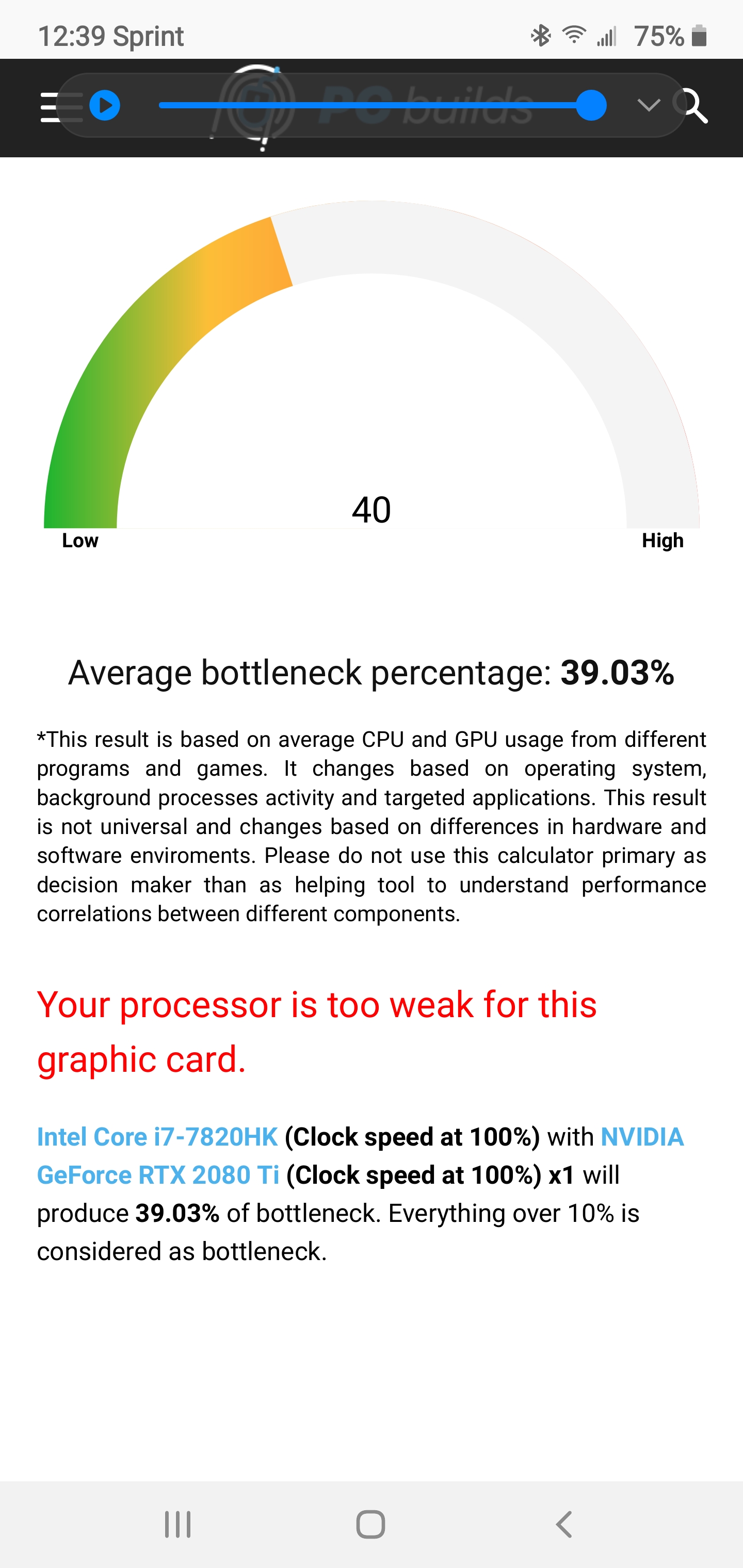
Ya, I think the 7820HK would be a decent bottleneck for the 2080Ti so holding out for a more "Powerful" card I think would just make it worse. I think I am just going to pickup a 9700k / 2080GTX Alienware Area 51m, to me it seems like the best Idea and just pass this computer down to the kido's.
-
I would love to see some good proof that a 2080Ti would be bottlenecked by a 7820HK or even a 9700K. I've used a 2080 with a 7700HQ and a 8750H, my benchmarks and scores have always matched/beat/loss +- a very small % (as all hardware is slightly better or worse), with the AGA which should be giving a small performance hit.
I'm not saying there won't be a performance hit, I just don't think it will be so big that you would regret the purchase. Unless there is some info from a reliable source showing a 2080Ti will underperformed in a equivalent setup?FXi likes this. -
Well here is one source, also keep in mind the amp it self causes a slight bottleneck.
Also the card is 1300$ then the amp for another 200, so for around 1500 more I start fresh with all modern hardware and gain the ability to upgrade the CPU later as long as the socket stays the same. GPU upgrades will depend on Dell still supporting the interface they have made in the Area 51. All in all just seems like a win/win to replace this 17 R4 and retire it to my kiddos so it's not like it's going to waste.
Attached Files:
Last edited by a moderator: Apr 5, 2020 -
-
Hey, guys - what would it take to fit a reference RTX Titan in the AGA?
https://www.nvidia.com/en-gb/deep-learning-ai/products/titan-rtx/
TDP is 280W, so not clear one would even need to upgrade the PSU? The recommended PSU is listed as 650W, but I guess they mean system PSU.
@lestat2k7 @Papusan -
I can tell you the Titan RTX works just fine in the AGA, though I can't comment on whether it will fit with the cover closed....I took the cover off mine a long time ago and I run it naked.
Depending on the workload, you may not need to change the PSU. If you plan on running the Titan within 90% of it's Max utilization, I do recommend swapping to another PSU though. It's easy to do, the cost of doing so is only 5% of the cost of GPU + AGA and the type of errors encountered on GPUs without sufficient power are definitely not the ones you want to troubleshoot. A lot of folks swap PSUs just because the stock one is pretty noisy.etern4l likes this. -
I don't consider that good proof, its just a number and that's it. I wanna see benchmarks. Maybe at like 720p the card will be bottlenecked by 40%. but at 4K or 1440p high refresh rates like the card is meant for? I can't see it being a big bottleneck. I know the AGA has a 2-3% performance hit, but like I said, even with a weak 7700HQ, I didn't experience such thing with my 2080. My 2080 benchmarks always were extremely similar, slightly better or slightly worse (I would undervolt too). For a example, here is a 7700HQ + 2080 - https://pc-builds.com/calculator/Core_i7-7700HQ/GeForce_RTX_2080/0KS12llu/16/
This website calculator seems like complete bs. A newish i7 is actually still a extremely good CPU. It's just newer Ryzen ands crazy priced Intel are that much better, but it in no way means a 7700HQ is a useless just cuz it has a 4core boost of like 3.2Ghz. Also, I could never recommend a 2080ti over a 2080 or 2080S due to the price-to-performance difference being so small for a huge price increase, I just don't want you to think you have to buy lower to avoid bottleneck -
Hi guys, like a lot of others i'm thinking of buying the AGA to use the Nvidia Ampere cards when released. Can anyone confirm use with a 17 R5 and the difference between external/internal monitor use? From what ive read elsewhere an external monitor works best. Additionally i've also seen possibly the 17 R5 doesnt operate at all much using the internal laptop monitor when connected to a AGA?
Any thoughts or experience, particulary with the 17 R5 would be greatly appreciated!
Dan -
Afaik, the AGA and its port were always meant to be able to be used both from the laptop screen and an external screen. For example, I don't even need a HDMI/DP cable plugged into the AGA in order to see it on my external monitor because it uses the laptop ports as well. If someone's didn't work through the laptop screen, sounds like a driver issue. The AGA can be really finicky, I find its always best to clean remove all GPU drivers with DDU. Plug in the AGA and then install the AGA GPU driver (desktop GPU). And then both GPU work fine.
-
Great, thanks for your reply.
-
I picked up a AGA and a 2080 Ti FE we will see how well it works on this old 7820HK.
etern4l likes this. -
Will work just fine, I play Rdr2 with same setup as yours and it performed much better than I expected
I think the 7820k still hold up pretty well till 1 or 2 years more with some OCetern4l likes this. -
Hi all quick question. I have the Alienware m15 with the 2060 and the i7-8750h. How much benefit would I get from a desktop FE 1070 and a AGA? I basically only care about thermals and maybe a small FPS boost. Thanks in advance.
-
You're looking at a marginal improvement and no DLSS/Raytracing. A desktop 1070 is about 10% faster than a mobile 2060 in most benchmarks. You will see lower CPU temps as the onboard GPU is idle. If you already have an AGA and are paying less than $180 for the 1070, it might be worth the effort. Otherwise, a 1660ti is probably a better card to look for, if you're trying to keep the cost in check.
I have to protest, do not do this with your GPU drivers. If you are using an Nvidia card in the AGA, do the following when updating your GPU drivers:
- Download the latest Nvidia driver for your laptop GPU and the AGA
- Shutdown the laptop by either the regular Windows power off menu or, if you have it configured, by pressing the disconnect button on the AGA cord at the laptop
- Restart the laptop so the onboard GPU is online and then restart the laptop in safemode
- Uninstall the AGA and GPU drivers while in safemode; use DDU for the GPU drivers
- Restart the laptop and immediately turn off your internet, if you don't Windows will download and install your GPU driver (and no clue what version it might grab)
- Install your GPU drivers and restart
- Install your AGA drivers and restart
- Reconnect your AGA
- Enjoy
Last edited by a moderator: Apr 30, 2020 -
I think every single person here with these Alienware have Optimus. And I have done this for over a year and it works perfectly. Its actually the only method that worked every single time for me. Idk if you never tried it before or maybe you're just commenting based on some mess-up you made/some special install you did with specifically disabling Optimus with a modded driver?
-
Not all laptops have Optimus. If you have a GSYNC display, you don't have access to the iGPU, only the discrete card. If you install the desktop card driver, you will bork the installation. Your solution didn't account for that. I figure it works for those that do have Optimus, but I don't think you're on the discrete card if you are away from the AGA in those cases. I bet you're only using the integrated GPU.
Further, I know my solution will work on either GSYNC or Optimus enabled laptops. I've tried it both ways; I have a GSYNC display and I tried installing the driver for a 1080ti (what I have in my AGA). It worked great when the AGA was hooked up. I took my laptop to work and all I got was a weird black screen with green artifacts. To confirm it, I installed the driver for a 1070 mobile, laptop fired right up with no problems. When home, installed the desktop 1080ti driver while the AGA was hooked up and no problem again. Unhooked the AGA, same result; black screen with dark green artifacts. Installed the mobile 1070 driver, then the AGA driver, hooked up the AGA and everything works fine. Unplug the AGA, laptop still works.
Like I said, I guarantee that if you install the desktop driver for the card in your AGA, your Optimus is what's working when you're not plugged into your AGA. Also, if you follow your instructions for a laptop with GSYNC, I know they're going to run into trouble.Last edited: Apr 29, 2020 -
Idk what you did to keep causing yourself problems, but there isn't THAT big of a difference in GPU drivers. You know how I know? Because I have the 2080 Desktop drivers installed. And never installed the 2070 Max-Q drivers. Guess what Nvidia control panel reports me using when the AGA isn't attached... the 2070. Guess what it reports being used when I have the AGA attached? The 2070 And 2080. I did this both on my 15R3 with Gsync and this current laptop without Gsync. Like I said, idk what you did to screw up something as simple as a GPU driver install, but I have been doing it this way for over a year because it works. And I have recommended it to others and it worked. Nobody has had a problem. Only one that has had a problem, is allegedly you.
-
I ended up shucking the GPU (a 1080) out of my AGA and building a budget PC that murders my 13 R3 and AGA (thanks Ryzen 5 1600 "AF"!).
So if anyone is interested in an AGA let me know. Barely used, I thought I would connect to my home TV all the time but never bothered since I played more away from home. Has original box, power cable, AGA proprietary cable. -
Stay on your high horse buddy. Alienware and Dell both don't recommend your approach. I know my way works fine, and if you'd been paying attention I stated quite clearly that if the AGA is connected and/or you have Optimus, you won't notice a problem. The issue arises if you unhook the AGA and you have a GSYNC display. I figure most people with the AGA leave it all plugged in 99% of the time, meaning they'd use your method and never encounter a problem. I'm simply telling folks that if you do it that way and try to use your laptop as, well, a laptop, you're going to have issues and gave them the way that Nvidia, Alienware, and Dell state you need to follow.
To anyone reading, don't install the desktop driver, unless you want problems. -
Learn to read, I will soon get bored with your silly and useless responses. I have used this on 2 different laptops, one had Gsync and one did not have Gsync, like I said above which you failed to read. Also, when I started installing it this way, there was no guide or info from Dell on how to install the drivers, hence figuring out what made it work 100% of the time. And btw, Dell owns Alienware. You bought your Alienware From Dell. You seem like you don't fully know what you are talking about, but yeah lemme get off 'my high horse' lol.
My 15R3 had a 120Hz Gsync display that I took to work 2-3 days a week and rarely used the AGA, for 3 years. And this m15r1, works perfectly in all scenarios as well.
Now since you apparently have trouble reading, lemme repeat myself. You clearly screwed up somehow or used some kind of modded GPU driver/failed in general with the uninstall/install proces. Idk what you did and at this point idc to help you ♂️. You think most people bought a laptop to sit it plugged into a AGA? That is retarded.Last edited: Apr 30, 2020 -
Dude, I don't know what your problem is. I've provided links to Nvidia, Dell, and Alienware. You're wrong, period, and giving out bad information. Did I say I installed a modded driver? I actually provided, step by step, what I did to confirm my findings. You seem to enjoy strawman arguments along with petty passive/aggressive insults. I'll be clear; your information is incorrect. Rather than be a prick or, conversely, turn down your ego, just click one of the three links provided. My references are backed up by both the major manufacturer of the laptop (Dell), the individual model support group (Alienware) and the driver developer (Nvidia).
I think many who own an AGA usually use it, yes. How is that retarded? You spend anywhere around $200 for the AGA and upwards of $500 for a decent card, how is it you don't think it is primarily the peripheral in use when a person who buys a gaming laptop is doing what they bought the laptop for in the first place? Like I said, for the third time now, if they follow your instructions and have either Optimus or use only an AGA, they may not notice the problem. If you run a desktop driver on the laptop only, it won't work, period. Is that hard to understand?
But please, continue to fling insults and your own anecdotal evidence that you're correct. -
Honestly if you didn't initially post attacking what I said, basically saying I am nearly bricking peoples laptops if they don't know how to get into safe mode, I would have responded and answered any questions.
This is where the "wasting my time" part comes in. Because for the third and last time, I have/had both a 15R3 WITH GSync and this m15r1 WITHOUT Gsync, for the past 3 years, using this method. And for the past 3 years, I have been recommending this to anyone that has a problem and it has worked for them. Your 'anecdotal' posts based on your single laptop on your single failed execution, is meaningless to me for the multiple reasons I have given you. And I never said you used a modded driver, I did however say you possibly used one. I don't care what you did nor do I want to try to help you based on your silly and 'high horse' accusations. Stop being a hypocrite because you can't uninstall/install GPU drivers. "I am gonna tell this guy to get off his high horse meanwhile I am gonna be the one on the high horse", what a joke. Just cuz my method isn't official, doesn't mean it isn't effective or doesn't work. "If you run a desktop driver on the laptop only, it wont work, period" ok kid, that's why I have been doing it for 3 years and you allegedly failed with it on your first try 1 day ago lol.
The other funny thing, is that if you use a program like NVCleanInstall, you will clearly see the desktop GPU driver COMES with Optimus. But I don't expect someone as knowlegeable as you to know that, ya know, basing your facts on your failed experiences. Which leads me to believe you aren't even using the official drivers or are using modded drivers and coming here to complain about your experience going bad.
Furthermore, Optimus has been questionable for over 5 years. Nvidia has a crappy implementation of it and they don't care to fix it, meanwhile ignoring everyones questions about it. One of the reasons we can randomly have GF Experience desktop capture and then another time we won't have it. Because of Optimus not being perfect and also just never being fixed. With that said, I am done wasting my time on this topic.Last edited: Apr 30, 2020 -
So you say. Hence, anecdotal.
No, you resorted to insults. Have I called you retarded? Have I said anything questioning your intelligence or reading comprehension (learn to read?)? No, I simply said you are wrong. Which isn't a challenge to anything other than the accuracy of your instructions. Further, you didn't list "multiple" reasons, you said some garbage about modded drivers and that I obviously did something wrong. Which I find odd, because up until my second response to you, I didn't say anything about what I actually did.
Did I ask you for help? Did I? Did anything in any of my responses indicate that I wanted help from you?
It isn't official, and while you may have had success (for the corner cases I've already pointed out) doesn't mean it's correct either. People come to this forum looking for good advice, and I know for a fact your solution isn't correct. Period. Of the two solutions provided, one is backed up by both the laptop manufacturer and the driver developer and the other is, well, it's yours.
Here we go again with the strawmen. You do understand how Optimus works, right? Optimus isn't the driver for the iGPU, that's provided by Intel. All Optimus does is tell the discrete card to go offline and turn over rendering to the CPU. So, for codebase simplicity, it makes perfect sense for Nvidia to bundle that in the driver package for all it's cards. Now, more interestingly, is why do you think Nvidia separates mobile driver packages from all its other products? When you go to their download page, it asks what card you're using. By your reasoning, there shouldn't be anything other than a single driver package for each tier of card. Yet we see Nvidia breaking each tier down by mobile and desktop products. I wonder why that's the case if, as you say, it doesn't matter...
Except that isn't the case and you're using ******** argumentation to try and justify your completely wrong position. I've only ever used WHQL, not even experimental drivers. I'm not looking to set any overclock records.
I'm not responding to your Optimus red herring crap. It's not relevant to the discussion. It's okay to be wrong, it's not okay to be a prick. Granted, there's no law against either, and you don't seem to be bothered with having been afflicted with both. I'm done with this as well, and I honestly hope (all this crap aside) you and your family are okay with all this insanity going on. -
I could pick apart all these comments and show why they are silly, but I won't. I could also go and record a video installing a RTX 2080 Dekstop GPU Driver on top of my laptop and show how it shows up as a 2070 Max-Q inside of Nvidia Control Panel, but I also won't do that. My info was provided to help multiple people and it did. And I am sure it has helped many that have not even commented or made accounts for this forum. I provided help to help people, I didn't provide help to have to defend why my method worked in all scenarios you say it would not. I have the tags of the laptops + my method I do every time needed, showing it worked with Gsync. Idk what you have, you just have these posts saying I am wrong
-
What Dell says:
https://www.dell.com/community/Alie...-Driver-issues-with-graphics-amp/td-p/5521156
What Nvidia says:
https://nvidia.custhelp.com/app/ans...l-notebooks-with-alienware-graphics-amplifier
I'm afraid I don't "just" have these posts and this is the second time I've posted these links. I didn't post my initial response to you for the sake of making you upset. I did it because I know that solution doesn't work 100% of the time. I stated this and have repeated it in nearly every response to you. There are corner cases where you won't notice a problem but that doesn't eliminate an issue existing. If we're going to give people good information, then you should make sure it is the most accurate we can provide. That's all. -
Hello! I'm new here.
I'm a happy owner of an Alienware 13 R3, and I wish to upgrade my machine with an Alienware Graphics Amplifier.
The thing is that one of the main reasons to do that is because I want to play with Ray Tracing enabled in games. But I read that some users are having issues in activating the Ray Tracing function with the AGA.
How is the status of this problem now? Do you recommend to acquire the AGA with a RTX 2070 or 2080 Super to play titles with Ray Tracing or I will not be able to do that?
May should I wait till the RTX 3000 are released?
Thank you very much in advance!Last edited: May 2, 2020 -
I had no problem enabling ray tracing on my 2080Ti, this is in a Alienware 17 R4 with a AGA. With a 7820HK i7 in it
As for performance, I have noticed no loss, I play everything at max in 1440p and maintain 70-130 FPS depending on the game. Battlefield 5 nets me 65-85 FPS with Raytracing on and graphics maxed.
one of the best things I have noticed sense hooking up a AGA is temps.. mine used to hover around 80-85C with the internal 1080 turned on. Temps now hold around 55-60C on the CPU and the PCH never goes above 65C
hope some of this helps.
-
Thank you for your kind answer!!!
If Ray Tracing is working properly, then I surely will purchase an AGA soon. That was my primary concern and it's not happening very often then I think I'll take the risk, as I think that my i7 7700HQ will not be a real bottleneck to play at 60 fps.
Would you buy a RTX 2000 series now then, or would you wait till the new RTX 3000 series arrives?
Greetings and thank you again! -
You may want to wait for the 3000 series to land and then look for a 2080ti; pricing should be more competitive with newer cards on the market. If money isn't an issue, why wait? There's always going to be the next best thing right around the corner.Everonfan likes this.
-
I agree, one of the reasons I did not wait is I plan on skipping the 3000 series, the 2080Ti will be more then enough for a few years all I’ll look at the next gen. My wife uses a 2070 Super in her AGA and she loves it. She games at 1080p and her FPS is around mine as she is pushing less pixels.
In the end it’s whatever you enjoy / wantLast edited: May 2, 2020 -
Thank you Fajo and Gumwars for your helpful answers!
Nevertheless, I think I'll wait till the RTX 3000 series arrives.I curious to see if the Amplifier works with this new cards, and if It does well, maybe I'll purchase the new RTX 3070.
I want to make sure that I'm future proof and I'm not in a hurry anyway, since my GTX 1060 still does well in the 1080p and 60fps range.
Greetings from Spain!Gumwars likes this. -
I'm still working with a 1080ti, which seemed like overkill when I bought it, and is still very strong with today's titles. The 3000 series cards look like a big step up from the 2000s; let's see what the future brings!
-
Proud owner of an AGA for my Area 51m! Can't wait to be able to pick up a 3080ti to slap in this puppy for when I'm at my desk and still have a completely capable 2080 to drive the built in screen when I'm not at home. Hopefully we get the 3k series by Q4 of this year.
-
I just picked one up too. Better than buying a USB 3.0 hub and running a Rift S with those USB ports away from my hands. (when not in VR)
Last edited: May 21, 2020 -
I've got a technical question for the room:
My setup has the laptop with a 2070 MQ and my AGA running an MSI Duke 1080ti. When I play some games, the AGA takes over all GPU duties. Other games, like No Man's Sky, the laptop GPU kicks in and I can't get the AGA to do any work. Has anyone had problems like this and if so, what did you do to solve it? -
Never had this problem in over 3 years of use with the AGA. Maybe it has to do with the drivers
-
So, the M17 doesn't apparently have an AGA specific driver. You just plug it in and it works. My 15R3 had a specific driver, and I never had a problem with it. Does your M15 have a driver for it?
-
Have you tried using external monitor yet? plugged directly into eGPU in AGA
-
Idk if you mean GPU driver or something like AWCC (alienware command center). But it definitely needs the AWCC which you can just download from Dell. The weird thing is it also downloads the AWCC from the Microsoft store. And then downloads more bs from the MS Store to go with the AWCC. I just get it from Dell and install that, then if it asks for updates I just let it update. But the AWCC should show up under the product page under the driver and downloads tab. From my experience, the AGA works way better and easier on the m15 than it did on the 15R3. But I would install the AWCC + updates and then do the GPU drivers after that.
It should just work both ways, whether its using laptops HDMI/DP or the AGA outputs. -
I neglected to mention that my AGA is running three monitors. My laptop is only connected to them through the AGA.
I'm running on a fresh windows installation with all associated drivers pulled from the Dell website. I'm starting to think it may be this one game that is the issue. I don't see the problem with other applications. -
Has anyone had problems with your AGA and the most recent Nvidia driver (WHQL 446.14)?
-
Funnily I tried your method of installing drivers recently since I was reinstalling AWCC to try something and it didn't work. So I did my method that you were so strongly opposing and saying it was flawed lolGumwars likes this.
-
So, two things. First, it isn't my method, it is the method recommended by both Dell and Nvidia which I provided links for both (and stated rather clearly in all of my responses to you). Second, you're 100% correct that the method I submitted by both Dell and Nvidia is effed up. I tried, multiple times, opened three support tickets with Dell, and was totally unsuccessful in getting 446.14 WHQL to work with my AGA and M17. I tried your method and, to my complete surprise, it worked without any problem at all. To be specific, I didn't install the desktop driver, I installed the laptop driver with the AGA connected.
Out of curiosity, what card do you have in your AGA?Last edited: Jun 14, 2020illuMinniti likes this. -
I meant I followed all the steps you provided, to see if it offered any benefit than the method I used that always worked for 3 years. I have a 2080 in my AGA and a 2070 Max-Q in my m15
-
The problem I ran into was after installing the driver with the AGA unplugged, I'd reboot with it plugged in and the 2070MQ would get completely disabled by Windows; the device manager reported the hardware suffered some sort of failure and I couldn't get it back online unless I reinstalled the driver with the AGA unplugged.
I wonder if there's a fork in the GTX vs RTX drivers. When you install the drivers, is your AGA unplugged or plugged in?
*OFFICIAL* Alienware "Graphics Amplifier" Owner's Lounge and Benchmark Thread (All 13, 15 and 17)
Discussion in '2015+ Alienware 13 / 15 / 17' started by Mr. Fox, Dec 10, 2014.