Problems? See this thread at archive.org.
Just download windows 10 directly from microsoft and make a bootable windows 10 USB stick.
It will be the best installation you can do, and it will just activate through the bios
-
Has anyone found a review for the new 4k touchscreen alienware 15 skylake from Microsoft store?
http://www.microsoftstore.com/store...ure-Edition-Gaming-Laptop/productID.332771400
Enviado de meu SM-N920G usando Tapatalk -
I could. I have done just that but my factory settings(OEM installation of windows 10 + recovery partitions) are lost. And the only way to get back these settings is by using a cloned image from a similar system. That's what I'm looking for
Thanks -
thats my point. I was worried about that stuff but a.) it doesnt work properly b.) you don't need it.
Save the SSD space, use all the MS tools and save yourselft headache. You dont need the recovery partitions, once you have an OEM USB Key from Microsoft anyway -
So, migration doesn't work properly u say? I thought about doing it. Will take a look into it
But still, factory settings give an OEM feeling which MS media creation tool doesn't. Would still like to try if someone has an image
Thanks -
The alienware logo is still there during boot. The only thing you dont see is the alienware logo in the about menu.
I had issues with alignment on mys sd's after doing migration with any tools. Also, when i actually had to use them - the recovery tools didn't even work properly. Iw as instructed by Dell's own team to avoid using the dell tools and they walked me through dowloading windows 10 directly from MS
THey say 99% of issues are resolved when customers do a full wipe and install from the MS systems, ironically.
Afterwards you just download all the drivers and apps from the dell site, and you'll have plenty of dell pop ups after that haha.
There's no benefit to chasing this dell build around - even dell themselves dont use it.,iunlock likes this. -
Which tool did you use?
I've been told that Clonezilla or Acronis Migration Assist will helpe with disk alignment issues and such -
I used acronis.. Honestly i had all kinds of weird softare freezes and quirks going on with the dell build and have none at all anymore. I'll just recommend you do what dell instructed me / i've had good expeirence with and thats just a clean install from windows 10 usb stick
-
A clean install is definitely the way to go. There are no incentives to go with the factory image. It's more headaches than anything.
nickbarbs likes this. -
hi
I just replaced my Samsung 15r2 to AUO B156HAN01.2, was fairly easy....
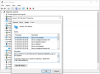
the problem is windows 10 cant migrate and recognize the monitor.
whenever I maximize a window, the screen flickering.
tried to reinstall the NVIDIA driver and Intel Graphic 530 but still the same.
any solution?Attached Files:
-
-
very bizzare. Did you make sure the eDP cable was firmly in place? I would be tempted to say there's an issue with your new fhd screen.
-
best part is recovery didn't even work properly ok the factory image! And the SSD alignment issues were driving me mad and killing my performance
-
I have 2 questions
1) Was any AW 15 R2 shipped with Windows 10?
2) If you upgrade your laptop to windows 10 from windows 8.1, does the recovery partition also get updated to windows 10?
Thanks -
yes i did.
replaced it twice. i think its more like a driver problem
anyone who replaced their screen to B156HAN01.2 can shed me some lights? -
1) I believe R2's are now shipping with W10 installed, then one I'm about to order does...
2) Nope, if your machine shipped with Windows 8.1 then that's what the recovery will be. Regardless of whether you upgrade to W10. -
My first guess would be a defective screen. Second once all your intel and nvidia drivers are installed, go into each of the control panels and create a custom resolution of 1920x1080 and try setting both 59hz or 60hz and see if that does anything.Last edited: Feb 1, 2016
-
After a long long long story dell couldn't fix my alienware 15 R1 max spec and are replacing it with the 15r2 mac spec i was just wondering how is the 4k panel on the non glossy screen i love how bright and colorful my screen is and im afraid that screen wont be cause it matte.
-
what was ur issue ?? throttling and overheating ?? and btw they accepted to give u skylake version. that's pretty nice, temps gonna be down a bit atleast, as for the 4K screen its the same IGZO display, so 4K quality should be fine , but if u have opted for full HD, thn the R2 version got 200 nits instead of 300 nits on R1..
-
So the Nits on the R1 4k are the same as the r2 4k panel? and yes im stoked they even gave me the 8gb version of the 980m! And yeah some issues, got the mobo replaced a few times that didnt solve the issue either.
-
if u can tell me what was the exact issue, so that even I can apply for skylake, for my case, they are arranging a tech to get my heatsink replaced, if that doesn't solve, ill have to force them to give me R2 model
-
it won't be as good but take the upgrade anyway
-
The 4k panels on the R2/R3 are great. Although non glossy (which of course as a designer I'd prefer glossy) it looks fantastic and does a good job with color reproduction. Gaming on it is a treat as well.
Powered by: Quad Core Exynos + 6820HK -
is that an option now?
-
exactly i do a ton of photoshop work and what not but i guess the one they are sending is gonna be my only choice but i do prefer the glossy anyday
-
Yes olny Microsoft offers this new model skylake alienware 15 4k touch
Enviado de meu SM-N920G usando Tapatalk -
...and also the max gpu option is a 970M on the Microsoft variant.

If it had a 980M, I might consider one as a secondary.
Powered by: Quad Core Exynos + 6820HK -
Darn i really think the screen is a deal breaker for me even tho they did hook it up with the newer model and 8gb v ram on the 980m, just cant stand matte screens , we will see when it arrives i can always say the screen bleed is bad and ask for a r1 i have a gtx 980 ti in the graphics amp so the extra vram does not mean much to me. and the ddr4 i can live without, But then again i don't want to come off as some snobby brat since they did go out and beyond to help me out.
-
Tried and doesnt work. I have to go with the defective screen option.
Now i have to ask for a refund from aliexpress.... -
100% a defective screen. There's no drivers at play with LCD monitors
-
Really sad i got a bad one though i can confirm AUO panel is much better than the Original 15r2 panel.
I went to as far as to factory image restore thinking the windows file might corruptLast edited: Feb 2, 2016 -
Hope the return process goes smoothly. Not only better than the R2 screen, should be better than over 90% of FHD laptop screens out there. Tons of crap being sold out there.
-
Okay so after a lot of thinking since im getting the r2 with the matte 4k panel im going to try to put this r1 4k glossy screen in the r2 body and use this glass bezel/ cover, i don't care if the touch isnt going to work i just love this screen way too much to have a matte.
I was gonna send dell the other screen in the r1 back youd think they know? Mainly going to see if it works and if it does ill just put it back in the r1 and go buy a new screen and glass panel for the new laptop! both screens are 4k so the 40/40 would already be there.
Any thoughts?
Here is the replaceable screen- http://www.parts-people.com/index.php?action=item&id=19650Last edited: Feb 3, 2016 -
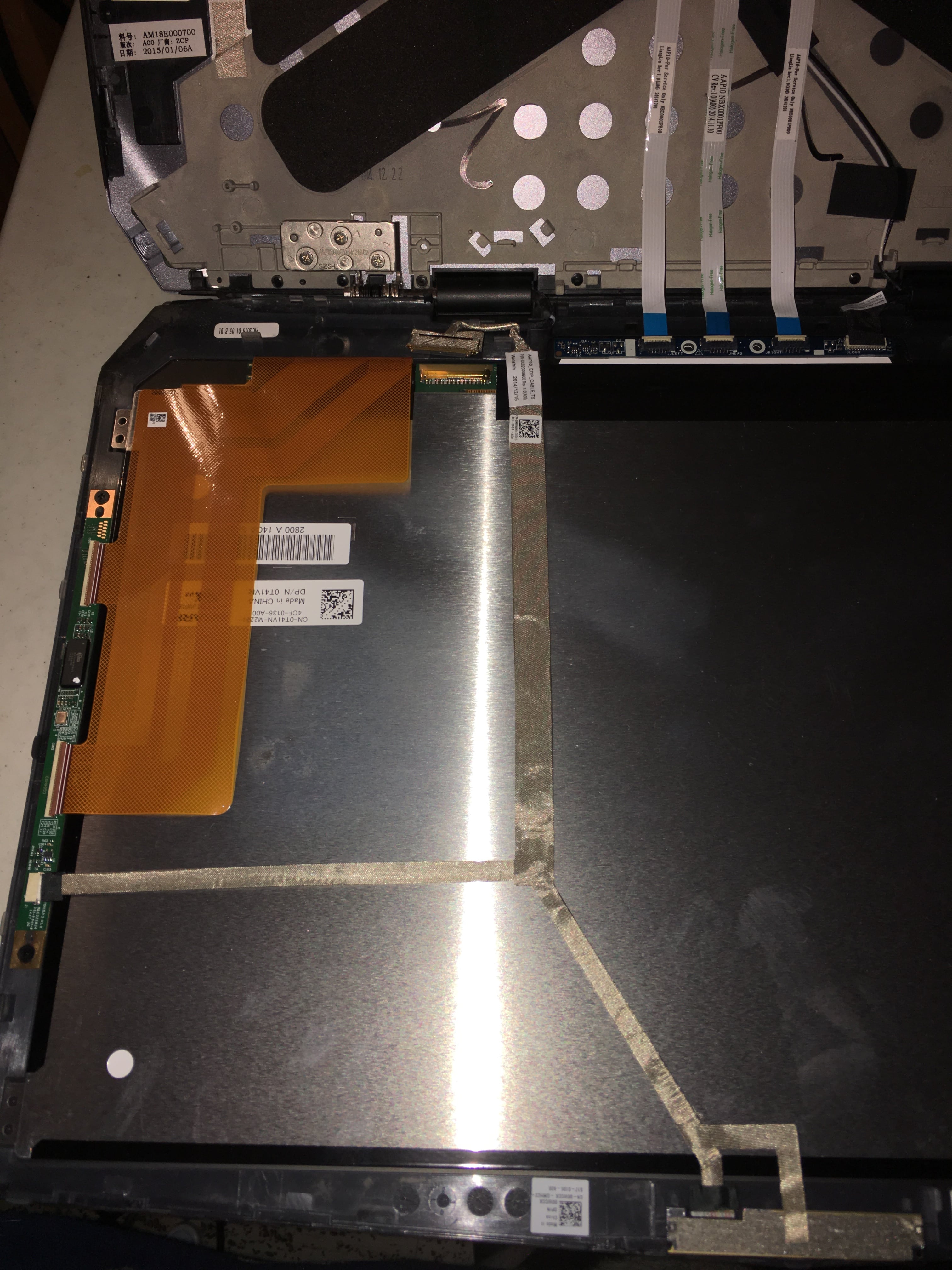
Hmm so this is what the inside of the 4k r1 (glossy touch panel) looks like if anyone wants to know, I do notice an extra split in the cable as you can see , i have no clue if the matte screens have that same setup but im assuming thats for the touch.
Edit- Just checked here and it looks like it does not, guess i wont have the touch function, oh well!![[IMG]](images/storyImages/ppc-dell-parts-image.png)
http://www.dell.com/support/manuals/us/en/19/alienware-15/Alienware15_SM-v1/Procedure?guid=GUID-94BE7019-1C4A-44C5-8CDB-37F4CEF6701F&lang=en-us
Edit again lol- i guess they actually all are one single cord going to the 40/40 so maybe after some drivers or windows 10 just recognizes it i will have the touch feature also!Attached Files:
Last edited: Feb 3, 2016 -
-
Interesting findings....thanks for sharing!
Powered by: Quad Core Exynos + 6820HK -
No probs ill keep you guys updated when the new laptop arrives.
-
Hi peps,
So my Alienware 15 (2016 model) and graphics amplifier is supposed to arrive sometime this month.
I have been reading up on the Alienware 15 and have been hearing things about certain bios havin higher fps, certain psus working better, etc.
I was wondering if someone could give me a run down on what I should expect and what I should do upon receiving my my EVENTUALLY late this month (Yes, i need to wait for dell for a whole month to ship my pc and GA).
Also Ill be hooking up the GA to a GTX Titan Black. -
Anyone tried the 330W adapter on a 15 r2 with the 6820HK? are there any performance benefits? wanting to get another adapter for mine and saw there was a higher wattage adapter available.
-
news flash : your 2016 model is actually a 2015 model
-
I got mine from this ebay seller - used but the screen performed perfect - only $34 now for the B156HAN01.2 :
http://www.ebay.com/itm/OEM-SAMSUNG...786004?hash=item2810565854:g:wXwAAOSwoydWoo0c -
Hello, I have just bought an Alienware 15 R2 and am waiting for it to arrive. I have read some forums about the screen being yellow? and not bright enough? I spoke to someone at Dell online and they told me that it was an issue with an older screen but now they use Vendor display? I just want to know if anyone that has bought an Alienware 15 R2 this year and if they are having the yellow tinge problem with their display?
-
what is the fire strike graphic score for gtx 980m @1326 mhz cores/2605 mhz memory?
i got 11,272 scores, is that normal? if yes then i will try to bump another 100 mhz both.
i joined forum after watch power draw video on youtube -
Ah okay, I apologize shows how much i knw about the pc
-
that's freakin high, actually good, I got 9200 points with 235 core oc, couldn't go further no matter how much voltage I give, it crashes, I cant believe ur score..
-
not overall scores
i mean graphics scores with 359.06 whql driver -
lol for a moment I thot u got a golden chip, yeah graphics score seems pretty normal.. and about GPU oc with prema mod, it depend on chip, mine did max of + 230 OC
-
lol no bro
my max oc is +220/+310 stock voltage @63 celcius with similar specs and 180 watt adaptor
fire strike bumped into
9567 overall scores
11,678 graphics
8714 physics (underclocked to 30x multipliers on all cores cause it runs hot like hell @79 celcius)
4325 combined scores
i do plan to repaste the cpu but cant decide the brand
----
ok i just test +500/+500 @1.062 v(stock of perma vbios) it runs the first fire strike graphics score with average 63 fps but the second graphics test instant crash.
i am assuming the need to retire my 180 watt psu right now.
but after watching mrfox power draw test i dont know if 240 watt enough for those clocks.Last edited: Feb 5, 2016 -
Is there a way to clean install Windows 10 via media usb creator ISO image without loosing my windows 10 activated alienware 15 r1 upgrade from 8.1? I mean after the upgrade sometimes my notebook sound stops and I have to restart and sometimes I get windows 10 freezes. I would like to make a clean install and format the ssd and install Windows 10 via USB ISO creator but without loosing the Alienware boot logo and without loosing the oem activation of windows. Is this possible?
Enviado de meu SM-N920G usando Tapatalk -
You should be fine to just do a clean install using the media creation tool.
When you upgraded from 8.1 you will have been given a digital entitlement which will be picked up when you install Windows 10, once installed it should activate automatically.
Also, your OEM key is stored in the UEFI somewhere so the Windows 10 install should pick that up and activate.
Either way you shouldn't have any issues installing Windows 10. -
Hi all. Total noob here, but an avid reader of this forum.
Decided to get myself a 15 R2 with a trepidation, with all the stories around the screen and all.
Someone said earlier in this forum that those happy customers rarely write here, so being grateful with this forum, I promised myself to post my comment here even when I am a happy one.
It was between this or the apache pro; the close call was won by two punches: newegg prices and alienaware keyboard; I type a lot, more than I game, so the decision should had been made before the head to head began but, per usual, AW’s weight, monstrosity, compare to more mobility promised by the apache pro, bla bla bla, these things tortured me for weeks before I eventually made the call.
The monster have stand in my desk for three days now. And this thing is so beastly cool.
My last laptop came from late 2007 so you should think that I would be happy with any new shinny thing on my desk but no, I do not feel we need to cater the need to buy to satisfy the need to buy itself (insert the usual politically conscious customer here…), so it must be a special one with promises of great things, those that I have achieved with the old laptopfriend, a 15 macbook pro, which is now hopefully enjoying her smooth transition to the comfort of retirement.
This note should eventually be equipped with some kind of technical testimony. Okay here is to begin: the yellowish screen, (I am so lucky that I got an AW with no bleeding screen), it is perfect for typing in Words. I tweaked with it for a while to get a better rgb or what have you but I decided to restore the default. In a dimly lit environment where I nested, there is no reason for me even to use 100% brightness. Not even 75%. The keyboard: I would make love with its buttery smooth but with enough oomph and torso keys. The beastly machine: I have bought a factory with a discipline of a clock. As of gaming, this thing is the closest thing to think of a laptop as a samurai. You could see how noob I am by being so technically insufficient; I hope you get my point.
I am certainly in a honeymoon stage, I should be prepare for the worse. Hence I will keep on reading you all and most certainly will be back with a question or two.
But as I have seen the worst from my old laptopbuddy (and how she eventually grew apart with the world following the rubbish Yosemite and El Capitan), I kinda feels really excited with this one. I hope the feeling is mutual.
15R2 6700 16GB 256GB 1TB 970MLast edited: Feb 5, 2016iunlock, soulvengeance and skunk1 like this. -
i must admit when i first pulled the AW15 out of the box i had a real moment
 .... it is an absolute thing of beauty!!
*OFFICIAL* Alienware 15 R1/R2 Owner's Lounge
Discussion in '2015+ Alienware 13 / 15 / 17' started by Mr. Fox, Dec 10, 2014.