Problems? See this thread at archive.org.
Will do a clean install this weekend. I have heard that you nneed to install drivers in a particular order, is there any post with that order? Or any sticky?
-
According to Dell:
Dell recommends that you install the drivers in this order: Application, Drivers, Firmware and BIOS. If drivers are installed out of order, they may fail on installation and/or your device might not work correctly.
You go over their driver list in their website -
And right there is exactly why Dell can't be trusted IMO. Call me old school but there is no way I would spend the time installing Applications and Drivers only for a Firmware and/or BIOS update to potentially throw it all out of whack.
I would deal with the low level stuff such as BIOS and any Firmwares first though, if your BIOS is not causing issues then I wouldn't touch it. It seems Dell isn't great with their own BIOS updates and most are riddled with issues. I'm running 1.2.2 as anything later causes problems.
Also, I have had no issue installing drivers in no particular order. Once my system is on the desktop I tend to make sure the Chipset drivers are up to date, then GPU, Audio, Networking etc.. Not once has the order in which I install drivers caused any issues.
Make of that what you will......Last edited: Apr 20, 2016 -
I would like to add to stay with bios 1.2.2 dont go to 1.2.12
The latest one is terrible. -
Just landed my 15 R2 yesterday from the outlet (a refurb). Machine was brand new and first thing I managed to do was put a small scratch on the lid as the zippers from the laptop sleeve caught it. There seems to be an intermittent metallic whine coming from it - sounds like either the HDD or an unbalanced fan. Overall really pleased with the deal I got and the UHD screen looks fantastic.
judal57 likes this. -
How much you got it for and the specs? I have the same problem I can hear a metallic whine, I am scared it feels like may be some wires are crackling. and chrome has a lot of issues with windows 10. feels so sluggish

-
Guys, I have a quick question about ram upgrade ... My alienware comes with 4GBx2 hynix, whether it is possible to add a stick to 16GB hynix instead of 4GB? Finally I got 20GB Ram. will it work properly? Thks.
-
It would only work if the timings and RAM speed were exactly the same and I doubt they would be given the size difference, mismatched RAM can work but most will recommend against it as you're just asking for instability.
-
It is best to buy 2 sticks of the same size? with a stick on the 16gb will run slower? Your opinion is important to me, offer the best solution
-
If you already have the 16GB stick then I would just use that and leave the 4GB stick out, it would only cause stability issues if you tried to run them both.
If you are about to buy memory then you need to factor in whether you need more than 16GB, the vast majority of people do not need any more than 16GB, only those that are encoding massive video files etc.. need more RAM. If you're just gaming the 16GB is more than enough....
If 16GB is enough then I would buy a kit with 2x 8GB sticks. These will be matched and run perfectly.
Something like this - http://www.amazon.com/Kingston-Technology-2400MHz-HX424S14IBK2-16/dp/B014R8JWEA
EDIT: Just a thought, what machine do you have? AW15 R1 or R2 -
I run a single 16GB stick because I got a deal on it. There will be no stability issues and minimal performance loss as dual channel performance boost is only noticed in benchmarks and is minimal.
My plan is however to upgrade to another stick in the future for when I run VMs and code.
If you have no need to upgrade to 32GB than @sirleeofroy is correct with recommending 2X8GB sticks. They will be cheaper and you will receive the benefit of dual channel. -
Dual or single channel is msot notable when running the iGPU that benefits hugely from better memory speeds. Other than that you wont notice it.
-
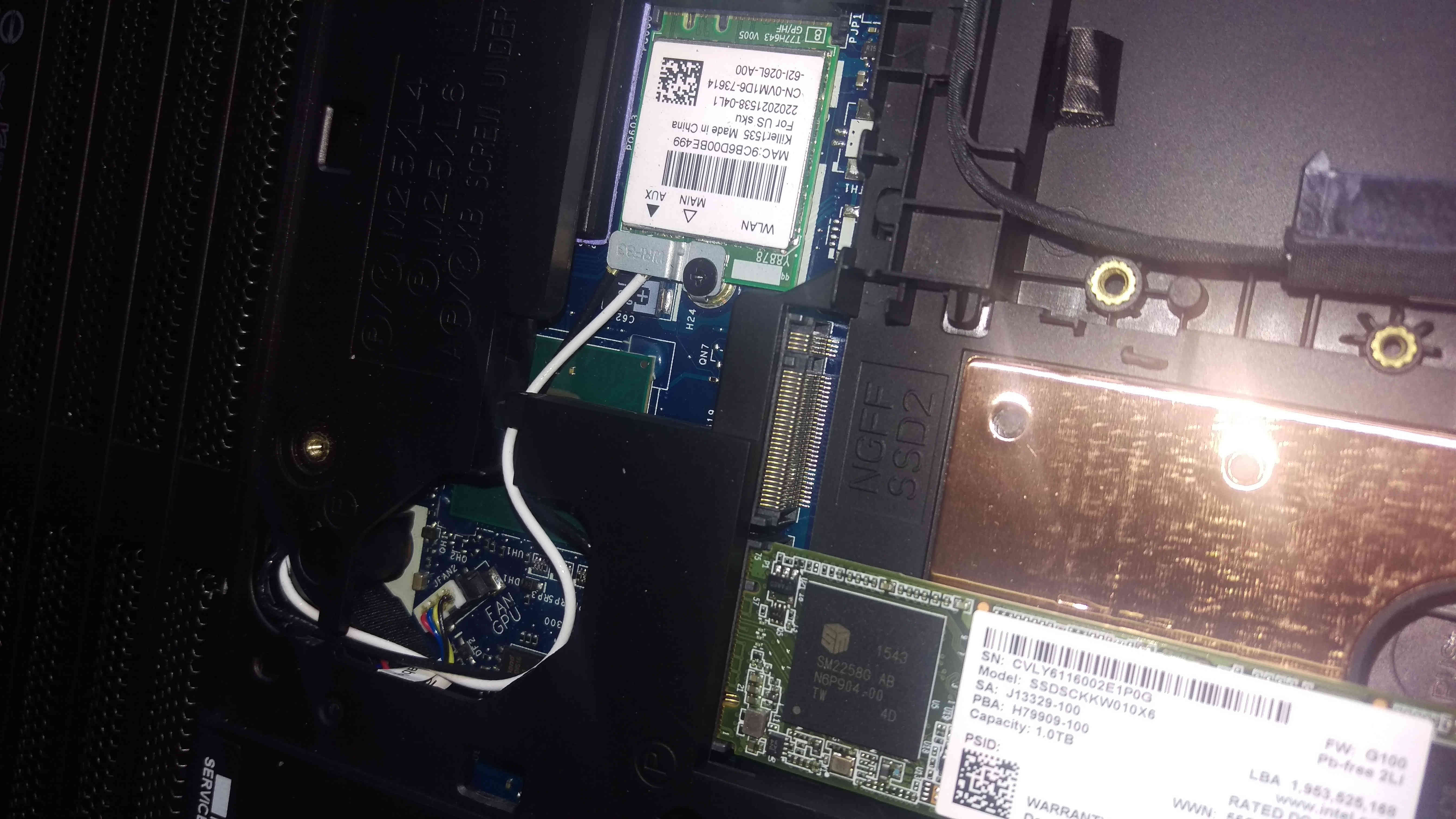
I have a question, I have been exploring the inside of my alienware 15 R2 and found what looks to be another set of m.2 slots under the two that are easially accessible, In BIOS, whenever I add a drive, it gets placed under hard disk in bios and leaves the two m.2 slots empty, so I am wondering, how do I get to these other m.2 slots.
Also, here is a pictureAttached Files:
-
-
The notherboard has 4 slots. The motherboardis shared with the aw17 models which have more drivebay space. The ports are now blocked by the 2.5inch drive.
-
I think I might be able to get at them if I disassemble the chases, its a question of do I want to spent the time. I should also note that I am asking because I am hoping these extra slows will accommodate my Samsung 850 pros in raid, however, at the moment the computer is being particularly mean and not showing my drives in the bios
-
mine too dont see them in the BIOS
-
I just tried flashing my bios back to 1.2.2 because thats when they announced nvme support. however, that did not work either
-
15 R2 not turning on..
I havent been using my 15 R2 since 3 days, today i tried to turn it on. No response.
I thought battery died, plugged in, alienware indicato rlighted up but still even if i press it it didnt turn on. After 30 min, indicator light is also gone.
AC adapter has the green light, i tried 4 different plugs no change.
Indicator is not lighthing up and computer not turning on at all.
Any ideas? Should i just contact customer service? -
yes you must. contact for replacement
-
I read in one of your posts that you have calibrated the screen LTN156HL01-102. Do you mind sharing the ICC profile? -
HWinfo has a few quirks I've noticed on my 15 R2
1) upon bootup, the custom fan controls are not active until you open the fan control window even if the driver is set to persistant and the INI file is modified (maybe an admin permission issue not sure)
2) There is not enough boxes to control the fan evenly, I have resorted to running the fans at 2300RPM until the temps hit 70 then slowly increase from there. At least there is no random jump in fan speed jumps. (I am looking into how to control the fan based on more temps in the INI file... -
Interested in upgrading your processor? http://www.aliexpress.com/item/100-New-CPU-i7-6920HQ-SR2FT-i7-6920HQ-BGA-Chipset/32615735063.html
-
Looks like a locked 6820HK so no upgrade really..... way too much hassle for anyone with 6700HQ and even if anyone was going to replace the CPU, why go for one that is locked?!?!
Will be a nice incremental upgrade for newer systems though, we will probably see this paired with new Pascal and Polaris GPU's in coming months...... -
DIfferences between CPU's on the same generation are far too incremnetal. I would never pay big bucks on a CPU that only offers max 5% more performance.
-
I have a weird question.. Off the top of anyone's head, does anybody know a 1366x768 screen that would fit the 15 R2? I'm trying to cross reference other 768 screens from dell that have the same connector type but no luck so far.. I really want a 768 screen instead of the 1080 screen lol
EDIT: I lied, I found this... From an Inspiron 15R
https://www.laptopscreen.com/English/model/Dell/INSPIRON~15~5547/
And here is my screen:
https://www.laptopscreen.com/English/model/Dell/ALIENWARE~15~R2/Last edited: Apr 25, 2016 -
Do any of you feel that the track pad is a bit un responsive? I try two finger scrolling up and down but at times my cursor would move rather than the page. Do you guys have the same issue. I had a replacement from dell, and it has the same issue.
-
Its one of the better ones I used. Two finger tracking is pretty much always on point and on the same level as a macbook pro. Three finger gestures are more iffy though. One of the better trackpads in my opinion.
-
Really?! It's not a terrible trackpad (much better than the POS on my old Latitude!) but I wouldn't put it on par with with a MBP. Even two-finger scrolling is erratic at times, the sensitivity adjustment is either on or off with not a lot in-between. I don't find it a particularly bad experience but not a particularly good one either.....
-
I actually grabbed my old mbp that I still had lying around and up until 2 finger scrolling everything is on par. I found the other gestures to be less consistent.
Maybe I just have super conducting fingers or something
-
I have the same experience as you. Sir Lee. It seems erratic, at times don't pick up two finger gestures and the pointer moves as if its a single finger scroll. May be rinneh is using newer drivers? I am still on stock drivers.
-
Can you share what drivers / software are you using for your trackpad?
-
Just the latest drivers from the Dell site.
-
My 15 R2 suddenly got unresponsive 3 days ago, not turning on and no light when i plug ac adapter but there is light on the ac adapter. Warranty kicked in and i sent the computer with their prepaid shipping box. They changed the motherboard, fresh windows everything in my hdd is gone unfortunately. They shipped it back yesterday so i will probably get it tomorrow. Hopefully everything is fine.
Really surprised that this happened to a 4 months old laptop.. -
DId you install bios 1.2.12 before it happened?
-
Can't Dell see that this bios version brick a lot of motherboards? Also flashing of bios on first gen Echo models bricked a lot of motherboards. It was very seldom socket models of Alienware become bricked because of this. I know Dell use a different bios now than before, but why can't they fix this serious problem?
-
I had 1.2.8 when i received my laptop, updated to 1.2.12 some time ago then i downgraded to 1.2.2 as it was suggested by many people here.
But does updating to 1.2.12 do irreversible changes that are not reverted one i downgrade ? -
Dunno, i was one of the first reporting this and past weel i saw 5 or 6 others. I have called them to report they should take that bios down. But till now they have not identified the problem yet. So they see those boards as just fabrication defects.bricked systems due to updates happen, but they didnt pull the bios yet and now daily a report of another user with the exact same issue.Bubloo likes this.
-
Ok. Bricked, fixed and will be new refurb motherboards. Virtually no cost fo Dell. But Tragic for those who are afflicted.
-
I received a perfect new motherboard, no refurb. Because the repair guy didnt hook up the LCD cable correctly he came the day after with a second new motherboard. I could have fixed it myself But I didnt open my machine. Let warranty handle it.
-
-
Yes unfortunately.
-
Past 2 weeks unfortunately now a lot of these cases because this bios. The worst is. It doesnt just happen right after flashing.
-
= A ticking bomb
-
Hello All,
Hope you remember the screen bleed issue I had and was discussing here...
The DELL technician visited a few days back and the below happened -
1. The technician was shown the issue (in a dark setup) where the issue was apparent.
2. He removed the original screen and replaced it with what he had got.
3. I checked the assembled screen in the dark settings and could see the new screen had the same issue but at different location (top right corner both sides), I showed him the same. It appeared to be worse.
4. I had an idea and asked him to remove the bezel and boot the machine. The bleeding was all gone! It seemed perfect.. so I guessed maybe the original screen is good after all and it could be a fitting/bezel issue.
5. I requested the technician to put back the original screen and checked it again w/o the bezel. Yes, the screen was all fine (original one);
6. Assembled back the screen, put back the bezel, and the bleeding is coming up again.
So the Conclusion is that it is a fitment issue, probably the bezel or the back panel are making the LCD squeeze or something. It is NOT an LCD issue.
The issue is still there and moving my hand around the bezel makes it better or worse depending on the location we move in...
So the final setup is that I am using the original screen. I have reported this back to DELL but am not much hopeful of anything now... so will continue with the setup (at least the screen is fine!)
Moving on now, I am planning to rebuild the partitions and OS with drivers. I understand there will be a lot of info on this around the forums, but if anyone can please guide me for -
1. the drivers, i.e. location/ DELL / Non DELL/ OEM?
2. BIOS version to choose, and use
3. Driver installation order (actually needed?),
4. Extra software I really need to have (specifically for AW)?
5. I have the 4K screen so any fixes for the BLUR issue (I see the blur on system windows etc.)
6. Anything else I need to take care about?
I guess this is it for now... will add if I remember anything, as always thanks for helping! -
I remember reading somewhere in these threads that someone else had a similar issue with bleeding caused by the pressure of the bezel, I'm pretty sure they fixed it by breaking off the bezel clips around the affected area one at a time until the bleed was gone. Now, whether you want to do this is entirely up to you.......
Now for your other questions:
1. the drivers, i.e. location/ DELL / Non DELL/ OEM?
Your Graphics driver and Killer networking driver should be obtained from the manufacturers, the Dell versions are massively out of date. The rest from the Dell site are ok.
2. BIOS version to choose, and use
First of all you need to check which version you have. Unfortunately, most versions are broken with the latest version (1.2.12) seemingly killing machines some time after having the BIOS updated. 1.2.2 appears to be the only stable. That said, if it isn't broken, don't fix it.....
If you want to roll back to 1.2.2 (assuming you're on a newer revision) then see here - http://downloads.dell.com/published/pages/alienware-15-r2.html
3. Driver installation order (actually needed?),
Nope, I have never installed in any particular order and I am yet to have any issues.....
4. Extra software I really need to have (specifically for AW)?
Only the Alienware Command Centre as far as I'm aware.
5. I have the 4K screen so any fixes for the BLUR issue (I see the blur on system windows etc.)
I suspect this will be to do with scaling in Windows, unfortunately I have the FHD version so cannot give you any advice here, I'm sure others with the UHD Panel can chime in....
6. Anything else I need to take care about?
Once you're set up, you should be pretty solid. After the initial few weeks of setting up, OC'ing and fine tuning mine, its been super stable since. -
I just purchased an Alienware 15 R2 that arrived yesterday. So far the computer seems good but I'm having an issue with my speakers. Whenever I play any sound out of them there is a delay of a couple seconds before the sound starts playing. As a result, I never hear any system sounds. If anyone can help that would be great. I have the newest creative sound drivers from Dell.
-
I'm guessing you're running the stock Windows that came installed. If so, my first recommendation would be to format the machine and do a clean install. Somehow Dell manage to make a dogs dinner out of the stock install so the only real way to diagnose problems is to do a fresh install using the Media Creation tool from Microsoft and take it from there.
-
Thanks a lot sirleeofroy! Your posts are always helpful!
I have some more though
1. Could you please share the direct driver link for the Killer n/w card?
2. I have the 970M as well.. so any M latest ones would work from nVidia?
3. One more thing.. can i completely nuke the partitions (all including recovery?)
4. while reinstalling Win 10, the registration will pick up the keys from bios automatically, yes?
Kindly advise.
Many thanks again! -
Ok that sounds like a good idea. I'll give that a try when I get home tonight and cross my fingers. I also saw something about the latest Bios. I updated to it last night. Would it be a good idea to roll back to one of the older versions mentioned above (1.2.2)?
*OFFICIAL* Alienware 15 R1/R2 Owner's Lounge
Discussion in '2015+ Alienware 13 / 15 / 17' started by Mr. Fox, Dec 10, 2014.