Problems? See this thread at archive.org.
Well, I don't get any blue screens now when the computer is bumped so that's better, but that may have been an issue with just my specific Killer card. I can't say I notice much difference in performance. So far the Killer 1535 and the Intel 8260 seem similar in the speeds I get. I've had a couple times where I was connected to the router but lost internet connection. I'm not sure if it's because of the driver, the router, or the wifi card itself. If I find out that it's card issues I'll post about it and probably swap in a 7260 from another laptop of mine to try that. I love my 7260 but figured I might as well give the newer 8260 a try instead of buying the old model.
-
I haven't checked actual run times. But on my Alienware 15 R2, FHD, i7, 970m, Windows estimates about 7 1/2 hours (+/- 1/2 hour) remaining on a full charge.
-
i get between 5 and 8 hours on battery depending on what i do. No gaming on the battery though. It degrades your battery quickly. If you donthat often you are heavy cycling your battery which means its worn out within 2 years. This goes for pretty much any gaming laptop and i do not recommend it. It means you are pulling the maximum wattage that a battery can handle in an instant.
-
Ok I have another question. Does anyone have the Intel Dynamic Platform and Thermal Framework Settings shown below. They should be located in the advanced power options under the power plan settings. I have the Intel Dynamic Platform and Thermal Framework Driver installed but the settings don't show up for me. I'm on Windows 10.
![[IMG]](images/storyImages/power-options.png)
-
Hi guys, new Alienware 15 R2 owner here, and I need some advices please.
I've only had the machine for 3 days, but already had a near miss when the machine didn't turn on. It worked itself out after a few plugging/unplugging of the charger and pressing and holding the power button. This was with the bios it shipped with 1.2.12.
I then updated to bios 1.2.14 but after a few horror story with latest bios I read on here, I've downgraded to 1.2.8.
Is this a stable version to stay on ? What everyone's running? I have the i7-6820hk and 980M if it matters. Would all bios recognise my gpu ?
Any advice would be greatly appreciated. It is a shame to see Dell/Alienware dropping the ball like this. I had M11x and M14x before and both of them was rock solid. Never thought I'd see a day when I have to do research for a bios update
Thanks everyone and have a great day! -
Is "fan performance mode" in the bios supposed to run the fans at 100% all the time? And it turns out I solved my own question about the power settings. The Intel Dynamic Platform and Thermal Framework settings show up but only the TDP config is available and it disappears with the newest 1.2.14 bios.
-
Yeah its weird but true. Fan performance mode means 100% fan speeds.
I wish it was just a more aggressive than standard fancurve.Sopey15 likes this. -
Thanks for the answer, that's what I really want it to be too. I thought maybe it was just a bios bug or error that made them run at full speed on mine.
-
Thanks for the answer, that's what I really want it to be too. I thought maybe it was just a bios bug or error that made them run at full speed on mine.
-
-
I can check when I get home from work if you don't hear anything from someone else.
-
Sure bro, Its better if u share, let them share as well..
-
Haha that sounds like we're at a self-help group. The UEFI box is not checked on mine.
-
thanks for the info, which bios ver in ur system ?
-
I'm on bios 1.2.2 right now. Just in case you need any other info; my system has i7-6700hq, gtx 970m, 16gb ram, 128gb sata ssd, 180w psu, windows 10.
-
Yeah I'm flashing back to 1.2.2, I usually do it by installing 1.1.0 then all the way upto to 1.2.2, then do a cmos reset, by using the CL2 pins located near RAM slot.. then install windows.. seems 1.2.2 is the best BIOS, this is 3rd time I'm reinstalling OS.. godamn BIOS, introducing more bugs.. and thanks for sharing ur system info.. why not use a SIG.. like mine Hail Hydra lol
-
UEFI box not checked here too. Not sure if it affects my system negatively but I dont think so.
-
Dang man you've got an in depth process. I'm lazy and just cleared my cmos with the pins last time I had problems and reloaded 1.2.2. So far it's been alright but I don't think I'm going to update to a higher bios right now because I had sleep issues with 1.2.14. That's a good question, I'll probably make one soon.
Edit: Lol I just caught the end of that, Hail Hydra. -
Guys my AW 15 is not picking up my wifi. I've been using it all this while but I switched off the wifi in between today and after I switched it back on my laptop cannot find it! It can see my neighbors' wifi but doesn't show mine! There's no problem with my wifi since it's still connecting to my other devices. I tried switching off and on both the laptop and the wifi but the issue persists
Sent from my A0001 using Tapatalk -
I would request you to download latest driver and delete ur saved wifi settings and reconnect after installing driver
http://www.killernetworking.com/ -
Hey guys, need your help on replacement parts for the AW 15 R2. This morning i dropped the laptop and had a 2 cracks on the palmrest and the fan exhaust (a few plastic grids went out). Nothing serious thankfully and i am considering 2 scenarios:
-Option 1: Purchase the spares and reinstall them myself;
-Option 2: Buy the accidental warranty from Dell and request a repair.
My questions are:
If Option 1: I can't seem to find spares for the R2, are the R1 parts the same for the palmrest and the bottom chassis (e.g. do R1 versions have the USB-C opening?)
If Option 2: Is it worth it ? I am seeing the R1 chassis for 38$ and probably the same price or less for the palmrest (Vs. 100$ for 1 year accidental warranty) .
-Also, the purchase date for this laptop is January 2016 (until January 2017), can i still be able to buy the accidental warranty or is it necessary to do it only on the date of purchase?
Please let me know. -
Option 2 is unethical and the same as fraud / theft. Rather Buy parts from Dell or others.
-
Guys where can I buy a new palmrest replacement part for Alienware 15 r2?
Enviado do meu iPad usando Tapatalk -
Surprising point of view i have to admit, didn't even think of it this way. If i broke the laptop completely and considered this option it would be considered fraud / theft. In this case we are talking about a maximum of 80$ for repairs (less than the value of the warranty)...
-
I believe the R1 touchpad assembly is same as R2 version, only the bottom base is different, due to the type C opening vs normal USB.. get it while its in stock.. its hard to find touchpad assembly cover, I hope u can use ur old keyboard and trackpad.
https://www.parts-people.com/index.php?action=item&id=18101slayer2333 likes this. -
Has anyone tried the R2 with Linux? If so, any problems with screen tearing while watching video over HDMI?
-
Thanks mate, i ordered the last one (shipping to Canada is more than the price of the part though), but the total is still around 40$.
Now looking for the bottom chassis i can't seem to find any (except for older models), i'm starting to think about gluing in the broken grids (personally i don't care much, but i know that it will have a big hit on the resell price). -
No problem mate, ill look out for bottom panel for R2, give me sometime, just collect ur parts first then assemble it..
-
Hello guys,
Long time!
Anyways, I have an issue and a question if anyone could help me with please (AW 15 R2) -
1. I have been trying to re-install Windows 10 via a boot-able USB but running into issues.
Details follow -
> Using a San-disk 3.0 16 GB USB drive;
> Made boot-able by official Windows 10 ISO (Microsoft);
> Using RUFUS utility in Windows 7 machine (my earlier XPS 15);
> The drive is NTFS formatted with "MBR partition scheme for BIOS and UEFI option" selected;
> AW Laptop is on Factory Default BIOS options;
I plug-in in the USB, boot the system, but sadly the USB is not being detected at all.
Questions -
> Any advice if I need specific boot drive settings?
> Any changes the BIOS needs to proceed and detect USB?
2. Can anyone please help me with the latest *stable* BIOS version I should use for the R2 15?
I am currently having the 1.2.2 version (default installed);
[EDIT]
3. I also had a query about the Sharp 4k / UHD screen. Has anyone been able to get rid of the yellow tint on this LCD? Any ICC profiles if anyone could share would be great!
Many thanks in advance!
ChetanLast edited: Jul 8, 2016 -
Hi
Have you tried forcing the boot menu and selecting the USB drive from there?? F12 I think....
The only other thing I can think of is that some Sandisk USB drives do not support the boot function, I had one and had the same problem. I just bought a new drive as they're cheap anyway!
http://forums.sandisk.com/t5/All-Sa...16-Gb-Acts-like-a-normal-harddisk/td-p/297958
Stick with your BIOS version 1.2.2 as it is the most stable, later versions have some pretty funky issues and could soft-brick your laptop.Ckhurana likes this. -
1. Yes I did try the boot menu option, but sadly can't even see the USB option in there?
Is that normal?
2. Will go with the current BIOS then (do we need to keep an eye open for the next stable one or we have a dedicated thread for that, kindly advise!)
Also, in the meanwhile, let me try with another USB drive then.
Any advice you have for the 4k calibration?
Thanks Sirleeofroy! Great support as always!
Thanks again! -
I've encountrd few like this, all you have to do is disable Secure BOOT and UEFI, get it to legacy try detecting it first, after that switch back to UEFI.. it should work.. try using the left port, if nothing works try GPT partition for UEFI when using RUFUS 2.9.. it works like charm..sirleeofroy likes this.
-
I would say that if the drive does not even show under the boot menu then it is one of the Sandisk drives that don't like to boot, unfortunately.
Definitely try another drive!
As for a thread for the BIOS, information is scattered across various threads but here is one for the latest BIOS - http://forum.notebookreview.com/threads/13-r2-bios-1-2-14-15-r2-17-r3-bios-1-2-14.792528/
I am unfortunately unable to help with your 4K screen as I'm running 1080 but I'm sure sure someone here with the AW15 R2 4K model could help
-
Thanks man, let me try that with the Sandisk once.
-
+1 Yep, this is definitely an option.
-
Thanks again sirleeofroy! I will try Vick's solution above (re-create the USB) and then if needed probably swap the USB and try again. Will post back how it goes.
-
Ok, I chose legacy, rebooted, and the USB option appeared. Am starting the setup now, many thanks Vicky!
For the default secured mode (Secure BOOT and UEFI?) when should i set this back... I mean is this the best option to keep enabled or anything else I should use?
Also, I have been under a rock for some time.. any quick knowledge about how this is different than the traditional BIOS (options) would be much appreciated!
Thanks again! -
Nps ur welcome, but again don't run windows setup under legacy mode, that was just to see whether ur USB getting detected or not, switch it back to UEFI and secure boot ON, and try to install.. UEFI is much better then legacy.. its more secured and faster.. its like a core encryption to ur system.. I had the same issue last week, with my sandisk ultrafit usb 3.0..
-
Oopsie, I was about to start it up!
Reverted now but can't see the USB again... so do i need to create it again with the settings you mentioned?
Sorry, this is just taking too long! -
Umm, I'm pretty sure that if the install is completed under Lagacy mode, when you switch back to UEFI and secure boot, the OS won't be found, either that or you'll have a super long POST. What really needs to be done, now it's been established that the USB does indeed work, is to install the OS with UEFI AND secure boot ON. This is what I did and to do that I'm sure you have to set the USB Drive to GPT for the install to work.
-
Yes do the GPT one
-
ok, and use the Fat32 or NTFS in Rufus then?
-
Try Both, I know its time consuming..
-
Ok, the 1st one worked! Yay!
I have started the setup, but now, I can't see anything at all! The setup windows are so tiny, I can't enlarge them, and can't even make out the options in there.
Is this because of the 4K screen? Can I get the normal resolution somehow, this is so tinny!
Also, during the earlier check (when I chose the legacy with secure off option) the screen was just fine!
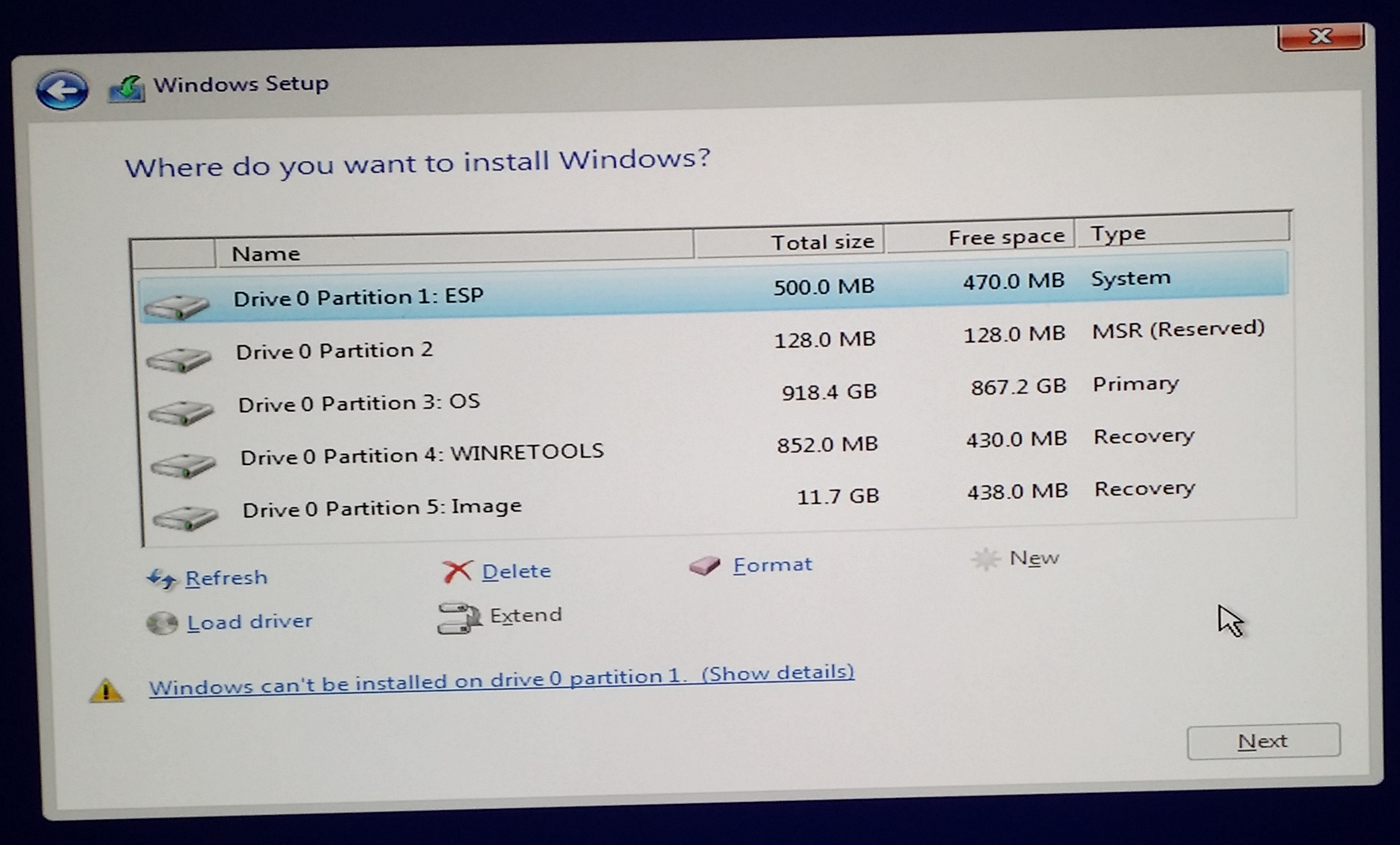
There I came across this choose partition screen (Setup.jpg) with lots of recovery disks and stuff.
Can you please guide if I can get rid of everything in here? Would prefer to start over and create my own partitions.Attached Files:
-
-
Good work!
Yeah because you are now in UEFI mode, the panel resolution is detected however, there is no scaling in the setup!
As for the Partitions, I would get rid of them all and start fresh, that's what I did
Vasudev likes this. -
Just to give an idea, please check the attachment.I can't make out anything in here
![[IMG]](images/storyImages/2eyxbgi.jpg)
-
The icons seem to be autoscaled up, but the Window object layout and Text isn't.
I can't even scroll down to the next cancel buttons, they are down somewhere but even using tab does not get me the focus
I had hoped Windows 10 would be friendly with the 4K display, but sadly doesn't appear to be.
So would the entire setup be just a guesswork? Did anyone else face this with a 4K resolution ? -
sorry for the late reply.. I was away. yes ur good to go, windows installation doesn't have scaled setup.. so its fine, regarding partition just delete all, then create 1 or 2 partition, that's upto you..
-
Alright, in am going through it now.. Deleted all partitions, and created 1 primary (100 Gigs) for the OS.
Questions!
1. It created 3 system partitions for me (!)-Recovery, System, and MSR partition, I understand if I would have created partitions on my own (beforehand) this wouldn't have happened, right? So should I simply let them be and move on?
(Please ignore as I am through with this, 500 mb doesn't matter! Below 2 Q's are what i am looking for now.)
2. I currently own the 1TB 7200 Physical HDD. What would be a good (and not that expensive) SSD option if I may ask?
[Edit, Completed setup, so the next obvious one]
3. Driver Installation -
Got the below list from the DELL official site (could be a bit old as downloaded them last month) -- what do i really need from this list? (though I understand the nVidia and Killer has to come off the manufacturer site right?)
- Alienware Command Center 4.0 for Notebooks - Application_CHDTX_WN64_4.5.19.1_A01.EXE
- Alienware On Screen Display Application - Application_D7RY5_WN32_0.33.0.20_A01.EXE
- Creative Sound Blaster Recon3Di Extras Driver - Audio_Driver_K32CX_WN32_1.1.9_A03.EXE
- Dell Digital Delivery Application - Application_2J26D_WN32_3.1.1002.0_A00.EXE
- Dell Foundation Services Application - Application_52C12_WN32_3.1.3300.0_A00.EXE
- Dell Update Application - Application_1GN7H_WN32_1.7.1007.0_A00.EXE
- Graphics Intel HD Driver - Video_Driver_09G71_WN32_20.19.15.4390_A07.EXE
- Graphics nVIDIA GeForce - Video_Driver_KN7FF_WN32_10.18.13.5940_A03.EXE
- Intel Chipset Device Driver - Chipset_Driver_CWDDW_WN64_10.1.1.7_A00.EXE
- Intel Dynamic Platform and Thermal Framework Driver - Chipset_Driver_9XXMN_WN32_8.1.10603.192_A01.EXE
- Intel Management Engine Interface Driver - Chipset_Driver_0P4C7_WN32_11.0.0.1173_A02.EXE
- Intel Rapid Storage Technology Driver - Serial-ATA_Driver_H7N90_WN32_14.6.1.1030_A01.EXE
- Intel Thunderbolt Controller Driver - Chipset_Driver_JM6H1_WN32_15.3.39.250_A01.EXE
- Killer Ethernet E2400 Driver - Network_Driver_3V8FP_WN32_1.1.57.1245_A02.EXE
- Killer Wireless-AC 1535 Bluetooth Driver - Communications_Driver_PJ4XH_WN64_10.0.0.102_A00.EXE
- Killer Wireless-AC 1535 Driver- Communications_Driver_RJ21G_WN32_1.1.57.1245_A02.EXE
- Kionix KXCNL Freefall Sensor Driver - System-Utilities_Driver_55HT9_WN64_1.1.4.1_A02.EXE
- Realtek RTS5227 Card Reader Driver - Chipset_Driver_0GF02_WN64_10.0.10125.21277_A00.EXE
- Synaptics Touchpad Driver - Input_Driver_RGKY7_WN32_19.0.15.15_A01.EXE
- Got the nVidia, but the killer is giving a large suite to download, is that the one?
Also, want to add again that I really appreciate all the help what you have shared, sirleeofroy and vickygamerboy, you guys have been great!
thanks,
ChetanLast edited: Jul 8, 2016 -
Regards SSD, I bought myself a Sandisk SSD plus, 256GB version, costed me around 6K in amazon.in... its the most affordable ones, 850evo pro is the best but it was not on my budget, so check for sandisk ssd plus, its decent, its not top notch at write / read speed, but def worth from a 7200rpm drive, about drivers, yes download Nvidia, KillerSuite from their website, also ull need Bluetooth driver from same killer website, suite only gives u wifi / lan drivers.. rest of them ull have to stick with dell, may be intel hd drivers u can get from intel.. synaptics u have to stick with dell drivers, website one doesn't work, thermal , management engine drivers stick with dell ones for now, later once they release new bios u can opt from station-drivers.com.. and yeah no problem, we are here to help when we can.. good luck
*OFFICIAL* Alienware 15 R1/R2 Owner's Lounge
Discussion in '2015+ Alienware 13 / 15 / 17' started by Mr. Fox, Dec 10, 2014.