Problems? See this thread at archive.org.
I've been trying to get the same battery life as well. Currently at about 6-7 hours on just web browsing and listening to music. Here are some things that have worked for me:
- Battery saver on immediately when on battery
- Reduce brightness to 20-30% on battery
- Maximum processor state capped at 80%
- Turn AlienFx off on battery
- Turn location services off
- Turn live tiles off in the start menu
- Apply an undervolt using Intel XTU (helps with lowering temps too)
- Turn off bluetooth if you don't need it
If you right click on the battery icon and click power options -> change plan settings -> change advanced power settings, you can access a bunch of options that will help increase battery life. Turn everything to maximum battery life that has that option. I also downloaded something called the Easy Services Optimizer that disables Windows services that most users will not need. Coming from using a Surface Pro 4 (which has terrible battery life), I've done a lot of research on how to maximize battery life. Hope this helps!
-
Very nice. I too have the 960M on my Dell XPS, however, it's no where near my 980M. Well obviously

It's a stretch to achieve 60fps with the 960M even on medium settings...depending on the game most titles can barely scratch 50fps on low settings. Of course the resolution plays a huge factor.
Try using NVIDIA Inspector to OC to +135/+150 and keep the voltage stock. You'll gain a nice jump on fps.
But I agree...really no need to OC with the 980M.
Powered by: Quad Core Exynos + 6820HK -
I was wrong. He has a 970. He claims 60 fps@1080 on Ultra settings.
-
The 970 is for modern games unfortunately not that fast anymore.
-
Aha! A few tweaks did the trick
In addition to what you said, I installed Power Plan Assistant, automatically switches power plans based on whether the system is plugged in or unplugged, similar to the ASUS Power4Gear app.
Now I'm getting an estimated 5hrs on battery, will try it out later to see actual run times.
Thanks a lot. -
Ah OK, that makes sense now. I was beginning to wonder if he somehow had a super 960M lol...because those 960M's are IMO why bother GPU's...for a gamer it's good enough to play PacMan or Ping Pong. (<- a point bring made)
Have you tried OC'ing your 980M yet?
Powered by: Quad Core Exynos + 6820HK -
FYI - you can get the amp through Dell epp for $136.79. Free 2 day shipping and 15% Dell rewards if you use your Dell preferred account as well - this will bring it down to $106ish. Use code code EXTRA10
http://accessories.dell.com/sna/productdetail.aspx?c=us&l=en&s=eep&cs=6099&sku=452-BCFE -
Nope not yet. I used to overclock processors and try and get the highest number possible in benchmark programs but now a days as long as the games run good then that's good enough.
-
Haven't been on this thread in forever and sorry if anyone has asked, but has anyone overclocked their 6700hq CPU before? In Intel XTU it gives you the option to adjust the boost Watts and Core IcMax in amps, can't say I have any interest in adjusting the volts though (unless a minimal increase is super safe)
Anyone care to share any settings?
Edit: the previous post literally talks about OCing, lol woops -
You cant overclock the 6700hq. Its locked.
-
Oh alright, I saw overvolt, overwatt and overamp settings in XTU so wasn't sure if anyone has messed around with it before.
-
Guys my :/D drive is gone. My 1 TBHDD drive is not showing up on the computer anymore. It was there last week now since couple days its not on the list, when i go to disk management it does not even show 1TB allocation. All it shows is the 256GB SSD.
What can be the reason of this and how to fix it?
Thank you. -
I get this issue (if it's the same). I've got a Crucial 960GB SSD drive that disappears on some reboots. Sometimes takes a reboot or 2 for it to show back up. Opening up file explorer now shows...what do you know...E: isn't there, dangit lol. I'm going to try this new BIOS Dell just posted, maybe that will help?
-
Exactly same, but now its gone forever. I did 6 reboots and my 1TB HDD is not showing up.
Is it safe? Last time i updated bios my motherboard burned so i dont trust them lol -
I updated to the new BIOS an hour ago and all is well, my SSD showed up upon 2 reboots, but can't say for sure if that means anything. Only 1/6 boot ups or so would the drive disappear, and always reappear in 1-2 reboots. Wish I could be more help. If you have an external enclosure you can install it to and give it USB power to make sure the thing is still even alive?
-
check whether you have samsung nvme driver installed.. it happend to me as well when i had that driver.. it happens only with certain drivers..
-
I was hoping someone might be able to help me confirm which GPU was in this system via the parts listing. I was trying to use this line item which has seemed to help in the past but could not get a hit on it:
TT3VN 1 MOD,ASSY,BASE,I7-6820K,AM,8,15
The complete listing:
G1WM9 1 BASE,NBK,CTO,AW15R2
Y21PY 1 MOD,CVR,LCD,UHD,AW15R2
0DM40 1 MOD,HD,1T,S3,7.2K,#2,HIT,JAG-C
00HYR 1 Module,Information,NO Hard Drive,Optiplex,HM/HL
V8410 1 Module,Software,OFCTOPK,Factory Install
2D5JP 1 MOD,KYBD,ANW,6,HOTKEY,E15/17
JR7M3 1 Module,Keyboard,82,United States,England/English,ANW13
H8C4T 1 Module,Battery,92WHR,8C,Lithium,SIMPLO
G8YDR 1 MOD,LCD,15.6UHD,SHARP,AW15R2
FDM3C 1 MOD,LBL,REG,NBK,WW,AW15R2
KRM43 1 Module,Software,SMOD,Artwork,W10,US/CAN
TT3VN 1 MOD,ASSY,BASE,I7-6820K,AM,8,15
41PGH 1 MOD,SSDR,256G,NVME,SMSNG,PM951
40R5C 1 Module,Information,9,SCREEN,Asset Recovery Business
R544W 1 MOD-SRV,SW,AW15R2
5YX62 1 MOD,LBL,INTEL,CI7,6,SML
PJ7VW 1 MOD,DIMM,32GB,2X16G,2133,N-E
5DCDC 1 MOD-SRV,SW,KILLER,1535,15/17R2
RNJY2 1 MOD,CRD,NTWK,KILLER,N1535,USA
0P1H1 1 MOD,SW,QFE,WIN10
PYC0K 1 MOD,SW,W10,EDITION,HOME
GV0CP 1 Module,Software,WINDOWS-LIVE,WAVE4,Consumer
85Y47 1 Module,Software,COMMONBUILD,Across Line Of Business
JJ8DK 1 MOD,SW,WIN10,64,ENGLISH,WW
XD0PF 1 Module,Information,2MP,Hard Drive, MIC,Asset Recovery Business
M3GVR 1 Module,Software,OFC-2013,Multiple User Interface,Factory Install
H68D2 1 MOD,INFO,HD GRPHC,UMA
RN0NJ 1 MOD,SW,DPK,W10H,HE
28W09 1 MOD,SHP MTL,BOX,ANW,240W,15
N971H 1 Module,Cord,Power,125V,2M,C13 United States
KF54T 1 Module,Label,Retail,Vostro,V131,20184
12R4V 1 FGA Proxy MOD12R4Vfor SKU 998-BJPW
K972H 1 Module,Adapter,Alternating Current,240W,Delta - Ac Adapt World Wide -
Hmmm, I'm not totally sure, but my Alienware 15 R2 with a GTX 970m came with a 180W power supply. The 240W supply tells me that it could be a 980m. Is this a replacement for another system or a new system?
Edit: Also, the first 5 character number should be the Dell part number. You could call their parts department and ask them, maybe they could tell you the full specs of the part. -
You should chat with Dell and figure that out. The first laptop I ordered came with a 240W power supply but it ended up being the AMD graphics card instead of the 980m.
-
Thanks for the replies. It looks like it is the AMD card due to the "AM" in the line item. It should say "GX" for the 980m. The Dell rep insisted it was the 980m...
TT3VN 1 MOD,ASSY,BASE,I7-6820K, AM,8,15 -
Looks like you're right, I just checked my receipt and it says GX. The first machine I got with the AMD card had AM.
-
can anybody share their experience using AW 15 with 4K screen playing on 1080p ?
will the blur and pixels be so eyecatching ? -
Hey folks! I'm a new owner of a 970m/IGZO UHD/skylake i7 model 15 R2 and I'm seeing a little bit of what looks like back-light bleed on the left and right of the screen. It's not the worst I've seen, especially compared to some poor chaps on this here forum, but curious if you think I should even bother with the replacement? What is acceptable bleed on an IPS panel like this? This is 100% brightness taken straight on. I'm fine with the IPS glow... But the sides do not look like glow.
![[IMG]](images/storyImages/2nb59uc.jpg)
-
It probably depends on the game you're playing, I have the 4k screen but I play most games on 1440p, and they look really good. I use the GeForce Experience app to optimize settings and then I increase them gradually to see if there's any major difference. No blur so far though, and Windows scaling has been kind to me, lol
-
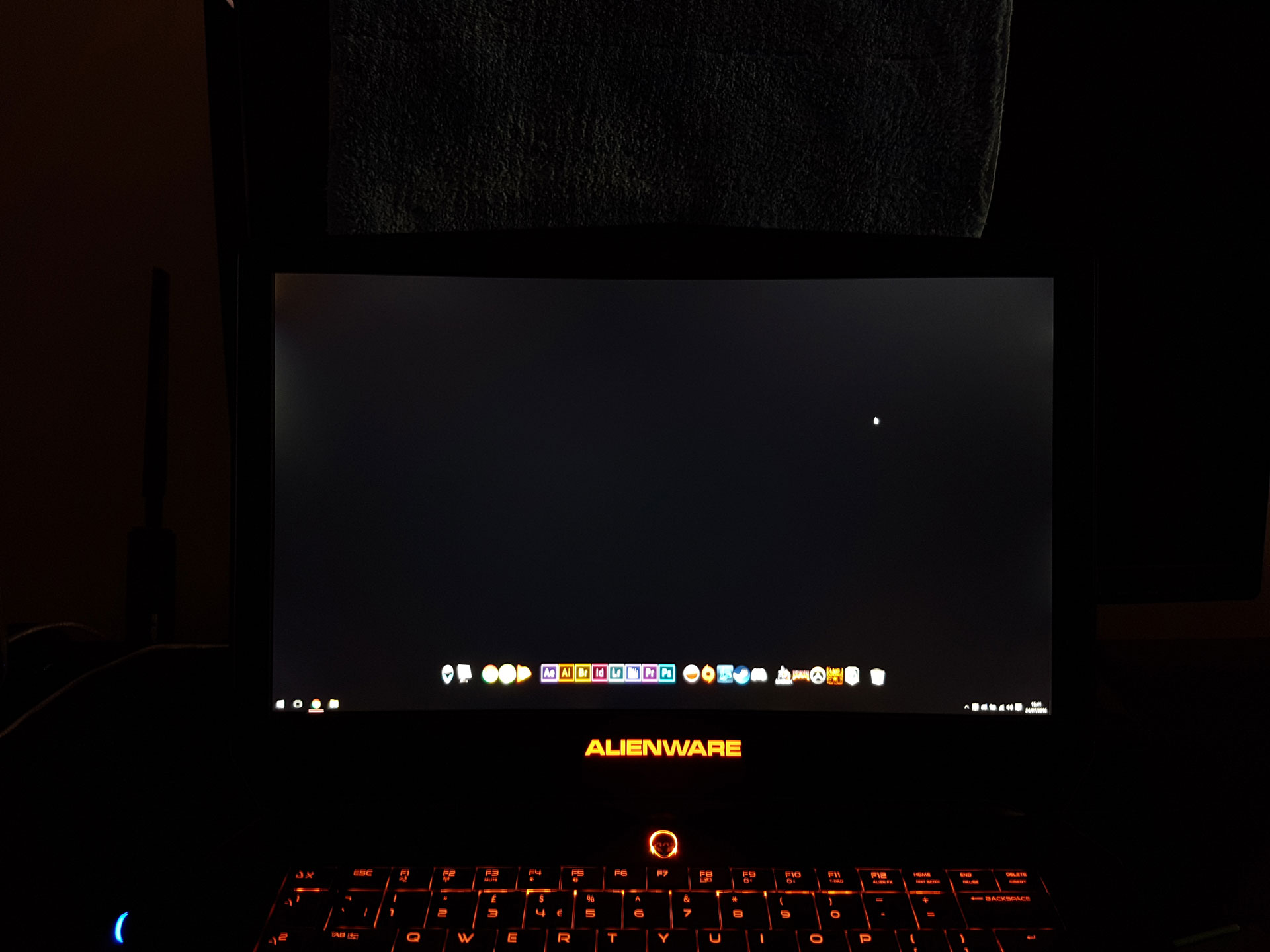
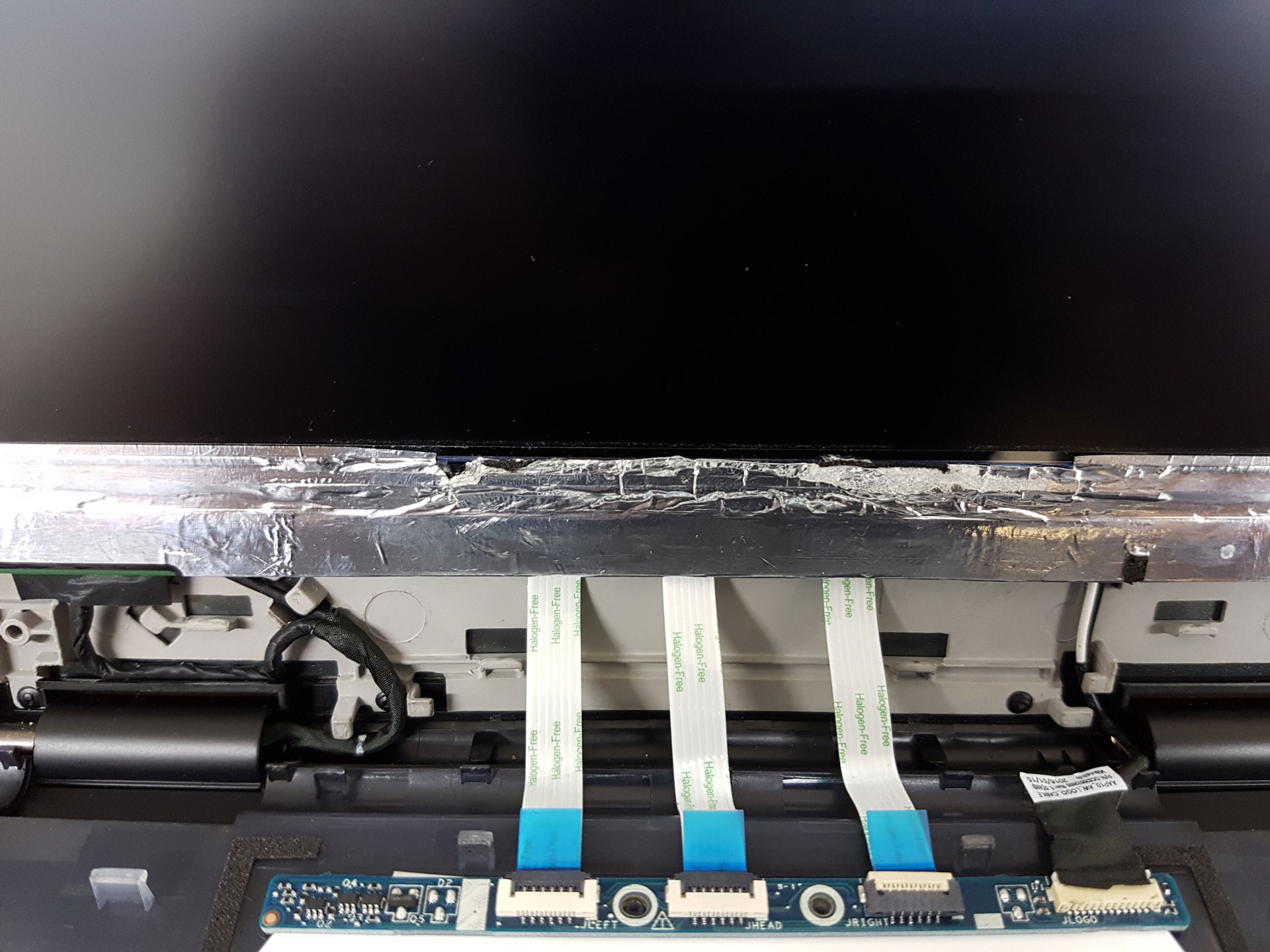
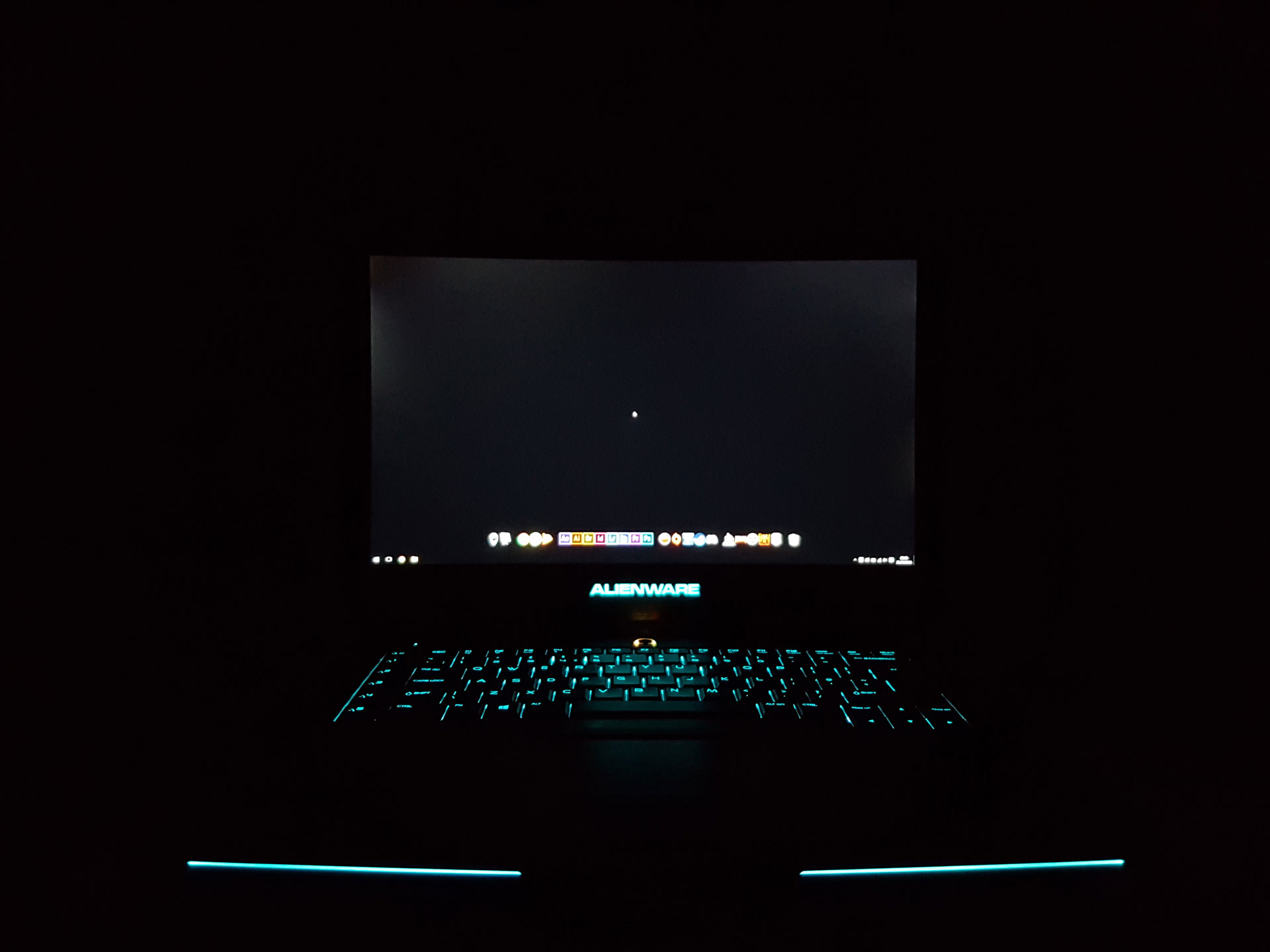
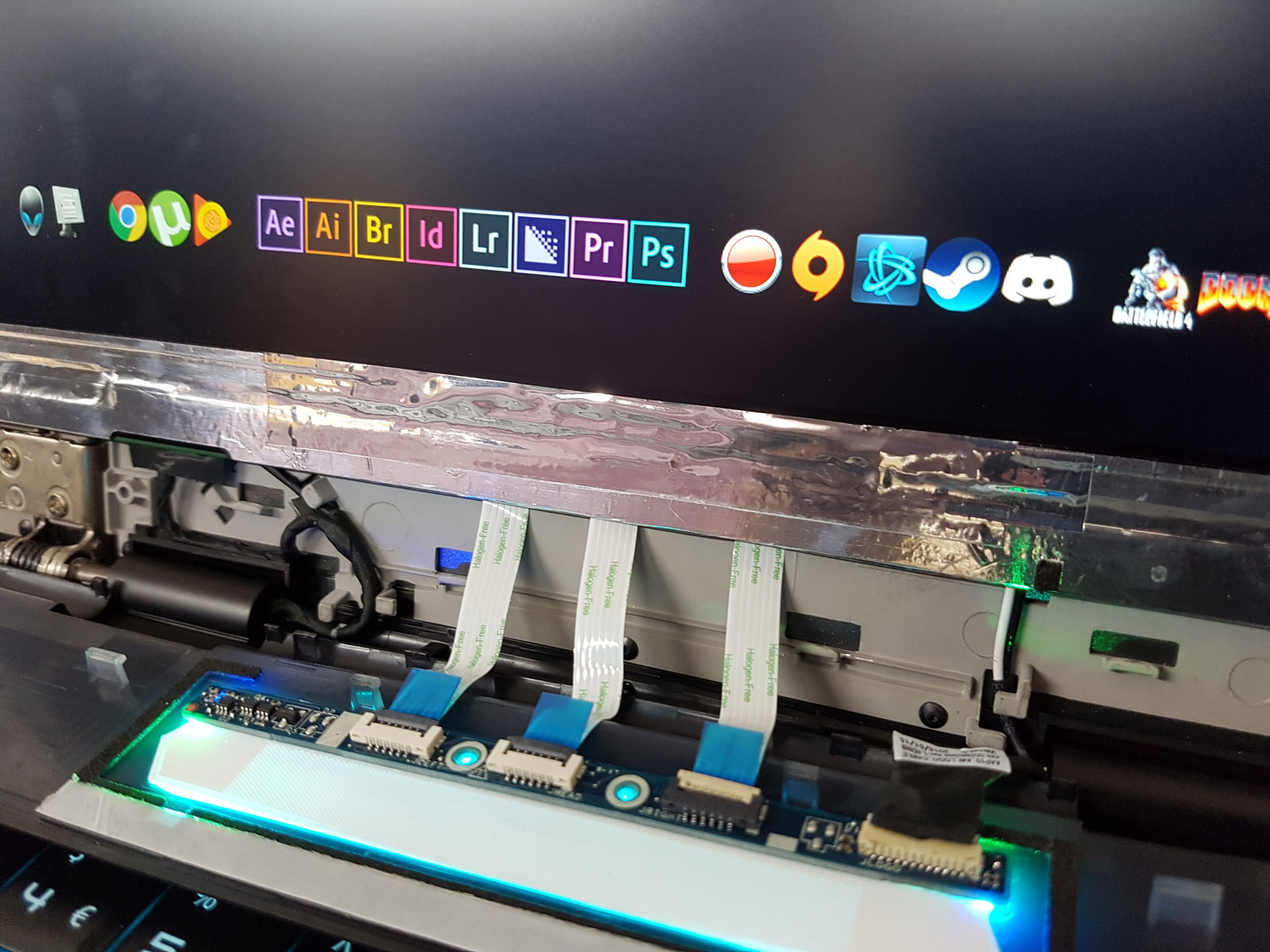
You can fix this, but DELL can't. I spent this week fixing my own.
They sent out a engineer who said it's a design fault and you can't fix it
Damaged the RF film removing the bezel (adhesive stuck the bezel to it)
Improved the bleed 'slightly'
Told me to fix it myself if I wasn't happy and they'd cover damages if incurred by me. Sending a new display and bezel if needed.
Fixed the RF film myself
Fixed the mounting bracket issue myself
Now chasing Alienware for compensation for costs and my personal time, and the cheek to ask me to fix it myself.
photo timeline
light bleed before technician
film damage
light bleed after technician
film repaired + mouting bracket addressed same time
light bleed after my fixAttached Files:
-
-
Hi everyone, trying to confirm here, is 84 C (CPU) and 70 C (GPU) temp high for the 15R2 with 980M on 1440p? Was just playing Battlefield Hardline on 1440p all maxed out and thought I should confirm the temp readings weren't too high.
-
Hello and congrats on the purchase! I am one on those unlucky ones who has had bad experience with the bleeding issues. Long story short is purely on luck the level of bleed you end up with. I had gone for alcd replacement but it was even worse so reverted to the factory one.
As a rule no bleeding is the norm, there is no acceptable level of bleed. Having said that, the bleed is more due to the way the bezel is set with the lcd. Of you mood your finger along the edges the bleed level and location with change. Go ahead try it.
From what I have heard the bleed is less in the glossy touch screen version and more common (along with the yellow tint) in the matte one.
The post above does a custom fix, I can see the results are encouraging but we can't be sure about warranty issues.
Sent from my SM-N9005 using Tapatalk -
I will be making a post on how to fix this today. I was in conversation with dell and wasn't willing to expose how to fix this. If you wait til tonight you'll be shocked and happy by the results
Sent from my SM-G935F using Tapatalk -
Can you please provide the followings:
-Are you using stock CPU/GPU frequencies or overclock.
-Room temperature
-Bios version
-if fan was at max speed or default profile
-Is it stock thermal paste or you repasted yourself.
-What's the position of the laptop (flat, on your knees, etc)
These factors play a significant role in CPU/GPU temps.
Sent from my SM-N910W8 using Tapatalkiunlock likes this. -
Thanks, here's the detail you asked for
-Are you using stock CPU/GPU frequencies or overclock.
Yes, stock frequencies
-Room temperature
27 C
-Bios version
1.2.2
-if fan was at max speed or default profile
I think its a max speed, its much louder, I also got one Opolar LC05 cooler attached to the left side of the vent
-Is it stock thermal paste or you repasted yourself.
Stock
-What's the position of the laptop (flat, on your knees, etc)
The laptop sits on a Havit HV-F2056 cooler -
-
DELL told me to take it apart and fix it myself and took responsibilty for damages should I muck it up.
-
Ok.
Thanks for the detailed post. Will give it thorough read and see if I have the courage to attempt the same. Lol. Am lucky if dell here even acknowledge the issue let alone support with warranty after this diy!
Thanks again for sharing!
Sent from my SM-N9005 using Tapatalk -
Well see what they say, if there anything like the techs i was dealing with they will let you do what you want.
-
I don't have that game but I'll do a long run with Doom on Ultra at 1080 and get back to you with numbers
-
From what i know, even if your ambient temp is high (27C) you compensate by using a cooler. Your temps are a bit high. Things to consider:
-Repaste your CPU/GPU (most important).
-Undervolt your CPU (using XTU).
Hope it helps. -
Hello everyone . Been reading hundred page about r2 screen . May I know what is the conclusion now ?
LG Display LP156wf6-SPU1
LG Display LP156wf6-SPB1
LG Display LP156wf6-SPP1 ( on predator 15 )
All of these using 30 pin so it is compatible right ?Last edited: Aug 3, 2016 -
You would be better off reading through this thread - http://forum.notebookreview.com/threads/alienware-15-r2-display-panel-mystery.783055/
Also, those panels you've listed are 12.5 inch?!
Are you asking about the Alienware 15 R2?iunlock likes this. -
Duplicate..
-
Hello, sorry for being lazy but can anyone point me to a quick repaste howti for the a15 r2?
Also, the only tp I have with me is the prolima tx 2. Should I wait and arrange anything better or would this work?
Sent from my SM-N9005 using Tapatalk -
Click on my signature where it says, "6820HK..." everything you need to know with pictures and also on the OP there is a link to the repaste thread as well.
Powered by: Quad Core Exynos + 6820HK -
Just got done with a 50 minute DOOM session and my hottest core hit 83C. This is bone stock with no cooler in a 23C room. Might need a better repaste done.Last edited: Aug 3, 2016
-
Absolutely. A repaste is a must. With similar ambient temps my max core stays in the low 60's. GPU at 57C under load. Hours of gaming. KF2 and GTA5.
It's worth every drop. A drop on ~20C is not uncommon.
Below is a screenshot after gaming running at 3.8x OC.
When I OC to 4.0, which I run at most of the time the temps stay in the mid 60's.
![[IMG]](images/storyImages/712dec0fece8d0a34a6e63d426ed9778.jpg)
This was before OC'ed at 3.8x:
![[IMG]](images/storyImages/719ab325626a3541daaabfca67d85ab1.jpg)
Powered by: Quad Core Exynos + 6820HKLast edited: Aug 3, 2016 -
Very nice. What paste did you use?
-
Thanks. I went with Grizzly Conductonaut Liquid Metal.
Here is the link to my thread.
If you're going traditional paste: GELid Extreme.
Thermal Pads: Fujiploy 17.0mk/WLast edited: Aug 4, 2016 -
Kryonaut for conventional paste ( or IC Diamond / GC-Extreme )
Conductonaut for liquid metal paste ( CLU is easier to apply ? )
Fujipoly ultra extreme for thermal pads or minus8 -
Ok, some "thermal job" related questions..
1. I have re-pasted my older and still running XPS 15 L501x MANY times. I can dismantle it half asleep now, LOL. Is the A15R2 any tougher to dismantle?
2. Many links here talk about repasting the A17, don't know if the steps are comparable in complexity and execution with the A15R2, but anyone care share an actual A15R2 disassembly video/how-to?
3. What process do you guys use for bench-marking temps? I have an old copy of 3dMark11, is this enough with the HWMon running in background or do I need anything fancier?
4. Call me whatever, but I am not at all comfortable with the conductive Thermal Compounds. How would the "Gelid Solutions GC-Extreme Thermal Compound" and the "Thermal Grizzly Conductonaut" compare IRL? Do the conductive versions justify the risk? I have never been able to understand sadly!
5. If I re-do the paste, do I need to re-do the thermal pads as well, I mean is that necessary??
And finally -
6. If I have to order a 256GB SSD from amazon.com, which one should I get? (I bought the 1TB SATA only version)
Many thanks, as always!
Chetan -
1. I have re-pasted my older and still running XPS 15 L501x MANY times. I can dismantle it half asleep now, LOL. Is the A15R2 any tougher to dismantle?
A: It takes some additional steps, but it's easy. Like yourself I can now repaste either a R2 or R3 half asleep. It's not that hard.
2. Many links here talk about repasting the A17, don't know if the steps are comparable in complexity and execution with the A15R2, but anyone care share an actual A15R2 disassembly video/how-to?
A: It's literally identical.
3. What process do you guys use for bench-marking temps? I have an old copy of 3dMark11, is this enough with the HWMon running in background or do I need anything fancier?
A: Firestrike is pretty common. XTU is okay. wPrime is good...it just depends. HWiNFO64 works great and is a favorite for the majority...
4. Call me whatever, but I am not at all comfortable with the conductive Thermal Compounds. How would the "Gelid Solutions GC-Extreme Thermal Compound" and the "Thermal Grizzly Conductonaut" compare IRL? Do the conductive versions justify the risk? I have never been able to understand sadly!
A: That depends on the individual. If you want the maximum temp drops, there is no other way than to go liquid metal Grizzly Conductonaut and CLLU are the best. Have you seen my thread on the comparison with lots of pictures? Here's the link. As for traditional paste, GELid Extreme all the way.
5. If I re-do the paste, do I need to re-do the thermal pads as well, I mean is that necessary??
A: YES! Absolutely a must. Fujiploy 17.0mk/W are the best we've seen so far...they can be found on amazon. Redo your thermal pads during your repaste while you have everything disassembled.
6. If I have to order a 256GB SSD from amazon.com, which one should I get? (I bought the 1TB SATA only version)
A: Samsung 256GB EVO, hands down. If you want you can also go with the Samsung 256GB Pro. Up to you and depends how deep your pockets are
-
Since BGA processors don't come with the IHS, it's basically delidded. Conductonaut performs only slightly better than CLU.
http://forum.hwbot.org/showthread.php?t=144316
Kryonaut is slightly better than GC-Extreme in this test using an evaporator, and both are non conductive thermal pastes.
Stock Intel paste in between die and ihs + GC-Extreme in between ihs and evaporator = 54C and 5070mhz max
Stock Intel paste in between die and ihs + Kryonaut in between ihs and evaporator = 40C and 5120mhz max
GC-Extreme in between die and ihs + Kryonaut in between ihs and evaporator = 21C and 5190mhz max
Kryonaut in between die and ihs + Kryonaut in between ihs and evaporator = 11C and 5290mhz max
*OFFICIAL* Alienware 15 R1/R2 Owner's Lounge
Discussion in '2015+ Alienware 13 / 15 / 17' started by Mr. Fox, Dec 10, 2014.