 Problems? See this thread at archive.org.
nevermind... it looks like 9.5mm is the max height. Can anyone here confirm?
-
My keyboard not working anymore and I got 1 keyboard with the same part number from alienware 13. The problem is all key working as expect except 2 shift key and I don't why. I tried reinstall windows, driver but no success. Anyone has any idea what cause this problem?
-
-
-
-
There is a own thread about compatible ram for AW in the sub forum.VICKYGAMEBOY likes this.
-
Did you mean 2400? G.Skill is good as they usually have the best timings for laptop memory. The HyperX are also good laptop RAM ...
It's crazy now..laptop RAM up to DDR4 4000 ...IF, the unit can support it. Vasudev and VICKYGAMEBOY like this.
 -
no no i mean 3400mhz not 2400.. i dont think this alienware board will support.. let me check the subforums which papusan mentioned.. the problem is i have a faulty single stick.. so now my turbo boost clocks doesnt go to 3.4 at all.. stuck at 2.6 base for some reason.. due to single channel.. im not sure..
-
Ah ok... keep us posted.
-
I dont know to be honest. I've never exchanged the ram in that model. It did come eith 2666mhz ram in my unit.VICKYGAMEBOY likes this.
-
2400 and 2667 should run w/o any issues using either Crucial ,Crucial Ballistix,Hyperx,Gskill Ripjaws and Samsung OEM RAM.VICKYGAMEBOY likes this.
-
I think something is faulty or try stopping DPTF framework Hub and put it to manual. Reboot or restart windows explorer.VICKYGAMEBOY likes this.
-
so that means on single channel it should boost to 3.1 on all 4 cores right ?
-
Single or two ram sticks doesn't matter. Max boost should work.VICKYGAMEBOY and 0lok like this.
-
ok i just tested once again with single channel ram, after reinstalling OS once again, i set it to high performance mode, now it goes to 3.1ghz all cores.. before it was on the default power slider settings, which was introduced on Fall Creators Update.. But seems my CPU struggles to keep up with my GPU on single channel ram.. all cors full 100% load on AC odyssey. and GPU around 80-90%.. thanks for the info.. now i have to order 3000mhz dual channel from UK or US.. its freaking expensive here..Papusan likes this.
-
it was power profile after all.. kinda weird.. lol..Vasudev likes this.
-
Hey lads. I'm running an R2 with 16gb ram, the original hdd, and gtx 970m.
my problem is that i have several monitors running and the system is sluggish as hell. The monitor layout:
left: dell ultrasharp u2715h @ 2k - 1440x2650 - vertical orientation
center: samsung 43" NU6900 4k tv (120hz)
right: laptop 1920x1080 built-in
When I go to Advanced Display Settings, the samsung is listed at 30hz which makes using the monitor for anything slow, laggy, and very annoying. I'm not trying to game on this as it's far too much for the gtx 970 and i unplug all but the 2k u2715h for gaming. Another thing is that all of the monitors are running the integrated intel 4600 gpu. Would switching to the GTX 970m in bios fix my framerate issue on the center 4k display? -
Try changing Multi display mode from Single to multi display mode.
-
already running in multi display...
-
AFAIK, 970/980M's can do 4k @30 or 4k @25. I can use FHD @ 60 but I don't 4k@60 works on HMDI. I believe TB3 port is utilised with another monitor?
-
Any idea why Witcher 3 has micro stutters on 418.91WHQL driver?
-
i have the game on library but i never finished it... i have to install again and check again.. i guess you are running on version 1.31 of Witcher 3.. Delete CFG and Reload the game.. Disable FSO.. and go to borderless and switchback. those are the tricks back in 2015 it worked.. i only test most recent games..
-
I never changed anything and using same settings as judal57. Some drivers were really good. I will turn off Hairworks and see if that works!
Its the blood and wine editionVICKYGAMEBOY likes this. -
thanks Vasudev.
the 2k is via display port, the 4k tv is via HDMI, and the TB3 (thunderbolt...?) is not being used. -
I don't have DisplayPort on 15r2 so I can't say for sure what it supports. Maybe, @judal57 or @VICKYGAMEBOY knows DP specs?
-
Turned off Hairworks and now stutters are reduced but there are slight micro-stutters and freezing.
-
i dont know how to look the display port version, but it can manage 4k at 60hz on my sony 55" 4k
-
Judal, are you running the 4k by itself and over what kind of cable? HDMI? Are you also running the built-in monitor or another monitor?
-
Just checked the spec sheet and 15r1/2 can do 4k on HDMI,DP and TB3 ports at 60Hz.
-
Hi Guys,
would there anyone by any chance have an old 15 R1 laptop, or motherboard? On my MB one component got burned out - its just an EMI filter, but its really hard to find a replacement.
Thanks a lot! -
Hey Guys,
I have a weird issue with my AW 15R2 (6820HK/980m GTX), did a repaste of the CPU and the GPU using thermal Grizzly conductonaut LM. Indeed GPU/CPU temps were amazing since then (CPU max 80C benching or gaming @ 4.0 GHZ no UV, GPU at 70C Max), however the PCH temps are skyrocking since then (idle at 75C, gaming at 100-106C). Just wondering if i did a bad repaste or if something else is wrong.
Other things that are maybe (or not) related:
Sometimes when gaming with an overlock on GPU (140 clock/180Mem/+37.5mV) the laptop would simply shut down (straight, no message, like the laptop had no more power) and upon restart i see a message saying that the battery is disabled. (i checked my battery, wear level is 34%) and i have to wait some time or shut down again and restart to get it to charge again. It seems that with this overclock the power brick (240W) is not providing enough juice and i can see that the battery is discharging as well during gaming.
Do you guys think that the PCH temperature is causing these issues? i don't want to do a full repaste before i can confirm this.
Do you think that the repaste was badly done causing such PCH temps ?
ANyone experienced these shutdowns ?
Thanks folks -
240W is barely enough even on my config 6700HQ+980M. Try 330W. The battery on our models is rigged by firmware esp. dell desktop charge it kills battery. PCH temps can be affected by ambient temps.c69k and slayer2333 like this.
-
@Vasudev @judal57 Next month there will be a newbios for everyone.. with new ucode and ME firmware.. i have already moved on to ryzen system
ditched intel
https://www.dell.com/support/articl...pact-on-dell-client-platform-products?lang=enjudal57, Papusan, Vasudev and 1 other person like this. -
Exiting news. I dont see any dates so maby dell removed it? Regardless I will update the bios from 1.6.1 to 1.8.0 when available.
Guess it's time to extend my support that expires in June.... -
Good job. I myself am waiting for release of Thinkpad X395/495 with Ryzen 7 PRO. I'm already seeing all heavy IO and CPU processing are getting lagged after applying CC uCode that somewhat fixes MDS but not future exploits which will be coming just like cousins who visits us during summer vacation after the schools are closed.
Meltdown and Spectre was already part of our household and now MDS is slowly becoming new pet to pester Intel HT and ruin their performance by 10-40% on certain workloads.
I tried BIOS patching with CC uCodes and twice it bricked and I had to use older full SPI dump to recover.
I think the version will be 1.7 because 1.8 will be same as of 15r3 and I don't want Dell to ruin my laptop after flashing 15r3 BIOS. Well, I tried running the BIOS but it isn't opening and so does the /writehdr or rom file cmd lines aren't working. -
My bad. The dates shows up on my laptop (June 2019), just not on my phone.
Regard the BIOS number I think you are right. Its two different systems/motherboards so unlikely the BIOS is the same for both. I guess time will tell if there is indeed a typing mistake from dell ore something to be concerned about.
Where did you get the new BIOS from since you already tried it? Just curious
Vasudev likes this. -
I made it using MMtool but with 0% success. It bricked and even SPI flasher was disallowed from writing to main chip, so I had to use alcohol pads to clean the Pins,chip and test clip. For now, the BIOS update is not my priority because more of them will be incoming every month.Last edited: May 20, 2019VICKYGAMEBOY and ThomasAAT like this.
-
So you recommend to hold off this bios update? I am currently on 1.6.1 on my AW17R3, no issues.Vasudev likes this.
-
Actually 1.3.12 with C2 microcode which was again modded to add CC microcode allowed SPI flasher to write many time. I updated to 1.6.1 to fix TPM issues but it didn't fix and modding 1.6.1 with CC ucode actually locked me out from using hardware flasher twice. The chip went to read-only mode which might have reqd. full mobo replacement or just SPI chip.
So, that's why I held off. Prema said CC uCode is not wrecking Skylake so I used VMware ucode patcher to update the same on windows and Ubuntu microcode patcher for Linux.ThomasAAT likes this. -
I understand. I have just flashed as normal when the different bios versions have been released. So I guess its no higher risk of bricking this time. But I will wait some days and see the feedback. They cant screw up as bad as last time!(??) never know, so better safe than sorry.
Vasudev likes this. -
Very interesting timing. Today I finally updated my BIOS to the latest (part of a spa treatment the R2 got) today and thought this must be the last one it will ever get. Its good to see you still around. Thanks for the heads up.Vasudev and VICKYGAMEBOY like this.
-
Well... what is the best way to disable Hyper-threading? Can XTU do it?
-
Bios
-
As I know there is no such option in my bios.
-
We don't have that option in BIOS. Only M15/17/A51m has them and possibly 17 r5.
-
-
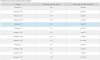
Hmm, I was of the impression that the 1.7.0 BIOS was the final release, but Dell has changed the date and it now says there will be a 1.8.0 BIOS in Aug 2019... Whats up with that? Something strange this and the BIOS numbers dont add up on multiple systems (I have compared the newly released BIOS's on all the Alienware models and most dont mach the number provided on that page. Like AW 15R2/R3 got 1.7.0, dont 1.8.0 same as with 17R4/15R3.. so I dont trust it)
You know @VICKYGAMEBOY ?
 Last edited: May 31, 2019
*OFFICIAL* Alienware 15 R1/R2 Owner's Lounge
Discussion in '2015+ Alienware 13 / 15 / 17' started by Mr. Fox, Dec 10, 2014.


