Problems? See this thread at archive.org.
OK didn't know. I'm on 416.81 whql.
-
-
416.94 with the latest GeForce experience will cause system freezing, randomly or when alt Tabbing, specially on October update, im satisfied with 390 series drivers, im sticking with that, all the latest games works fine, so no need to use a new driver.. but anyways ill just try if anything new shows up and compare benchmarks..
-
Cant boot bf5 with older drivers and blops4 has major stutters on some maps with old drivers. So for those i def recommend the latest. (at least for the 10xx series and up)
-
Yes for Blackops 4 Specially, COD games are always like that, and for HITMAN 2 as well.. But You can See the Difference in Older Driver, Specially the Frametimes, Nvidia cards have horrible frame times.. I have used 416.94 for 2-3 days.. I tested few games, its not looking good...Vasudev likes this.
-
416.94 and the one before where good for me. the one before that for the 20XX launch have been quite bad. But thats on the 1070. No clue how they run on the previous gen.Vasudev likes this.
-
Tried out various drivers and also did a clean install for a couple of boots it was working fine with just plain windows and nvidia driver installed but since I have to be connected to the internet all the time I couldn't hold off windows from installing whatever driver it wanted to and voila! welcome back throttling.
I see considerable performance drops and it is infuriating me that if I stop CPU throttle GPU will Power throttle and if I enable CPU Throttle then the GPU won't.
If you were me, what would you have done?
I can't just keep formatting everything over and over again.
Setting up dev environment is a big pain in the side.Vasudev likes this. -
The gpu is perfectly fine, see the AC Odyssey benchmark I posted a few posts back. Not bad all things consideredVasudev likes this.
-
Try BIOS recovery on USB stick and make sure to Reset BIOS to defaults. Also, remove the RAM chips,K/B cables etc.. and re-attach them. You can do a power reset too.
Make sure no AW apps run in background such as Dell support assist and the like. -
Tried that too
have reformatted right now and installing just the nvidia driver now
have already reset the bios to default and removed thw coin cell battery too for that.
Will update after the driver install in 10 mins.
really looking forward to blocking all sorts of driver installs either by os or me coz I need to get this resolved.
thank you everyone for your input just bear with me for a while more -
UPDATE
It's definitely the BIOS then
having troubles even with just the nvidia driver installed and clean windows.
isbthere any tried and tested bios version I can rollback to? (if that's possible) -
This is ridiculous
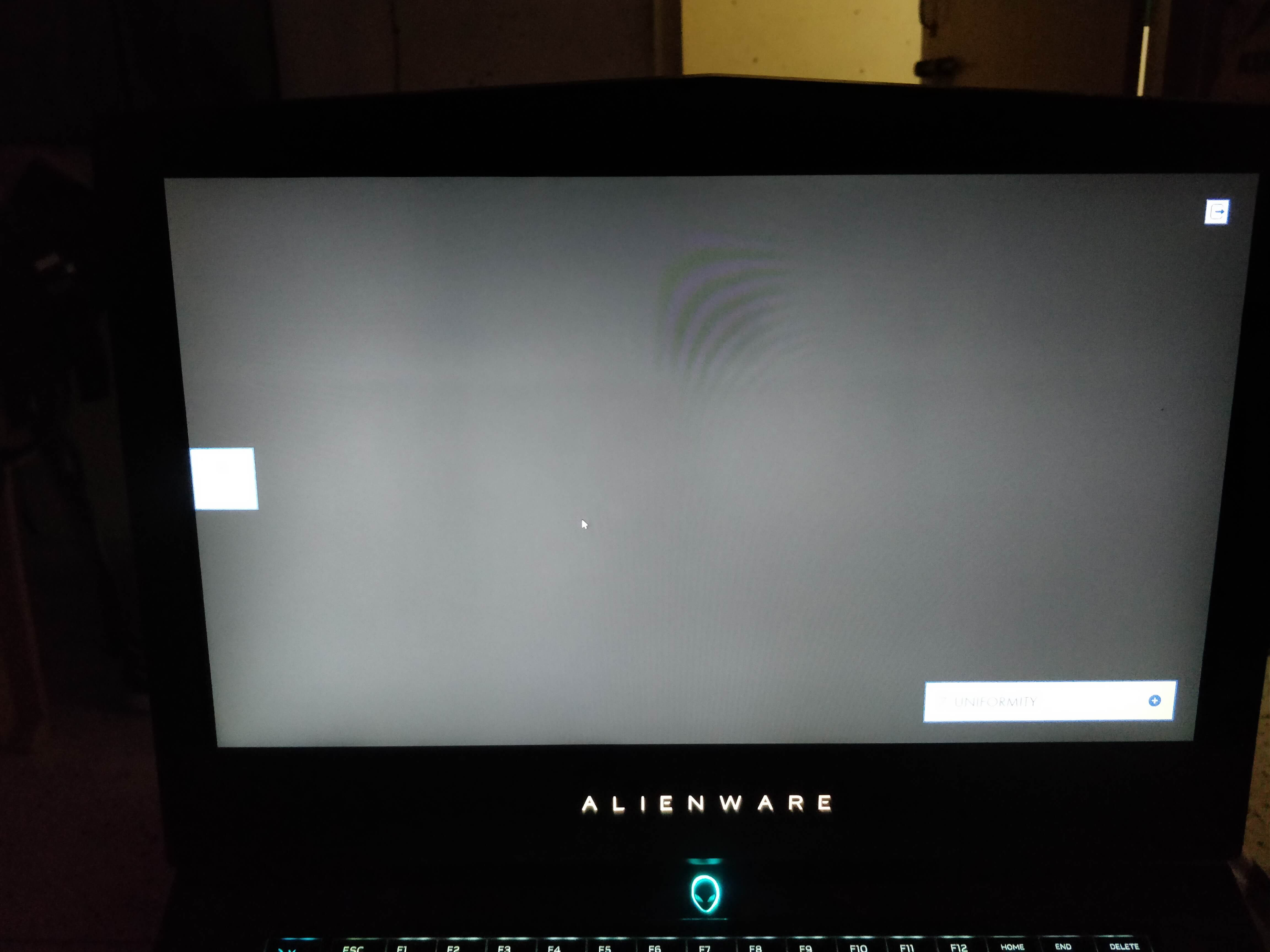
Just noticed it today. I seem to have shadows on my screen at the middle.
@Vasudev @VICKYGAMEBOYAttached Files:
-
-
I think somewhere LCD cables are pressed too tightly and I see some light bleed.Last edited: Nov 24, 2018
-
How should i go about fixing it?
-
Any details you missed when you repasted the laptop? It needs a full disassembly.
Maybe its time to ask dell for mobo replacement. -
I think I probably did it all fine.
and I have broken a clip inside on the fan mould and also have severely scratched the left hand side connector which holds the side led strip, the screw is stripped now. Had a stripped screw on the heatsink as well but after some tooling it came out. So in short the internals are pretty evident of being opened up.
So I guess I am out of warranty now What do you think?
-
Then claim it under accidental warranty called ADP. Tell me the temps were worse even after dell techs repaired and I had to do it myself to reduce the temps by 20C and during that, parts broke.
-
Dell Says the computer is working completely as expected and the Stutter fault is not their fault as the temps are NORMAL and the Clock speeds are going upto EXPECTED speeds!!!!
So no Mobo Replacement and for the screen uniformity issue they said it is more of an issue of the TN technology rather than the panel as most of the panel have it and a PERFECT one is RARE because of the manufacturing process
Okay, so now? WTF am I supposed to do with all the keyboard stutter and the annoying dark spot on screen.
2.5Lakh Rupees WASTED. NEVER EVER Buying an Alienware. NEVER.
@Vasudev @VICKYGAMEBOY Guys please help me out with the keyboard issue, I have tried nearly everything to my knowledge still no fix at all.
Vasudev likes this. -
there is only little hope left.. buy a new keyboard from aliexpress or ebay for cheap.. it will come with new cable.. try out.. you cannot point at particular hardware at this time.. for your screen.. i just feel its faulty.. the backlight sheet may be damaged i guess.. dell is still best when it comes to after purchase support.. comparing other brands.. but their technical teams are ******** who doesnt know how things works.. i never owned a newer system.. so i wouldnt know.. you can ask @rinneh he owns newer models.. and may be @iunlockVasudev likes this.
-
-
-
But none will buy it and price will be too low too.
My laptop was quoted just 300$ after 4 months when its cost price was $3000.propeldragon and VICKYGAMEBOY like this. -
I checked the cables are alright and I don't feel comfortable about the fact that I should be doing such extensive part testing for something relatively new and in warranty.
Terrible market prices
True! Can't sell it my parents will butcher me. Still a long way from starting to earn so can't make such "independent" decisions.Vasudev likes this. -
Hello I plan to repaste my AW15 R3 (6700HQ + 1070). What size (thickness) of Thermaal Grizzly Minus Pads do I need?
-
@Vasudev @VICKYGAMEBOY I have arranged for a replacement for the screen however the dell guy on phone told me that the dark patches will be solved through a replacement however if there is light bleed chances are it won't be fixed through a replacement. How should I go about this process so that I don't end up having worse light bleed issues and a poorer experience overall! Please help ASAP
-
The screen quality is unpredictable. You need to check it yourself with a slideshow of images/videos to check screen quality. As for light bleeding there's a 80% chance you might get a worse display with lightbleed and good overall screen w/o any blotches.
-
So should I move ahead with a screen replacement or not? I don't want to get a worse screen than I already have. Isn't replacement supposed to fix things rather than breaking them even morec69k likes this.
-
Go with the replacement and you can ask for yet another replacement if you're unsatisfied with screen qualityc69k likes this.
-
Is there anything i should be careful about with the technician so that nothing gets broken or gets even worse
-
The WLAN antennas,LCD display cable,Mobo cable and those fragile macro key cables. Check if the LCD screen is sitting flush within the plastic housing of LCD assembly.msri15603 likes this.
-
LCD is just luck, if you have really good chance you will get a panel with minimal backlight bleed.. its common on these panels.. some have more on top left.. some on bottom right.. also it depends on the pressure of the LCD back and the bezel..
-
So the dell tech came in today and brought a new screen
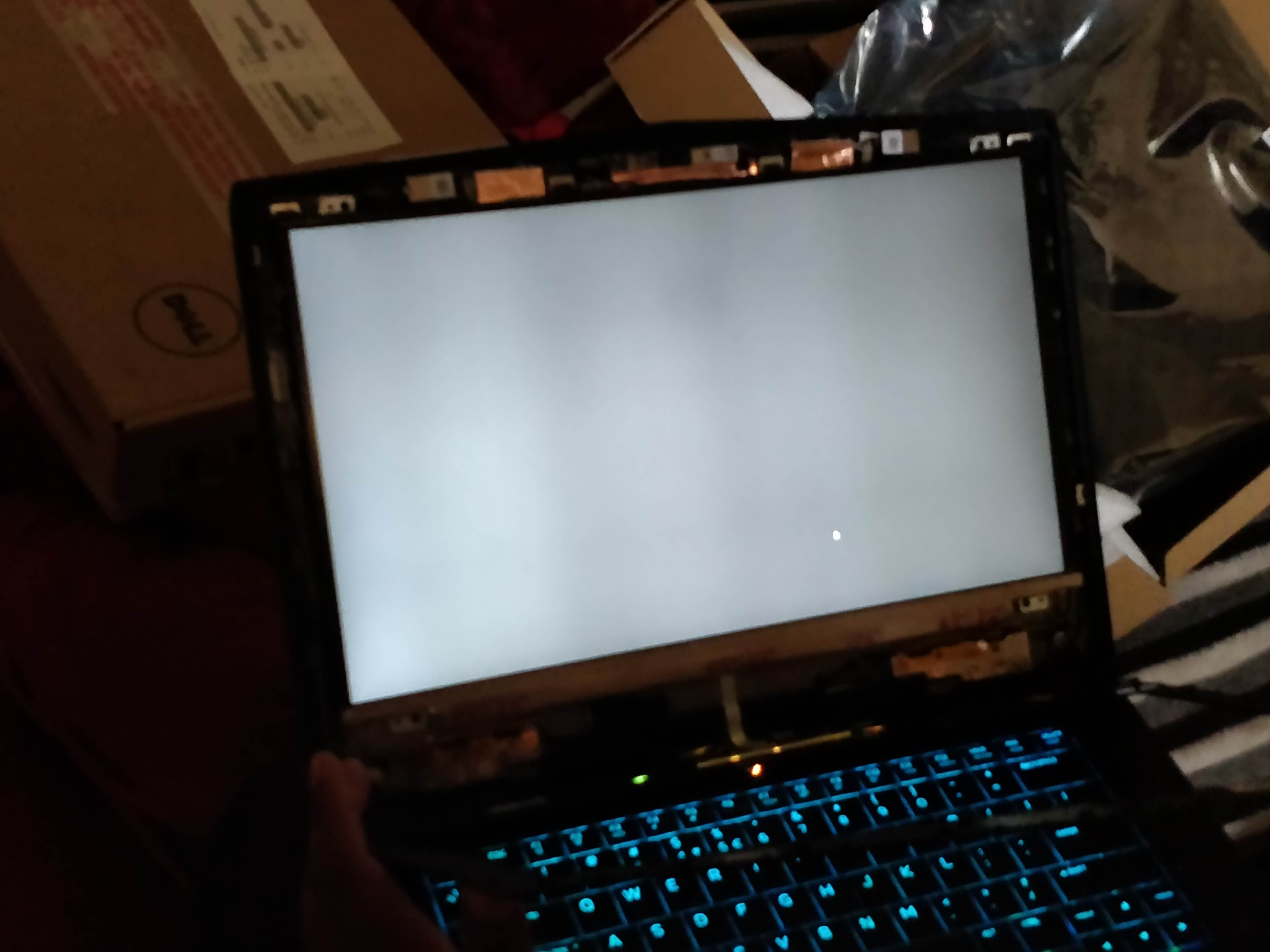
This screen is even worse in terms of dark bands and I had to place a new product replacement,
Returned the new screen and had my older one installed compared to this crap the older one is still better.
Here is the new screen I clicked while He was replacing the panel, the flaws are immediately noticeable.
The tech that came advised me to request just one more replacement and if the issue isn't resolved then learn to lice with it. I don't want to considering the money I have spent on this machine. Any advice from you guys?Attached Files:
-
-
Its absolute garbage and way too bright even when seeing the picture at 50% brightness.
-
Waiting for the next one :/
HOW DO I LIVE WITH THIS **** -
-
Might be a cable shielding issue. Request a new display cable too.
-
Any thoughts on this custom heatsink? I feel like I've seen something like this for the 17 R4 before.
-
Pardon the ignorance, but what makes the heat sink custom or different from OEM? The listing suggests it is a direct replacement making no mention of any improvements/benefits over stock...?
-
There are some differences between this heatsink and the OEM. The top CPU arm looks stronger, for one. In theory, this would minimize the core differentials.
It also uses vacuum copper, whereas the OEM 15 R3 heatsink doesn't. In theory, this should help lower overall temps of GPU and CPU.Papusan likes this. -
its a scam, the photo you see there is just R4 heatsink with a R3 arm. The copper is exactly the same. For the 17R4 they released a version where they repurposed the R5 version to fit the R4 @Rei Fukai had one for example. In the listing for the 17R4 they where showing an unpainted version of an R4 heatsink but you would just receive the R5 heatsink.
If you do have core temp differentials. use a 0.3 to 0.4mm copper shim in combination with Gelid 0.5mm pads on the CPU VRM's and in general you will have higher pressure from the heatsink because of the shim and this equalizes the pressure.
Recently I did this on a machine of a friend of my and it has been doing very great. He had one of the earlier heatsinks. I did change the screws for the heatsink as well though, because the standard screws are a tad too soft for the pressure maybe. So I used stainless steel screws which tend to be harder. -
Interestingly enough, I'm already using a copper shim on the cores most affected. Although I'm still using Arctic Pads since they were most convenient for me.
But okay then. Good to know it's not what it seemed to be.Vasudev likes this. -
So after a long chain of emails and screenshots I'll be getting these parts for replacement
- top lid +lcd + bezel for the display issue
- heatsink for high core temp differential
- keyboard for that weird throttle when using the keyboard.
@Vasudev @VICKYGAMEBOY would like your input on this and right now the current state of my system is that at 3.7ghz all cores it reaches a max of 90 on the hottest core and 81 on the coolest with gpu at 68.
So how should i go about the replacement so that I don't end up with a poorer heatsink than what I currently have. How should i go about testing it too?
Using noctua-nth1 btw.
And also I have a stripped screw inside the laptop not that it won't allow for disassembly but it is where the bottom led strips are attached so that cover doesn't completely come off but I can rest it against something and open up the mobo. What should I say to the dell tech so that I don't find myself out of warranty.
Awaiting your responses. Thanks!Vasudev likes this. -
If you have same problems even after 3rd replacement demand full system replacement.
Let the tech open it up and repair it. Anyway be careful and make sure disassembly won't break working parts.
Try IC Diamond or coolermaster mastergel maker. -
Asked them for a replacement and they said that they will replace parts but won't replace the system since it has been a long time since purchase.
and about letting the dell tech open it up, should I just play dumb about the stripped screw inside? And is there any specific heatsink revision I should be looking at for a better core temp diffrential? -
After 3 unsuccessful repairs a system will be replaced with new one which is marked as refurb but new PC.
If they play dumb its time to play your part and deny anything tech says. -
I would suggest against any sort of shim whatsoever on the CPU/GPU heatsink.
The reasoning behind it:
tolerances are already tight. I know for sure that the heatsink is not making contact with the dies, hence it must be sitting too high above the die, obviously. The thing is that, the pads, if they are of the wrong height ( if someone recommends 1mm Fujipoly on the VRMs above the GPU, that is just a broad approximation, your heatsink might be a bit in or out. here recommended does not equal right for your machine) they will further create more gaps. Don't lift **** up, and don't put pressure on that motherboard, its Dell, they already chose the cheapest Chinese manufacturer, how far do you wanna push it?
by adding shims, you are further pushing the heatsink up. SO if the heatsink was not making contact with the secondary chips before, now you made sure it wont any more with some of those chips.
my advice: the heatsink head over the CPU needs adjustment if you have CPU differential. Bend it a bit, and try. it is soft metal, it will bend easy, just don't break ****, be delicate. Bending the arm up, to create more pressure does not work wonders either. -
Have tried that before. Didn't work out in my favor. And despite having a spare heatsink to work with, I don't want to risk it.
The shim method works for me (only tried it as an experiment rather than being recommended it) because the core differentials are about 2 to 4 C, down from the at most 10 C I sometimes got. I chose to place it where the heatsink wasn't making much contact on the affected cores, not on the whole CPU. If it was the whole CPU, then there'd be no difference from pre-shim. -
oh awesome! I thought you were still having issues.
I don't consider 2 to 4 degrees C to be core differential, really. I haven't seen any machine that did not have differentials in that range. The whole chip cant be the same temperature obviously.
how long have you used this setup for now? I mean the shim and all? -
Uhh.... A couple months ago, I think? Probably a few days after I upgraded my M4800's GPU that needed a shim. Still use it to this day.
-
@Vasudev @VICKYGAMEBOY @rinneh So after the third service I could OC to 4ghz all cores locked with a -150mv undervolt and gpu locked to 1886Mhz. This is all after a heatsink change(sunon) now, the top cover's alienware head logo has lost it's lighting again and the screen patch appears to only occur when the alienware head is lit else the screen has no dark patch over that spot. The keyboard throttle is still there after the keyboard replacement.
A screenshot of my temps after some time of ME:A and BFV at Ultra 1080p :-
Throttlestop settings :-
So my question from you guys is how are my temps now?
Should I push for a replacement laptop that will be a refurb as you guys mentioned or have I attained acceptable temps through traditional thermal paste (Noctua NTH1).
PS: The temps don't go past 80 when on 3.5Ghz
I want everyone's advice on how should I go about everything now, should I clock back to 3.5? or stay at 4GHZ? are the temps fine now considering I am not using LM? Also, do note that the core differential issue is kinda worse than before, earlier it was 8C max but I had temps shooting 88C with 3.6Ghz with the old heatsink the new heatsink allows me to maintain 4Ghz during gaming at the temps I have shown above.
Also Indian Users, how bad will the temps be during summers now considering I am hitting 89C right now? I fear I'll throttle then.
Eagerly waiting everyone's responses!Vasudev likes this.
*OFFICIAL* Alienware 15 R3 Owner's Lounge
Discussion in '2015+ Alienware 13 / 15 / 17' started by katalin_2003, Oct 24, 2016.