Problems? See this thread at archive.org.
Consumer Dell in Europe is usually not a great experience, they only really care about the pro market here..
You would be better off with a Clevo or MSI laptop..
-
Not in my experience, always have been assisted very well in the netherlands.
-
Also in Canada using Alienware phone support in english.
Envoyé de mon SM-G935W8 en utilisant Tapatalkrinneh likes this. -
So reading these forum posts after I purchased an Alienware 15r4 I was a little scared I would have thermal issues. I ran a stress test for about 10 minutes and went into the Alienware command center and first had it set to performance. It started to overheat just a little then I set thermal to full throttle and temps went down from 92 and one short lived peak of 94c to around 59-62c. I am not sure how long to run the test but I just didn't feel good leaving all 6 cores at super high clock speeds for a long time. However the cooling system seemed to handle the load once the fans were set with no problem. No throttling and temps were consistent around 60c. I think that is pretty good. Now real world performance with GPU stressed along with the CPU may yield different results and I may try that next but for what I do I think the cooling solution is fine.
I got mine with 16gb ddr4 2666 ram, 256 GB nvme ssd, i7-8750h and ips 60hz gsync display. So far I am pretty happy. I had bought an Asus ROG Strix GL703GM which had very similar specs but a 120hz WVA TN panel. Cooling seemed worse on the Asus but overall for the cost it was a nice laptop. It was 17.3" vs. 15.6 and the funny thing is the Asus was slimmer under an inch thick and lighter with a mostly plastic build. So I took the Asus back and am going to keep the Alienware. This is my first Alienware so I had no idea what to expect.
Just thought I would give my experience so far.Last edited: Jun 2, 2018 -
After reading through this thread not sure if I want to buy the new alienware 15 now...Was on chat with support got them to bring down a 120hz 1080p w/ GSync and 1080 to $2999.99 pretax but not going to pull the trigger if the thermal issues are still there.
-
How are you able to go back to 60hz? Once you go 120hz there is no going back.....LOL going back to 60hz makes me feel like the pc is lagging or there is this kind of delay to it.shashank066, Kalen and Pete Light like this.
-
Got AW15r4 i7 8750h/gtx1070/256ssd/16gig
Donwside : ips 60hz no-gsync. Someone know if any screen ips 120hz will fit or AW have specific bracket position.
Envoyé de mon iPad en utilisant TapatalkLast edited: Jun 7, 2018 -
I just got a Alienware 15r4 going from a Alienware 18 (2013 version)
My 15r4 has 16GB ram, i7 8750H cpu, a 256 m.2 drive, and I switched out the 1TB data drive for my older Samsung 512GB SSD drive.
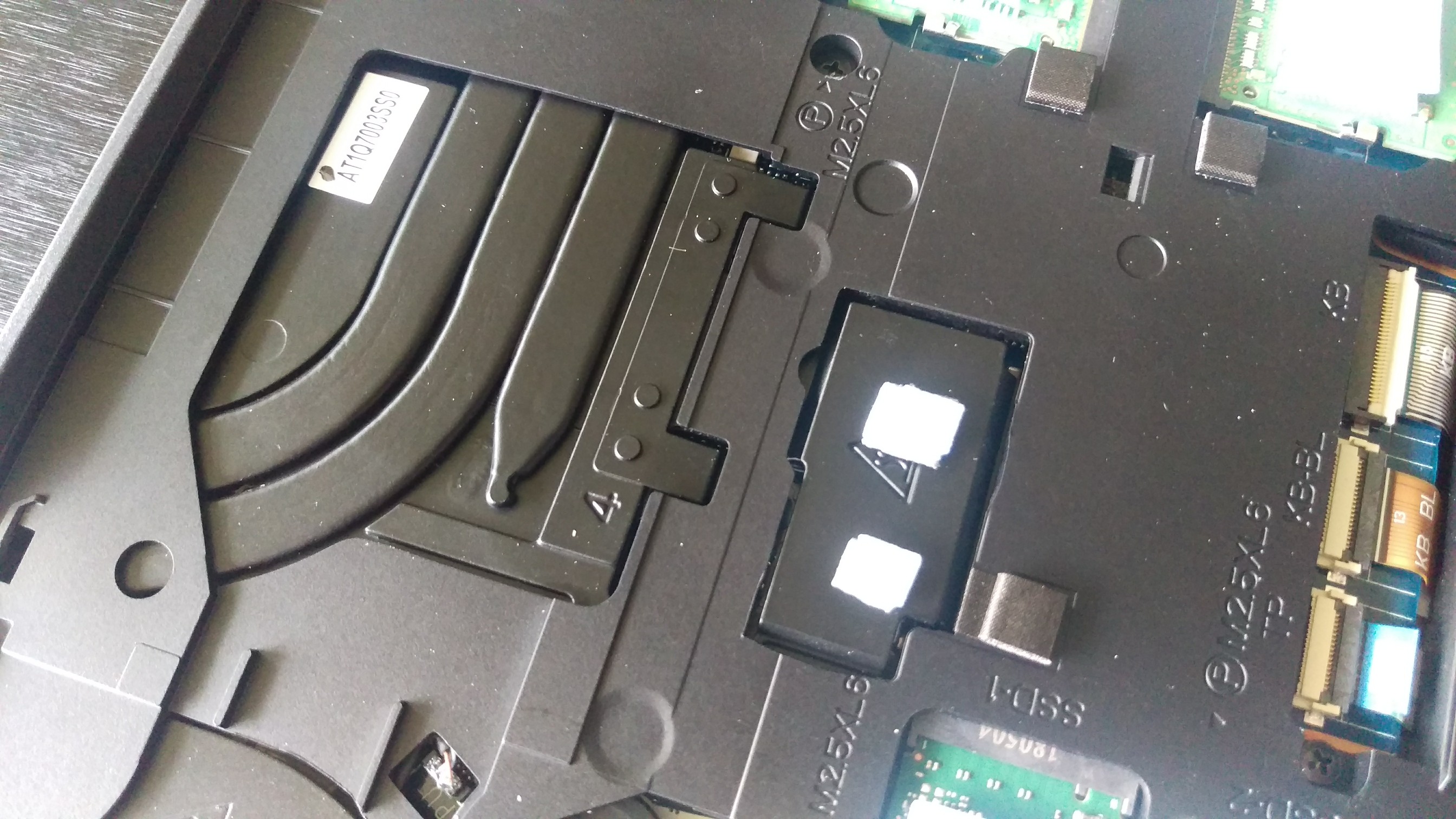
Does anyone know any mods we can do to be able to stack that 1 2 and a 1/2 TB drive back to back with my 512GB SSD drive? Or where can I buy the two other open disco
Drives that fit into these two open m.2
Spots as seen in this photo. As you can see one is longer then the other . -
Oh for those who want to know the 330watt power supply from the Alienware 18’s works perfectly with the 15’s. Not that you would want it but if you one day add new parts that require more overclocking power it can be used
Pete- 7r0jan likes this. -
So I got my Alienware since few weeks now, and I’ll give you my feedback like I said before with the new VivePro.
Everything is really cool and easy to use.I have actually no issue using my Vive Pro. In process with this coolpad, GPU never goes up to 55’celsius and CPU 60’celsius. Don’t think to use it without a coolpad, I tried one session and I won’t do it again. It was painful for the laptop.
To conclude, I’m glad to have those two beast under my roof. One of them keep me warm, now guess witch one it is???
...for the setting be ready to buy a male male mini display port, that all you need to go to heaven! My Gtx1080q love it..cheer broLast edited: Jun 11, 2018 -
I was gonna buy the 15 R4 and return my 17 R4. But after reading about all the thermal issues on the new 15 I think I'll hang onto the 17.
I "only" have a 7700hq but at least it has reasonable thermals. I did a stress test with very bad airflow (system was flat on the table) and the highest temp I got was 86C. But all cores stay below 60C during everyday use. -
Hi everyone! I'm super happy with my AW 15 R4 (8750H, 1060), however I have noticed something interesting and would like to see if it's the same in your systems.
My proceesor never goes abover 3.9ghz. I have set the multipliers to 41 in Throttlestop, but the multiplier remains at 39 max during Cinebench test for example. ¿Shouldn't it be able to go up to 4.1ghz? I have also tried the TS Bench with 4 threads, and the result is the same, it won't go above 39. Is this normal or at least the same in your laptops?
Thanks a lot -
I haven’t had any thermal issues at all. I even set my fan curves extra low with hwinfo and even during gaming they barely fire up. I was expecting a hot chip since the i9 -8950 is a 6 core but for whatever reason it’s been fine. I have been running it stock as well as my 1080 with a +200 overclock. The i9 says boost 3.0 on the i9 is supposed to hit 5GHZ on the two best cores but highest I’ve seen the i9 go was 4.8ghz without me touching anything .
Mind you I am using HWINFO . With aggressive fan speeds. I recommend everyone using it. Anyone who has owned a alineware 18 it was a must to use now with the 15 it just kicks ass. -
-
I foolishly tried to pull out my Alienware r2's lovely 4K Sharp panel and may have broken part of all of the assembly. The panel has amazing colors and beautiful 4K. It is also a glossy touch screen panel. The assembly is such that there is a glass panel all over the surface of the side opposite the lid. The glass goes nearly edge to edge, covering the front bezel and Alienware logo at bottom center.
There is a gap between the lid and the glass panel, and prying that opening all around the edges separates the lid from the glass panel and the LCD display behind it. When you pry this assembly apart, you see the back (silver color) of the lcd panel, and you see where all the cables are connected.
There appears to be some sort of adhesive underneath the black tape that surrounds the perimeter of the panel that keeps it bonded to the glass panel. When you break that adhesive/glue, you can see the lcd panel and 2 plastic sheets in front of the panel.
When you lift the lcd panel off and away from the glass panel and then look at the glass panel, it's dark and not see through, and when you touch it, it's smooth as glass.
I reached a point after disconnecting all cables and removing the lcd panel from the glass panel (bonded by what looks like glue), I got scared and wanted to see if the panel still worked, so I reconnected all cables, snapped the glass panel assembly back onto the lid assembly and powered up the laptop. Now, I don't see anything on display except a dark display, with the exception of the lowerright, which has some cracks where the LCD panel's light is shining thru. When I look at the LCD panel, it is lit up but no images appear.
It appears that there is a ribbon cable that connects to this glass panel, so maybe it is what reads the touch inputs from the glass panel and transmits that thru the cable to be interpreted?
When I saw that cable was attached somehow to the glass panel, I got scared and realized this wasn't going to be as simple as I thought.
My questions are:
1. I don't see any images only the lcd panel's backlight on bright.. can I assume the panel still works though?
2. If yes to #1, can I remove it and use it on an Alienware 15 r4 (which came with a matte 4K panel by AUO)
somehow? Do I have to disconnect touch-specific modules/cables for it to work? There is no glass
panel on the Alienware 15 r4, it is just a bezel with no glass over it. If I were to take the lcd panel from the
15 r2, would I remove the 2 thin sheets of whatever that is in front of the lcd display? what are those for?
I wish to use it as a non-touch on the 15 r4, because I like the color accuracy better.
3. can I salvage the 15 r2 damage done, by buying a cheap panel off eBay and installing it for non-touch
display? Would I have to break off the dark glass layer that is immediately on top of the clear glass touch
surface? It seems opaque and I cannot see thru.
Thanks in advance! -
Just a heads up best buy has these on sale for 1600.
https://www.bestbuy.com/site/alienw...lid-state-drive-black/6239219.p?skuId=6239219 -
I have read the specs, in 2 cores it should go up to 4.1gHz
-
-
Nah macrium reflect is what you want. Can recover that from within windows!Last edited: Jun 25, 2018Vasudev likes this.
-
You can control boost by pushing too fan on the undervolt which is a neat little trick. Obviously you see this hence the 3.6 frequency.
-
yep I have an XPS 15 9560 as well and it's a really capable 1080p gaming machine. With a little work you can comfortably run AAA titles like PUBG and BF1 at 60fps on high or medium settings! A great little laptop and that display is beautiful for work too.
hi there. I have quite a lot of experience with LM and in my view it's worth balancing the heatsink perfectly before applying it. Also you really don't need much at all. The amount shown in @iunlock s guide is accurate, anymore than that and you risk it leaking out onto your motherboard or just not working as well! The reason your results are not that impressive is because your heatsink isn't properly balanced. If there is not close or even contact then LM doesn't work to well and can even be worse than traditional paste under these circumstances
wow ok not good. What's you're GPU temp like out of interest? You have a very poor contact between CPU and heatsink. I.e. it's too far away. Did you add extra pads our anything?
I'm very happy with mine! There is hope I believe, whilst it's an extra cost or effort. A proper repasting, repadding and rebalancing will completely resolve your tree LM issues. good luck!
probably power limit throttling. Check with hwinfo and lock for the appropriate limit reason. Have you overridden your PL1 & 2 limits in BIOS?
1080will hot the same temperature limits in the VRMs as the 1060, it well just have more of them...c69k likes this. -
Yeah like 1 more vrm lol. Why wouldn't they have the same? There the same vrm in all the laptops, just quantity is different in the 13,15,17. BTW I've never hit the temp limit on my vrm. I just don't like hot spots on my keyboard.
-
VRM are the voltage regulators sitting around the GPU and the CPU ? I am being slow here, what exactly do you do to control their temperature?
-
Yes but I'm specifically talking about the gpu side. Nothing software wise except undervolting. Making sure proper contact is made with the heating. You can put some thermal pads on the backside of the heatsink where the vrm is so it touches the aluminum base but you have to use low w/mk thermal pads or the bottom will be SCORCHING hot.c69k likes this.
-
A bit confused again.

From the various heatsink photos I have looked at, the heatsink covers the VRMs and other ICs and there is a thermal pad as the interface. I understand that you want to make sure there is proper contact between heatsink and VRMs. I do not understand the last bit about the using low thermal conductivity pads or the bottom will get hot? You mean the case of the laptop ? Isn't that what we are trying to achieve , get the heat away from those ICs? -
Yes the case, the bottom aluminum base will be hot. Yes that's what I'm trying to achieve but I don't want my vrm that is around 90c transferring to the base with 17 w/mk Fuji poly which will cause the base to be really hot. If you use 6 w/mk arctic pads it won't transfer most of that heat. So it will just be warm instead of scorching. This mod is for people with laptop coolers in mind. C96k knows how hot it can be. If you don't have a cooling pad, arctic pads can even transfer too much if you use a wide thermal pad. I'll post a picture of how I have it on my system.
c69k likes this. -
I put 2 small squares of thermal pads on mine but I need to do more experimenting on my system to see what works best. Type of pads and area of coverage (stripe vs 2 small pads). Picture is a 13 r3 so don't get confused.
Attached Files:
-
-
Alright I am in too many threads and keep getting confused. To summarise, we are trying to cool down the VRMs, we have not put a thermometer on them (I mean with wired sensor, not IR), but we assume they go over 100C, their heating up may contribute to GPU throttles but we have not shown how ( software? hardware? ), we know for a fact that the heatsink many times does not make good contact, and we can improve matters by attaching thermal pads between heatsink and back cover to let the cover take some of this heat, but not too much ?
propeldragon likes this. -
Well if you notice prochot being triggered it could be the vrm (was in my case) and my gpu and cpu temps were in the low 70s. I 100% know my system has vrm over 90c when I game. I believe when prochot is triggered it will affect the whole system, someone correct me if I'm wrong here. Yes attaching thermal pads between can help. Moderation is key. The last couple of generation of alienware laptops are pretty similar to each other.
-
The difference between arctic pads and for example thermal grizzly minis pads of 12wmk is only 2c under load. That the thermal lroperties are twice as good doesnt mean the temperature will be twice lower. Also pressure and hardness matter. Fujipoly pads arefairly hard so the pressure isnttoo good.
-
I own all 3 thermal pads those few degrees to the bottom base does a lot. I can feel it with my hand.
Vasudev likes this.
-
Well I cannto confirm this, have tested the Gelid pads, Minus pads and Arctic pads and all offer with the right thickness & pressure similar results. My palmrest isnt warmer or more cold with either of those pads. Havent measured it with a temperature sensor. The bottom panel hardly becomes warm with all pads. Too much air between the heatsink and the panel itself for it to have a real effect. The hottest spot on my laptop is next to the left arrow key on the palmrest and thats because of thsoe voltage regulators underneath that arent covered by a heatsink.
-
Thinking of getting a new Alienware. I need it somewhat more portable so I think I'm goint from the 17 R4 to the 15R4!?.
I was wondering what runs hotter in this chassis..1080 MAX-Q or 1070 OC? I REALLY want to have the system as silent as can be... as I do a lot of hours working and to some extend Gaming at night in our bedroom (which is where my desk is). Has anyone any comparison on that? Plus.. is there a version with Optimus here? The 4K option? How is battery life when turning off lights and brightness down etc.. -
Are all these Alienware R4s having heating problems?
I'm a noob getting into pc gaming, and my AW 15 R4 will be delivering Monday. Been reading this thread , and now I might be feeling regretful:/ -
These are my findings too on the Alienware 17, used IR thermometer on keyboard and screen area, the previous laptop (which I returned) rose up to 52-53C right next to the right shift key, this one is at 45C, I will try to do it more often in case it rises, but this is a much better laptop anyway, its thermals are so much better out of the box.
-
Can someone please tell me the panel name of the 1080p 60Hz IPS G-Sync on Alienware 15 R4? Need to swap my 120Hz TN to IPS. Any 15 R4 owner with 60Hz IPS?
Found it posted a few pages back.
B156HAN06.0 HW2A (AUO60ED)
Part Number: Y502XLast edited: Jul 3, 2018 -
I did a quick search - but can someone confirm. I'm getting the Alienware 15r4 and also bought a WD Blue 3D NAND 2TB M.2 stick as additional storage. The Dell spec pages say each M.2 slot supports 1TB max (including the 2.5" drive bay!). This limitation seems odd, but before I crack open the new WD Blue drive - can someone let me know if the Alienware 15 supports 2TB drives on the M.2 slot?
-
I have a 2TB HDD on the 2.5" drive bay and works great on my AW 15 R4, I'm sure the SSD will also work
-
I didn't found those settings in the BIOS.... other users with AW 15 R4 or AW 17 R5 have reported the same behaviour.... I guess Dell limited the turbo frequency to avoid even further temps problems
-
I've had my r4 for a few days now. Temps are much better than before. Playing games seems okay, but has anyone had an issue with wildlands
?
Vram on gpu is only using about 2gb and Temps stay fine but the cpu went up to 70/80. It's a lot better than before but the fan speed is going at 100 with both balanced and performance modes.
Surely that will knock out the fan if I'm playing for a hour or more right?
Even when I stress test in aida 64 the temps seem fine it's just playing this game which I didn't think was that cpu intensive? -
Hi All,
I have a question about the G-Sync version of the laptop. I know that only the dGPU can be used to display but can the iGPU be used for programs like Photoshop where it can accelerate them? Is it even visible in the device manager? How long is the battery life? I don;t meant the best, just browsing, wifi and full brightness, not gaming. -
The igpu doesnt do anything in the gsync version. Battery life is at most about 3 hours.Vasudev likes this.
-
So no encoding or productivity support? Too bad. Is the G-Sync really worth it? I always preferred a dGPU and the scaling tools are also better, but since there already is an iGPU why not use it for something, if not for gaming. Is there any screen tearing on the model without G-Sync?
-
There is always screen teating if you arent using any form of sync, Gsync, Vsync or otherwise. So yes you can fix screen tearing by enabling Vsync but you will have a higher input latency because of that. Gsync is incredible to use to fix tearign without excessive input latency but in case of a laptop you lose a lot of your battery time. If you are using your laptop almost always on a desk with your power supply attached I wouldnt see any reason why to use the iGPU. It's only beneficial for saving your battery when away from a power outlet. With the iGPU and proper optimus support you should be able to get about 8 hours of battery time.
-
That's exactly my dillema whether I should get no screen tearing or continue using v-sync. The iGPU would be great for games like FTL and other light gaming and productivity tasks without any power outlet. So basicslly the iGPU just sits there and is not used for anything or does it still help with encoding? Too bad, but it's not a desktop. If anyone knows if it can be used for anything besides gaming let me know please.
PS. Is it even present in the device manager? -
iGPU doesnt do anything in a Gsync machine. Its not wired to the screen and is fully bypassed.raz8020 likes this.
-
So is it possible to get the 8750h with the 1070 version without heating issues out of the box with no throttling? Just curiois because Alienware is sending me a replacement laptop. Hopefully it doesn’t overheat.
-
I'm struggling with mine now.
Cinebench thermal throttles with temps of 95+.
Undervolt and cap at 3.7 gives better results and much lower temps.
Out of the box.... No.
And googling it... Most of this gen run hot -
How do you cap it?
*OFFICIAL* Alienware 15 R4 Owner's Lounge
Discussion in '2015+ Alienware 13 / 15 / 17' started by alexnvidia, Apr 25, 2018.