Problems? See this thread at archive.org.
it should fit w/o any issues.
-
-
Does anyone know what thickness Dell uses for the thermal pads on the heatsink for the 15r4?
-
measure!!!!! every ehatsink is different. dont find an easy way because there isnt.Vasudev likes this.
-
So I have the 15r4 i have been playing assassins creed odyssey and the fps on high is below 60fps. the temps are around 80c on the gpu is in low 70s-80s. The utilizations are not at 100 percent on either and the fans are at performance mode. Why am i not pulling higher fps?
https://imgur.com/a/PTUY0rr -
The 15r4s finally hit the outlet today - 180 of them....
-
So Dell uses different size pads? What do they choose them at random or something???
-
How do you know there were 180 of them? -
No they have various heatsink manufacturers and they all vary a bit.
For example, when I followed iunlocks guide, no thermal pad was touching the components. You can only do it right if you measure yourself and carefully check which pads are used, which make contact or not. Its even possible that out of the box you have poor contact. DOnt go by other their guides alone.Last edited: Oct 6, 2018c69k likes this. -
Maybe a power throttle? You can monitor that through MSI afterburner.
-
The Dell outlet does 2 major inventory updates each day - 15:15 CST and 01:30 CST (+/- 10 minutes). After the update, that is how many were in stock. -
Hello All,
I just wanted to give an update on the temp's of the Alienware 15 r4. I received mine from the outlet today, and ran furmark, as well as heavyload to peg both the CPU, and GPu at 100%
This has the 1070, and the i9 processor. The max I got to temp wise after about 20-25 mintues was 88c. Pegged 100c at first until the fans kicked up to high speed. The GPU never throttled and was at 76-78c, but the CPU stayed around 3.1 - 3.2 ghz under the full load.
When I had the rear lifted slightly for better air flow, average CPU temp was 80c, and GPU was 70-72c.Rei Fukai likes this. -
Could you run Cinebench R15 and post the score. As well post temp and clock speed results from the test. ThanksRei Fukai likes this.
-
Might have to set the fans to always on to get a real test, since the fans take a minute to ramp up. But I got 126.6 FPS on the OpenGL test.
For CPU I received a 1160 first run, 1141 second run, 1060 third run. 3.71 - 3.73 (First run it dropped to a low of 2ghz before fans kicked on) The other runs stayed between 3.3 - 3.7 ghz as the fans were running higher.
As for Max temp as the fans finally started to kick it up, all cores were between 94-89. After fans kicked on, it stayed between 68-74 between all cores.
I did just re-paste today as well, and usually with my experience it takes a bit for the thermal paste to set. I may try to re-run this weekend and see what I get. -
So far, seems like a pretty good system. I don't think I'm ever going to utilize 100% on GPU and CPU doing anything else but tests. And this is primarily going to be plugged into an AGA. I suppose I may have gotten lucky. It still runs a little hotter than I like but. Under my circumstances, I shouldn't ever have any issues.
I actually got the AGA to use with my Alienware 13 R3, as I decided to try using a laptop as my only computer since I always felt like I waste money buying laptops that sit there and do nothing unless I am traveling, or out doing over things.
When docked, I have 3 monitors and a 1080ti. Works out pretty well.
I also noticed, moving from the Alienware 13 R3 to the 15 R4, that it no longer needs to switch the internal NVIDIA GPU off, is this new with the new 15 R4/17 R5 models? I would assume there are more lanes available in this model as apposed to previous generations. I can use either my 1080ti docked, or have it pipe out from my 1070 from the laptop. I found that interesting. -
Hey guys, so I just ordered the 15r4 from the outlet, ridiculous price too. Certified Refurb - i9, gtx 1080, 16gb, 512 nvme, 1080p ips. - all under 1700$ (without tax or shipping) with the promo code. My hopes are all these thermal issues I keep reading about are sidelined a little. I'd like some recommendations on what to do with the laptop to help thermal issues and whatever else - day one. Tried going G7 at first but the build quality was absolutely atrocious. Thanks guys!
-
Also did you get the per key backlit from the outlet? curious if the outlet sales right now for the i9/1080s are the refreshed ones. Little worried about thermals though.. -
With it having a 1080 and I9, buy some phobya paste and gelid thermal pads now. So when you get your overheating machine you can do something about it, rather then dell come out a couple times over the month to piss you off with mediocre temps.c69k likes this.
-
So I did a clean in f windows. I went to the driver site and downloaded the touch pad driver. I cant get it to install. It says completed but it wont install and the Alienware Pointing Devices fail to install. I can move the mouse around the touchpad but i cant scroll or do anything else. Any tips?
-
Download AW Pointing device UWP app from MS Store.
-
i9-8950Hk is supposed to run 4.3GHz stock on all 6 cores and yours max out at 3.73GHz... Have you found out what's wrong? And got it fixed?Rei Fukai, Vasudev and Vistar Shook like this.
-
Tried, it errors out
-
You need to enable Windows update and BITS services. Can you type what error it was? 802xx1ef or something?
-
It could be the fan profile he selected in AW command center. If you put fans on "Quit" or "balanced" they will ramp up very slow, and it won't boost to it's boost clock. Only on "Performance" the fans will ramp up quick and let the CPU boost to it's boost clock. AW has tied the fan control to the CPU performance. If you make a new fan profile and it's not aggressive enough, CPU will keep downlocking.
I think it's a new low for AW and shows how incompetent the engineers are @AW. I only found out after 2 months of using my laptop when it suddenly wouldn't boost anymore. By changing the fan profiles I found out they're tied together.
I think it's a new BGA cancer/throttle mechanism.Vasudev likes this. -
Them offloading drivers and apps onto the windows store pisses me off so much. I have still never been able to install the "Theme pack". Just says it doesn't exist. Thanks a lot Microsoft.
Vasudev likes this. -
Balanced fan profile or not... If you can't expect stock performance without "special" profile you shouldn't support it with money.
Very nice. Azor and Dell force you to show your privacy if you later want to sell or give away your old computer. One of many reasons you never ever should use the Micro$h4ft Store. Why support idiocy?
This means you shouldn't support those who force you over to M$ Store either...
http://forum.notebookreview.com/threads/windows-10.762434/page-535#post-10816917Last edited: Nov 5, 2018shashank066, Ashtrix, Vistar Shook and 2 others like this. -
Its mandatory now. UWP or nothing but basic INF based UWD driver will exist and only extra SW will be from Win store.Vistar Shook likes this.
-
Not all perform INF driver updates. Means you are forced to accept crippled privacy. Nice done, DELL! A collaboration between the devil and the hand of snakes.Ashtrix, Vistar Shook, Rei Fukai and 1 other person like this.
-
Ohh, I thought bare UWD drivers were given by dell site and for extra functions UWP apps must be downloaded for proper functioning or added GUI to tweak settings.
Thanks for that, +rep .Rei Fukai, Papusan and Vistar Shook like this. -
Has anyone tried running the AGA with regular NVIDIA drivers, not the ones issued by DELL? I've read that it may cause some problems.
-
You can install dell driver if you want best AGA performance. Stock drivers sometimes don't detect AGA.Rei Fukai likes this.
-
I have always done this and it offered the best performance in my case, simply because some new game release optimizations where not implemented in the older Dell drivers.
Nvidia drivers have built in external GPU support and have been unifying desktop & laptop drivers in 1 package for a couple of years now. -
Hmm .. two contradictory answers, I assume the second one is from experience, what about compatibility problems? I've seen posts about it but wanted some first-hand experiences. Do stock drivers really offer worse performance with AGA comparet to Dell, or even compatibility problems?
-
I have been running the AGA on 2 different alienware laptops (15R2 and 15R3) and I never have had any compatibilitity issues. But some custom GPU bioses seem to cause the card not to load up? But the consensus isnt there on what's actually causing that. SO it is 2 years of experience for me. But recently I just kept only running my internal laptop GPU because apart from thermal sthere was no reason to keep using an external 1070GTX vs the internal 1070 that I have.
Stock nvidia drivers always offered the best performance in my case. Dell drivers where just a tad older because they verify them first and as far as they told me and I know they just repackage them after testing. But that is just my experience.
Some AGA problems are caused by faulty cables. The cable is a tad finicky and if one of the pins isnt connecting properly it coudl cause the card for example to run only in 1X vs 4X mode.
Frostbite engine games dont load up with older drivers such as BF5 now, but older games did the same. They are blockign old drivers so you would receive a nice error message to please load the latest drivers (thanks EA!.......not).propeldragon and sharpman like this. -
@rinneh is not wrong, you CAN use the Nvidia drivers for the amplifier, but most reddit (about the AGA) posts are from people with Nvidia drivers that have problems with the AGA. In this case (due to the AGA not being a standard, but a proprietary technology) Nvidia cannot and won't fix AGA comparability issues that arise. Contacting Nvidia while using Nvidia drivers will result in a redirect to Dell due it being their technology. (Like here: https://forums.geforce.com/default/topic/1026625/driver-not-working-on-a-graphics-amplifier-help/ )It is advised to use the manufacturer's driver, for any issues that arise. Release Highlights
As part of the NVIDIA Notebook Driver Program, this is a reference driver that can be installed on supported NVIDIA notebook GPUs. However, please note that your notebook original equipment manufacturer (OEM) provides certified drivers for your specific notebook on their website. NVIDIA recommends that you check with your notebook OEM about recommended software updates for your notebook. OEMs may not provide technical support for issues that arise from the use of this driver.
You can perfectly fine use the Nvidia driver, but IF issues arise, Nvidia won't help. Even if it's their silicon.
I'm using a standard dell driver from may and my GPU boosts to 1911 Mhz max without OC. That's way higher than the 1823 Mhz of the Nvidia drivers. I've also noticed that games use my GPU a little bit better than the Nvidia driver.
"When attempting to update the NVIDIA graphics driver on Dell notebooks connected to the Alienware Graphics Amplifier, the update may fail with the following error messages:
Setup-based installations: "This graphics driver could not find compatible graphics hardware. View details."
INF-based installations: "Windows found driver software for your device but encountered an error while attempting to install it."
This occurs on Dell notebooks connected to the Alienware Graphics Amplifier with the graphics driver preinstalled, and an attempt is made to update with a Release 361 or later NVIDIA driver."
Explanation:
The graphics driver that comes pre-installed on Dell notebooks is configured to support the graphics hardware included in the notebook. The driver release available on nvidia.com may not include support for that hardware until a later release. Users attempting to update the driver may select a driver that supports the graphics card within the Graphics Amplifier but not the notebook GPU, resulting in loss of all Dell-specific driver settings for the notebook. To resolve this, beginning with Release 361 drivers, the NVIDIA installer will block the driver installation if the driver does not support the specific Dell notebook. This support is necessary to ensure that Dell-specific driver settings are preserved during the driver update.
Solution:
Users should update their Dell notebook graphics drivers only with drivers that support the NVIDIA GPU in the notebook. This may involve waiting until a UDA driver is released that includes this support before attempting to update the drivers." -
If you're using Nvidia drivers and want to keep using them, do not delete them !!! You won't be able to install them anymore. Dell made a deal with Microsoft so when someone needs to install a driver there are only two options. The exe from the dell website, or windows updates both will download whql dell drivers.
Dell has started to block the install off Nvidia stock driver, just like how they put the AW command center in the store. These are things apple does so I'm not surprised of they remove the command center exe from the dell website.
Turning off driver signature enforcement does not change a thing, windows will only accept dell certified drivers. -
Thanks for the tip. I wanna learn more about this. is there some source with the technical stuff that explains on how they do this? I'm stuck with the old AW CC ofcourse.Vasudev likes this.
-
i don't have any documentation at hand, but i do know that just like how Nvidia signes their bios (and how insydeh20 d0es) they put in a signature to sign everything. That prevents tampering on the said bios/driver.
Dell started signing their drivers when 17 R5 with the gsync screen became bricked for some people. The nvidia driver overwrote the EDID driver preventing the screen from working. because Dell had to replace the whole motherboard they took some measures to prevent this from happening in the future. i think that microsoft made a deal with dell offloading the driver support from the dell support assist/alienware updater to the microsoft store. This would give the MS store a boost, because you cannot update without making a Microsoft account to sign in to the MS store. for now they're offering their drivers as exe on the website, but i'm getting the creeps if i think about the way Dell is moving the last quarter. it won't be strange if in 2019 all the drivers dissapear from the dell website, making rollback and things like that impossible ('ive already downloaded all the necesarry drivers and put them on a stick so with a fresh install i can install what i want, not what dell/Microsoft wants. i have the r5, but i rather have my r4 ! (changed my mobo and display assembly from the r5 to the r4 due to the chassis being alot more sturdier on the r4) i do have to note that i'm on 1803, i do not think 1703 had this issue !Ashtrix, Dennismungai, Papusan and 2 others like this. -
Some very interesting things came up, thanks guys!
Rei Fukai likes this. -
You can install AW CC for your PC from MS Store app. Its a huge download of 250MB. After downloading disable Win updates using wub to stop OC controls from being downloaded. I bet you can get access to Game library but no light control unless Dell used subset of controllers and ICs from TI.
Its somewhat restriction imposed by Microsoft for driver standard. You need to use UWD from 1803 or above for enhanced functionality otherwise it won't install and WU gets basic drivers only. -
I suspected already that 1803 Was blocking the install off the Nvidia drivers. I was a few days ago tuning my system and i wanted to try different gpu drivers ( dell vs nvidia ) to see which one pulled the most Mv's. I could not install the dell driver or Nvidia driver suspecting that W1803 was ****ing with me.
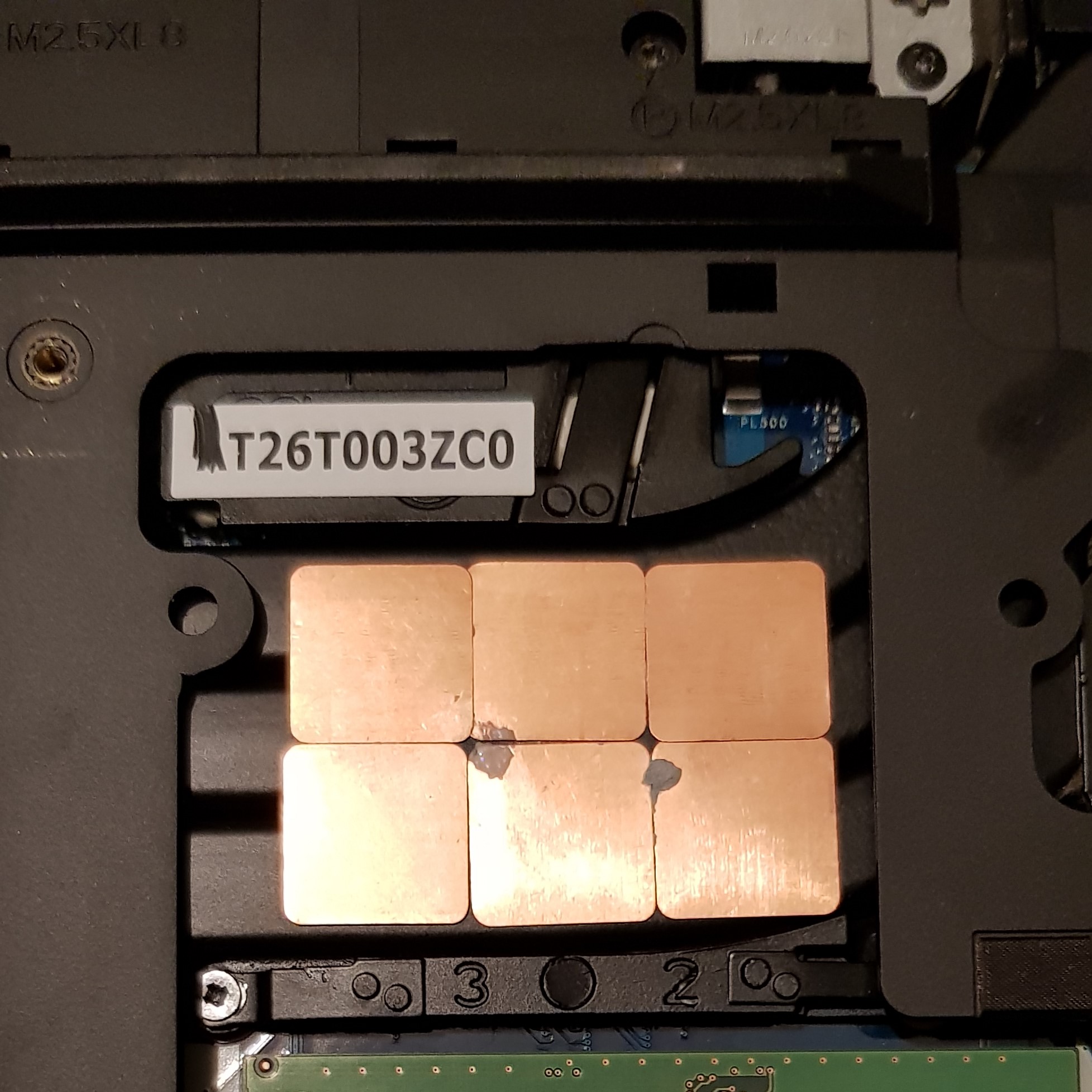
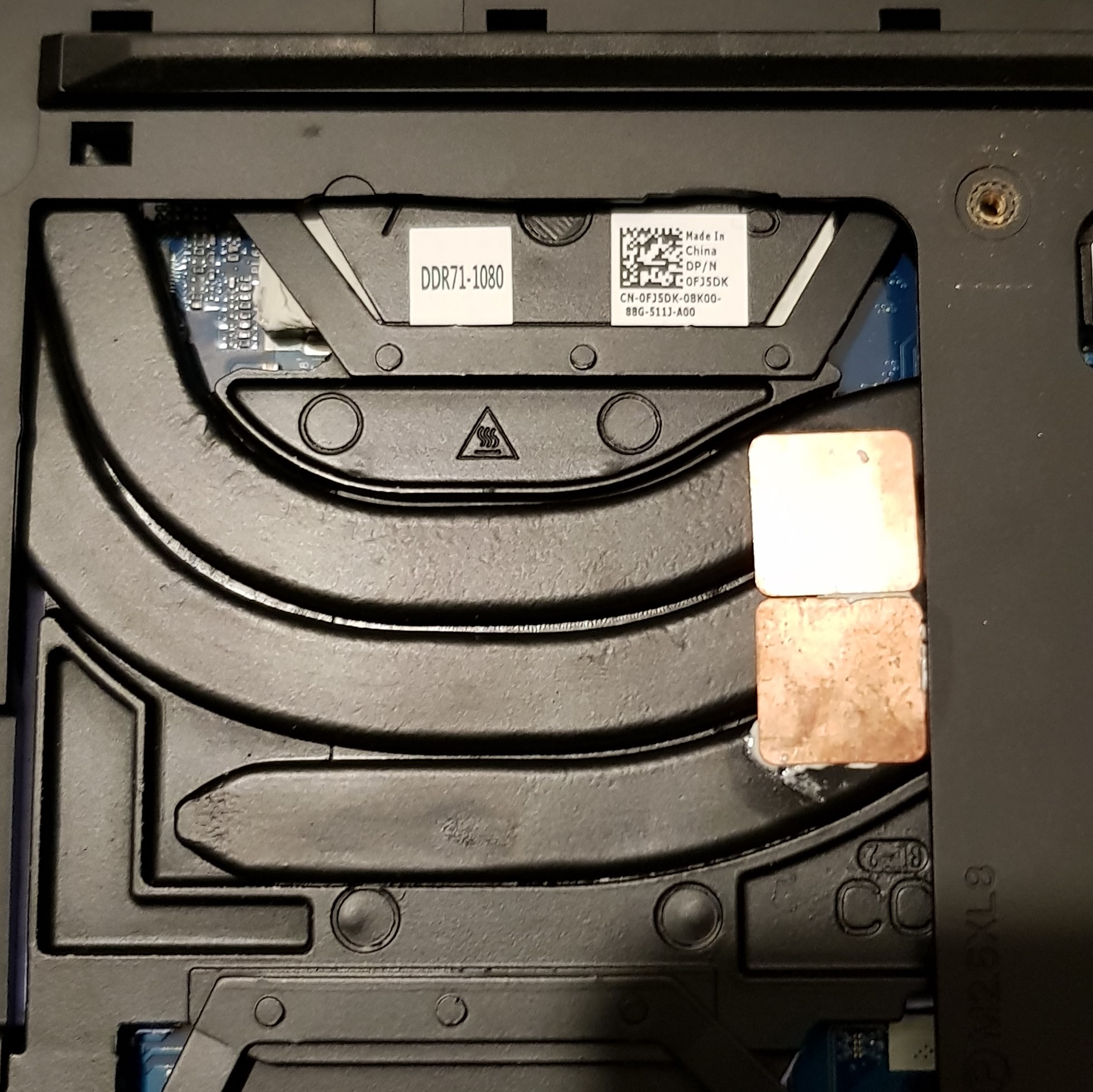
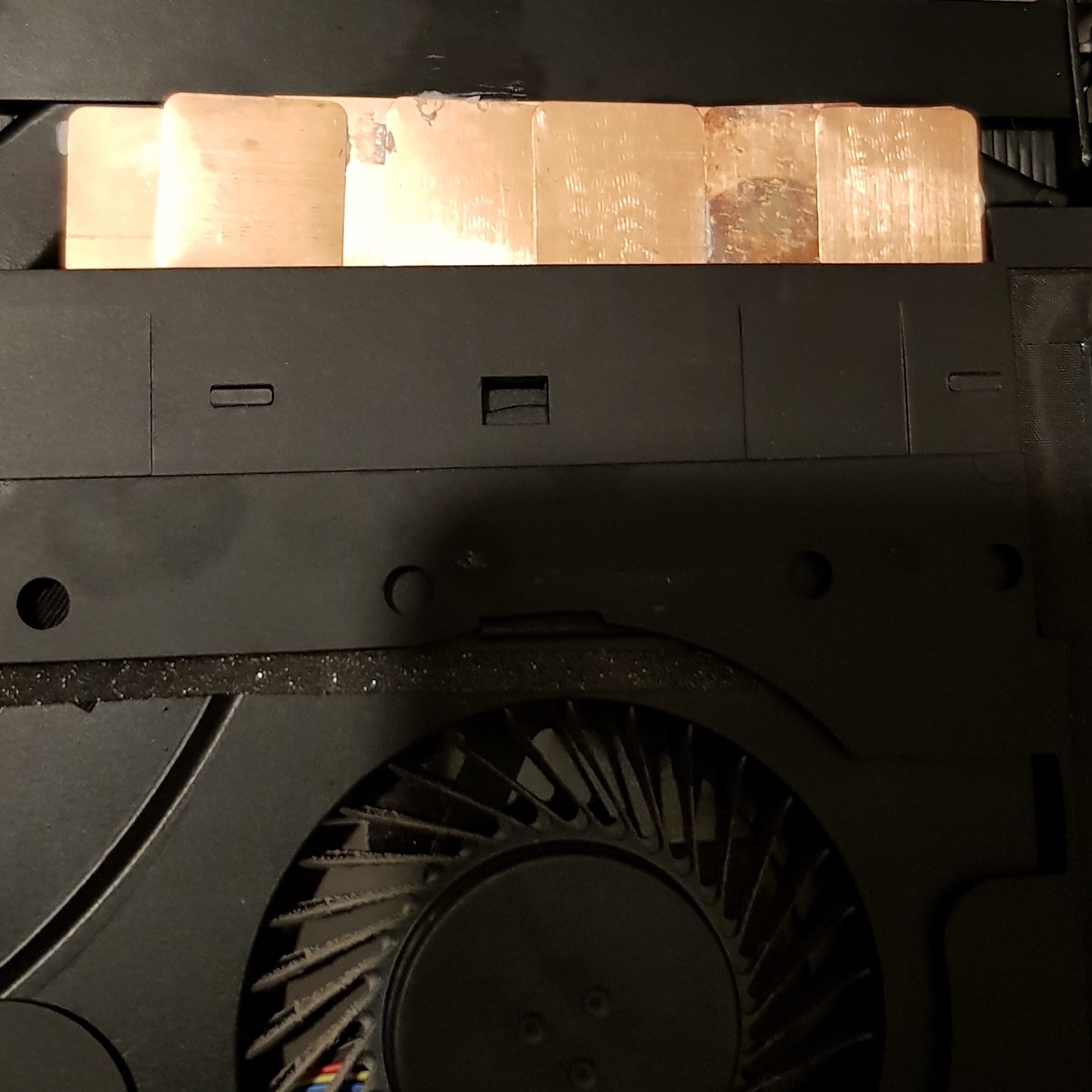
Another thing I noted was that the pipes of my heatsink had a few mm space in between them. I proceeded to inspect the heatsink and I found out that my heatsink was transferring the heat from the CPU but because of the few mm space it would not transfer all the heat and heat up the air that was present in my system. I connected all the pipes (on the cpu side) to each other by putting a copper shim on top of the gaps (and with some k5 on the shim) it effectively connected the heatsinks again with each other and eliminated the gaps. I'm under the impression that it dropped my temps 5C but it's too premature to tell. I need to order some extra shims (and K5-pro) to really see the difference. Also I put some on the heatsink fin making the fins extract more heat (more copper = more heat the fins can hold = cooler heatsink due to more air that's being removed from the heatsink. Again too premature to tell, but playing star citizen on my laptop would yield a 65 watts on the CPU side and 190 max on the GPU side. Ambient temp was 22c and it would reach 95C in the CPU. Now I have my max @90c cpu (GPU utilization is 100% with star citizen) and GPU temp 73C max.
I think this mod can be done on all heatsink, but is not necessary. I can provide pictures if there are people that are interested.Papusan, Vasudev and propeldragon like this. -
I would like to see your modifications as well as long term testing results.
-
No problem man, will post some pictures of my heatsink when I'm at home bropropeldragon likes this.
-
And... yet, in spite of this abject foolishness, there will be no shortage of dumb-dumbs lining up to throw money at this kind of crippled feces.
Last edited: Nov 19, 2018Papusan, Ashtrix, Vasudev and 1 other person like this. -
Is this true?
I have an Alienware 13 R1, and there were times when the internal Intel GPU would temporarily switch off and switch on to allow the discrete Nvidia GPU to show the display on my external monitor. So, I'm assuming the Alienware 15 R4 that I bought will resolve this issue? -
Yes but it’s not as it seems. Because the new models offer gsync displays the nvidia GPU must always be running to power the laptops display as they are connected directly to each other. Optimus is not an option.
Sent from my iPhone using Tapatalk -
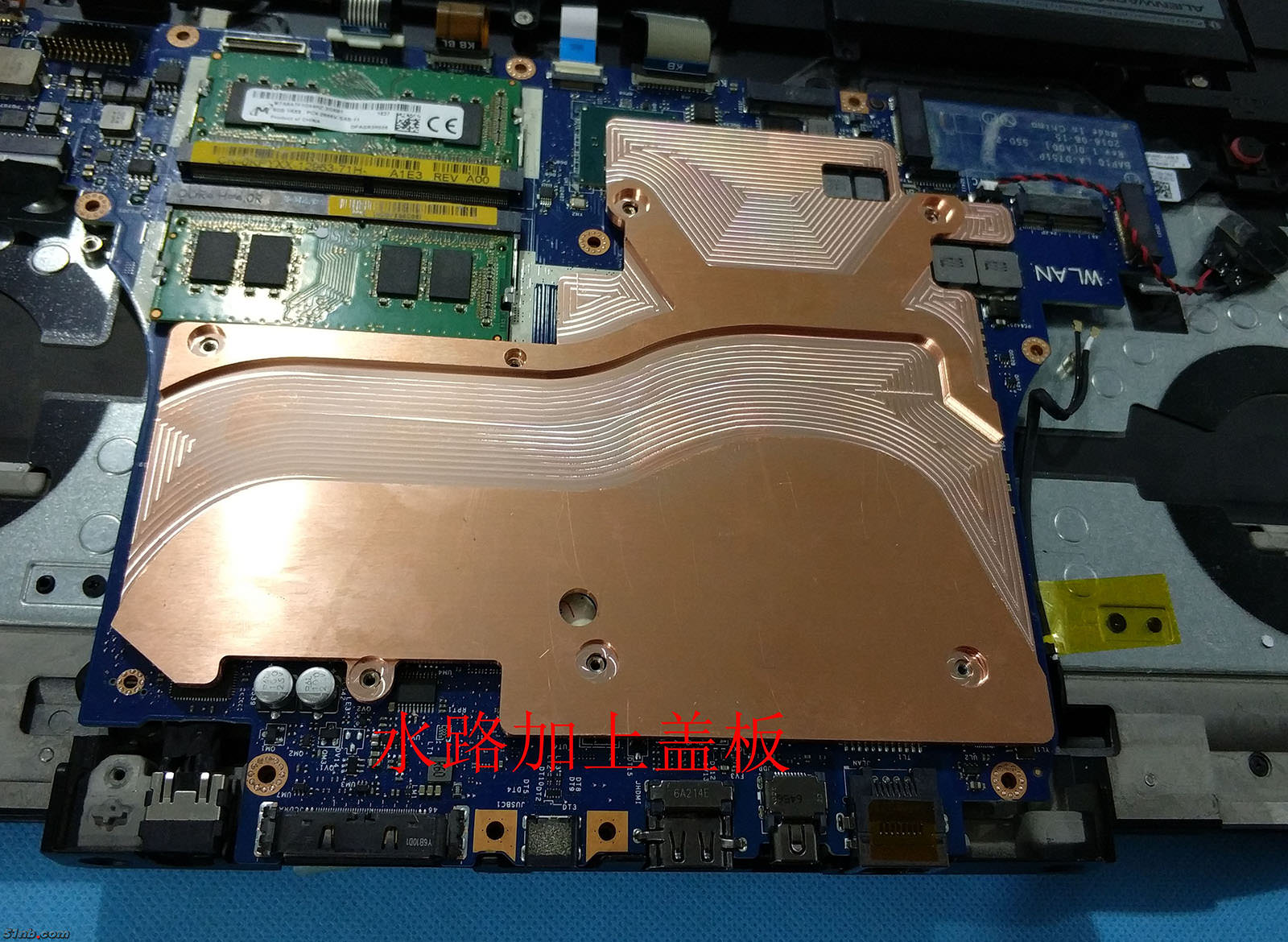
here brother, some pictures i made. The third picture shows my concept pretty good, but i did not have enough shims to cover up the open spots.
My hypothesis was, that where ever you could see the heatsink fins (the spots where you could see the fins with your eye) to cover up the whole space and to trap the heat underneath it. That way the heatsink would get hotter, instead of heating up the air that's present in the chassis.
the first and second picture shows almost the same concept, except over here i have used the shims to connect the heatsinks together. This gives my heatsink the upper hand in terms of sucking up the heat (because the shims connect the pipes with each other) i'm still testing it (i would like to create a heatspreader for my heatsink cause i have an spare heatsink) but in the end a heatspreader like the last picture would be my best guessAttached Files:
rinneh likes this. -
-
Let me know what your results are! What did you use between the shims and heatsink? I used thermal paste when I tried this.Rei Fukai likes this.
-
I used k5 pro, but Thermal paste should be enough. The paste is close the gap between the heatpipes, so it can trap the heat underneath the heatsink. Warm air travels up, so it's better to tile the up side, and the under side also can trap the heat. I'm going to replace the shims for a complete cover of the heatsink to see if it helps.propeldragon and Vasudev like this.
-
I only put thermal paste on top of the heatpipes and not in the gaps too. I didn't want to end up with thermal paste in the cracks I couldn't get to. Maybe this is why I didn't get good results.Rei Fukai likes this.
-
Good idea, I only have one remark - cleaning would be very difficult and would require to disassemble the whole heatsink and the 15R4 isn't maintenance friendly.Rei Fukai likes this.
*OFFICIAL* Alienware 15 R4 Owner's Lounge
Discussion in '2015+ Alienware 13 / 15 / 17' started by alexnvidia, Apr 25, 2018.