 Problems? See this thread at archive.org.
Ya I will give it a try once I get home
Sent from my Nexus 5 using Tapatalk
-
Thanks! I got 237 this time around. Should be around 226 or something if I remember correctly.
-
238 here.
-
Thank you.
We should be getting 223-226 or so though.
http://www.notebookcheck.net/Intel-Core-i7-4980HQ-Notebook-Processor.122665.0.html
I mean at the end of the day it's *probably* not worth worrying about to any degree, but this site is making my OCD for numbers worse sometimes
So far from my tests though btw the laptop gets higher scores with a undervolt. My CPU scores were 10% better after I undervolted by 75mV.
75mV seems stable for me from the ~1.5 hours of tests I ran on it, but we'll see. Anything over 90 gave me a blue screen instantly. Anything over 80 gave me a bluescreen after 15 minutes of stress tests. 75 is the sweet spot so far it seems. -
Interesting.
I tried the super pi mod and my numbers were pretty dam close to what notebookcheck says they should be. For the 32M it says 20.9 and I got 21
And yup with the lower voltage, you'll notice drastically cooler temperatures. I mean you hit a max of what? 83C with XTU? My max is about 93 and then the fans cool it down to somewhere in the 80s. So you'll have lower thermal throttling. I'm not sure the thermal throttling percentage on XTU is accurate. -
Yes, this is normal. The design of this machine is such that the heat pipes run the entire length of the laptop, along the area just above the keyboard. Since the heat pipes are shared between the CPU and GPU, they are quite long, and therefore will also transfer the heat from one side of the laptop to the other.
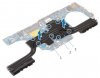
This pretty much matches up perfectly with my super-scientific illustration (I didn't have an Infrared Thermometer when I first reviewed this laptop)

-
Maybe it's just nothing, I have no idea. I'll try that in a few and see what I get. Thanks! Max temp I saw was a flicker of 83. It was steady around 75-77 though. Then under light use it runs low 50's.
I did notice this laptop has a larger increase in heat in the keyboard area than the other R2 I had. Undervolting fixed this.
I just realized I posted this in the owner's lounge and not the benchmark thread lol:
http://forum.notebookreview.com/thr...-benchmark-thread.770320/page-37#post-9972674 -
Unfortunately, no amount of undervolting will change the fact the heat pipes run right under the keyboard for pretty much the entire length of the machine. Any applications that tax both the CPU and GPU at the same time will result in a warm/hot keyboard. The question then becomes whether or not the resultant heat is tolerable to the user.
-
When i say "fixed" i mean made the heat tolerable like before.
-
Amazing what a slight undervolt can accomplish!
Every time I look at that heat pipe diagram of the R2, I get pissed off. All they had to do was place the CPU/GPU elsewhere, maybe run the pipes only along the top of the machine, avoiding the keyboard area.
The Clevo P650SE manages to keep its components almost as cool as the R2, while having almost no surface temperature issues. So it can be done.
This is what the Clevo surface temps look like under typical gaming load (in this case Diablo 3 on high settings, ambient temp of 24C)

According to this review, the AW15 reaches temps of up to 43C. I'd assume the AW17 does a bit better, given its increased size.
At any rate, I should know soon, as my laptop is scheduled for delivery in the next week or so.
On a side note, I just received my M5 Pro. Nice machine, I must say. Despite how thin it is, it keeps the i7-4720HQ at 75C during the XTU stress test.Last edited: Apr 1, 2015 -
I can tell you it definitely got up into the 40's temperature wise to touch. Now it's probably mid 30's at most. I don't have temp gun, so it's my guess (ambient temp is about 24).
BTW Truelife screen, you are awesome. It's a shame you have a little chip on the bottom! I thought it was dust at first or something like that but judging by how it reacts to light, I'm pretty inclined to say it's a chip on the clear section of glass on the very edge. The touch screen is nice and responsive though, the on screen Windows 8.1 keyboard pisses me off though.
You can see where the scuff scratches are on the bottom below.


Now this is pretty trivial, I don't really see the bottom of the laptop much. The "chip" is never in view unless I'm in strong light but it's just a little concerning that such an expensive laptop ($3350 CAN retail) has this in it. All in all so far with this laptop, I am pleased. -
That chip it's not present on my TrueLife display, I'm checking it right now with my led flashlight, tomorrow I'll post a photo for you.
-
Thank you!
Anyway, we needed some pics so here:
Please ignore the messy mic/guitar cables in the second pic lol I just noticed.
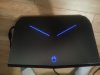
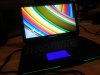
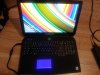
-
237
-
Just ran a 213 with throttlestop turned on.
-
mine i got 256 -
Thanks guy!
Appreciated greatly. This is the exact data I wanted. I'll see what I get with throttlestop later after class.
What were your settings in throttlestop btw?Last edited: Apr 2, 2015 -
I ran it with the default settings but made sure the multiplier was at 40T, I'll double check when I get backbnosam likes this.
-
My scores are worse with throttlestop LOL
-
Just for kicks I bought and ran Passmark on my new AW17R2. Mine shipped with 8GB ram, 5400rpm C drive and of course the 180w PSU. I added a Crucial 256GB M.2 as C Drive, 480GB SanDisk Extreme SSD as 2nd drive (bye bye mechanical), maxed to 16GB ram and am using the 240w PSU. Oh, I had a Win8.1 Pro upgrade, installed that too. Deleted McAfee, just running Microsoft Security Essentials that's built in (and for some reason they renamed it Defender which is NOT the same as the cheesy Defender in Vista, FYI). Here's the results:
![[IMG]](images/storyImages/39137202658.png) bnosam likes this.
bnosam likes this. -
Honestly guys, this truelife display is amazing. I can't say anything bad about it. There's like nearly no backlight bleed at all, very great. I can barely see any in the corners...but only when the background is black and you have to pay attention fairly close to notice it.
-
That's good that it doesn't, my matte screen doesn't have any on it either, I was very surprised considering how bad the first one was.
-
Glad to see you finally got your new machine. Hope you are enjoying it.
-
I really like it. It's awesome, thanks man!
-
Anyone with a 4980hq can let me know what their max temp they are seeing is? I think what I'm seeing is the lazy fan profiles more than anything. I barely ever hear the CPU fan and the temps during intense gaming stay at around 80 to 85 but I'm seeing spikes as high as 96.
Sent from my Nexus 5 using Tapatalk -
I've never seen temps over 83 before I undervolted. Now I don't see temps over 77 for more than a short spike.
-
How much did you undervolt
Sent from my Nexus 5 using Tapatalk -
-68 mV. Running stable for the past couple days even while gaming.
-
Really don't want to repaste without a disassembly video first. Going to give the undervolt a go.
Sent from my Nexus 5 using Tapatalk -
Yea try an undervolt. I have no idea how you're spiking to 96 though, that's mildly alarming IMO.
-
Yes doesn't make a bit of sense. Don't even have the 980m running using external graphics
Sent from my Nexus 5 using Tapatalk -
That reminds me it does overclock while using the egpu
Sent from my Nexus 5 using Tapatalk -
Do you have that option on or off in the BIOS?
-
Currently turned on. Going to play some dragon age and see how high my temps go from a cold boot.
-
Think I just figured it out. I am using -68mv voltage now, but I realized as soon as I opened up Throttlestop, the speed of the CPU went up to 3800mhz and it started having huge spikes up to 95 and 96 celsius. As soon as I close out of Throttlestop my CPU will drop back down to 2.8ghz and stay there but will never go above 77 celsius.
Edit: just realized I had turbo boost disabled.Last edited: Apr 5, 2015 -
Yea only happens when the CPU is being stressed to its absolute limits, could be a repaste in my future
Sent from my Nexus 5 using Tapatalk -
What were your settings for throttlestop?
-
What were your idle settings?
-
Just the default settings. I am normally in the mid 70s but if there is something that really stresses the CPU it will jump up to 95 in literally a second and instantly jump back down to 65 or 70
Sent from my Nexus 5 using Tapatalk -
I meant idle temps lol whoops.
-
Idle is around 50
Sent from my Nexus 5 using Tapatalk -
Around 50
Sent from my Nexus 5 using Tapatalk -
So has anyone figured out a good solution to getting finger prints and marks off the body? As you can see in the pic it is a bit marked up from my hands.
-
im keen to know as well
-
Use isopropanol alcohol on it. You don't even need to wipe much. Just clear it off, leave the streaks that remain to dry, and a minute later its brand new. Best way to clean a lot of matte materials, even matte car vinyl.
-
Are you sure this does no damage or degrading of the material?
-
I wouldn't use isopropyl alcohol. Over time it will wear down the soft finish...but then again so will your hands / arms so it'll depend on how ocd you are lol.
Microfiber cloth and water usually gets rid of the vast majority of fingerprints, you can also use a tiny bit of soap if I remember correctly (dell had an article on it a while back). If you have super stubborn ones then break out the alcohol but an LCD cleaner spray might be safer.Splintah likes this. -
(Holy Mother of God what's happened to the Edit Button!?)
-
I just wipe it down after every use with a soft cloth, usually does the trick. EVERY use. That is what is required to keep these soft-touch materials clean. I sometimes use an LCD cleaner spray, for stubborn marks.z0mgn0es likes this.
-
^ This. I use a dot-sized drop of soap on a damp, soft cloth to clean the matte surface. Cloth alone works, but anything with alcohol will generally wear down the material a lot faster and leave an uglier mark, imo.
*OFFICIAL* Alienware 17 R2/R3 Owner's Lounge
Discussion in '2015+ Alienware 13 / 15 / 17' started by Mr. Fox, Dec 10, 2014.


