Problems? See this thread at archive.org.
it's a new installation with an iso that I download from the microsoft web
-
Has anyone bought the new Alienware 17 r4 with 4k gysnc screen ?
Do you know who the panel is made by ..?Last edited: Oct 26, 2017 -
Pretty sure its the same AUO panel as before, but now GSync certified. Some other laptops have had the certification before using the same panel and there doesn't seem to be any other 17" 4k panel that has Gsync in the market.Rei Fukai likes this.
-
Although the 1080 is not enough to push 4k ultra @60, EVGA has refreshed one of their laptops this year with a GTX 1080 and a 4k g-sync panel. It's the EVGA SC17. The panel would come to it's use faster with a sli 1070 or 1080, but it's nice to see that manufacturers are trying to push 4k more and more
-
Honestly I'm not worried about playing in 4K but I like not having to worry about tearing when playing 1440p thanks to GSync. I might swap my 120hz QHD panel on my R4 for the 4K but I would definitely want to make sure I get a GSync capable one.
-
Today I have another "date" with a dell support technician.
For the third time in one year, this time I'm getting a new battery.
When I turn my 17 R4 on I get an ePSA warning saying the battery isn't detected or it's a "non Dell battery" so it won't charge and it won't work without being plugged in.
Reseting the battery works for a few minutes. Upon restarting for the second time I get the same warning.
My question is, how can the battery get like this? Can it be a heat issue? Is it simply a defective battery? Or could it have more serious motherboard issues? I'd hate to get a 4th motherboard...Vasudev likes this. -
Maybe it was defective, its quite rare that ePSA flagged it. Either way you're lucky not to face Note 7 like battery issues.
-
New battery in! Everything seems tip top now!
Fingers crossed it was a faulty battery and nothing else.Wiz bit, Maineiac12 and Vasudev like this. -
How do you know that? I run my 4K HDR OLED TV of my R4 all the time. BF1 ultra and Destiny 2 (high) both look great and run 60 FPS average, min 50 now and then
Sent from my SM-G935F using Tapatalk -
I have the 4k panel made by auo with a 1080 and while some games (ghost wildlands) manage around 45 frames on ultra/high that is enough for me. I don't need 60 frames. But I can achieve 60 frames on games like GTA 5 and battlefield 1 (max settings) and witcher 3 if I turn some settings down ... having had every alienware 17 r4 with all 3 display panels ..In terms of visual quality and overall experience I'd never go back now to less than 4k not just for image sharpness but colour quality of the auo panel is great. The Sharp 4k panel is ok too but I had stuck pixels with that and also it had panel tearing which I hardly get with the auo panel. I would say the 1 benefit with the Sharp panel is it has slightly better blacks.
What would be great would be a 4k gysnc semi glossy panel. Maybe we may get that option on the next a17 revision. Both the Sharp and auo panels have a hard coating anti glare finish.
Different bios can impact the battery and some drain it (bios 1.012) did for me.
Glad you had a good experience with dell support. Last edited by a moderator: Oct 29, 2017
 -
Hey guys i have noticed that many people who have been having problems in the 17R4 recently(in newer models) have the i7-7820hk model .
What i wanted to ask was how are the the i7 -7700 hq gtx 1070 models? DO they still have throttling or is it resolved with the newer models?I dont know how to repaste and i think i will damage my laptop doing that. So should i not consider buying this 17 r4 if i wont repaste??
Please reply as soon as possible as i have only a week left to buy it . -
Or ask @iunlock if he has any AW units willing to be sold? You can opt for traditional paste though if you're afraid of LM.
-
Ummm.. didnt the traditional paste caused problems due to being of poor quality compared to all the grizzly, LM ,etc.Vasudev likes this.
-
I think he means traditional as in non conductive as opposed to the Conductonaught. Don't confuse traditional paste with stock paste.which tends to wear out sooner and not be as effective.Maineiac12 and Vasudev like this.
-
Does anyone know where the tron lights in the lid connect to?
My right side one has started to work intermittently. I had this on one on in the base a while ago and the cable just needing pushing in properly on the motherboard.
Sent from my iPhone using Tapatalk -
With @60 fps ultra I mean locked at 60 fps with a minimum of 60, max 60 and average 60fps.
That's enough for you, I get that. But I'm not talking about a Max of 60fps, I'm talking about a minimum of 60fps. For 4k @60fps everything turned on (in every game) the 1080 is not sufficient to push 4k locked at 60 without going beneath 60fps. Sure it can push 60fps with some settings turned down but if you turn everything on and resolution scale to Max on games like battlefield and assassin's Creed you bring the 1080 to it's knees. And benchmarks on the internet support what I'm saying
http://www.trustedreviews.com/revie...-performance-benchmarks-and-conclusion-page-2
https://www.tomsguide.com/us/nvidia-gtx-1080-ti-benchmarks,review-4241.html
https://www.tomsguide.com/us/nvidia-gtx-1080-ti-benchmarks,review-4241.html
https://www.gamespot.com/articles/nvidia-geforce-gtx-1080-review/1100-6439863
all of these benchmarks support my claims. the GTX 1080 t.i. IS 30% faster and the T.I. can't handle @60fps ultra settings in 4k.Last edited by a moderator: Oct 29, 2017 -
I'm not so sure. The new one says its 400 nits, the old UHD screen is 300 nits. I really want to know if the "new" one has the same color range as the old one.
Price is the same, so I feel like there must be some sort of drawback of going for the new one??Last edited: Oct 29, 2017 -
Indeed, I recommend traditional paste as well for those who are new to repasting.
Yes, those are connections are located on the upper rear part of the mobo. So that black piece in the back, it's right under the middle section if you were to remove the plastic part.
It is common for those ribbon wires and/or plugs to not be fully secure...pathfindercod and Vasudev like this. -
Hey guys.
I've been using an external display with my 17 R4 connected via HDMI and it's so laggy... Anyone else experiencing this?
My unit is a 1440p 120Hz and the display connected is a 1080p 60Hz unit. I have the desktop extended to it. Any idea on how to fix it? -
I did a "side by side" input lag test of my old monitor and new monitor using a cell phone camera and https://www.testufo.com/flicker. Due to the limited ports on the 17 r4 I had to use display port for one and HDMI for the other. So I swapped back and fourth to average out the lag difference from each port. I found that the HDMI port was almost always about 15ms slower than the display port. On each monitor it was the same. HDMI was just shy of 1 frame behind displayport at 60hz.
-
Is anyone else experiencing the system taking a LONG TIME to get to the bios password? Sometimes my system will take about a minute now just to ask for my bios password.
-
Check display settings in Nvidia? Check driver version too.
-
It's a weird sort of lag. I get input lag but that doesn't surprise me and I think it's mostly because the external display is a slow 60Hz IPS. But some software, like Chrome, gets super laggy. If I select text in chrome, e-mail or Word, the mouse cursor moves quicker than the blue selection highlight and that's very very weird...
Yeah everything is as it's supposed to be and I'm already on 388 driver.Vasudev likes this. -
my keyboard suddenly stops working after going to sleep. yesterday i've already reseated the ribbon cable's underneath my laptop. is it also recommended to check the ribbon cables in the back ? cause today it started to show me the same behaviour again (aol up key down key and some others won't work after windows 10(1709) resumes out of sleep. after a minute or so the keys start to work again. it is something trivial butvery anoying. anybody a idea ?
-
Look for any update for keyboard TACTX formware through AW Command Center.
Wipe the gold contacts and cable with a clean cloth, keep them aside for sometime and put them back and check ePSA or any WinPE.Rei Fukai likes this. -
After a horrific experience from @Meaker@Sager (not him specifically) and XOTICPC, (maybe I'll make a rant post later) along with some help from the buying advice forum, my 17 R4 arrived yesterday. Since I've laid my eyes on it, I've been nothing but beaming, everything about it is so great. The audio, display, performance, and of course the AW classic design and build quality. Even Tobii is kinda cool. Happy to be a part of the Alienware family.
Pete Light, Maineiac12, leeloyd and 1 other person like this. -
-
Hello guys, I am here to tell some good news.
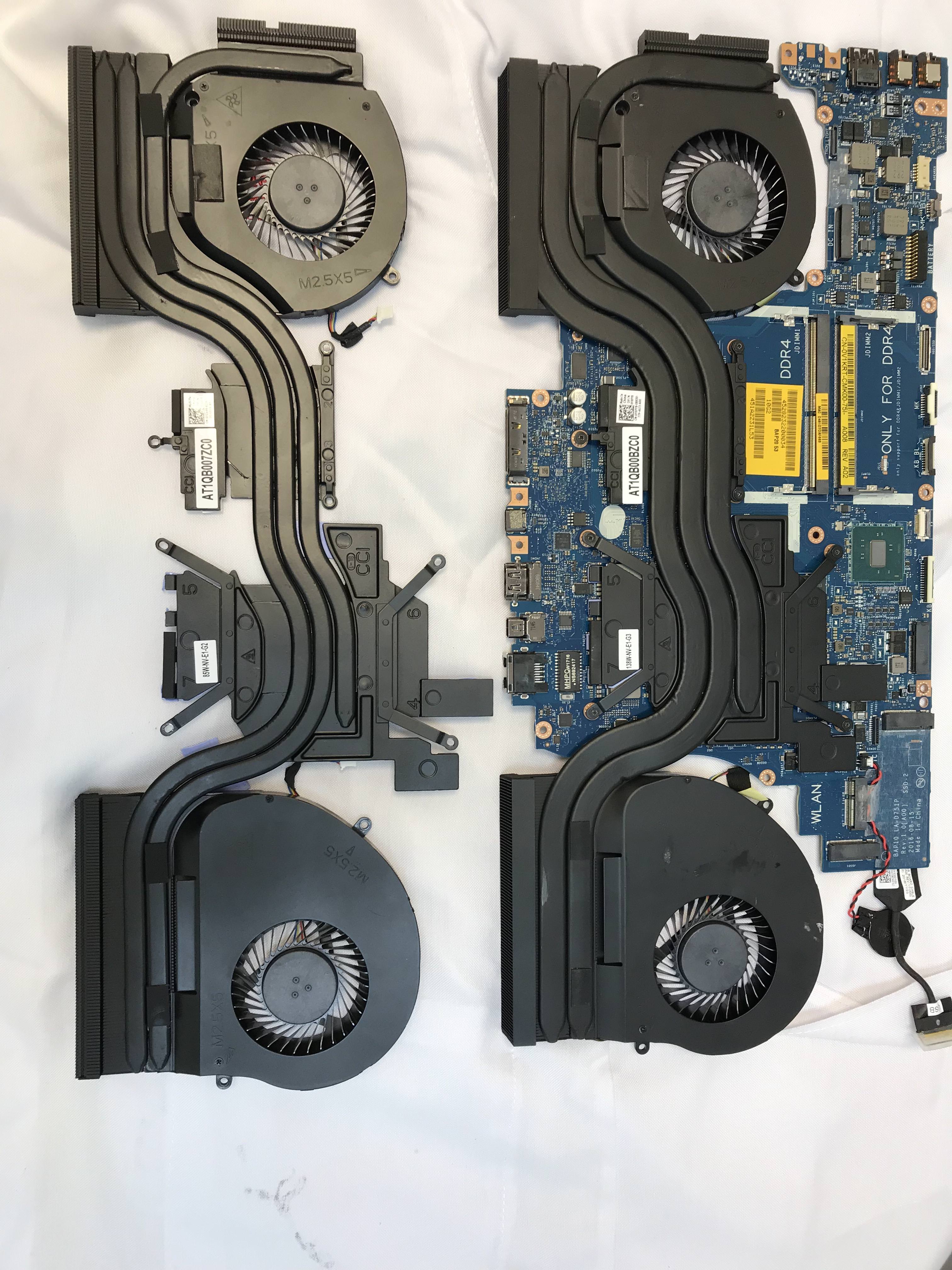
Today, after 2 weeks waiting for the new heatsink kit that came abroad my wait was worth it.
The Dell technician came and the first thing that I noticed is the size difference of this new heat sink from CCI (Fans are still SUNON) compared with my previous one.
One is 85W and the other one is 125W
During the replacement I removed all the crap paste of Dell and put my new Thermal Grizzly Hydronaut (only a thin layer on the die of the CPU and the GPU), all thermal pads came properly.
now my worst temp was 82 celsius , idle now reduced to 37-42 CPU, GPU is alwaus under 40, stressed 71 at most
I am very happy the results, now my CPU can sustain 3.9Ghz without any Undervolt.
Quick facts
CPU BEFORE(Celsius)
Idle: 57-60
Full 92-99
GPU BEFORE(Celsius)
Idle: 57-60
Full 92-99
CPU AFTER (Celsius)
Idle: 38-45
Full: 67-71
GPU BEFORE(Celsius)
Idle: 54-60
Full 78-84
My 3D Mark benchmarks have also increased.
I will run my tests and let you know.Attached Files:
Vasudev likes this. -
-
Glad you had a good dell customer support experience. Do you have gtx1080 or 1070 as the heatsink with wider pipes is usually reserved for the 1080. If you have 1080 your gpu temps are superb (71c) if you have the 1070 you gpu temps are just abit below stock average - but satisfactory. Cpu temps is ok, undervolting will lower further upto -10c ..gunbolt likes this.
-
Hello Wiz, yes they sent me the 1080 heatsink.
Running further tests here I found out during game the gpu temp never goes more than 67 celsius.
No undervolt at atll since the change, I will do that too and see how it goes.
-
They were talking about switching the heatsinks up a level across the board. 1060 would get the 1070, 1070 gets the 1080 etc....not sure if it ever came to pass but this would suggest maybe they are going ahead with it finally.
gunbolt likes this. -
Hi Guys,
Just purchased a 17r4 from the outlet for £1500ish
Spec
I7 6820hk
GTX 1080
16gb ram
256ssd
QHD G Sync display
I’m think it was a pretty good deal for the specs of the system, just bit concerned about the cpu over heating and the potential banding issue on the display but I’m guessing Dell will sort this out if there’s an issue?gunbolt likes this. -
Hey everyone
I recently purchased an AW17R4 with a UHD (Non-GSync) display:
Sharp [Unknown Model: SHP1446]
LQ173D1 [DELL P/N: CK7T7]
And I've noticed ghosting while doing day to day tasks, its not so much of an issue in games (I'm not an FPS player) but it is there, I've spent a few weeks trying to get used to it but I still notice it a hundred times a day - especially on dark screens I can see the icons etc move in an almost fluid/animated way.
I've contacted Alienware, who are willing to send an onsite engineer to replace the screen but "we're not sure if this will remedy the issue" which leads me to believe this is probably just how the screen is.
So I'm wondering anyone else has the same screen and can confirm that's just the way it is or if it's even possible that mine could be 'slower' that it should be.
I know some people are more intune with this sort of thing than others, but I've never really noticed motion blur/ghosting on anything - until now.
I know a photo isn't ideal but my 1080/60 video camera doesn't really do it justice.
https://imgur.com/a/qpTbx
This was taken while scrolling at a perfectly "readable" pace.Last edited: Nov 3, 2017gunbolt likes this. -
I have a 1080 and my GPU temp doesn't go above 64-65C. This is with LM though so I suspect that under 72C is ok for traditional paste (but not exceptional imo)
Sent from my SM-G935F using Tapatalk -
Banding yes, temps no. If you get stuck let me know and I can help
Sent from my SM-G935F using Tapatalk -
I noticed laggy external display on both HDMI and Miracast after updating to Windows 10 Creator's Fall Update. I just figured it was due to needing to wait for a Windows Update or Updated Intel/Nvidia Drivers.Shark00n likes this.
-
Alienware 15 R3/ Alienware 17 R4 System BIOS
Fixes & Enhancements
1. BIOS ROM security enhancement.
2. Tobii Camera behavior improvement.
3. VR devices support enhancement.
4. PCIE SSD device compatibility improvement.
Version
Version SKL1.2.0_KBL1.2.0, SKL1.2.0_KBL1.2.0
Category
BIOS
Release date
03 Nov 2017
Last Updated
03 Nov 2017
http://www.dell.com/support/home/us/en/19/drivers/driversdetails?driverId=KPCGM
To ensure the integrity of your download, please verify the checksum value.
MD5:
e5e04979556f57a47afccb3b462d206a
SHA1:
8178b77e2e39df687b14289805fe34cf5e683737
SHA-256:
a610d33efae0f9f12a1b81597740808a0fb4805e2586e904a3d5c997ff13945b
I just updated to this BIOS and everything is working fine. -
Not sure if it's entirely the bios update to the SSD, but my god adding heatsinks+bios makes a huge difference. Performance is great and everything seems overall snappier.
Vasudev likes this. -
Hi I want to add a 8gb ram in my alienware 17r4 and i cant find the brand of it as i have heard that it is better to pair them up with model brand speed ect. Does somebody know what brand of ram alienware 17r4 late 2016 i7 6700/fhd/gtx 1060 has? or if it doesnt matter and somebody has make it work with other brand which brand should i get for 1 x 8gb ram?
thank you for any replys -
-
Could someone please remind me how the cores are placed in the 6820HK. I have 2 cores (1 & 3) that are a few degrees hotter than the 2 others (0 & 3). Preferably when you face the stripped motherboard, It would be nice.
Thank you ! -
What's the performance of the 17r4 with 6820hk/7820hk and gtx 1080 in games like witcher 3, battlefield 1, assassin's creed syndicate/unity/origins? Can't find any proper vids on youtube.
gunbolt likes this. -
like any 7700k on stock speeds paired with a 1080. the 7820HK is essentially a 7700k for notebooks. the only difference between the chips is: a few mhz different speeds and they pull different Voltage opposed to the clocks. also is the 7700k 95 watts and the 7820HK 45 because it is a notebook chip. but at the same speeds, the scores are the same (when performing a cpu benchmark)Vasudev likes this.
-
Thank you for your answer. I just found one post confirming he upgraded his 17r4 with 1 stick of crucial 8gb guarranteed compability without knowing whicy brand was the other stick it shipped with, he said it worked but nothing else,
Can somebody confirm the crucial stick 1 x 8gb to be paired with the other 1 x 8gb ram it shipped with the aw 17r4 working properly. I really want to upgrade it tomorow but scared to do the wrong move. Any help really apriciated. -
Anyone experiencing the Windows device disconnected sound that happens when you unplug something upon closing the lid? When I open the lid back up, the device connected sound plays. What is this?
-
Check if sleep mode is enabled whilst the lid is closed?
Are you on W10 FCU?
*OFFICIAL* Alienware 17 R4 Owner's Lounge
Discussion in '2015+ Alienware 13 / 15 / 17' started by katalin_2003, Oct 24, 2016.