Problems? See this thread at archive.org.
I'm on 1.2.3 and everything runs smoothly as before. And AFAIK it doesn't contain security fix for INTEL-SA-00088, but for INTEL-SA-00086 (Intel Management Engine vulnerability).
-
Thanks guys. I'm a bit worried about repasting it myself as I'm confident I'll end up snapping a cable or something... I guess I'll have to ask a local repair shop or something.
Thanks guys. -
ur CPU is screaming. 100c is WAY too high, rise bottom of laptop, open it up, see if fans are blocked by dust (or does cpu fan spin at all, check it out). thats not normal.Last edited: Jan 5, 2018Shozuki likes this.
-
Guys.. when i play DOTA 2 the game is stuttering once in a while... but it's only with DOTA 2... if i play DOOM, Overwatch, BF 1, PUBG... the game just runs smoothly... what could be the issue??
-
The fans are spinning fine, it just needs a repaste...
-
Contact dell and ask them to run some tests. If it is over heating they will send a new heatsink. Watch what the engineer does. I’m sure you can do it yourself though and there are many guides on here and on YouTube etc... pl don’t pay some local dealer or someone to repaste your laptop - use the free warranty, and worst case senerio if your laptop has a faulty cpu you will have registered the issue with dell to get a refund.Shozuki likes this.
-
Hello fellas, I need help with something. I removed the display frame. There is a part of golden color that says "dont touch!". I want to know, what says "do not touch" is part of the display or part of the flex cable? what does this gold cable have ...? what is your function? Do you understand what I say?
![[IMG]](images/storyImages/LT16pGZl.jpg)
![[IMG]](images/storyImages/Y3YlhB0l.jpg)
![[IMG]](images/storyImages/1sQkL2ml.jpg)
-
High voltage of backlight circuit, better don't touch if powered on

-
High voltage of backlight circuit of the display?
too late... I touched it and ffuck the display. Now should I replace the display or something else besides the display?Vasudev likes this. -
Yes, of the display.
Did the display work before you touched that? Only if you damaged that tape and something behind.. I guess you'll need a new panel..Vasudev likes this. -
Human curiosity is great.
Upon seeing Don't Touch Label we actually touch it. (Myself included)
We should make a label saying Please Touch it, then most people will ignore it.Pete Light, raz8020, IXVIXXII and 3 others like this. -
Hi Guys!
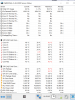
I got an 17 R4 with 6700 and a 1070 I've bought in December 2016 (one of the earliest models). As everyone else I got the throttling shenanigans going for the last 13 months and I had Dell techs coming over, to repaste twice. (and switch the display with the banding) The last repaste was a week ago and I got the following thermals in less than 10 days. (see attachment) Needless to say this is completely unacceptable for a laptop for 2k and now I got 1 month left from the warranty left, then I'm on my own!
As an early adopter I'm now in a position most of you will be in a matter of months: We have to decide what to do after the laptop goes out of warranty!
The heatsink issue is unresolved, due to the intel bug BIOS is locked (Dell limits its liability so you cant rollback), the fix will cause more CPU overhead = crappier thermals under load.
What would you guys do now? My laptop has been serviced twice, the heat issue is still there and it will stay as Dell is demonstrably stopped caring about it and doesnt react to claims. Would you extend warranty? Would you push for a refund? Would you sell it to some poor uninformed dude on ebay/craigslist? Undervolt?
I do love this machine to bits, but the crappy cooling will murder it in less than 2-3 years for sure.
p.s: No I'm absolutely not fine with taking it apart and repasting, I've paid $ 2000 and I want my moneys worth!Attached Files:
Vasudev likes this. -
-
the cpu core temperature differential problem is unresolved even to this day. makes no difference whether you are an early adopter. the cpu side of the heatsink is fundamentally flawed from factory.Papusan, Vistar Shook and Vasudev like this.
-
There's no risk in touching any of that as long as the system is off and even if it's powered you have to be truly ham-fisted to damage anything.
The warning applies mainly to handling the screen when it's removed from the display lid (and fully disconnect and unpowered from the system). The reason is that underneath the warning label there's the panel's circuit board and this is only flimsily attached to the rest of the lcd, so if you'd lift the panel at this end then there's a good risk to break the thin flexi-cables that control the individual pixels and the backlight leds. For a similar reason there's also a (very large) warning label at the back of the panel; if you pick up the panel by touching the flat, white backside of the panel then you'll force the backlight against the lcd, causing very noticeable, localised backlight bleed. Just handle it by the exposed metal frame at the left side, right side and/or the top and everything will be fine.
Anyway, it's highly unlikely you killed the panel just now. What's wrong with the system in the first place that made you remove the bezel?
That's from the CCFL era (20kV), but this is a LED type backlight, so it's only about 20V. Nothing to worry about safety-wise. Tubes weren't that bad either; higher voltage means lower amps, so the only risk is in shorting the panel.Pete Light, Spartan@HIDevolution, Niarus and 1 other person like this. -
were u aware of its problems from day one when u got it? if yes enlight me why did u keep it after 6 month period? till 6 months u can get refund if device is not working properly. now you are stuck with ur warranty going off, dont hope too much they will give u new mashine or fix ur problem, go sell that junk till it has some warranty still and dont buy same laptop again, since this aw 17 r4 have real issues with cooling.Spartan@HIDevolution likes this. -
I dont understand the hostility and the extremely abrasive comments, with 0 intention of constructive help. There were numerous times Dell has assured us that they will solve the issue, and I had the warranty to lean on meanwhile. Please do me a favor, and dont react to my posts in the future! Thanks!IXVIXXII likes this.
-
it was not my intension to troll you, provoke or flame, i simply ask you why did u keep defect product so long knowing its not just issue with ur unit but with general line of the product. this laptop aint cheap and for that reason itself if its not working properly you either send it back as soon as possible or try fixing, if second dosent work, you get ur money back, im not sure why you are upset with me now? if you trust company saying ''we will fix it dont worry'' and wait nearly 6 months after you got the laptop, and issue is still there, its safe to say it wont be fixed. i had my own problems with aw18 and 880m fiasco, i had the laptop nearly six months (5 and half) and when i saw there is no fix to it, it was time to return it.
if u are upset i called the laptop ''junk'' it was just me being furious they sell products like that that dont perform like they should, in terms of thermals in ur case.
again not my intension to start arguing here. and btw i gaved u good advice, sell it.t456, Papusan and Vistar Shook like this. -
Please tell me which part of your condescending answers qualify as "good advice" for this situation?
(Rhetoric question)
Again, pls dont bother to reply to my posts. Thanks! -
Most of the people on the AW threads now a days seem more about bashing, trashing and being generally negative instead of helping. What they don’t understand the industry standard is what it is now and here to stay. Except a few certain exceptions of DTR notebooks. If they hate technology the way it is now in the majority of notebooks they should just move on the desktops. Instead they would rather make people who want a notebook feel like garbage for buying one. Almost all notebooks nowadays straight from OEM’s need some help. That is where a third party like HIDevolution comes in or one of the fine members on the forums that offer services to people who do not have the technical ability to do it themselves.
That being said I would keep at Dell while your under warranty until it gets close or they replace it. If you really like the machine extend your warranty before it’s up to ensure fix or replacement. That or a little research will help you tweak it yourself or make
arrangements with @iunlock or any of the few others on the forums to get the machine tweaked and proper.
Good luck!Last edited: Jan 8, 2018reigning, Pete Light, IXVIXXII and 2 others like this. -
well, since u 2 are happy with reciving expencive defective product and have no problem with it, who am i to ruin ur happiness. good luck with tweaking, repasting etc and feel free to update me what results u achieved on end.
nedooo, Vistar Shook and Spartan@HIDevolution like this. -
Mine is not defective at all. CPU runs in the high 60’s-low 70’s in heavy games and gpu never gets about 68. CPU differential on 1-3 degrees.. to top it off, came like that from Dell...
Falkentyne likes this. -
wow!! those are superb temps man!!pathfindercod and Vistar Shook like this.
-
Do you have the OC vBIOS?
-
Yo alex! Have you tried the new 198W heatsink that was linked here a few pages back?
-
@t456 thanks for the explanation! The thing is, this laptop was disarmed several times by Dell support and that circuit backlight lost the glue. (With the laptop on) I removed the display frame to see how I could stick it with double-sided tape. I used a hair clip to remove a piece of double-sided tape that had previously placed inside the backlight circuit and suddenly, the image of the display faded to disappear. I started the netbook and I only see vertical lines ... by far, it's the stupidest thing I've done since I can remember, I know ... I was using the netbook all weekend and it works perfectly, except for the display, of course. I have no other option, I must change the display ...
Q: Is there any chance that the Intel onboard video board is damaged too I took a look at Windows DM and it's OK and the HDMI connection to a monitor works perfect... -
Seem to be having an issue with Dell regarding changing the details and using my warranty therefore I'm just going to go ahead and repaste the laptop myself. The only question I have though is regarding the thermal grizzly conductonaut it seems it comes in 1g and 5g varieties - question is is 1g enough or 5g?
Thanks -
I had the same problem, I bough my laptop (i7 6700 and 1070) in November 2016, after the first 4 to 5 services replacing motherboard + HS and dell tech breaking some stuff, they upgraded my laptop to i7 7820 and 1080. The new laptop had the same differential core + high thermals + throttle. Around October 2017, after 2 or 3 more motherboard and HS replacements I decided to return my laptop and they gave me 100% refund almost 1 year after my purchase.
-
1g is enough for ~2-3 repastes, though I would recommend to pick 5g - you'll have extra for the future.Vistar Shook and Shozuki like this.
-
Thank you sir, That's great!!
-
Plus the new end of the syringe is very precise and easier to apply.
-
Yeah, new batch of TG Conductonaut comes with the metallic curved needle which helps to dispense LM more accurately.
-
Cool thanks guys. I think I'm ready to do this!
-
You worked on the display while it was powered on or had the battery still attached? And did you replace the tape afterwards?
There's tape that covers the circuit board on the front and back. These boards are exposed and will short when their smd solder joints touch the metallic sheet that's between the back of the lcd and the lid, this sheet being conductive because it keeps em noise away from the sensitive wifi antennas. Made the mistake once to remove part of that tape (smd work) and not put it back; all sorts of errant behaviour occurred, including a black display, unexpected shutdowns and refusal to boot at all. -
I mean it' clear Dell lost money and resources, but you also lost some time on frustration, troubleshooting issues, arguing, attending free disassembly and assembly lessons and who knows what not...sounds like some nice adventure you got there
Vistar Shook likes this.
-
It could be cool just to let him handle some radioactive materials with all disclaimers and warning signs displayed, and observe...maybe Hulk or some X-Man could appear LOL
-
nope i havent. i've seen it, did sparked my curiosity. it appears the fan outputs are more tightly sealed compared to the current ones which have large gaps just before venting out the cool air to the heatsink. those who have opened their system will understand what im talking about.
are those 198W heatsink official alienware parts? or are they modded by some oem china factory? also, it has the same fundamental flawed tripop design. unless they are manufactured to extreme tight specs, i don't see how it can improve arguably the single biggest problem facing every alienware models from 13 to 17R4 which is the cpu core temperature differential problem.Vistar Shook likes this. -
This is not an official modification straight from the Chinese cellar. I bought this piece of sh*t. One of the thermopipes are damaged.
Temperature dropped ~10°C (59/65 gpu/cpu on new) relative to my old system (64/72 gpu/cpu on old).
My config (6820cpu/1080gpu):
P.S. It's a stupid investment in my opinion. Bought here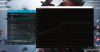

Tested in overwatchLast edited: Jan 9, 2018Vistar Shook likes this. -
Are these temps with OC vBIOS?
-
Of course, I provided screenshots of my video card settingsNiarus likes this.
-
I recieved mine this week it turned out to be faulty it increased my temps instead of decreasing them :'(
-
I'd pay someone else to repaste it properly and get it running to its full potential. For the sake of a few hundred quid you have a brilliantly cooled, powerful laptop and the saga is over...
Sent from my SM-G935F using Tapatalkiunlock likes this. -
EDIT: tried to quote the above post. (where to get it repasted)
What sort of place would do this? -
Really? By how much? What paste are you using?
I might get one to try my hand at lapping and modding it. Also to do a proper LM setup.
Anyone recommend some good foam dams, maybe some glossy nail polish?
-
I have cut pieces from this foam with ~1.5-2mm height, but I guess any other soft foam is alright, you should probably check its heat tolerance (based on material).
-
Just FYI, this will not be coming to our machines (in classic Dell fashion): "Unfortunately, it won’t be available for the Dell subsidiary’s existing machines."
https://arstechnica.com/gadgets/201...mmand-center-app-with-a-centralized-game-hub/ -
Current version of AlienFX is enough to control the lights and I'll pass their OC utilities, TS and other 3rd party soft are way better.Pete Light likes this.
-
A Few hundred. +$450 is a lot of cash
raz8020, Mr. Fox, Niarus and 1 other person like this.
-
You probably got it wrong, if you're referring to ¥450 (yens) for HS as $450, it's ~$70 Though it's a joke of course.. Without work and this modded HS the 'make up' is around $70 (LM + pads), with the work it'll probably be ~$150.
Papusan likes this.
-
-
Seems to be overwhelmingly overpriced, as it's handcrafted jewellery I should consider this as a part time job for a half-price, haha
Wiz bit, Papusan and Vistar Shook like this.
*OFFICIAL* Alienware 17 R4 Owner's Lounge
Discussion in '2015+ Alienware 13 / 15 / 17' started by katalin_2003, Oct 24, 2016.