Problems? See this thread at archive.org.
Are there any resources on which RAM sticks are compatible with the Area-51M?
-
From Dell support.. Area-51m, memory upgrade 128GB?
-
They don't know their own product and what it's capable of. HIDevolution has tested 128GB and it does work! Although they had to install the modules one at a time before the taptop would boot.Lantea likes this.
-
What it's capable of vs. what Dell themself have Validated is two different things, bruh. But yeah, Intel specs say max memory size 128GB for 8th and 9th gen processors.
Was more to post what manufacturers they say is compatible. Remember Dell had to push out new firmware to Improve the compatibility of storage devices. Nothing is bankers/guaranteed/sure with Dell and compatibility with 3rd party hardware.Ashtrix, jclausius, raz8020 and 1 other person like this. -
So I am really tempting about this beast, since this looks like an incarnation of my good old M18xR2.
I have a 17r4 with 7820hk and RTX2080Ti via AGA right now. Should I upgrade to 51m with a i9 9900K with an RTX2060? Can it handle the 9900K as the 2060 will be disabled? -
Do what now?
![[IMG]](images/storyImages/8Yb0Sav.gif)
-
Thanks. I guess I should be asking what sort of memory people have been using for upgrades.
I'd like to do 32GB for now. -
I'm guessing mine is about to be delayed, since it was supposed to be delivered from the 18th to the 21st.
With the problems people have been having maybe I should be glad... -
I think he means because he is using an rtx 2080ti in the advanced graphics adapter... So it wouldn't be using the 2060. That said I'm not sure why it wouldn't handle that setup just fine...
Sent from my Pixel 2 using Tapatalkraz8020, Spartan@HIDevolution and twin snakes like this. -
Anyone able to unlock power limit in MSI Afterburner on their 51m?
If so, could you send me a link or tell me how to do it? Thanks! -
This laptop burnout problem is unprecedented! Everyone with the issue should really take 10 minutes to do their best to post the details surrounding it (as previously requested

What bios/vbios and mods... what exactly they were doing at the time, their heat findings since they got the model, what adapters were plugged in, system specs, ambient temps, etc etc.
This data can really be beneficial to finding the rhyme and reason, and to help others stay safe until a possible official fix is presented down the road.Falkentyne and DrewN like this. -
Yeah, I'm really considering returning it and purchasing the 2080.. Problem is I dont want to wait another month and go back to my 17 R5 in the meantime with 60Hz panel.
I might just bite the bullet and upgrade to the 2080 later on this year when they start selling them, but hopefully we can get a TDP bios update.
As for the 180w/240w, I'm sure it could handle another 30-50w increase. If not, I'll just purchase another 240w, or a 330w.Dagr and Adam Reynolds like this. -
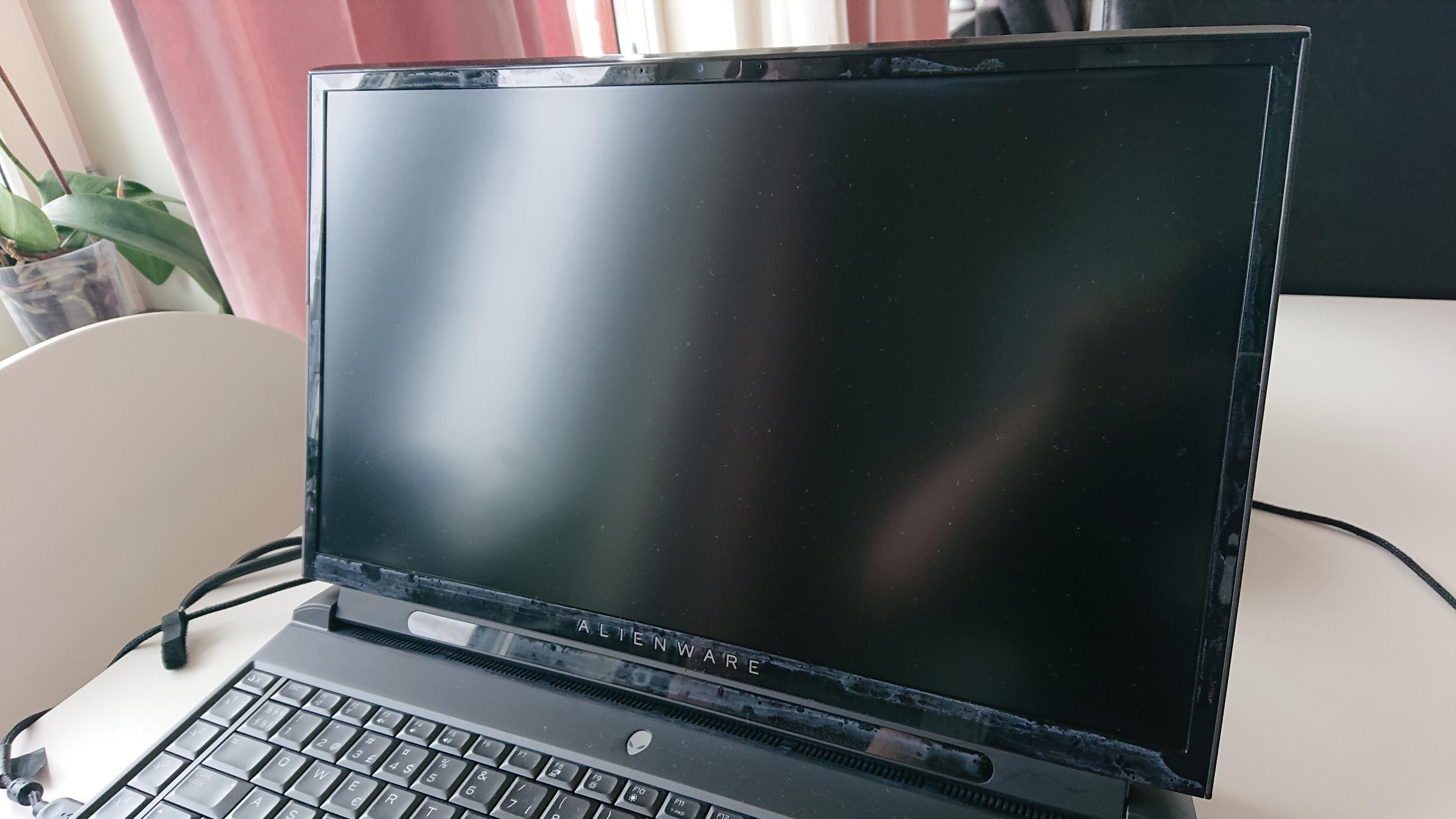
Can you guys tell me what is this?
Around my screen this white thing keeps getting back. I clean it with microfiber cloth that don't scratch.
It started as soon I recived the laptop, around 1-2 hours after I oppened it. When I clean it its all back and good but after a few hours this white thing keeps comming back as seen in picture.
Note: Only around screen, not on keyboard or outside laptop.Attached Files:
-
-
looks like a protective plastic to me. can you not peel it off?
-
I couldn't resist. Even with the problems, I'm going to hope Dell can fix them. I returned my 9700k/2070 today to Microcenter and just purchased the 9900k/2080 model from Dell's website.
For $357.71 more than my Microcenter 9700k/2070, I'm getting the 9900k/2080 model. Only difference is instead of a single 512GB m.2, it comes with 2 256GB m.2's and a 1TB SSHD. Oh and the ram "might" be only 2400, as the Microcenter ram was 2666 even though the system was still only using it at 2400. Oh and I could have even saved $50 more if I went with the black, but I really wanted the white model.
The "SAVE17" thing says it expires 3/18 at 6 AM ET, which is in less than 2.5 hours! So I wanted to make sure and get that deal.
As far as an increased TDP BIOS for the 2070, I'm guessing it won't happen. The reason I say that is, look at this page:
https://www.nvidia.com/en-us/geforce/gaming-laptops/20-series/
Scroll down and under the "THE POWER OF GEFORCE RTX GAMING LAPTOPS" section, click "VIEW FULL SPECS".
Notice how under the 2080 mobile they say 80-150+ Watts, but under the 2070 mobile they only say 80-115 Watts.
Looks like NVIDIA is suggesting OEM's can basically give the 2080 mobile card as much power as they want (by putting that little + symbol there), but I can't find any indication that any vendor has upped the power for the 2070 beyond the 115 watt spec. My guess is NVIDIA is saying the 2070 mobile can only be sold at 115 watts max.
We'll see though. I just didn't want to be stuck with the 2070 and feel like the neglected stepchild (no offense to all of you stepchildren out there).
Although, if you hold out, maybe later this year they will start selling mobile 2080 Ti's and you can upgrade to that.Adam Reynolds likes this. -
Was it quite difficult pulling it off? It looks like it could have taken the top layer/coat off of the plastic? I get a similar look on paneling in my bathroom because the protective cover lifted off the top layer of shiny material. Hopefully not that but could explain why it keeps returning.Spartan@HIDevolution likes this.
-
Just called Alienware Belgium support. Because there was a burn issue. The usual next business day support doesn't apply. They will come and pick it up. Guy bluntly says, that the laptop arriving to them might take up to 12 business days. And they they will try and repair everything possible. And if that doesn't work a new laptop will be sent. That can mean new built order from China, which means at least 14 business days for the laptop to arrive to me. So I am without a laptop for basically a month now. No compensation, and basically the next business day on-site support is a lie for this case. Didn't know they could overrule next business day on-site support just like that. Not very happy to be honest
-
That's sucks, I will keep my pc which i was gonna sell as a backup for if this issue is going to be widespread. I would not be happy with this awsner from alienware and would try to escalate it further.SlickDragon, propeldragon and c69k like this.
-
Tobi at bottom had plastic cover, its down under scree. Around screen was no plastic cover.
Was easy to peel it away. Nothing of unusual.Fire Tiger likes this. -
Ahh, nice purchase man!
Nice find on that. I think the 2070 in the 51m is 120W though isn't it? I'll double check in the a.m. when I'm on my machine.
I'm being sent a replacement, same specs, but I'm going to try and see if I can pay for an upgrade to the 2080 before they send it out. If that happens after the 30 days runs out, I'll just stick with it until they start selling the DGFF 2080. I just really hope that it's not insanely overpriced ($1000+.) 2080Ti would be nice, but I doubt it will happen. If it did, it would probably be extremely gimped.SlickDragon likes this. -
Someone needs to tweet Frank and tell him someone needs to come into this thread pronto to 1. Explain the issue and 2. Address your situation. That sucks and its utterly disgusting.
I am 1cm away from denying delivery.SlickDragon, Lantea, c69k and 1 other person like this. -
I don't know how something like this could get through motherboard QC. You'd think that they would test the crap out of the components in a top-tier machine like this, not just before assembly but after.
Lantea likes this. -
12% off at Dell UK (Ends today) with SAVE12
-
The 2060 models are up for sale on the Dutch website now. Starting price 2200€. Explains the recent price change and the lesser offered models.
For 2200 and some discount you can get it under 2k. For a 2060 model thats pretty nice!
@QUICKSORT You should try the social media channels, the social media support group always helps me way better out then the dummies on the phone. I wouldn't accept pick up and the wait game, this is instant replacement material, they can pick it up when they ship you a new one and investigate the hell out of the burnt components. Tell them how utterly disappointed you are, and you are with good reason!SlickDragon likes this. -
Use a damp paper towel. That is cleaning residue from something.
(The microfiber is just smearing it around and not taking it off)
I See it all the time on my sun glasses if I use a micrfibre cloth that has been previously used for something else.Spartan@HIDevolution, c69k and Fire Tiger like this. -
Return it for a full refund ? If you are outside the 14-day refund period, say it is of unacceptable quality and since it cannot be replaced immediately you want your money back.SlickDragon and Lantea like this.
-
Thing is, I don't want my money back, I want the laptop. But fixed. And I want it fixed as advertised. Next business day, on-site.
I don't want to wait a month for it.
But I have to admit. It feels bad to be aware that this is actually a flaw in the laptop and might happen again, considering there are 6 reported cases of this so far, in just one month. But there is no other laptop that I liked. Perhaps the m15 Oled. But that one is still not available yet.SlickDragon and c69k like this. -
I tried it and we see in a few hours if it comes back.
You think they use something in dell factory? Or maybe I received a laptop that has been sent back and they did clean it so that's why this white thing appears?Fire Tiger likes this. -
Umm. So... peer pressure wins? Yeah, I saw the "timer" countdown on the Dell 17% off sale and finally broke down. My return window with Microcenter is this thursday...
*grin*... so, order placed as well fro the i9/2080! (I also sprung for the white again since I like it so much on my current laptop... such a great off color... AW really knocked it out of the park with the feel of this thing.
Sigh... lol, so after all that I ended up having to place that order after all. $375 over what I paid at Microcenter nets me an i9, a 2080, an extra 1TB hybrid drive, and the larger power supply. Here's hoping I'm not laptop-less for too long... *grin*. In the end, I know I'll be happier with this setup... I was willing to pay a big premium to have a gaming laptop, might as well put the effort & extra 375 into making it the best it can be for now!SlickDragon, Spartan@HIDevolution, c69k and 4 others like this. -
Personally, I think it’s a great call.
Before release, it seemed everyone was super confident the cooling would handle the 9700k at best; but now it’s clear you can game on the 9900k without any throttling. If that’s the case - and the money isn’t a huge issue - I really think the i9 is the one to get.
And yeah, the 2080 is a big step up from the 2070 on this machine, too.Spartan@HIDevolution, c69k and Dagr like this. -
They have the same type of clause in the US warranty. If they can't identify which parts to dispatch to the technician they require mail-in. I would honestly be surprised if they even have the parts in stock this early after the machine was released. My guess is they will get it at the repair depot, determine a >30 day parts backorder, then call you to get a priority new system build setup.Darkhan likes this.
-
hi everyone first post here, i have wrote to dell customer services and pointed to this thread, as the issue brought up by others has got me concerned about my purchase hopefully we will see a dell representative post in here soon.
on a side note, can we gather what system specs/configs are effected and if the units were modded with aftermarket accessories.
my specs i ordered
Alienware Area-51m
Windows 10 Home 64bit English, Dutch, French, German, Italian
Alienware TactX keyboard with per-key RGB LED AlienFX lighting, anti-ghosting, and N-Key rollover technology - UK
Killer 1550 802.11ac 2x2 WiFi and Bluetooth 5.0
NVIDIA® GeForce RTX™ 2080 8GB GDDR6 (OC Ready)
1TB RAID0 (2x 512GB PCIe M.2 SSDs) + 1TB (+8GB SSHD) Hybrid Drive
32GB 2x16GB DDR4-2400MHz
17.3" FHD (1920 x 1080) 144Hz Anti-Glare IPS Display w/ NVIDIA G-SYNC + Tobii eyetracking technology
9th Generation Intel(R) Core(TM) i9-9900K (8-Core, 16MB Cache, up to 5.0Ghz w/Turbo Boost)
Dark Side of the Moon
1Y Collect and Return Servicehadi7fold likes this. -
Ha, sounds like you and I were doing the exact same thing last night... staring at the dell website deciding if we should do it or not!.
I also opted to get the backpack they are advertising with the 51m.
Oh and one additional benefit of ordering at Dell. I believe it said I would be getting around $200 "in rewards". I believe I can use this $200 to buy anything at dell.com, like perhaps a spare 330 watt power supply. So that helps a lot too. Someone correct me if I'm wrong on that!Dagr likes this. -
Thanks for that. I am worried too. We don't know if there is any specific configuration that is causing this. I sure will be sniffing my laptop when it arrives every couple of minutes .....hopefully this gets sorted out
-
Just wanted to post some thoughts on the performance of the 9700k/2080 set up.
Cooling is only ever stressed when OCing and benchmarking. During games, the laptop stays very cool.
DMC5 is an absolute joy on this hardware. Every setting maxed out, runs 144hz without any noticeable drops). System runs cool during this time, even on balanced fan setting. When I plugged into my 60hz projector, the system was basically at idle temps while playing DMC5.
Anthem is an unoptimized piece of trash and the game itself is about the same quality. Even that manages around 80-100 FPS on ultra. Setting to low doesn't seem to really event effect performance.
Obviously, 16gb RAM and a fast NVMe are basically prerequisites. Every newer game that I've played goes over 8gb of RAM fairly constantly. Anthem seems like it has a memory leak, since I see it start at 10gb then work its way well over 16gb.
I have a 500GB Samsung Pro NVMe with an ADATA SU800 2TB SSD. I use the Pro for the OS and most played games and the SU800 for everything else. Even on the SU800, load times in games like DMC5 are so fast that I can't even read a single tip in the load screens.
My unit came with base specs of 8gb ram and 1 TB SSHD. The 8gb ram was obviously useless and the 1TB SSHD shouldn't even be an option. Imagine someone not "in the know" purchasing the laptop and think "solid state hybrid sounds nice! 1 tb is all I need!" and then booting the OS with that useless drive. I wouldn't even use it as a storage drive. I booted the system when I first got it with the 1tb SSHD just to check it and download drivers to a USB for a fresh install. It was painful. I should have just paid the extra $50-$100 to get a decent SSD/NVMe and put that in the second m.2/nvme slot. At least then I would have had something. As it stands now, the 1tb SSHD sits in a box for RMA purposes.
The unit I received from Dell is performing very well, but unless I sell it for what I paid for it (I had a hefty discount), I'll be returning it. Waiting on my XoticPC order that was a good deal, came with a 500gb Samsung Evo Plus, 16gb of ram (which I will shuck and put in other devices), 3 years warranty, and American customer service.SlickDragon, mattcube64, c69k and 1 other person like this. -
got a call from dell guys, users with issues, need to submit support tickets with dell.
are all effected units ordered with dell? or third parties?
hope everyone effected has brang the issues up with dell directly or place of purchase. -
That is absolutely unacceptable. If they can't honour the next day support, they need to send you a new system right away and then wait for you to return the broken one.
Try to get in touch with Frank Azor, he should be ashamed of this type of crap support on an expensive high end system, especially when you pay extra for next day support.
If I was using the laptop for business and had to wait a month for a replacement I would be demanding or suing for compensation for the time I lost and the replacement system I had to buy in the meantime to get my work done.SlickDragon, propeldragon, alberty and 1 other person like this. -
Depends on the region and the tech if they come late or if the time slot isn't available NBD is downgraded to Standard shipping where turnaround time is higher. I always asked the tech I'll be doing the reassembly after I hand over faulty parts and get new parts.
There are many loopholes in NBD concept of most OEMs.c69k likes this. -
So I contacted Frank Azor through Twitter (for which I created a new twitter account), and I got replies from both him and Alienware Tech.
The reason why it is not covered under next-business day on-site support is, is because On-Site is handled by a 3rd party company that only does as instructed and does no troubleshooting of diagnostics. In my case, the problem is more serious, and there is no possible way for them to make sure what kind of repair will fix this, and even if it is fixable. So this machine has to be checked by dell technicians, in order to be properly fixed. Depending on how easy it is fixable (which can take longer as they have specific stages of solving this kind of thing that can take some time), and the availability of the parts and how fast the parts ship, considering the laptop is new and there are lots of orders, can vary. But I was told that this case usually takes between 1-2 weeks. Frank Azor was kind enough to provide a replacement laptop, though I don't know the details about that. So I'll have to wait and see what happens from now on.judal57, Sherif_k, SlickDragon and 4 others like this. -
Ok, I'm confused. It sounds like you had a nice experience with the Alienware Area 51m. Yet you are getting rid of it? I'm curious, why? You mentioned you're waiting on an XoticPC order, is it also for an Alienware Area 51m?
I'd just be amazed if there was a better deal on the 51m over the 17% discount that was at Dell recently.LoganWade, Spartan@HIDevolution and Vasudev like this. -
Replacement is the only way to go, maybe they silently upgraded most components under new revisions. Stick with stock Dell BIOS it is shipped with because I feel they did something to latest BIOS updates.Aradhakr84 and Amroth like this.
-
Good luck with it, hope Alienware gets it together and manages to solve the issue to your satisfaction. It seems if you have an issue with the Area-51m the only viable option is to contact them on twitter, which honestly I am not sure what to think of.
-
I agree, I wouldn't touch the BIOS update until we get a confirmation on what is causing this problem...Vasudev and Spartan@HIDevolution like this.
-
Hey guys just wanted to give an update. After talking with dell support they also wanted me to send in the unit for repair. Onsite repair was not an option. I declined and decided to return the unit. The retun department would not offer any discounts on the replacement unit. Armed with the 17% discount I declined the replacement order. I’ll reorder I just need to figure out how to shift money around since it will take 2 weeks to get my refund for my initial order. -
after reading about these burning 51's i'm scared to hell since i did the 200w vbios update as well as the bios update
sorry to all that had this issue happening.... :-/
-
We don't know what is causing the issue yet, but it seems most of the failures are during long gaming sessions so it sounds like heat affecting a specific area of the motherboard, probably near the power input jacks (just my opinion please don't take it as fact).
So if I were one of you guys already enjoying your sexy laptop, I would disable turbo clocks and all OC so the system runs as cool as possible until we get a confirmation on what is happening.Lantea and _deadbydawn_ like this. -
The only other thing I can think of is using Lemon Juice or Vinegar to clean the plastic. That will definitely remove any topical residue. If the issue remains, then you have quite the mystery. At that point have the bezel replaced or something.
Make sure to record the cleaning and the reappearance for any warranty claim.
Alternatively, if you dont want to bother. Cut some vinyl skin or tape off and spray paint. Solve the glossy bezel problem that way too
Kormi, c69k and Spartan@HIDevolution like this. -
I honestly wouldn't stand for that kind of behaviour, but I do like to beat out my chest in these situations. They either put things right after spending thousands or you shame them in big ways so others don't waste their money.SlickDragon, Kormi and Lantea like this.
-
I raised my concern to Ted from HIDevolution that I am worried about my order. He told me not to worry because out of all the Area-51ms they've sold, no one has come back with such issues and they do rigorous QC checks before shipping out laptops with extreme synthetic benchmarks and actual gameplay sessions so don't sweat it too much, might have just been a few cases.
*OFFICIAL* Alienware Area-51M R1 Owner's Lounge
Discussion in '2015+ Alienware 13 / 15 / 17' started by ssj92, Jan 8, 2019.