 Problems? See this thread at archive.org.
sure
Major Geeks now hosting major driver updates of Alienware, the big stuff only:
Alienware Area-51m Nvidia Driver 25.21.14.2546
@ThatOldGuy @Darkhan
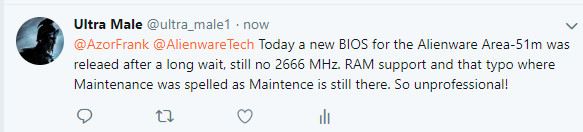
Ok so, no 2666 MHz. RAM support yet, everything is the same, even the fan profiles, they only start spinning at the boiling point, 0 changes as far as I can tell
-
-
Nice!
Guys, do you know any way I can force a BIOS update without knowing the BIOS admin password? Like making a USB drive or something? IT flatly refused to let me dual boot my personal drive on the same laptop as the work drive. Plus they installed some BS Bitlocker software.
I would rather just hack it myself than have to argue with the corporate machine. Sigh. -
Good luck in the unemployment line if you do this.
Sent from my SM-N960U using Tapatalk -
Checked the different fan profiles for different settings in their ACC tool? Opened up XTU and checked for changes?
-
Go to the IT office and check the sticky notes behind the monitor
 .
.
BIOS admin passwords cannot be bypassed as far as I know. However, you may be able to dig it out via some trickery in the HKey. A little beyond me as never had to use BIOS passwordsVasudev likes this. -
Note 1: Before updating the BIOS, ensure that you suspend BitLocker encryption on a BitLocker-enabled system. If BitLocker is not enabled on your system, you can ignore this step.
Note 2: Do not turn off the power or interrupt the BIOS update process during the update.
God dammit. Looks like I'm out of luck.
If they had a valid reason to refuse I wouldn't try to get around it. I have a valid reason to want to boot to my personal SSD- I have thousands of dollars worth of audio plugins and programs that I accumulated over 10 years of my professional life as an audio engineer.
It's easy to request procurement to sort me out with an Adobe Creative Cloud license. It's not easy to do that with literally hundreds of audio plugins and tools. I requested HDMI and DisplayPort cables in February and March and guess what? Still didn't get them yet.
At the end of the day I have to get my projects done and I can't afford to wait 6 months for them to acquire them.
Also I would rather not lug around two Alienwares to work every other day...Vasudev likes this. -
@Amroth
This! Don't mess with the IT d00d! Seriously. It may seem like a cool thing for you but for them that's crossing the line. -
Companies don't allow this because of the security risks involved as it introduces a high potential for IP theft, using unapproved software that can lead to security or technical issues, among several other valid reasons. Not to mention usually the company won't be held liable due to the loss of personal data caused by any issues. I think you should try to see if there is another alternative than skating by your companies AUP. You should ideally keep personal and work items separate. If you need these plug-ins and other software to do your job you should make your case to management or procurement to get what you need or see if you can get an exception to have them installed from an external device.
Otherwise, subverting your company's policies will definitely give you more headaches than not and the high potential of you looking for a new job because you were told no and then did it anyway. Just telling you from experience as a Director at one of the largest technology companies in the world. Obviously, things change from company to company, but judging from what you put here it's probably not going to end well should you try to do this.
Sent from my SM-N960U using Tapatalkhmscott likes this. -
You could do that with Dell BIOS Flash update but SCCM or any deployment will block the update nonetheless since its not approved for deployment. I don't think A51M has 5MB MEI vPro capabilities unless you asked for one as CTO.
If its ucode you can rely on OS updates and for MEI you can rely on Win-raid. -
Bios 1.5.4 I am seeing issues in all games and even firestrike even in demo, the GPU starts out normal 1970-1950 stays in that range for about 2 minutes and then downclocks to 500 at temps of 75c, then after about 1 min of that it will spike back to normal for 2 min or so then back down again.
I am not OC the GPU and did not have this issue before bios update, I also have performance set in 3d settings, I wiped the drivers and reinstalled the newest Dell drivers and still seeing this.
Can anyone else confirm?VoodooChild, mason2smart, hmscott and 1 other person like this. -
This makes me not want to update...
Sent from my iPhone using TapatalkEnkeixpress, VoodooChild, BADAZZYOUNGIN and 3 others like this. -
-
“Improved thermal stability”.
![[IMG]](images/storyImages/88447cfe4e00caa08c0d9e27cd12411a.jpg)
Sent from my iPhone using Tapatalk -
Shoulda waited.
just down clocked to 1830 1725mem max fan on and exact same thing happens after 2 min. I would advise not downloading this BIOS for now.Last edited by a moderator: May 29, 2019Papusan, BADAZZYOUNGIN and LoneSyndal like this. -
Thanks for the heads up.
Think I'll turn windows updates off for now. As I noticed they've been pushing BIOS updates through windows updates lately. NOT COOL, DELL, NOT COOL.raz8020, Papusan, mason2smart and 1 other person like this. -
Wonder if you could swap the motherboard with the “system is now throttling too often under mild load” so you could get one before the update.
Sent from my iPhone using Tapatalk -
And what with further bios updates? Avoid every single new firmware updates the coming years? Only one single firmware upgrade is enough to lock you out from rolling back next time. What with fixes they don't put into their info sheet? Those who is hided. And what with those firmware updates pushed out from Win Update with love from Dell? This won't be easy!
-
Anyone having issues with their internal and external mic outputting very low?
I thought it was just my headset, but it turns out the internal mic has the same issue.
Basically I have to have the mic in my mouth and yell for it to pick up my voice clearly.
I've checked all windows and my headset settings to no avail. Mic is set to +100. I was able to set the internal mic to +30dB, but it picks up every little noise.
I'd appreciate some help figuring this out. Could it be a driver issue? If so, what driver should I remove and uninstall?
Edit: It works perfectly in Discord, but terribly in everything else. Odd..Last edited: May 29, 2019 -
Have you tried rolling back BIOS? Not sure how to do so with Dell stuff yet to attempt.
Sent from my iPhone using Tapatalk -
Is 2x 330 watt within the power limits for the 51m? Any benefits to grabbing 2x 330's?
-
No reason to get this. CPU 210W max turbo, also about 210W max GPU.
-
unless your super OCD and hate having one small psu and one large instead of 2 same size.
-
Sure but what about upgrades? In the future is it possible for the system to pull more or is it capped?
-
This is the last gen Z390 CPUS so they say. There will never be a 300W+ GPU in this system; I can guarantee that. The 510W is more than enoughmason2smart and Darkhan like this.
-
https://docs.microsoft.com/en-us/windows/release-information/status-windows-10-1903
A few known issues preventing 1903 to show up in Windows Update. Probably the biggest being having external USB drive plugged in.
EDIT: already covered by you! -
Did I do what?
After a wait of almost 2 weeks for new part, I finally received a second replacement screen from Alienware and the backlight bleed on this one is next to nothing! Gorgeous screen overall! I am really happy! It gets super bright too without blowing colors out of proportion. This is an AU Optronics 144Hz GSync Panel by the way.
No need unless you intend to physically modify motherboard hardware to use this extra power. 510 watts will give you all the juice that you'd need.Last edited by a moderator: May 29, 2019mason2smart and LoneSyndal like this. -
Due to pcie 4.0?
-
I learned my lesson when upgraded from version 1.3 to 1.5. Not going to upgrade anytime soon. No need to fix what's not broken. What actually needs a fix is the fan control software in AWCC. Fan control using just 3 dots on the curve is a big joke!
As ridiculous as it may sound, our laptops are already obsolete. PCIe 4.0 (and soon upcoming 5.0) is incredibly faster! But, as long as I keep getting 60+ FPS on my games, I will keep lugging mine around without any regrets. Going strong so far!
The red and white beast with new screen.
![[IMG]](images/storyImages/IMG-20190530-073919.jpg) Last edited by a moderator: May 29, 2019Xatanú, Fire Tiger, Darkhan and 1 other person like this.
Last edited by a moderator: May 29, 2019Xatanú, Fire Tiger, Darkhan and 1 other person like this. -
B173HAN Display Calibration (Dell 562NF; AUO Display 17.3in) for Area 51m
https://r.tapatalk.com/shareLink?sh...lay-17.3in)-for-Area-51m.829043/&share_type=t
Sent from my iPhone using Tapatalk -
I already calibrated mine yesterday. Looks great! Plus, not all displays are created equal so one profile across multiple of them may not always give optimal results.LoneSyndal likes this.
-
I thought I heard someone say one of the 2 PSU's got much hotter than the other one... would the lower wattage PSU benefit from being upgraded to a 330w to handle the load / heat better?mason2smart likes this.
-
The 180W gets pretty hot, but it functions.mason2smart and hmscott like this.
-
The heat is well within specs and shouldn't be a problem.hmscott likes this.
-
Yeah, that's it. I used to put in larger PSU's in place of smaller ones to reduce the heat load.
Not saying it's gonna happen, but I've seen people report PSU's melting either themselves or something that got dropped on them - something falls on top of them and traps in the heat, and they fail.
I try to put the hot PSU's on a solid surface that can absorb and dissipate heat if possible, removing them from carpet or bed coverings that can trap in heat. And, try to put them out in the open where they can get air flow over them instead of tucking them into a corner of nested cables.
The 330w should run cooler in place of the hot 180w. But, the 330w PSU's aren't cheap, unless you already have one to put in service they are over $100 typically - and I wouldn't get a cheap knock off, I'd get a real AW / Dell / MSI / etc 330w unit with a warranty.
https://www.amazon.com/Dell-Adapter-DA330PM111-ADP-330AB-332-1432/dp/B00CGA5JQM
Note in the amazon comments, some vendors aren't real Dell OEM, so maybe order from your laptop vendor - DELL or the shop where you ordered your laptop for fulfillment with a "real" Dell 330w PSU. I've ordered PSU's on Amazon and got real OEM PSU's, but you never know, so inspect it when you get it - at least Amazon is good about returns.Last edited: May 29, 2019 -
Could some of you post results from Aida64 Cashe & Memory benchmark? @Darkhan @ssj92 ++ others. Thanks
raz8020, Falkentyne, c69k and 1 other person like this. -
I must admit I was surprised and a little excited to see this new 1.5.4 BIOS firmware has showed up, very tempted to update to it, but I think I shall refrain from updating to it, and stay on 1.5.0, at least for now until another new "hotfix" BIOS firmware shows up. I like improved thermals but not if performance with either the GPU or CPU is reduced in order to provide cooler temperatures.
-
This is what we get when a big enough mob doesn't know how to control their hardware temps and put in place suitable undervolts for their particular chips. Manufacturer goes ahead and restricts everyone. I am not liking where this thing is going. I might never update my bios on this laptop going forward until I actually see substantial performance boost with all thermal "mods" removed.Xatanú, hmscott and LoneSyndal like this.
-
We need a “Prema” or “Sven” for AW machines. Unleash the beast we paid for!
Sent from my iPhone using TapatalkXatanú, Fire Tiger, hmscott and 1 other person like this. -
I mostly use my laptop using ONLY the 180W brick while doing regular stuff which is quite heavy if compared to just web surfing (involves 6-8 virtual machines with modest graphics loads) and my power supply does NOT get burning hot. It is warm to the touch, sure, but no burning stuff. I only connect the 330W brick when I want to play something. If not playing, it remains disconnected and tucked away under my cable management setup.A hidden contributing factor to this cool operation is that I have set Custom battery charging settings in Bios where my battery starts to get a charge ONLY if it is at 65% or below. The charging stops at 75% and remains stopped until it goes below 65% again. When I keep it plugged in, charging never drops and load on PSU is minimized.hmscott likes this.
-
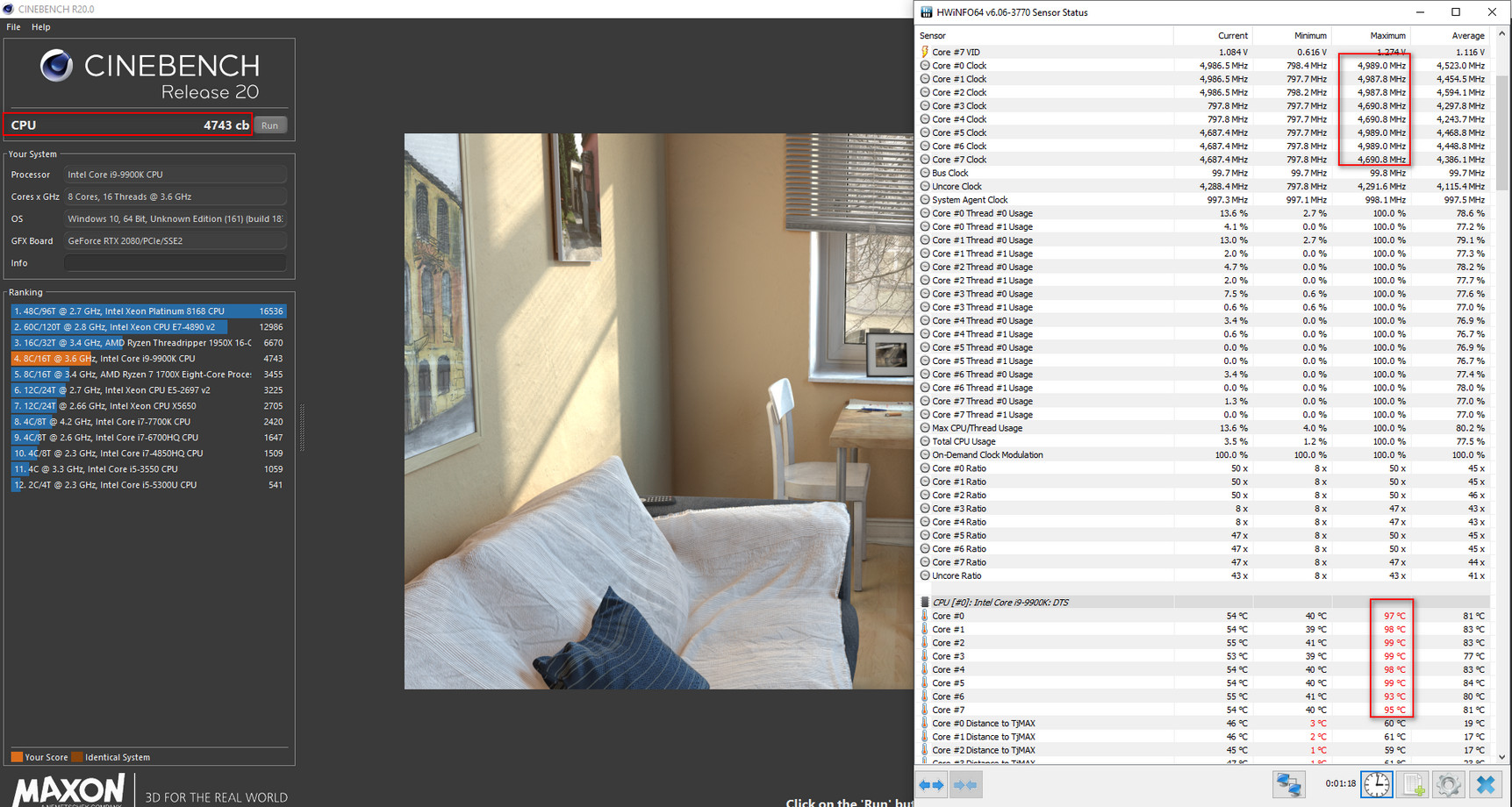
It's not exactly difficult to reduce voltages for either the CPU or the GPU in the first place to be honest. Just takes around 10 minutes to undervolt the i9 9900K to -110, and set clock multipliers to 4.5 GHz with Intel XTU, for suitable temps.
What I was hoping that this new 1.5.4 BIOS firmware would do is make it so that we won't need to undervolt at all to keep the i9 9900K under 90 C during normal stock clock rates, and at 100% load.
But it seems to play with the clocks of the GPU? What's going on? There was nothing wrong with the temperature of the GPU to even begin with. It's the temperature of the i9 9900K that needs sorting out. Too much voltage going into the machine.
Bring out another new BIOS firmware that actually fixes something please Dell, this 1.5.4 one is rubbish. Cheers. -
None know if Dell's engineers have added in hided fixes in this firmware to lessen the smoke and the burn up. They usually don't want tell what is added in any Bios.
And from what we know... They avoid tell the owners of Area-51m what's up with it.Last edited: May 29, 2019raz8020, Xatanú, Arrrrbol and 1 other person like this. -
I still don't understand why people jumped on this laptop.
It's worse than a Boeing Crash-8 aircraft.
It's this
You know the Alienware 51m is bad when all of the reputable tech sites (like Gamers Nexus and Jay2cents) are ripping it a new one with the MSI GT76.
If the GT76 doesn't explode when you run prime95 on it at 5 ghz it's going to steal the thunder. -
Have you tried with only the 330w? What are the charging characteristics in comparison? Does the 330w run cooler?Last edited: May 29, 2019
-
I managed to get my hands on 2 of these machines in my friends circle here and what I noticed is that after a thermal pad "upgrade" that those guys did, one of them used a 1.5mm thermal pad on CPU VRMs and it was not making good contact with all of them. As a result his CPU was unstable at very low undervolts. He bumped it up to 2mm thermal pad on all of them and the problem went away. Surprisingly enough, the other one was making good contact with the VRMs with the same thermal pad which further strengthens my belief that these heat sinks have a non-uniform gap issue where same thermal pad doesn't fit all. I am not aware of any abuse that took place at the hands of the owners of those machines before I took a look at them but it is safe to say that these components want perfect contact with the heat sink otherwise funny things will happen which other connected components on the motherboard may or may not like/bear.
-
A lot cooler even when under load. With both, the 180 seems like it wants to melt. Since I went with the Eurocom PSU, no more issues.
Sent from my iPhone using Tapatalkhmscott likes this. -
It definitely runs cooler, but the 180W runs cool enough as well so I am easily able to spare a significant amount of baggage weight by cutting the fat brick and sticking with only the tiny one. The brick gets warm (not hot) when I try and game on it, even though the GPU performance is roughly half.
Guys check out this thread and give your input as well. https://twitter.com/Key_Logger_/status/1133946519906914304Last edited by a moderator: May 30, 2019Fire Tiger and hmscott like this. -
-
Its BS they dont let us downgrade. Especially when they cripple the system with new bios updates.
*OFFICIAL* Alienware Area-51M R1 Owner's Lounge
Discussion in '2015+ Alienware 13 / 15 / 17' started by ssj92, Jan 8, 2019.


