Problems? See this thread at archive.org.
Unless you delid the 8700k the 9700k should have better thermal right?
-
You know I was considering getting the 8700 for this laptop and swapping it with my 8086K. But for $100 I figured the 9700K was a decent value. If I ever get bored I may still try the 8086K in my Area 51m. Besides the cool factor or bragging rights I never once considered the 9900K.
-
The 9700K and 9900K are soldered and actually delidding those chips provides pretty nice gains, which means that the solder isn't that great and leaves a lot of temp improvements to be had .... I have a buddy who has the 9900K in his Clevo, delidded and the temp differences were astonishing... the stock 9900K idled at high temps even... after the delid it improved it by a lot.
The 9 Series chips run hot out of the box...
Very nice chip. I have the same and in fact I'm right in the middle of tuning mine further right now to 5.4GHz and it's stable with my RAM at 4200MHz ...I'm going for 4500MHz on the RAM right now...
Value wise it works out pretty well when buying it (9900K) as an upgrade option so I totally get that.
This all comes to show how practical the 8700K / 8086K is for the laptop. Having all 6 Cores firing at 5.0GHz is such a sweet spot IMO for the Area 51M. (For those that don't know the 8086K is Intel's 40th anniversary binned chip of the 8700K. So now your chances of getting a super 8700K chip is very slim now, because they bin it at the factory and the ones that can OC past 50x etc... get labeled as 8086K.) -
The heck were you a few weeks ago when I ordered this thing? That seems well reasoned enough. I have a i7-9700k model arriving in a few days. You would have saved me $100 and probably some thermal headaches!
Terreos likes this.
-
Hello
So i have tested my AREA 51M 9900k/RTX 2080 two days every day straight 3h of gaming and CB.
I would like to share with You some experience.
I had not issues in games except heat problems on profile OC 2.
Basic profile with no OC work just fine and CB score is 1700+
Profile OC 2 CB score is only 1800+ so its not much of the diference with no OC. (could You please send me screen shot of Your settings as You reach 2100 CB score)
I also have to say on OC 2 laptop is getting very hot which is not good feeling while gaming.A specially place above the keyboard close to the power button.
I will run much more testing today and lets hope i will find some sweet spot. -
Man 5.4GHz is impressive. I never played around with mine as I have mine stuffed into an Ncase M1 with a 240mm aio on it. Besides the pump buzz I can't hear anything from the case. Though I kept telling myself I wanna see if I can hit 5.2GHz. One day I'll try. Lol. Maybe I'll find out I have a golden chip and definitely swap it over to the Area 51m.
If they offered the 8700K I wouldn't have even given it a second thought and gone with that. I'm sure they got a deal from intel on the 8700. But taking away overclocking ((tweaking)) is a nono for me on a product like this. Before some of the members got their laptops I was expecting to have to undervolt the 9700K. But so far it seems minor overclocking maybe possible.
iunlock likes this. -
I disagree that the 9 series chips run overly hot out of the box. The 9900K in my area-51m idles at 40-42C under balanced fan profile absolutely silent. That's not hot to me. Sustaining at 5.1ghz and not getting above 90-92C is also not "hot" to me. Sure, if it had a liquid loop, it would be lower but in this form factor it doesn't seem to struggle much to maintain load at overclock.
Attached are photos of my idle temp, Firestrike score screen and cinebench score screen. These are screenshots of each being run 10x, this is of the 10th run after the system is fully heated up. These are not my all time high scores on the system. -
On what profile OC You are having this scores???
Can You show me some settings
thank You -
attached are pics of 2 cinebench runs. the processor can hit 5ghz+ and not break 70C. It's tricky shooting these screenshots while everything is happening due to me having to switch multiple screens and menus within a different window but they're fairly representative.
judal57 likes this. -
I will say that I have been working with CPUs and overclocking/modding for a very long time and I believe that I have an extremely good 9900k/rtx2080 both. Heat seems to be decent given this form factor. I can get the CPU into the 90s but the GPU is under a heavy OC as well and it never gets out of the low 80s. Mind you when I get my 9900k to get into the 90s, I'm doing stuff nobody would ever do. Like exporting a 4k raw to 1080p file, while running cinebench and a game in the background just to see what the temps would go to. I've had a couple of blue screens (not cpu or gpu related) and some general system instability but it has nothing to do with the OCs and I believe it will be resolved in software updates.
If you're looking to play Anthem on a 51m, it's spectacular. I'm outputting to a 1440p ultrawide monitor and never dropping below 95fps, with highs over 140. All settings Ultra. Weirdly enough, I average the same FPS using the Area 51m monitor, despite it being lower resolution. Not sure why.Last edited: Feb 24, 2019VoodooChild, raz8020, alberty and 2 others like this. -
The Area 51m has also proven to be a workstation titan. Exporting video and editing 4k raw in a timeline is spectacular. Eats DaVinci Resolve alive. HIGHLY recommended for video editing.
I also saw some discussion of an 8700k and 9700k vs. the 9900k in this laptop. I have machines with the 8700k and 9700k and I prefer this 9900k Area 51m to them by a huge margin and disagree that the 8700k would be "perfect" in this chassis.
The 9900k temps are quite good and the performance gain over the 8700k is substantial. Both chips are fine for gaming but if you're doing things outside of gaming, like editing, rendering, or compiling, the 9900k is WAY better and the thermals of the area 51m allow for overclocking to make it even more so.
If you're second guessing getting the 9900k in favor of an 8700k or a 9700k, don't. I wouldn't pick a 9700k or 8700k over the 9900k in the Area 51m.
When my 9900k in the 51m is idling at 40-42C and hitting 5.1 - 5.2ghz at or below 90C, what would I gain going to an 8700k or 9700k except less performance?
I'm hyper critical of products I buy and don't blink to return them if they don't completely make me happy. I've returned electronics for things as petty as not liking the look of an air grill.
So far, I'm keeping the 51m. That's saying a lot.Last edited: Feb 24, 2019ErikO, VoodooChild, c69k and 5 others like this. -
Also as a side note that I forgot to mention, I got the option with the 2TB nvme drives in Raid 0 and the trash 1tb "storage" spinning disk drive.
Well, when I received the computer, Aienware installed the OS onto the spinning disk drive and labeled the raid 0 as "DATA". The read/write of the spinning drive was like 200MB/s, the raid 0 benchmarks at 3,100 MB/s. No joke, it took Windows 3 minutes to load on the spinning drive- now that I'm on Raid, it boots in 3 seconds.
I had a laugh at that. Was trying to figure out why the OS was so slow. Cloned the install onto the raid, all was fine and dandy. Just shocked me that they did the OS install on the trash drive instead of the raid 0. Someone not as computer inclined would have been disappointed by the system performance out of the box.
Just something to look for when you get yours if it's slow out of the box. Not sure how many this happened to from the factory.Richard Bortz and BrokenNinja like this. -
@Err0xx
You purchased from Dell? Or someone else?
Did you repaste cpu/gpu? If so with what?
What is the exact setup you purchased ?
Sorry if I'm asking for information you previously posted.
Much appreciation.
I plan on using my 51m for gaming/ heavy solid works x64 modeling/Maya
And some gaming. I feel 64gb of ram is going to be a must. -
How in the world are you getting 90 FPS MINIMUM on Anthem at 1440 ULTRA? Not even the 2080Ti manages to get that which averages around 75-80 with some dips to 60.
propeldragon and Rei Fukai like this. -
This means the PC crashes rather than restarts, and the XTU service has not shutdown properly. If you are at the desktop and do a proper shutdown does it also happen?
This is the service: "Intel(R) Extreme Tuning Utility Service"
I start the XTU application with every restart and tell it manually what to do (eg -130mV) and leave it to that. XTU runs in the background and provides some monitoring too. This and the MSI Afterburner is all you need to monitor and adjust. -
Guys did anyone already paired his tobii eye tracking on https://gaming.tobii.com to get Maybe Devision 2 ?
i have done it yesterday but i don't really know how to get a key or any free game ?
https://support.ubi.com/nl-NL/Faqs/...our-copy-of-The-Division-2-TD2?fallback=en_GB -
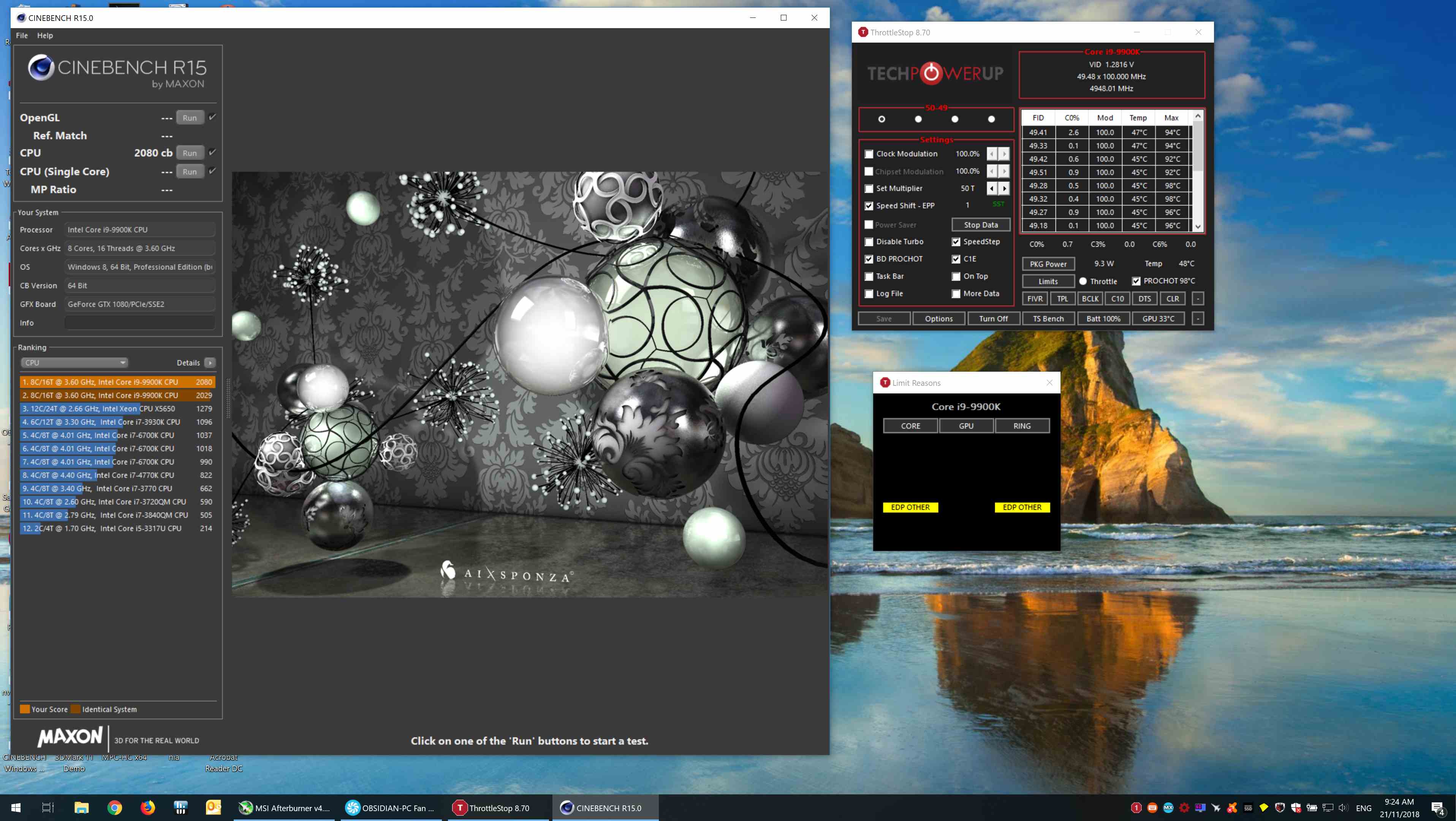
Your chip is gimped. An 9900K running full speed @5 Ghz scores at least 2100+ and hits 2200 easily. You should've crossed at least 2120, cause the first engineering sample 9900k chip on 5 GHz scored 2122 cb.
A consumer 9900K (not a chip from the lab) will hit 2150/2200 cb easily. So the firmware is holding you back already and you don't have much thermal headroom available of you want to let the 9900K spread it wings. -
Anthem supports DLSS and you can enable it as of the newest geforce drivers. It's usable at 1440p but it's not at 1080p, I assume that's the difference that I didn't think of earlier. In earlier tests, dlss wasn't available, so rtx cards that support dlss should now see higher performance. my FPS numbers are with DLSS on. My Anthem FPS on DLSS with rtx2080 is equal to my FPS numbers on my RTX 2080ti without DLSS. I have both to compare- albeit the 2080ti is in a desktop. And of course, the 2080ti using DLSS is higher than my rtx2080 using DLSS.
Purchased from Dell. Have not repasted yet, but likely will in the future using graphite pads that are rated at 35W/m-k. MUCH less messy- linked below.
setup is max everything Dell offers.
https://www.amazon.com/dp/B07CK9SHZ...olid=18EJDEUBA8J5A&psc=0&ref_=lv_ov_lig_dp_it
The chip performance you're quoting is in a desktop form factor with likely 10x the airflow. If I didn't care for mobility, I wouldn't have bought the area 51m. I'm not aware of a single 9900K in a laptop form factor that has EVER hit 2200+ CB unless they have the chip exposed to Liquid Nitrogen. I have a 9900K under a liquid loop that does 2550 in the same test. But it's not mobile. It's in a desktop. I'll gladly trade in 400 points to be able to go portable. I'm not claiming this is the MOST powerful 9900K implementation. Physics 101 should make that obvious. I'm saying that this is the best LAPTOP 9900K implementation I've seen and I disagree heavily that my area 51m 9900K is "gimped" when it's scoring as high as it is with laptop thermals. I'll bet everything I own the chip in this laptop scores higher than the one in my desktop if I were to switch the chips, and the one in my desktop is already in the top 10% of being able to stably overclock to 5.58ghz.
Point is Dell is mass producing a laptop with desktop internals that's giving 90%+- of the performance of 45+lb desktops. If you're never going to move your machine, it's relatively pointless. But for those of us that need the mobility, you'll rarely miss the 10% deficit.
Oh, and the sound/speakers are *really* good, too.Last edited: Feb 24, 2019raz8020, VoodooChild, IXVIXXII and 2 others like this. -
Hi guys can some one check this with their laptop. I've got a 51m a week back and found this strange Gap at bottom corner of the display.
https://photos.app.goo.gl/NAXkuAf8ML7wXjnKA
Also please check if the light bleed in the above link is acceptable or not.
Thanks for any help -
I do not have a gap there, but I do have a little rubber foot that is meant to act as a "rub protector" between the monitor and the clamshell at the hinge. Is yours missing this little leg thing?
As far as the backlight bleed, that looks like a lot to me- though it always looks worse in photos than in person. My unit has a slight bit in the top right and none over the rest of the screen.
Attached photo of that spot on my machine.Last edited: Feb 24, 2019 -
Can you post an image of yours of the corner and rubber thing that you were talking about. About light bleed, yes it's looks worse in the photos than for the normal eye. My only concern is that strange Gap now. I've got this after waiting for long time and I don't want to return this as Dell doesn't provide replace option, I've got reorder it if I return it. This is really frustrating ☹️.c69k likes this.
-
Posted above.
-
I think that's missing. I need to check it once I get back home. What a poor quality check of Dell. I think i need to blast them for this and ask for a replacement.
-
First off thanks for posting up and sharing the screenshots etc... My emphasis was that I would opt for the 8700K/8086K, but that is my opinion. As for the 9900K running hot, that is a subjected term as you've pointed out. 90C+ is not hot to you, but to me anything near that I consider hot so it just depends on what hot means to you.
The point is that an OC'ed 8700K/8086K would be more than adequate for this machine leaving greater thermal head room vs a 9900K. I never implied that a 9900K is a bad chip lol... in fact, I just got done delidding one before I saw your replies... anyways... I hope that clears things up.
Again, thanks for posting the info and what you've shown validates what I've been saying all along in trying to help the trolls here see the bigger picture in that this system is more than adequate for gaming and work tasks.
Your real world example will dismantle a lot of heresy going on around here... so kudos for that.
Now as far as the whole 8700K vs 9900K thing, you have to realize that not everyone (even you had mentioned that) works with exporting 4K raw files etc....
Of course for those that work with that kind of stutf would benefit from more cores. That is obvious...
But the point of what I was saying about how IMO the 8700K/9086K is a perfect choice IMO for this chassis was geared toward the majority.
Even you went onto emphasize ..."...Both chips are fine for gaming but if you're doing things outside of gaming, like editing, rendering, or compiling, the 9900k is WAY better..." .... Well yea of course and again that's what I had meant. -- The majority of the people here are not doing what you're doing with 4K content / work.
Oh and by the way.... we seem to be cut from the same piece of cloth because I too am hyper critical and extremely OCD with stuff... So I completely understand.
Keep them posts coming... thanks for that...
I agree, it should have at least been over 2100, but for the chassis that is still very respectable and in the real world it makes a negligible difference... I'll let you know what I can get from mine once I have it in my hands.... all the while so far so good in seeing some data ...Last edited: Feb 24, 2019Rei Fukai likes this. -
@Err0xx I didn't think people actually used those IC graphite pads sense
der8auer said in his YouTube video it's equivalent to a medium or low end thermal paste. But if your always opening and removing the cooler assembly I can definitely see reusable for ever being quite nice. Thanks for the quick response n the information.
I wanna go with der8auer direct die plate with my 9900k delidded.c69k likes this. -
That'll be great to see. Please keep us informed. As for the graphite pads, a few of us worked with regular graphite pads (not the grizzly branded ones) on laptops and although it was okay, it wasn't anything special. According to my test data and iirc, it worked well under ~80C, but after temps shot up after that, it was a slippery slope to TjMAX heaven vs using LM etc...BrokenNinja likes this.
-
I think this is a trademark symptom of autism, mild, or not.
As far as I am aware graphite pads are made by Panasonic in two guises, the ones we want are compressible and they are the ones you will want to use. I would buy them branded Panasonic and not from Grizzly or IC, unless Grizzly/IC made their own of course. -
So on the whole 8700k thing. I've tried both the 9700k and 8700k in my laptop. I was only able to squeeze out about a 1300 cinebench score on the 9700k while i am able to get 1525+ on the 8700k. The 9 series chips run considerably hotter and are more power demanding. The 8700k in my system can hit 5ghz and stay at under 70c at full load. There are power issues so it underperforms by about 10% or so. It still outperforms the 9700k tho. The 9900k is great but 90c is alot of heat and also there is alot of heat runoff to your 2080 because with a +150 core +175 mem oc on mine it stays under 74c. The 8700k+2080 seems to be the best gaming option. It also is no slouch at workstation stuff either. I think as bios options open up my performance is bound to increase. Also i only have 8gb of ram till monday and i bet that will have an effect. Ill update my scores on this thread after i get my 8gb sticks in.
-
If anyone had any issue installing nvidia drivers, the last driver 419.17 works for me. You need to install as an express not customer install via go force experience. Once installed you should have access to nvidia control panel then also.
Temps on my 9700 are excellent 72c average no need for repasting, but it won’t stop me doing it thou at some point I guess (more so for 2080 gpu) which hits 79c.iunlock likes this. -
This talk of the previous Gen CPU seems bittersweet... On the one hand you can choose a CPU that would run with less power but still meet your needs with today's less demanding CPU tasks/games, but on the other hand that defeats one of the purposes the machine was marketed to me... The ability to change or upgrade to a i9-9900k for the demand of the software of tomorrow.
The question remains, which has been adressed by a few, in general how much crippling has gone into the system that ensures it can run, and at least to me, how much modding / tweaking can I do to squeeze more performance if so desired.
In the end though, I guess this is one of the great things about the Area 51m's LGA socket is that you have options.Last edited: Feb 24, 2019Mr. Fox, raz8020, Papusan and 1 other person like this. -
I have a 7700hq on my 13R3 which is already 2 generations behind and play AAA titles like battefield 5 with DXR and DLSS “on” at 1440p on ultra settings and get solid 60FPS with CPU usuage only at 55%! 8700 is more than enough to run any game for couple of more years IMO and when and if I do get the area 51m I would pop one of them on just to help reduce the thermals instead of the 9700.
9900 is just overkill and would add extra cost to a machine that is already retailing so high.Last edited: Feb 24, 2019 -
I think there are some good arguments for any of these three CPUs... but... I think many of us have quickly forgotten that just a couple weeks ago, the consensus was that the 9900k would never even maintain its base clocks under load, and that is pretty much now confirmed untrue.
Stock, out of the box, seems everybody is able to keep core 1 at 5ghz under load, regardless of benchmarking or gaming. In a laptop. That’s highly impresssive, imo. We haven’t seen any throttling unless folks run intensive benchmarks 7, 8, 9+ times which is unlike 90% of real world examples.
And that’s not even factoring there is room for improvement - underclocking, delidding or improved paste. Seems with a mild under bolt and some thermal grizzly, all the above will stay true AND you’ll stay in the mid 80s, possibly. That seems pretty good, no? -
I'm glad that works for you.
But to me something that is marketed as "the *most powerful laptop* Alienware has ever made", doesn't hold much water if it runs in the same circles as previous Alienware model CPUs. Can you imagine if they said the "new Area 51m can match the performance of our old models from a few years ago"?
In any case, I don't want to turn this into some silly argument on CPU choice, and look to the last point of my post above... all of us now have options within an Alienware model.
Last edited: Feb 24, 2019 -
For comparison: this iz a DTR running a 9900K @4.9 Ghz scoring the same score's as you. This is BTW an Clevo P870DM2/P870DM3
Now imagine this beast running fully unlocked. It will hit those desktop score's you're talking about. 5Ghz on air is also the same 5Ghz on water, it's the purity of the wafer where the cpu comes from that dictates how much it will score, not on which way it's cooled. On water you can indeed hit 5ghz more easily but it won't be faster than any other cpu on air. Maybe it will be more stable, but that does not teanslaye to a 50/100 points difference.
I get where you're coming from, but a chip running 100mhz slower than you and having the same score should indicate that there is something going on. If it's okay for you then everything is fine, but as others has said your chip should've score higher so for the tweakers this indicates that AW still has some work to do.Attached Files:
raz8020, bennyg, Papusan and 1 other person like this. -
-
Trademark symptom of autism? Explain yourself. You shouldn't be joking about stuff like that. Not nice.
Thanks for sharing. It's good that there are choices and as you've demonstrated, I'd rather have a CPU that I can run at lower temps and at a higher OC, than one not at its full potential with higher temps.
Yes indeed.
Very true. It's nice to see data being rolled out among the owners. It'd be funny if someone compiled all the smack talk from the trolls who were making those remarks lol.
Now regarding OC on CPU's just to be clear most of us consider a true OC if it is on all cores instead of just Core #0. I've never based an OC on just one core. Now I wonder if some of the discussions regarding OC here were based on the assumption of it being on just one core? I hope not...mattcube64, Rei Fukai, EepoSaurus and 1 other person like this. -
Unfortunately I have already moved to throttle stop and it works like a charm so I can’t confirm your question. TS does work very well and the results are rather good. I’m sitting comfortably at a .115 undervolt and my average temps in anthem have been mid 60s.
-
How was the fan noise on balanced mode when gaming?
-
Fan noise and temps on balanced mode and max fans when gaming!
Thanks -
Hey guys can anyone point me out a link to the rtx 2080 drivers ? when i download them straight from Nvidia and i choose ( notebook rtx 2080 ) it says not compatible ?
what do i do guys ? -
Who'm say you have to exposed it to Liquid Nitrogen to perform correct vs. clock speed in laptops?
Switch chips or use the one you already have doesn't help much if you can't feed the chips with needed voltage due power cap or thermal limits.Last edited: Feb 24, 2019 -
Download the Nvidia GeForce experience app and it will install the drivers.
-
Very respectable. I didn’t test decibels or anything but I never really noticed them while gaming with my speakers on. It’s definitely tolerable.
-
Just to double check and confirm, if your going to use it as purely for gaming the 8700K performs just as well as the 9700K (give or take a couple of FPS) and runs cooler?
I was pretty dead set of getting one with at least the 9700K but if I can save $100 bucks and still have the same gaming performance with the 8700K that would be pretty sweet.
OCing the 8700K is not possible with the AW control center?
What tool is best to OC the 8700K in this laptop?
How are the speakers on the M51? I can’t wear headphones when gaming ( have to be on alert for work and at home) so good built in speakers are a big bonus.
Thanks -
Straight from Dell, the 8700 is the non-K version, so no unlocked multiplier/OCing.
Real lame. If it's between a 8700 or a 9700K for $100, most everyone is gonna choose the latter for the K version. At this price. I'm doing 9900K cause for the money I'm dumping into the machine, I don't see much reason to hold back on any of it.rickdeckard, c69k and IKAS V like this. -
Hi,
I have added few more pictures of the panel frame. If you can check please. -
So far the 8700k outperforms the 9700k in every way that i can find. It runs cooler, faster and for less power and money. You can use XTU to overclock it. I'm sure throttlestop can be made to work with it eventually. The speakers are great.IKAS V likes this.
-
I’m a idiot, I just noticed from dell the 8700 is not the K version.
-
Someone did an unboxing video on youtube
Edit: Clicking the user you see they have a couple more videos of gaming including gaming with just 1 PSUc69k likes this. -
*OFFICIAL* Alienware Area-51M R1 Owner's Lounge
Discussion in '2015+ Alienware 13 / 15 / 17' started by ssj92, Jan 8, 2019.