Problems? See this thread at archive.org.
-
-
These are surprising results. The latency of HyperX is clearly better, but not the throughput. This contradicts the results we saw earlier, where HyperX throughput was much higher.
Are sure the test was run from completely idle state, with nothing hammering the system in background?Normimb and normand668 like this. -
Nothing running in the background unfortunately and just finished testing both again, read/write/copy results are consistent with only the latencies varying by up to 0.3 with either the stock or HyperX.
Regardless there is still the marginal improvement, however i'm disappointed as ofc it would be more if the throughput was the same at least i assume. It would be interesting to see the variance between multiple copies. Anyone else have HyperX to benchmark?etern4l likes this. -
This is a shot from the hip, but it could be that there is some internal bottleneck within the motherboard (if not , knowing "the new Alienware" a little, a software hack to cap the speed at Dell value RAM levels and punish aftermarket upgraders) :/Papusan and normand668 like this.
-
Great shout, either case sounds extremely plausible unfortunately.
I'm erring towards the motherboard limitation however as I got the impression it had a limit originally due to the limit of them selling 32GB XMP. That and the experiences I've had with the unstable Crucial RAM....
Frustrating these limitations, ffs, I'd happily pay extra not to have such limits (or be provided decent RAM in the first place).
Oh well, I live and learn, it just ceases to amaze me the stupidity of it all in terms of some design decisions.
Back to the 32GB XMP limit by Dell at point of sale, I'm sure I've seen other vendors and consumers highlight the use/sale of 64GB XMP HyperX.
If so, it may be the case that even if it works there is a similar bottleneck not only with how the latency and throughput seem at least inversely proportional, but increasingly when above the use of 32GB I'm guessing.
Worrying as it means a lot of people (self included) not getting the performance they would normally have expected with aftermarket upgrading.etern4l and Spartan@HIDevolution like this. -
I remember HyperX benchmarks before and after being posted and they looked different. Between this, and the AWCC memory shenanigans, I wouldn't exclude anything here.
Funny how you can go from the world's most upgradable laptop, to one of the world's least upgradable laptops in a matter of months. -
Can someone with 300HZ monitor do a test here -> https://www.eizo.be/monitor-test/ only with "Gamma" checked? From day 1 I have colors issue with my monitor... I tried to calibrate it hundred of times but everytime I get not satisfyingly results. My colors are somehow washed. When I did that "Gamma" test I notices that my monitor color is green instead of grey - you can see the attached image. The right monitor is 100% sRGB, the left one is crappy one, which I use for console logging of my apps which I develop. I am not very satisfied with the 51M R2 colors. Do you have similar issues or I should call DELL?
Thank you all.Attached Files:
-
-
That's definitely not normal. I just ran it on mine and it is grey(mostly). There does seem to be some green fringing around the logo and if i drag another window infront i get green fringing on that too but the whole screen is mostly grey.
![[IMG]](images/storyImages/rO5pJGD.jpg)
![[IMG]](images/storyImages/PQ0kwRg.jpg)
Those wavey lines only seem to show up on camera but the green glow around the window does show up when looking at it.b.kolev likes this. -
Yeah, the green glow around the windows is normal to be catched on a camera. Definitely will call Dell to replace the screen.
Thank you very much for providing me the details about your monitor! -
Macrium Reflect Rescue Media ISO v7.3.5555 (with RAID support and cloning to dissimilar hardware supported).
Bug fixes and Improvements v7.3.5555 - 19th January 2021
- Macrium Task Scheduler - Unsupported Operation
The German language version of Macrium Reflect v7.3.5550 reports the error "Attempted an unsupported operation" when taking the Defaults > Scheduler menu option.
- Note: This release will not patch English versions of Macrium Reflect from v7.3.5550. English language versions at v7.3.5550 are unaffected by this release.
- English language versions will not patch from v7.3.5550 to v7.3.5555. This isn't required.
- All Full installer downloads will be v7.3.5555
- All German language installs will patch to v7.3.5555.
Use RUFUS to make a bootable USB Flash Disk from it
@Mr. Fox @Papusan @Fire Tiger @MogRules @Normimb @normand668 @Vasudev
Note: I never install Macrium Reflect, I only boot from the USB Flash Disk to create or restore images. That way I have none of its bloated services running in the background.
Be smart...be like Spartan..![[IMG]](images/storyImages/dkhLNPB.gif) Last edited: Jan 19, 2021Darkhan, DreDre, normand668 and 5 others like this.
Last edited: Jan 19, 2021Darkhan, DreDre, normand668 and 5 others like this. - Macrium Task Scheduler - Unsupported Operation
-
The post above has been updated with a new version, please redownload and create your rescue media
@Mr. Fox @Papusan @Fire Tiger @MogRules @Normimb @normand668 @Vasudevnormand668, Darkhan, c69k and 4 others like this. -
guys! what do you think about bios 1.6.0? will it affect anything if i flash it? i am still running 1.3.0!
-
-
Hey guys

in case they present a new A51m r3 on 26. jan.... who is gonna order the new one?
hope for
- 200w 3080,
- still desktop cpu... Intel would be okay, ryzen 5k perfect
- 1440p 165hz
need something new to play with XD
see you guys in the nex Owner Loungechewbakaats58 likes this. -
Why the 26. of Jan?
-
-
https://twitter.com/alienware
Ampere Laptop presentation on 26.janetern4l likes this. -
Great link. Basically Nvidia got rid of Max-Q as a designation of lower end GPU variants for thin and light by dissolving it in a bunch of other monikers. I mean what does DLSS have to do with low power laptops. It's meaningless. They should have just said: "OK folks, listen up: we are no longer going to helpfully designate those weaker, low-power mobile GPUs as Max-Q for you, so you have easier time shopping. Sorry. Please read detailed specs and reviews before making your purchases. Good luck out there."Papusan likes this.
-
Thanks. Not a mention of the new Alienware VP taking part in the event... Is she OK?
-
This guy
got his hands on the rtx 3080 mobile. This should be an 130w version. He made videos of valhalla, WD legion, cp2077 and RDR2
AC Valhalla hovers 75 and 90 FPS on 3080 mobile
in this test the 3080 FE has 82 FPS svg
WD Legion hovers around 55 FPS with major CPU Limit
in this test the 3080 FE hits 75 FPS avg
RDR2 hovers around 55-60 fps
this video with MSAA in 1080p on 3080 FE is in the same range (55-60fps)
looks like the performance is between 3070 und 3080.
I think a new A51m R3 with 180-200w RTX 3080 could beat the 3070 desktop card and if not, the performance should be at least the same.
No claim to scientific accuracyLast edited: Jan 22, 2021FXi, chewbakaats58 and etern4l like this. -
guys any ideea why the ram speed keep resseting to 2666mhz instead of 3200mhz on reboots? keep happening to me and i don't know why!
etern4l likes this. -
Hum....i am in no way an expert gamer but those results for Cyberpunk are not good.
I tested with the same settings this person had. 1080P, Ultra settings, DLSS to balanced, Ray tracing on. My 2080 super 200watts was averaging around 15FPS more compare to his video. This represents around 25-30 % difference in favor of the 2080 200 watts vs 3080 130 watts. If alienware would have a 180 or 200 watts for the 51M R3, i think at best it could reach the performance of a 3070 desktop or 2080TI but i doubt it.
I repeat i am no expert. Could the CPU favor my system? i don't know. But 25% less performance seems very bad when it was supposed to destroy the previous RTX generation. -
Aren't you comparing apples to oranges? Need to wait for results from a 200W 3080 machine, i. e. a 51m-class DTR laptop (of which there will be like 2 in the world).Normimb likes this.
-
Hum.....apple to orange?.....no i don't think so. I understand it's not a perfect match but so far we have no information about a possible 200W 3080 (that i know of). 150w seems to be the max TGP for this card.
We will soon see but i expect to be disapointed with the results of the new gen card.Last edited: Jan 22, 2021etern4l likes this. -
Well, it's 150W+. Clearly Ampere can take some serious wattage, so there's little reason to assume it won't run at 200W given appropriate cooling. What's confusing of course is that there will be several different variants of the 3080 mobile on the market, so basically "3080 mobile" is meaningless - could be a 80W or 200W variant with vastly different performance.
-
Just bought an r2 on dell refurb for $1229. Stupid deal couldn't pass it up.
-
This happens for me anytime an issue occurs with overclocking with the Alienware Command Centre Application.etern4l likes this.
-
Top spec?
-
Learn to use TS. You will never look back.
-
I have used on another machine in the past.
Should I uninstall AWCC as well, and if so how can I take control of the fan speeds of the notebook if I do?
Many thanks. -
I'm sure people will chime in with more definitive answers, but FWIW I would make sure all OC settings are at default in AWCC and don't touch them, and use TS to control the CPU.
-
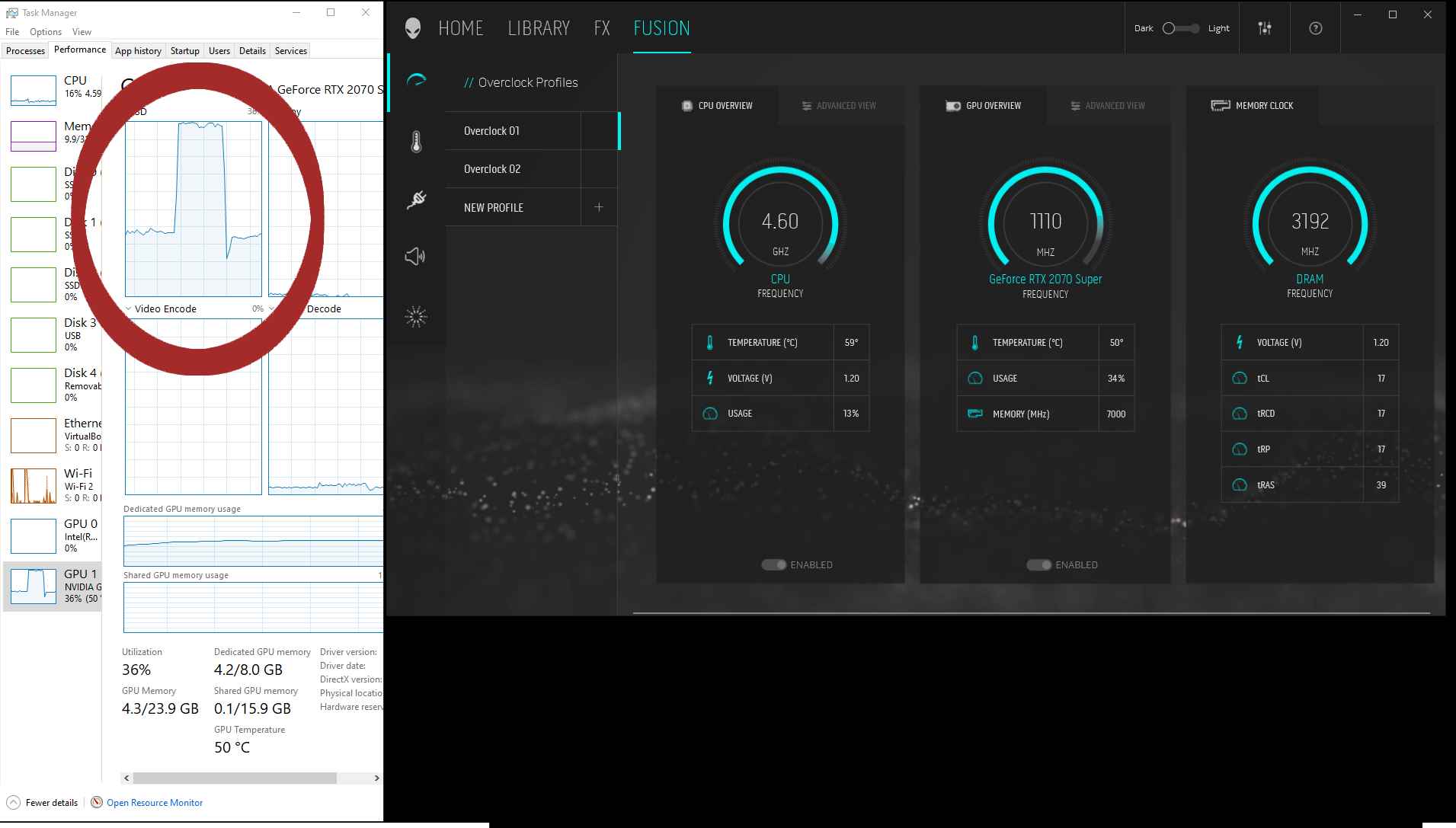
Hello, I have a recent and new issue with AWCC and my GPU performance, I wonder if anyone else here has any experience with this issue or could provide any possible feedback or solutions.
While playing a computer game, when I switch from any other thermal profile to, 'Çool'. my GPU usage jumps from an avg. of around 35% to between 90 and 100%, this is shown both in AWCC and in Task Manager, (please see the attached photo).
Neither temps or fan speeds or clock speed changes significantly.
The usage also changes marginally under small loads, from between 3% and 7% - under different profiles.
In the past week I have updated my NVidia 2070s drivers and also AWCC updated, I have also moved to the 1.6 bios in that period.
The problem persists after reinstalling older GPU drivers and AWCC (via the Spartan method mentioned on the forum here).
Anyone with any ideas?
Many thanksAttached Files:
Last edited: Jan 23, 2021 -
-
i do use mainly throotlestop to undervolt and all that! but i still need awcc to control fans!
maybe somebody will figure out what causes those ram resets!A User likes this. -
Sorry but you have no other choice but to insttall and run AWCC and OCcontrol with this alienware system to control fan speed. (fan control is possible with HWinfo but i don't recommend it. It's complicatted and not safe).
To undervolt CPU you should use the new throttleStop version 9.224.
To overclock the GPU (if you want to) i suggest MSI afterburner (but you may encounter some issues with some games, same goes for awcc).
You will soon learn that awcc is one of the worst software/firmware ever created. It's been bad for many, many, many years and Dell don't do anything about it.
To unsinstall and reinstall you should follow @Spartan@HIDevolution guide. (not dell's guide wich is not up to date) -
-
Hello, thanks for getting back and for your advice.
I play a couple of different games, and always on an LCD TV capped at 60 FPS.
So, as far as I know this is not really taxing my system and allows me to run fans quietly, am I correct in thinking this?
Depending on the game my CPU, GPU usage hovers around 50% and fan speeds range from 35 to 55%.
Temps for the CPU range between 50 - 77 degrees, and the GPU generally sits between 48 and never more than 65 degrees. -
your settings are fine if your happy with how it performs. In general the GPU of the 51MR2 runs really cool.usually under 70C and rarely above.
The temps you are reporting are really good but it all depends on the performance you are getting in return (how many FPS?).
Personnaly i would use Balanced profil for quiet operation when you are connected to your TV and limit the FPS to 60. If the option is not avalaible the i would enable v-sync. This setting should give you a constant 60fps for a 2080 super (if that is what you have) on most games.
You should enter your system inofrmation in your signature, this will help us help younormand668 and Papusan like this. -
Thanks again Normimb
AWCC is currently uninstalled (via the Spartan method), TS installed and I'm monitoring things via task manager. I will probably install again and leave it unaltered (as advised previously in this thread) when I know things are stable without it.
I was pretty freaked out when finding today changing the thermal profile maxed out the GPU!
FYI - the fan profile appears to revert to ''balanced'' without the AWCC software installed.
I'm using framerate limiting rather than V-sync in the games I play - which all offer that.
Sig. updated.
It's a 2070s.
The performance is a steady 60 fps, except in Star Citizen where it lowers and avg.'s out at about 48.Last edited: Jan 23, 2021 -
(A question about NVme not being recognised in the bios, if anyone could kindly advise?)
Hello,
I have a formatted NVme from my last computer as a backup drive in the fourth slot inside the R2.
It is recognised in Windows but not in the Bios (which is fully updated) and appears to be functioning correctly in the Windows environment for over a month now.
I'm i doing something wrong? Is there an installation step regarding the Bios I don't understand?
Many thanks to you all. -
I've seen some BIOSes not listing SSDs in AHCI mode. Why is this a problem?Normimb likes this.
-
Hey thanks for getting back.
I'm not that confident in the BIOS!
The laptop is all/only NVme's
I assumed there is a problem because I've always worked by the principle that the BIOS precedes the installed "Disc" Operating System.
I was quite surprised to find the NVme was available to Windows, without being recognised by the BIOS.
It still strikes me as an issue, could you explain why its not?Last edited: Jan 24, 2021 -
Someone with the new 360Hz screen? Is the new AUO display?
Last edited: Jan 24, 2021 -
Well, let me rephrase - it is a problem, but not a showstopper. Ultimately, the reason most people buy an SSD is to use it in their system, not to admire its presence on a BIOS screen. Can always temporarily switch to RAID mode to confirm it's there. As to why this happens, I was assuming BIOS age was a factor: my 2015 AW 15 R2 doesn't show my SSD in AHCI mode, my 2019 m15 does. Surprised to see this happening in the 51M, but it could be something else, since you haven't confirmed your BIOS has AHCI enabled, and Dell defaults to RAID mode.Last edited: Jan 24, 2021
-
i can confirm that 360hz screen is the AUO screen. more exact: AUOEC91! Manufacturer 6FC17_B173HAN
that's mine of course.maybe others have another model?normand668, Pedro69 and etern4l like this. -
i have found the interposser board to add 3rd and 4th m.2 ssd instead of the 2.5 inch ssd! full set cost me 100£ with taxes and shipping! got in on aliexpress!
normand668, Satanello, quan74 and 1 other person like this. -
Something Dell should be providing for free, or at a small fee....normand668 and Papusan like this.
-
Assuming you mean this one? https://www.aliexpress.com/item/100...earchweb0_0,searchweb201602_,searchweb201603_
Please do report once received! Curious if it actually includes the heat sinks, pads, screws, cables, and everything else required, and how long shipping takes.
Thanks!normand668 likes this. -
i think that's the one! i have purchased full set with all pieces! will report when i receive it. will take a while i assume!
-
Monitor Name: Optronics [Unknown Model: AUOEC91]
This is from HWinfo
*OFFICIAL* Alienware Area-51M R2 Owner's Lounge
Discussion in '2015+ Alienware 13 / 15 / 17' started by Spartan@HIDevolution, May 9, 2020.