 Problems? See this thread at archive.org.
Why at all update the chipset driver? Chipset software doesn't even contain a real driver (= .SYS file).
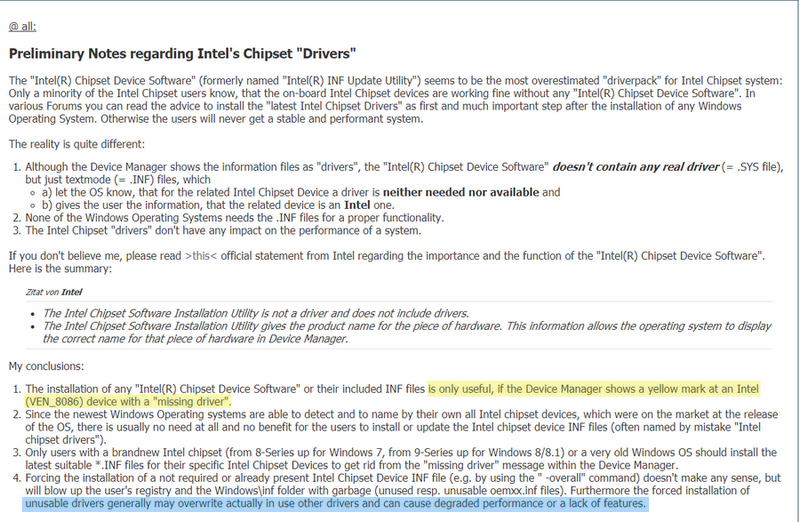
Some info about Chipset drivers http://forum.notebookreview.com/thr...-by-obsidian-pc.801464/page-111#post-10633395
-
-
I have the hall sensors. Regret not getting the uber. How was the warthog? I have been considering the logitech's GX56...
Your right. I shall refrain from comments on your posts in the future.
Pity...I had a suggestion. But it was probably unhelpful...
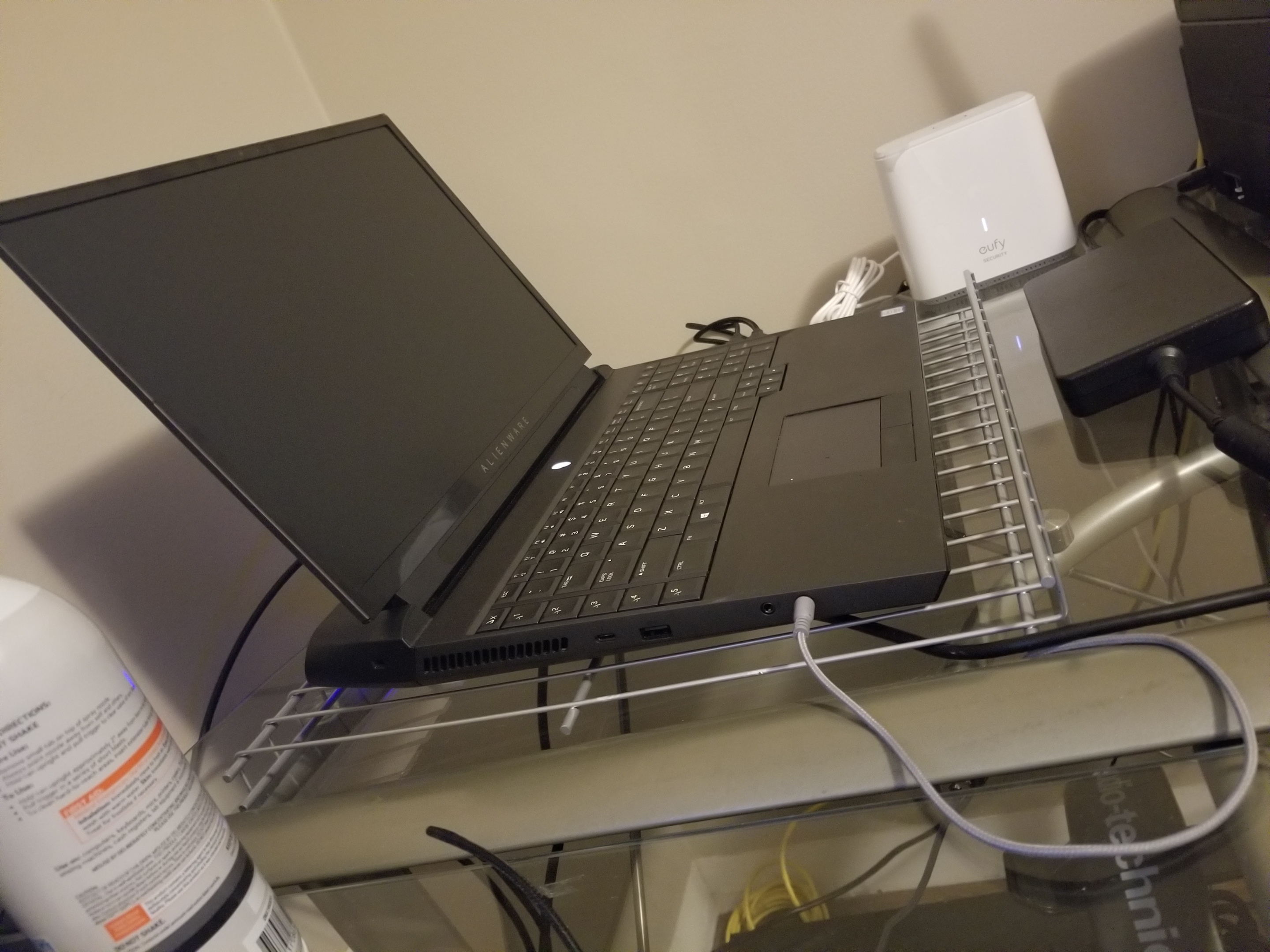
The flooring is finally installed and I'm starting to move back into the office. I modified the pantry shelving and had some left over. My son actually suggested trying it out as a cooling rack. Its actually...perfect. improves airflow, has a retention edge...even matches my desk.
The wire shelving is dirt cheap in HD or lowes..Attached Files:
Last edited by a moderator: Mar 26, 2020Docsteel, Fire Tiger, S1ammin and 3 others like this. -
-
My point exactly! I learned that the hard way... there’s pretty much no need to ever touch chipset “drivers”.
Thanks man!
Haha awesome! Also, loving the black A-51m. I’ve fallen out of love with my white, even with my skin on it.Last edited by a moderator: Mar 26, 2020RMLJD, Papusan, Fire Tiger and 1 other person like this. -
So tried MW5 with the new Nvidia gforce ready drivers
It activated DLSS. Which did improve visuals a bit. BUT spiked temps by a good 5 to 10 degrees on the cpu and the GPU.
CPU 79
GPU 73
Odd. -
I use the same thing to hold laptops over the output vent on my portable AC unit. It does work nicely for a laptop cooling stand as well. Plenty of room to breathe... no obstruction to airflow.RMLJD, S1ammin, Rengsey R. H. Jr. and 1 other person like this.
-
The Warthog joystick has the same 'bumps' around the center position, though less pronounced than the original Cougar stick, but also has some weird 'stickiness' upon initial movement, even after trying several difference types of grease for the gimbals. I bought extra springs for Ian's NXT, but if push ever comes to shove, I will revert to the Warthog stick, If I can find where I left it, lol!
I actually bought two Cougar setups long ago, and now that you mention it, I cannot even remember what I did with my other Cougar throttle. I do remember scavenging the circuit board from it because my original went bad, but that too, was so many years ago.
Too bad this stuff is so old and not really supported anymore. Heck, I have the original ThrustMaster rudder peddles and a very nice person happened to have an extra spring that he sent me for free, and this had to be back back in the 90's!
Flight Sim community is the best!
But sorry for diverting too much, but as a side note, my A-51M is about head-to-head (mostly ahead), at least in synthetic benchmarks with my AMD 3950x w/1080ti. This laptop is a real beast and I cannot wait to move it to a room with space to properly appreciate VR.RMLJD likes this. -
@Virale and @Spartan thank you both very much! The sound is back! I had pretty much given up but the fact you two gave me the nudge I needed got me optimistic again. Needless to say, I won't be messing with things I know nothing about going forward. I booted into the diagnostics on my first boot this morning and the 'annoying' beep happened. So I went into advanced and done the sound test just to be sure and low and behold it worked. Thanks again, love this forum!
-
Be smart....be like Spartan....
![[IMG]](images/storyImages/y0H0dMj.gif) jclausius, MogRules, Fire Tiger and 2 others like this.
jclausius, MogRules, Fire Tiger and 2 others like this. -
It is amazing what a bit of elevation with a laptop can accomplish

-
Not a revelation or news, but upgraded from the stock 16GB RAM on the Area 51M successfully this morning to 64GB of RAM using: Two Kingston HyperX Impact 32GB 2666Mhz DDR4 CL15 260-Pin SODIMM Laptop Memory Kits (four sticks total, 16 GB apiece). HX426S15IB2K2/32 part number if anyone else is interested in a reliable upgrade, these are known to work in the Area 51M and with luck if a future BIOS miraculously enables 2666, should work fine at CL15. Ordered off Amazon in the US (memory shipped from Britain, go figure) for $149.33 USD per pair, pre-tax. The total was like $303.something.
On BIOS 1.81 - as expected 2666 memory running at 2400, CL14.Last edited: Mar 26, 2020 -
1) What makes you run BIOS 1.8.1 when it was a) Pulled by Dell. b) Has GPU throttling at 75C? c) still has no 2666 MHz. support.
2) Is the Kingston HyperX Impact RAM better than the Micron 32GB 2666 MHz DDR4 RAM that came with my Alienware? Better timings?
![[IMG]](images/storyImages/8Yb0Sav.gif)
-
Yes....it's Black...it looks cool....
uugui shi, RMLJD and Spartan@HIDevolution like this.
-
-
1) The system upgraded, it didn't downgrade. So far no issues, but I am waiting it out for the rumored next BIOS to enable 2666... if someone knows of a reason not to be on 1.8.1 I am all ears... recall I have the poor man's 2070+9700K configuration, heat is a non-issue I get zero throttling. Ever.
2) I wanted to go to 64GB, and the kit has been confirmed working for a fair price. I mean there was a time I would sweat one CL difference on memory, those days are long gone now Always had good luck with Kingston over the years, and Crucial both.
Last edited: Mar 26, 2020MogRules, RMLJD and Spartan@HIDevolution like this. -
1) As far as I know, any BIOS above v1.5.0 causes GPU throttling when it reaches 75C which is a very low temp to start with. Also, why did Dell pull the BIOS and went back to 1.7.3, that is another thing I'm worried about.
2) Fair enough, and I'm with you there, other than in benchmarks one wouldn't know the difference between CL X vs CL Z memory -
I never see throttling on this configuration, I have looked for it. You are correct, it would it if hit that temperature (I thought it was 78' though), but it never does. I have run multiple stress tests with 3DMark's 4 K Spytest extreme and checked in HWInfo but it never reports throttling, and the results pass (usually), but even a fail is a hair off. My benchmarks are decent, I think I got like 8300+ on Spytest.... and I still get Gsync (which is one reason I opted for the laptop - I had an AW M15 in my possession - but 90C all the time was a joke), but even with the lovely OLED panel, I couldn't deal with no Gsync after I adopted my AW3418DW panel...
I am not 100% sure, but I think the HyperX memory runs one CL lower than the Micron.... can anyone else confirm? For some reason my memory is that the RAM I had that came with it (2 8GB sticks) ran at CL 15...Last edited: Mar 26, 2020Spartan@HIDevolution likes this. -
I have the same rudders! Things are built like a tank, you can't break them.
Never could get used to that center bump. I found my dusty cougar set up neglected in the basement.. Also my f22 precursor...with "stickyworks" digital upgrade.
Since my state is on a"shelter inplace" I have a new project you may like. Converting a steel battalion co toller to work with win 10. That would be awesome with MW...
Gonna be tough.S1ammin likes this. -
If I remember correctly I think it had something to do with the M.2 slots and an issue that cropped up with 1.8.1 so it was pulled. One of the slots was disappearing or something along those lines.Lopt and Spartan@HIDevolution like this.
-
-
Do you need to follow that complex downgrade path to go back to 1.7.3?
-
Hmm... I have my second M.2 Samsung 970 Evo Plus on the second slot... I don't recall any "disappearances" so far, but if that is correct I might downgrade...Fire Tiger likes this.
-
The trash RAM Dell pushes in their laptops has 20% lower bandwidth than HyperX impact. Of course, they also run the RAM in their flagship laptop at 2400Mhz like it was 2015 - they don't care.
Anyway, are humans good at discerning a 20% difference in anything without the help of a stopwatch, benchmarks, etc.? I don't think so. It's also true that this RAM bandwidth difference is much more likely to translate into measurable performance differences in memory intensive applications such as image processing, rendering, data science etc. than GPU-bound games. The annoying thing though is that HyperX memory is not much more expensive at all, but of course Dell is known for trying to save pennies every step of the way, even when building premium/enthusiast systems. At least with them, those customers who care about memory-intensive applications, or don't mind paying a little extra to get the most out of their systems, still have the option of picking the lowest possible configuration of trash RAM and putting their choice of memory in if needed (unless it's the m15/m17 R2 soldered garbage).RMLJD, Papusan, Fire Tiger and 2 others like this. -
Do any of you guys experience a sort of artefact in some apps? Its not all apps but managed to capture it below. Could this be a setting within NVidia control panel that's causing it? It doesn't happen in games or YouTube videos etc.
Papusan likes this. -
That looks like you may have inadvertently enabled a filter with Nvidia overlay...
Check the filters are all offFire Tiger likes this. -
Not personally but that is kind of an interesting effect!Fire Tiger likes this.
-
Where would this filter be?
If I move the app (Rockstar launcher) around the screen that effect appears but then will clear up soon after and look normal. It happens in the Epic launcher as well. But other apps aren't impacted.Last edited by a moderator: Mar 26, 2020 -
It may not affect everyone, it might depend on what drives are in use, what your doing with them etc. It's possible it's only triggered by a specific use case or scenario. Being that I don't see people reporting this issue my guess is that it's very specific, but they removed it anyways to be on the safe side. If your not having issues your probably fine staying where you are.
Honestly have not tried, but I believe so yes.Last edited by a moderator: Mar 26, 2020Fire Tiger likes this. -
Yeah I mean that's pretty much it. I never heard a real reason why 1.8.1 was removed, but with no information and (as of yet) no ill effect, I am content. The data on my 2nd m.2 drive is not critical, its mostly gaming data or is replicated. I believe the rumor was the next BIOS was due sometime soon, like in April.Spartan@HIDevolution likes this.
-
Will it finally give us 2666 MHz support? This ticks me off man even the XPS 15 and m15 R1 and R2 have 2666 MHz. support.
@Papusan can you please nag on Ernie?
-
Only Alienware's engineers know for sure at this point but Umar and Ernie are riding them to get this to us, along with trying to do something about the GPU temperature throttling. Time will tell if we get them.
Nagging Ernie won't get us anywhere, they are completely reliant on the engineering team, and they are well aware that we're waiting.
I think it's safe to say we can expect delays with almost everything being that most people are locked down at home around the planet.RMLJD, Spartan@HIDevolution and Lopt like this. -
Do you by any chance have your GPU Memory OC ? I experienced that when I was playing around with GPU Memory OC.
Unfortunately going by past experience with Dell so far, we can expect CYA maneuvers, and it's unlikely anything to improve or increase performance will be released, at this point I am just hoping they don't make thing worse.Last edited by a moderator: Mar 26, 2020Fire Tiger likes this. -
I have to agree with this. The memory I selected was 2666 since I figured it couldn't hurt and if it ever happens to be that Dell engineering actually does adjust to 2666 (I seriously don't expect it), then its icing on the cake. Honestly, the difference is way, way smaller than a lot of people think, but I get wanting to "max" the performance.... kind of the point of the system. I mean I don't need 64GB of RAM, 32 GB likely all I will need, but I sure like having 64GB!MogRules likes this.
-
Sup guys, what's the current state on Area-51M Bios and Vbios?
Which version are recommended to use at the moment? -
Alienware_Area-51m_1.5.0 and RTX2080_200W_VBIOS_v1.0.0.3
Period. -
Seems to depend on who you ask and what your doing with it.
I run 1.7.3 and the 180w vBios and have zero issues, no throttling, but I am not overclocked.
If your overclocking and bleeding more heat into the GPU then you will throttle heavily once it hits the upper 70's. I never go above 74c and never throttle. -
I don't yet, I have MSI Afterburner installed but haven't configured it yet. Only GPU related changed were in Nvidia control panel but even changing it back to defaults didn't fix it. Other apps seem unaffected its only Rockstar and Epic launchers that dispatch this type of artefact.Spartan@HIDevolution likes this.
-
what driver are you on? what VBIOS? and what BIOS?Fire Tiger likes this.
-
180w vBIOS and 1.8.1 BIOS. It only seems to only be one or two apps, strange.Spartan@HIDevolution likes this.
-
I am using the latest nVIDIA Driver 445.78 with BIOS 1.5.0 and VBIOS 200W and have 0 issues. I see you are having more issues lately man.Fire Tiger likes this.
-
I got my 51m on Feb 22nd this year i have bios 1.8.1 and it is working perfect however ..when i added 2 bigger m.2 drives the 2nd drive disappeared!.. it only happend once!. It was not detected in bios ..but after unplugging and plugging the drive back in it was detected in bios and not gone missing since ..Spartan@HIDevolution likes this.
-
Hmm... well, good to know. What's odd to me is that a new 1.8.2 hasn't yet surfaced... it's been awhile too since 1.8.1 came out...Spartan@HIDevolution likes this. -
That might be why 1.8.1 was removed. If it hasn't happened again maybe don't worry about it, but if it does happen again before they release a new BIOS you may want to consider going back to 1.7.3Spartan@HIDevolution likes this.
-
They were slow before the Corona Virus don't expect anything anytime soonFire Tiger and Papusan like this.
-
They use their resources on coming models. Why should they spend time on EOL models right now? This isn’t only due the COVID-19 pandemic. You can’t earn double up on already sold models. It’s business as usual.
-
It's like they release a set of drivers too and rarely update them. Check the nVIDIA drivers for the m15 R2 vs the ones for their flagship Area-51m! the area-51m has drivers that are like 20 versions old vs the m15 which is at a much newer brand 441.XX while the flagship is still at 432.XXPapusan likes this.
-
Hey there! Been a while since a post from me. Hope everyone is staying healthy and safe though this. My old but reliable m17 r4 with a 680m has served its purpose. Still running strong but failing to keep up at this point lol (I think 6 years old). Recently picked up a 51m refurbed unit (certified refurbed) here in Canada through Best Buy online from a company named DCR (third party on website) located in Toronto. I have a 1 year parts/labour warranty though DCR. I am currently on bios 1.8.1 that came shipped with the unit. Do you recommend I flash to 1.5.0 as well? I want top performance aka what I paid for. I have tried contacting the company for a history on my service tag but they say most of their products are cancelled orders. I can tell the screws on the back of the unit have not been scored at all so I know its never been opened to the gpu/cpu (as I believe these are key screws for that access). Screws on the back panel have been scored so I know the hdd's and ram have been accessed. I originally paid 3380 for an i7 9700k with 256gb of storage and gtx2080. Instead I received an i9 9900k with 512gb ssd ncme (sn730wdc - I want another for raid 0) and 1tb spinner so that was nice. I have had zero issues so far but I can tell its held back at the 180W point from watching my monitors. I have stress tested the CPU mainly and have stayed away from stressing the CPU as I'm hitting my power peaks just from Warzone. Did I make a good decision on this unit? I went with dark side of the moon as I love the look. Looking forward to responses, sorry if this was long! STAY HEALTHY! PassLast edited by a moderator: Mar 27, 2020Fire Tiger likes this.
-
Is there any reason not to use Nvidia reference drivers in laptops? I know from personal experience on the AMD side that switchable graphics for example often need manufacturer drivers or it simply won’t work.
But I’ve never encountered an issue with reference drivers with Nvidia cards before. Have you observed any issues?Fire Tiger likes this. -
Nope, it's fine. There was a time a couple of years ago when using nVIDIA Drivers used to fry laptops due to incorrect power limits or voltage but there hasn't been any cases recently.
yes
Force downgrade Alienware Area-51m Bios (or any alienware) to locked lower versions
Area-51m BIOS / VBIOS Collection (mirrors)
========================================
Alienware Command Center v5.2.81.0
Fixes
- Fixed Alienware Command Center truncating some device names.
- Fixed in Fusion tab the power drop down box would show blank power plan.
- Fixed no error message shown when shortcut macro has its target file deleted or moved.
- Fixed repeatedly and quickly clicking on FX tab cause Alienware Command Center to close.
- Fixed wording for Active System Theme on G-Series systems.
- Fixed Alienware Sound Center produced static noise from internal speakers when unplugging USB headset
@Fire TigerLast edited by a moderator: Mar 27, 2020Fire Tiger, Papusan and pathfindercod like this. -
Maybe check out latest Alienware Command Center from Today. Nothing is posted about it in released notes but you never know what is hided in there
From what I have seen the last years, Dell offer newest drivers for own notebooks that have only Dell as brand name. As you can see, Dell pushed out newer graphics driver for their other Gaming series Notebook ( G series Gaming laptops) a couple of weeks ago.
Guess who's from their Gaming flagship. And who is from the G series gaming laptop.
Regarding oldest graphics drivers for Area-51m, it could be the engineers is extra caution due all the burned up graphics. Always a reason for making differences between their models.Last edited: Mar 26, 2020jc_denton, Fire Tiger, Mr. Fox and 1 other person like this.
*OFFICIAL* Alienware Area-51M R1 Owner's Lounge
Discussion in '2015+ Alienware 13 / 15 / 17' started by ssj92, Jan 8, 2019.



![[IMG]](images/storyImages/EeChF7M.gif)


