Problems? See this thread at archive.org.
With all the issues and waiting for the R2, I really am considering if I should just buy a "old" gaming rig and wait for next generation instead.
Both Lenovo Legion Y740-17 and HP Omen 17 are available to me for about half the price of a gen10 gaming laptop. Both have i7 9750H and RTX 2080, thou the Lenovo is the Max-Q version.
The Lenovo is fairly quiet thou and that a big plus in my book.
Still, both will let me play all the new games on high settings. Decisions! :-/
-
Just curious what version is the AWCC that is causing this temp limit to be forced to 75?
I hear you. Not knocking the 2080 in the least, its around 15% faster on average. I mean that is substantial, but man the hassles it seems to bring in the A51M R1.... lordy. The 2070 in the A51M is not a MQ though, but I am sure you knew that
My gripe is I bought it with the intention of one day upgrading to the 2080, but with Dell pulling the option and telling me that "only refurbs are available for $1800 USD", I can live without it.Last edited: Jun 3, 2020Papusan, G46VW, Virale and 1 other person like this. -
Thats a crazy price, could get a desktop for that.
-
-
lol yeah, at that point you’re better off selling your R1 for a good amount that allows you to put the money from the sale + $1800 towards an R2 with a 2080S if you’re going for anything!
The 2080S is likely not worth $1800. Dell is pricing the 2080 like that (and offering “only refurbs”) to stifle upgrades to the R1
Better said: to stifle *what little “same generation upgrades” exist* to the R1Last edited by a moderator: Jun 3, 2020Docsteel and Fire Tiger like this. -
No, this is not a bug. This is an intentional targeted power cap.
@Spartan, I think is best to create a new topic at this point so people stop asking.
Then why release this laptop with a 190W GPU, then rise it to 200W and then cripple it to 180W? Did you know that at 74ºC on max fan the RTX 2080 does about 150W? With that limitation, then why spend the money in a thick DTR and not go for a lighter thinner laptop?
I don't game on the device most of the time. Heck, mostly I'm playing old games that don't stress the laptop at all. But when I need the performance, I really need it, otherwise I wouldn't have wasted all this money in the thing!Last edited: Jun 3, 2020 -
@G46VW The motherboard failure was not because of downgrading the BIOS. The right SODIMMs have gone bad, they just won't work so..... Dell is going to replace the motherboard and we have a Local Dell in Dubai so that's not an issue. When it comes to customer service and warranty, they are the best, they crap all over ASUS and Apple's warranty.
For example, if your laptop has any issue here, you have to drive all the way up to the ASUS Service Center to drop it there, then they will take another 2-3 weeks minimum to repair it then you have to drive back to collect it.
With Apple and their overhyped Apple Care, you have to take an appointment which is usually never less than a week ahead so if your laptop is not working at all, you're SOL if you had no other laptop, then it took them 3 weeks to replace my previous MacBook Pro. Horrible! I don't understand why everyone praises it so much. Their customer service is great but the way stuff is handled in the Apple Store and taking appointments and the repair procedure is appalling.
With Dell, I just call them, they do a few diagnostics, then if they can't fix it they send me a technician to my place the next business day provided the parts are there or whenever the parts arrive.
@Biker Gremling Yes I will make a thread on how to unlock the GPU Thermal Limit so people stop asking in every post.Fire Tiger, DaMafiaGamer, Biker Gremling and 1 other person like this. -
Does anyone know if the alienware 51m r2 will have the same motherboard layout as the r1, it could be a drop in replacement
but I'm sure they changed the design as well as the heatsink layout, this is dell we are talking about
Oh btw, I guess you can call me an alienware 51 owner again, just ordered the full housing for this:
![[IMG]](images/storyImages/nPTAanX.jpg) Last edited: Jun 3, 2020Papusan and Fire Tiger like this.
Last edited: Jun 3, 2020Papusan and Fire Tiger like this. -
Here is a good comparison showcasing the difference between using 200 watts vs 150 watts in a 2080 GPU. The difference is negligible when it comes to frame rates. This is what I was referring to comparing prospective buyers who either want to run there machine with reliability in mind or extreme performance. Not everyone needs to pump the machine dry of every last breath of performance for it to work correctly. I get your point though, remember dell has good customer service though, everyone has been mentioning that. I dunno....I wish it could satisfy everyones needs, maybe dell will figure out how to do that some day.
RMLJD and Fire Tiger like this. -
I use the ThunderBolt port with Wacom Tablet and My phone and Thunderbolt External Drive i have had No problems at all ..Also its very fast my External TB 1Gb Drive i get over 1800 Mb/s read and write..
-
How much do dell charge for an out of warranty repair cost for say a new motherboard or 2080 gpu?
I have no warranty and I fear this is what will need replacing after the diagnosticsFire Tiger likes this. -
Contact them and ask about extending / re-instating your warranty, or talk to them over chat ask how much it would be.Last edited: Jun 4, 2020
-
Could I renew my warranty and then report the issue? I am assuming the cost of a repair would be near enough the cost of a 3 year warranty.
What are your thoughts? Other than ethics is there anything stopping me doing this?Fire Tiger likes this. -
-
-
I'v been on 1.10 for some time now, and have no problems undervolting on Win10 or Linux.Biker Gremling and Fire Tiger like this.
-
lol...
-
Good to see you making a come back. You should make a video/thread of the progress once all parts arrive.
Excellent news, what do you use to undervolt?Papusan, Tim V. and DaMafiaGamer like this. -
Hello guys, I'm a little lost with newer BIOS than 1.5.0, I have done the unlock Temperature Slider thing and I have it now unlocked, but when it reaches 76-78 º degrees it throttles a lot so the games become unplayable, there was some kind of FIX for the agressive thermal throttling or just go back to 1.5.0 and lost the g-sync on the laptop screen?
Thanks a lotFire Tiger likes this. -
1.5.0 is definitely the route to take, if you have a newer Chi Mei panel though, you will lose Gsync on your inbuilt screen. I use Asus GPU Tweak to raise the limit to 78c, this prevents the aggressive throttling, any higher and you'll experience the downclock to approx. 300mhz until you hit 50c. However, I think you can use fan control within HWInfo64 to increase the limit further. @Helifax is likely your best bet for the latter suggestion.Silverfeyn likes this.
-
Thank you, do you know where I can find the HWinfo64 fan control guide or something to see what I can do?
I don't know if just go back to 1.5.0, is there much diference with the fan control tweak and just run 1.5.0 with 200w?
Thanks a lotFire Tiger likes this. -
I suppose the main difference is the messing about, once you're on 1.5.0, you don't really need to do much other than set the temp limit within AWCC to 87c.
In terms of the HWInfo64 control trick (going off of memory here), you need to set the thermal profile within AWCC, then open HWInfo's fan page and set the max fan settings there. You likely need to do this every time you want the GPU to go above 75c. Not sure there is a way to automate that whole process.
Within HWInfo settings you need to uncheck the EC Control box and that should allow the fan icon to display.
This post gives a bit more detail, I haven't tried it as yet sorry - http://forum.notebookreview.com/thr...-owners-lounge.826831/page-1839#post-10987238DaMafiaGamer and Silverfeyn like this. -
I know they're all different and a complete lottery but can anyone or a few share their Afterburner curve / OC /UV settings. I should probably leave mine as standard but I think I want to play again.
-
I have found my sweet spot to be just over 1 V at 2070 MHz (I think +190). +450 memory. In games like modern warfare I don’t experience any throttling whatsoever. However when I run a benchmark like heaven, it pushes the wattage passed 200w and I experience power throttling (around 7300 score with throttling). I game for hours with this and usually hits peak of 183 Watts. CPU is set to -89mv at 4.9. 1.5.0 bios. Gpu max temp 80 / cpu max temp 83 - 3hrs of gaming. Temp slider at 87.
Worth noting I have not had any issues with my awcc in the last few days like many have. I run the windows tweak tools as mentioned previously in this thread.
Does anyone have before and after surface temperatures to the right of the power button After doing the vrm pad change? Really debating doing it.Fire Tiger and pathfindercod like this. -
@G46VW @Biker Gremling @custom90gt @Fire Tiger @Suhailap
The Dell Technician just left my house. He came with a new motherboard and replaced it! I am very impressed by how Dell managed to order a motherboard and had it sent to my place in 2 days exactly!
The replacement motherboard came with BIOS 1.5.4 so I downgraded it back to 1.3.0 via the recovery USB which went fine then upgraded to 1.5.0
If you're wondering why not just downgrade directly via the recovery USB to the version I want? Well, one time I did that but I noticed something was not right, I can't remember what issue I had as it was almost a year ago, I flashed back to 1.3.2 and had some issue. Then when I reflashed the same BIOS 1.3.2 again. Maybe the flashing first through Windows performs a FULL BIOS upgrade not just a recovery I dunno but, everything worked. So I chose 1.3.0 as the recovery BIOS as it then allows me to install any BIOS I want since it wouldn't be considered a downgrade, be it 1.3.2 or 1.5.0
@MogRulesLast edited: Jun 4, 2020RMLJD, Biker Gremling, Papusan and 8 others like this. -
hmm, im glad it worked and so quickly.
I never come close to the limit on either of my CPU or GPU though. Max fans with the proper undervolt on both the CPU and GPU result in temperatures and performance that is more then suitable for my needs when it comes to gaming. I do have to play around with the tweaking software but I have yet to find a game I cant run consistently in the 60 Celsius range temperature wise. I wish though MSI afterburner, well I wish you could add as many profiles as needed because it seems I need to add a new profile for every game I start to test out.
I use HwINFO with Rivatuner which is apart of afterburner but I was under the impression my slider in AWCC for the temperature management of the GPU, well as far as I was able to tell it was going to what I set it to, I have it at 82, well another words I thought it starts to throttle at what I set it too. Ill have to do a few more tests, but I dont think myn throttles at 78-79, it goes all the way to where I have it set on my slider, yet im on bios 1.8.1 with the 180 watt vbios 1.0.0.5.Last edited by a moderator: Jun 4, 2020Fire Tiger, pathfindercod and Spartan@HIDevolution like this. -
New Alienware OC Controls v1.2.74.1238
You sill need the old Profiles.zip otherwise the GPU Temp slider would be locked even if you set it to Read-OnlyLast edited: Jun 4, 2020Biker Gremling, PDUB72, Papusan and 3 others like this. -
Just in case you missed this in the other thread...
http://forum.notebookreview.com/thr...r2-owners-lounge.832848/page-19#post-11017920
Spartan@HIDevolution likes this. -
Yep had a look at it right after posting this then I knew all hope was lost. It feels like dell just change the design on purpose for no genuine reason, like why have a micro sd card slot and not a full one?
Mr. Fox, jclausius and Fire Tiger like this.
-
-
Sometimes XTU and sometimes AWCC. I noticed when I use AWCC (from a profile I created for undervolt only) it changes the CPU Ratio Multiplier to x49 on seven of eight cores,so, when I don't want that I use XTU.Fire Tiger likes this.
-
Hello!
One more question, do any of you play games at 4k resolution on a 4K TV with HDR?
If so, do you use the HDMI port or the mini display port?
With the mini displayport + adapter everything goes butter smooth, but if I output the computer throught the HDMI port, the HDR flickers , losing and getting signal when playing games.
Just curious if someone has this "problem" too, is not really gamechanging since I can just use the mini display port and it goes just fine.
Anyone with this problem? Thanks -
1) What did you set the Power Management in nVIDIA Control Panel under Manage 3D Settings? Optimized or Adaptive or High Performance?
2) What Intel Graphics Driver and nVIDIA Driver versions are you using? Please list both.
3) What BIOS version are you on?Silverfeyn likes this. -
There are huge differences between HDMI and DisplayPort bandwidth and specs.
Even DisplayPort for example can't handle HDR above 100Hz and 5120x1440 (sub-4K resolution) because it uses all the bandwidth the Port provides. I am talking here about FULL-RGB 10bit colour scheme! NOT the compressed formats!!!!!!!
HDMI is a pretty old port (with all the updates & variants) by today's standards Always use DP and everything will be waay easier ^_^
Not sure how much this helped ^_^Silverfeyn and Spartan@HIDevolution like this. -
1- I have (by default) the power management set at Optimal Power
2- Intel driver version Versión 26.20.100.7262(from Alienware website), Latest Nvidia driver version 446.14
3-BIOS 1.5.0, but before this, I had 1.10.0, 1.9.2 and 1.5.0, in another motherboard, because yesterday a tech from Dell came and changed the MB and Graphic card because another problem I had(2º monitor, 1080p through HDMI losing signal every 20 minutes)
I think is related to this, because of the other problem I had, yesterday Dell changed my MB and Graphic Card, and this "problem" with the HDR and the HDMI on demanding games is still here. But if I just use the Displayport, everything works just fine!
Thank you very much!
-
1)
Right click on your desktop then choose nVIDIA Control Panel. Go to Manage 3D Settings from the left pane, then scroll down a bit until you see power management. If you see it's set to OPTIMAL which is the default setting when you install a driver. That's your issue.
Optimal Power means when there is no draw on the screen, the GPU clock speeds is set 0 MHz to save power and then ramps up once it needs to. Sounds great on paper, works like crap. This is the number one reason why anyone might experience crappy performance from their nVIDIA GPU. What's worse, is that's the default setting in the nVIDIA Control Panel after you install a new driver often leading people to blame the driver for bad performance when it's just the fault of nVIDIA's clowns.
Set the power management to Adaptive which puts the GPU at lower clock speeds when no GPU intensive apps are in use and it would ramp the clocks up when needed. That actually works. It's the best balance between getting lower heat from the GPU and good performance in games.
When benchmarking, for the optimal results, it's best to set the power management to High Performance.
Mind you, after you change the power management to whatever you set it to, a reboot is mandatory for the new clock speeds to take effect.
Classical nVIDIA Swiss Cheese
2) Intel Graphics Driver is fine, but stay away from the latest nVIDIA Drivers, they are full of bugs. Install this, nVIDIA Graphics Driver v26.21.14.4223
3) Yes good, I'm on 1.5.0 too. That's the best BIOS. Don't upgrade.
Try those suggestions and see if it helpsG46VW, Fire Tiger, DreDre and 1 other person like this. -
Thank you!!
I will try with Adaptive mode, I will tell you if something is fixed tomorrow when I test it a little. Thanks a lot!Spartan@HIDevolution likes this. -
Yeah, you know "upgrading" the CPU could be an easy option but I bought the laptop thinking I might actually need it on the road traveling more in a position, then I changed jobs so now my A51M sits on my kitchen counter (God bless my tolerant wife) and I still have access to my desktop. Coming from an AW 13 with a 1060 the 2070 still is at a minimum a +80% speed boost.... in some cases double. I can't complain (but sometimes I still do) as the song says. Focused now on seeing what a 3080 Ti brings to the table on the desktop front...
Its still a sh*tty move on Dell's parts to totally pull the option off their site... before even the R2 appears...Fire Tiger likes this. -
Hi,
Just a quick PSA to tell you guys the very last Alienware OC Controls Application (Version 1.2.74.1238) published yesterday still allow for an UNLOCKED GPU temp slider.
Of course, the little TRICK is still necessary to bring the slider back.
Also, yesterday I booted on the SupportAssist partition accidentally and answered "NO" to the question "Were the color bars displayed correctly?".
Nothing huge, but when I rebooted I instantly received an e-mail from DELL Support telling me a support ticket was opened xD.
Today, they tried to call me and sent me a new e-mail suggesting me to re-do the test and send them the results.
Furthermore, they linked me the latest 1.10 BIOS and told me to upgrade ASAP if not already done.
PLUS, they linked me that video and told me to follow the instructions (lol). -
Yeah when they were troubleshooting my previous motherboard with fried RAM slots, they told me to update to BIOS 1.10.0. Seems like that's the first thing they want to push customers to do. Like a BIOS would fix a fried RAM slot
Fire Tiger likes this.
-
Can Dell stop with the updates already ? Didn't they get the memo? We don't need any of their update after 1.5.0 period.
They should just concentrate on their new schemes and leave us alone.Biker Gremling, Rengsey R. H. Jr., Docsteel and 2 others like this. -
I think not, try calling their support, the first thing they will ask you to do for anything is to update the BIOS. Even if you tell them your computer is overheating they will say update the BIOS. Mouse is not working all the time, update the BIOS. I think they want to ensure everyone gets crippled systems to reduce warranty claims.Lopt, Biker Gremling, raz8020 and 2 others like this.
-
We already tried. Only way to install a custom BIOS is by replacing the PCH.
Boot guard will not allow unsigned BIOS installed on the Area-51m.
Supports next generation graphics in amplifier. RTX 3000 support confirmed in AMP? lol
So 2933Mhz is now available using this hack? No proper support I guess from AW.
Can you run at 3000 or 3200 as well?
Is this the AW factory image? Is it win 10 pro or home?raz8020, Rei Fukai, Mr. Fox and 1 other person like this. -
Yep! You cannot achieve 3000/3200 sadly but the method I used worked for me. Also in case anyone is curious, I bought a second set of the g skill ram to max my laptops ram at 64gb. After flashing the new ram and adding it to the laptop the ram speed changed automatically from 2933mhz to 2800mhz (which explains the current offering from new versions from dell). So if 2933mhz is your goal, stick with the 2x16gb configurationLast edited: Jun 5, 2020c69k and twin snakes like this.
-
That's not an Alienware ISO. It's Macrium Reflect for Backup/Recovery
-
Living with a clear conscience and having the ability to look at the man in the mirror is pretty important. If integrity is not important, I suppose anything goes. Unfortunately, the absence of it is pretty common in a me-too world that revolves around situational ethics and self-entitlement.
A rhetorical scenario to consider... Would it be a good plan to buy a wrecked car, take out an insurance policy on it and then say you wrecked it the day after taking out the policy? Ignoring the fact that the pre-existing accident is most likely already a matter of public record with the ISO, NHTSA and NICB and accessible to the insurance company, would doing that be OK with you?
I think the fact that you're asking means you already know down deep inside what the answer is. -
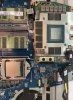
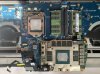
So with the recent throttling issue with command centre forcing 75c on us an having to apply workarounds to command centre to get 87c back (thanks to spartan for that workaround) I thought I’d repaste my laptop for the 1st time, I’ve had it since feb 19 I’m on bios 1.3.2 and had no burn out or any issues with it.
On opening it up I didn’t think the factory thermal paste was spread to bad compared to the a17 r4/r5 see image.. an all the pads seemed ok an be touching the components nicely. I didn’t replace those.
Having repasted though, maybe cpu temps have dropped a little avg 65c-70c depending on game at stock clocks, but gpu remains the same 81c I’m using the original vbios 190watt.
Has anyone repasted with non liquid metal paste an got any meaningful/ more noticeable reduction in temps on gpu?
I used thermal grizzzley kryonut - not because I rate it as such, in fact I think it was over hyped on the a17 r4/r5 forums but it was either that or mx4 as that is all I have.Attached Files:
-
-
After installing the latest OC Controls I noticed that my CPU wasn't responding to Throttlestop. Had to revert back to the version from February and tell Windows to stop the notifications from AWCC

Enviado desde mi GM1913 mediante TapatalkRei Fukai likes this. -
Quick question, if anyone uses the RTX 2080, can you see "Integer Scaling" as an option in the nvidia control panel? Like this:
-
It might be your driver version. I run older drivers on my desktop because they produce higher benchmark scores and are overall more reliable than newer drivers. I don't use any special features in the newer drivers because they are worthless to me. Integer Scaling is not an option.
On my turdbook performance is not all that important as long as there are no stability issues, so running newer drivers with no real concern for benchmark scores being the best they can be I see the Integer Scaling option is present with version 442.19 drivers. On the basis of that observation, it may be dependent on what GeFarts driver version you have installed.
*OFFICIAL* Alienware Area-51M R1 Owner's Lounge
Discussion in '2015+ Alienware 13 / 15 / 17' started by ssj92, Jan 8, 2019.