Problems? See this thread at archive.org.
I like Alienware Command Center, and my unit has been nothing less then amazing since I bought it a few months ago. The complaining is quite cringy to be honest, we know how people feel about this. The thread is 2200 pages long.
Im not trying to provoke you or anything. Im glad you purchased it, but some people find the cup half full and some people find it half empty.
I also wanted to share something about my unit as well that happened. Not sure if anyone will know what this was, its hard to describe. This is not a complaint, just something that happened to me. I have been enjoying my unit for a few months now and about a month ago I decided to turn off G-SYNC as I had figured out I was getting more frames in BF5. Well a few days ago, I tested firestrike and found that my FPS was limiting to 72 in most cases, and my scores were low. I turned on G-SYNC and my scores went back up to where it had been, 150s or so, and then when I disabled G-SYNC my scores stayed high. I then checked in game after this, and my FPS jumped in game by I would say 30-40%. So, even though I had been enjoying the performance jump from previous laptops over the past 2 months I gained even more a few days ago. Something was stuck along the way that was limiting my FPS.
That was my experience, I dont know what caused it but its all working great now. If anyone has had this happen to them Id love to hear about it. I want to say G-SYNC got stuck on the on position even though it was turned off in the software but Im not quite sure that was the case.
-
Well. I did it. I voted with wallet and purchased my first non-dell laptop in 8 years.
My sons graduation gift. A MSI GE66 raider. It has a 2070 super 32 gigs ram and a 240hz screen.
And it runs very cool.
I have been generally happy with my 51m. But I am not happy with the bios issues. The horrid treatment of the 2080 folks. And the broken upgrade promise. And although not really an impact...the deceit on ram speeds.
So....there it is.Last edited: Jun 29, 2020 -
@Mr. Fox Had I had not installed Transmission, I would've never known about the Intel TPM Provisioning Service! I was trying to install Transmission then it gave me a warning that it needs to close that service otherwise I would need to reboot. Good thing it mentioned it as I never cared to check, turns out that gets installed by the Intel Management Engine Driver even if you have Firmware TPM disabled in the BIOS so i completely disabled that service. @Papusan @jc_denton
Last edited: Jun 29, 2020 -
Nice catch, they always try and sneak all sorts of useless telemetry, services and bloatware into the drivers at any opportunity. I've installed the bare minimum drivers on my machine, and any drivers that I used were stripped down versions.raz8020, Spartan@HIDevolution, jclausius and 5 others like this.
-
-
Just the inf driver which you install through Device Manager
-
Exactly what I was going to say, it removes the hassle of actually installing extra crap you don’t need
-
For instance any Intel drivers can be reduced to .inf files, the most basic form. Great maintained thread over here:
http://forum.notebookreview.com/threads/intel-drivers-updates.782418/page-46
And nvidia drivers can be stripped down to basic driver and core functionality with nvslimmer or NVCleanstall, removing all the bloat and telemetry. -
Awesome tips, many thanks!Normimb, Papusan, jc_denton and 1 other person like this.
-
-
I can honestly say the A51M R1 with 9700K+2070 runs very cool, it seems like even a 9900K+2070, or 9700K+2080 runs fine, its just the highest combo of 9900K+2080 is where the problems (combined with BIOS) where the problems all lie. Very curious how the R2 shapes up, but I would be very surprised if throttling and BIOS tweaks don't rear their ugly head at some point.RMLJD, etern4l, jclausius and 1 other person like this.
-
Did anyone coupled an A51m with an AGA yet? 51m has some strange behavior comparing to older model like my 17R4 when using with an external GPU in AGA
The dGPU (RTX2070) is still enabled when plug AGA in, render both dGPU and eGPU available for use, dGPU drives internal monitor and eGPU drives the external one via its own displayPort cable
I can even set the dGPU for Physx delicately or select it for rendering games
This is unseen with AGA as with older model, dGPU was always disabled
I though this was a normal behavior with G-Sync A51m model, but mine is a Non-Gsync one, so it doesn't make any sense to me
For now I have to disable the dGPU via Device Manager, I want to contribute all heat dissipation of the heatsink to the CPU only
Any idea?
-
This is normal, and it was also the case for the 15R4 and the 17R5. The internal dGPU is hard wired to the internal display, and the AGA is a separate 4x PCIe link.
I'm not sure what specifically you are asking, but If you disable the internal display, the built in dGPU will go into an idle state. Keeping a monitoring tool open like MSI afterburner will prevent it from staying in the idle state because it gets pinged for information, waking it up. -
Soo my throttling has returned after I updated my Command Center software. The profile that I created per Spartan's directions is still in place but I am randomly getting cut down to 300 mhz GPU clock for minutes at a time before it returns to normal. Any ideas?
-
Patience is a real virtue, unlike so many other things these days
 DreDre, Vasudev and Spartan@HIDevolution like this.
 -
This is normal. Just disable dGPU in device manager and it will no longer run at 3D clocks. You can also go to settings and select the eGPU as your preferred graphics device.
Another thing you can do is just disable the internal display and set to external only (Windows + P key)Vasudev, RMLJD, twin snakes and 3 others like this. -
@Spartan @Papusan @Mr. Fox @Normimb
SooOoo.
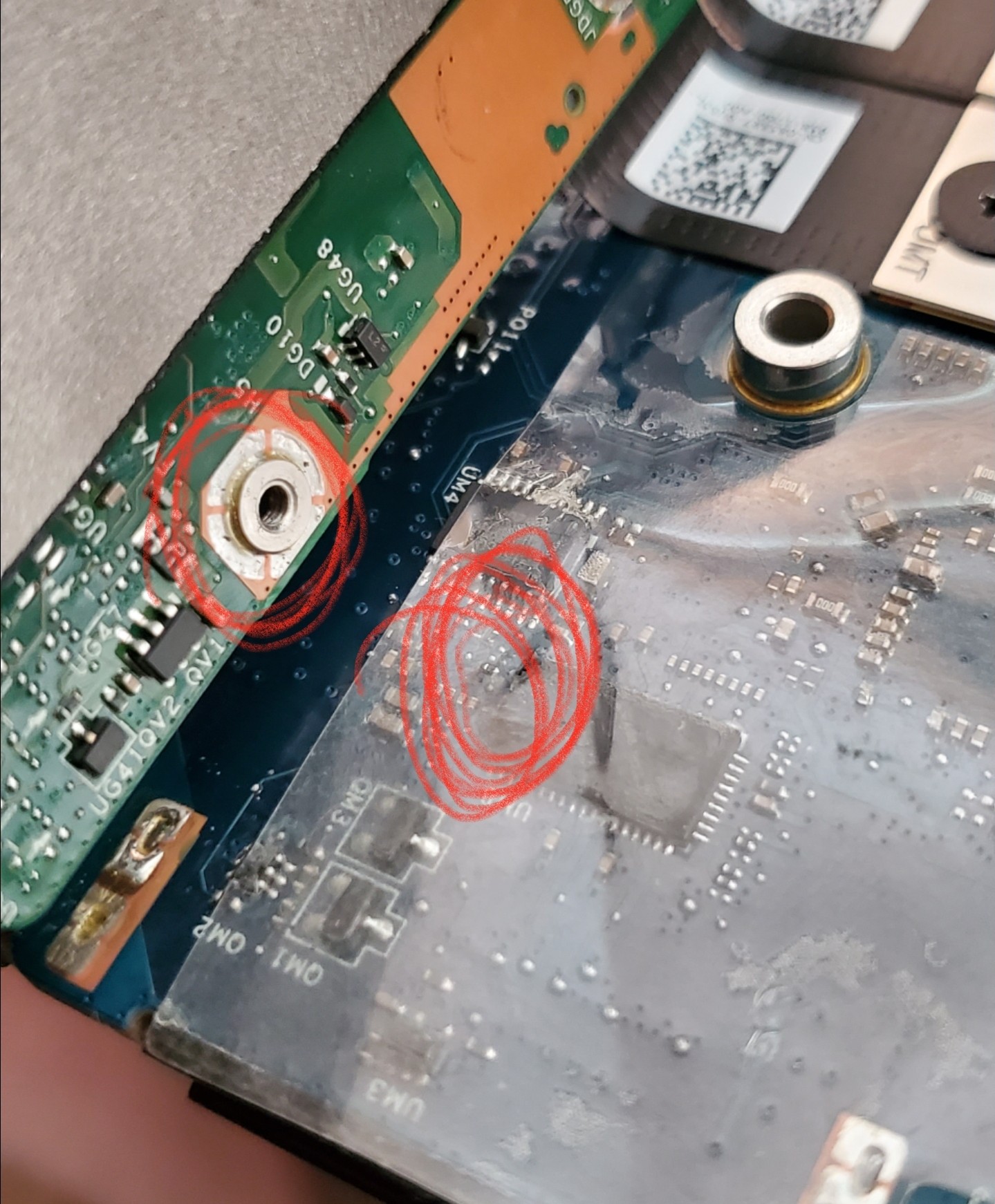
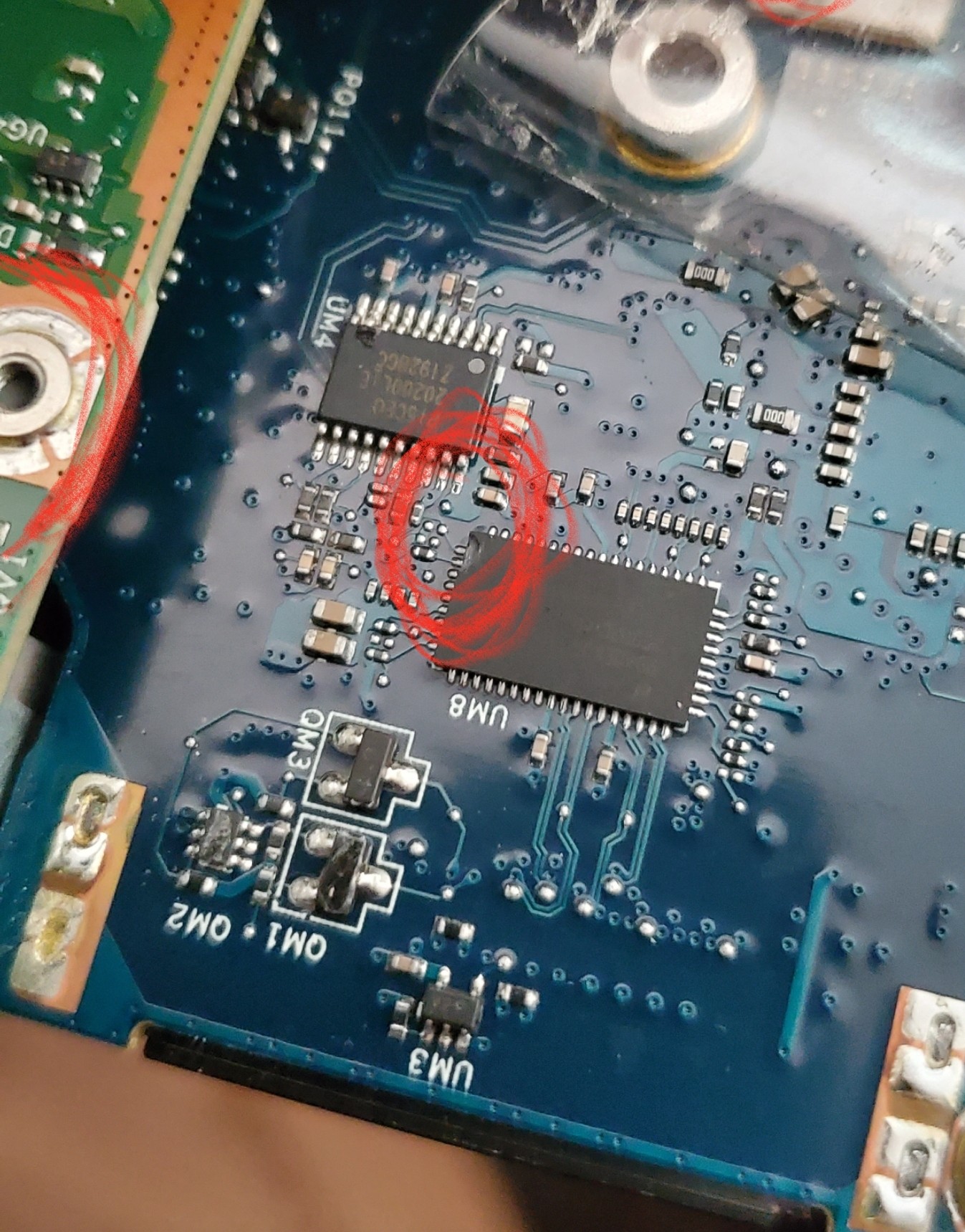
The tech arrives today .. Replaces the Mobo, and CPU. Device is up and running minus my Raid-0 configuration, Which I was going to do a fresh install of windows anyway. Well....We power it down he says Bye yadda yadda.. I go to power it back on about an hour later, and boom. Nothing. No lights, no flashy alien head. No anything. I ever so nicely call Dell/AW support, and explain the situation. While I am on hold for about 15 minutes, my inquiring mind had to know . SooOoo.. I open her up, looking around.. examining the damn near entire tube of thermal paste that has covered my CPU and GPU... I notice the GPU has quiet a bit of up and down play.. I remove the screws for it, and behold.. the tech had used the wrong screw.. WAYYY too long for what was supposed to have been used. The screw had made its way down to the motherboard.. breaking the corner off of a chip.. melting the plastic covering.. charring the end of the screw.. and killing absolutely everything.. yet again.. this time it got the GPU, CPU and Motherboard... and my NVME drives can't be seen by any other device I have in the house.Attached Files:
Last edited: Jun 29, 2020DaMafiaGamer, raz8020, Biker Gremling and 9 others like this. -
-
2nd sound card blew tonight...after 2 hours with Dell they insist they need to replace the motherboard!!! Is there a way I'm missing to get them to just try replacing the soundcard first??? They were very inflexible on the phone.
Long version: Loud pop tonight. No sound from speakers or headphone jack.The 51m is running very hot in the area of the sound jacks and the left CTRL. Will not give an option to use realtek drivers at all...clearly SC is blown. 2 hours with dell support.... and the result.... they want to replace the motherboard!!!
Tech said its part of the MB...Explained multiple times that it has a audio daughter card. Told him their records will show I had one replaced already. I pulled up the service manual. He said thats what engineering wants to do....
Im really nervous about this.
For the record this is my 2nd significant sound card issue. Im starting to think there is a problem with soundcards.
Oh fyi...they told me its not overheating till it hits 100 degrees!
Last edited: Jun 30, 2020DaMafiaGamer, Biker Gremling, Vasudev and 3 others like this. -
If you have a picture, maybe @Mr. Fox want add it into his AW fire hazard photo album
http://forum.notebookreview.com/thr...bricking-systems.781467/page-60#post-11027880
Hope you get it fixed on next try. Good luck bro.Last edited: Jun 30, 2020 -
Im really frustrated. I have a sick feeling they will screw it up. Guys...keep your warrenty renewed!!!
etern4l, jc_denton, Papusan and 1 other person like this. -
Maybe the motherboard is causing the sound card to blow? It could be a good thing they want to replace both. Definitely, keep a watchful eye on the tech during the strip down and rebuild.Biker Gremling, Vasudev, etern4l and 2 others like this.
-
Can I ask your usage case scenario regarding the soundcard? What percentage do you use the laptops internal speakers compared to headphones. How loud or what setting do you put the sound at? More importantly how are you using your unit? Mostly for gaming or workstation purposes? I use my headphones prob 90% of the time Im on my Area-51m.
Sorry for all the questions, when ever issues like this pop up with machines I own I like to do some preventative measures if at all possible. Also, lastly, have you taken your laptop apart once or on multiple times before each failure of the sound card?Fire Tiger likes this. -
The interesting part is my soundcard area gets warm as well when I use it. Plug my headset in and it cools right off again....don't know why the soundcard would be getting that warm at all to begin with.
Docsteel likes this. -
Man what a complete bummer, hope you get covered by insurance or something. And as to whom ever certifies these so called "technicians", they should really screen them for basic computer knowledge. Feel like I've read many stories about the sheer incompetence of these techs.
If they mess anything up, they should be held accountable. Did you grab any pics of the card after it popped? -
[
Well, the amp has to kick in when driving the speakers I guess. Does A51M come with a subwoofer, like its direct competitor Clevo X170/XMG Ultra? -
Many brands models come with a sub. But not for A51M. Even the thinner/slimmer models from other brands have installed a subwoofer. Search Subwoofer in the A51M thread with my nickname
Last edited: Jun 30, 2020DaMafiaGamer, Biker Gremling, Rei Fukai and 4 others like this.
-
I was playing a youtube vid thorugh external speakers while setting a game up via discord. Did not have volume max. 80% on external powered speaker . Rest is headphone. 50/50 between gaming and productivity
Have not opened it it months. -
I am sorry for you. Same kind of things happened to me before with previous system. Since then, when the tech comes to my house, i stand next to him and help him, to avoid this kind of frustration. Good luck on your next repair, and if for any reason you are not completely satisfied with the next repair, ask Dell for a Brand new system exchange.DaMafiaGamer, Vasudev, etern4l and 3 others like this.
-
Mine is painfully hot to touch. That just started. Im going to open it and see what it looks like. No burning smell....raz8020, etern4l, jc_denton and 1 other person like this.
-
I had a motherboard fire on the M18xR2 that was caused by the amplifier for the onboard audio. Those that have been around long enough to remember will recall the issues with SoundBlaster Recon3Di.
Please take photos so I can add them to my album. -
Or the sound card doesn't like the impedance of your headphones, or there is a pinched cable somewhere making a short, current integrated audio amps have a lot of protections built-in.
-
I use a astro a30(dont judge me) so its made for pcs....
Ooened it up...Not seeing obvious issues with burning. Did find a broken plastic piece left over from the first replacement. Part of the back cover tab alignments. Tech had a heavy hand.
Now here's something interesting. Its getting hot over the jacks but very hot where the left "5" and ctrl key is. Thats not soundcard...thats were the audio plugs into the MB. Maybe Dell knows something I don't about this issue. .Last edited by a moderator: Jun 30, 2020jc_denton likes this. -
If you don't use the mixamp, or any other headphone amplifier that is most likely your problem..
Your headset has an impedance of 32Ohms, thats pretty low, the usual is more in the 300-600Ohm, that doesn't make them bad(or good for that matter), but looks like Alienware audio design is pretty sub-par given that its burning up due to driving low impedance headsets..raz8020, Docsteel, Papusan and 1 other person like this. -
Heres a question....the a30s came with the mixamp. Its a usb Dolby decoder. Does using usb for sound use the pcs soundcard??? In other words. Can i use the mixamp for sound until they do thw repair?
Fire Tiger likes this. -
If its USB, it has its own dedicated audio card inside the mixamp and it wont need the laptop audio card to work.
So, its plug and play, it will install the driver first, that should only take a couple seconds.raz8020, Papusan, jc_denton and 1 other person like this. -
Heres something fro the class action folks. Online in the Dell upport database there is a list of my system configuration. My ramspeed is listed as ""370-AEOO: 16GB (2x8G ) DDR4 at 2666MHz"
Might help your lawyers to get a screen shot.
It worked!!! Thing is ancient. It has a rubber coating thats getting that slimy sticky feel. But its working!!!
I am getting an odd fluttering sound in the background.....but its better then nothing.Last edited by a moderator: Jun 30, 2020 -
Never had overheating problems in the area of the sound card, but it must also be said that I always use my Denon PMA-60 in USB DAC mode
-
I have never seen a single brand with so many examples. Two of them are from personal experience.
Alienware Fire Hazards | Mr. Fox ImgurDaMafiaGamer, raz8020, jclausius and 4 others like this. -
Mine is not painfully hot by any means, just warm. It's noticeably warmer then the opposite side.
-
So sorry to see the mess Dell tech has done which is essentially a paper-weight. Most Dell techs never have disassembled A51 M1/M2 since Dell don't provide them for doing test runs and they do it on guess-work.
I hope Dell pays for new NVMe drives.
I think they want to rule out faulty PD system to daughter board. I never knew Dell made separate daughter boards for sound. -
I replaced the screen assembly myself when my screen came glued diagonally like this \ \ instead of | | with the technician watching, and then replaced the entire palm rest myself as well when it discolored (lunar white) and the tech just left me the box and prepaid label to send my old part back to Dell.
I will never let anyone service my machine. It’s me or no one (I might trust someone here haha). No technician out there will know your 51m better than you, I guarantee it.
I take mine apart extremely carefully, lay it on a towel to prevent scratching, map out screw positions (I know them by heart now), use compressed air, ESD protection wrist band, ESD safe tools.
No tech is ever gonna love your system like you do. It didn’t cost them ~3,500 USD+.
Unless you are extremely intimidated, don’t let Dell handle it. Otherwise, open up that service manual, and it’s e-z p-z!DaMafiaGamer, Vasudev, kfxsti and 6 others like this. -
your connecting external speakers up to the audio jacks? Can I ask what kind? Thanks
-
-
Logitech Z 560s. 400 wats of thx certification from a simpler time. Running them 2.1 config.
-
Logitech Z 560s. 400 wats of thx certification from a simpler time. Running them 2.1 config.
-
Do you think if you were not connecting it to those external speakers you would be having the issue?
-
Not sure why that would cause it. They are powered speakers. And I have had a bose powered set connected before these for months... Now having them on on jack and a discord going on in the other...could that have done it??
Someone more savvy then me would have to answer. The soundcard should be able to support them -
Do you know if the heat generated around the sound card area was only happening when you plugged in your external speakers?
Sorry for all the questions, I probably am the last one to know about sound card issues, but I am some what of an audiophile although I havent plunged to deep into the culture yet. My feelings on this is I dont think you would be having problems if you were not plugging the speakers into your laptop but then thats just a gut feeling. You dont run any DAC/Amps with your setup? Maybee adding a DAC/AMP between the audio jack and the speakers would take strain off of the soundcard? Or am I thinking about this wrong...
I just use headphones with my Area-51m, but mostly because I need to hear footsteps in BF5 which BTW is a ridiculous advantage to someone that is not. Damn that sux though, hope you get it all sorted out and figured out. I would not want someone prying all my stuff apart to change out an entire mobo, espeically on something that cost 4k. For me, its best to get the most out of what comes in the box for a few years before someone starts ripping everything apart. There is a reason we have so many complains and hardware issues around people that are doing heavy modding to the machine (multiple bios downgrades along with re-pasting). Some day there will be a DTR that is made to be handled and upgraded like a desktop, with ease but Im not so sure that day has arrived yet and with this system.
I do love my unit though, there is nothing that feels and is as aesthetically pleasing on the market. I love AWCC, has been nothing but a joy to use for me, once I got it to stop trying to update and everything has been peachy and roses since it arrived. I came from many BGA laptops though so this was a overly welcome pleasure to purchase and use. I am an enthisiast, I keep all my hardware so I can play it many years down the road to remember what we were all doing. I still play games on a Sony Vaio Z , you know the expensive ones that cost like 4k new back in 2009-20011. Its so fun to remember what was being played back then and play it yourself. To bad theres really not that many great games atm.Last edited: Jun 30, 2020 -
Hmm....I dont use a dac. But it could not hurt. My problem is I dont see why powered speakers would cuse the card to "overwork". I mean...it can only put out what it can power wise. And that is the same for any sound card. Remeber these are powered speakers. Designed to be driven via soundcard or cell phone.
Evidently the tech screwed up my Gsync....framerates hrz wise have dropped dramatically. Not sure why .
Apparently they are sending a motherboard but not a sound card....
Should I get thermal paste? Is nanogrease the consensus favorite (cuse I know the tech won't do LM)Last edited by a moderator: Jun 30, 2020
*OFFICIAL* Alienware Area-51M R1 Owner's Lounge
Discussion in '2015+ Alienware 13 / 15 / 17' started by ssj92, Jan 8, 2019.