 Problems? See this thread at archive.org.
Interesting. Thanks for it. I am good with this reducrd performance with one brick, because I have silence and moderate temps. If I make this mod, I would lose the silence if I want good temps.
-
BTW, anybody here replaced his/her 144Hz FHD screen with a 4k screen? I am planning to buy a 4k panel for my machine and I would like to know if I need to buy a new 40pin eDP cable. I read in another topic that the 144Hz machine has a 40pin cable and that is useable with a 4k panel. This is my target: B173ZAN03.3.
-
Guys, can anybody help me out here?
1 of the 51m's (right hand side) has a MUCH more yellow tint vs left hand side?
Any ideas - it's a fresh OS install ?
I just checked the numbers and the left hand side is as follows
LG Philips [Unknown Model: LGD05E2] - Week 0 2018.
The right side is a Chi Mei panel week 3 2019.
I really don't like the low brightness, i think @HaloGod2012 said somewhere these new panels have an anti-blue light filter built-in?
Is there any way anybody can help me calibrate to match the LG? i have no idea what I am doing.
@DaMafiaGamer @Spartan@HIDevolution any idea lads?
Edit - Going to answer my own post, and leave it here as it may help others in the future.
Calibrated the Chi Mei panel to almost match the LG, much better and near-identical viewing experience, much better.
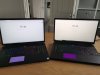 Last edited: Feb 6, 2021
 -
I find this interesting, too. However, the 2080 is too slow for me. In games like CoD I need 100+ fps (FHD is the only option), and FHD is too blured on a UHD-Display. QHD-Games (with 60+ fps) are sharp enough. A UHD-Display would be optimal for a 3080 (maybe this year) or a 4080 in 2022 (maybe...)
-
The Chi-Mei panel is simply awesome, it has good contrast, little ghosting, and the colors easily are on par with my AW3418DW monitor. I pity the folks who got the first screens on the A51M R1, they frankly suck in comparison.Last edited: Feb 9, 2021
-
Honestly I don't care the fps in 4k because if it isn't enough, I can lower the graphics (it is not an issue for me), but when I'm only internet surfing or watching movei it could be great to have an UHD display. I had in my prev. Predator 17x an 4k panel and it was much more better picture quality than the FHD panel.
-
I understand that. But I use the Area 51m only for gaming.
-
So.. I went ahead and ordered this Vapor Chamber for my Area 51m:
https://www.ebay.co.uk/itm/Vapor-Chamber-for-ALIENWARE-Area-51m-51M-R1-ALW51M-Fan-With-Heatsink-0FY4CJ/264882164884?ssPageName=STRK:MEBIDX:IT&_trksid=p2060353.m2749.l2649
![[IMG]](images/storyImages/0KxKXHq.jpg)
It didn't arrive on time sadly, even if it was shipped as International Priority with FedEx. (Apparently FedEx had some serious issues around that period. I ordered it on the 15th January and I got it on the 3rd February, not too bad, but it did miss the 27th January delivery date).
Unfortunately the HS came bent out of the box The build quality is awesome. But, it made poor contact on the GPU & CPU die.
So, it took me around 3 days of "messing around" and re-adjusting it to get the GPU to have proper contact and the CPU to have proper contact.
Out of the box, the thermal pads weren't making proper contact and the contact with the GPU was very very poor. As a result it would instantly spike to 80 Celsius
So... I ditched the pads (the pads from the OG HS don't fit properly as well) and instead I went the "messy" route and used K5 Pro Thermal Paste for all the VRMs, Memory Modules, etc.
(Since I had to manually adjust it and as it was bent from transportation or factory?! I couldn't have used thermal pads anyway - as I don't know the spacings after my adjustments).
Thus, I was amazed how great the K5 Pro is! Sure, it is messy as hell! And can be problematic to clean-up afterwards - if someone cares about that
After 3 days of continuously re-adjusting it (by bending different parts of it a bit a time - using my hands and a few tools), adding washers to increase pressure, changing screws, etc,
and 1 tube of MX-4, I decided instead of using the TG Kryonaut that I used before and I use it for my PCs and other Alienware Laptops, to try the Thermalright TF8 paste.
And it did not disappoint! (It is thicker than Kryonaut and I think it is better for laptops in general. Kryonaut requires a good pressure for it to work properly - like in a Desktop Cooler - something not really present in Laptops)
In any case, after 3 days of going forward and backwards, I managed to get everything running very very smooth:
![[IMG]](images/storyImages/5vwDWmb.jpg)
![[IMG]](images/storyImages/4Rh0cEt.jpg)
![[IMG]](images/storyImages/llbRiOw.jpg)
Of course, everyone is asking about the results and if it was worth it
From my Point Of View, it WAS TOTALLY WORTH IT!
Here is Metro Exodus:
( the MOST GPU Intensive game that I have' ever seen to date!) running for 30 minutes on Full Fan Mode with the 200W VBios and +135Mhz Core +500Mhz Memory (overclock)
The i9 9900k CPU runs at 5.0Ghz on 6 Cores, 4.7Ghz on last 2 cores with -100mV in this image.
![[IMG]](images/storyImages/DeEYFhr.jpg)
Thus, I decided to do benchmarks again and see for the 1st time how much I can push the GPU.
I managed to push the GPU to a +150Mhz Core, +500Mhz Memory (didn't go with memory above this) and here are the results:
![[IMG]](images/storyImages/3H7mps8.jpg)
https://www.3dmark.com/spy/18157429
I want to mention this is on BIOS: v.1.7.3. v.1.50 seems to give worse results for me. Obviously v.1.12 & v.1.13 will give worse results CPU side because of all the Intel CPU fixes - that limit the CPU performance
(And Full G-SYNC support )
For the record the maximum usable score I was able to get on the stock HS was 11 085 :
https://www.3dmark.com/spy/18039408
All great and good, but how are the actual temps?!
Normal Gaming:
Using Metro Exodus (other games, including Cyberpunk 2077 will stress the GPU less. After 1 hour:
GPU: Full Fan - 69 Celsius Max / Performance Fan - 73 Celsius Max / Quite Fan - 78 Celsius Max
(200W VBIOS, +135Mhz Core, +500Mhz Memory - for some reason using RTX features will crash the driver if above +135Mhz Core. Rasterisation ONLY works fine with + 150Mhz on Core).
CPU: I didn't really measure it, but anywhere from 60-70 Celsius to 80 Celsius (in games that are CPU Bound like Assassin's Creed)
CPU Benchmarks Cinebench R20:
On stock HS, anything above 4.5Ghz would result in thermal throttling and clocks will go down drastically. The CPU will go down and the lowest clock I've seen was 3.9- 4.1Ghz (Across 3 consecutive runs) - Full Fans.
On the Vapor Chamber, I was able to clock the CPU to:
- 5.0 Ghz on 1-6 core
- 4.8 Ghz on 7-8 core
- PL1 & PL2 default to 210W
- Cache Ratio x47
- Core Voltage Offset - 120V
As a result, the CPU will still reach 100 Celsius and thermal throttle. But! The lowest clock that I've seen was 4.6Ghz! It will hover between 4.6 / 4.7 / 4.8 Ghz! (Across 3 consecutive runs) - Full Fans.
(Liquid Metal would definitely make things a lot better here, but I don't have the tools to delid the i9, re-apply the IHS apply both here and there and so on and so forth).
So definitely the Vapor Chamber on the CPU is doing a great deal (I would still not run this CPU above 4.7 Ghz
)
So... Would I recommend this MOD for the Alienware Area 51m R1? Hell YES! I do!
HOWEVER!!!
The way I have received the HeatSink - it was practically unusable! I had to meticulously adjust bit by bit (by hand - copper is soft), add paste, put it back, remove it, check for contact: over and over and over and over for 3 days!!! If you don't have the patience or you are not willing to spend the required time to get it to work on your system, I don't think it will work "out of the box"
I for one, I am really happy and I don't regret "wasting those days" as now I have the Area 51m on TRUE desktop performance levels!
And for the FIRST TIME I am actually able to use the Quite Profile to actually, you know,
Play games without the GPU throttling down to some weird and
CRAZY numbers
It is really SAD that Dell/Alienware didn't make an OFFICIAL Vapor Chamber REPLACEMENT for the Area51m R1.
(Sadly I don't have $5000 growing on Trees to replace my laptop every year, since you decided to improve the COOLING solution, Dell!) -_-
Hope this post helped
If you have any questions or want more info just ask and I will try to answer them
Cheers,
HelifaxLast edited: Feb 10, 2021jorotaruGuy, jc_denton, Fire Tiger and 12 others like this. -
I seem to recall seeing somewhere that someone did actually.... Google ?
-
I am not this motivated but I am happy to live in a world where people are.MogRules, DreDre, Helifax and 1 other person like this.
-
Wow, great job. I like how TS score from your 2019 laptop is basically just a notch below the results we are seeing from the highest spec mobile 3080
Helifax likes this.
-
Thank you! I've been debating ordering this damn thing for weeks. I have no problem spending the time to make it work if the results are even slightly close to yours. Thank you again!Helifax likes this.
-
There are also some new 17 inch laptops with a (QHD) 1440p 165hz screen. I would like to try this on my 51m but so far I haven't managed to find the part number for this screen. Has anyone tried this upgrade? This resolution is the sweet spot for a 17 inch laptop and with no scaling issues.
-
Just be aware although superb results, mine turned up 10x worse than the OP's and it was completely defective. It was past repair in my opinion, warped in around 6 places.
Maybe postal, but the box arrived intact.
As OP has mentioned , you will at the very least need to spend a few days tweaking. Mine was like a banana.
Returned it.
I have had another heatsink (17 r4)from this seller before and it was flawless and superb, so maybe i was unlucky....Fire Tiger, Helifax, ApolloX75 and 2 others like this. -
the B173ZAN03.3 is 100% compatible I saw it on a forum or other person had done tests, only the gsync function does not work according to them!no need to change the 40 pin EDP its working with the original one
-
Thanks for the heads up, I appreciate it. I'll temper my expectations for sure.
-
Can someone remind me what the fix was to the intermittent freeze issue of about 2 -3 seconds? If I remember correctly it was a USB issue.
@Spartan@HIDevolution -
No, it was Dell SupportAssist if you have that installed, get rid of that garbage.Fire Tiger, jclausius, etern4l and 3 others like this.
-
mine stopped doing it after the latest bios and windows updates.
-
What BIOS are you running then if you don't mind? I am still getting it but I thought I was up to date...
-
Do you guys know if something like this would fit into the A51M?
I'm looking for a SSD to change the stock 250GB I have so also any suggestions on which to choose are welcomed. -
1.13 not sure if that or the update to windows 20h2 fixed it for me. both were done around the same time.Docsteel likes this.
-
Hi! Need a little advise here.
Got my 51m R1 with 1.13 bios. Looks like the poorest bios for CPU and RAM settings/overclocking I have ever seen)))
Read a lot of information here but did not find exact answer.
Which bios version should I downgrade to get:
- most possible CPU/RAM settings
- best GPU performance
- g-sync
- and maybe highest possible RAM speed
Any advise is appreciated ))Virale likes this. -
This is the thread you should read http://forum.notebookreview.com/thr...ed-lower-versions.829542/page-8#post-11042687
But don’t expect magic.Fire Tiger, etern4l, Normimb and 1 other person like this. -
Before you brick your computer, make sure you read the downgrade path and recommendations of how low you should go depending on your motherboard revision from this thread. I think Spartan and Docsteel are the most experimented in downgrading and upgrading and there’s at least 1-2 people that have bricked their 51m R1.
Just precautions.
In short, the best is 1.5.0 or 1.3.2. Both perform practically the same and have the highest GPU temp limits (87° C) and un-throttled performance. The downsides are: if you have a ChiMei panel, Gsync won’t work on 1.5.0 or lower. Also, RAM will run at 2400 MHz and it won’t run any higher on BIOS 1.5.0 or lower (XMP is unsupported, and starts some partial flimsy “support” on BIOS 1.8.3).DreDre, Fire Tiger, Normimb and 1 other person like this. -
You can downgrad bios safely untill1.5.0 (you will probably loose G-sync)
NEVER downgrade to 1.3.2 bios. This will Brick your CPU or your MB if you have the newer version of the MB (we are guessing December 2019).
I recommend you don't downgrad bios and do those settings: The 51MR1 will perform almost as good as the one running bios 1.5.0 with the latest bios, a 78C profil (will prevent terrible thermal throttling) a good thermal paste (thermalright TGX on GPU and CPU).
The safest and best way to have a performing system is: Follow @Spartan@HIDevolution to unlock the GPU temp and create a profil in AWCC at 78C. http://forum.notebookreview.com/thr...-owners-lounge.826831/page-2194#post-11020274
Then read @Biker Gremling guide that explain how to create a 78C profil in awcc and some other important tips: http://forum.notebookreview.com/threads/alienware-area-51m-undervolt-and-overclock-guide.830857/
Install the 200W vbios (there's a 180-190 and 200W bios version for this laptop) http://forum.notebookreview.com/threads/area-51m-bios-vbios-collection-mirrors.829190/
5 peoples have brick their laptops downgrading to bios 1.3.2 (i was number 2). Avoid this.
Edit: Last and most important advise: avoid installing all automatic updates from Dell for the future. Dell have been on a mission to reduce performance of the 51Mr1 since all the good reviews were done.Last edited: Feb 20, 2021Lopt, devilhunter, Docsteel and 7 others like this. -
Thanks everyone for answers! Now have some threads to read))
By the way, currently I have 64gigs of G.Skill memory with XMP 2900 and 3000 profiles but memory is running 2800. Why is it so?Papusan and Fire Tiger like this. -
Greed + they went for cheap built MB. Read the last paragraph in the pict from my post here and you may see how Dell do it's trickery. Remember Dell only allowed 2400MHz as max ram specs for Area-51M R1 for over 12 months after the innitial realase. Only the the thinner Alienware BGA models could run ram at Intel's specs for last gen processors.
See also same pratice for the other AW models... Upgrading Ram
Last edited: Feb 21, 2021 -
Thanks for this summarize. When I buy my 2080 card (I hope sooner than later), this will be very very helpful for me.
-
Be damn careful with maxing out the power limits or use older firmware. Here's a new one bites the dust Area-51m, problems, #3
Alienware power pcb just started to over heating on the left of the laptop the just busted in flames -
Yes i would be very carefull using the 200w Vbios. It will give the best performance but it's at our own risk. In my previous testing i have found some advantage in performance when benchmarking with the 200w Vbios but in games it would perform just a little better then the 180w Vbios. Considering the risk of breaking the laptop vs the pleasure of using it over a longer period of time the 180W might be bettter choice from the start. The 200w Vbios should only be use when you know for sure that your system as good temps and it usually is after a good homemade repaste (TFX is the one i recommend) otherwise with dell's original paste i would only use the 180W Vbios.
-
Turns out I am on 1.12....
-
Guys, how do i block the Alienware Command Center from updating? I have auto updates to the Microsoft Store set to off and i also deleted the dell automatic driver installer.. But somehow the AWCC is sneaking in.. I think along with windows updates now.. Its very annoying because any update totally breaks my AWCC to the point it just spins and loads for ever with the Balance / High Power box completely Missing!! I just want to turn it off for good from updating! Tnx
-
Maybe start by using the search feature in the forum:
Guide: How to block Alienware Command Center from automatically updating -
Hi,
I want to upgrade my Area-51M R1 (9900K, 2080, 32GB) to 64GB.
Current 32GB Setup with this Kit: HyperX Impact HX426S15IB2K2/32 (2x16GB 2400 CL14, Hynix)
I have now bought this 64GB - Kit: HyperX Impact HX424S15IBK2/64 (2X32GB 2400 CL15, Micron)
Well, 64GB are fully recognized by Bios and Windows. Memtest86, GSAT are fully stable and without errors. No problems within Windows.
But if I run Dell Bios Diagnostic (ePSA) Errors are found (Error 20000123, DIMM 1).
If I remove the 2nd DIMM, ePSA doesn't complain and all seems fine.
Bios is latest.
Should I ignore this ePSA ?
Ok, 32GB - Modules are not officially support but I've read that some guys are running also 32GB- Modules without any problems (even 128GB).
Thanks for your opinion / comment.
-
Are you following the correct DIMM order?
-
Yes. Same Slots as before.
-
Hi, so i did what you posted.... In the registy for the version i replaced the first digit with a 10.. But everytime i start my computer a pop up says downloading a newer version of AWCC.. I just click delay it.. Is there a specific location where this newer version is located in which i can just delete it?? I even changed the value of the version of the OC controls in the registry.. Still get the upgrade waiting popup.Last edited: Feb 28, 2021Virale likes this.
-
That's the only thing I used to do when I had my Alienware unless you soe how had installed it through the MS Store then thats a totally different thing.Papusan likes this.
-
FYI I only asked if anyone had tested starting the version with a higher number “like 10” to see if the auto updates would just assume you were on a higher version and not update... I don’t know if anyone tried that and if that even works. Just follow the OP instructions... the “10.x.x” version thing is pure speculation...
-
What if you swap in one of the sticks from Dell together with one of the new? Same errors?
-
Well i changed the version numbers in both registry locations.. It didn't seem to hurt anything. I changed it back as it did not work. So i ended up blocking awcc from windows firewall. I blocked the inbound and outbound.. So far so good... It seems to not be trying to update now... I will keep my eyes on it fo now. Fingers crossed. TnxLast edited: Mar 1, 2021
-
Not sure if anyone else had problems with it, but the newest nvidia game ready driver on geoforce experience (461.72) introduced fps drops down to 40ish fps and choppiness that lasted for like 60 seconds at a time before returning to normal on some games for me. especially Apex Legends . I rolled back to 461.40 and it went back to normal.
All the drivers after the drivers in the 45X.XX range have been bad for VR anyways. but that is a different story. for some reason they just aren't fixing it for months now and people are pretty pissed about it on VR message boards.Virale likes this. -
I think I may have actually noticed this in WZ. FPS was crap recently but assumed it was the zombies update... (it’s especially laggy near that area in Verdansk). Maybe it’s the drivers lol! Thanks!
-
hello, is it safe to downgrade from 1.13 (latest bios) to 1.5.0 anymore? I would love to downgrade again ( 1.7 ---> 1.5.0 ) successfully.
Many thanks -
Here is the answer.
*OFFICIAL* Alienware Area-51M R1 Owner's LoungePapusan and devilhunter like this. -
the same applied to the most recent bios (1.13.0) ? -
All we know is that bios dowgrade to 1.3.2 is breaking laptops and this doesn't matter from wich version you were downgrading.
If you have no issue with 1.13 try the settings i explained. If you have issue with this bios then downgrade to 1.7.3 if you wish to keep G-sync or 1.5.0 to loose G-sync but gained max temp GPU up to 87C. Personnaly i think any bios downgrade is risky. Are the 3 FPS more in games worth it? -
thanks for your reply, I don’t plane to use 1.3.1 since it doesn’t have advantages over 1.5.0
but I had to upgrade to 1.13.0 (hardware related , hdd not recognizable). And I’m afraid since it’s not confirmed people can downgrade from 1.13.0 not (1.3.0)
I’m sorry because I’m scared to Brick my machine
also is this covered by warranty (Accidental damage)?
*OFFICIAL* Alienware Area-51M R1 Owner's Lounge
Discussion in '2015+ Alienware 13 / 15 / 17' started by ssj92, Jan 8, 2019.


