Problems? See this thread at archive.org.
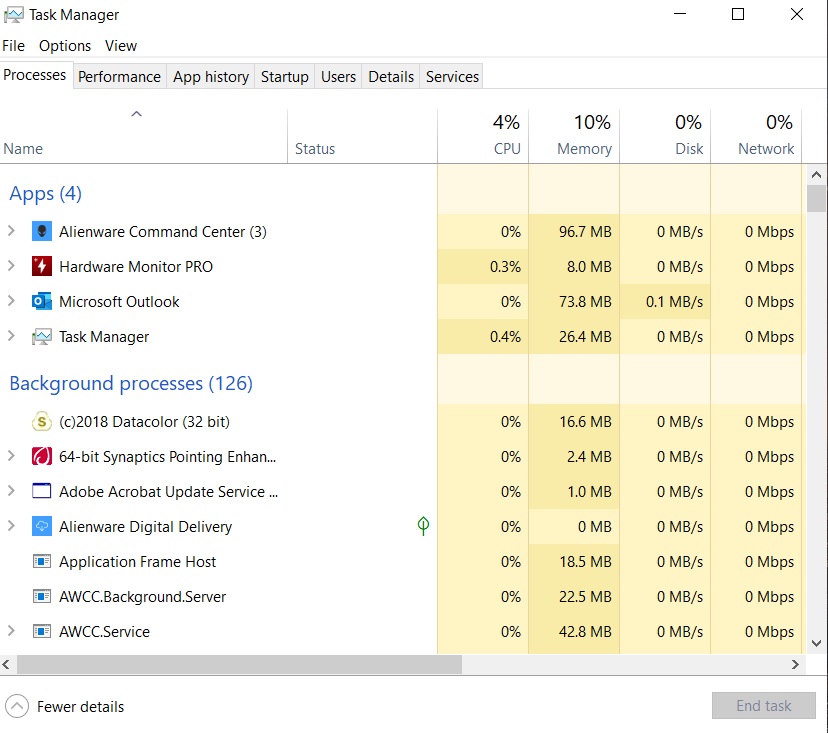
Sorry if this is already been told before but I updated the Alienware Command Center, and it has INSANE memory leaks. I use 2 monitors and have the tendency to leave the temperature readings from the Alienware CC Fusion tab always on my laptop its own monitor.
However I very recently updated to the latest version, and whenever I open the temperature history, the memory usage skyrockets, increasing by the 2nd. 1st time I noticed Aliewnare CC was using 6.5GB of RAM!!!
So There is somewhere a HUGE memory leak. Where should I best submit this issue?
-
I was on the factory image and when I updated to the latest Command Center, I lost the Alienware Audio icon. I contacted Alienware Support via Twitter and they gave me a lame response saying that sometimes they remove features from the Command Center. I wasn't convinced by this response so I clean installed Windows and installed that same latest version of the Command Center and the Alienware Audio icon was there!
I didn't get a chance to check memory usage previously but here's how it looks like on a clean install:
Oh and there's no point contacting them view Twitter, their support is atrocious.
@QUICKSORT Try turning Diagnostics Data Off:
Last edited: Jul 11, 2019 -
The GPU in the 17 R4, also had issues with thermal pad contacts - which led to micro stuttering as your well aware, I wasn't just referring to the heatsink tripod part as such.
I really do think the issue is a crappy batch of MOSFETS on early batch 51-M's, ultimately its Dells issue and dell should have revised it properly, especially what they charge people. An extended warranty is extortionate and almost daylight robbery.
Will we will see how it pans out in the future.c69k likes this. -
I am on the new CC and mine is avg 100-103mb very little. Maybe you should try uninstall reboot and reinstall? @QUICKSORTS.K, Papusan and Spartan@HIDevolution like this.
-
Thanks for the advice. Even though I did disable diagnostics a while back, it re-enabled itself it seems like. I suppose I have to manually disable it after each update. Quite annoying.
Anyway, I tried a clean install of the Command Center.
But no luck. The memory leak is still present.
I started the application before starting to type this. At which it was at 180MB,
Now It's like this already, not even 3 minutes after:
![[IMG]](images/storyImages/p85uGUr.png)
-
My Diagnostic Data is on, never turned it off.
Attached Files:
-
-
are you on a clean install or the Dell factory image?Darkhan likes this.
-
Dell image
-
That's probably your issue, way too many updates from both drivers and Windows Updates including a major build update. I would format and do a clean install or try to reach out to Dell Support which I doubt will offer any meaningful helpPapusan, Darkhan and Fire Tiger like this.
-
Ah ok. I'm sure that it was simply a case of a bad laptop rather than me undervolting. It just scared me since it died 6 hours after an undervolt. Well, wish me luck and thanks for the response. -
Ahh, very true, I forgot about that...
That was on the VRAM not the mosfets of the VRM. So again that was different. VRAM wouldn't burn like mosfets would.
I highly suggest that one learns how to repad. If they cannot l, then I suggest taking it to a shop that can do it. There are many local repair shops in most cities that can do it for a reasonable price.
Ya ya, we shoulnt have to, but with the way corporate logistics are, I'd rather just fix it myself and enjoy the system in a solid reliable state. -
http://forum.notebookreview.com/thr...ven-core-temps-due-to-uneven-heatsink.797477/
"The proof that supports my original theory of the heat sink being uneven due to the thermal pads being too thick on the FET's above the CPU is true. You'll have to use a thinner thermal pad to allow the heat sink to seat properly"
http://forum.notebookreview.com/thr...5r3-disassembly-repaste-guide-results.797373/
![[IMG]](images/storyImages/RiHAK93.jpg)
All the TRIPOD AW models had same/similar issues.Last edited: Jul 11, 2019 -
I have fixed many many of those systems and some even with a band new heatsink that never has been installed, and has proper measured pads, the heat sink would still fit uneven often and lead to core differentials. Because of this, I would say it was tripod issue before I would even go the route of blaming improper pads. That is just referring to uneven contact on the dies.
There was an issue where the pads sometimes did not make enough contact on the VRAM chips on the GPU, which has had he just mentioned caused stuttering. These are two separate issues.
With, this system is a different story I blame pads. The more time passed with burning, the more pictures of the burning of the fets I saw, the more it sounded eerily like the EVGA 1080 mosfets fiasco. The R4 and the EVGA cards are good samples of what I mean with pads. If they are not properly on fets they can fail spectacularly. (i.e. burns, smoke, or instant death). When they are not properly on VRAMS or if GPU/GPU dies are not properly cooled they just throttle / under perform.Last edited: Jul 11, 2019 -
Her is the proper "Stuttering" thread... http://forum.notebookreview.com/thr...gtx1080-in-game-random-stutter-freeze.804499/
"The problem lies with the thermal pads covering the power delivery circuits, VRM, FETs. Again, for those who followed iunlock's guide blindly, you are in for a nasty surprise. i must stress here again, NOT ALL HEATSINKS ARE CREATED EQUAL"
I don't know if the Heatsink have variable quality on the Area models. If Dell add same pads all over on all laptops some will have/run into problems. If its the uneven heatsink quality you shouldn't blame it on the pads.
Edit. I forgot to add in... Have Dell changed pads for the Area models?Last edited: Jul 11, 2019 -
Interesting. You do make a good point. It would be interesting to see the sinks and the pads of the failed / burnt systems to see how they are making contact and the evenness of the sinks.
Regardless, my focus is usually selfish lol. I'm not an engineer with a goal of trying to change Dell or their design. I just want a system that is reliable and solid. If in that process I find a way to do this for myself, I share it. Since its an uphill logistically daunting task to get any giant corporate conglomerate to change something that might require a huge cost in an industry that moves so fast to the next product, I'd rather just find some solutions to work with what we have. As of now upgrading the pads to better thermal conductivity and more of a proper fit seems like it does the job.
Your suggestion sounds like it is a plausible reason for the issue. Different pads does seem like it would compensate for an uneven heat sink. -
From old of I mean Dell used soft pads who was very forgiven regarding uneven heatsink quality. But not sure if they use same/similar quality pads nowadays.
As you can see from the burned out DGFF graphics card the pads have more than good enough imprint.
-
If those pads left an imprint, and the other examples did too. Then surely this rules out the fix being adjustment to the thermal pads?
It would backup the MOSFETS being potentially inadequate for the job? -
I like my Auo panel and really don't have much to complain, although I have been a victim of dead pixels with this panel + massive light bleed which was mostly QC issue as the screen was not properly installed within the bezel. And as far as brightness goes, unless you wear 5 pairs of sun glasses at once on top of each other, you should be VERY OK with the max brightness on this panel. I personally find it pointless to have a blinding max brightness option in modern panels because that is not a real life usage scenario (unless you use your machine outdoors in the afternoon under bright scorching sun, trying to outshine that massive furnace with your max knits). Most of us will have brightness somewhere close to the half mark anyway, unless carrying out eye-strain benchmarks on our own eyes.
How many thieves admit publicly that they've done a robbery on so-and-so date? None. If somebody messed things up, they'll NEVER admit it. Otherwise they'd void their warranty. So, the easiest way out is to blame it on the manufacturer and play innocent victim. I've seen it enough to feel that this is the norm these days. Buy a new machine, ruin it, and then shed crocodile tears. I'm sure that there were QC issues with SOME of them. Which brand doesn't have these issues? Nobody is perfect (and warranty covers them anyway). But saying that only angels buy these computers and Dell is the little sibling of satan is ridiculous.
You had great temps? How are you so sure when half of the key power components don't even have temp monitoring circuitry on them?
Which batch DGFF card did you have? Are the mosfets NCP-303150 pr NCP-303151?Last edited by a moderator: Jul 12, 2019FXi and Dc_Striker like this. -
I haven't seen many pics of burnt cards (people discover the smoke and call Dell Support without posting what's up)... I expect that the components was the main culprit (remember also there is almost no air flow around the mentioned components). From what you have seen in the thread... Dell have used at least two or 3 different component versions/revisions on the DGFF cards. Same also for the MB power delivery components.
Then we can go back to what I have said before... Dell try as hard they can to reduce RMA numbers/bad reputation with crippled (with nice help from Microsoft) firmware. I'm very sure THEY know very well there is loads of bad components out there in many of the Area laptops. Imagine how this would look like if Dell didn't throw out the new firmware to try stop the Smoke And all know AW with those higher up has been quiet as oysters on this delicate smoke problem.
Last edited: Jul 12, 2019Darkhan likes this. -
It should be obvious by now that there were multiple issues with the 2080 cards.
1) Bad Components (low end with lower operating voltage, spikes caused them to blow up)
2) Thermal pads (some 2080 were without thermal pads making contact, causing the components to burn)
It could also be the combination of the two. AW decided to release a firmware update to keep temps & power down.
Newer models from June onward should hopefully not have any issues.S.K likes this. -
Does anyone have that kind of behavior with the speakers or audio of their Area51m ? :
For me the sound is sputtering on voices / high end of spectrum, but I manage to "repair" it temporarily by switching the audio drivers to another position (multiple times) from 16bits to 24bits, something like that....
After a while, the problem came back...
I've changed the speakers with the one I had on the old unit, so I don't think it's the speakers, but something like a driver issue or an EQ feature (the one in AWCC I'm using).... -
I personally don't use any of these laptop speakers so haven't noticed. For me, Anker Soundcore 2 (30 dollar or so) speakers work the best! WAY better than ANY laptop out there. And quite cheap so I rock a couple of them around my laptop when listening to loud audio / music. Mostly for my toddler when she wants to listen to her favourite rhymes but for gaming, I almost always use my Sony WH-1000XM3's.
phusy likes this.
-
Yeah I got Bose headphones for traveling and Mackie cr5bt for home, but when I'm at work in my headquarters, I like to have some music without using headset or aditionnal speakers, and those have nice sound... when it's not having that issue :/S.K likes this.
-
While swapping the speakers, did you make sure that the rubber dampener washers were properly installed? Without them installed properly, the speaker assembly will crackle on lower frequency range outputs and ruin the listening experience. Also, these speakers are not the most ideal for bass-rich music so I guess lowering the volume a little bit will help when listening to something with heavy low-end bass in it.Nomadsan74 likes this.
-
Yes I took time to make sure they were properly installed as the disassembly manual stated. My problems is with voices and mid/high range, not low range :/
-
That too. Anything that resonates with the speaker grill in the front will make the listening experience less pleasurable. Could you play a sample track that creates this problem for your particular case and share a recording from the laptop speakers and also the track so that I or somebody else could try and reproduce it? If reproduced, may be we could look into ways to fix it more efficiently.Last edited: Jul 12, 2019
-
Ok ! I will use my studio microphone to be sure you can hear it
For me @55% volume and 50% video volume on youtube that video is clearly saturating on the voice range more than it's suppose to be :
Last edited: Jul 12, 2019S.K likes this. -
Thanks! I'll give it a go and let you know how it sounds on my machine.
-
Here is the record :
https://drive.google.com/open?id=1LE9eG74oUczGapB9_p2cl4gp0-UhlIjX
If you listen closely, you'll hear when his voice reach F ("...Few reasons..."), S ("...Synthesizers...") syllable sounds speakers are producing a strange sound saturated on high, a distorted, sputtering or crackling sound.
TBH I had the same sound experience with the original speakers and I swear I didn't change anything on those speakers on the swapped unit :/
I'm asking myself if I'm not going to pick the old sound card from the dead unit to see if it's improving.
I know it's not a big thing, but once you hear the default you're only hearing this...
For songs it's also very noticeable, song like Lonely Day of System of a Down, where the intro is calm with a clean voice, you can hear the saturation on high pitch notes of the singer and it's kinda ruining the sound :/Last edited: Jul 12, 2019Fire Tiger likes this. -
I believe the stories told by QUICKSORT, Voodoo, and many of the others here on NBR who say the system up and died while watching a movie or running idle. I'm pretty certain our members with a pretty good track record of posts DID receive a lemon Area 51m... and it went up in smoke either due to poor engineering/manufacturing of the system and its components or incorrectly applied production in Dell's facilities just like they said. They're not liars.
There are too many reports of burned up / dead Area 51m systems, and there are just not that many ppl who start fiddling with thermal pads / material right out of the box. The numbers suggest something else than the end-user causing this problem. Now, I'm sure there may be a few bad actors in this bunch (or posts made in other places), but that number is most likely in low single digits (percentage wise).
Thinking Dell is a white knight, spotless of any misdoing and would own up of their own mistakes is naive. I don't believe Dell is 100% culpable in all cases, but their actions do suggest there's something up (ie. changing BIOS settings to get around design faults). As they say, "let the buyer beware." That goes with the Area 51m until things seem to turn around.
We can agree to disagree. The NBR members should read up on all the information, and decide for themselves.
Last edited: Jul 12, 2019Papusan likes this. -
That's an utterly false conclusion considering the fact that usually only those people revert to forums who are either enthusiasts (a minority) or are having issues. The silent majority is usually away from forums. But I am not here to change your perspective, and neither are you going to change mine. The fact remains that nobody is perfect and this kind of ridiculous criticism must come to an end that is borderline destructive and instead of appreciating an innovation such as DGFF, everyone is just bashing Dell. I don't have any Dell stocks because I don't have that much free time at my disposal to fiddle with that stuff but I do think that innovation should be admired and not bashed. This basher mindset has been continuously hurting innovation as innovators end up discontinuing what they tried to do good just because the very people for whom they did it, did not deserve it in the first place. And by the way, that BIOS "update" 1.5.4 is *optional* in case you didn't realize. That is why version 1.5.0 is not locked like previous versions. In my firm opinion, all the bashers deserve to be stuck with Max-Q for life.
P.S., The moment Dell offers a replacement for burned unit, there remains no more room for criticism. None at all. Full stop. Period. It's just plain rhetorical at this point to bash Dell for QC and conveniently ignoring hundreds of cases where conductonaut ruined motherboards are claimed under warranty and Dell still replaces them. But well, this seems to be the age where baseless rants are considered as something cool and admirable.Last edited: Jul 12, 2019 -
@VoodooChild Sorry to bump this, but how did you disable the service?
Also, what calibration profile do y'all use for the AUO panel? -
Manually calibrate the panel using windows 10 built-in calibration tool. It should be plenty good for all practical purposes. As far as disabling that service goes, why would you want to disable it in the first place? It doesn't consume that many resources anyway and once you set things up, even if you close AWCC, the settings are retained within the firmware and still work if you boot into linux for example with no AWCC. I am not able to get your motive behind disabling that service.
-
I want to disable it to get rid of AlienFX custom colors in some games.
-
If you want to totally disable it, you can simply select "GO DARK" option in the Active System Theme menu at the bottom of AWCC Home screen. It will turn off everything.
-
Right, but I don't want to disable the lightning, only prevent games from hi-jacking it to strange colors.S.K likes this.
-
You can try AWCC related services in Windows services. Press Windows Logo + R and type "services.msc" in Run box. Once there, look for AWCCService and Stop + Disable it.
-
But this will also disable the whole AW Command Center too, not just custom lightning?
-
In your AWCC games library, click on the culprit game and underneath that, select "No Theme" from the themes menu. See if that helps. I personally don't add any games in AWCC and only use it to control fan profiles so I don't have any such issues so far.FXi likes this.
-
I can believe that. They ought to make using LM invalidate your warranty. Dismantling the machine carries risks, even without using LM, and a good design would allow you to replace battery, RAM, SSDs etc without needing to open up the whole laptop. In the past they used to place seals on equipment to stop people from tinkering.
But it is not only Dell using those components, we should be seeing other machines catching on fire too. And the way I see it, if Dell could point the finger at someone else, eg ON Semi or Ti etc, they would rather that, than risk youtube videos with A51ms on fire. There is a standard procedure called a "recall" for these cases. But Dell has kept very silent, trying to swipe under the carpet, "normal failure rates" and all that, yeah right, every time I buy a laptop I consider smoke and fire a "normal" failure
But manufacturers are sometimes known to drag their heels.
https://www.mirror.co.uk/news/uk-news/breaking-whirpool-admits-800000-tumble-17799117 -
Not super techy when it comes to hardware upgrades.
Does this have implications for the Area 51m's future upgradeability?
https://www.notebookcheck.net/Intel...00-sockets-launching-early-2020.427323.0.html -
You can replace battery, ram, SSD, wifi card, screen, speakers, audio board as well as sata drive (in fact, even the BIOS button battery) on Area 51m without opening anything except the back panel. In fact, if you take the ribcage off, you can even replace the entire chassis WITHOUT ever touching the heat sink assembly which I find pretty neat. Underneath that, you can replace absolutely everything including keyboard and touchpad, without having to re-paste.
And regarding bad components, that can happen to any brand, not just Dell, as you rightly said. Personally I feel that this was the first iteration and Dell's first experiment with their own proprietary graphics card form factor due to which I am compelled to give them additional leverage, more than I'd give to any other vendor who is just copy-pasting nVidia's blue-print onto their motherboard and calling it a day. Designing a proprietary graphics card daughter board and making it run at full specs without ANY support from nVidia requires some serious innovation and for that, I commend Dell. I think what they have achieved with DGFF in the very first iteration of products is going to disrupt this otherwise monotonic industry to the core and all the other complacent competitors will now be forced to innovate which is good for us as consumers. This is precisely why I tend to admire this step by Dell, regardless of the initial glitches that might have been there, but warranty covered them for everyone so it's all good.
These are all speculations. Nobody knows for sure yet. For now I'd say just enjoy what you have. 9900K has plenty of horsepower for 2-3 years to come, unless one is compulsively upgrading on every CPU launch just for the heck of it.Last edited by a moderator: Jul 12, 2019 -
It does not seem to work. Those games that have 3rd party support for AlienFX seem to override anything setup in AWCC.
-
Then the only possible workaround seems to be disabling AWCC completely when playing those games, or try tinkering inside their settings. Can you name a game that does that? I am yet to encounter this problem.
-
This was interesting. But the crippled BIOS "update" 1.5.4 who you say is "optional" is OLD! Dell have put out newer firmware market as URGENT with same target (stop the smoke). And where did bro @jclausius mentioning old Bios version 1.5.4 ? And if he did, does it matter?
Last edited: Jul 12, 2019 -
Like you said, rolling out BIOS updates to keep the power down and the real problem masked, shouldn't be allowed to be done, should be forced to do a full recall and rightly so against any affected machine, which there will be no doubt a full database of machines from said date to another that needs a proper fix.
-
Those bios "updates" are "optional" and NOT mandatory. This is why 1.5.0 is not locked. And what is the basis for your "recall" idea? My machine works perfectly. Why'd I give it back when it has no defects? Recall is only done when there are consistent defects across the board on ALL machines. This case doesn't even remotely qualify for a recall.
-
Either way - going back to my original post, all the blaming the amateur enthusiast in the world wouldn't come close to the probably 5% of affected machines going up in smoke, that's a poor excuse and not valid given the evidence so far.
it's clearly a GPU component issue if you asses most of the cases, and paying $4k+ for a system, should demand the utmost quality control and after service.
If you buy a car and they know it's got a potential safety issue a recall is FORCED, this should be no different.
There should be no excuse, don't get me wrong. I have probably had over 500+ Alienware machines in my hands since 2010, and I'm on the whole a big fan of the brand.
however, the way this issue was dealt with, stinks of secrecy and it being simply "sell and forget"
What about those who took a 1 year warranty on a few $$ system, and it blows after that 1 year, i doubt a post by (soon to be ex-employee Frank) is gonna save your bacon -
It seems he think the OLD is the NEW.
No pad in the world can help on this. The burnt DGFF cards wasn't the only problem. No active airflow around the components won't exactly help cool mentined power components.
Last edited: Jul 12, 2019raz8020, jclausius, Vasudev and 1 other person like this.
*OFFICIAL* Alienware Area-51M R1 Owner's Lounge
Discussion in '2015+ Alienware 13 / 15 / 17' started by ssj92, Jan 8, 2019.