Problems? See this thread at archive.org.
Oof, that's tough! You'd almost have to pick a game at random and play just that game until you finish. Else you end up hopping around forever
-
-
Hi
Im planning to add RAM to my 51m.
By now he is running with 2*8 gb, the idea is to move on 4*8gb, so I keep the 2 original Dimm.
Here are the two installed sticks
![[IMG]](images/storyImages/Screen-Hunter-1125-Dec-30-20-35.jpg)
![[IMG]](images/storyImages/Screen-Hunter-1126-Dec-30-20-35.jpg)
Should I go for two new Dimm with the exact same spec (dunno if they are easy to buy)? Or other DDR4 2666mhz are okay?
Do you think this one is the exact same? https://www.dell.com/en-en/shop/del...1rx8-ddr4-sodimm-2666mhz/apd/a9206671/mémoire
ThanksLast edited: Dec 30, 2019 -
You should check out Destiny 2. It's free to play now on steam, you only have to purchase the season passes/DLCs if you want. It's a fun FPS/MMO. It's a pretty fun game, although the end game gets a bit stale.Fire Tiger likes this.
-
Best way would be to get the same part number, problem is that even that can sometimes lead to memory issues, because it's not a pretested kit of 4.jclausius, Papusan and Fire Tiger like this.
-
you should check out a game called "Control" that is on sale in the Epic games store for 30 bucks until Wednesday (the store says it's 40 bucks, but it only charged me 30 when i checked out). i think at the moment it is one of the best games to show off ray tracing on these RTX graphics cards. i've played it for about 8 hours now and the reflections, lighting, and surfaces look amazing.Last edited: Dec 31, 2019RMLJD, Fire Tiger and Lopt like this.
-
On the memory question - like to take the system to 32 GB or maybe 64, any suggestions from anyone on good memory to go with for the AW Area 51M R1?
Fire Tiger likes this. -
I've had HyperX memory installed from the get go, had it in previous laptops too without issue.
-
Even if i put LM on all my laptops, i have to say that i like the way you see things. Kryonaut is a very good paste and if that is enough to make your system being able to play games...why not. LM is not necessary for every machine.RMLJD, Lopt and pathfindercod like this.
-
It should look like this
Attached Files:
Fire Tiger likes this. -
-
Here's a little something for the serious Overclockers:
Link is to Toms Hardware article
How I Set a World Record with a Hand-Picked Core i9-9900KS
https://bit.ly/39nyDchDonald@Paladin44, Virale and Normimb like this. -
Another vote for Control. Im half way through and love it.
Outer worlds is good...if you liked fallout.
I have about 20 games on steam I bought and still have not played. And I got onto the xbox game pass unlimited deal, which gives you PC version access also.....so I have 100 or so revolving games for the next....3 years I think..
If only life/work/kids did not soak up so much time.
ILopt, Fire Tiger and Virale like this. -
Yes LM is a hassle, gives a couple of degrees less in temp of benefit in the best cases, and carries many other risks like shorting things/spilling, etc. For everyone’s benefit and to put thermal paste questions to rest, check this:
https://www.tomshardware.com/reviews/thermal-paste-comparison,5108-11.html
Feel free to flip through other results. The verdict is the same; if you want a non-conductive paste and you want the best: use Thermal Grizzly Kryonaut.
Interestingly enough, Phobya Nanogrease Extreme boasts a higher conductivity, but underperforms vs Thermal Grizzly Kryonaut. The general consensus from more internet research and this forum is that most likely that has to do with those that are testing it don’t apply a thin enough layer because it is so thick. Some users here have done so and seen great results. I have a tube of it ready to repaste. I’ll do it mid January most likely, as I’ll have some time (currently on Kryonaut). Should be a killer combo with the Fujipoly Ultra Extreme pads.Lopt, Donald@Paladin44 and Normimb like this. -
I used both. Always had good results with kryonaut but like others, i think it looses cooling capacity with time but i am still not 100% sure about it.
For Phobya nanogrease extreme i have had good and bad results (bad results when too much paste). Like you said that paste is so thick it is very difficult to spread a very thin layer. I have had good results only when i used a heat gun to heat it a little bit before i spread it (i think someone on this forum mention to put the seringue in hot water for a couple of minute). Then only i obtain very good results (-6C on GPU). -
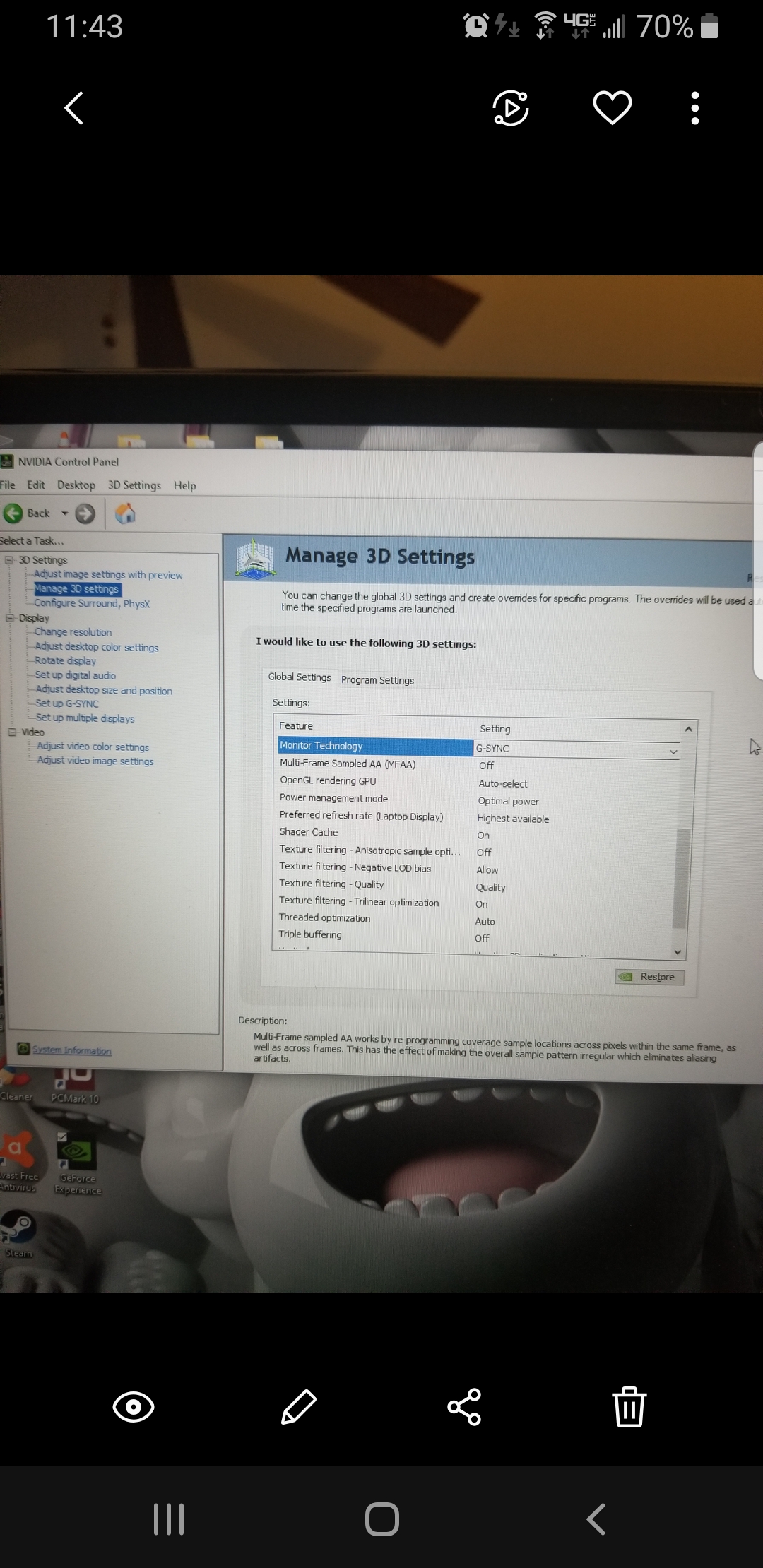
I was on the latest BIOS version on Dell's website(1.8.1). Got it to work by performing a full factory recovery/reset. After installing latest Nvidia drivers, G-Sync now shows up as an option. Thanks!!
Lopt, Docsteel, Fire Tiger and 1 other person like this.
-
Thanks all for the well wishes and advice. I'll probably go with kryonaut and look into what I have to do to change out my thermal pads (at least on the 2080's VRMs).
I had heard about kryonaut losing its performance rapidly after being applied so I was a little worried about it, but hearing the testimonials in here and reading how hit or miss nanogrease can be, I'll go with the tried and tested hard to bungle paste.Lopt and Fire Tiger like this. -
So I should stay with my 16 gb.
-
I went with Phobya as some recommended it due to its thickness and ability to fill in any potential issues caused by an uneven heatsink. It was my first ever repaste, I think I might strip it down and do it again just due to the enjoyment I got from it.
Temps are down a good 7-12 degrees in different scenarios, thats also with a -115uv at 5ghz all cores.Lopt likes this. -
-
Yeah, 9700k with 2080. It can stretch to 5.1ghz all cores but I need to go down to about -70/80mV for stability when I didn't notice much of a difference outside of benchmarking, so changed back to 5ghz.
-
If I ever choose to upgrade to the 2080 (presuming Dell doesn't do the right thing and supply DGFF 3xxx series cards for the R1), what are your thermals running like with that combo, is there any significant difference for cooling vs running the i9-9900K?Fire Tiger likes this.
-
If I leave my fans on balanced there are short spikes in the high 80's for CPU, the average though for a few hours of game play and nothing else is more like high 70's.
GPU is limited at the min to 78c after using GPU Tweak to lift the limit, it again though averages around high 60's.
It could just be down to the games I've tested it on since the repaste that aren't too heavy thermally, these would be Rage 2, BF5 and Far Cry 5 all at ultra settings.
On performance or max fans the spikes are much lower than high 80's. The CPU hasn't thermal throttled that I've noticed since the repaste.Docsteel, Lopt, pathfindercod and 1 other person like this. -
@Fire Tiger
Are you saying your using ASUS GPU Tweak on your Area51m ?
does it work well with AWCC and Throttlestop and Afterburner no conflicts ?
Tell me more please
Fire Tiger likes this. -
I have the OC functions in AWCC set to off as it used to mess with my TS settings.
I don't OC or UV my GPU with Afterburner or anything, therefore, the Asus GPU Tweak works absolutely fine.
Before my comp messed up I had a few test results using GPU Tweak and not using it. It definitely allowed the GPU up to 79c before throttling, where without the GPU would hit 74c then start throttling at 75c.Lopt likes this. -
Yes! Putting the syringe in a cup of hot water for a few minutes makes it MUCH easier to work with and spread. THIS is the pro tip here, pardon me for not mentioning it earlier! This is the way to work with any thick paste.
Also, of all thermal pastes, I’ve read the opposite about Kryonaut. It’s supposedly one of the most stable over time.Last edited: Dec 31, 2019Normimb likes this. -
Haha I was about to ask if it was a 9700K too! That UV is not possible on my 9900K at 5GHz. If I turn off HT (basically making it a 9700K), it lets me UV super aggressively tho, and sustain a good OC. Less heat too!Fire Tiger likes this.
-
I went with the 9700k as I doubt I'll ever really need HT, tbh I barely even understand it haha.Spartan@HIDevolution likes this.
-
Read up on it, it’s a clever error handling method that unlocks a lot of speed (hence double the threads) by changing the way instructions are queued up for the processor. Uses more power, so it generates more heat!Fire Tiger likes this.
-
Depends on how the heatsink is. Regardless... Thin and soft paste as etc Kryonaut is recommended to be re-pasted each year. With warped/uneven heatsink be prepared to have re-paste as hobby.
Double amount threads doesn’t mean double performance. More like +-30% But not in games.
FXi, jclausius, Normimb and 1 other person like this. -
I didn’t say double threads = double performance. As with everything, it depends on how the application uses threads. Heavily threaded applications benefit directly by increasing number of cores/threads and more modern/the latest games do benefit.
-
So I'm filling an Amazon cart right now. Decided to go in for the nanogrease, hopefully I don't mess it up. Outside of that I'm looking at thermal pads. I don't want to spend a fortune (already spent 3.2k on the laptop after all) so I would like to only get enough pads to cover the essentials. Will a set of 100 x 15 x 1.5 and 100 x 15 x 1.0 sheets of fujipoly ultra extreme xr-m cover the most important bits, or do I have to get more? Is there another brand that is recommended for beginners to thermal pad replacement since this one seems hard to work with (despite seemingly having nearly triple the amount of thermal conductivity as the other options I'm seeing on Amazon...) There are much bigger sheets of Arctic pads available for much cheaper, but they're also only 6W/mK compared to the fujipoly pad's 17W/mK.
I'm also considering upgrading the RAM though this is a much lower priority for me. That said I'd heard that there are some kits that run at 2666 out of the box despite XMP being disabled in the A51m's bios. Any recommendations on that?
Thanks for any input.Fire Tiger and Lopt like this. -
I have 16 In my Area51 and it’s plenty for me, keep in mind this is 90% a gaming machine only.
Enjoy your Area51m
Sent from my iPhone using Tapatalk -
If you have heard any reliable reports of any RAM actually running at anything over 2400 in the Area51m I’m sure we would ALL be very interested in that
Please share!
Sent from my iPhone using TapatalkDocsteel likes this. -
Happy new year people! Yeeeee have a great 2020 and may the 51M R2 be in our favor soon!
Sent from my GM1917 using TapatalkPapusan, Terreos, Lopt and 1 other person like this. -
2020 will start by a HDD swap I think. Hope the replacement one will be good.
-
Is it sad I’m hoping Clevo gets off their lazy asses and make a slim bezeled DTR and show them all how it’s done?
c69k likes this.
-
I've never done a repaste or even opened a laptop before outside of replacing RAM and HDD's. Its really quite straightforward, I followed the Alienware teardown video and took my time to place screws in order etc. I only needed one screwdriver for the whole teardown.
I re-used the thermal pads that came with it, but may replace these on the next teardown. -
Clevo laptops need a new look before I really consider one :/ powerful yes but office laptop looking... Not into it to much.
Sent from my GM1917 using TapatalkLopt likes this. -
I guess Alienware forev then, unless I really get an itch to actualy keep my 9900ks at 5ghz :3
Sent from my GM1917 using TapatalkLopt likes this. -
Hang in there brother, a little birdie told me official i9-9900KS supporting BIOS in on the way for our Area51m, Hang in there.IXVIXXII likes this. -
Oh my Im Gonna burst.
Sent from my GM1917 using TapatalkLopt likes this. -
So what’s gonna happen when we get the 10th gen CPUs? 9900ks won’t be top of the line anymore.
Lopt likes this.
-
Not gonna care about 10 cores tbh and I'll be shocked if that 10 core cpu will been be able to get to 4.8-5ghz but will see. Anyway I plan to buy a R2 51M and pass the one I have now down to my gf
Sent from my GM1917 using Tapatalk -
It's because of her I have my 51m in the first place, let's just say she put the Dell financial on her name. I'm helping pay it back of course.
Sent from my GM1917 using Tapatalk -
Most likely in more ways than one
 pathfindercod, Lopt, Darkhan and 2 others like this.
 -
Now I’m just jealous. Thanks Don.
-
Hire me at HID and I'll give you a taste :3
Sent from my GM1917 using Tapatalk -
Does the KS have the same form factor as the K ? If so, can we delid it the same way we did the K version ?
-
Yeah the KS is the same chip. Just some tweaks for it to run a bit faster and is “binned” by Intel. It’s what the 8086k was to the 8700k.
*OFFICIAL* Alienware Area-51M R1 Owner's Lounge
Discussion in '2015+ Alienware 13 / 15 / 17' started by ssj92, Jan 8, 2019.