Problems? See this thread at archive.org.
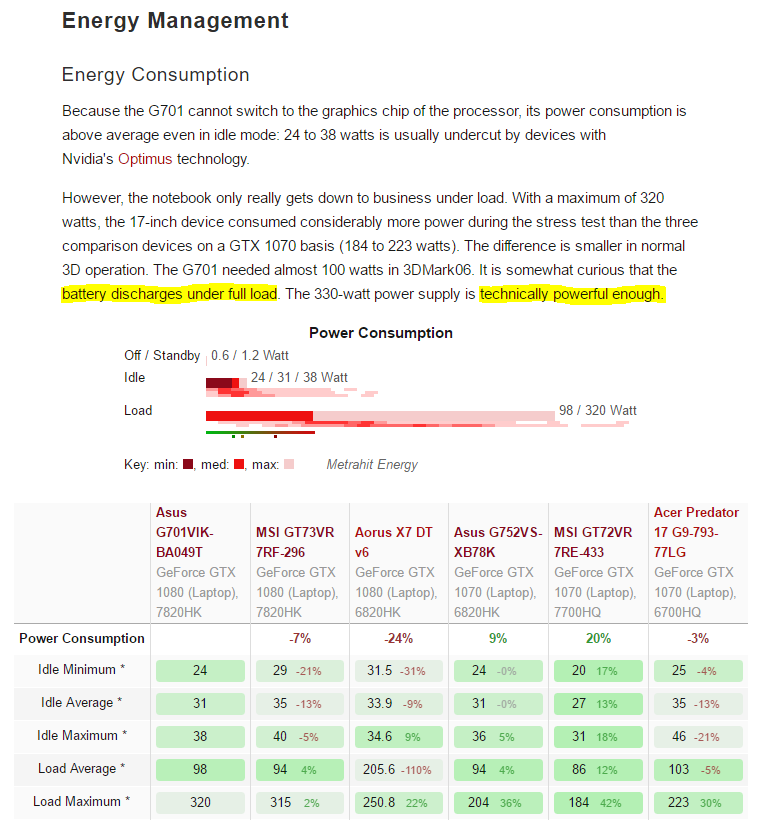
FYI 1070 comes with 240W psu. And 240W PSU can pull +260W from the wall. Similarly as well can 330W go far above 400w. Both Acer and Asus BGA models have similar behavior like AW. Ask AW ceo Mr. Azor or Umar why this happen in their FB or Twitter account.
Edit: You could test OCCT or Wprime 1024M stress test and Heaven benchmark test simultaneously with maximum charged battery over a longer period.
-
-
Got it. I've already tweeted to AlienwareSupport. I am thinking I will tag Azor Frank too now. Thanks!Papusan likes this.
-
-
@Papusan, from @iunlock 's findings (thanks to him) on the ASUS GTX 1080 7820HK powered machine also the battery drains 5%, because of the higher TDP GPU + OCed 45x HK BGA CPU pulling past the 330W powerdraw which I think that these machines (ASUS / AW) have the restricted Hardpower cap on the Motherboard like that Alienware 18 which can't take proper 2x330W PSUs (<400W only with 2x330W) unlike the M18x R2 or the Clevo counterparts which can draw more power, 600W+ any day (Plus as we know the 330W PSU can supply more than 330W). So these machines might be draining from battery LOL !!

AW is worst because it has this powergimp hybrid battery from 1070 and other parameter conditions too. Also from iUnlock's findings from the 775DM3 review that machine can handle 46x with a 6700K + 1080 without any power gimp from the battery with a single 330W PSU..
So there we have the BGA machines
vs the LGA/Socketed
Last edited: Mar 5, 2017Cass-Olé, Mr. Fox, Papusan and 1 other person like this. -
AW17R4 Kaby Lake's new target goal:
![[IMG]](images/storyImages/seE0fQh.jpg)
What this will prove. Can the AW17R4 handle the battle when it comes to pressing the peddle to the metal? Sure there is an element of the silicon lottery, but aside to that, with 2xCPU+2xGPU chips of the Asus and AW that are pretty close, that can hold similar clocks...the question is, can AW remain standing or will it fall?
This boils down to software and the integrity of the machine... The AW17R4 Kaby will say a lot....very highly anticipated, even more so now that we have a base to go off of, Asus G701VI.Last edited: Mar 5, 2017 -
Same problem for the AzerBook with 1080 as well. Yeah, something nasty. As expected. I and @Mr. Fox pushed +425W with the older single 980 + single 330W in bench. There is a reason the engineers for the different brands want to cripple their BGA models. Because the PSU used is more than powerful enough.
Last edited: Mar 5, 2017 -
Time Spy: 7485 on the 7820HK / GTX1080
Eager to know if the new 17R4 Kaby can reach this....
![[IMG]](images/storyImages/Tk1A9Au.jpg)
-
It did not help. Every time the graphics card is heated above 73 degrees the system becomes unstable. Where can I download previous VBIOS?
-
If other don't have problems with same vBios, you should look after if you have another problem.
-
Before update VBIOS a notebook worked stable. It can not be rolled back?
-
You need the VBios your laptop was pushed out with.
-
I updated my bios and the GPU bios and a day later my R4 died. Is this connected or just bad luck? Laptop was 3 days old. It's going back.
-
Reinstalling the OS and the driver did not help. I think the problem because I have micron memory.
Can someone give previous VBIOS? -
2017 17 r4 1 Month Update (1.0.12, 1080 VBIOS, 3.6 Ghz, -0.150mV)
http://imgur.com/nlnQDwF -
Doesn't look like it's working to great and holding the 3.6GHz clock for very long
Sent from my SM-G935F using Tapatalk -
Yes they are connected. Bios is a real funny thing. The wind can shift every so slightly and it can make things crap out.
Did you makes sure to close everything before flashing the bios?
What GPU do you have?
The clocks are throttling down to 33x. Also, can you adjust your hwinfo64 so that we can see your power limits on the cpu and gpu? -
It wasn't flashing the GPU that caused it. It was the power button board. Dell replaced the motherboard and it still wouldn't power on, so the original motherboard was probably ok, the next day they replaced the button board and it''s been fine since. I still dont want to mess with the GPU bios on the new board., just incase.
-
Just beat 20k in 3dmark11 performance test.
http://www.3dmark.com/3dm11/12042740 -
Did you use MXM 1080 or what?
-
Nope it was on my AW17 r4. This was done after upgrading to this "new Vbios". Tried it on both 1.0.2 and 1.0.12 BIOS and both benches yielded nearly the same results with 1.0.12 giving a P score of 20612. For some reason It does fine when benchmarking but when gaming I keep getting power limit and TDP throttling on both the GPU and CPU. as soon as temps go above 84 on CPU or 74 on GPU the system freezes for around 1 to 2 seconds and GPU usage drops to 0%. XTU doesnt show any throttling at all but I do notice the TDP drop from CPU 46w down to 26w. and GPU from 170-190W down to 68W. I've basically tried everything but it keeps happening. Temps never exceed 87 CPU on max load. currently running @ 4.1 core and cache, GPU at 2Ghz core no Vram overclock. -
Are you guys experiencing battery discharge under load after the VBIOS update?
-
If you run @4.1GHz and get only 10147 in 3DM11 physics, you have massive throttling in benchmarks as well The wimpy Physics score indicate around 3.7GHz clock speed.
-
+1 i'm waiting old vbios from support)
-
Same issues with vbios flash. Dell is replacing mobo on Monday or Tuesday.
-
You haven't unlocked TDP limits in XTU. PM me and I'll help ya fix this
Sent from my SM-G935F using Tapatalk -
I tried to PM, but apparently I haven't commented enough to get the option. Maybe this is the same issue I have? I get a stutter under load, my GPU is clocking (not overclocked, mind you) at 1860mhz when under load and causing DX errors and intermittent lockups/crashes.
-
PM sent.
Update your GTX 1080 VBIOS on Alienware 17 and increase your performance today!
Discussion in '2015+ Alienware 13 / 15 / 17' started by Game7a1, Mar 1, 2017.