Problems? See this thread at archive.org.
Install the latest acer drivers + latest drivers from amd on top if you don't need the latest intel drivers. I find that combination much more stable than the modded drivers which are not notebooks specific
1- Use driver sweeper and clean out the amd drivers
2- Reboot
3- Install the 4820tg amd drivers (latest from acer which works with the 5650m)
Skip this if you're don't want latest amd drivers (v12.3)
4- Reboot in discrete mode by pressing F2 at bios posting and changing the settings, install the latest amd drivers from amd website
5- Reboot in switchable mode
-
hey guys. can one of you hook me up with the acer oem theme (with the green logon screen)? thanks in advance.
-
Thanks, I did something similar but I'll follow those steps exactly. The other thing that's odd is the Intel drivers on Acer's site only install Intel Turbo Boost, not the Intel VGA drivers. I still have to install those drivers from Windows Update.
-
Lenovo ThinkPad Edge S430 readies to enter Euro market, gets priced at â¬809 on German site -- Engadget
Is Lenovo ThinkPad Edge S430 gearing up to compete with our 3820TGs?
I can't find a page detailing the difference of our CPU/GPU with the planned specs of the S430. I'd upgrade to a 14" if the resolution was higher then our 1366x768 and if it has more horsepower. -
I don't know the specs yet, but the one I would keep an eye on is the Dell XPS 14. It will have an HD+, 400 nits display, Ivy Bridge CPU and one of the Nvidia 6000 series GPUs and will be an ultrabook. If Dell puts the GT640M Kepler in there, it could be a great little notebook. It should be anounced at Computex.
The S430 is interesting because of its Thunderbolt port. The GT630M GPU seems a bit anemic but you can add a lot of desktop power with a Thunderbolt EGPU. -
Dell will be priced accordingly though. It might be a deal-breaker for many of us.
-
If they price it too high, it will be in the outlet in no time - a win/win.
-
Thanks for the info. Was able to google a bit on the XPS14-9092sLV. If this "Ultrabook" can run without being throttled too much and if the cooling is adequate then I'll be sold. Unfortunately I doubt it will run cool during gaming sessions running longer the an hour and a half. I'd rather a thicker notebook with better cooling then an ultra thin machine. Still gonna hold on to my 3820TG; got my 4th keyboard delivered to my door just a few hours ago (French layout, coffee, and kids killed all previous keyboards).
-
You use the French Bi-Lingual keyboard? If so, I have an original one laying around that I will never use. If you want it, I would be happy to ship it off to you if you PM me an address.
On the throttling issue with the new Dell, since it will have a ULV CPU and a Kepler GPU, I would be willing to bet that throttling is not an issue (at least not on AC power). -
I appreciate the offer but I mean I don't use the french layout. I still have the original one here too. I've been buying US layout keyboards from Hong Kong. Every time I have to purchase a new one I debate doing the backllit hack but I always back out because I have to swap keyboards so often.
This Dell sure has me excited though. -
It all depends on the GPU they put in it.
Too bad about the keyboard, thought I found a place to get rid of my old french KBs.
While you're waiting on Dell, check out the Gigabyte ultrabook. HD+ display and GT640M. http://forum.notebookreview.com/8563470-post147.html Gigabyte is not known for its build quality or high end materials selection but it's a start. Who knows, it could be a real sleeper. Note the dual vent cooling design. -
Thanks for the link Bronsky. That Gigabyte looks good... Decent. After checking some bench marks comparing both GPUs I don't think it's a big enough jump for me to upgrade. It's VERY nice to see the market recognizing the 13"/14" form factor with a powerful dedicated GPU though. For a while I was thinking the 3820TG was going to be a hidden gem that was never repeated.
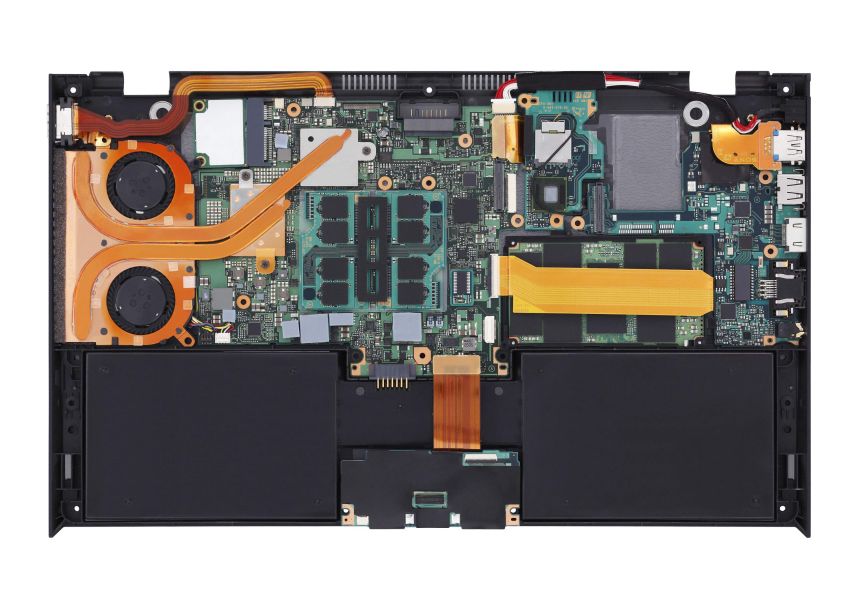
Nice to see dual cooling too. Would like to open it up to have a look at how it compares to the 3820TGs cooling.
Not sure why but I have an odd feeling in the pit of my stomach that the Gigabytes "dual cooling" won't be as separated/distanced as the 3820TG. I'm thinking it'll be similar to this (and therefore a bonus, but slightly not as efficient as ours)Attached Files:
-
-
When I read the description as dual vent, I wondered if it even had dual fans. I'm sure the reviewers will have at it. Still, it is nice to see someone trying to improve the things that made the 3820TG so great. The improved resolution is really something I would like on the Acer. Mine is still going strong after nearly 2 years of constant use. I have had it back for a shorted webcam and have had not the hint of a problem since. I have a 3 year warranty on my 3820TG, so I am not really looking to replace it ATM. My company asks us to replace our primary notebooks every 2 years, so I may get another work notebook and keep the 3820TG at home.
-
For those interested, figured out my downclocking problem. In one of the drivers I installed, "Plugged In" performance got set to "Maximum Battery Life," and therefore PowerPlay wouldn't clock up the card.
-
I disabled power play altogether because it kept turning off my wireless card when my 3820TG was on battery power, no matter how I manipulated the settings. After a clean install, I didn't even reinstall it.
-
Whenever I am in power saving mode I am unable to watch any sort of flash videos (youtube and other sites show green pixelated videos). Anyone else have this problem?
Is the solution as simple as reinstalling the Intel HD graphics driver? If so, anyone know if there an acer specific one?
Sorry if this was already answered. I cannot search this thread for some reason.
P.S. I am unable to get my FPS in BF3 above 30. Is this normal? -
I have have trouble peeking 40 on med in BFBC 2 with the i5 6550 (I don't overclock). Not sure which model you have or what settings you play at but 30 might be normal with BF 3?
-
The search function has not worked for some time. What kind of clocks are you running on your HD6550 and what settings are you using in BF3?
-
Medium/Low settings. Default clocks, but sometimes a very slight OC.
I might try some paste on it this weekend.
Any idea with the video issue on the intel graphics chip? I am thoroughly confused how to install graphics drivers properly on this machine. I have been installing the latest AMD drivers by switching to discrete mode and then installing (I assume that is correct). -
Everyone seems to have their own installation method but I installed the Acer video driver first, then switched to dedicated and installed the latest AMD. I run mine overclocked to the max when playing BF3. It gets a bit hot but runs the game smoothly on med-high at 35 FPS or better.
-
I have the exact same issue when on Intel graphics. Reloading the flash video usually solves it for that particular video (not always though), but it's nontheless quite frustrating since the green pixelation occurs often.
I guess it's a driver-related problem but neither have I any idea on how to update the Intel graphics? I installed mine like Bronsky. -
When you are in Intel mode, click on the blue icon in the tray, go to power settings and move the setting from battery saving setting to performance settings. Then go into power saver, change all video settings from max battery to max performance. If you have Acer's ePower running, disable it. Reboot, and let us know what happens.
-
I think I was able to get rid of the problem using the 4820tg video drivers.
My process
1.) Uninstalled all video drivers (intel, ati)
2.) reboot and installed the acer drivers
3.) reboot in discrete and installed new ati drivers
4.) reboot back in switchable -
Does anybody tried Catalyst 12.4 driver?
On my system it have disabled brightness control in discrete mode again. Moreover, this time - not only Fn-arrows, but also in Win-X and Power options too.
-
Hi! First post on this great forum and this awesome thread that helped me a lot, thank you!
I'm trying to use my monitor at the same time as my TV. I've made a slim VGA cable (cut the screws) to make it possible to connect both HDMI and VGA at the same time. My problem is that when I'm running this setup my both screens sporadically goes black for a couple of seconds. It seems to be like the GPU gets "disconnected" for a second (Windows is making the device unplugged-sound). This problem remains even if i unplug the HDMI cable. The only thing that solves the problem is switching from the high performance GPU to the battery saving one (but I can't use the HDMI on battery saving GPU, right? the computer always switches to high performance when plugging the HDMI). When I change VGA cable to an uncut one there's no problem (except that the HDMI won't fit...)
How do I solve this? The slimmed VGA cable seems to be the problem, but why only on the high performance GPU? I've tried two different VGA cables that I've cut away the screws on, and the screen goes black more often with one of them.
How did you solve this problem with the tight VGA and HDMI connections? Are they selling slimmed VGA cables anywhere? (Googled it of course, could not find anything). Is it possible to run the battery saving GPU when using HDMI?
https://docs.google.com/open?id=0B_lDJvJY-ytZM2ZzM2g3cDlqV1U <- there's my slimmed VGA cable. Shielded with aluminium foil, duct tape and rubberish tape
Thank you!
/Jesper -
No change, unfortunately..
Ok cool. So those drivers are compatible with the 3820tg? I'll give it a try. -
Hi,
It seems that the LAN port on my 3820TG is dead. Under Win7 SP1 I cannot see it in the device manager and a driver installation fails.
Is any chance to replace the LAN card?
Cheers,
tome -
tome you sure its turned on in bios.
i know some bios can disable it from there -
anyone?
-
Hello everyone,
I have 3820TG ATI+Intel with default win 7 and UnifL drivers. 1.19 bios vers.
I do a bit of gaming sometimes and sometimes it switches off by itself because of the overheating I guess.
It is a bit hard to read through the whole topic, so may be someone got this problem when ATI card completely disappear even though it is turned one in bios.
And I can't seem to find out why it is happening.
Sometimes it works for 1-3 days, and after that the laptop goes to hibernate as usual, then when I switch it one I receive an error of loading from cache and the video card is gone, only the Standard video adapter is present in the system without drivers and it is Intel. And even if I switch video to discreet only in bios it is still load Intel card. Everything was fine before for almost a year.
I have seen a few people had this problem on different forums, but no one seems to have any ideas why it is happening.
Any help appreciated.
Thank you! -
worked for me. I think others have posted about it. Problem fixed?
-
My HDD is dying I need to buy a new one
guys, any good SSD to buy on the market right now?
-
Crucial M4
-
My crucial has been flawless for 2 years.
-
Should I get 128gb or 256gb? :/
-
It's up to you. I'm fine with 80GB Intel G2 + external USB HDD.
-
sorry, can i ask if there is anyone who tried loading 16GB DDR3 1333MHz into this notebook?
Any complications?
thanks -
thanks, but i meant the whole theme (with the green logon screen) not just a wallpaper.
-
Seems to work for me aswell! I've watched a couple of vids i had trouble viewing before, and so far so good Thanks for the tip!
-
how can I tell which whether I got 1st Generation or 2nd Generation Intel Core i5 Processors on my 3820tg?
-
First gen is what you have.
Second generation aka Sandy Bridge has 2 added i.e. first gen CPU is Core i 5 430M and second gen is Core i5 2415M. -
Thanks
anyone know will it support ddr3 1600Mhz ram? -
Not at 1600MHz. With two core CPUs (Core i3, i5 and i7 6xxM) it would run at 1066MHz and with a quad core i7 at 1333MHz.
-
Any opinion on the Sony Vaio S 13.3? Weighs about the same as my 3820TG, but has Ivy Bridge, GT640M and HD+. Price seems reasonable.
-
Hmm... with a 120GB SSD and 6GB of RAM, how much would my i3-370M / HD5650 3820TG be worth on the second hand market?
-
That is a good question. They are rare. I have only seen a handfull of these ever for sale on ebay. The last one I saw with conventional drive went for $450 but that was before the last generation of notebooks was released. The new Acer V5 is only $650 and Trinity laptops will be in the same range or less. Depends on condition too. Mine is really used.
-
Thanks!
I think I'll get SSD and see how it go. I heard that Win7 64 is better with 8gb ram, right now I only have 4gb ram and my laptop is getting very slow even I just format it few months ago
-
It shouldn't be happening. I'm using Win 7 64bit with 4GB RAM and it works perfectly fine.
Check RAM usage- if it's close to 100% than it is a problem but it you have a lot of RAM free adding more RAM will not be beneficial. -
Hi guys.
I am experiencing incorrect time and date on my 3820tg lately. I already changed the BIOS and Windows clock and date manually but when I turn my laptop off and turn it on after sometime, the time and date are both messed up.
I am guessing that this is caused by a depleted CMOS battery because my laptop is already 2 years old. If this is the reason, could you please let me know where the CMOS battery is located and walk me through on how to replace it. Also, please let me know the type/model of the battery.
3820TG Owner's Lounge - Part Two
Discussion in 'Acer' started by Bronsky, Mar 13, 2011.