Problems? See this thread at archive.org.
I contacted Cooler Master support about this a week ago:
They said most Acer should be supported, but couldn't guarantee the model-specific compatibility for the TimelineX Series...
-
Should work.
-
Has anybody tried the Intel Wifi/Bluetooth 6230 combo card in a 3820TG without BT? Intel® Centrino® Advanced-N 6230 – Overview Does it work?
Bronsky
-
I was not expecting this. Where do I pick up my prize?
-
Now that I think about it, it also lets you install the latest Intel drivers. Considering that installing the latest discrete drivers while in Discrete BIOS mode actually upgrades the driver to the latest in Switchable mode as well, would this BIOS mod do the same for the integrated drivers? Would installing the latest Intel drivers in integrated-only mode update the Intel drivers in Switchable mode also?
-
That will probably work. Feel like being a guinea pig?
Integrated Only option is great for Windows XP and Linux where disabling ATI could be a problem. -
Since Acer doesnt support XP, i used a XP-Driver from lenovo Y460 for 5650m (some google translated chinese forum said is will work, it did!), had to add my device ID in that .inf file though. But as you may know, when switchable is activated in WinXP, both gpus are powered on but only the intel is working/used, even disabling the 6550m in device manager does not end the power draw of it yielding a total of ~2 hours on battery.
Therefor i really wanted to have the bios switch (need XP for Cubase).
-in ubuntu u can have a acpi script
-win7 works anyway
-linux has switcheroo
-xp i can only go with bios switch afaik
Another Question, prikolchik, ive seen u already tested kizwans modded 1.19 3820tg BIOS. I tried to update the BIOS as stated in your crisis disk Post...
i keep getting the "cannot flash if memory manager..." error at the flash interface, even in DOS... i googled that stuff already but i simply failed.
-You used HP usb flash tool... hook at dos bootable and where do i get the boot files then? i tried the files from winXP-, win98-, driverless-bootfloppy (created through a virtual floppy).
or is it meant to do the bios flash without the interface like in the crisis fn+escFor15s recovery? that cant be the only way to flash a modded bios, right?
what i dont get is that there is a 64bit flash utility in acers bios Package, it works but the Buttons are locked so you cant choose the bios file and the used bios file is embedded in the exe somehow.
isnt there a version of that utility that allows you to choose bios file, i guess that would reduce the trouble for a lot of people
Anyway, greatest Thanks so far to Kizwan and prikolchik -
You don't need the crysis disk for this type of mod. You are modificate the CMOS not the BIOS.
-
Yes, but Kizwan made a bios that doesnt reset when factory defaults are loaded (if i understood it right). Therefor i would appreciate the biosflash
-
Can you give me the link?
I have only read the first mod variant. -
http://forum.notebookreview.com/6763651-post721.html
bottom of that post -
Hi, I'm having a similar problem as Marrt. I am trying to upgrade my laptop, 3820TG-624G64n the i7 series, BIOS to the modded 3820TG BIOS made by Kizwan, so that I could disable VT (Virtualiztion Technology). However I am not able to flash my BIOS.
These are the methods that I've tried:
1) Used the guide by prikolchik, using the fn+esc key to recover/update bios. The screen remains black all the time, the kind of black that shows that the screen is not even booted, not the lit black. Tried it a few times. The USB light does light up and blinks a few times, thereafter nothing happens. I had to manually shut down and reboot it, no changes.
2) Used the HP USB boot utility, followed the guide to use the MiniDOS from USB to boot. When I tried to boot from USB, it shows FreeDOS Kernel and nothing happens. I wasn't able to type in any commands, let alone parameters. The files I had inside the USB were: Command.com, kernel.sys, BIOS.wph (modded), phlash16.
3) Tried various winphlash, winflash and other flashes, none works. All gave me errors.
Been spending hours just trying to flash a BIOS, please advise what should I do next. Hope I supplied enough information here. Many thanks. -
Hi!
Being a new owner of this jewel, I just noticed, when I plugged my headphone, that some surround effects were activated by default. That's not disturbing with the internal speakers, but that sounds so ty when listening with headphones. I advise you to deactivate it if you plan to plug external outputs. The better is to install drivers from realtek homepage.
See Ya! -
Very interested too.
-
Did you create Crisis disk on Windows XP 32-bit? Is USB drive size less than or equal to 2GB? Try another USB flash drive.
I used HP USB boot utility to create a bootable flash drive and MS DOS. I couldn't get FreeDOS to work either.
Do not use those. There is a high chance of bricking your laptop and having to RMA it.
1. Create bootable USB flash drive using HP Disk Storage Format Tool. Copy MS DOS file (you need to copy only 3 files: COMMAND.COM, IO.SYS, MSDOS.SYS) on it and test to make sure you can boot to it via F12 Boot Menu (F12 boot menu must be enabled in the BIOS).
2. If your BIOS is NOT v1.19, then download unmodified Acer BIOS from the support website and flash to it. You can do it by exctracting archive to a directory acer (for example) on your flash drive, then boot from it and type C:\acer\Flash.bat. It will flash the BIOS.
3. If you running BIOS v1.19, then you can flash to Kizwan's modded BIOS. Download it and extract it to the flash drive in directory kizwan (for example). Boot from USB drive using F12 boot menu and type C:\kizwan\BIOS.bat. This should flash the BIOS.
I have made my own modification of kizwan's BIOS to add extra backlight levels (1,2,4,6,8 to stock 10,20,30,40,50,60,70,80,90,100). If there is any interest in it, then I will upload it. -
I bought a sparkle ultra slim 90W adapter, it works well.
-
Me too! Go buy it on Ebay and tell us
INTEL SINGLE WHITE BOX CENTRINO ADVANCED-N 6230 WI-FI H - eBay (item 310300519816 end time Apr-01-11 12:23:49 PDT) -
Yes I tried SanDisk and Sony, 1gb and 64mb respectively. I created the Crisis disk on Windows 7 64-bit, my current laptop.
I am going to try your method now, thanks for the quick reply, will post back the results for it.
Thanks alot prikolchik, that 5-liner guide you made just beat all the other 20 stupid guides I saw over the net, google searches are becoming more and more irrelevant these days. I got Virtualization Technology to be disabled. Another question if I may, I'm now trying to create a BIOS recovery flash drive. In it I want to have the original 1.19 and Kizwan's modded BIOS. I created 2 folders within the usb drive, each containing the respective files. In the root folder I made 2 .bat files, 1 intended for original BIOS, the other for Kizwan's modded BIOS. In each I used the following commands:
//This is for original BIOS
set UMAROM=JM31119.WPH
: DOSMode
cd DOS
...
//This is for Kizwan's modded BIOS
set UMAROM=JM31119.WPH
: DOSMode
cd KIZWANMOD
...
Notice both the BIOS files are the same name, is it ok to do it like this? Will the .bat files know which folder's BIOS to run when it runs phlash16 /c /s /x /bbl /mode=3 %UMAROM% ? -
Crisis disk creation does not work on Windows 7 64-bit. That is your problem
Haha, no problem. I am sick of stupid guides too, so strive to make sure my guides do not add to the list.
Great idea! I will use your idea when I will be writing a proper BIOS flashing guide.
DO NOT USE /BBL OPTION as it tells phlash16 to flash BootBlock and if BIOS is corrupted (or lets say you flashed BIOS from the wrong model) chances are BootBlock is too and with corrupted BootBlock you will not be able to use Crisis Recovery and your motherboard will have to be replaced (or BIOS chip de-soldered and flashed with flash chip programmer). /bbl option is highly unlikely to cause a problem in this case, but be on the safe side and leave it out. Change your command to phlash16 /c /s /x /mode=3 %UMAROM%
It is OK to have /bbl option in original unmodified BIOS when you flash it the first time and know the BIOS is tested and works, otherwise leave it out. -
Alrighty, roger that. I copied the /bbl parameter from the original .bat file. And here I thought at our era, flashing BIOS is a given thing, easy to find it all over the net, unanimous throughout. Thanks again man.
Since I'm here, I might as well ask the problems I'm having all these while, not after the BIOS flash, not sure whether other people are experiencing.
This laptop of mine, 3820TG-624G64n i7 series, has these problems:
1) When I plug in a USB device, 40-65% of the time my windows explorer hangs and stops responding. Then my whole laptop gets slowed down by 90%, until I slowly get windows explorer to restart. And it just happened 5 mins ago while I was trying to see the model of my Acer external DVD drive. An intermittent problem.
2) 10-20% of the time I plug in a USB, my laptop says it does not have enough power supply. It then cuts off my mouse. And the same device can work sometimes, other times it says that. And I even switched to Intel onboard graphics because I thought I was using too much power. An intermittent problem. Just happened too.
3) I bought an external Acer CD/DVD drive, SlimType DVD A DS8A2S. Say I put CD A in, when I go to My Computer, it shows the name of CD A. At this point I swap another CD, I refresh My Computer, the name does not change. I remember the contents in the folder does not change too. But I just tried, it does not have this problem now.
4) Another problem with the CD/DVD drive, all the disc that I tried to ripped image from, the image from it seems to be corrupted. It may just be my CDs, but happens all till now. By corrupted, it means I couldn't run it in a software, specifically a playstation emulator. I suspected that it may be the software issue but, I've done some testing and deemed the problem to be my drive. I couldn't read from CD straight in the software and neither does the iso from the CDs work. I suspect it's a driver issue but I've yet to find a driver over in google. Just asking for some advice on what can be done next.
Thanks for anyone helping me to look through the problems in advance. Thanks again man prikolchik. -
I was wrong, it is my HDD thats making the noise. Atleast i guess so as the blue led flashes when i hear the noise...
Anyone got any suggestions to fix it or is a ssd the only suggestion? -
Wow...never would have thougt this incredible notebook would get so much attention - as more than 1000 pages - when the first info hit us about it in March 2010 (when the specs were accidentaly revealed on Acer International site).
Feels good owning one... -
I'm trying to figure out a way for switchable graphics not to trip when I plug or unplug the power adapter. I'm on the HD6550 model and the catalyst help center says this option is available under switchable graphics properties but I don't see it there.
Basically I only want the graphics to switch from integrated to discreet and vice-versa when I push the physical switch button or choose to switch in the GUI. -
kizwans 1.19 BIOS for 3820tg works indeed!
i experienced some little short timed graphic bugs in win7 when running on intel only as i insert the power connector but that doesnt bother me as long as it does no harm... does it do harm?
Excellent Idea! pls Share!
THX to you guys now i have my nearly perfect little Notebook, XP with 6 hours Working time, Backlit Keyboard will arrive soon.
The only thing thats left for me to do is to find a screen with better contrast values -
Just have to enable it in registry.
Method one
1. Press Win+ R or press Start and then Run. Type regedit and press Enter.
2. On the left, navigate to [HKEY_CURRENT_USER\Software\ATI\ACE\Settings\Graphics\PowerXpress\AutoSwitchingFeature] then the right there should be a key called Accessible. Double click on it and change from Nobody to Everybody. Click OK.
Method two.
1. Alternatively, create a blank .txt file and paste this in it:
2. Rename the file to fix.reg and double click on it. Click YesCode:Windows Registry Editor Version 5.00 [HKEY_CURRENT_USER\Software\ATI\ACE\Settings\Graphics\PowerXpress\AutoSwitchingFeature] "Accessible"="Everybody"
Method three
1. Download the attached file autoswitch_checkbox_fix.zip. Open it and double click on autoswitch_checkbox_fix.reg. Click Yes
The "disable autoswitching" check box will now appear either in Configure Gaphics or in ATI Control Center.
Cheers!Attached Files:
-
-
Thank you very very much! I wanted to have full control too.
-
Thank you but it didn't exactly work. Using your method did give me the option to enable or disable auto-switching in the switchable graphics properties, however when I chose not to auto-switch, it still switched to intel integrated when I went from ac to battery power.
-
Hi everybody,
Im new to these forums and have a 3820TG on the way. I was wanting to know whether a Asus UL30 Keyboard would fit in my 3820TG as I prefer the look of the UL30 keyboard. I cant seem to find how many clips the 3820TG has on top and if it would fit the UL30 keyboard. -
BIOS has been updated as of March 3.
How do I create the CRISIS disc? -
You need to be in Windows XP 32-bit. USB drives needs to be 2GB or less. Try different brands if needed.
-
I am doing a clean installation on my 3820TG with Win7 X64
However, when I unplus the power cord, with "P" power botton pressed,
I swtiched to Intel HD Graphic card.
Here is the issue I got, after swtich to Intel HD Graphics,
I could not open to set my graphical option
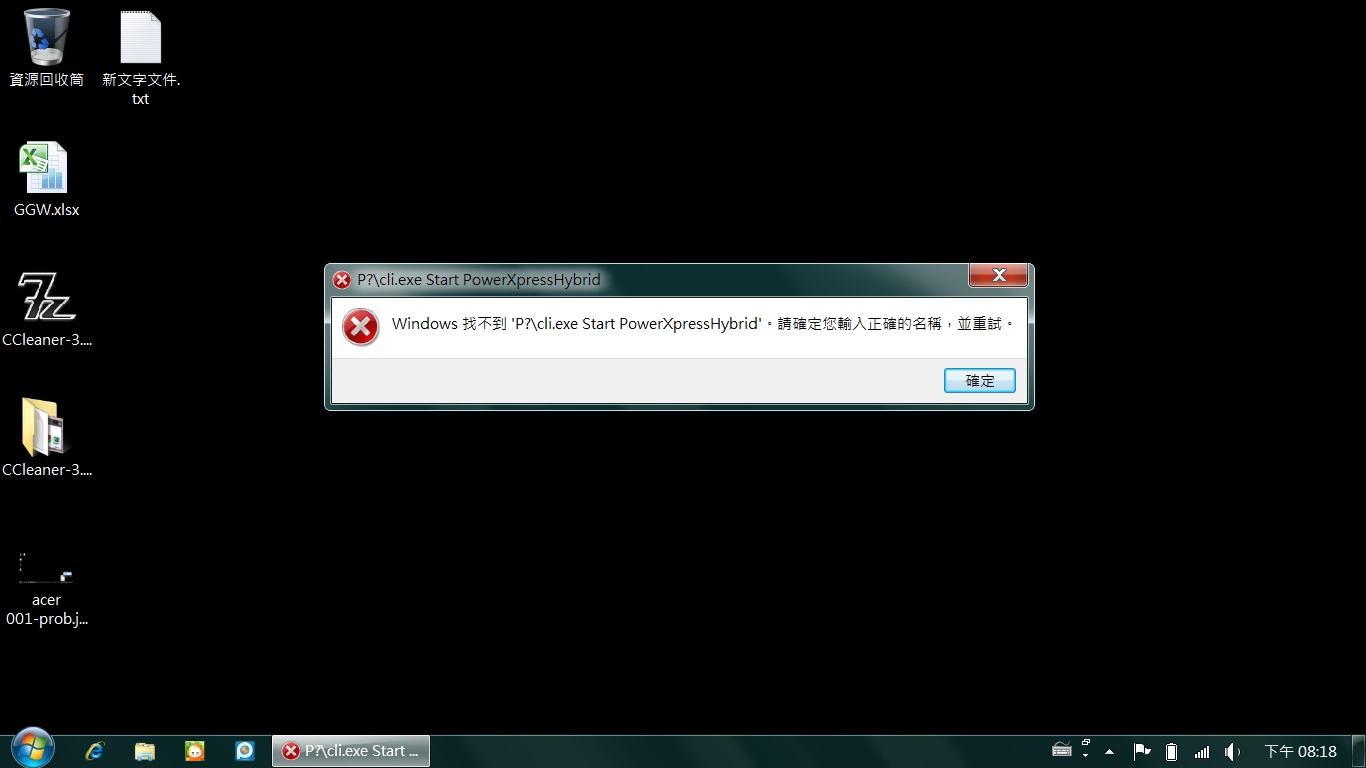
it pops up error message like this:
windoes cannot find P?:\ cli.exe Start PowerXpressHybrid error
something like that...anyone face same trouble like me? -
Interesting.. Can you please post a screenshot?
http://tinyurl.com/67hczox] which should lead you to Acer Aspire TimelineX 3820T/3820TG BIOS recovery (by prikolchik).
I recommend using this method -
That tells me how to flash the modded BIOS, not how to make a Crisis disc. Or am I misunderstanding something here?
-
Link you were looking for is right here:
![[IMG]](images/storyImages/2uos1s8.png)
Alternatively, >>>>>>>>>>> Acer Aspire TimelineX 3820T/3820TG BIOS recovery (by prikolchik)<<<<<<<<<< -
Uninstall Acer ePower/Powersmart Manager. It switches graphics as well.
-
Ah ok. Well I don't have any 32 bit computers, so I guess no CRISIS disc for me...
Well I'm trying to update the BIOS from the official to 1.15 to official 1.19 first. I'm in DOS right now following the steps here but every time I do C:\>Acer\Flash.bat, it gives me an error. -
Thx for the replying,
I am posting the Screen shot; however, I am using Chinese version of Win7..
Wish you guys could kinda of get an idea what is going on with my 3820TG
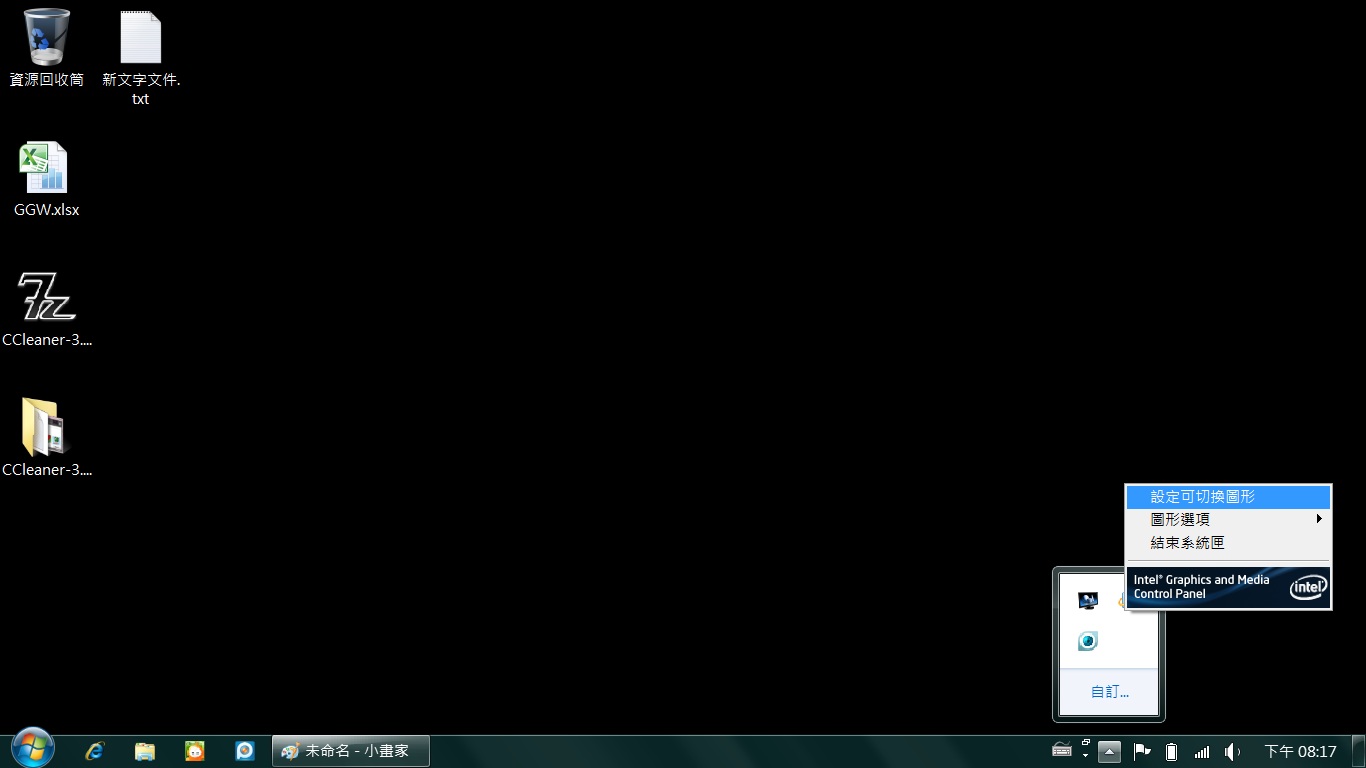
Pic1:
http://forum.notebookreview.com/attachment.php?attachmentid=62289&stc=1&d=1299383795
I want to click on "Set Swtichable graphic" (PS. but in chinese...)
pic2:
then error occured cli.exe (could not find cli.exe ?p:// PowerXpressHybrid...something)
http://forum.notebookreview.com/attachment.php?attachmentid=62290&stc=1&d=1299383795
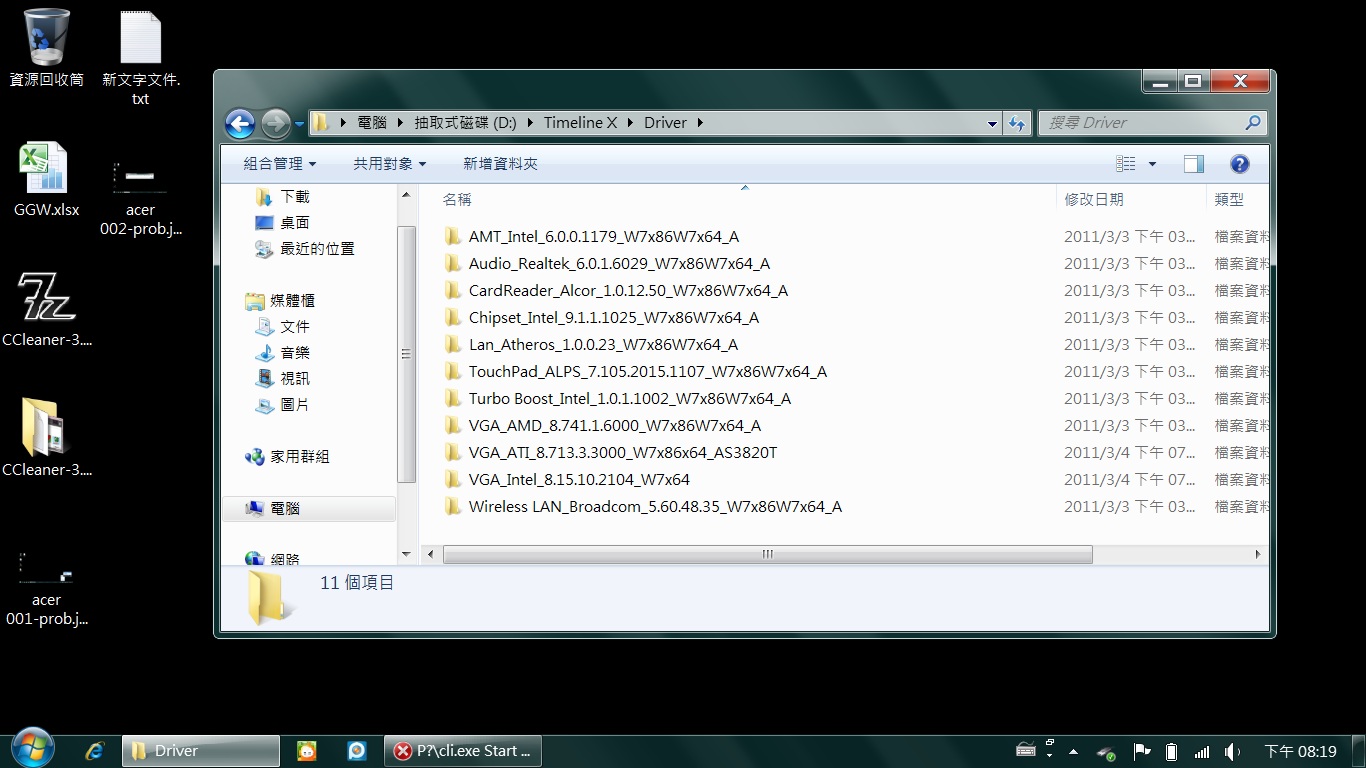
Pic3:
Here are the drivers I used for clean install WIN7 X64 (Downloaded from Acer.com)
http://forum.notebookreview.com/attachment.php?attachmentid=62291&stc=1&d=1299383795
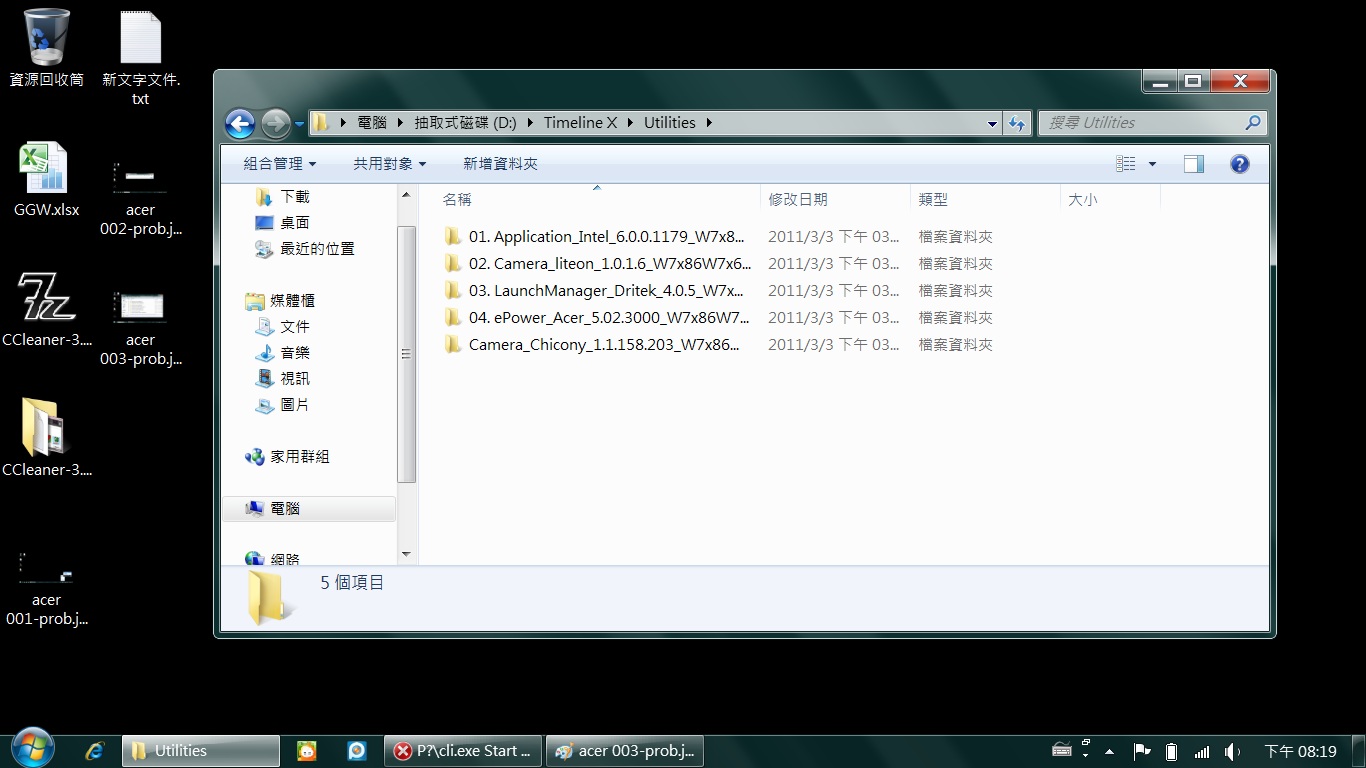
Pic4:
1~4 are the utilities I installed in order myself ( again download from Acer.com)
http://forum.notebookreview.com/attachment.php?attachmentid=62292&stc=1&d=1299383795
Updated: Today I reinstalled again, but install all drivers and utilities from "Acer Disk" created from Acer eRecovery, then the intel(R) control panel and swtichable video card works...
Thought/Idea: mayeb the drivers and utilities provided from Acer.com is not good enough...!?
Any idea why this error pops up?Attached Files:
-
-
BTW, old question again..but there're 1005 pages, hard to find...
Does 3820TG Timeline-X easy to replace the keyboard?
I am using Canadian Bi-lingual version, willing to change to US keyboard. I do not like the small left shift and right "enter key and its layout"
Does anyone has link for Keyboard swaping guide for 3820TG?
I am not a technician...so kind of afraid to mess up my laptop..or anyone know where in Canada could get the labour keyboard swapping done? -
If you go to the guide at the bottom of the first post, Bronsky's clean install guide, then in it there are two guides for changing the keyboard. Without doing the backlit mod described in those tutorials is simple. If you look at the top of the keyboard, there are 5 tabs that you just simply pop in and the keyboard comes right out. There is a tab on each side of the keyboard as well but those come out once the keyboard is lifted gently. After that you just disconnect and reconnect and the new keyboard pops back in. All in all a 5-10 min process.
-
Yes, to change for the non-backlit US keyboard is very simple: just push 5 buttons that are holding tabs in the upper side of the keyboard, and pull the keyboard (there is still one tab on each side), unplug the flat cable and do inverse steps with the new keyboard. Don't need to touch one single screw! If you look for the Service Manual (there are links in a few pages before) it's going to tell you exactly how to do this.
-
Where the best place to get 3820tg shipped internationally these days?
-
bought a Belkin 90w but seems doesn´t work so well... i´ll try coolermaster one
-
Depends on where you are. EU, I would say Germany. Otherwise, probably PCHome.
BTW, anyone considering a backlit KB, Raulilha has spliced into the Bluetooth Module and drawn power from there. No need to solder anything on the Computer anymore. After you fit the KB, splice the module and fit a plug onto the KB, it all just snaps together. Extremely nice job. http://forum.notebookreview.com/7225773-post441.html
Bronsky
-
Alternately, the Novatel EU850D has a sim slot right on the card. It is an older design though so might only be capable of 7Mb/S
-
Quick question to anyone, Regarding to the universal power adapter,
Lots people complained about 3820TG's AC adapter is too big. I am looking at
Coolmaster USNA95 Ultra Slim 95W 19V Universal Notebook Power Adapter
However, it is 95W instead of 90W(Acer manufactory original)
Does this model works? or any sugguestion? -
Depends. The latest available in the US is the I5-480M/HD 6550/750GB but it has to be imported from canada so it comes with a bi-lingual keyboard.
Bronsky
-
It's definitely an ugly keyboard. The left shift key is god awful.
But, where is the model with the 720gb? I can only find the i5-480M/HD6550/500GB. Not like it makes a difference, I'm just curious. I'm debating selling mine and picking this model up, but I don't really game so I think going from 5470->6550 would be a waste. -
Just put my I5 back in. Just like last time, it struck me how much harder the Fan works with the I5. Idle temps are a few degrees higher than the last installation, but, still in the low 30s. It's nice having BT again. Don't know why they ever sold this unit without it. It's amazing how little the fan kicks-on with the I3-370M. For business applications, if you don't need the I5, the I3 seems to be a lot quieter.
You're right, the 500s are the largest on the Canadian units. I must have seen the larger drives somewhere else. Or, maybe I just saw the specs. I forget.
Yea ... I hate the bilingual KB. I used for 5 minuts before I swapped out a US KB. Everytime you go to type a capital letter, you get \\\\\\\\\\\\\ before the letter.
I use my Acer for work and the HD 5650 comes in handy for some Modeling application and simulations. I also DL and edit aerial images (mostly cut-and-paste editing). For most applications, however, the 5470 would be fine.
Bronsky
-
When I first got my laptop windows recognised the CPU as a 480 while I ordered a 460. Thought it was a driver mistake but yesterday i checked bios and there actually is an 480 in there according to the BIOS aswell.
-
Acer announced 38 30 series for april, with Sandy Bridge platform and some other improvements. If it's matter of deciding for an upgrade, I would wait one more month.
Acer TimelineX 3820TG Owners Lounge. Info, benchmarks, tweaks, mods and upgrades
Discussion in 'Acer' started by Hendrickson, Jun 1, 2010.