Problems? See this thread at archive.org.
WOW are those user replaceable batteries I see at the top of your picture? I might be in heaven if the batteries are that easily replaceable!
-
-
Nice find, I like the T61. It was a really reliable notebook. My fan changes speed under load and stops when there is no real activity on that CPU or GPU. For instance, if I'm using the intel GPU, the dedicated GPU fan rarely kicks on. When I'm gaming with the machine, running models or assembling aerials, my fan goes from idle to full and back quite a bit.
Bronsky
-
I think 3830TG has more space than 4830TG since the 4830TG space is taken by the DVD drive which is not exist on the 3830TG
Mine's sometimes stop when browsing/light job in the cool place (air conditioned)
I'm curious too, I always set to "Active" because I frustated with the overheating, and I think setting that to Active helps to prevent overheating (a bit). -
"Active" means increase fan speed, "passive" means clock throttling. Reading that the fan wasn't speeding up under load made me think of this.
I guess what I really want to know is: Does the 3830TG's fan ramp up under load? -
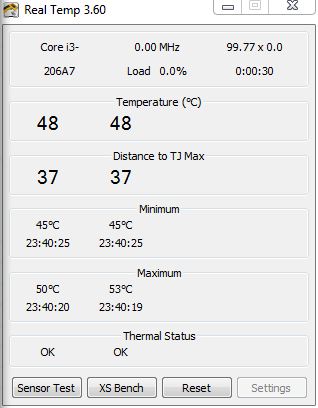
Well that fan seems to make noise almost all the time. If CPU cools down to about 40 Celsius the fan stops. When playing games the noise gets significantly louder.
-
My 3830TG always "fans" at medium speed. Never stops, nor gets louder. At least I don't hear any difference.
-
Just played BF:BC2 on dual displays, one being a 20 inch monitor playing at native res. On medium settings for about an hour with throttlestop. temps got up to 88c but gameplay was pretty smooth, 40+fps. Medium setting is better than I thought theres not a big difference between that and high. I tried to put the game to 1600x900 and the computer went a little crazy i had to restart it.
All in all, medium settings gaming is no doubt do-able with throttlestop. If you plan on doing light gaming like this then I would recomend the 3830tg in a heartbeat.
If anyone wants a quick review I'll do one when I can. -
Is throttlestop at all necessary with only the integrated gpu and no plans for gaming on the 4830?
-
I don't have a 4830, only the 3830TG. With Nvidia GPU disabled, there should be no throttling. The system might disable the turbo boost, but 2300mhz should work.
-
Are you sure your system is throttling?
I falsely assumed my as4830T was being throttled until I downloaded Intel Turbo Boost Monitor Utility, and found that in fact my system is not throttled.
I ran some programs to load the cpu and saw turbo boost jump up to 2.9 ghz, but usually around 2.7.
The link to Turbo Boost Monitor Utility is here:
http://downloadcenter.intel.com/Detail_Desc.aspx?DwnldID=19105
Make sure you have your power cord plugged in, and your windows power management settings set to "performance"
You will see that when the cpu is under load, turbo boost does kick in. -
i felt the same way for a long time and carried around 14"ers.
it is taking a while to get used to this 15". the keyboard seems off to the left..
but the screen is so big that i just accept it as a 14" with some extra space on the right.
and the keypad is handy. -
I'm now seriously considering the Gateway ID47H03H (thanks for the FS link, Bronsky!). The main reason why is that it has a 14-in edge-to-edge screen in a 13-in size!
I thought Gateway made garbage, but this new 14-in and their NV series with AMD A8 APUs suddenly look pretty awesome. -
Gateway is made by Acer, and Sandy Bridge still outperforms anything that AMD currently has, even if the AMD has more cores, Sandy Bridge still out performs it.
There are lots of benchmarks on tomshardware and AnandTech.com -
Just to clarify, the ID47H03H is SB Core i5 + 540M. It's the bigger NV75S03H that's AMD A8.
The ID47H03H is more expensive, so I'd rather get the 3830TG if the throttling can be worked out. -
With up to 2.4GHz turbo boosting on the A8 mobile CPUs that pull 35W including the integrated 6620G GPU the A8s are reaching a level of performance CPU wise that means they now fall between the i5 and i3 in terms of performance, and their GPUs are significantly faster than the Intel HD3000 GPU in the sandy bridge chips and that's what really limits gaming ability on most laptops. The 6620G IGP is rated at about 85 to 90% the performance of the ATI 5650 GPU which is a quite capable mid range GPU.
-
i can play starcraft 2 for 3 hours straight and the fan will make less noise than a cat purring. the only place i feel heat is directly to the left of the trackpad, and even then it feels no warmer than if you touched someones arm.
i wouldn't worry about thrttlestop at all if i were you, on battery with maximum performance surfing the web this fan runs cool as a cucumber. no heat anywhere.
the 4830 is amazing...i still can't get over the fact that i paid 350 out of my pocket for it on Amazon (sold the Xbox and had 200 in credit) -
The c't - a well-known German magazine - tested the new AMD CPUs. As you said, the fastest AMDs are between the i3 and the i5 when it comes to CPU power. But when it comes to GPU power, it's almost as fast than an i5 with extra Nvidia GPU.
Therefore, the main advantage is not its speed, but the battery power which is used. This allows long battery times AND a great GPU. -
Are you certain about the battery life?
My issue with AMD, and I have owned AMD based laptops in the past, is their horrible battery life.
I understand the AMD mobile A8 is available in a 35W model, but battery life goes goes beyond just wattage usage. Factors such as speed-step technology and performance per watt is something that Intel has hands down.
I have a hard time believing that a 35 watt AMD chip put up against a 35w i5 would have the same battery life.
That is why I chose my Acer with an i5 2410, this thing seriously has all day battery life!
Maybe my past experiences with AMD mobile chips has put a sour taste in my mouth when it came to battery life. Maybe things have turned around with their new APU's. -
Well, your experience differs from mine. My 3830TG has only 5.5 hours of battery life in powersaving mode (800mhz, low display brightness). I guess it's just the fan running all the time without stop.
I don't know much about the new AMDs, as they just arrived on the market. We'll see if they work as well as the core i3/5s. -
That app is proven to not indicate throttling, i think that's mentioned on one of the first pages of this forum.
-
Looking at the early reviews, I think the AMD A8 uses more power than the Core i5. I have yet to find any ultraportable with the A8.
But I think the A8 in a 15-in or greater laptop is a good choice. It strikes a good balance between totally useless Intel iGPU vs. battery-sucking dGPU, which is good for most "regular" users.
I think for those of us who are looking for a thin and light gaming machine, probably Core iX + 540m is better. With a smaller battery, idle power consumption is better on the Core iX. In game mode, frame-rates are more important than battery life, so who cares.
As a side note, the better spec'ed Gateway NV and ID machines seem to be available only in Canada. Makes no sense, but good for us Canadians (for once).
-
Not just for once ... the 3820TG was sold in Canada only, not the US. The ID looks interesting. Is it sold with the Eng/Fr bilingual KB only? If not, I'm sure it can be imported into the states.
Bronsky
-
I really wanted the 4830TG but I am worried about the battery and throttling reports.
I am looking at the Gateway ID with the GT 540M or the Asus U46 which I really like for its portability. The BB version got editor's choice from pcmag.
Stick with the Acer, go with the edge to edge Gateway, or the gold asus? -
Bronsky, I went down to FS just now, and got the sales guy to crack open a new one :> (there were none of display).
The Gateway ID47 is not as light or thin as the 3820TG (which I've seen). The screen looks nice, but it wasn't powered on, so can't say too much. The keyboard was En/Fr-CA, but not as bad as the HPs.
The only real problem is the half size Left-Shift because of the extra "\" key. But I've always remapped that key with SharpKeys, so I don't think it's a show-stopper.
From quick visual inspection, it looks like a quality laptop, but I literally had it for only a minute FWIW. Price, for me, is the killer. $850 is too much. If it was $100 less, I'd get it.
nicksti, I get this feeling any of these gaming ultraportables may run into throttling problems, especially in the summer. The 3820TG is the exception, as it's still the only ultraportable with 2 fans (I stand to be corrected). -
the new sony z is dual fan. However, the gpu is external so i guess it is not Ultraportable. Even with two fans the new z seems to be hot. Sandy bridge isn't that impressive.
the new sony z is dual fan. Older macbook G4 series had dual fan, but they were tiny. Even with two fans the new z seems to be hot. Sandy bridge isn't that impressive.
So is Acer manufacture gateway laptops now cause gateway has really bad quality? -
Acer owns emachines and gateway now. I do not know if they have consolidated the operations to say the manufacturing process is shared, but I do not consider Acer to be poor quality. At the end of the day, if you buy a laptop that is sub $1000 and it has decent specs, compromises will be made. Usually it is the screen and the chassis.
The above $1000 Ethos line I do not see get knocked for poor build quality. I will not hold my laptop by the corners, nor will I have it in a bag with books. Portable, good battery life, decent specs, and something that will last (hinges wont crack by just opening and closing lid) is all I need. -
I disagree with you. For 800 Euros, I expect a laptop to be working, fast and somehow robust. If I wanted a poor quality laptop, I'd buy a netbook or a 300-dollar-notebook. The time for 2000-euro-laptop is definitely over, some manufacturers like Sony just didn't realise that yet.
For 400 Euros, you can even get a real Thinkpad Subnotebook (x121e AMD) now. It may not be fast nor robust, but 4 years before, the cheapest Thinkpads were around 1200 Euros.
I always considered Acer to be poor quality, at least until I bought the 3830TG, as its predecessor was said to be a damn cool machine. But Acer is as poor as it ever was. They throw fast machines with cheap prices on the market, but they don't care about any quality nor service. If you take a look at the drivers on the 3830TG support page, they're from April. Now take a look on the support page of Lenovo's T61 - some drivers are from May (2011) although the notebook is 5 years old.
The 3830TG would be a damn cool machine - if it would work the way it's meant to be. -
I think the lack of updated driver is not an important thing, since we can get drivers from each vendor, especially the nVIDIA driver because it's updated oftenly, and it's available on laptopvideo2go..
-
if the vendor got the drivers right the first time around then there would be no need for updates, other than to add features.
-
Years ago, a friend of mine had the same problem with an Aspire. Acer didn't offer any support on their homepage for it, the model didn't even exist there. No problem as long as you have the driver disc, but he had lost it. We spend 3 days looking for a working driver.
For me, the driver search is no problem, but for users who are not used to it, that might be difficult. If, at least, the official driver from Nvidia would work, but you need a hacked driver from laptopvideo2go instead.
I simply do not understand why Nvidia just excluded the combination of IntelCPU/NvidiaGPU in their official drivers. Makes no sense to me. -
Is the build quality of an Acer any worse than the other laptops with the same features at the same price? I do not believe so.
If you want a decent gaming machine + light and portable + good build quality you cannot find anything for $800. Vaios do not go below $999 base. Build quality is the tradeoff in these machines. -
The 14" Sony CA is $749 base, and with a 6630 GPU is only $849. Upgrading to an i5 CPU and 1600x900 screen gets you to $979.
-
CA doesn't look good (I prefer the E series), weigh more, thicker, normal battery life.
the VAIO in the same class as 3830TG is the S series, starts from US$899 with i3 and HD6470M, while the cheapest model with i5-2410M+HD6630M (on par with GT540M in 3830TG) is CTO SA, starts from US$1349, but the 1600x900 and BD-drive is included.
ACSC said I can get my 3830TG tomorrow..I hope the LAN+bluetooth problem will be fixed.. -
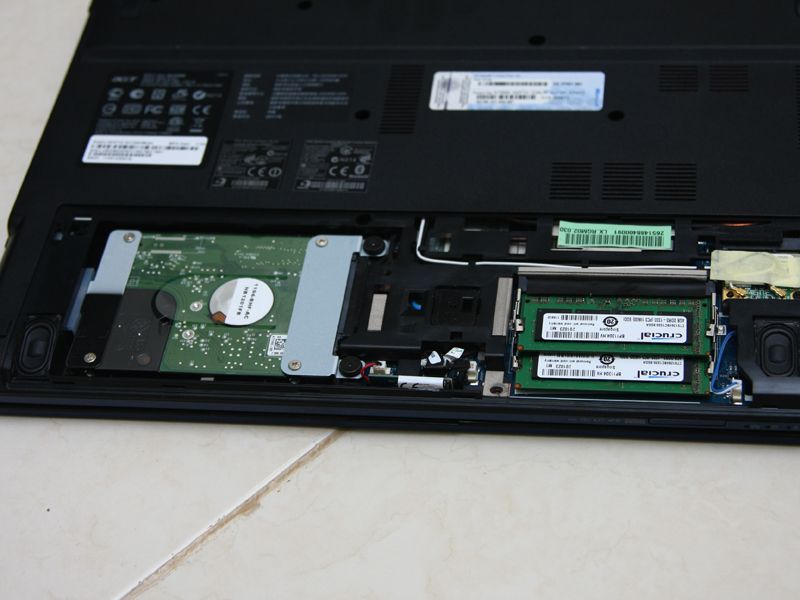
Does anybody know how or have instructions on how to access the memory slots on the 4830T? I want to add more memory. I heard there are two memory slots. Are they both accessable in the same location?
Thanks -
On the 3830TG you have to remove one (1!) screw at the bottom und remove the back panel. Don't know if it's the same for the 4830T.
-
Just unscrew the bottom front, hdd and ram are accessible from there..
-
Build quality is the tradeoff we've seen in the past x amount of years (3, 5, you decide) that bring this hardware to the sub $1k range. It's unfortunate but as manufacturers 'pass their cost savings' onto the consumer, we must bicker about keyboard flex and premature hardware failures.
About the Vaios, I bought for $2k USD a Vaio in 2001 and it's like 8 pounds, the battery lasts for 30 min if I'm lucky but it still works perfectly and is tank quality. Six months ago my brother bought a $1100 15" Vaio EB with i5-580 and 5650. It pops and creaks when it's picked up and the head phone jack went out about 3 weeks after he received it. Sony told him he needs to send it back to China to have the warranty work done. He loved that white EB though, but coulda bought a Sager/Clevo for several hundred less with the same hardware.
I don't see Sony offering anything unattainable by other laptop manufacturers with exception to a diverse name brand and consequently higher price tag. -
Well, the 4830 looks quite different from the 3830TG.
Attached Files:
-
-
Someone just bought a 14" Gateway ID to test it for throttling. He is looking for programs to ID throttling. I was going to recommend Intelburn test and HW monitor but you guys who are experiencing it know better. How about giving him some things to run to test it out and letting him know what to expect. It would be nice to get a report on this.
Here's his thread. http://forum.notebookreview.com/wha...uy/596669-your-thoughts-new-gateway-id-2.html
Bronsky
-
Out of the box should I plug this laptop into charge to full capacity? What should be done to keep the battery running well for as long as possible after?
-
For best battery life: Don't let it get real hot, don't leave it at nearly 0% for any length of time. For a better calibrated battery charge fully. Discharge til the laptop hibernates. Charge to 100% again. Do this once every 3 to 6 months. Each time you do it you'll likely "lost" anywhere from 5 to 15% capacity. It'll actually be gone by the time you do the cycle, but the battery won't know it until it fully discharges. Other than that, there's not a lot to do with most modern batteries. My 4820TG at 6 months has lost 2% capacity with a LOT of working on battery , with at least 40 or 50 discharge cycles, 10 or 20% of those to nearly 100% discharged.
-
So, I've been reading through this thread for a bit now, and am the new owner of a 3830TG.
So far, I have no complaints. I can play Crysis at native resolution with all Very High settings (with a bit of help from ThrottleStop), which is enough to keep me happy for a laptop that costs less than $800.
Anyways, what I wanted to ask is, any chance you could enlighten those of us who aren't as used to digging around for drivers? What would you recommend we download? How do we go about looking for it?
Thanks for the help in advance! -
What are your temps and do you overclock the 540m?
-
Crysis 1 may run at 1200mhz as well, so you won't always notice the throttling. Just run ThrottleStop in monitoring mode (it does nothing, shows only temps and speeds) on an external display while gaming.
I guess one of two cases:
- You didn't have your Nvidia Card enabled for Crysis (the Intel is not really bad)
- You played the game at 1200mhz.
A link to new graphic drivers can be found in my signature. -
Sony Vaio CA with i5-2410 / *768 Display / 6630 GPU / 500GB HDD / 4GB RAM = $979.00
I bet for $150 extra, Acer could have kept the dual fan solution and given us a rock solid laptop. But there is a big market difference between $799 and $949 -
where can i find pics for how to remove the heatsink/fan mechanism?
My 3830t comes in tomorrow and I'm gonna apply some as5 on it
EDIT:
nvm found it:
http://broo2.blogspot.com/2011/07/acer-3830tg-6431-teardown.html
EDIT:
on second thought... considering how fragile acer laptops apparently are... i might hold off on taking this thing apart... hmmm -
but i truly think that it does not need 2 fans, it has a single larger fan.
the problem lie's in the factory assembly, too much thermal paste is the real only issue, the netting on the bottom just keeps temperatures down 2C or so, the thermal paste on (total 3 i have done) is badly applied and needs to be redone and WILL decrease maximum temperatures 15-20C.
so many companies do not seem to understand thermal application, the application of thermal compound really needs to be hand done to be good, i am and will always be a firm believer in that. -
Hopefully more new owners will redo their thermal paste as well for a broader range of results. Your solutions could very well be all that's needed. The Sandy Bridge Macbook Pro owners were noting that redoing the thermal paste got their temps under control. It was a terrible situation for them, the stuff looked like it was applied with a putty knife.
Looking forward to more results for the 3830. -
i'm kinda tempted to do it when i get mine tomorrow. only thing holding me back is how fragile some of the connectors look.
having taken my old xps m1330 apart numerous times, i know that one bad move and somethings going to stop working. everything's packed in so tightly that there's really no room for error.
*scared
anyone have the specs on the power adapter? apparently its quite large and bulky. i'm going to buy a travel sized one with the same wattage. is it 65w? 90w? any suggestions for which power block to get? -
Yes, the 3830TG is really easy to break, as all parts are made of really cheap plastic.
The power adapter has 90w (35 CPU, 35 GPU makes already 70).
Acer TimelineX 3830/4830/5830 T/G
Discussion in 'Acer' started by lee_what2004, Feb 6, 2011.