Problems? See this thread at archive.org.
I would say, most 3830TG-buyers are gamers or power-user. If you wanted an office machine, you could get a Thinkpad, a 300-Euro-Acer or a T-Series TimelineX. But you're right, the T-Series is mostly unaffected.
-
hey all, i just got ma own acer 3830tg and i did a clean install, i forgot to backup my drivers though. i have all the required drivers but i am missing the UBS3.0 Charge Management software. can somebody please upload it to fileserve or someplace for me? and also the default TimelineX wallpaper that has two of the laptops stacked ontop of each other....lol...thanks a lot
-
i don't have a previous model to compare too, but "cheap plastics" is not a term i would use when describing the 2011 5830T. no heat problems either, runs very cool or lukewarm even in 90+degree weather.
here you go
http://www.easy-share.com/1916979242/UsbCharge.exeAttached Files:
-
-
Thanks boss!!!! nw im as gud as new!!!

-
battery wear is miraculously dropping...
i'm down to 1.6% now. haven't drained or anything. if this thing holds out i might not have to get the sanyo battery replacement. hmm
also anyone else get a pop up that says their windows isn't genuine? I installed update KB971033 and now it's not genuine anymore... -
the nvidia control panel in my 4830tg suddenly stopped working. when i open it, a window comes up but it is not responding. anyone has an idea what happened?
-
Maybe, it's just a virus. Such errors are quite hard to fix in windows, as one single missing file may lead to the problem. I'm mostly using the following steps:
Uninstall and reinstall the driver. In my signature, you'll find a link to the latest driver. (1) If this doesn't work, reinstall windows. (2) If that doesn't work, format the harddrive and reinstall (3). Skipping step 1+2 may safe some time. -
You can try doing a recovery to a couple days ago when it was working
-
i already tried re-installing the drivers and doing a system restore. the problem still persists. then, i created a new user account. surprisingly, the nvidia control panel works flawlessly on the other account. hence, the problem seems to be isolated in my original account. can someone shed some light on this issue?
-
Alright, so I'm looking to buy the 3830TG. I found it for $699, which is a decent price.
So before I pull the trigger on that, would any of you advise me against the purchase? Is the throttling issue really that big of a problem? -
The throttling is no problem at all. You get a wonderful machine with a 1.8Ghz CPU. Expect no more and you're happy
-
where did u find it for $699? and does it come with the free xbox offer?
i just got mine this past week. throttling is really not a problem if you use throttlestop. it's automated so you don't have to do anything.
i set mine to stop throttling when i'm plugged in (for gaming), and to revert to default settings when i'm on battery.
setting it at 18x multiplier max, u get 1.8 ghz which is more than enough for most games. the gpu is the bottleneck, not the cpu.
and just some icing on the cake. i just installed laptop2go drivers and tested vantage. i get over 4500 GPU score in vantage at native res (1366 * 768)
with the xbox offer i got mine for $550 + tax. I was looking into 2 alternatives: the Vaio SA or the Envy 14. Neither has nearly as good battery life, and the 540 is about 40% more poweful than the 6630. the price is about 1/3 the vaio and 1/2 the envy 14. it's also smaller than the envy 14.
i bought mine knowing it would have 2 issues: throttling, and possibly a panasonic battery. panasonic batteries have more wear.
so far, my wear started at 3.3%, and raised to 5.5%, then dropped to 1.6% and has stayed at 1.6 for the last few days. -
Haha, well, how do you like the notebook? Do you do any gaming? And how hot does it run? Can I have it in my lap when gaming? Sorry for so many questions, I just wanna be sure before I buy it aha
I found it for $699 at CanadaComputers without the xbox offer. Where did you find it for 550 WITH the xbox offer?! And how hot does it run? Is it okay to have in your lap? -
I think he means he sold the xbox for around 200 and it went from 750 to 550
-
May be this 3830TG notebookcheck.net review can help you in making this decision.
-
Then all you have to do is move the My Documents, My Videos, My Downloads, etc to the new account and delete the old account
-
The GT540M isn't quite that much more powerful. For 3DMark06 it's about 18% more poweful and for 3DMark11 the difference is 1%.
-
Mine's around a week, but they told it takes that long because the inavailability of the replacement battery, and I also ordered them to replace with anything but Panasonic.
I entered the ACSC (Acer Customer Service Center) with 40% Battery Wear (I showed both BatteryBar and Battery Care to make them believe) and I told them that my battery last in 5 hours only, compared to the advertised 8 hours.
Of course, 5 hours to 7 hours!
you have to get the BatteryBar Pro, if you haven't buy it yet, you can get the 30-days trial (just right click on the BatteryBar, and click "Activate 30-days trial", after that, the notification will appear telling the BatteryBar Pro trial has been activated. Then, right click on the BatteryBar, choose Preferences, and click the "Display" tab, then tick "Display the battery ID in the status popup".
I got my 3830TG when the holiday starts, and everything (battery, HDD, and BIOS upgrade) done just some days after the school starts
-
My 540m scored over 4500 gpu score on vantage. A 6630 gets around 3000.
You should not use 3dmark11 to bench weaker gpus. The score is so low that the difference in power between 2 weak gpus is hard to properly measure.
In terms of temps I have temp monitoring constantly on for CPU and gpu. CPU gets up to 88C max. Gpu gets up to 78C max.
The handrest area never becomes too hot. I don't use it on my lap so idk about the temps on the bottom. U shouldnt use it heavily on your lap anyway... if you want to have kids -
GT 540m is better than HD 6630m 5% or 15% or 40% it don't matter, better is always better.
-
thanks, but i fixed it by disabling connectify at startup via msconfig. i don't know why it messed up my nvidia control panel. i've been using it for quite some time without problems.
-
The numbers I see for 3DMark Vantage GPU are 540M=3489, 6630=3101. Did you mean PCMark Vantage? That's a mostly CPU dominated score, but that gets 6307 for the 6630 and 6930 for 540M. So again, no huge difference.
The 540M pulls ~35W TDP while the 6630 pulls ~20W. For pulling a little over half the power and getting 85 to 90% the performance, that's not bad, and is a lot less likely to result in the kinds of thermal throttling we're seeing with so many G540M equipped laptops. -
Anyone know how to solve the problem of low fps with the battery? I have all options on high performance, but there is a loss of fps when using the battery, off is some kind of profile cpu turbo boost is disabled etc, if a game is running and I connect and disconnect AC again, the game works perfect with battery so there not is a problem of lack of supply
Anyone know how to fix this? I have seen this problem in 3 different models, acer, pb, asus, on asus uninstalling the Power4Gear resolved, but in the others do not know what to do -
no i'm talking about 3dmark vantage. i ran it performance mode at 1366 x 768 and got over 4500 in the gpu score
-
It's not a good idea to try and run a CPU and GPU at their designed speed when running on battery power. Most manufacturers use throttling to try and protect their batteries from being damaged.
If you are not worried about the possible consequences then you can give ThrottleStop a try. It should help you mange your CPU performance when not plugged in but use of ThrottleStop is at your own risk.
Dell laptop explodes at japanese conference- The Inquirer -
hi i recently bought a new timelinex 4830t-6642 and i was wondering if anyone can tell me how to configure the P button to make it the "powersmart" button? i tried to ask acer support but all they told me that this laptop was compatible with the software but they said i would have to contact the pay for support people to tell me how to configure that button. so if anyone can please help! thank you.
-
've tried Trottlestop3.0, I have a i5 2410 but does not the trick, apparently works and no difference in the information it displays, but really is not working, intel monitor displays turboboost show 2.3 ghz max tb is off etc, and the fall in performance fps if load a game with batt
I have enabled the options set multiplier, and power saver off, any ideas? -
Vaio Z Power: When switching to battery power, often times both the CPU and GPU get throttled back. You can PM me a picture of how you have ThrottleStop set up and you can also turn on the Log File feature and include a ThrottleStopLog.txt file while gaming on battery power so I can have a look. Upload your stuff to www.mediafire.com if you have lots of data to show me.
You can also try doing some logging with GPU-Z to see if your GPU is being throttled like I suspect. I'm not sure if you can adjust some PowerMizer settings to prevent this if it is happening. -
mr. throttlestop guy, i have a question for you..
in throttlestop options there's a checkbox to display GPU temps in the system tray.
every time the computer restarts, or throttlestop software is closed/restarted, that setting is disabled. can you make it stick? also i can't make windows 7 keep that GPU temp show in the taskbar w/o manually clicking "show icon and notifications" each time. -
^that one because when the throttlestop started, the nVidia is OFF state and hence not detected ?
and when you try to detect its temp, it would trigger the nVidia going ON/OFF just to report the temp hence reducing battery life ? -
Has anyone found a good cooling pad for the 3830tg? I'm thinking of getting one.
-
ahhh i see. sorry first laptop with switchable graphics
-
Sent MP, thanks I really like to solved this issue if there a solution, and I can optimize the performance with my own profiles GPU / CPU, not a drastic bottleneck limiting performance by 60% in battery mode... how now...
-
When you click on OK in the Options window, do all of the other settings get saved and restored correctly? If not, right click on the ThrottleStop.INI configuration file, select Properties and then click on the Security tab and make sure you have full Read / Write access to this file. I think Windows can block Write access to this file when it is moved to different folders on your computer. When this happens, it blocks the settings from being saved correctly.
I have an older laptop with an Nvidia GPU and this ThrottleStop feature is working correctly and it works OK on my desktop computer which has an ATi GPU. When the Nvidia GPU is disabled because the Intel GPU is working, this problem might be because ThrottleStop can't find your GPU because it is asleep.
When testing, try unzipping ThrottleStop directly into a new folder on your desktop. This should avoid any file permission issues. I'll try to do some more testing but if it works on my laptop then it will be a tough problem to solve without access to a laptop that it doesn't work on.
Windows 7 does some funny things with Show Icon and Notifications. I just leave all my Notification area icons on all the time to avoid these problems. -
I am using Cooler Master U2 on my 4830TG (core i3). So far able to control temperature around 80-81 C (with throttlesttop @ 1.9ghz) at room temperature around 27-28 C.
-
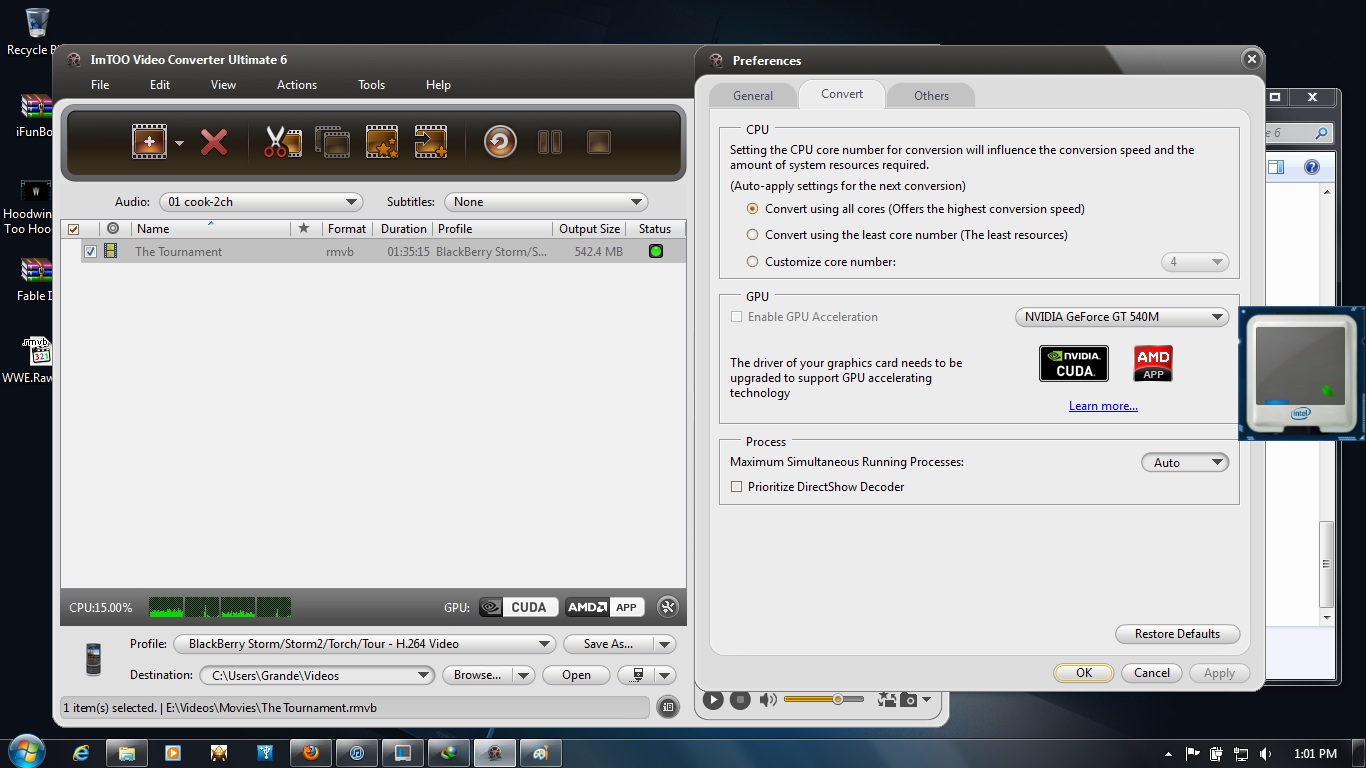
Quick question people, i just installed imToo Ultimate Video converter 6 and i have the 277.5 Drivers from laptop2go, yet i do not have the option to enable GPU acceleration in imToo. The program says i need to update my drivers to enable GPU acceleration. Please is there a work around as i tend to convert a lot of movies for my friends BB Torch. Thank you
-
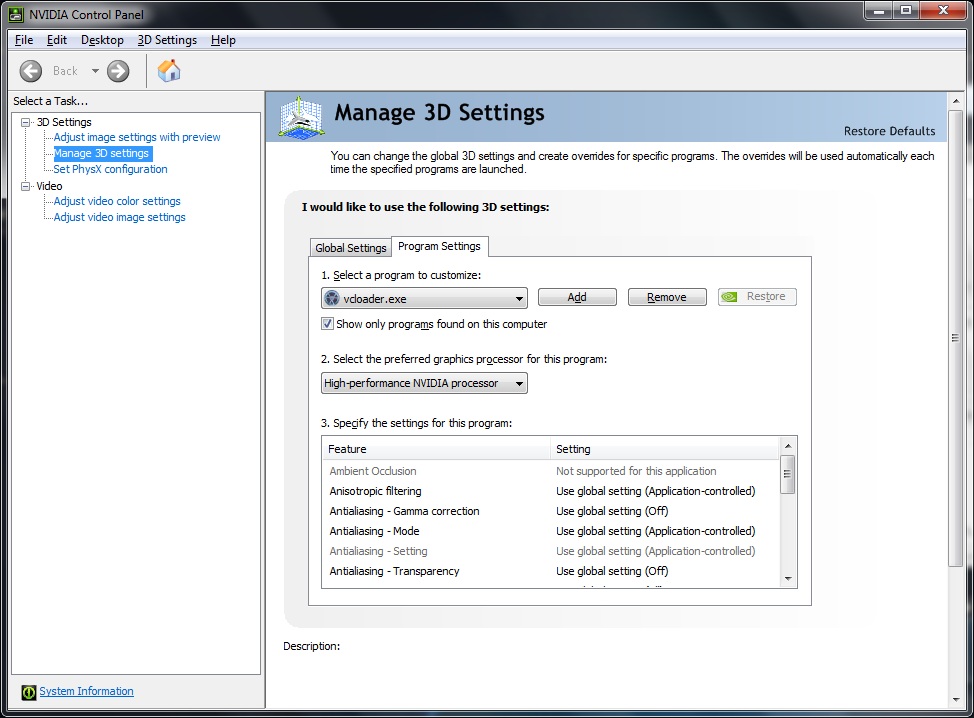
Have you added the program .exe to the 3D Settings in nVidia Control Panel to let it to use nVidia ?
-
Yeah brov, i selected 'vcloader.exe' to use only the Nvidia processor. I attached pictures to show u wat i am experiencing
Attached Files:
-
-
CUDA has always been a buggy technology. I guess your program just doesn't recognize that a newer driver is installed. May be a bug in the program or in the driver. I guess the only way is to use the CPU for that work.
-
I think I'm gonna try the U1 hopefully it can lower temps to around 75c. I think the u2 would be too big for the 3830.
-
The U2 ist just fine for the 3830TG. It has some space left and right, but not too much
-
I'd also say U2 will fit fine on 3830TG. But best to go shop and compare
-
im really thinking about buying this laptop. i have the u30sd but it doesn't fell as great of a deal as this so im returning it. should i wait til september for a better cpu or is this good for my daily routine of low-med starcraft 2 with some music and browsing in the background( sometimes hd videos). yea i cant help running 2-3 apps at a time =) thx
-
Ah I just ordered the U1. I think I will appreciate the smaller size since I will have a small desk when I move back up to school. I can always order that $12 fan on Amazon that can attach to it.
Which size? The 3830tg should be more than enough for your needs. SC2 should run pretty smoothly with throttlestop and music in the bg. Go for it! -
Just got my 3830TG-6431 yesterday, plan on doing a more thorough review of it down the line and try a few tweaks out. Here is quick summary of what I think of it so far.
Use / What I have Done: As of right now I removed the bloatware from the installation (45 minutes or less). Then installed a clean version alongside the original installation to make sure all the drivers were available. Some of the drivers / applications are not listed on the Acer site however the only two notable ones are the webcam and usb charging applications (which can be backed up via the eRecovery program). After getting my new installation setup the way I wanted it I installed batterybar and downloaded cpu-z, hwmonitor, and throttlestop.
Thermal Issues: During one of the windows updates the system powered off, appeared to be a thermal cutout. Upon looking at the cpu clock with the intel utility I noticed that when the processor was running at max turbo the core temperatures would slowly increase. I watched it until it got to around 85 then opened up throttlestop and disabled turbo. After that temps went back down to below 65C eventually. Clearly there is a thermal issue here (it should be noted that I had the laptop on a table with a tablecloth which was probably hindering airflow into the bottom vents).
Battery: According to batterybar I have the Panasonic battery, and as of now it is at 5.7% wear. The wear was holding around 4.7% until I had it overheat (so the heat may be affecting the battery, although it is a bit soon to tell). Batterybar was also giving an estimated run time of 6 hours, however I plan to test run time later.
Build Quality: Personally I felt that the build quality is just as good overall as my older 5810 timeline. I like the blue finish and the new hinge design. To me the laptop feels pretty solid overall. The keyboard area does have some flex to it as well as the palm rest area, however I do not notice it while typing and using the computer. I do find it a bit of an aesthetic annoyance though.
Keyboard: Other than the flex mentioned above the keyboard feels good to type on and I prefer the matte textured finish over my previous timeline's glossy finish which always showed my fingerprints.
Display, Speakers, & Noise: For my uses the display is good, as far as I am concerned it appears as good as the one on my previous timeline if not a bit clearer. The display is still glossy though so using it outside will be a pain as usual... The speakers I found surprisingly loud and of decent quality the Dolby Home theater software seems to help them sound fuller at the expense of some volume, with it disabled the speakers are louder and a bit tinier. The fan noise is fairly quite at most speeds and the only sound that is heard is the air movement.
Closing Remarks: Overall at the moment I am pleased with the laptop and hope that I am able to tweak it into being a bit more thermally stable. If it were not for the thermal issue I would probably give this laptop a 9/10 however it is probably closer to a 7/10 or a 6/10 depending on how bad these thermal issues are (I plan to find this out soon.) I noticed earlier that the fan seems to avoid max speed even when the system is very close to overheating so it would appear the bios should be updated with better fan control (if this is in fact done by the bios). The system only requires one screw to be removed to get at the hard drive, RAM, wireless card(s) which I though was quite convenient.
Future Efforts: I have yet to try out the Nvidia graphics but plan to in the near future. I plan on putting an ssd and 8GB of RAM into this laptop as well as redoing the thermal paste on the heatsink. Plan to see how well the system works when using the Nvidia graphics on TF2 and Crysis 2. The battery life I want to test via local movie playback with wifi on, and casual internet use. Since I plan on replacing the thermal paste I will be disassembling the majority of the laptop and posting a full review in about 1 to 2 weeks. I hope I can figure out how to correct some of the thermal issues with this unit because I feel that it could be a nice well built affordable unit. -
Try the Zalman NC1000. I played Crysis 2 (without 1.9 Patch) on highest settings many hours without throttlestop and the temp stayed below 85°C most of the time. According to the log of throttlestop the cpu throttled only a few times, but I don't notice any lags in gameplay.
-
how much did the temp drop by? and i was jw but would this be better? the Cooler Master SF-19
-
Wouldn't it kinda too big ?
-
the bigger the better =p lol jk, well if its just gonna stand there would it matter? since ill have a external keyboard and mouse plugged in most of the time.
-
Well it seems an extra $50 can virtually eliminate throttling. It seems to be a good investment to preserve the internal components for the future. Playing games 1+ hours a day at 85c will definitely decrease this computers lifespan. Lowering it 10c could help preserve it at least a little.
From what it seems the Zalman+throttlestop can keep temps around or under under 75c even on pretty heavy games. This seems like the easier option than changing the thermal paste... If you can stand the bulk underneath.
Acer TimelineX 3830/4830/5830 T/G
Discussion in 'Acer' started by lee_what2004, Feb 6, 2011.