Problems? See this thread at archive.org.
I keep getting this message at start up...and then I notice on the AlienFX icon in the dock it says (Disabled Mode)...I tried uninstalling and re installing Command Center but that did not work. Anyone know how to fix this issue?
-
Can you right or left click on that icon?
-
does this message by any chance read this :"Alienfx is disabled and has turned off all zones.... " and is your alienfx lights off when this message appears? if yes, then its simply command centre notification about alienfx . it appears every time you restart, resume from sleep/hibernation your laptop.
If its something else, can you please paste a print screen of the error? that might help us to ascertain the problem . -

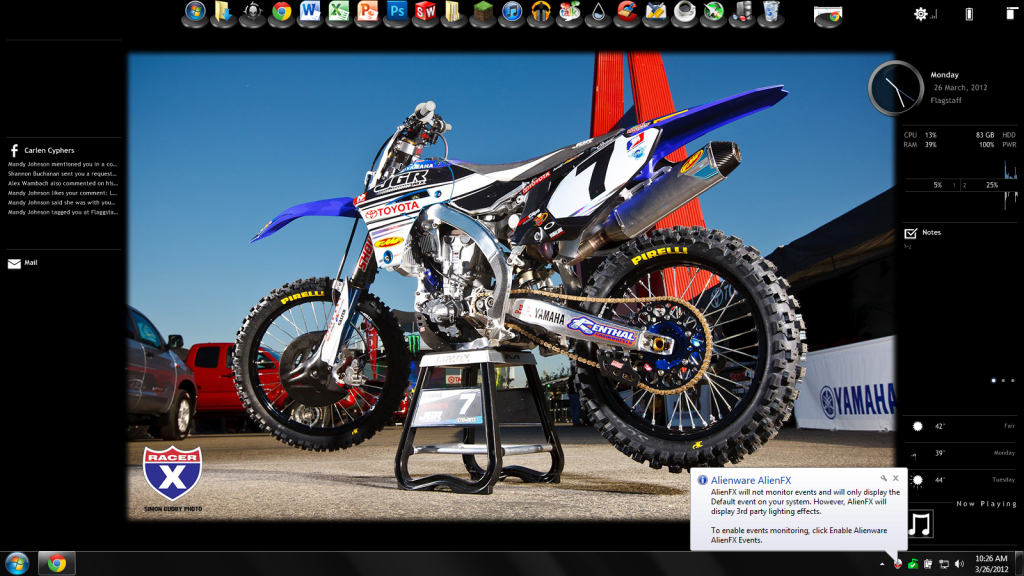
As you can see in the right hand corner there is the message about it...it says to enable events or whatever yet there is no option for that.... -
allright.
do this:
(Do this step only if you have disabled alienfx lights i.e you have turned off alienfx lights. else skip to step 2)
step 1) right click on alien head in the taskbar> click go light
Step 2) right click on alienhead in taskbar > click 'Enable Alienware Alienfx events'
hope this should solve your problem!
-
I don't see that option though...here is the picture of the options in the lower right hand corner:
![[IMG]](images/storyImages/23.png)
-
anyone have any ideas?
-
Is your themes in basic or advanced mode? I think when you have it in advanced mode that's when you can click 'Enable Alienware Alienfx events'
-
So I went in dark mode picked a different theme and went back to light and it fixed everything lol
-
I am having exactly the same problem on my 17. I will going dark tonight.
-
You should also try solution #1 in this article.
-
I can confirm that this method works. Mine showed disabled after letting the game Hotline Miami control my AlienFX, but his fixed it.
-
both these guys are 1000% correct. I have no idea what causes this. I can throw one idea out there though, some games are allowed access to your alien fx lighting. I was playing world in conflict yesterday, and have (3rd party access allowed , on in alienfx control panel) the next time i rebooted i noticed the alienfx icon was red. I got the same message as the original poster that it is in disabled mode.
to fix this, just right click on the alienfx icon in task bar, click on go dark, lights will go off, then just click on the alienfx icon again and then "go light". for me it works every time as long as the reason why your lights are in disabled mode because of a game using your lighting previously. -
Seems like that's what happens precisely.
AlienFX (Disabled Mode)?
Discussion in 'Alienware 14 and M14x' started by CC268, Mar 26, 2012.