Problems? See this thread at archive.org.
Just a heads up... In the past couple of months dell have started shipping the l702x with a newer, less power hungry (and therefor runs slightly cooler) version of the GT 555M based on the gf116 chip rather than the original gf106 chip...
Apart from running cooler and using less power there doesn't seem to be much of a difference between this version and the older one (although unconfirmed results that it can be overclocked a bit more) but official 285xx nvidia drivers do not recognise the card, the newer beta driver is needed
It's possible the m14x may start shipping with the same chip so just letting you guys know... If anyone has bought the m14x recently and has the gf116 chip you'll need the 290.53 (iirc) beta driver from Nvidia's website
Can tell what version you have by running GPU-Z and checking the model number displayed
---
I am here: Google Maps
-
-
Interesting
-
This sure does explain a lot, but then how come when people update to the newest Beta Driver they still get this problem?
not trying to de-prove your theory or anything -
i have 1.5gb card. shipped with a06 bios. how do iknow what version of the gt 555m i have?
-
heh, didn't even know you guys were having trouble :-S so there is an issue then?
all I know is that recent XPS 17 (l702x) models have the new chip and people who decided to clean install windows using the supplied drivers (or website drivers) couldn't get the GT555M drivers working... There were a couple of large threads on the XPS forums
after speaking to a dell rep on these forums (Bill, I believe) the problem was narrowed down to the A14 BIOS supplied with the newer machines and the fact that the drivers supplied had not taken the new revision of the graphics chip into account, basically the revision of the card was so new NVIDIA hadn't included it in any of the drivers yet... Then 290.53 was released and seemed to fix the issue for people
here's a selection of posts:
http://forum.notebookreview.com/dell-xps-studio-xps/636471-l702x-gt555m-gf106-vs-gf116.html
http://forum.notebookreview.com/del...-l1702x-nvidia-driver-issue-cant-install.html
http://forum.notebookreview.com/dell-xps-studio-xps/630224-l702x-nvidia-driver-issue.html
http://forum.notebookreview.com/del...-flash-bios-a14-updated-1-5-see-post-1-a.html
download GPU-Z:
GPU-Z Video card GPU Information Utility
this will tell you the exact specs of your card and model number -
Thanks Jon, will take a look when i get home. Not that i'm having trouble but quite a few people are and they seem to be the 3gb card owners presumably with newer units. I just want to avoid the hassle of it all and just update when everyhting is ok.
-
I would do the same haha if i had my m14x, still being shipped

thats Sinkguy, your doing this forum a great honor! -
![[IMG]](images/storyImages/gpuz.png)
if you have the newer revision of the card that should be what you see ^^
I've had this laptop since march last year so my version's the GF106 chip, seems it's only in the last couple of months Dell started shipping the l702x with the GF116 -
Thanks for bringing this to our attention Jon!
-
i have that card.. im my 14x.
I have noticed low temps in bf3 only i had crases too.. driver related i think.
only i can't load that beta driver 290.53 driver only the dell 263 one? -
Since what month have they've been doing so? I've had my M14x since Late ish november
-
So it says GF116 under GPU on the top left?
-
yes,
![[IMG]](images/storyImages/carddetails.jpg) [/URL]
[/URL]
Uploaded with ImageShack.us[/IMG]
I had the motherboard replaced, and in return got this card.
I just can't load any other driver. -
Damn, I just got my motherboard replaced, received it Friday, and I still have 106! Maybe next time
-
im not seeing the GF116 as a plus, unless the driver situation improves..
-
True I guess, it just makes less heat and uses less power. I wonder if it would help gaming on battery?
-
Dell-Bill_B I believe frequents these forums a fair bit and managed to help the l702x people with their issues regarding the new card revision... Might be worth bringing it to his attention?
You shouldn't have to be stuck using the official dell/Alienware drivers as the nvidia ones are updated frequently to sort issues/increase performance with games and it may be as simple as changing the hardware ID in the bios...
Does sound like you guys are having the same problems that the l702x guys were having though - hope you can sort it. The gf116 is technically a better chip from a power/heat pov but from what I've seen so far there's been no significant performance improvement
Additionally I think nvidia will be rebranding the gf116 chip (in its current gt555m form) as the gt630m in the future
Edit - and it's not gpu-z messing up, both the newer l702x and m14x models do seem to be using the new revision of the card
---
I am here: http://maps.google.com/maps?ll=51.124237,-0.146986 -
If I'm not mistaken you need to have a different VBIOS if you really have a GF116 card... at least in the currently available BIOS there's only a GF106 VBIOS in it. I think that's also how GPU-Z gets this information... so you either a different VBIOS or GPU-Z messes up.
Could you dump your BIOS and upload it? -
mmm can i do this from gpuz?
![[IMG]](images/storyImages/438.png)
![[IMG]](images/storyImages/carddetails2.jpg) [/URL]
[/URL]
Uploaded with ImageShack.us[/IMG]
need another way to do it.. -
You can do it with the InsydeFlash utility that Dell provides for updating the BIOS. I attached a modified setting file which should tell InsydeFlash to dump your BIOS to c:\m14x. Just download a BIOS update from Dell, extract the archive and replace the platform.ini file in the folder there with the one I attached here, then run InsydeFlash.
Attached Files:
-
-
Ok standby
-
done..
I had two output files this is the one marked new.
hosted here: -
Thanks. Hmm, exactly the same VBIOS, it says "GF106"... I don't think there's anything new in there, and if it is something new then only the manufacturing process changed, but the chip must be absolutely identical.
Only way to find out whether it's really a "GF116" would be to look at the chip during a repasting session.
Did you guys use the same GPU-Z version when checking? -
0.5.7 the same as posted by the other.
-
I really have no idea what this means... only way to really confirm whether it's a new kind of chip revision is to take a look at the die...
I don't know what GPU-Z is reading out to get their values... Apparently not the VBIOS, unless the programm randomly messes up for some reasons. -
With a little help Ive updated the driver..
![[IMG]](images/storyImages/4y6.png)
have some rep guys.. -
It reports a different hardware ID for your card than usually for the M14x... that's why you had issues with the drivers. A modded .inf file will do.
Still the question about the card revision remains... -
Well... The issue has occurred with the l702x so it's unlikely both the l702x and the m14x with 2 different BIOS' and motherboards would both start reporting a new version of the chip for new buyers
The gf116 is used in variants of the gt555m (along with the gf108 iirc) in other notebooks so it just seems they've switched manufacture to the new chip, which was originally made to address power and heat consumption issues anyway
Strange that the bios hasn't been updated though
---
I am here: http://maps.google.com/maps?ll=51.124521,-0.147885 -
Have a GF116 card
I can install 285.79 driver fine with INF mod.
However, I can't install the latest ones even with the INF mod. Is there something wrong?
Using 1.5 gb card. -
1.5gig or 3.0gig card?
-
I clean install and beta divers with the modded inf..
BF3 is now fine.. -
the question is why is it saying PCI-E @1.1. Mine reports the same, though it should be 2.0?
Any solution, or does it affect performance anyway? -
I definitely have the GF116 card. BIOS is A07
What I would like to see is a definitive saying on what needs to be done in terms of driver updates.
Should I be switching to A08 BIOS? Is that required to properly run the new drivers?
Should I just update drivers now? (if so, which ones?) Or should I wait for Nvidia to release a new set of drivers that will work with this new card?
I would like to do whatever I can to make this system run at its best, but I am not entirely sure what gains I would be getting from it by doing it now while things seem to be so unstable. -
My system is exactly like yours, delivered on Jan. 3rd. I thought about returning it but following others advice all is well now. I upgraded the bios to A08, mine was delivered with A07. Updated the driver from Dells site to 269.37 listed as urgent. Went to laptopstogo and downloaded the 295.18 driver with the mod .inf file. I installed it yesterday and it installed fine. You can find instructions on this in the other thread about recognizing the card, I believe 15 pages, all the info is there. -
I did exactly that and had no issues at all. It's worth mentioning that I didn't even need to clean install the graphics drivers for it to work.
Props to all who worked long and hard to get this solution. Lets all hope future driver updates will go smoother. -
Glad it worked for you and I didn't do a clean install either. Yes, and thanks to all who worked on this for a solution.
-
I'm running 290.36 with modded inf file.
Pm me if you want a copy of my inf file
---
I am here: http://maps.google.com/maps?ll=50.861027,-0.992812 -
am having an issue. . . currently on 269.37 and trying to update to 290.53 BUT am unable to. do i have to get the one with a modded .inf?
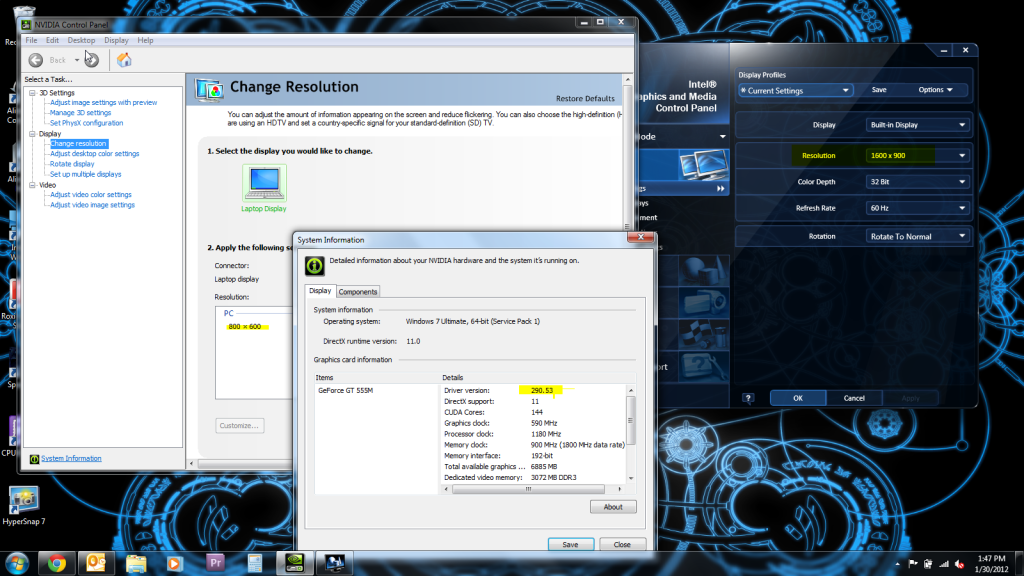
was able to install modded 295.18 but after install the screen resolution it only sees is 900x800 or something.. definitely not 1600x900!
thanks for the help. -
Me too. I used modded inf but just after it started to install everything failed. I lost my video driver. Had to reinstall the older ones again.
-
finally was able to install modded 290.53 but same issues ive had with 295.18!
on nvidia control panel the only screen resolution i see is 800x600 BUT on the INTEL CONTROL PANEL i see 1600x900 what gives?

-
I'm am running .36 with good results.
It's worth changing if you having problems, my resolution is fine.
Although I modded the inf myself as the laptoptogo one didn't work.
Pete.
---
I am here: http://maps.google.com/maps?ll=50.861487,-0.993774 -
how did you mod it?
-
I opend the device properties and copied the hardware device details,
then i added the hardware id string into the nvam.inf
This one:
%NVIDIA_DEV_124D.01% = Section106, PCI\VEN_10DE&DEV_124D&SUBSYS_04911028
Then further down the file added the link:
NVIDIA_DEV_124D.01 = "NVIDIA GeForce GT 555M "
Hope this is helpful to you, I did take me some time to work it out.
Pete.
GT 555M new version?
Discussion in 'Alienware 14 and M14x' started by Jon vMagic, Jan 13, 2012.