Problems? See this thread at archive.org.
I'm using SkyUI and sorted favoutites that use SKSE, but SKSE is incompatible with the latest patch on my steam version, still the mods do what i want from them without running the script extender. will see how it goes when SKSE gets updated
So far i get a solid 60 fps indoors and outdoors on 1920, high settings no AA
-
Download the lastest SKSE here. It says it is beta, but has been super stable for me.

-
I did that, but the game does not start, it starts, screen goes black, then i get a CTD with no error. I read somwhere that it might be the sorted favourites menu that needs an update... i dunno... i dont mind that SKSE isn't running actually as long as the mods work
but thanks
-
Do you use the nexus mod manager? That program keeps good tabs on what mods have been updated and need to be redownloaded.
What you are describing is what happens to me if I mess arround with the Xfire profiles too much, hence my warning before. I know you are happy, but i just wanted to lay out all the options for you
plus, checking your sig, you might want to upgrade up to 8GB if you are doing mods like the hi res pack. Skyrim does hit the memory limit from time to time, even with the 4GB patch.
PS - Sorry to the mods for getting so far off topic. I'll pull it back or use private messaging from now on with this subject. -
I deleted the old driver completely (Catalyst 12.1 preview driver). I have deleted the driver using the express uninstaller from ATI. Then I used the Driver Sweeper. After all, I tried to install the new driver. But every time I get a blue screen or I get the message that the driver was not installed properly. I still use the old CCC (from the Alienware driver), because the new ones do not start
-
It worked 100% fine with my R2. I felt like the game BF3 ran A LITTLE better, but that could be due to placebo effect... It seemed noticeable enough though somehow.
-
Would anyone care to post the latest stable release for Radeon HD 6870M?
Thanks. -
Finally got round to installing this, my 12.1 CCC wouldn't do anything when I tried to change from iGPU to dGPU, gave me reason to format and install this 12.2 driver
Installed over Dell 11.8 drivers, got a BSOD, then restarted and installed again successfully (just like the other driver versions)
-
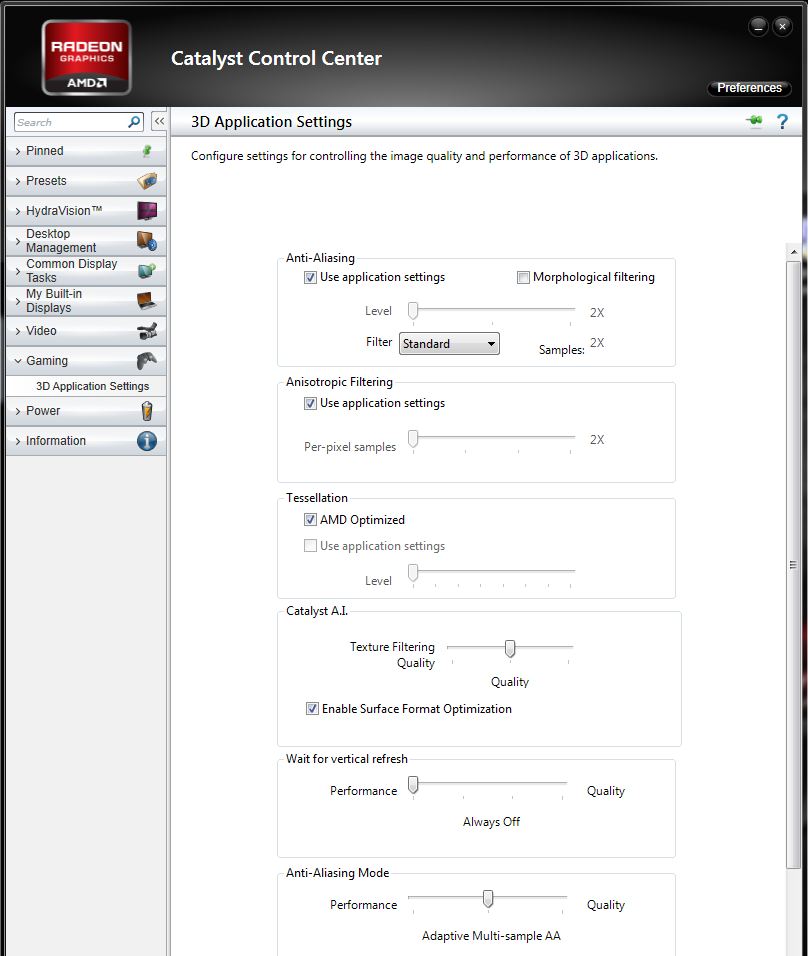
I'm currently running crossfirex 6990m. Do I want to have texture filtering under Catalyst A.I. set to Performance, Quality, or High Quality. Also, do I want to check Enable Surface Format Optimization?
-
Bump!!!!!!!!!
-
I think the best you can do is to experiement to see what suits you...
that said, i can show you my settings:Attached Files:
-
-
Maybe, try the 12.3 Preview drivers
-
Anyone test this driver with SWTOR/BF3 using the 6970m ?
-
I already posted this in the benchmark threads but why not here so more people could see
I spent this whole evening trying to update my card to the 12.3 RC driver and failed. Now for reason I could not find, I can only install the Dell stock driver, anything else would BSOD or white screen and the driver will not load. It said "no amd graphics driver is installed or the amd driver is not functioning..." I tried in order: dell driver -> 12.1 WHQL ->12.2 beta -> 12.3 RC. Clean install, driver sweeper did not help . -
You have to use this version: AMD Catalyst 12.3 RC 8.95 31 January – BenchmarK3D
Stock Dell to 12.3 RC 8.95 31st Jan is working fine for me; only got a BSOD when trying to update to 12.3, restarted and then installed just fine.
![[IMG]](images/storyImages/5ws.png)
-
I see absolutely no difference in performance with these drivers on BF3 and Crysis 2.
-
thanks mate! As helpful as ever. Though i suspect it is the same as the mediafire one i downloaded last night. Will check when im back from school.
-
Tried these last night, got the BSOD, and then rebooted, and poof said i had no drivers installed, re-installed Dell's wish having up to date drivers was fool proof.
-
I did a fresh windows install and everything is in place now.
@bigblondviking: try clear everything out. Then dell stock to 12.3, bsod restart 12.3 one more time. It should work. -
I basically have a "fresh install" i just got my Samsung 830
I did have Steam, Skyrim, DeusEx installed.. before i tried this...
I try driver sweeper, then stock to again 12.3, after the 9-5 is done... (or i could attempt over RDC... ) -
yup, i Use this method and worked.... but i can open my CCC afterward.....
do you have CCC issues after install it ? -
Nope everything is working as it should be. I did have ccc issue before the fresh install though. at that time the driver is not functioning properly either.
-
just installed 12.3 (12.2 early release driver) without any BSOD. Overwrite method works well.
-
when i try to install 12.2 i either get a blue screen,
or is succesfully installs.
if it does install catalyst manager either will not load or when it does it is stuck on somehting called AMD XGP which seems to be the driver for and external graphics setup.
tried clean install as well and had no luck.
any ideas? -
Re downloaded and installed over the weekend... bingo! up and running on 12.3 now
AMD Catalyst 12.2 Preview Driver Released
Discussion in 'Alienware 17 and M17x' started by bigspin, Jan 25, 2012.