 Problems? See this thread at archive.org.
Can you let me know where to look for those discounts or link me to the right thread?
-
-
Err depends on where you are, typically for Dell UK its 10% off at least. Try a rep somewhere, should be in the alienware forum.
Here
http://forum.notebookreview.com/alienware/669327-alienware-sales-assistance-thread-redux-69.html
I assume your in the US, so codes could be found...
Dell Coupons - Official Dell Coupon Codes & Free Shipping Promos | Dell
Good luck with your buy , hopefully you can get a good deal, voucher codes change daily/ weekly so if there is nonoe just wait a bit, and there might be some, but I bought mine in the UK, but I can't see the US not having similar codes.
-
Any decent uk codes around now? Can't find any valid ones
-
You gotta be quick for them, they only last short periods, but they will probably issue another one again. Depends, there havebeen a week or so without codes then one will be out afterwards.
Currently saw one for 9% off.
Valid Dell Coupon Codes & Vouchers for 2013 - Hot UK Deals
2nd post on that website shows 10% off a M17x and free delivery. -
Hey guys,
I need your opinion. I am about to purchase an m17x R4 at 1800 Euro...second hand. Is it worth it???
-Intel Core i7-3610QM
-2GB GDDR5 NVIDIA GeForce GTX 680M
-8GB CORSAIR DDR1600 RAM [upgraded by the first owner...I have to trust him that he was gentle on the screws...]
-17.3" 120Hz w/ 3D Bundle WideFHD (1920 x 1080) WLED LCD
-DVD+/- RW
-500GB 7,200rpm SATA 6GB/s HDD
-Creative Sound Blaster Recon3Di with THX TruStudio Pro Software
-Killer Wireless-N 1103 WLAN
-Windows 7 SP1 Home Premium 64 BIT [For that one I care not...I have an Ultimate copy at hand]
+ Nvidia 3D glasses and mousepad
Bought in July and Next Business Day Support until 07.2015.
Should I go ahead or should I wait?
10x -
As long as it is in pretty good condition, I would personally go for it.
-
veselatakurabiika,
In my honest opinion, that is a horrible price, especially for a second hand computer. I went on the Alienware site and another reseller's site, and built the same computer for 1800 euros.... and that's brand new (not including shipping)
I'd say buy a brand new one with the 680M and 120Hz screen, and get everything else as the lowest possible... considering the CPU is already the lowest, and then buy the RAM and a hard drive separately... You'd get a brand new, and better system, for an even lower price (not including shipping). That guy is basically selling a low spec second hand laptop for the retail price of a better brand new one......
-
LeoVainio, I've been working on it as well and I got to the same conclusion as you...It is really not worth it.
Would you recommend going over to the 120Hz 3D screen or staying with 60Hz 2D? I cannot figure out whether in the R4 you can disable 3D and enable Optimus.[pretty sure R3 with 3D meant disabled Intel GPU = no Optimus] I don't plan on watching or playing 3D, but the 120Hz screen is very tempting...
Is there a difference in the panel itself? I remember that in the XPS line[l702x] the difference between 3D and 2D was in the grey wifi antena missing in the 2D version.
Many thanks, you helped a lot
-
120hz screen = no integrated GPU, its a limitation of the iGPU, it will be disabled and cannot be enabled on the R4, so you lose battery life. It's really up to you, if you think you will use 120hz or be happy with 60hz. On iGPU I get around 5 hours battery life running basically chrome and thats it really. Don't know if it drops much or not for the 3D screen.
-
People are reporting that battery life is half of what you are getting [ http://forum.notebookreview.com/ali...-optimus-3d-vision-bundle-120hz-version.html]
I am deep into research now on 120Hz vs 60Hz. Battery life is a nice thing, but screen quality is a priority I really have to apologize for asking stupid questions before reading - I am under time constraint... 10x
-
The 120Hz was it for me, I haven't used 3D that much... but I must say it is BY FAR the BEST 3D technology I have ever seen in my entire life, so when you use it... you'll be amazed.
The 120Hz screen is also beautiful, yes you can tell a difference, and I love never having to worry about vsync. Knowing your games are running at 120fps at 120hz is just incredible. The 120Hz was the deal breaker for me vs. M18x SLI.
Personally I don't mind not having Optimus, I would hate the hassle, and from what I've read it can be a problem. At full charge when I pulled charger and set power options to power saving (nothing else) it said 3 and a half hours remaining. Which is far more than I was expecting, and what can you expect from a beast like this. I can not imagine a single instance in which I would require more than 4 hours of battery life, this is a desktop replacement... if I bring it somewhere for an extended period of time, I'll pack my charger with me.. you wouldn't carry this around without a backpack anyways..
If you play a lot of games that run over 60fps, I highly recommend the 120Hz screen. I play a lot of fast paced games and shooters so it's very worth it for me (not to mention older games and some indie games etc that easily run at high fps). The screen is SUPERB, very bright and BEAUTIFUL colors.
It is quite an expensive upgrade, but you will definitely not regret it after.
-
2 to 2.5 hours for me. Way more that I ever want or need. No optimus means no optimus issues since it offers me nothing .
-
I'm on board guys
Many thanks!
-
Is that on Power Saver?
I have never even had my laptop unplugged for that long so I've never had to test the limits of the battery xD but when I pulled out the charger, and let it wait for a few minutes, it estimated 3 and a half hours for me wonder why yours would be over an hour less :S
It's always a good feeling convincing someone to get something amazing, knowing they won't regret it. Especially when I was SO amazed by the display and the 680M.
You gotta let us know what you think when you receive it
-
Yeah, nax power saving but I can't remember if I had the card set to high-power in the driver? I did ask around and got similar numbers.
Give it a try if you have time, I've seen windows estimate plummet in use before... -
Sure thing!
-
As have I but on brand new computers it tends to be far more accurate than after a while
Might actually be bringing it over to a friends place today so I guess I could probably check it out... Note, my estimate was with the computer practically idle
-
You guys are making me wish I pulled the trigger on the 120hz screen, even though I never game above 60fps lol. I'm thinking about changing my order, but I really don't want a delay.
-
I did a test this morning. My GF has an XPS l702x with the 3D screen and it turns out it was always running at 60Hz. I installed Mafia 2 and changed the settings back and forth from 60-120 - well there IS a difference And I noticed it immediately...much much better with 120Hz - the game looks to me even unreal. Micky D, LeVainio, best advice ever
Now just patience... -
I'm going to call my representative tomorrow to see what kind of deal she can give and how long it will add to the build time. If I can get a decent price on it and it doesn't add too much of a wait I'll go ahead and order it
-
That's great info, I've never tried that! - +rep
-
Glad to hear that Personally the 120Hz is one of my favorite features of my M17x
You will love it!
-
I'm looking to get an M17x R4, but the package I'm looking at won't let upgrade the wireless card. Anyone else having a similar problem?
-
Will I be able to upgrade my NIC adter buying my Alienware m17x?
I am planning on upgrading it to Killer 1103 later on, is that possible? -
If it is still not working just give them a call to create a build. The web site has these anomalies sometimes. It's also the chance to hit them up for some discount
Yes you can but there is some confusion as to whether you still will have bluetooth. Depends on what dell use in the build since the killer card does not have bluetooth. -
Hello I always follow this forum for all news related to alienware, now it's my turn for advice before purchasing.
First tip, I state that I use the laptop only for video games, so the first question is about the processor :
Third Generation Intel ® Core ™ i7-3630QM (6MB Cache, up to 3.4GHz w / Turbo Boost 2.0) [Included in Price]
Third Generation Intel ® Core ™ i7-3740QM (6MB Cache, up to 3.7GHz w / Turbo Boost 2.0) [add € 190.10]
Third Generation Intel ® Core ™ i7-3840QM (8MB Cache, up to 3.8GHz w / Turbo Boost 2.0) [add € 460.05]
worth spending € 460 for the 3rd processor?
Second suggestion:
2GB GDDR5 NVIDIA ® GeForce ® GTX 680M [add € 330.00]
2GB GDDR5 AMD ® Radeon ™ HD 7970M [Included in Price]
worth spending € 330 for geforce 680m if I do not use 3D?
third suggestion:
44 cm (17.3 ") WideFHD (1920 x 1080) WLED LCD [Included in Price]
17.3 "120Hz w / 3D Bundle WideFHD (1920 x 1080) WLED LCD [add € 240.01]
worth spending € 240 + € 330 for 680m for the 3D? I always thought that playing in 3D require a lot of effort in terms of performance and do not want to play in 3d at 20-30 fps.
thanks to all for your attention I hope that everything is understandable. -
Hi, welcome!
For gaming most people agree that even the lowest CPU is more than adequate. I tend to go for the middle option since the top of the range carries a cash premium way above it's worth.
I've been an nvidia fan for a few years now so you know which I am going to say
As for the 3D 120hz display, if you have the money go for it. Even people that do not use the 3d say it is visibly nicer. And I was very surprised at the quality and performance on my 675 for 3D. In the right games it is truly awesome. Every one I have shown it says pretty much the same - 'how can you go back to 'normal' gaming after that!' The frame rate drops are quite large but with that frame rate alternating to each eye it looks very smooth, at 25 - 35 FPS in Batman Arkham City for example. Similar numbers for Max Payne 3. I spent many hours just wondering around in Assasins Creed revelations (3D) when I first got my R3.
Processor in my sig was a freebie upgrade from Dell
HTH and good luck with your decision.
Edit: If battery life (but not in gaming) is important then note the 120hz display does not allow the use of the intel iGPU. An advantage in my eyes, I never have optimus issues
-
Thx for answer ^^,in your opinion,Third Generation Intel ® Core ™ i7-3630QM (6MB Cache, up to 3.4GHz w / Turbo Boost 2.0) [Included in Price] is fine or Third Generation Intel ® Core ™ i7-3840QM (8MB Cache, up to 3.8GHz w / Turbo Boost 2.0) [add € 460.05] is a lot more better for video games consdering the price to add ?
and another question if i call dell is possible to have some discount in price?
-
You would not see any difference in gaming between a 3.7Ghz and a 3.8, although I believe the 38xx have better overclocking capabilities. Only really useful if you're into benchmarking. I'd go for the 37xx as the best bang-for-buck, but the difference between that and the 36xx (base) is negligible unless you are doing some hard-core applications. The 3840 is more a bragging rights thing IMO
The sales reps do have some leeway for discounts, depends on a lot of things but always worth a call; 'I really want xxx config but the price is a bit out of my range, any discounts available?'
Another edit!: If you decide on an AMD GPU then the processor is a little more utilised as they off-load physics to the CPU. NV does it on-board. -
ok thx u i really appeciated it
-
You're welcome. Let us know what you go for and if you manage any discount. I wrangled 10% off 2 AW laptops (purchased singly) last year!
-
Hey there Guerriero
I'll try make it short and sweet, CPU doesn't matter at all. If I were you, I would at least not pick the lowest option. After all you are buying an Alienware so shouldn't really skimp on something, and there are some CPU intensive games that might get 2 fps higher with a better CPU xD I pretty much just got the 3820qm because I had the budget and wanted bragging rights...
The 680M is absolutely beautiful. Nvidia has always been on top with reliability, drivers, stability, extra features. And the Nvidia control panel is awesome. Been playing some Assassin's Creed 3, Far Cry 3, etc... completely maxed out and running super smooth. I'm one of those guys who cannot stand low fps... I'll turn a game down all the way to low settings if I have to, I need 60+fps ... and minimum like 50 on single player games to be comfortable with it. The 680M does not disappoint, everything maxed out. I think the 120Hz screen even adds to the smoothness.
About the 3D... It is by FAR! the best 3D technology I have ever seen in my life. It is incredible. If you've got the money for it you should definitely go with 680M + 120Hz 3D.... For me it was the 120Hz screen that I wanted, but the 3D is insane as well. But if you are gonna get the 60Hz screen, you might as well go with the 7970M... it has equal performance for much cheaper. So if you don't want 3D, you could save like $600... But I strongly recommend Nvidia over AMD so if you want a beautiful 120Hz 3D screen and the 680M with great drivers etc, I think it's worth the cash since you are buying an Alienware. And the games don't play at 20fps btw so many games run at like 100fps anyways so you might not have to even turn any settings lower... But like Battlefield 3 -.- obviously you'll have to put it a little bit lower, but I don't even notice the difference between Ultra and High, or Medium... ESPECIALLY in 3D xD so don't worry about it.
Well looks like short and sweet didn't work out but hope I help you a bit
-
ok this is my final spec :
Alienware M17x Base
Windows 8 64bit , Italiano
Memoria DDR3 a doppio canale da 6144 MB (1 x 2 048 + 1 x 4 096) e 1600 MHz
Internal Italian Qwerty Keyboard
2GB GDDR5 NVIDIA® GeForce® GTX 680M
Disco rigido Serial ATA da 500 GB (7.200 rpm)
DVD+/-RW (Read/Write)
Creative Sound Blaster Recon3Di with THX TruStudio Pro Software
Killer Wireless-N 1103 a/g/n 3x3 MIMO with Bluetooth 4.0
Italian Additional 220V AC Adapter Power Cord
Primary 9 cell Li-Ion Default Base Battery
Di terza générazione Processore Intel® Core i7-3630QM (6MB Cache, up to 3.4GHz w/ Turbo Boost 2.0)
Integrated FullHD Camera with dual digital microphones (Win 8)
Alienware M17x Nebula Red 3D Compatible
Avatar not included
TimeZone (GMT + 01.00) Brussels, Copenhagen, Madrid, Paris
AlienFx Colour Rosso Marte
LCD 17.3" 120Hz w/ 3D Bundle WideFHD (1920 x 1080) WLED LCD
Additional Software Alienwere M17x Resource DVD
Power Supply 240W AC Adaptor
around 2.300 on the site, i asked for a quote to a dell employer, i hope the price will drop significantly. Is ok like this?
-
Config looks good to me Spend the money on the display and video card. Anything else can come later. Are you planning to put in an SSD yourself? Huge drop in loading times and well worth the cost (IMO)
-
Should be able to get that a LOT cheaper than the price quoted. I was able to get the same config without 3d screen for £1300 ~€1600. I think I have my quote saved somewhere. Make sure when you get a good price to get a quote from the person your talking to. Internet prices change regularilly e.g. discount codes etc. which could expire. The quote should be set in stone for a few months, even if the discount code expires in the meantime too.
-
Yep i have a OCZ VERTEX 4 128g in my hand right now, i just waiting the new laptop
yeah that sound very good
-
ok this is my quote :
1 Alienware M17x : Standard Base
1 Processor : 3rd Generation Intel Core i7-3630QM (6MB Cache, up to 3.4GHz w/ Turbo Boost
2.0)
1 Display : 17.3" 120Hz w/ 3D Bundle WideFHD (1920 x 1080) WLED LCD
1 LCD Back Cover : Soft Touch 3D - Nebula Red
1 Memory : 6144MB (1x2048 + 1x4096) 1600MHz DDR3 Dual Channel
1 Hard Drive : 500GB 7,200rpm SATA 3Gb/s HDD
1 Optical Drive : DVD+/-RW (Read/Write)
1 Italian 220V AC Adapter Power Cord
1 Power Supply : Alienware 240W AC Adapter
1 Battery : Primary 9-cell 93W/HR LI-ION
1 Graphics : 2GB GDDR5 NVIDIA GeForce GTX 680M
1 Sound Card : Creative Sound Blaster Recon3Di with THX TruStudio Pro Software
1 Wireless : Killer Wireless-N 1103
1 Keyboard : Internal Italian Qwerty Keyboard
1 Fuso orario : (GMT + 00.00) Dublino, Edimburgo, Lisbona, Londra
1 AlienFX Colour : Mars Red
Software
1 Operating System : Windows 8 64bit, Italian
1 Os Media : Windows 8 64bit, MUI Resource DVD
Servizi
1 Standard Service - 1 year of Next Business Day coverage included with your PC
1 No Warranty Upgrade
1 No Accidental Damage Protection
Alienware Orion Messenger Bag -
€ 2.000 (before around € 2450) not bad tomorrow i buy it ^^
-
Two quick questions:
How hard is it to get to the internal fans to pull them out and clean them? On my XPS M-1710 I literally have to removed the LED panel, and take the computer apart to clean them? Also - how effective is the cooling? With the M-1710, I have to have a good cooling pad under it to sit on my lap and to keep it from shutting down from heat.
Lastly - 7970M (ATI) vs. 680M? I will be doing some gaming but a lot of video editing. Comments on whether the 680M is worth the extra money (no 3D or 120 Hz for me) and why or why not?
Thanks very much! -
Hi, the fans are as easy as it gets. Two screws to remove the lower panel and your accessing them. Three screws each to remove.
For the video see my earlier comment (previous page) and leoVainio's. Basically I say yes it is worth the extra!
-
Fans are super easy to get to, you only need to remove the bottom cover to get to those.
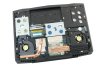
-
The 680M is no doubt the better card. Better drivers, more stable and reliable, cool Nvidia features, control panel etc... But I did hear a while ago that the 7970M was much better at I think 3D applications such as CAD or other 3D design things... don't know if any of this applies to video editing. Most likely everything is unnoticeable.
But since you're not getting the 120Hz screen, the 7970M has a much much better performance for price value. The cards are equal in performance, but 7970M is a couple hundred bucks cheaper. So if that's all that matters for you, you could save good cash. But I still strongly recommend the 680M, heard people have trouble with the 7970M especially with AMD's bad driver support.. however they did release some pretty good drivers recently.
Oh yeah and about the fans, getting to the inside is super easy... I was worried because I had never done that with computers before but it was a piece of cake the first time I opened it up to check my RAM. And the cooling... is amazing don't worry about that at all. I wouldn't max out Far Cry 3 on my lap for a few hours, but was playing Hitman: Absolution for a bit on my lap yesterday and it was just fine
These laptops are beautiful
Great welcome aboard !
-
First time poster here. I'm about to putt the trigger on a new M17x R4, and I'm really excited to see it up close. I'm pretty set on the options, except for choosing a wireless card. Are the killer 1103's worth the upgrade cost? I'm going to be spending a lot of time working on Hotel internet and I'm hoping for something that won't drop me every 5 minutes while I'm gaming.
-
If you're gonna be spending the majority of your time on WiFi, then yes I see no reason to skimp a few bucks on the wireless card... It's been working great for me, although 95% of the time I'm using an ethernet cable.
But yeah why wouldn't you get it if you're gonna be in a hotel where wireless can be far or a few walls away, definitely worth it IMO it's not very expensive.
-
Agree with leo here. I never travel so I can't say how good it is on varying distances from the WAP but I did a bit of research when I first got this model.
The killer allows you to prioritise traffic based on the application so if you have a lot going on you can decide which app gets the most bandwidth - works for background torrents. I also read that the card/software can reduce ping times in on-line games if you are in contention on your lan (such as in a dorm or a hotel). Never tried it so YMMV.
-
Point is, if you're gonna be on wireless the whole time... get the best wifi card.
If you're gonna be gaming all the time, get the best GPU... if you're gonna be multitasking all the time, get the most RAM
No reason to skimp on a part very important for you
-
But does the Killer have any advantage in simply picking up and using weaker signals? If the main advantage is prioritizing tasks, that's not an issue for some of us.
-
OK, trying to figure out the HDD option to pick:
I'd prefer SSD, of course. But I need at least 500 gig of HD space. And the 512 SSD from Alienware adds $360 to the price, argh! I'll be doing a lot of video editing of large files, so speed AND size is important to me. If I got the 750 Gig 7200 and 64 Gig mSata SSD Boot drive (I assume they'd install Windows to the boot drive, not sure what you do with the space left past the Windows install) is it possible to easily add another SSD later? Without removing the 750 Gig and the 64 Gig mSata SSD Boot drive? -
For the HDD option: Yes, you can add in another SSD after your 750gb HDD and 64gb mSATA drive. Look at my signature for an example configuration.
-
Thanks - is it as simple as sliding it in an empty slot and formatting it? Also, is the 64 GB mSata SSD for Windows/bootup only?
Thanks! -
I can't say for sure because I almost never use it... But since you will rely on WiFi almost all the time, I'd suggest even if the Killer is only 1% faster with only 1% more range or whatever, it would still be worth the 20 or something dollars it costs over Intel I mean, you're gonna have this laptop for years. Yes it's got some neat features like prioritizing bandwidth, but either way it is the best wireless adapter.. Don't know the exact specs but I believe it is the fastest (lowest ping), and has the most range... So spend the extra something dollars on it, you won't regret it at least
Same as vsg28 said, look at my signature... I've got an SSD + a Hybrid drive (750GB HDD with mSATA) Go for it
Alienware M17x R4 Pre-Order Configuration Questions... Ask HERE
Discussion in 'Alienware 17 and M17x' started by katalin_2003, May 1, 2012.


