Problems? See this thread at archive.org.
This is one of the more important questions I have as well.
@Joker: I have read that you somehow made or have instructions for a modded 10.9a driver that makes it work on the m17x-r2. Is that accurate or does it install and we get some more strange bugs? Also, I read in a much older thread that you had said that AW/Dell know about the problems with ATI reference drivers and ATI was working on a fix...is this still true or will we always have to wait for dell to make their own special drivers?
Is Brian quitting AW or something? My internet is slow here and i really dont feel like going back over 10-20 pages I missed of the past week or so to find the post...
-
-
Oles chiefs
http://forum.notebookreview.com/ali...d-speed-issue-investigation-discussion-5.html
check out Brian's 3rd last bottom post. Sad news I know hey.
Cheers.
-
Yeah that sucks...particularly the part about "I am doubtful my replacement will have any presence on here..." That doesnt sound encouraging.
Any news, Reborn, on the future of our driver updates? Will ATI get us able to use reference card drivers? Or will we be at the mercy of Dell/AW until the m17x-r3 comes out and we are...dare I say it...tossed aside for the younger, sexier model?
On a completely off topic side note...am I the only person who feels I got NO improvement with my touchpad from A09? -
No news yet about the drivers chiefs. However hopefully we are able to use the AMD reference drivers in the future without too much hassle. So far it seems we were able to use the 10.8 AMD drivers fine from AMD/ATi so I don't see why we shouldn't be able to use 10.10 next time. Cmon where are out new drivers AMD.
I tell you one thing though. If Dell releases a nice Nvidia 400m GPU anytime soon I would seriously consider changing to it. oles
470m SLi hint hint Dell/Alienware; wink wink nudge nudge LOL.
I got a pretty substantial improvement with the A09 bios for my touchpad. Its working great now. Perhaps try installing synaptics driver or uninstalling it if you already have it installed. I uninstalled mine because I wanted to get the scroll working. + it works pretty well with standard Windows drivers.
Cheers.
-
Hey guys,
for some reason, after uninstalling latest Dell driver (Grim's edition) i can't reinstall it.
Ive uninstalled CCC and then booted into safe mode, ran driver sweeper to clean ATI, reboot into safe mode, run CC Cleaner, boot back into windows to reinstall Dell ATI driver but it fails with ATI driver part of the installation. So now i'm stuck with the standard VGA drivers. Not sure how to get the ATI drivers installed again. Attached image of error log.
Any idea how i can get around this issue so i get the drivers back up?
ThanksAttached Files:
-
-
You can try force installing them through device manager. Use the have disk method and then pick the location of where the driver files are and install them. Once it is done then you should be able to reinstall everything else.
Cheers.
-
I had this problem once with a different laptop. I found (trial & error) that I had to stop any and all ATI background services (ex. atiedxx.exe, atiesrxx.ese, MOM.exe & CCC.exe using Task Manager) in order to fully uninstall and/or install any new ATI drivers. It's been a while and I don't quite remember the sequence I used for that notebook, but I do remember that I couldn't get anything going with them working in the background. Hope this helps a bit.
Mmcxii -
I'm still trying to learn as much as I can about updating drivers (as well as computer stuff in general). I have a question that I am hoping someone can help...
So I have verified that I updated to the 8.763 Driver and the new VBIOS. I went to look catalyst control center and I did not find the Catalyst Version 10.8 in the information center. Did I miss something? And if so, is there any way to get Catalyst Version 10.8 installed? I don't want to brick my computer so I figured I would ask before I proceed.
Any information would be greatly appreciated.
Also just wanted to say awesome forum. I've learned a bunch already. -
Cheers, will give that a try, although i noticed there are 2 info .inf files within the same folder. Not sure if it makes a difference which i choose. can try one or the other..
Thanks, i have tried that though im not sure if there are processes i am unaware of still in services as i couldnt clearly spot anything ATI related. yet still failing for me. Might still be missing some. -
Hi all,
I have just formated my m17x r2 and have updated to the new A09 BIOS, VBIOS and Drivers for the 5870's everything is fine except for two things.
1. my video playback is of a lesser quallity (looks more saturated and pixelated)
2. can't use the eSATA port unless I have a device pluged in and turned on before I start the Computer. (will stop working if I unplug and then plug it back in.)
Thanks for any help. -
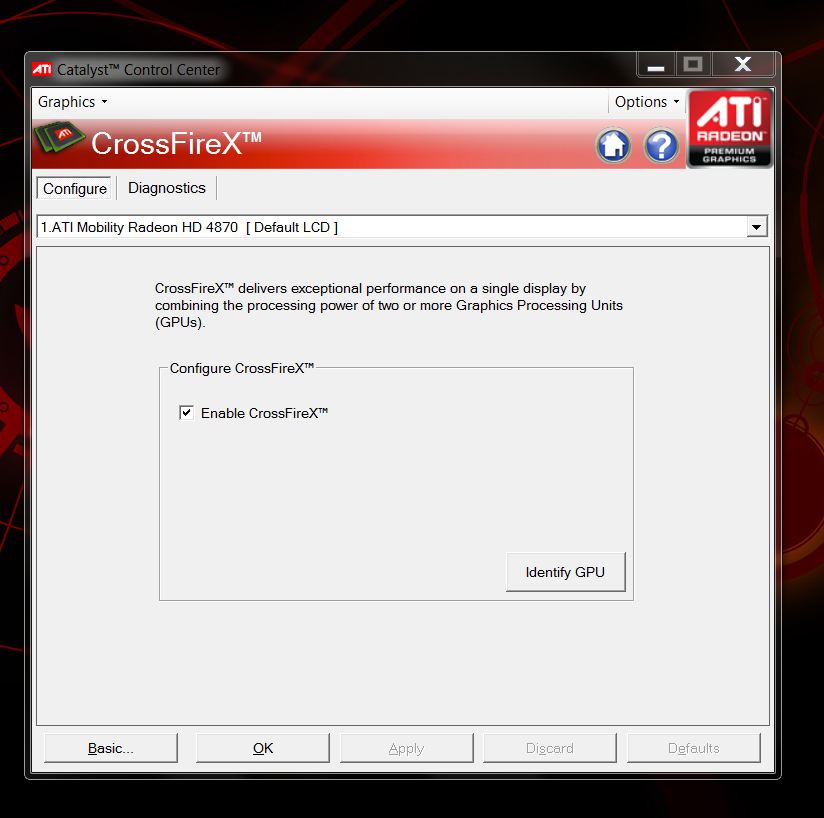
Bat Boi, i have just installed the drivers for the 4870 you have on your first post...Seems my macine came with mx15 drivers, now it states cirrectly mx17 and my systems seems alot more responsive...I am now however unable to locate the enable/disable crossfire option....Any ideas
-
CCC Control Panel (Advanced)? Upper left corner pulldown (Graphics), select CrossFire. Attached screenshot from search.
-----------------------------------------------------
Folks, please only post regarding the Dell 8.763 Driver or the 5870 VBIOS. For any driver mods, VBIOS mods, SSD or BIOS related posts, please post in the appropriate thread.
Thanks everyone!
Attached Files:
-
-
So it seems it only worked if i forced installed it to Vista version of ATI driver, normal wouldnt work..
This isnt quite what im after is it? since im on win7
Attached screenshotAttached Files:
-
-
Ah i see. Its a start chiefs. See if you can install any other driver now over the top.
Cheers.
-
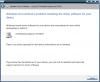
Have tried that already through normal installer and through forced (Device manager), still no go.
Attached image of failure message when trying to force.
Any other ideas?Attached Files:
-
-
Hmmssss. Only other ideas would be to delete them in device manager. clean out all the drivers and start from scratch. delete the driver folders as well. Seems something is odd there. Right click delete uninstall the 2 GPUs one by one. restart go into safe mode and wipe again using driver sweeper and CC cleaner. There might be some reg problem. hmmmsssssss..........
Perhaps dl AMDs 10.8 drivers and try forcing them. or an earlier version of dells.
Cheers.
-
Wont that cause a BSOD if he applied the 5870 VBIOS update?
-
Ah yeh trues that. Woops sorry. Just give the AMD 10.8s a try. Anything above 10.7 as Brian said last time.
Ah I'm so sleepy. Can you take over batboy thanks.
I'll catcha guys 2morrows.
Good Luck.
Cheers.
-
How does it fail? Be specific please.
-
Hi BatBoy,
Basically, i've uninstalled my latest Dell driver(Grim edition), and after that i am failing to reinstall it.
it installs the CCC and everything except for the ATI display driver. it fails there.
So it would say installation complete with warnings/error log.
In the error log, it says ATI driver failed to install.
I have attached screenshots.
You can see in the error log under "ATI Display Driver" and under "Error messages"
And to note, i have gone through the whole uninstall in windows first, then boot into Safe mode, driver sweeper, CCleaner, then back in windows to install it.
Also, i've uninstalled the GPU's from device manager as reborn suggested with the rest of the process. Still no go.
Cheers..Attached Files:
-
-
genn,
What happens if you try the following:
1. Run the installer again - this time select Uninstall
2. Allow the uninstaller to run and then run the installer again - select custom, select all and install.
Do you still encounter errors? -
Yep BatBoy, i've tried that multiple times, did full Express uninstall to remove everything, then more than once, tried both normal and 'custom' and selected all. No difference.
-
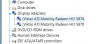
I think you have a problem that the VGA drivers are not correctly installed...
In Device manager your 2 VGA drivers have to be listed under Graphic Cards. If it's listed under some other unknown device (1st entry in list normally), then you have to install VGA drivers first (eg revert). When you dont see 2 VGA cards under Graphic Cards you cant install any Dell or ATI driver.
If nothing helps, i can suggest a clean install of windows with the latest drivers and then you have to worry less about driver conflicts. -
Yeah, they're listed in the correct place. I think i have no other option it seems except a new format. Well i've been wanting to format for a while now. I have been having cpu performance issues too, so should work out for the best..
-
Here is everything i have installed, you may want to check for SSD specific drivers on the support.dell.com site or ask others what they have installed for SSD for optimal performance (i think you need TRIM).
http://forum.notebookreview.com/ali...70-september-2010-incl-vbios-flash-guide.html
Good Luck, i'm sure you can be much more comfortable after doing so
-
Thanks Grim, that sounds like the way to go, sorry this is a bit off topic from thread but its important since im going for format, need quick advice in regards to Alien Respawn partition, can/should i just delete that partition completely or can i update that partition to have the new installation and drivers i will have after format?
Thanks. -
What I would do, if AlienRespawn is intact, run it and create the backup media (either USB Flash drive or Optical media). Once done, perform a factory restore and start fresh. If you insist on performing a clean, manual reinstall of Windows, still make the AW respawn rescue media - this will preserve your ability to roll back to an out of box state.
-
Thanks bat, grim, reborn.
rep+ -
Hey guys, I am having problems, I installed the driver from the link in the first post, after using device manager to uninstall the old ones, and all it shows after I installed what was linked to is the old driver numbers... what gives?
EDIT: I seem to have fixed it, where can I look to double check I got the new VBIOS?? -
Hey theres chiefs.
Use GPU-z to check the vbios version. Check it against Grims picture. Or otherwise your just looking for the vbios version number 012.020.000.027.037640
Cheers.
-
Hi Guy's
I was just wondering if anyone is have a problem simular to mine. After I updated to the new A09 and video card drivers/Bios I have been having problems with video playback. avi from the web or blu-ray .iso is pixelated and some what saturated. I have had Dell out and they have replaced one of the video cards with no change to my problem and now they want to change both card and the MOBO. when I was running A08 and the older video drivers I didn't have this problem.
Thanks for any help. -
If you update to the new VBIOS it will conflict with the system that will be reverted, as in a factory default drivers the A00 drivers are installed and the system would boot in a BSOD. And the problems will continue as you try to somehow get the ATI drivers uninstalled, to have them installed from default VGA driver.
-
I lack a 2GB Mem stick is there a way around this? :/
Once you flash a Bios is written to the ROM so it does not change when you reinstall windows
-
anyone knows when will the new drivers become available?
-
You can also use a CD-R to burn a flash cd with the provided installer.
-
Grim, just to inform you, i did a factory image restore. Seems to work ok afterall. No BSOD.
-
Oh thats good news chiefs. Glad your back up and running. When all else fails the reformat re install OS is the last and only option really. Or if you have a ghost image backup handy.
Cheers.
-
Looks like there was just an update now with Alien Respawn, i think this update is just what i was after, it has updated the recovery partition with new files. I assume it has put the new ATI driver in this case. So that should hopefully fix that prob. Will make it easy to roll back.
Once in doubt, format.
Cheers Chiefs
-
Gennosuke, where do you see the Alien Respawn update?
-
Everything working well for me here, in general I've noticed lots of improvement.
-
It looks like i also have video playback issue since A09 Bios (I keeped the beta driver and beta Vbios tho)... so since I've installed A09, all my videos no longer play as smoothly as before, a lot of time the image is splitted...
So It looks like it is not linker to video drivers but A09 bios I suppose there are no ways to go back to A08 right?
-
flynnaz, It prompted me randomly for an update.
I assume there would be a manual way to trigger an update through the app? -
Was it through the Data Safe program?
-
Not at all, just the Alien Respawn decided to popup a window randomly prompting to update.
-
I got the pop up as well today and updated AlienRespawn.
Sandy -
I too had this a couple of days ago...setting up my new system out the box...had done recovery discs via respawn and a bit later, pop up with an update (which i did) - took a while to update the partition etc etc but i just presumed it was needed. Dont think its an issue really....must have come from within the program itself i reckon.
-
Oles Stevie welcome back chiefs.
So hows the new system going? All good I hope.
Did your new system come with system bios A09?
Dell new drivers and Vbios?
Cheers
-
Hey Reborn - TY for the welcome! - glad to be back!
Nah, my new system (as below) shipped with A08 and the previous dell drivers/vbios - had to do them again on this but all seems good so far....got it set up nicely (pretty much stock apart from a/v) and its working well. Like i say, done the vbios via cdrom and the 8.763's....noticed that performance in Metro 2033 is one hell of a lot better - can be played in very high with dx11 and advanced DOF enabled! msaax4 the lot.....so im quite happy atm.
Did a stock run of 3dmark06 out the box and scored 16500 which was cool i think, although now, every run after that has scored around 16275max - guess its the new drivers/vbios - although gaming is improved, its knocked the score a lil bit.
Have you tried out Ati 10.8? - im waiting for their latest mobility release as they skipped it for 10.9.....if you have tried 10.8 opposed to 8.673, how did you find them? - I havent got ati profiles installed as im using 8.763 (do i need them or would the be useless?)
Anyway dude, its good to have a lappy with no probs at the mo (oh, only prob is the flextronics psu, getting a delta tomorrow as was gettin the old "not recognised" battery message - delta should cure that i think - it did in the past)
Anyway, been away a while - fill me in on any developments eh?
Laters!
-
read the fisrt msg from this page
you can go back to A08, i did it
http://forum.notebookreview.com/ali...ios-a09-discussion-thread-25.html#post6780506 -
Reborn, I gotta ask because it's been nagging at me for awhile: what's with calling everyone "chiefs" and saying "oles"?
M17x R1/R2 - Dell 8.763 Driver (4870/5870 GPUs) + 5870 VBIOS Discussion (non-beta)
Discussion in 'Alienware 17 and M17x' started by BatBoy, Sep 20, 2010.