 Problems? See this thread at archive.org.
I have the default 240w psu and a 330 psu from my old m18x r2 and both seem to show same fps results. Noticed also that there was no major increase of fps even if i lowers the graphic settings from ultra to low. It still stays on the same range of 15-30 fps. Have also tried deleting the catalyst 14.2 driver and switched to 13.1 but i still get the same results.
Yeah 820qm could be doing all the bottleneck but i don't think it'll drop gaming performance that much.. Or would it? Recommend any other game where i can do further tests?
Sent from my iPhone using Tapatalk
-
-
Yes i found it just seconds ago, as far as i can say, ichime is a very known person in here, and very legit. I do not want to scare you though, master Yoda says: "R2 users path is full of obstacles and hot coal is widespread on it, to get it to fully working condition a significant amount of $ might you still need" sangemaru likes this.
 -
IS this 330W PSU Modded ?
-
Was just gonna use it for extra parts on my current r2. All I need really is a better PSU.
-
Nope not yet. Does it have to for it to work?
Sent from my iPhone using Tapatalk -
I cannot find your previous posts that would point what you are exactly trying to do here, for CF 7970m/8970m you NEED it, for a single card config with 8xxQM CPU you should be fine with stock PSU, what is the game name ?
-
Oh sorry. Actually i have a 7970m crossfire setup on my r2. First game i installed was bioshock infinite. Using crossfire fps was crappy. Only around 10-20 fps. Tried doing a single card only and i only got 15-30 fps. Not sure if the problem is the game, or driver, or if i'm just doing something wrong. Basically i find it odd that i only get these framerates using both crossfire and single video card. Should i expect more when playing bioshock infinite or am i getting the expected framerate at my current setup?
Sent from my iPhone using Tapatalk -
Seems like can be power plan, or driver, or something else, bioshock infinite should be going on ULTRA on single card
-
Really weird issue you're having.
A single 7970m should drive Bioshock no problem (although the CPU may still bottleneck you).
I'd have been of the opinion that you have a bad crossfire cable, but if single-GPU also has low-fps, not sure what to say.
Holy hell flingin, i just noticed. You're running 3.7GHz across all cores? That physics score is insane for nehalem mobile. -
Do you think the os can be a factor? Im using windows 8 right now. Maybe installing windows 7 will help?
Sent from my iPhone using Tapatalk -
Yes it may, r2 had some issues with win 8 if I am recalling it correctly. Install Windows 7 and report back to us
-
A little light finally. Will let you know how it goes after i reinstall my os. Thanks!
Sent from my iPhone using Tapatalk -
Aye on the OS front. I never could get the R2 including single-GPU to work properly with Win8. Maybe Win8.1 could work but Win8 was dead in the water for me.
-
If it means anything win 10 seems to work good on the r2. I seem to be running 4870m cf just fine on it. Gonna be doing some game testing on it the next few days. If 10 works I would say 8.1 works about the same.
-
I've run both 8 and 8.1 on the R2 without issue, even in CF. Might be a specific driver issue?
-
Have just finished re-installing windows 7 and unfortunately i am still getting low fps on the same game. To add, after re-installation the 2nd gpu doesn't seem to be detected using hwinfo64. I mean it's recognized as a 2nd gpu but temps are 0C. I don't know what i'm doing wrong.
Sent from my iPhone using Tapatalk -
Did you disable ulps after driver install?
-
not sure how to do this as i am quite unfamiliar with the process yet. can you link me on how to do this?
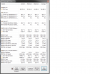
by the way, i was wondering if my 2nd gpu is currently being recognized as it seems unusual seeing temps like this?
-
Read the first post. Completely
I don't mean to come off as annoying as i'm sure I do, but all of us didn't exactly work on the guide for nothing. The first post has 99% of all the things you need to check to make sure everything works before you try anything else.
And instructions.
And don't skip anything.
EDIT: In response to the GPU temp attachment, that's because you have ULPS enabled and the card is basically turned off.
Disabling ULPS will result in always having both card turned on, which for this kind of machine is pretty much the point.Nospheratu, tron2^ and nitsun69 like this. -
Thanks for the push sangemaru! After disabling ULPS, frame rates have increased.
Although there seems to be another set of problem.
When I start playing say SNIPER ELITE 3, at first I get below statistics...
GPU1: 55C, 450MHz
GPU2: 45C, 300MHz (not used)
29.3 fps
After playing for a while, gpu1 temp starts to shoot up and fps also increase as shown below.
GPU1: 81C, 950MHz
GPU2: 45C, 300MHz (not used)
109.1 fps
And as soon as gpu1 exceeds 85C, unit just shuts down and reboots.
Sometimes after x hrs of gaming, this does not happen. Sometimes in less than 1 hour, temp jumps up.
Not sure if it's just a random occurrence.
To add, this unit was purchased w/o a battery yet but I will be getting one pretty soon.
Do you guys think the battery is a factor to the sudden jump of temp or lack of power?
Also the cards were originally from an M18x R2. Seller told me that both cards are 925/1300 bios modded.
Not sure what this meant but I'm guessing these were overclocked when it was installed on the m18.
Would appreciate any inputs you have. -
85C is very high temp for 7970m.
I would recommend a repaste if not completed already and clean grilles and fans.
My peak temp for a single 7970m in m17xr2 is around 74-75C.
Highly recommend ICD7.
I doubt the battery is the issue. Since you say they have been bios modded I would recommend to go back to default here but I am no expert on this matter.. -
Hi tron! Thanks for the response.
Already did a repaste on both gpu's and cleaned the fans last weekend so I'm pretty sure this is not the problem.
I was thinking of putting back both cards to default but I am not familiar of the process too. Couldn't find any links around the net too.
Hope we have someone around the forum who can help. -
I know this might sound labor intensive but I would try one card and see if it works normally. Then try the other card in the main primary slot and see if it works akin to the other.
This way through trial and error you can verify that the GPU's are intact and working normally.
Once this is confirmed then venture on board and do the crossfire process.
Best of luck. -
Got it! I'll try that when i get home. Will let you know how it goes.
Sent from my iPhone using Tapatalk -
. Are sure you turned ulps to 0 and then double check it. Every time you change you driver otherwise you primary will rapidity heat up and secondary will run at 0.ccc is a great way to check in this works. Think it'd in th e preformsce section. If done correctly both clocks should run. I'd also us can to lower your clocks to stock. And consider under volting each own to 9 75. That's my winded two centd
-
The cards are overclocked and probably overvolted. Look into using one of the undervolted vbioses in the first post for lower temps and stability.
The m17x r2 has a known shutdown point for the 7970m cards at 85C. Seek to keep temperatures in check. Use more recent drivers with frame pacing and always keep vsync enabled because rendering too many frames will heat up the card beyond what the r2 should cool.
Also, why is the second gpu unused? Do you not have crossfire enabled?
Additionally, if you don't have the 330W PSU mod (or 2x240W PSU mod), look into doing it. Straining the PSU also results in increased stress and heat on the CPU and GPU's for some reason, my temps dropped severely on all components once I started using the modded PSU. -
I disabled the 2nd gpu on catalyst because i wanted to test if the problem was gpu only or if crossfire was contributing to the problem.
Also saw how the modded psu was done on iamsolidstate's site and i don't think i have hands that are dextrous enough to perform what is needed to modify the psu. Would probably check and read the how to again this coming weekend and see if i can grt enough confidence to do it. But I also don't want to end up breaking both psu's as looking for another one here in the philippines is not that easy.
Will be looking on to the undervolted vbios you posted on the first page and i'll let you guys know how it goes.
One question though, by drivers with frame pacing do you mean the catalyst version i'm using should be the recent one (i think it was 14.9)? And vsync is found on the game settings right? Sorry for too many noobish questions.
Sent from my iPhone using Tapatalk -
You can also do the dual 240w PSU mod, you will not have to open the psu, just cut some wire , soldering and things . You can also buy some power supply socket and you will not have to cut the psu wire at all , just make a box with all the things, two female power socket and one male jack with 20/30 cm of wire . Like this you can use one psu when you are outside and both of them at home.
-
Yes, the most recent drivers.
And you HAVE to do a PSU mod (the easy way is to just give imsolidstate's blog link to a computer service shop and bring in your 240W and a new 330W PSU and hover around while they do it for you).
If you don't do the mod, you won't stop having issues with the machine. You can't drive the cards on that PSU. Even if you can do it now, in a few weeks or months at most you'll kill the PSU. -
Got it! Have decided to do the modded 330w this weekend. Will let you guys know how it goes. Thanks again!
Sent from my iPhone using Tapatalksangemaru likes this. -
Has anyone been able to install the newest beta driver? More specifically to a 64 bit win7. Ccc will install but I can't get the driver install.
-
Tried installing it manually from device manager > update driver?
-
Hi guys
I'm running the 14.9.2 beta on Windows 8.1 atm. No problems encountered during installation. Performance isn't as good as 14.9.1 for me though.
@justanotherAWguy, those clocks on the graphics cards are unecessary for gaming with your current configuration with the 820QM and 240W PSU. Use a vBIOS with default clocks and preferably undervolted to 0.975v as mentioned already.
Once you flash this vBIOS post up a 3Dmark11 or 3Dmark Firestrike benchmark using the latest version of the software. This way we can rule out if its the actual game thats the problem here and if your cards are running more or less on par. You should be getting around +-10000 on 3Dmark11 and +-7000 on 3Dmark Firestrike (bear in mind these scores are with ThrottleStop tweaked/overclocked 920XM's and 7970M's at stock clocks).
Also regarding temps, as sangemaru has mentioned the Dell 7970M cards auto-shutdown the laptop around 85C. Dell cards also do not have auto fan control as mentioned in the guide so make sure your HWinfo fan profiles are setup properly and are infact active in the background. The guide on the first post really is an amazing comnprehensive source of info for any R2 user with 7970M's so read it and then read it again and read it one more time to be sure
sangemaru and justanotherAWguy like this. -
Another noobish question. How would I know that the flash of vbios was successful? I did the step by step flashing of gpu using vbios Dell7970m.rom and after the process it opted me to reboot my unit and after I restarted I tried to open Sniper Elite 3 again but to no avail. Temps still started to increase until the range of 85C.
I already followed the steps on the first page but I still got the same problem. Am I missing something?
@Nospheratu I tried running 3Dmark11 too but during test it was still reading high temps on gpu1 until it reached 88C and rebooted again.
Honestly i really have no idead how to check if the clocks are on default and if my gpu is undervolted to 0.975V.
Hope you guys would be nice enough to share your inputs.
Thanks again so far for the responses and help.
-
Use GPU-z to determine what voltage and vbios you're running. (if the post-flash prompts for restart, the vbios flash was successful)
Be advised that unless you're installing clean drivers, controlling voltage might require you to use the -xcl command in MSI afterburner to unlock overdrive and write custom profiles which you can edit to control the voltage itself (usually the overdrive-enabled svl7 vbios doesn't require the -xcl afterburner process, but you still need to write custom profiles and edit the voltages and apply those profiles to get the lower voltage to stick).
Also, until you perform the PSU mod, you can expect plenty of aberrant behavior. My CPU and GPU's only started running manageable temperatures after I performed the PSU mod. A tech friend explained to me that using the weak PSU at those higher power draws would result in voltage fluctuation, which would also result in amperage fluctuation, which results in leakage and increased temperatures, instability and inefficiency.
The PSU mod is a must-do. -
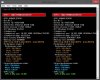
Try using GPU Shark. Download version 0.6.6 from here. There are newer versions but I've found 0.6.6 works best to show both cards information.
Once you download and open it up and click on the View menu and then Detailed View and post it up here. It should look something like this.
 sangemaru likes this.
 -
@Nospheratu Here is the captured image using GPU Shark. Not much difference I think.
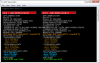
@sangemaru will be looking for a local technician today to help me with the modded 330W psu. hopefully everything goes ok after that. thanks!
EDIT: So before I went out, I tried using the 330W psu i was planning to modify and plugged it on my r2 and tried playing sniper elite 3 again. This time temps where stable at around 55C to 63C.
Although FPS was only around 18-20. I was wondering if it's safe to just plug in an unmodded 330W psu (from and old M18x) to my unit? Would that screw something up in the future? I know that my unit makes 2 beeps when I turn it on and gives me a warning that the psu is not Dell's. Just wanted to check if it could break something. -
thanks for the suggestion. gave it a try but it just came back stating it was already up to date. Think I got it to work though by using the update in ccc. It's listed as the correct version. My only concern is it was installed over the 1beta driver instead of uninstalling it first.
-
Guys will correct me if Im wrong but from what I understand the without the chip from the 240w psu the 330 will run just like the 240 and pushing our machines at all will put extra stress and shorten the live span of the psu. I was able to run my old 240w psu for a few months. I made sure to limit my voltage where ever possible (ie. turned off not needed things in the bois and undervolting).
-
The PSU should shut off after 240 W itself until it receive the 330 W ID from an m18x. That's why you have to make the mod , that will delete all this stuff and the PSU will be able to go to 400 W if i am right.Nospheratu likes this. -
And by that you mean that it is not safe to use an ordinary 330w psu on an r2 right?
Sent from my iPhone using Tapatalk -
Its perfectly safe. The R2 treats it as a generic PSU and will reduce the performance level of the laptop until a supported PSU is connected (240W ID Chip). The 330W without any modifications, trips and shuts down as soon as more than 240W is requested from it, as toto29620 has already mentioned.
Whether any damage can occur by multiple hard shut downs remains to be seen but I dont think you have anything to worry about at all.
From your screenprint it seems that your secondary card was not flashed as it still is overclocked. You will have to flash that card as well to rule out any potential problems. That isnt related to your high temps though. You have to make sure your GPU's dont go above 80C to be safe.
What are your ambient temps today? For example its warm here today and the ambient is 28C. My GPU's are idling at 40C and my CPU at 46C. After a 3Dmark11 run (Benchmarks only) the max temps for my GPU's were 73C on the primary card and 72C on the secondary card. The CPU's max temp was 79C. If your GPU is reaching 88C its either rediculously hot where you are or your heatsink installation might be incorrect. The PSU may be playing a role also as sangemaru mentioned but lets try to eliminate the simple factors first.
I would suggest relooking at your card's heatsink installation. Make sure there are no gaps between the heatsink and your GPU's core and that it is sitting flat and flush. It could be that you used too thick thermal pad on the inductors (square grey plastic components) which could be affecting the heatsinks contact on the GPU's core. I am not running any thermal pad on these inductors as the gap is too tiny and it affects the way my heatsink sits. Various guides on the net say that we do need to have pads installed there but I have been running without them for over a year now. If I remember correctly alienhack is also running his cards this way.
To sum up thermal the pad installation, I have them installed on my vRAM chips and mosfets (little black squares around the inductors), nowhere else. This allows my heatsink to make complete contact with the GPU core frame (silver frame around GPU). -
@Nospheratu Thank you for the detailed explanation.
Yes. Just wanted to see if flashing the 1st card first would make any difference. After seeing the same results, I then flashed the 2nd gpu and unfortunately I am still getting high temps on the 1st card. Ambient temps on both cards is ranging from 39-40C. Pretty normal I think. Have already checked the heatsink seating on both cards and I am confident on how these are properly seated as I don't see any relevant gap which may contribute to the high temps.
Just to update with the PSU, I had planned to have it modified last weekend with someone very familiar with AW units. Before transferring the chip from the 240W, at first he verified if this was working properly on my R2. And lucky-me, we got two beeps during start up saying that the ac adapter was non-dell's. I told him that it was like this when I bought it and thought that this was normal. He said that even if we transfer the chip from the 240W psu, my R2 might still not recognize the modded 330W psu because of this problem. In the end we decided not to continue doing the modification as we might end up having two un-usable psu's.
And so had a little reading over the net and found that an updated A10 bios would fix it. I am currenty using this bios version so I don't think that this is the problem. Also did a power drain 3x but I still got the same problem. I guess all that's left to do is buy me a new 240W psu and see if the problem still persists. -
And we have a winner!
I think thats your problem right there. The 240W is being treated the same as the 330W at the moment since the laptop is not receiving the 240W ID chip signal. As a result its operating in low performance mode which explains your terrible in game performance.
As for the temps it can be explained by sangemaru's low power explanation. If you had a battery you would have realised this sooner as the motherboard doesnt allow an unsupported PSU to charge the battery.
You could move the connection tip slightly and jiggle it a bit to see if there's a problem with contact at your power jack but be careful as you dont want to damage the motherboards power jack plug if its not already damaged.
Best of luck. I remember amazon had some pretty good deals on the 240W adapter, not sure if its still true. -
Yep, there was a guy some day ago with the same thing on m17x R3 , psu wasn't seen and the cpu and gpu were running slow as , 800 Mhz for the cpu and 150 Mhz for the 580m. He can't even play CS GO
-
Hi
I'm about to upgrade from two 5870's in Crossfire to two 7970M in Crossfire, I have read a lot of this thread and would like to confirm that I can use my current crossfire cable, the one connecting the 5870's together?
Thanks -
Aye, that's the only cable you should be using be gentle with the connectors, it's easy to ruin the cable with the 7970m cards
-
Yes the crossfire cable is the same.
EDIT: Bah beaten to the punch, it did make me stop a second and go double check lol. -
LOL..
Thanks guys. Glad to hear that.
I'll hopefully receive the cards next week and start this.. -
So guys i might join you soon in the 7970 crossfired m17x r2 member club ! I have bought an unested 7970 for basically nothing on ebay, let's hope ...
I have already the right heatsink , right fan , crossfire cable. Is there something special to do ? I put the second card in , go to windows and see if it work , if yes , flash the same vbios that my actual one and activate crossfire in catalyst , do the ulps thing? Is there something else ?
Pretty exited a this moment, if it work i will give you some bench with the 720qm ... that will be interresting to compare with 920xm @ 3.6/7 Ghz.
M17x R2 7970m CrossfireX Ultimate Installation and Tweaking Guide
Discussion in 'Alienware 17 and M17x' started by sangemaru, Jun 7, 2013.


