Problems? See this thread at archive.org.
Do you mean this one?
Coreys Rainbow =D.ath
I reupload it.
Found it in this forum as well, but forgot the exact subforum.
Credit to the creator.
-
It wasn't that one as the colours across the keyboard are the same.
I'm not sure I can describe it, but the rainbow.ath I downloaded one via mediafire each zone on the keyboard started off a different colour, so not only did the keyboard change colours but the colours appeared to move across the keyboard.
I did download that one yesterday though, and i'm sure I will use it if I can't find the one I had. -
Is there a way to tighten the LCD screen?
-
In what way?
If you feel that the hinges are not tightened, yes you can do it.
Follow the video and the screws are under the touchstrip. -
Hi guys, got a problem here.
Got a secondary HD5870 from ebay, but when I install it into the laptop,
the laptop wont boot at all, but all the lights still light up.
When I remove the card, the laptop now boot normally.
What's the cause of this?
Could it be the card I got from ebay is defective? -
Please guys, help me. Really desperate right now.

Fyi, when I look at the back of the secondary card, it shows A00, while my original card in the system is A02.
What I should do? -
Follow these instructions and pull the vbios from the master card, then boot off the bootable usb drive and flash the msater vbios to the slave card.
This is the guide for overclocking, but here is the break down. I don't feel like cutting and editing the above. If you can understand it, it's easy to see what steps apply to you.
Save a copy of the Master vbios to the usb drive by typing the following in DOS after booting from the USB drive with ATIFlash on it.
" atiflash -s 0 nbios0.rom"
Then flash the vbios you just saved to the slave card by typing
" atiflash -p 1 nbios0.rom"
Once done remove the USB drive and reboot. Hopefully that will work. -
THanks for your feedback DR650SE.
Does this mean I have to flash the secondary card only?
So do I need to boot the laptop with the secondary card only to do this?
Because if I tried to boot the laptop with both cards at the same time, the laptop will not boot up at all. -
Hmm, I missed that. That may be a problem. If you boot with both in the system, will it even get to the bios? If not it may be a faulty card. Does it give any flashing lights (CAPS lock, scroll lock, or num lock) on the indicator panel?
If you can't boot with the card in the system there isn't much that I see you can do Maybe somone else knows something you could try. Make sure large monitor cable is firmly and properly attached.
-
If I boot up with both, it will not get even to the bios.
Weird, but I dont have any flashing lights, all lights just stay normal.
Thanks for your feedback. Any suggestion?
From what I have read, if the cards are both REV A00, then it would be a problem to boot the system in BIOS A05 and above, it seems like people reported it will boot just fine with BIOS A02.
Currently I have BIOS A10, should I revert to A02 and try?
Btw, currently my left card, which comes together with the system when I bought this laptop is REV A02 from what I see from the back of the card, while the right card that I just bought from ebay is REV A00. Could it be the cause of the problem?
Sorry for the long post, hope you and anybody can help. Many thanks!
-
It could be the problem as one has the old vbios and one has the new vbios. Try and revert back to A02 and if that works you should be able to flash the new card and revert back to A10.
Have you tried booting with the new ebay card in the the master slot? If that works you could flash the vbios with the dell vbios flash that works in windows I believe. -
I have not yet try to put the ebay card into the master slot.
Meaning, I need to put the ebay card into the master slot, boot into windows, and flash with the latest VBios?
That way it should behave as slave card right?
Then shut down the laptop, reinstall the original card again on the master slot and the ebay card on the slave slot?
Am I right?
Sorry for asking you many questions but really need your expert opinions.
Thanks for your feedback, really appreciate it. -
Update.
I have revert to A02 Bios and now it seems like it boots into Windows just fine.
DR650SE, you are right, the ebay card has the old VBios.
Here I attached the screenshot showing the VBios for both cards.
So now the thing that I need to do is to flash new VBios to the ebay card right?
I think I dont to disassemble the laptop again right?
Btw, I tried to run 3dmark06, it seems like I got 14147, it is ok my specs in signature?Attached Files:
-
-
That's right and no, you don't have to disassemble the laptop (unless you need to change the thermal past).
That score is what you should expect
Don't forget, after flashing the vBIOS to flash to the recent motherboard BIOS, the one you had before flashing the A02.
Cheers -
Thanks katalin for your feedback.
So 14147 is already good for crossfire right, then I feel a bit relieved.
So the recommended way to flash is to use usb right?
Like DR650SE said before.
Forgot to ask, do I need to uninstall the driver first?
Or just proceed straight away with the flash? -
Yes, the best way is with a bootable USB in DOS, +1 DR.
This way you're sure to minimize the causes of a failure or interruption during the flashing process. -
Thanks katalin, what about the driver?
Do I need to install or uninstall any driver before proceed with flashing the vbios?
Currently I have 11.8 driver and crossfire profile. -
Nope, I wouldn't worry about the drivers. Just the vbios. I'm relieved that flashing back to A02 worked. Glad to know your card isn't bricked. Also 3DMark06 is mostly CPU bound. The faster the CPU the more your GPU's will scale. Use Vantage as it is good at pushing the GPU's and not really too reliant on CPU. So the raw GPU score is accurate.
-
Thanks DR650SE, you have been such a great help.
Btw, one more question before I do the Vbios flash, just to ensure that my steps are correct.
What I need to do is,
1. Install the HP usb disk storage format tool.
2. Choose the thumbdrive, choose FAT32.
3. Tick 'quick format' and 'create a DOS startup disk'
4. And then I locate the Windows 98 system file.
5. After I have done, copy the AtiFlash to the pendrive.
Is that correct, my apologize for asking lots of question, but since this is my first time owning an AW, I need some advice.
-
Thats correct. Then you should switch to boot from USB in the bios. Than restart with the drive in. Should boot to something like C:>_ and type
"atiflash -s 0 nbios0.rom" and hit enter. Once your back to the C:> _ type
"atiflash -p 1 nbios0.rom" Once thats done, you will have placed the vobios from the master card (0) onto the slave card (1).
Thank you can flash the A10 bios and all should work well.
No worries on the questions, were all here to help. -
Rep +1 for you my fren... i learn it also..
-
It's sad to report that the cards will not work in BIOS A10.
Both cards already have the same and latest VBIOS but it seems like the problem still persist.
I guess I need to use BIOS A02 for now, looking for another secondary.
Might send back this card for a refund if I find anyone want to sell their secondary HD5870. -
Try downloading the new vbios from windows and then flash that while your in bios A02. Or try other versions of the BIOS. Maybe re download the BIOS A10 and reflash it. Something seems funky that it would work in A02 in crossfire, but not A10.
-
I also think that this problem is kinda weird.
I am quite afraid to go back to A10 currently, because if in case it won't work, then I have to disassemble the laptop again to remove the secondary card to make so that it will boot up normally.
Could it be that I need the card with REV A02 as well for the slave card? -
Hmm, I wouldn't think so, but that is an issue. When testing I normally leave the notebook disassembled with the Keyboard plugged in so I can run it. But there shouldn't be any physical differances in the cards. Just the vbios.
When I get home I'll see if I have copies of the vbios on my HDD. If I do I'll upload them, both slave and master. -
Thanks DR650SE!
Will be waiting for that.
-
Hey man, sorry, just searched my drives and externals, and I got nothing as far as the vbios for the 5870. Perhaps some one else will chime in.
-
BTW, is BIOS A10 still the lates avaliable for this beast ?
-
Yes .
-
It's ok, man. You have been a great help to me.
Guess I am going to send back this ebay card.
-
Hi guys,
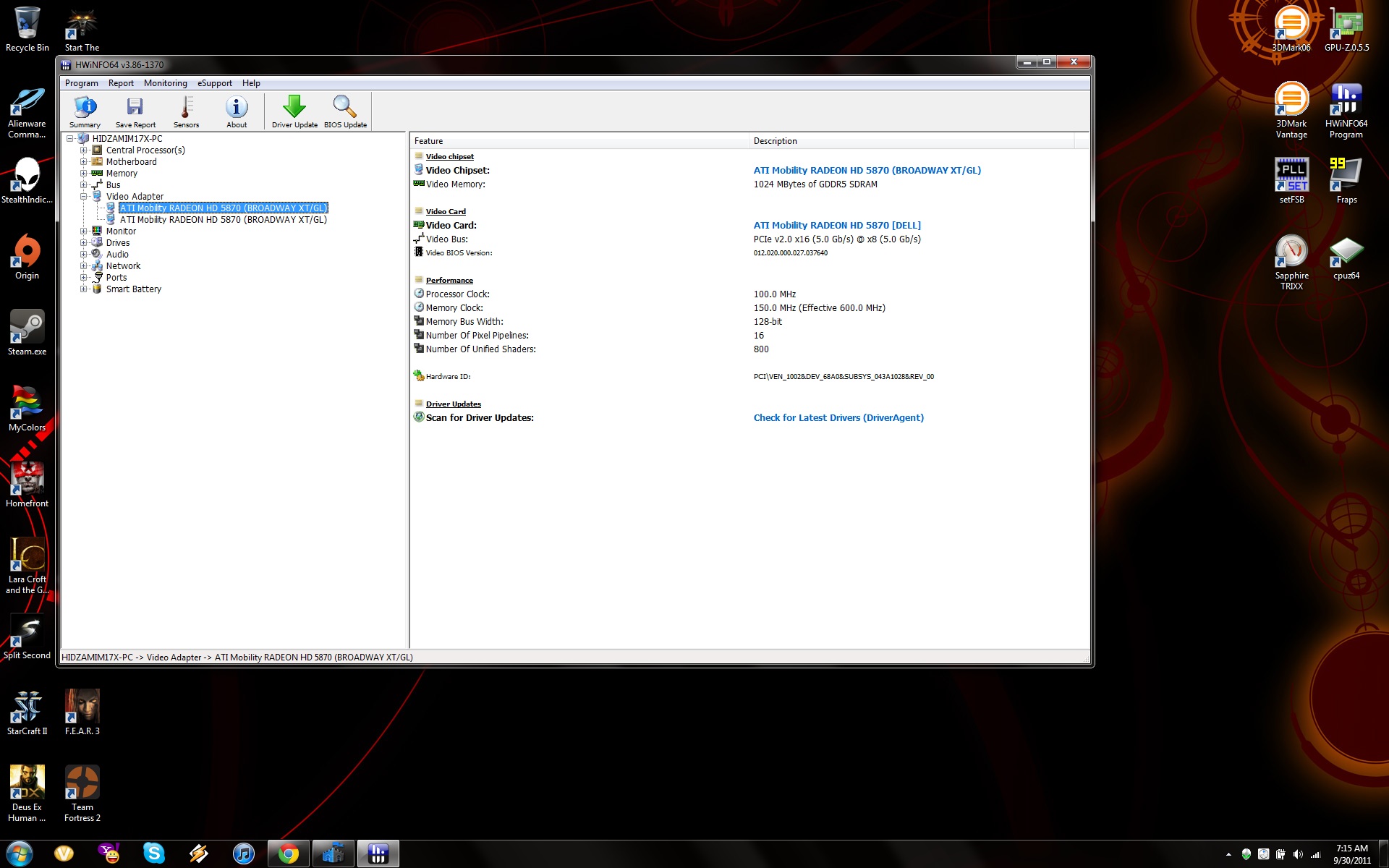
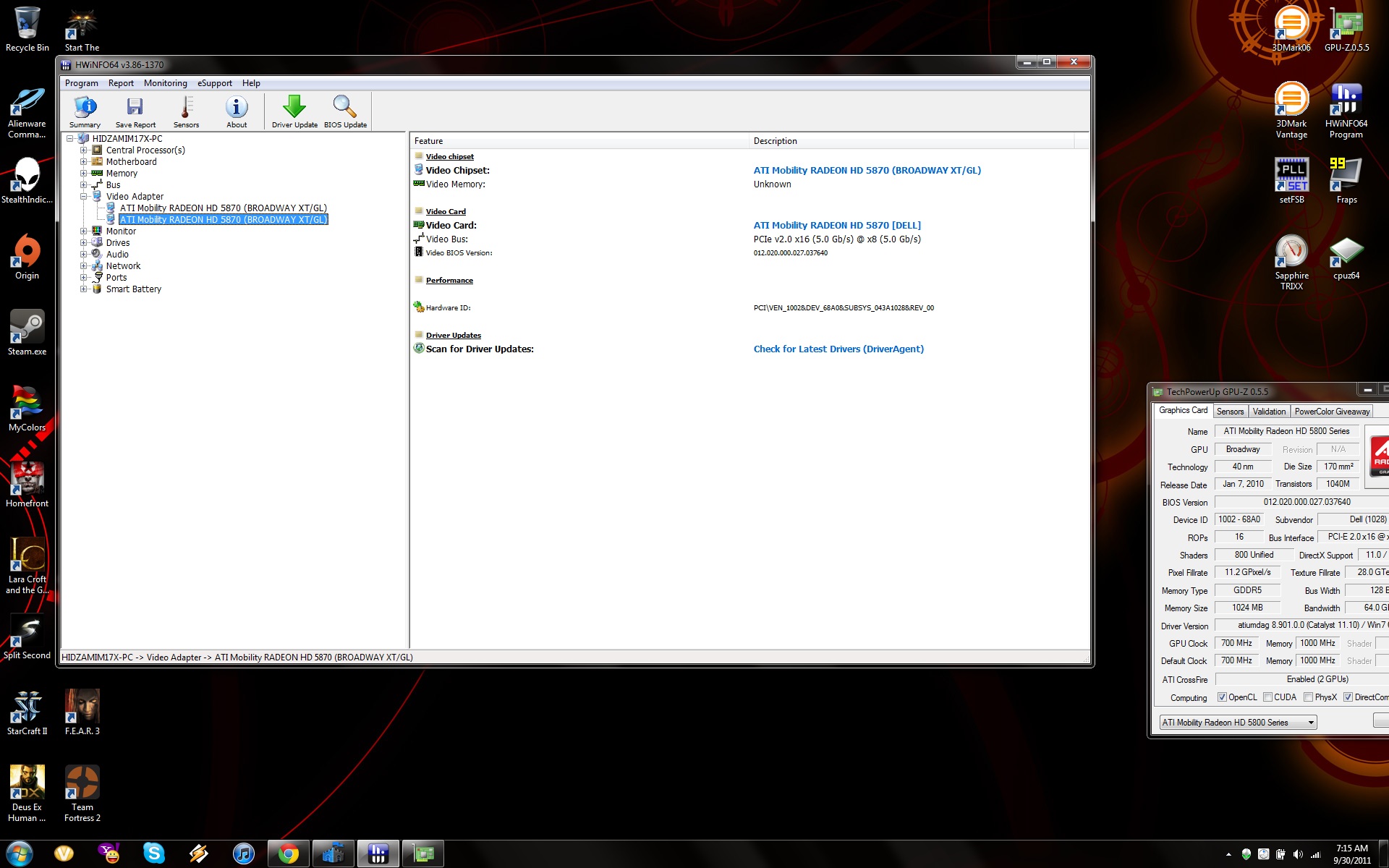
I thought my master HD5870M which comes with the laptop is REV A02, at least that's what I see from the back of the card, but when I use HWinfo to show the hardware id, this is what I got, I think it shows REV A00 for both cards.
If that's the case, then I think my problem is just like this thread before, http://forum.notebookreview.com/alienware-m17x/490277-m17x-r2-cf5870-wont-boot.html
What do you think guys?Attached Files:
-
-
A simple fix would be to have somebody here with the CF 5870 post his vBIOS for you to flash.
Sadly i don't have a copy, running nVIDIA
-
Yeah I think that's the problem right now.
Hmm I think reborn has 5870M CF, might PM him regarding this matter, or just buy from him and return the one that I have now.
-
Hey buddy hid7, So sorry man my GPU is no longer in working order.
There are a couple of other sellers though over here which you can buy from
http://forum.notebookreview.com/com...n-mobility-5870-pulled-alienware-m17x-r2.html
http://forum.notebookreview.com/computer-components/612144-fs-dual-5870-cards.html
Cheers.
-
He actually has the cards but needs somebody to give him the vBIOS.
Hidz, isn't it available for download on Dell's site? -
If worst comes to worst and no one else can upload them, Next week I will remove my 6990's and put in my 5870's so I can grab the vbios off them. I just have no time this weekend to do it.
Surely somone else has crossfire 5870's in thier system now. -
Here it is
-
Yup Katalin's got it covered!
That is the one. Easy install too with that one. Just boot and flash off a bootable USB!
Cheers.
-
Thanks, saves me time.
Hopefully he can boot it again in A02 with both cards, and flash from there. -
Yeah i was on the phone too earlier and damn browser won't scroll in Dell's list, the M17x R2 was the one i couldn't reach
-
Guys, thanks a lot for the feedbacks.
NBR is truly a great forum.
katalin, I just got back from lectures today, will try to flash the cards using the link that you gave.Thanks a lot
DR650SE, thanks for the effort on helping. Really appreciate it.
reborn, it's ok man, you have helped a lot as well.
-
Oh wait before I flash, is it the same step as before?
1.create a bootable pendrive, then put the extracted files into the pendrive.
2. Then do this?
" At the Command Prompt, type in "atiflash -p 0 dellb0.rom” (without the quotes) to flash the master card. Then after it has been flashed, type, “atiflash –p 1 dellb1.rom” (without the quotes) to flash the secondary/slave card. Once the flash process has completed, you may remove the USB key and reboot"
-copied from tech inferno.
is it right guys? -
Install
1.Double-click the new icon on the desktop labeled R281544.exe.
2.The Self-Extracting window appears and prompts you to extract or unzip to C:\DELL\DRIVERS\R281544. Write down this path so the executable (I.e. Setup.exe) file can be found later.
3.The Self-Extractor window appears.
4.Click OK.
5.After completing the file extraction, if the Self-Extractor window is still open, close it.
6.Click the Start button and then click Run.
7.Type C:\DELL\DRIVERS\R281544 in the Open textbox and then click OK.
8.Follow the on-screen installation instructions
-
I don't know what happened, but when I try to flash using the method described by katalin, I got a message saying,
'This VBios is intended for following video card,
ati mobility radeon hd 5870
This update cannot be performed on this system'
Weird, I have the exact same gpu already, very confuse.
-
Ok I have done vbios update, but still, bios a10 failed to boot with both cards.
what is the disadvantage of using bios a02?
other than jerky touchpad? -
Have you tried a power drain after you flashed the cards?
-
Yeah, but still does not work.
Thanks a lot for your help katalin, I am going to send this ebay card for a refund.
Then I might buy a secondary card directly from dell.
-
servus guys. Can somebody tell if i can flash the Dell/AW vBios from a 580m on a clevo one?
I think about it, to replace my 6970M against a 580M. -
I just noticed a small chip in the top of my LCD
. I have no idea what could have caused it. I wonder if this would qualify under my complete care warranty? It's not bothering me that much, so I will probably just wait until I have more than one issue that needs to be fixed.
-
Hi Guys,
Just got hold of my new M17 Rx2 last night. I got it off the outlet store here in the UK. Very excited but have absolutely no idea where to start.
Luckily there appears to be some bright minds around here with lots of experience in the platform. So my question is, what to do first???
*Clean install of slim Windows 7 optimised for SSD?
*SSD tweaks to get them running at peak performance?
*SSD in Raid? I am not sure if they are or are not in Raid at the moment? Which is better for this platform?
*Any Bios / Firmware / Driver updates that must be done?
I am very new to all of this and have only about a day of reading this forum (I am up to about pg 70 of this thread) behind me.
Specs below:
i7-940XM
8GB 1333 MHz
512GB (2 x 256GB) SATA Raid 0 "Stripe" Solid State Drive (SSD)
17.0" 1920x1200 (WUXGA) RGB LED Widescreen Display - Beyond HD (1200p)
2x 1GB DDR3 GTX 285M SLI
Blu Ray reader
Ultimate-N 6300
Any help, tips or tricks to get me started much appreciated!
Cheers,
Raymond
*OFFICIAL* "All Powerful" M17xR2 Edition Owner's Lounge - Part 3
Discussion in 'Alienware 17 and M17x' started by BatBoy, Dec 6, 2010.