Problems? See this thread at archive.org.
True, but then I'll want the next GenBut than again the next gen won't get me anything the current one won't. Although if the current platform will support the 7 Series AMD GPUs, or next Nvidia solution, it may be tempting. The nice thing that makes the move somewhat possible, is the fact that I already have the killer wifi, GPU/heatsinks ect.
It's not like my system is holding me back, so I can live with it for now.
What kind of Bios overclocking options does the System have? Does it have any voltage control for the CPU? and is it top mounted or bottom mounted? I'm guessing bottom mounted.
-
-
Well, I dident OC at all, since I use the system for work, just dont wanna risk it. Bottom mounted, as I have opened it up for cleaning..
Also, the big sellers for me was the 990X processor, ability to go to 24G of memory and the ability to Raid5, the ability to SLI was just a bonus TBH. -
Wow just took a gander at the Np7280, that you guys are talking about, and what a beast. I especially like how they state "You may choose to opt out of the two adapter standard option for a savings of $150, but be aware under some extreme stress situations, using a single adapter may cause the safety breaker to switch off", I have never seen that before.
-
Yea. I want that system lol
-
Yes, it is a beast, matter of fact, I have maxxed mine out, added mem, added a 4th HD.....
-
Sager Midern does make some darn good systems, I still have a NP8880 from 2001 that is still kicking (P4 with ATI Rad 9000).
DR650SE if your still looking for pricing, there is a site called
Custom Laptops by PowerNotebooks.com - Custom Built Gaming Laptop Computers
I bought my Sager from them back in 2001 and it was far cheaper that going with Sager directly. -
I can also reccomend Gaming Laptops - XOTIC PC - Gaming Notebooks - Custom Laptops - Custom Notebooks where I got mine at.
-
Thanks guys. Ill look into those resellers. Id get a bare bones system with a 990x and was looking at LPC Digital. Like babyhemi as i bought my ssds and killer from him who runs LPC Digital. I think he runs it anyway. Gave me a decent quote at 1600 for a barebones system. Posted it on the last page. Plus cost for 990x.
-
Anyone else wish the R2 had a docking station capability? I use one for work and it's nice to have all peripherals plugged into the docking station, including two Monitors. It'd be great if the R2 had this ability. There is a Targus docking station, but for me it doesn't have enough USB ports for my liking. Also a USB port replicator can take care of that. But the Targus docking station only has a single DVI port from the looks of it, and I'd like to be able to hook up two monitors.
Plus with a traditional docking station, you can power on the notebook without having to open it. I don't think thats possible with the Targus station linked.
Another quick question. With a USB Docking station, you can plug the ethernet cable into the docking station, which is then connected to the notebook via usb. Will this bottleneck internet speeds? Right now I have 30MB d/l speeds wired, more like 20-23 wireless. -
Alienware used to have a port for docking and a docking station you could buy, but they suddenly got rid of it. Dunno why.
-
I can't say for sure if it would on your system because you have the USB 3.0 card, but I can tell you that in the squad cars we have a similar setup and it sucks. Most of the docking stations in the cars are only USB 1.0 while our GD6000 laptop is USB 2.0, and it slows everything down for us. We are starting to get some of the "newer" docking stations that support USB 2.0 but for some reason, and it may be our IT guys fault, the laptop and our Verizon wireless cards are having connection issues and report, "To Increase Speed, please use a USB 2.0 compliant port to continue".
Now granted we are using an entire mobile platform, with a modified Crown Vic power setup but I'm pretty sure the principle is the same. Hope this helps bro. -
eSATA is good, I think it's better then USB 3.0 even...
-
I am soon to join you all.
Upgrading from my year old Qosmio here.
Been a good machine, not a single freaking problem, but my enthusiast side has been suppressed long enough I think. Found a person on OCN who is selling his R2 for $1400. 920XM, CF 5870s, 1920x1200 screen. Win?
-
That looks like a good price, see if you can offer him $1200 for it. Always gotta do some haggling.
@Darkloki, I wish they had an eSata docking station. That would be prety nice, with extra esata ports in the back
Thanks for the explination Captian, it does help a bit. -
Oh I've tried, but he knows how bad I want it and helped me out a bit anyway. Originally came with a SSD but since my Vertex 2 is going with me here it dropped the price down a little more.
-
@imglidinhere I got my R2 for $1200 but upgraded to a 920XM which ended up costing me a little more than yours will. But it is one of the best purchases I've ever made! Totally in love with it and I'm sure you will be too.
I say go for it! -
one eSata port on the right hand side isn't enough for you?
-
MOAR IS BETTER! Always.
-
If I did the math right, where did you find a XM processor for $200 smackers?
-
Maybe here I think he did say it was a little more. $239 for a 920XM (ES) -
Whoops.. maybe I was being a bit lenient with 'a little more', sorry.
The XM cost me $270 from Shirley's (it is a QS) but after I sell my 720QM it'll bring it back down closer to the $1400 mark. -
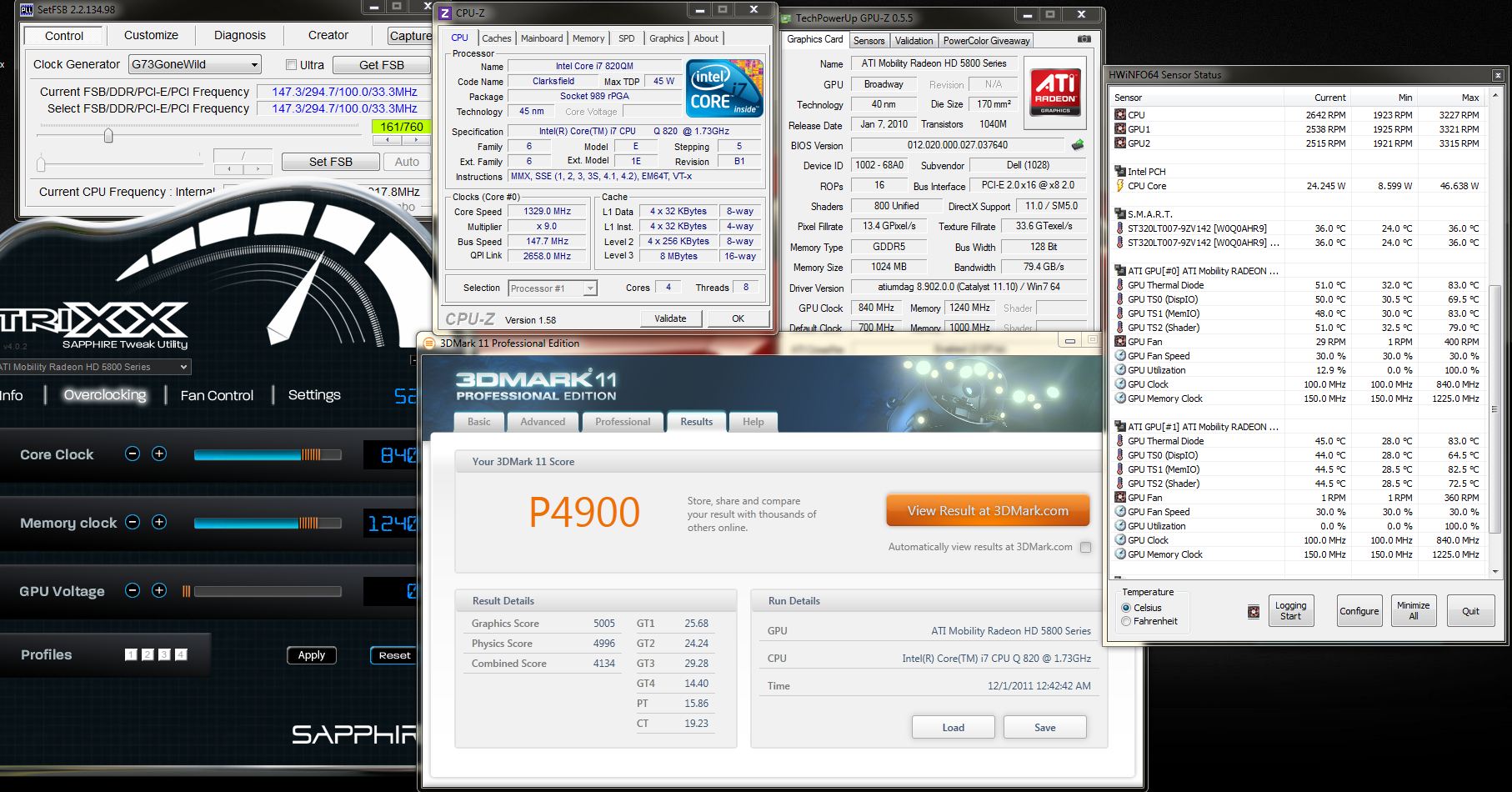
ok my first oc result with R2.
All stock voltage.Attached Files:
-
-
Thanks guys, I got a little to excited, I am looking for the 940XM and those guys go for 400 plus. I am debating to go through dell and sell the old chip or just buy another and keep the old for warranty...Ah Choices.
-
Are you going to go for a QS? Mine is working really well and I highly recommend Shirley's if you do.
-
Captain, just go with a 920xm, there isn't that much difference between them except the extra 133Mhz on the 940xm.
Plus, the highest scores were reached with the 920xm.
The 920xm QS reached a bargain price and it's the best bang for buck imho. -
Thanks Rypac and Katalin for the advice. I did not know the 920's scores are better than the 940. I will have to look into that. I did not know there was a QS version of the processor. Usually I only see OEM and retail. I tend to stay clear from the retail ones because of the price.
-
Here you go:
New Intel Core i7-920XM Processor 2.0GHz/8m/1333 (0735858211307) | eBay
Or even cheaper if you do a search, but I ordered from the above seller and everything is fine. -
^^^
I second Katalin
The 920XM is a beast. If you go with Shirley's, make sure you make an offer! -
Heck yeah thanks a million guys, I have been debating going with an XM or just wait for a modded a10 bios. This seems to be a more feasible approach.
-
i just looked at the 920xm and noticed a message at the top
"Dear Customers, because of Chinese Lunar new year, all items will be shipped after Feb 8. ThanksSee all items."
i certainly dont want to wait 2-3 months to get a cpu -
Just do a quick search on e.bay there are other 920xm sellers
-
I saw the shipping delay on one of my toys sites. I am in no rush for a new chip, my 740QM can kick butt. That shipping delay is just giving me more time to save up for the CPU.
-
Ok, folks, time to close this one.
New owner's lounge here:
http://forum.notebookreview.com/ali...wners-lounge-thread-part-1-a.html#post8135278
Enjoy!
*OFFICIAL* "All Powerful" M17xR2 Edition Owner's Lounge - Part 3
Discussion in 'Alienware 17 and M17x' started by BatBoy, Dec 6, 2010.