 Problems? See this thread at archive.org.
Thats awesome news! Glad I could help. Mine shipped on Friday and received it Monday but it hopefully its quicker for you because its midweek.
I might be wrong about the two finger scrolling, apparently 3rd part apps can enable it but I cant find anything within the synaptics control panel
-
Yep thanks a lot!
 Oh nice! I got my work as my shipping address, so if there is a chance for a late Friday - early Saturday morning delivery, I will call UPS to chance the delivery address for me. *fingers crossed*
Are you using Windows 7 or 8? A friend of mine got two-fingers scrolling on his XPS, after upgrading to Windows 8... -
Im on Win7. Just looked online and apparently theres an option within the synaptics panel to enable it so i'll have a look when I get home shortly. It would be a big plus if I can sort that
-
Overall compare to you Macbook, how do you find it?
-
The machine itself or the Touchpad?
The touchpad on the mac is far superior to any none apple machine i've used over the years but thats not a slight on the AW17. The AW has a good quality touchpad, its just lacking the glass surface for truly smooth scrolling. I love the mac for the OS, battery, touchpad gestures, portability, etc but its no gaming machine and they never will be. The top end MBP's are majorly lacking a high end GPU and its not that they cant fit it into the unibody form factor because Razor have managed it with their machine which is almost identical to the MBP... but thats for another forum!
Mac for work, AW for play -
I've just checked and I've got the same I was under the impression that it would be 3 years NBD as well, so I've just emailed my rep, let's see what he has to say about this.
-
I will miss the battery and touchpad gestures :/ How about the screen of the AW17?
-
Actually, the Synaptics touchpad does support multi-touch, with the right driver. I've used it in the past and it was great. Many gestures can be used/programmed, so from that perspective, the AW pad is not all that bad.
http://forum.notebookreview.com/alienware/675463-synaptics-scrybe-multitouch-gestures-alienware.html -
Out of curiosity, on my online package slip at the end there is: 817-BBBC , an ideas what is it? Oh the software support says it is for m17x R1, is that common? Or my sales rep screwed things up?
-
Have any AW17 owners with a 3d screen and a 780m graphics card had any throttling / temp issues?
-
I think they ran out of the 4900mq + 780m option. It is no longer available on the Dell website
-
The screen is superb and i really like the anti glare. Thats one thing I hate about my current MBP, drives me nuts sometimes
Cheers Stevie! Do you have an updated link for Scrybe? The one on that post is dead and I cant seem to find it on the net. Having multi touch would be awesome. Managed to get 2 finger scrolling working and having app launch using gestures would be nice too -
Just to let everyone know. HWiNFO64 released build 1965 beta with support for the new Alienware machines. I won't have time the next 2 days to test it out because I'll be away. If anyone would like to volunteer to test and report on it it would be much appreciated by me and Mumark (Creator)
Alienware Fan Control - Page 93
HWiNFO64 Download -
Here's a link to Synaptics web site, those were the suite's I was using which worked just fine.
Drivers | Synaptics -
Oh yes. Throttle point was at around 72-73 degrees for me, right in-between the non-3D optimus/non optimus throttle points. Was one of the reasons for sending it back.
BTW, you might check out the interesting discussion in the GTX 780m overclocking thread. Right now it seems that the 780m is unable to achieve any significant performance advantage over the 680m because of power limitations. -
That will likely change when new drivers are released, and definitely when a modded vBIOS becomes available.
-
The new fan control for MSI`s GT70 is far better.
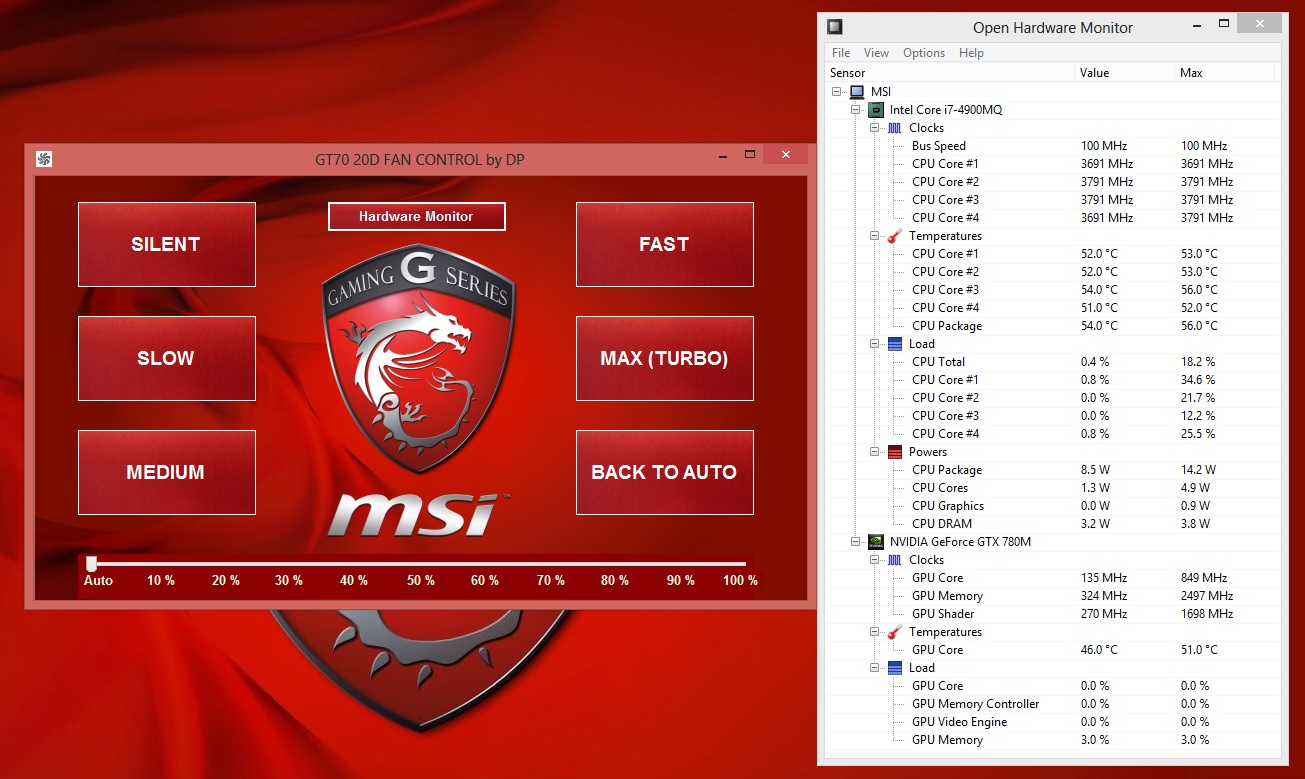
-
So you guys think Dell/Alienware will fix this soon??
Also I noticed this bios listed on the site. I believe our laptops were shipped with A01?
Driver Details | Dell US -
That is really depressing, I imagine playing a demanding game on very high settings or doing some heavy 3d rendering on a warm day might cause it to throttle after not too long...?
Are you saying that people are discovering that even having the bios modded to stop the 780m from throttling will not give any substantial performance gains over a previous gen card like the 680m? If so that is terrible!
If this is the case, are newer drivers really likely to offer a significant performance increase? Why would nVidia release a flagship top-of-the-range GFX card without the proper driver to support it? What's up with that?
-
Out of the box, not with a modded vBIOS. With a modded vBIOS we are seeing nearly 9k in 3DMark 11 with no overclock.
New drivers should help and may eliminate this issue. NVIDIA has not released any drivers designed for the 780M, yet. The driver that comes with the system is quite old. It's like 311.28? I'm sure new drivers will help a lot, we just have to wait. -
I've got my new AW17 with a 780M and the driver version it was shipped with is 311.48 just for clarification on what the new systems are coming with. I'm downloading 3DMark 11 as I type this and I'll post the results after I run the tests.
-
No, we are not seeing 9K in the AW17 with a modified vbios. While I had mine, best I could achieve was P8200 *with* a modified vbios without throttling and with overvoltage support. Card wasn't stable even at +100 MHz oc though, perhaps due to power draw as johnksss sugested.
-
I said "nearly." I've seen 8700~. The CPU helps a bit with that, too. There's definitely an issue, though. Something should be done...
-
bah just read a review and it said only the 18 can do sli. is this true? because my 17 comes in tommorrow :/
-
Did you not... you know... look at the specs of what you bought?
-
I was looking to possibly upgrade the card later on i just remembered reading a couple m17x threads a while back on sli...so yes I did read my specs maybe i should have just asked if upgrading to sli was possible These type of laptops a new to me since i never had an alienware before anyways...thanks for answering my question
-
I have a few questions to people in this thread. I've been interested in getting this laptop, but the pricing on them is so strange. Why isn't Blu-Ray an upgrade option on the base model? Is there any way around this that doesn't involve paying a wildly higher price for customization? Also, has there been any news on AMD solutions (8970/8990M) becoming available in the next two - four months?
Ideally, I'd like to get one of these but the MSI GT70 is offering a lot minus the HDMI in for a 2K price and it's tempting me. -
The most likely reason for not allowing the usual upgrade options is to help Dell manufacture the laptops faster and more cost effective. This is common with large computer manufactures, i.e. Apple, that offer customisation in their laptops. I guess a few months from now, a non so-restrive upgrade model will be available.
You can try over the phone talking with a rep? A short story: I wanted to upgrade my CPU from 4700MQ to 4800MQ, but didn't want to pay for the blu-ray and mSata premium. My sales rep told me it is impossible and I went with the cheaper model. However the next day, I cancelled my order and asked another rep to give me a quote with the CPU upgraded ONLY. He said he will do so and sent it through my sales rep -as she is the manager of my account unfortunately. She got back to me saying that is not possible to do that. Dunno if the other rep got confused or my sales rep is just lying to get a bigger commission...
Other users in the forums say they got reps saying these restrictions will be lifted soon...
For the AMD, dunno about Dell, but while I can recall reading reports about a late summer-early autumn release of them, MSI released a laptop with the 8970M. The performance is on-par with the 680M (based on notebookcheck's review) and more or less similar to a 770M -at one test it was better, at another worse.
I was also debating for the A17 or the GT70, but the price at the end, after the instant cashback and a 11% discount on-top, was the same. I just hate the MSI look and by using one, I found their keyboard not as good as it is advertised. Mainly due to its' weird layout -Windows 8 shortcuts need the Windows key, which was moved in the MSI keyboard... -
Both are decent options. The AW is sturdier and has a better warranty, but the MSI has more customization options and is cheaper. Normally I would say that the AW is a better choice, but a few cut corners on the new models and Dell's attempts to limit configuration options make the decision tougher. I don't know if Dell cut costs on the motherboards and other internal components too...
I would still go with the 17 and buy an extended warranty. -
Btw, just also curious.. What Nvidia drivers are you all using for the 780m right now? Was just reading it's rejecting the latest 320.xx drivers. So are you guys sticking with the preloaded, outdated one for now? Or modding the .INF and using the latest?
-
Dont tell **** , dude.
We need to look in the future.
-
Sooooo I just found out my laptop shipped early this morning and on 2nd Business Day Delivery, however I'm not sure if they Win 8 Recovery DVD. Would I be better for me to download a Retail Win 8 copy and use that instead, especially since I will be clearing bloatware.
-
If you're curious to try the 320.xx drivers then I just answered a post in another thread describing how to mod the driver using an inf from laptopvideo2go, here is the link to the post (post #4401):
http://forum.notebookreview.com/ali...ware-m17x-r3-r4-owners-lounge-thread-441.html -
If anyone is looking for smooth 2 finger scrolling twofingerscroll v1.0.9 works perfectly on the AW17 and if your a mac user you can invert the scroll direction to match. The scrolling motion is much smoother and more responsive than the built in Synaptics one. I would definitely recommend!
You can download it from this thread;
TwoFingerScroll v1.0.7 update! (two finger scrolling done right! + more) -
Optimus was enabled, probably... the intel 4600 showed up in the device manager.
Is it possible to switch graphics on the fly at will? For example, tell the OS that you're on battery now and you don't care what program is running and that you want the nVidia chip to not run?
Aside from that, I find it very regrettable that despite the rainbow options for the lighting, there's still no WHITE choice. -
To be honest there did not seem to be alot of bloatware on my machine that came with windows 8.
-
Agreed - mine only had alienware programs and steam on it. Anyone else get any dead pixels? I will be reordering when I get my refund - just hope I can get as good a deal as last time...
-
Hey all - newly posted nvidia beta drivers 326.19 have built in support in the INF for the 780M!
-
Thanks, just installed! Seem like pretty awesome drivers, 8% more fps on F1 2012 with these in comparison to 320.49. (Note I'm on 670MX not 780M, but wanted to report my findings, probably translatable gains to 780M too).
-
Is there any trick to installing the nvidia drivers so it doesn't break optimus or is just install and your good to go?
-
On my laptop I had to disable Optimus in order to install the 670MX, but that was because it's not a standard card for the M17xR3. If your laptop is the original config or with an aftermarket GPU installed that was available as an original option for your laptop, then Optimus should work fine. If you're reinstalling all graphics drivers, for example as part of a fresh Windows install, then it makes sense to install the intel graphics driver first for the iGPU, and then you install the graphics driver for your NVidia Card. If you're just updating your NVidia Drivers, I always just recommend choosing the 'custom clean install' option that is presented to you during the NVidia driver installation.
-
Hey gang...
So got my laptop delivered yesterday with the wrong OS on it. I asked for Win8 and it came with Win7 installed. What a surprise.
Anyway... Dell is sending me a copy of Win8 to perform my own "upgrade". Can anyone think of any immediate issues I might encounter or anything I should know? They mentioned Command Center will break and I'll need a different version. I downloaded all the Win8 Alienware 17 drivers from Dell but I don't know if I actually need to install every single one. I'm paranoid now of system instability because I have to do it myself. -
If I were you I'd let it be. Win7 is alot more mature and stable compared to Win8. Why don't you use Win7 for a couple of months and decide then?
-
ah thank you that makes sense. i read somewhere that you need to do the nvidia drivers with optimus both enabled and disabled - is that true?
-
I'm planning on installing 8.1 soon. To me it looks like it fixed almost everything that 8 got really wrong, and I'm looking forward to developing Metro apps. (Seems easier than normal for windows development, and there is a growing market for them)
-
If you want to use Optimus, then I guess you have to have it enabled! ;-) And then I'd just go ahead and install the NVidia Drivers while Optimus is enabled (if you've already got the Intel iGPU graphics driver installed first).
-
Mine arrived today and I'm loving it. Spec in sig. I managed to get a Generic VGA video card benchmark result - Intel(R) Core(TM) i7-4800MQ CPU @ 2.70GHz,Alienware Alienware 17 on the new 326.19 beta drivers and with SVL vbios. Pretty happy with this considering I've done nothing else yet! 3D is amazing, keyboard is the best I've ever used. Even the touchpad is amazing in my eyes! Couldn't be happier!
-
Great to hear it man! That 3D is a surprise and glad you like it.
So, you got it today and you've already flashed a modded vbios? Now that's comitment
-
3D screen worth it then?
-
Something weird just happened to me just now. I was playing Dirt 3 and I noticed that the game started freezing for a few seconds every now and then. It was also making a buzzing noise every time it froze. So I thought it was a problem with the game so I tried closing it. When I did, I saw that my desktop and all the icons were grainy and messed up and the cursor disappeared too. I didn't know what was going on so I pressed the power button to put the computer to sleep. When it woke up everything was fine. So what happened and is it a hint of a big problem?
*OFFICIAL* Alienware 17 Ranger (2013) Owner's Lounge Thread
Discussion in 'Alienware 17 and M17x' started by Mr. Fox, Jun 12, 2013.


