 Problems? See this thread at archive.org.
In case anyone is interested, I modded the INF from 320.49, disabled the driver signing enforcement, and the drivers installed ok. upon running 3dmark, i have no video at all - black screen. Upon rebooting, I get the windows 8 logo and then a black screen. After a few minutes, windows 8's bsod and says driver power state failure. Now I'm trying to reboot into safe mode to put back dells crappy drivers.
N
-
New to the forums here, ordered my 17 in the beginning of this month, after looking at a couple of reviews, I'm a little concerned with the 780 in this thing. The performance is lacking, probably the drivers. I have a 5870 in my desktop rig, after dealing with that card since its release my goal was to get something that doesn't crash every 5 min, I most likely freaking over nothing that isn't fixed with time, just bugs me when I'm dropping $2600 on something that so far isn't super impressive.
-
New score on my 17 with 780m after some tweaking. Still haven't found vbios...

-
Good job, Brother Imarik. You're making nice headway from where you first started earlier today. Keep on going and I suspect you will make those MSI and Clevo reviewers look like noobs before too long.
I found your score and it's not the lowest one out there for 780M so don't listen to the criticizers http://www.3dmark.com/3dm11/6839963
Here is a really lousy MSI 780M score for the haters to chew on... http://www.3dmark.com/3dm11/6776977
(there are lots of low MSI 780M scores if you search the Futuremark web site)
And, another MSI 780M score almost exactly the same as yours... http://www.3dmark.com/3dm11/6759006 -
Should it not be possible to install drivers from the nvidia website though? What tweaking did you do?
-
Generally the difference between SSD & HDD is night & day, but any differences between the performance of modern SSDs is hard to feel as a 'normal' desktop user, so I would say that it's probably not worth the effort or money to replace it. (Think I read that in a Toms Hardware article)
-
Maybe it's throttling due to temperatures being too high. Perhaps check that temperatures are OK and that no throttling is happening (CPU and GPU). And I guess you've not got anything abnormal running in the background. Perhaps clean install the drivers by trying to remove all remnants using Driver Sweeper. I hardly ever use Driver Sweeper, except if I want to eradicate all previous installation traces.
-
NV are often behind the curve in adding in GPU/machine ID's on mobile (verde) drivers. They have only recently managed to get a WHQL (bad driver, bad bad driver) for all the new desktop cards. Until they get updated you can get the modded inf needed from here: LaptopVideo2Go: Drivers
314.22 is the last good working one - all the later ones are causing serious issues
-
I would wait a few months to see how the performance and build quality turn out.
-
Yes the Nvidia GPU Boost technology could have played it's role in low 3DMark11 scores. If there is a way to disable it that would be great. Previously it was Enduro now it's GPU Boost -_-"
-
I was about to say check your optimus setting, that may be why your score is so low. When I first had my m11x r2, optimus wasnt working correctly and SC2 could barely run. Though now that I think about it, I think I fixed it with a driver update with Dell... Hopefully you can diagnose the root of the problem soon, there's nothing fun about being let down on a purchase like this.
To turn off the lighting on your trackpad or for any zone for that matter, go to Alienware FX and set that zone to "black" that will shut that LED off.
I ordered my AW17 on 6/27, and just woke up to an email saying that it had been shipped and that I will receive it tomorrow by 3pm. My EDD was 7/22, so receiving 12 days earlier than expected is awesome! Will do an unboxing video and will eventually do a review video just to contribute to the forum community. -
For whatever reason, the Alienware FX does not allow setting the trackpad zone to black. Already tried that. Another odd issue - the AlienwareFX no longer has white as a color option. This is bizarre as the m17xr4 did and I liked white for most of my zones.
N -
Just to show its not a benchmark problem:
M17XR4/680M/3610QM - 320.49 drivers, optimus
Tomb Raider - Ultra, 1920x1080 - 53.8fps
Tomb Raider - Ultimate, 1920x1080 - 33.0fps
17/780M/4700MQ - 311.48 drivers, optimus
Tomb Raider - Ultra, 1920x1080 - 49.3fps
Tomb Raider - Ultimate, 1920x1080 - 20.3fps
17/780M/4700MQ - 311.48 drivers, no optimus
Tomb Raider - Ultra, 1920x1080 - 63.9fps
Tomb Raider - Ultimate, 1920x1080 - 36.4fps
17/780M/4700MQ - 320.49 drivers, no optimus
Tomb Raider - Ultra, 1920x1080 - 67.4fps
Tomb Raider - Ultimate, 1920x1080 - 40.4fps
no overclocking, all stock speeds -
Can you post some temperatures? It's unlikely, but the GPU might be throttling due to heat.
I suspect that the underlying problem is the BIOS. -
This is very bad indeed .... looks like my inbound AW17 is due to return to sender....
-
It's your drivers. I don't know how many times this has been said.
-
I agree, just trying to point it out in hopes of getting Dell/NVIDIA to fix ASAP.
-
Clevo 780M got a 7900 GPU score in 3dmark11 running on even older drivers.
Test Schenker XMG P703 (Clevo P177SM) Notebook - Notebookcheck.com Tests
Don´t get me wrong. I would love to own an AW 17 because build quality and outer appearance is above the competition.
But I´m not going to order until this performance issue is solved.
Edit MSI GT70 scored 7427 GPU with 311.48 drivers. -
So how are they gonna fix the performance issue? Must the owner send their laptop back to dell or download it through online to fix the issue?
-
Running 3dmark11 again with gpu-z recording temps/speeds....
-
Temps peaked at 67. The card only ran at top speed (850mhz) for part of the test. Most of the rest was at much lower speeds. Definitely an Optimus / driver problem which Dell should be able to fix. Question is how long will it take?
-
Got 320.49 drivers, with modded inf, successfully installed in discrete graphics, non-optimus, mode (fn+f5)....running 3dmark now....This got me to 7300! Getting better! Temps peaked at 77 and the card ran at 850mhz for all the tests.
N -
This was a big issue with gtx680's and 120hz 3d displays, same thing happened to my m17x r4. It was with the 320.18 drivers talked to nvidia they where able to replicate the issue and came out with a fix in 320.49 but now my m17x doesn't boot anymore(separate issue) so i cant test it myself but I've been hearing mixed results some say the issue is fixed others no, wont know till I get my replacement 17. Since your running windows 8 you could also try using the win8 nvidia driver it's 326.xx.
-
77C is toasty for 3dmark11.
-
@Nyceis,
Are you running 3dmark11 using the high performance power plan(battery settings) with the following settings:
minimum processor state: 100%
graphics power plugged: maximum performance
graphics power battery: maximum performance
Regards,
Mark -
Windows 8 probably doesn't help either. I've heard a lot about performance issues with games running Windows 8.
-
Could you rerun the test on 320.49 drivers but with Optimus enabled? We need to isolate if it is Optimus that is screwing up the 780M performance, or if it was the 311.48 drivers.
Thank you -
Just ran it with this and got 7100, so no change really.
NVIDIA GeForce GTX 780M video card benchmark result - Intel Core i7-4700MQ,Alienware Alienware 17 -
No, because when I switch back to Optimus, the 311.48 drivers reinstall and the 320.49 won't work properly when Optimus is enabled. I've had no luck getting them installed with Optimus...
-
They reinstall? Automatically? What the h...
Then we are at a dead end. We need to figure out if Alienware have the same Enduro problems Clevo had or if it was just the 311.48 drivers that didn`t play nice with the new Alienware`s. -
Strange that your score dropped 200 pts but thanks for trying it out! According to MickeyD on page 26, the last good working version is 314.22 as the later ones are causing serious issues. Maybe you can try it?
-
That sure seems to be the case but of course all this new HW rolls the dice again. Worrying to see the black screen issue raising it's head (assume a 120hz display?) NV say the only fix for this is a vbios update (for the 680m anyway) that they have supplied to dell and clevo....
Anyone else that gets the black screen, an external monitor gets around the problem/pain of starting win 8 in safe mode to roll back
-
Any chance I could get the modified 320 drivers?? I suspect this might be an issue but until I get my replacement from Alienware I want to test all possibilities of issues I have had with my laptop since I got it yesterday.
-
I should have stated, this is the non-3d display.
-
These usually work for me on unsupported hardware: LaptopVideo2Go: Drivers
-
Couldn't do 320.49 w/o optimus, but i did do 311.48 w/o optimus:
17/780M/4700MQ - 311.48 drivers, no optimus
Tomb Raider - Ultra, 1920x1080 - 63.9
Tomb Raider - Ultimate, 1920x1080 - 36.4fps
so definitely a combination of old drivers and an optimus problem. -
Which panel is installed in the non 3D AW 17?
-
Yikes that doesn`t look good. You got 70% more FPS in Ultra without Optimus.
Since its the same driver, we still can`t be sure if its Optimus or the driver itself. Let us know when you get other drivers to test with Optimus.
Will be really sad if Alienware is plauged with the same problems as Clevo owners had with 7970M and Enduro. Will be interesting to see what Notebookcheck finds out with their Alienware 17 review. -
That is very weird to see, especially with NVIDIA graphics.
Does anyone else have similar specifications? If so, please share with us some results. -
I may post some benchmarks with my Clevo P370SM (4800MQ, 780M) if that's alright.
-
Well, as this seems to be an Alienware issue, I don't think that would help us diagnose/determine this issue.
Edit: Might as well. Go ahead and share some results!
-
I just ordered an Alienware 17, with 4700MQ and a 780MQ. Will get a 840 Pro from Amazon as well
Wow at the benchmarks! Somewhat it gives me "second thoughts", but then again it is most likely a software problem... -
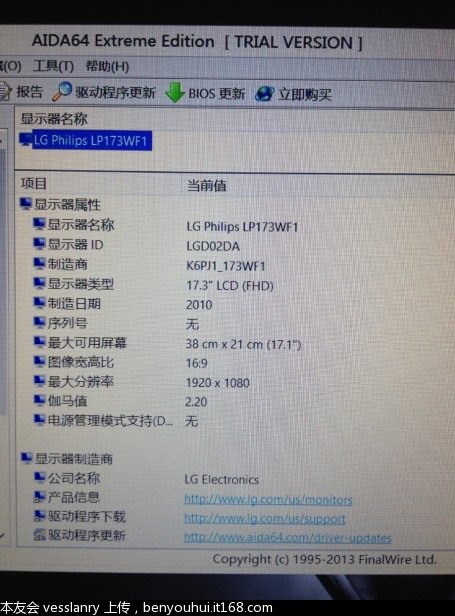
My reports an LGD02DA - same ID as my m17xr4. Very different color schemes though. The 17 looks better, closer to my IPS desktop display. My m17x r4 is noticeably cooler in color. Its a very nice screen.
N -
I will keep it in mind, but you have got to wait.
-
Well it is final now. The display on the Alienware 17 is kinda MEH.
The display used on Alienware 17 is LG Philips LP173WF1 LGD02DA K6PJ1.
It is one of the displays used on the M6700 as well as on the Dell Inspiron 17R. An Inspiron notebook, garbage notebook share the same screen as their top Alienware notebooks. That sucks bigtime
What dissappoints me is that Dell could have used the newest model, LP173WF3, which is a 17.3" IPS screen they use on the M6700 for those who want to upgrade.
Read about it here: http://forum.notebookreview.com/dell-latitude-vostro-precision/687614-newer-monitors-m6700.html
Alienware M17xR4 use basically the same screen, but its called "D3WCF". -
Granted its not IPS, but other than that, it's pretty good as far as TN panels go. Just curious as to what you don't like about it.
-
The Dell m6700/HP 8770w LG IPS panel has quality issues and would add hundreds to the price. Besides, GTX GPUs don't support 10-bit IPS. I think that is the only 15-17" IPS panel available, so if AW wants to add an IPS panel for the 17. it has to source another one.
This TN LG screen is still better than the Chi Mei screens Clevo, MSI, and ASUS use. -
For the screen, this review here says some nice stuff about it:
Alienware 17 Reviews | Gaming Laptop Reviews
Same article shows 3D Mark is low compare to the GT70, but in-game performance is good.
AW17 in the review is with the 4800MQ, but the MSI has the Raid-0. -
You can only rely on reviews to a certain point. Most reviewers are sponsored or paid by companies. It's most prevalent in video games. IGN rated Diablo 3 nearly 5 stars, but every gamer that has bought it gives it like 2 stars, 3 at the most.
I think we need some former M17x owners to give us their feedback. Go straight to the source. -
What dissappoints me is that they recycle and continue to use old screen, and use the same screen on a $1000 freaking Inspiron crap notebook. When you pay $2700 you kinda feel you deserve better than that
*OFFICIAL* Alienware 17 Ranger (2013) Owner's Lounge Thread
Discussion in 'Alienware 17 and M17x' started by Mr. Fox, Jun 12, 2013.


