Problems? See this thread at archive.org.
Here, check this out. The 128Gb Samsung 830 @85$ on newegg:
http://forum.notebookreview.com/not...ssd-84-99-shipped-newegg-com.html#post8750537
-
-
I've tried to skim the thread, but can't seem to find an answer.
Do we know for certain if Optimus works on the m17x R4 with a 3D 120hz screen?
N -
Guys, is this a good SSD to buy? Crucial 256 GB m4 2.5-Inch Solid State Drive SATA 6Gb/s CT256M4SSD2-RXW | eBay
It'll be my very first! Any better / more reasonable suggestions? I'll be buying it in India, so if someone / some site can ship it here cheap, that'll be great! Between Crucial, Samsung, OCZ and Corsair, what would you guys suggest? Those are about the ONLY few borderline-reasonable offerings here. And I want one around 240-256GB SATA III.
-
I'm a huge Crucial fan because they are cheap, reliable, and perform comparably among the top drives. Samsung is also a high quality drive, a little bit faster than the Crucial M4, but also a little more expensive. I think that, in general, Corsair makes very good products, but their SSDs tend to focus more on write speed than read speeds. In a gaming system, I think the most important metric is 4k random reads. The OCZ Vertex 4 is the fastest of the bunch, but OCZ drives have suffered from reliability issues in the past. The Vertex 4 has only been out for about 3 months, so it's a little early to know whether or not they have exorcised the demons.
-
Thanks for that! So you're saying I should avoid Corsair and OCZ, while opting for Crucial or Samsung. So which among the two should I pick? The two offerings I'm looking at are very similar specs-wise and price-wise as well. Also, I take it with any such SSD I can use those Intel tools that I never got to try out, like SRT (Smart Response Technology) and the like?
-
Pretty much. My personal opinion is that you cant go wrong with either the Crucial M4 or the Samsung 830 (and I usually recommend the Intel 520 series, too). Which one you choose is up to you. I have been loyal to Crucial (I have 3 of them) for various reasons. As I mentioned before, they are cheap, reliable, and perform well, plus, it's an American made product. All other things being equal, I like to buy products made in the USA.
Yes, Intel SRT works with any SSD, but Intel SRT is SSD caching to accelerate a mechanical HDD. That's probably not what you want to do, especially if you are looking at a 256GB drive. If you do, remember that SRT is limited to 60GB. If you have a drive larger than that, you can use 60GB for caching and the rest as a logical drive. -
Quick question
If I purchase an M17x r4 with 6gbs of ram, do they normally put those ram under keyboard panel or under the easy access back panel? -
Yeah, I bet I'd find a nice "Made in China" sticker at the bottom even if it IS American! Thanks again for that last suggestion.. You've been very helpful. Much appreciated! I'm pretty surely set on the Crucial M4 now.
-
I have to say I love my machine so far. Its funny though it has a poorer windows index score on my HD than my desktop did. The desktop had a random 7200 RPM drive in it as well and scored much better than 5.9 and didnt have the caching drive. Any reason for this?
-
No problem! Funny you say that because I think final assembly is actually in China. Micron (Crucial's parent company) is an American company, though, and their semiconductor fab plant is in Virginia. Samsung has a fab plant in Texas, so who knows, maybe theirs are technically made in America, too.
-
Ok, I got a different HDMI cable in case the 15 footer was too long for the HDMI out. Sadly it is still not working. The monitor says check the cable. The laptop sees the monitor their but will not display anything on it. I tried to call Alienware tech support but they blew me off saying it was a third party monitor and they couldnt help cause they do not know if the monitor is compatible. This is starting to tick me off. I even called their solution support and they told me to talk to me they would have to charge me for it cause my warranty only covers hardware support. Dell has to be the absolute most worthless company. I have never had any company not want to tell you how their crap works. Anyone know why it will not display my desktop on the external monitor?
-
Hi guys I'm new to forum and hopefully an m17r4 owner by the of the day. Just wated to run this quote by you and see what you thought
M17r4/ base model. Added amd radeon hd7970 m 12gig ram and the one year damage warranty. $1509.60 5%gift card and 2 day shipping
Also is the blueray a necessary upgrade? I had to get rid of it to afford the better vid card. Any other suggestions are welcome Thanks for ur time. -
Nope. The display is wired differently so no intel chip. A plus IMO
So far every thread (and both mine) say that they use the easy access and leave the difficult ones empty
The caching is done on frequently accessed files and the WEI will be using a random pattern, defeating the cache. I think you're only comparing basic HD's and the desktop one will probably be faster.
-
+1 rep added
Thank you for the reply, it was much appreciated. may sound like a stupid question, but it is actually one I was searching for and couldn't find the answer.
Hmm, since I don't wish to get my hands that dirty so soon after purchasing; that leaves me with deciding to replace just the 2gb with same ram, or replace both with either more ram or possibly better quality ram. Since I will more than likely be using the Dell gift card that comes a month or so later towards this, I should have plenty of time to research. Any suggestions are welcomed.
thanks again. -
You're welcome. I can say that I recently had dell replace my lcd and I watched the engineer. He said the r4 is easier to dismantle than the r3 (although I've not seen anyone else say this) and he had the keyboard off in under 10 mins. 6 screws I believe and release the bezel around the keyboard. So looked very easy
If you've got 6gb of 1600 RAM you probably have plenty and won't see any improvement but just my $.05c. maybe use the gift card on some accessories, I like the lap pad and headphones (for the badge!)
Good luck! -
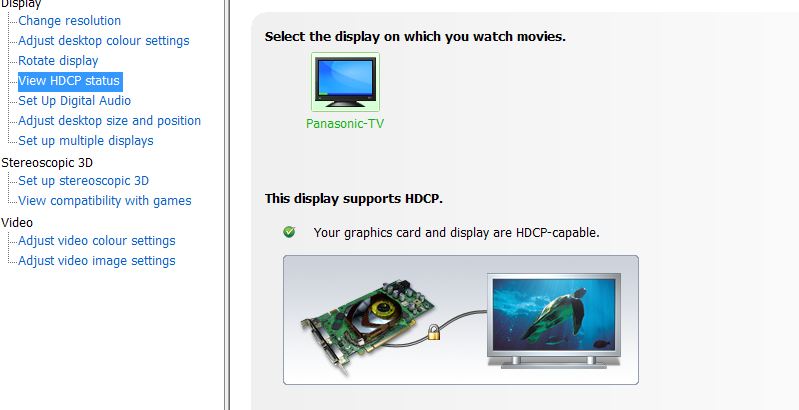
After some reading and what not I guess our 23in LED monitors are useless with the laptop unless we want to do VGA. Seems it has the same issues others have with different devices not wanting to handshake and verify HDCP compliance. Kinda sucks we have these nice panels too. Boo for the industry not having a flat standard where all things will work together.
-
Optimus does NOT work if you have a 120hz screen. The 120hz uses a different cable that bypasses it completely and it cannot be changed due to hardware limitations.
-
I've been reading, and think for my use, 6gb will be enough. I'm also pretty set on peripherals, but you never know.
But I still remember the nightmares of having to work with a Mac in the early 90s. I spent more time allocating memory than anything. I had to open my graphics programs in a certain order as I would close the hogs to conserve resources, and they had to be the last one I opened, or the memory wouldn't be freed up. I also got rather adept at saving as I'd crash a lot. This comes in handy when playing games like Skyrim.
-
It would really be nice to have the GPU card wired to a DVI out in these gaming laptops.
-
Yeah I know right. Anyone else have this same issue with their M17x-R4? Would using drivers other than the ones from Dell help or is HDCP not in the drivers themselves? Also how do I get into BIOS options?
-
I thought the miniport uses the dvi standard? AW techs told me I could get 120hz output on this port for external 3d monitors. Adaptor cables are available
-
I believe all you need all you need is the proper adapter and you should be good to go.
-
Im assuming you mean the small port on the left hand side of the machine? Also if the system is having HDCP issues using HDMI out wouldnt it still have issues with DVI?
-
Yes that is the one. An Apple < choke > adaptor is all you need.
Don't know about HDCP but your probably correct, the problem will still be there since that is a driver issue but it's worth a try, the adaptor is inexpensive. I got one (miniport-hdmi) for a few quid off amazon. For some reason it works better than direct hdmi-hdmi where the laptop switches inconsistently, sometimes needing me to Fn-F6 but the miniport works perfect. Also it supports audio unlike standard dvi
-
I may look into that with the exception of the Crapple adapter. Id rather be stuck with the laptop monitor forever than have a product of theirs in my home. lol. Thanks for the info.
-
Completely off-topic, but interesting (to me anyway). I had never heard (or noticed) the word "quid" before, until I started watching the show Wheeler Deelers, and now I feel like I see it everywhere!
-
Tried the mini displayport out to HDMI and ended with the same result. So I guess Ill take the kids monitors back to the BX and I gave them ours. Crazy our kids have 23" LED monitors lol. Guess Ill have to find us new ones that will hopefully work with these laptops.
-
Thought I'd check it out and it IS down to the hardware as far as I can see. Seems you need a HDCP compliant device - probably only TV's and projectors. I get an extra menu item in the driver when the TV is connected.
Attached Files:
-
-
That is a good deal if you're certain you got an R4 (3rd gen Intel).
Did you order online or negotiate with a Dell rep? I ask because I noticed that the R3 (2nd gen Intel) is being offered online at up to $400 off.
If you negotiated an R4, please PM me the rep's contact info. I just ordered an R4 and didn't get as much percentage discount currently offered on the R3 (and I've been a decent small biz client of Dell's for 10+ years) -
LOL. Last 10 years working in the States and I didn't even realise I'd gone back to local colloquialisms along with returning home.
-
It will work with monitors too. I went to the BX and got a Samsung LED 24" and its working like a charm. I guess it just didnt like the HP monitor.
-
Hey guys, i just got my R4 , installed my ssd and did a fresh install of windows . Im allready abit worried about my GPU temps , considering they hit about 55 C watching movies on VLC :/ , that seems very high to me .... can someone with an 680m post theyr temps ? As soon as i start Diablo 3 like a minute in the fans go to high , havent done proper testing but the initial idle and minimal use temps are pretty high
?
-
Why does everyone reinstall windows on the new machines? I thought there was pretty much no bloat ware on these?
-
Most people are installing SSDs.
-
There isn't.
Simple really, buy it with the cheapest drive option and get an aftermarket SSD
-
Ahh gotcha. We cant really do that. It would be nice to afford it lol. We went with the intel wirless and 660m just cause we got two at the same time and couldnt really deck either of them out. But its all good they serve their purpose and if we really wanted to change the HDD later or the Video card we could.
-
So i have the 660m and just bought a 7970 for $217 from Dell. How much better of a performance am I going to get from the AMD?
-
Dell sold you the 7970 straight out for only $217?
-
Yep, upgrade-able part *they keep telling me its out of stock at the moment the last 3-4 days*. They are having a tech come out to install it for me too.
Order Number Product Description Estimated Delivery Date Subtotal
Module,Card,Graphics,AMD WIMBLEDON XT
view more
Delivers by
08/06/2012 $200.00
Order Subtotal: $200.00
Shipping and Handling Total: $0.00
Tax Total: $17.50
Total Amount: $217.50 -
lucky!! Congrats on the cheap upgrade
-
I wonder how much would it be should one desire to get a GTX 680M?
-
Thanks. it's been delayed though another 3 days. *sigh*
-
Wow Im actually amazed. I thought these cards were a lot more expensive than 200 bucks.
On a side note, I have decided our coolers suck. When the systems are idle it keeps it a nice and cool 35-38c but when they are being used for gaming say for EQ2 or SWTOR, they hit about 55-60c. Still sounds like no issue other than the fact with no cooler under it it still hits about 60c. Makes no sense to me really. lol -
First, holy crap that's cheap! Second, that's a huge upgrade, so the difference will be substantial.
I'm not quite sure I understand what you mean. Are you talking about CPU or GPU temps? Either way, those temps are nothing. My desktop CPU and GPU ([email protected], GTX 560ti 448@840Mhz) both run about 65-70c under load, and that's in a huge Cooler Master HAF 932 case. My old 7800GT would regularly hit 85c. -
Those were GPU temps. I know its not over heating I just do not understand why there is no difference in running a game with the cooler and without. I figured it would run hotter without a cooler under it while playing vs with a cooler but its the same. Makes me wonder if I just wasted money on buying it.
-
Ooooh, oh oh! I'm sorry, I misunderstood. What kind of cooler is it?
-
The Targus HD3 gaming chill mat. It works great when idle droping it 10-15 degress. Just during load times it remains the same as if it wasnt there.
-
I'm not familiar with that one. Is it one big fan in the center? If so, that could be the issue. The intakes on the M17x are at the back corners, so air may not be directing to the correct place. I have a Cooler Master Notepal U3, which has movable fans. It seems to do ok, making about a 5c difference under load. Nothing will work miracles, though.
-
No it has 3 fans across the center of an aluminum grill. I know the fans on the system are at the back corners. just as an experiment I moved the laptop where the back fans would be above the three center fans and it changed nothing. Maybe its staying around 60 and the system fans dont cut on I dont know lol. I know it droped 10+ at idle. I just find it strange nothing changed under a load.
-
Actually, that's a good point. I hadn't thought about that. Sorry it's not doing what you want it to.
*OFFICIAL* Alienware M17x R3/R4 Owner's Lounge Thread
Discussion in 'Alienware 17 and M17x' started by katalin_2003, May 4, 2012.