Problems? See this thread at archive.org.
Wow, if you still have it on, can you take pics of teh minimal glare that comes with it? I'm looking for something with a complete deletion of the glare.... so the more matte, the better
Tyvm! I've been looking at it as it was your reccomendation a while back I believe.... I think the difference between 3d and non 3d is there is probably a slot/hole for the IR receiver for 3d panels
I'd love to see, if you have it installed, some pics, if available of side views and outdoor viewing for reference, as I'm still debating on which one to get. Reason is, is because i'll be outdoors a lot and would love to lug my big machine aroudn with me!
-
Sorry, I don't have it on anymore so can't post a pic
It definitely does not eliminate the glare completely, I don't know if there is another product out there that does. The fit on it was nice where you could tell it was there but not in a deal-breaker kind of way. Also, there was no problem using 3D or anything either. -
gotcha reechings, would you compare the semi-glare to it like the Zagg Invisible Shields? I'm looking for 100% Matte overlay.... I'm unsure if you've ever seen this, but there is one for the iphone's that I've seen, it's COMPLETELY matte.... Was hoping there was a company that did the matte for the AW too
P.S. Just out of curiosity, I went to invisible shield/Zagg's website to look for overlays for the laptop, they only produce the overlay for the Alienware Area 51 m17x, not our m17x r3/r4 lol... -
Got my 1080p display installed and all I can saw is wow!!! Can't believe how big a difference there is.
-
"'Running at idle, our 17" unit has to accept criticism. 32-44 W watts is worse than average for a notebook with auto-switching GPUs. According to the tool HWiNFO, the HD7970 doesn't clock down very much in idle mode. Even without activity, its core never drops below 720 MHz. The Radeon HD 6990M had to fight with a similar problem upon its release. Power saving mechanisms seem to lack optimization at the moment."
Alienware M17x R4 Notebook Review - Notebookcheck.net Reviews
Is there someone, who can check idle consumption with HD4000 and with HD 7970m ?
Would be very useful for me. -
I got another problem, I'm not so sure if it's my internet service provider or my wifi connection router or its just my laptop but apparently and unfortunately, my M17x has like a fluctuating internet connection when using the internet. I tried pinging through the use of cmd, and I sometimes get request time out. When I see a request time out (well that obviously mean that it cannot connect to the internet) I get my samsung galaxy s3 and try searching the web and it does with no problems at all! Weird. Kinda sad that I can't play borderlands 2 properly with this connection >.>
-
Isn't it? I came back from my XPS m1330's screen, and it was such a huuuuuuuuge diff! lol....
Even IF the power drain is high, our laptop's are pretty amazing that it takes 3+ hours to consume full battery. That's some food for thought, considering I came from a XPS 17 w/ GT555m video card (non-3d). That barely lasted me past 2:45 under regular usage.
What type of router do you have and what type of wireless card are you using? -
I don't have my G-Nexus with the zagg with me on vacation but I would say that the semi-glare level is similar if memory serves me well. It's definitely not 100% matte with no glare.
-
It seems that they updated windows key on the keyboard. I got my M17X a few days ago, and realized on the keyboard has a 3D looking straight windows for the start button, where as mostly screens of m17x even in July have the windows flag in a circle. I'm assuming newer laptops use this key now? To promote windows 8 metro?

-
interesting find (+rep) I'm guessing this is what all new laptops are going to have here soon. Not if I like the old style or the newer one more.
-
Ha, interesting. The power of the Microsoft marketing machine
-
First they come out with the 3740QM, now this! My laptop is out of date already
-
pssh, At least your not a full generation behind like me.
-
Guys, I was wondering, will this work for my alien ware m17x r4?? I really need wimax to work
Brand New Intel 6250 622ANXHMW Advanced N + WiMAX Wireless Half Mini WLAN Card | eBay -
Yes. (ten_chars)
-
Gotcha, thanks reechings! It's back to the drawing board now
....something new came out already? =\ I've still got the windows button with the circle, and it hasn't even been a month yet (I don't think).
lol.... I can't complain because I have the 2.3Ghz version, I can never keep up with these labels intel makes on their mobile chips
(i'm on the 3610qm)
Anything should work so long as you have the provided drivers and the card fits in the slot correctly
-
I just bought my R4 2 months ago and now they already change the key design? AW sure know how to keep their stuff updated...
-
Hi guys. quick question. is the m17x r4's gpu upgradable or is it soldered just like the g75's 660 and 670?
-
It's upgradeable.
-
Guys, I wanted to ask before I actually recieve the laptop,
That whether having a msata iSRT with a SSD give any further performance gains to a SSD
if not how are you utilizing the msata (apart from making it a drive in in7) and an ssd when you have a spinning platter -
Hi, slightly slower than a dedicated SSD but still way faster than a conventional HD when configured as a caching drive - you wouldn't want to cache an SSD, pointless. .
If you have an SSD in the msata port then it can be assigned to accelerate any mechanical drive. Think of msata as just another drive bay, but specified to only fit SSD's (size-wise). -
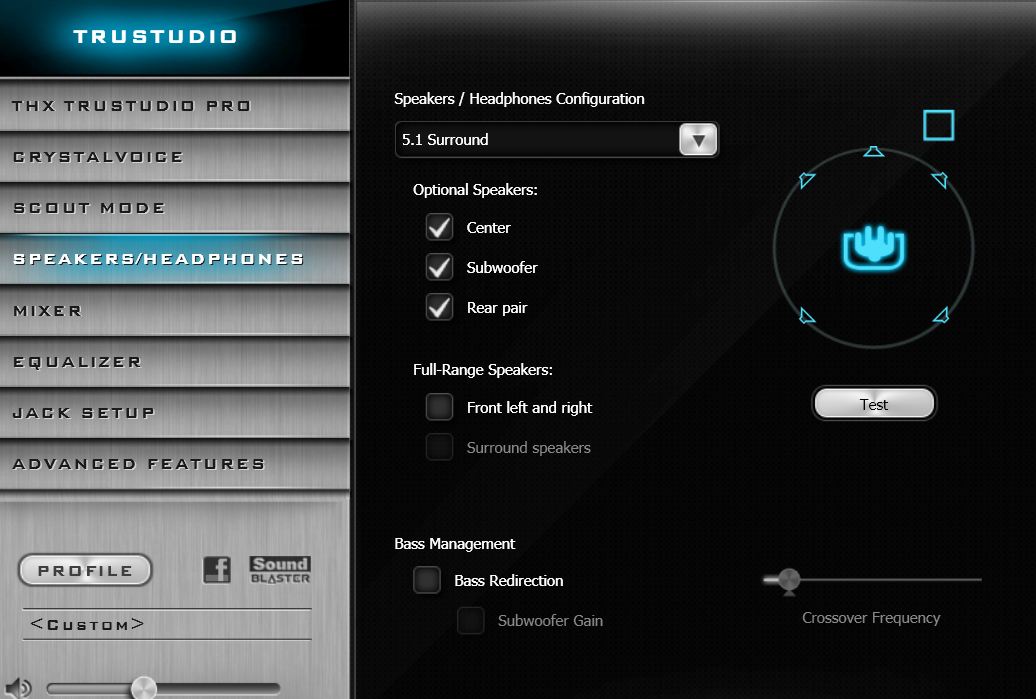
I'm having one issue with my R4 with 7970. When ever I hook up the laptop to my receiver the audio out is only in two channel is there anyway for me to change it to 7.1?
-
Make sure you are using the spdif output. The laptop doesn't do surround via the other jacks.
-
Thanks for the reply. I'm kind of bummmed to hear that.
-
My R4
.
![[IMG]](images/storyImages/capturehso.png)
-
So if I am using the HDMI out to my receiver then I cannot get surround sound on 5.1 system?
-
Sexy! But it's not properly placed? :S
I so want one like that but white! So I can put it on my black M17x! :O I'll be venom!! Where can you get those stickers?
![[IMG]](images/storyImages/31fghk%2B3FUL._SL500_AA300_.jpg)
I so want to put this on my laptop! :O -
Very Nice!! +rep
-
Not placed properly ?. You mean centered ? It might be a tad off center or the leg on the left is thicker.
Here is where i bought it.
poppinoff | eBay -
I'm still only getting two channel audio out with the spdif conection. Any thoughts?
"7.1 Digtial Audio out using HDMI out connection or S/PDIF Optical port"
is listed under the site in the tech specs -
Yeah Centered.
I am so getting the Triforce, GOLD!
Thanks Quadzilla!
Question though, if you removed it, will there be like a residue that will be extremely hard to get rid off? -
I adjusted it so its near perfect now
. It comes on a double sheet of sticky paper so you peel off the sticky side first that way you can lay the sticker down and rub it very well before removing the last part, kind like doing a screen protector with the 2 sheets between the actual protector. The piece with the sticker though is a thick white so it was rather hard to see through to get it all lined up but thankfully if your careful you can lift the sticker to adjust it without destroying it.
No residue that i saw when lifting it and the glue is very gentle stuff IE barely any at all so it holds it firmly in place but no messy stuff at all.
It really is stunning in person and i am big Spiderman fan so it seemed like a perfect choice for the Red machine.
-
I didn't think stickers could look soo good on the laptop, now i want a "Lexus" logo at the bottom of my laptop
-
I don't know as I don't have an adapter or equipment to check. Did you setup the Sound Blaster software to show that you hooked up to a surround sound system?
Maybe someone else will be able to help. -
So I can remove it later if I decide I don't like it and my laptop will be okay?
Sent from my SAMSUNG-SGH-I727 using Tapatalk 2 -
Just ordered the triforce sticker (gold) I wonder how it would look like on my Stealth Black Alienware!
-
Yep when i lifted mine to adjust it was flawless underneath . There really is no glue holding it down or i should just say very little but at the same time its very secure even the tiny strands like the small ends of the spider legs are not moving.
Im sure it will look great especially to a Zelda fan.
Another shot at an angle showing off how sexy it is
![[IMG]](images/storyImages/61135777.png)
-
It's just like picking out tattoos. I know I want one, but can't ever commit. Dammit!!!
-
Well for the cost of these if you get bored you can always peel it off and start over . Certainly less permanent then a tattoo
.
-
can anyone tell me if the blu-ray reader is region free?
sorry if this is dumb question, newb here! -
Yeah I know! :O Thats really really good Quadzilla!
-
tried to change it under the sound blaster and through control panel
only thing that shows up is 2 channel audio with different frequency options. It's very frustrating my cheapo lenovo would switch it to 7.1 automatically through hdmi.
Ok edit. Tried this with my Sony receiver haven't tested it on the pioneer. Hdmi 5.1 and 7.1 work only with enduro on.
perviously I tried this but it didn't work I really have no clue what amd's deal is with drivers. -
Hello guys!
1 question...if i change the thermal paste on the GPU And CPU when the pc is still in warranty...then the warranty will be void or will be ok and wont be any problems?
Tnx fo answer!
-
So you don't see this option? Weird!
Attached Files:
-
-
You can change the paste as often as you like without voiding the warranty.
-
Superb tnx for answer!!! I think that this is the only manufacturer which alows this during warranty!?
-
I believe it is only a couple manufactures who allow it . MSI puts a void warranty sticker but they allow it as long as you do not damage anything and Clevo/Sager also allow it.
I notice Razer laptops will not even allow you to change the hard drive without killing you warranty, so yeah it is best to ask if you are unsure what the outcome might be.
-
Is it possible to turn off hyperthreading on the r4?
Sent From My Rooted E3D -
The option might be there in the Custom A05 BIOS floating around the internet but not in the stock one from what i have seen.
-
Hmmmm ok thanks I'll give it a look at
Sent From My Rooted E3D
*OFFICIAL* Alienware M17x R3/R4 Owner's Lounge Thread
Discussion in 'Alienware 17 and M17x' started by katalin_2003, May 4, 2012.


![[IMG]](http://imageshack.us/photo/my-images/706/capturehso.png/)


![[IMG]](http://imageshack.us/photo/my-images/545/61135777.png/)